

 100% Security Verified | No Subscription Required | No Malware


 ChatGPT
 Perplexity
 Gemini
 Claude
 Grok
Grok
If you want your daily vlogs to feel like scenes from a movie instead of random clips from your phone, the right cinematic daily vlog filters can completely transform your footage. In Filmora, you can combine film-inspired filters and LUT-style looks to give everyday moments a polished, story-driven mood.
Below you will find curated filter styles tailored for aspiring filmmakers and cinematic vloggers who shoot quick daily content but still care about color, contrast, and a subtle film look. Use these ideas as a starting point, then tweak intensity and grading to fit your own channel aesthetic.
In this article
Soft Film Looks for Everyday Daily Vlogs
Morning Soft Film
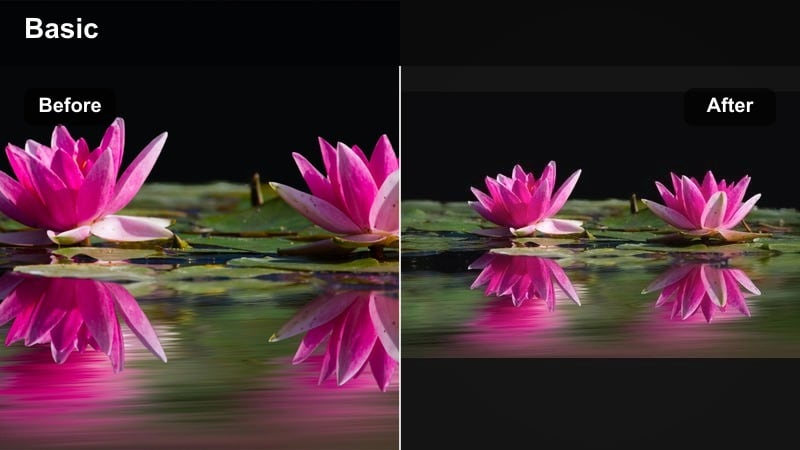
- Effect look: Low-contrast, slightly hazy film tone with gentle highlights and muted saturation for calm daily mornings.
- Best for: Morning routines, desk setups, journaling, coffee shots, and slow lifestyle vlogs in soft daylight.
- Editing tip: Lower the filter intensity to around 40-60 percent and lift the shadows slightly to keep skin tones clean and flattering.
This soft cinematic filter wraps your daily morning clips in a dreamy film glow without losing realism. In Filmora, you can combine it with subtle highlight bloom and a gentle fade in the blacks so your footage feels like it was captured on lightly aged film stock. It works especially well on handheld shots of coffee steam, sunlit windows, and simple desk details, smoothing out harsh contrast from phone cameras and action cams.
For practical use, drop the filter on your entire morning sequence, then adjust intensity clip by clip so close-ups of faces stay flattering. Use Filmoras curves to gently pull down bright whites while keeping midtones natural, and add a touch of vignette to guide the eye toward your subject. If your scene is backlit by a window, reduce haze a bit so you preserve texture in hair, notebooks, and mug details while still maintaining that relaxed, cinematic softness.
Pro tip - Match softness to light direction: If your light source is strong side light from a window, dial back haze and bloom so the image stays clear and intentional. For cloudy or flat lighting, increase the filter intensity slightly and add a touch of glow to highlights so your footage still feels cinematic rather than dull.
Neutral Journal Film
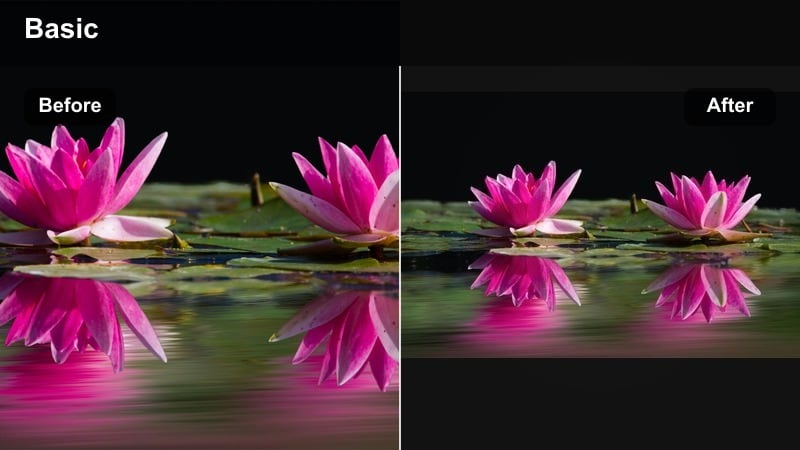
- Effect look: Balanced, film-style color with neutral whites, gentle contrast, and subtle grain feel for everyday storytelling.
- Best for: Talking-to-camera diary entries, day-in-the-life vlogs, planning sessions, and sit-down updates.
- Editing tip: Keep white balance as natural as possible, then use the filter to shape mood instead of fixing color casts.
A clean cinematic vlog filter like Neutral Journal Film is ideal for your A-roll, where viewers spend most of their time looking at your face. In Filmora, you can keep exposure and color extremely natural, then use the filter to add a gentle film curve, very light grain, and slightly softened highlights for a timeless, documentary-style look. It subtly improves your footage without drawing attention to the grade.
To use it in a daily workflow, drop this filter on all your talking clips across an entire vlog or even a longer series. Then do quick per-clip tweaks to exposure and temperature to match different shooting times and rooms. Because the look is neutral, it pairs easily with more stylized B-roll grades, letting you cut between calm sit-down segments and cinematic sequences without your channel feeling visually chaotic.
Pro tip - Use one base look for a whole series: Apply this neutral film filter across a whole vlog series to keep your channel looking cohesive from episode to episode. Lock in the filter as a preset, then only tweak exposure and temperature per clip to speed up your daily editing workflow.
Evening Warm Film
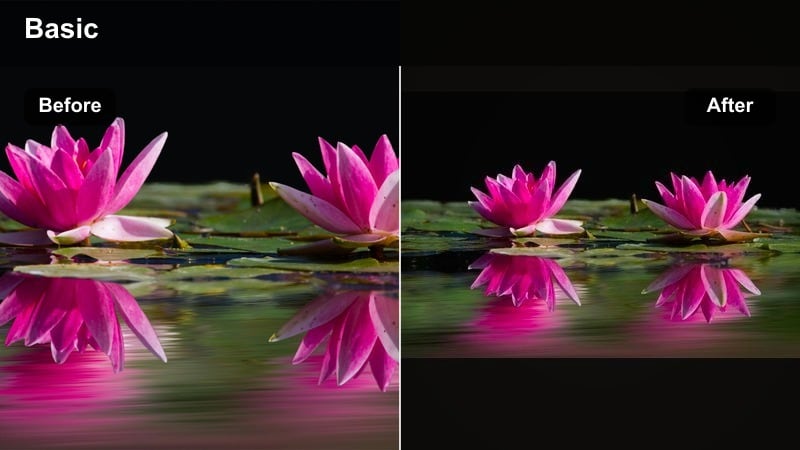
- Effect look: Warm cinematic tones with slightly deeper shadows and cozy amber highlights that mimic golden-hour film stock.
- Best for: Evening routines, cooking, hanging out with friends, and dim indoor scenes that need warmth and mood.
- Editing tip: Reduce saturation in the reds and oranges just a little so the warm film glow stays stylish rather than overly orange.
Evening Warm Film is your go-to look when you want everyday nights to feel like they belong in a romantic or indie movie. In Filmora, this filter leans into warm highlights, gentle amber midtones, and slightly deeper shadows to create a cozy, intimate atmosphere around lamps, candles, and kitchen lights. It can be particularly effective on scenes with a lot of wood, warm textiles, and natural skin tones.
Apply the filter at moderate intensity, then head into Filmoras HSL controls to pull back overly strong reds and oranges, especially in skin. This helps keep the scene cinematic instead of orange-tinted. Combine the filter with a light vignette and softened highlights so practical light sources like lamps stay bright but not blown out. For vlog sequences of cooking or casual conversation, cutting between wide shots and close-ups using the same warm filter will instantly make the entire evening routine feel like a crafted story beat.
Pro tip - Protect skin tones in warm grades: Use Filmoras HSL or skin tone controls to keep faces from going too orange while still letting the scene feel warm and cinematic. If faces look oversaturated, back off the filter intensity very slightly and add a subtle vignette to push focus toward your subject.
Street and Outdoor Cinematic Daily Vlog Filters
Urban Film Grit
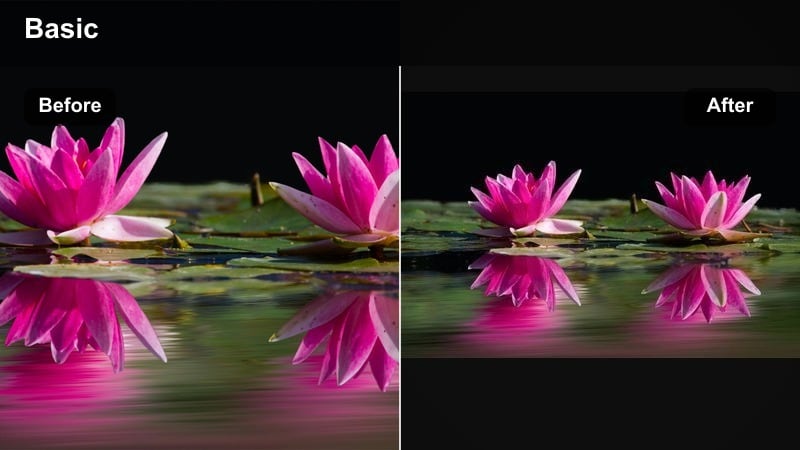
- Effect look: Slightly desaturated city tones with deeper contrast, cooler shadows, and a subtle gritty film-style finish.
- Best for: City walks, commuting, travel snippets, street food, and handheld cinematic vlog sequences.
- Editing tip: Stabilize the footage lightly before applying the filter so the gritty look feels intentional, not like a mistake.
Urban Film Grit is perfect when you want your daily street shots to feel like frames from a modern city film. In Filmora, you can use this look to cool down shadows, deepen contrast, and dial back saturation just enough to highlight neon signs, streetlights, and reflections in a stylish way. It is great for handheld clips shot on the move, where a bit of grit and texture actually supports the mood.
To integrate this filter into your vlog, use it mainly on B-roll of crosswalks, trains, alleyways, and markets, while keeping your face shots more neutral. Stabilize shaky clips with Filmoras stabilization tool first, then apply the filter so micro-jitter does not get exaggerated by the contrast. Short, punchy city sequences graded with Urban Film Grit between softer indoor scenes will create a nice rhythm and make your daily routine feel more cinematic and dynamic.
Pro tip - Lean into motion for street vlogs: Add a bit of motion blur or smoother transitions so the gritty film grade feels part of a fast-moving urban montage. Cut to the beat of your soundtrack and keep shots short to emphasize the cinematic energy of the city environment.
Pastel Street Film
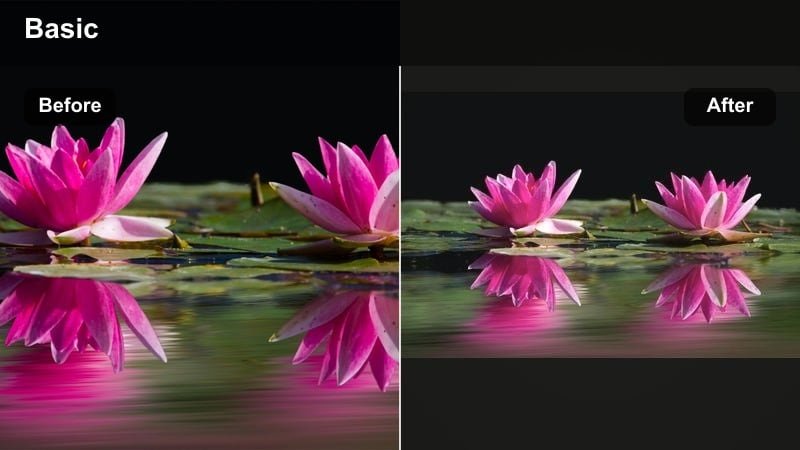
- Effect look: Soft pastel color palette with gentle contrast and light film bloom that keeps street scenes light and airy.
- Best for: Shopping, café hopping, casual walking shots, aesthetic daily vlogs in bright neighborhoods.
- Editing tip: Lower the clarity a touch and reduce harsh highlights to avoid plastic-looking skin in bright daylight.
Pastel Street Film is a great choice for aesthetic, lifestyle-style daily vlogs shot in bright, colorful areas. In Filmora, this filter softens contrast, brightens midtones slightly, and nudges colors toward gentle pastels while preserving enough detail to keep the footage crisp. It can turn storefronts, café tables, and window displays into pleasing, Instagram-ready frames that still feel cinematic.
Use this look on outdoor clips from shopping trips, brunch outings, or walks in clean, well-lit streets. Reduce clarity a bit to avoid harsh skin texture and combine the filter with modest highlight control so white walls and sky do not blow out. Because the palette is light and brand-friendly, it pairs well with simple text overlays and minimalist lower thirds in Filmora, making it ideal for sponsored segments or content aimed at social platforms.
Pro tip - Use pastel looks for brand-friendly content: If you work with lifestyle brands, this kind of pastel film look often feels more commercial and shareable on social platforms. Keep text overlays simple and minimal so the gentle color palette stays the main visual hook of your vlog.
Travel Cinematic Film
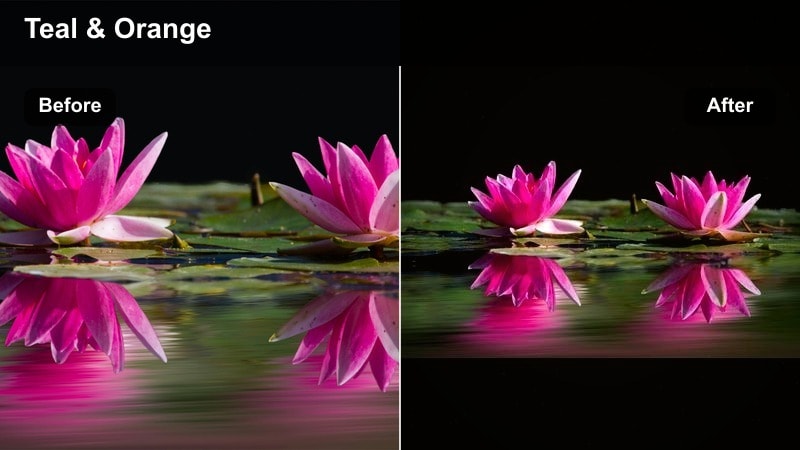
- Effect look: Rich travel colors with boosted midtones, cinematic contrast, and a subtle film-inspired teal and warm balance.
- Best for: Travel vlogs, road trips, landscape b-roll, and location reveal shots in daily travel diaries.
- Editing tip: Use this filter only on your most scenic clips to create peaks of cinematic intensity inside an otherwise simple daily vlog.
Travel Cinematic Film is designed to make your best locations feel like they belong in a feature film, even if the rest of your vlog is simple daily life. In Filmora, this filter leans into rich colors, with slightly teal-tinted shadows and warm highlights that flatter both blue skies and golden light. It is especially effective on wide shots of coastlines, mountains, city skylines, and iconic landmarks.
For impact, reserve this look for hero shots and short travel montages inside your daily vlog, rather than applying it to every clip. Add it to your strongest B-roll, then use Filmoras curves and HSL tools to fine-tune skies and foliage so they pop without looking artificial. Pair these sequences with music-driven editing and slower transitions to create mini cinematic set pieces that stand out from the rest of the day-in-the-life footage.
Pro tip - Build mini-set pieces in daily vlogs: Group two or three travel shots with this stronger cinematic filter to create a mini-montage within your day-in-the-life video. Let music breathe under these segments so viewers can enjoy the visuals without constant talking over the cinematic shots.
Indoor Aesthetic Film Look for Daily Vlogs
Desk Setup Film Look
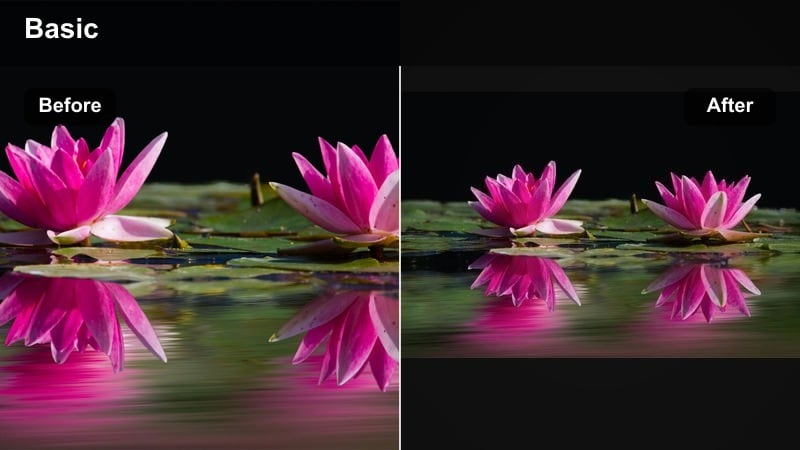
- Effect look: Clean, slightly cool film-inspired look with crisp edges and controlled contrast for tech and workspace shots.
- Best for: Desk setups, editing sessions, productivity vlogs, and overhead shots of gear or planners.
- Editing tip: Add a gentle vignette and increase micro-contrast just a bit to highlight gear details without making the frame look harsh.
Desk Setup Film Look makes your workspace footage feel like a carefully lit studio scene. In Filmora, this filter slightly cools the image, sharpens edges in a controlled way, and refines contrast so laptops, keyboards, cameras, and stationery all look clean and intentional. It is ideal for creators who feature gear, productivity tools, and editing timelines as part of their daily vlogs.
Apply the filter to static tripod shots, overhead desk scenes, and slow slider moves. Then, in Filmora, add a subtle vignette to draw attention to the center of the frame and bump micro-contrast to bring out textures in keyboards, notebooks, and screens without crushing shadows. Keeping camera movement smooth and angles consistent while using this filter can help turn your desk into a recognizable visual motif that anchors your channel identity.
Pro tip - Use consistent angles and a stable look: Pair this filter with repeatable desk angles so recurring shots become a recognizable visual motif in your vlogs. Keep camera movement slow and intentional; let the crisp film look and composition carry the visual interest.
Cozy Room Film
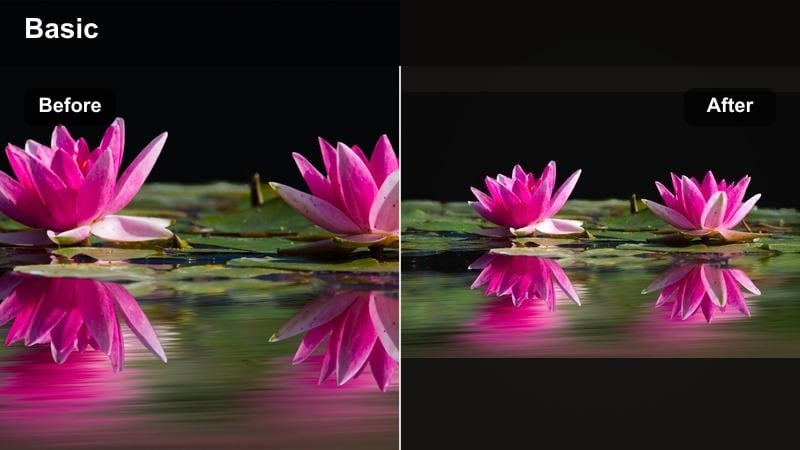
- Effect look: Warm indoor tones with slightly lifted blacks, soft contrast, and subtle cinematic glow around light sources.
- Best for: Room tours, cozy corners, reading nooks, and night routine daily vlogs with lamps or fairy lights.
- Editing tip: Lower the highlight roll-off so lamps and light bulbs maintain shape instead of blowing out completely.
Cozy Room Film is all about turning simple bedroom or living room spaces into intimate cinematic environments. In Filmora, this filter warms your palette, lifts the blacks a touch to create a gentle fade, and adds a soft glow around lamps, candles, or fairy lights. The result is a comforting, film-like mood that suits night routines, journaling scenes, or quiet reading moments.
When using this filter, start by correcting exposure and noise, especially if you shot on a phone in low light. Then apply the filter and adjust highlight roll-off so bulbs retain their circular shape and do not become solid white blobs. Combine this look with slow pans, locked-off tripod shots, and a touch of ambient room sound in Filmora to sell the feeling that viewers are stepping into a private, cinematic corner of your day.
Pro tip - Control noise in low light scenes: If your room footage is grainy, reduce noise before applying the filter so the final image looks intentionally cinematic, not messy. Avoid over-sharpening low-light clips; instead, use the cozy filter to add character through color and contrast.
Kitchen Lifestyle Film
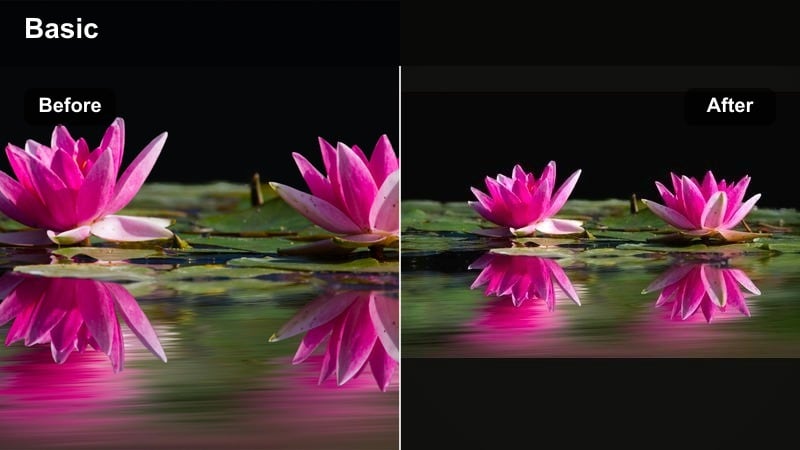
- Effect look: Neutral-warm kitchen tones with medium contrast and a subtle filmic curve that keeps whites bright but not harsh.
- Best for: Cooking, meal prep, coffee making, and casual conversations in the kitchen during daily vlogs.
- Editing tip: Cut between wide and close shots using the same filter strength to keep a seamless cinematic feel in your sequence.
Kitchen Lifestyle Film is tailored to everyday cooking and home activity scenes that appear in nearly every daily vlog. In Filmora, this filter keeps whites and countertops looking clean while adding just enough warmth to food, skin, and wooden elements to make everything appetizing and inviting. Medium contrast and a gentle film curve help preserve detail in steam, textures, and stainless steel.
Use this filter consistently across both wide shots of the kitchen and close-ups of chopping, pouring, and plating. Keeping filter strength similar across angles makes your sequence cut together naturally, even if clips were shot at different times of day. Enhance the cinematic feel by adding a subtle vignette and pairing the visuals with layered kitchen sound effects in Filmora, which will make simple breakfast or dinner prep feel like a planned scene instead of random documentation.
Pro tip - Use sound design to support the film look: Layer natural kitchen sounds like chopping, pouring, and sizzling under music so the cinematic filter feels grounded in reality. Leave a few moments without dialogue to let visuals and sound carry the storytelling, just like in narrative films.
Mood-Driven Cinematic Filters for Storytelling
Moody Rainy Day Film
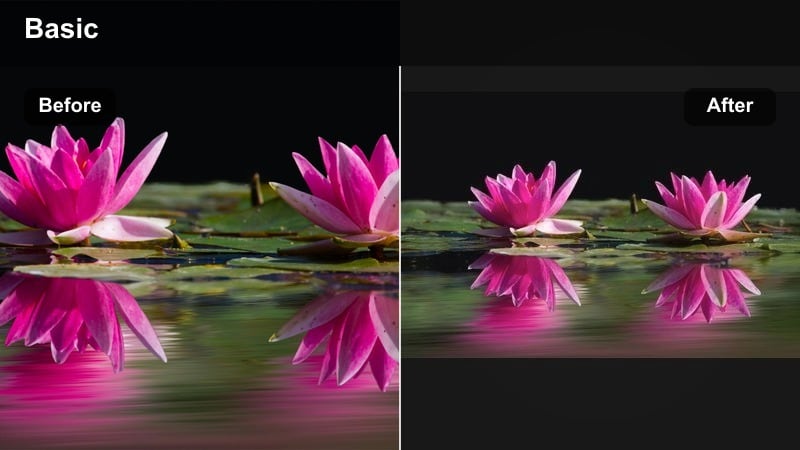
- Effect look: Cool, desaturated tones with lifted blacks and gentle fade that mimic a moody indie film aesthetic.
- Best for: Rainy days, introspective monologues, quiet studying, and emotional narrative beats in daily vlogs.
- Editing tip: Lower music energy and hold shots a bit longer so the moody grade has time to sink in for the viewer.
Moody Rainy Day Film gives gray, overcast footage the kind of emotional depth you see in indie films. In Filmora, this look cools your color temperature, desaturates most hues, and lifts the blacks with a soft fade, creating a sense of nostalgia and introspection. It is ideal for shots of rain on windows, slow walks under umbrellas, or quiet time at a desk when your mood is more reflective.
Apply this filter to a dedicated segment of your vlog where you want to communicate a shift in tone, such as a personal update or reflective voiceover. Muting colors across the frame lets small accents like a bright mug or jacket stand out more. Pair the grade with slower pacing, longer cuts, and subdued music in Filmora so viewers have time to feel the atmosphere rather than just see it in passing.
Pro tip - Use selective color to guide emotion: Keep most colors muted but allow one accent, like a jacket or mug, to remain stronger so it becomes an emotional focal point. Use this accent color across a few scenes to subtly tie the feeling together throughout the vlog.
Bright Happy Film
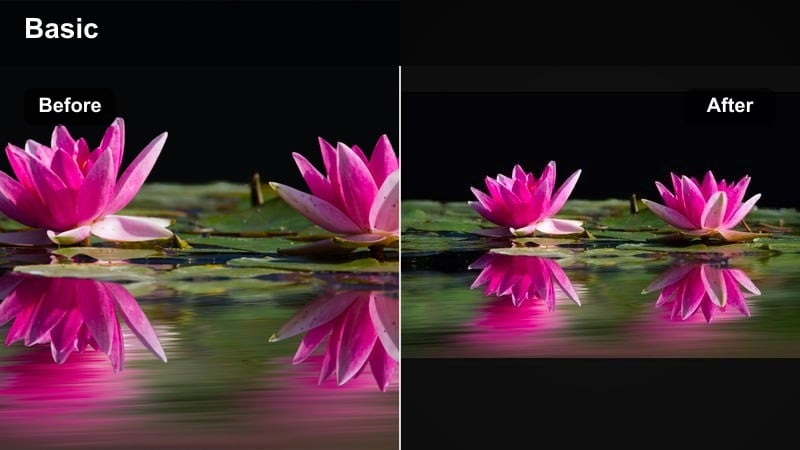
- Effect look: Vibrant, high-key film-inspired grade with bright highlights and cheerful, slightly warm color balance.
- Best for: Productive days, celebrations, outings with friends, and exciting announcements in your vlogs.
- Editing tip: Avoid clipping highlights by lowering exposure slightly before applying the filter for a controlled cinematic pop.
Bright Happy Film is designed to make your best moments feel like scenes from a feel-good movie. In Filmora, this filter pushes brightness and color in a controlled way, keeping skin tones pleasant while adding a subtle warmth and saturation boost to the entire frame. It works especially well for sunny days, group shots, and celebrations where you want energy to jump off the screen.
Before applying this look, pull exposure down a bit so highlights on faces and clouds do not clip once the filter adds its punch. Then, use it on sequences where your music peaks or where big moments happen, like hitting a milestone, hanging out with friends, or finishing a productive day. Combine the filter with quick cuts, subtle zooms, and rhythmic transitions in Filmora to create dynamic, social-media-friendly segments that your audience will remember.
Pro tip - Sync intensity with music peaks: Apply this brighter filter on sequences where the music builds to keep visual and audio energy aligned. Use jump cuts and quick punch-in zooms with this look for a kinetic, social-media-friendly style.
Late Night Cine Vlog
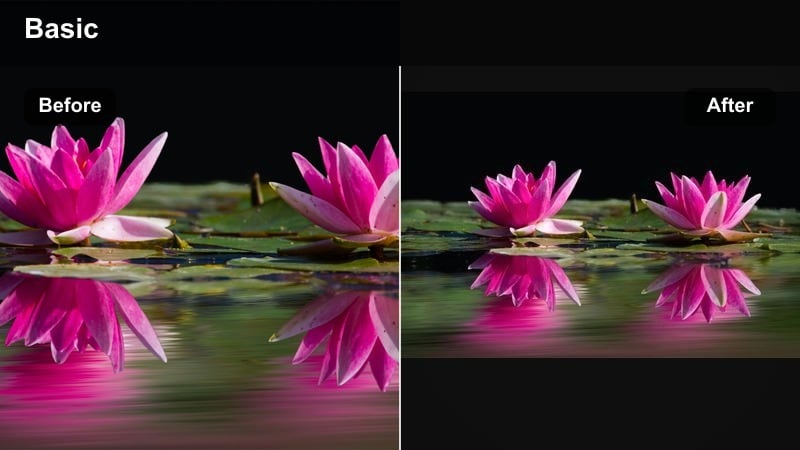
- Effect look: Deep, contrasty night look with rich shadows, neon-friendly saturation, and subtle film halation around bright signs.
- Best for: Night walks, city lights, late editing sessions, and reflective end-of-day monologues.
- Editing tip: Expose slightly brighter in-camera, then let the filter pull shadows down to keep noise under control.
Late Night Cine Vlog is built for after-dark sequences where bright signs, screens, and car lights define the scene. In Filmora, this filter deepens shadows, adds contrast, and boosts saturation around neon or colored light sources while keeping overall noise in check. A gentle halation-style glow around highlights can give your night shots a distinctly cinematic edge.
Use this filter on B-roll of city streets, monitor-lit desk shots, or late-night reflections to visually separate them from daytime footage. Shoot slightly brighter than you think you need, then lean on the filter and Filmoras curves to pull shadows down, which helps avoid noisy, crushed blacks. Intercut talking-to-camera clips with moody street or desktop B-roll using the same grade so the whole end-of-day section feels like a cohesive cinematic chapter in your vlog.
Pro tip - Use B-roll to break up talking: Cut between late-night talking clips and moody street B-roll with the same filter to create a reflective sequence. Let a small amount of natural ambient sound creep in under the music to keep the scene grounded and immersive.
Tips for Using Daily Vlog Cinematic Filters in Filmora
- Keep one main cinematic daily vlog filter as your channel signature, then only adjust intensity per scene.
- Shoot a quick gray or white reference clip at the start of your day so it is easier to balance color before adding stylized filters.
- Use stronger film look filters only on selected hero shots to avoid visual fatigue and keep key moments special.
- Match filter choices to music style; softer grades work best with lo-fi beats, while punchy film looks suit high-energy tracks.
- Export short test clips on your phone and watch them in natural light to see how your film look daily vlog grades feel outside the edit.
- Save different versions of the same filter preset for indoor, cloudy, and sunny conditions to speed up everyday editing.
- Combine subtle vignette and slight grain with your movie style vlog filter to reinforce the cinematic feeling.
- Avoid stacking too many intense filters; start light and build up until the footage feels filmic but still believable.
Cinematic daily vlog filters help you turn ordinary routines into scenes that feel intentional, cohesive, and film-inspired without demanding a full colorist workflow. Start with one or two signature looks in Filmora, apply them consistently to your daily content, and refine them over time until your audience instantly recognizes your cinematic vlog style.
Use cinematic vlog LUTs, film look daily vlog filters, and movie style vlog filter combinations thoughtfully to enhance emotion, not just aesthetics. As you become more comfortable with grading, organize presets by time of day and scenario so you can maintain a professional film look even on busy upload schedules.
 secure download

