

 100% Security Verified | No Subscription Required | No Malware


 ChatGPT
 Perplexity
 Gemini
 Claude
 Grok
Grok
Cinematic portrait video filters help filmmakers and cinematic creators shape skin tones, contrast, and depth so every close-up feels like a frame from a movie. With the right presets in Filmora, you can instantly give faces a filmic finish that matches your storys mood.
Whether you are shooting short films or crafting dramatic close-ups for social content, these cinematic portrait video filters add nuance, texture, and emotion to every frame. Use them as a fast starting point, then fine-tune light and color for your own signature look.
In this article
Soft Filmic Portrait Filters
Porcelain Soft Glow
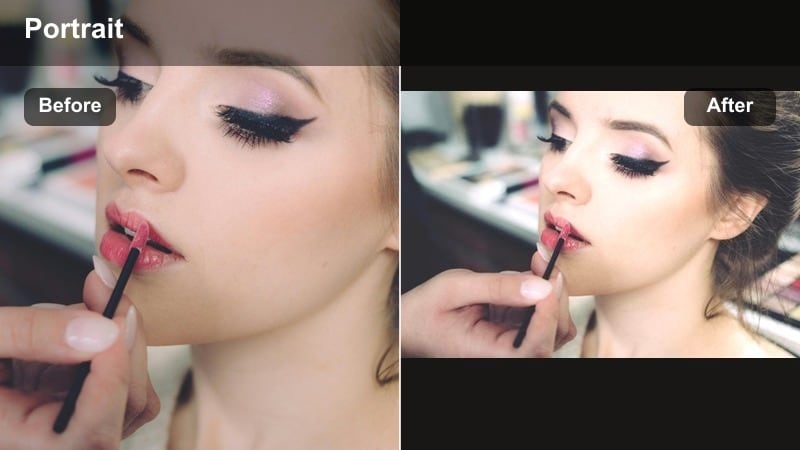
- Effect look: Gentle glow with smoothed skin and slightly lifted highlights for a polished filmic portrait.
- Best for: Romantic short films, dreamy dramatic close-ups, beauty-focused talking heads.
- Editing tip: Lower the filter intensity to around 60-70 percent and add a touch of clarity around the eyes to keep detail sharp.
Porcelain Soft Glow is designed to give faces a luminous, film-ready finish that still feels grounded in reality. In Filmora, this cinematic portrait video filter softens minor blemishes, lifts highlights, and wraps light smoothly around the cheeks and forehead so every close-up looks more intentional and stylized.
Use this filter when you want your subject to feel idealized yet human, such as romantic leads, beauty creators, or emotional talking heads in short films. Apply it as a base layer on your portrait clips in Filmora, dial the intensity back to taste, then use local adjustments on eyes, lips, and hair so the glow does not reduce important detail or contrast.
Use Filmoras AI to Match Cinematic Portrait Palettes
Filmoras AI tools help you quickly match cinematic portrait video filters across different shots so skin tones stay consistent. Apply a filter you love on a hero close-up, then let AI-assisted color match bring nearby angles in line.
For filmmakers and cinematic creators working on short films, this means faster grading on coverage shots and fewer mismatched dramatic face tones from scene to scene.
 secure download

Preview Cinematic Portrait Filters in Real Time
Filmoras filter previews let you audition multiple filmic portrait filters on your close-ups without committing. Hover and scrub through your timeline while testing different movie look video filter styles on the same frame.
You can instantly see how each preset changes mood, texture, and depth, then fine-tune intensity, exposure, and color for your final grade.
secure downloadCombine Portrait Filters with LUTs for a Complete Grade
After dialing in skin with your preferred filmic portrait filter, you can stack creative LUTs in Filmora to shape the overall scene. This layered approach keeps faces natural while giving the rest of the frame a bolder cinematic style.
Work lightly with LUT intensity so the portrait filter remains the foundation for skin tone, while the LUT adds global mood and genre-specific color.
secure downloadVelvet Matte Skin
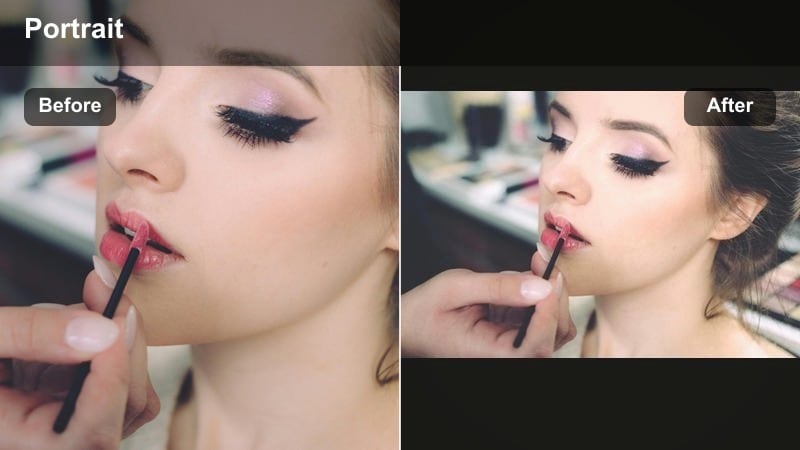
- Effect look: Matte, low-gloss skin with softened highlights and a hint of filmic contrast.
- Best for: Dialogue scenes, indie short films, portraits in soft window light.
- Editing tip: Pair with a subtle vignette and reduce saturation in the background to keep attention locked on the face.
Velvet Matte Skin is ideal when you need to control shine and keep actors looking refined under practical or window light. In Filmora, this filter gently flattens specular highlights, lending a smooth, editorial-style finish that still respects natural pores and facial contours.
Use it across dialogue sequences or character moments where you want viewers to concentrate on performance rather than skin reflections. Add a vignette using Filmoras effects, and slightly reduce background saturation so the subjects face becomes the visual anchor, especially helpful for cinematic YouTube interviews and narrative shorts.
Pearl Highlight Fade
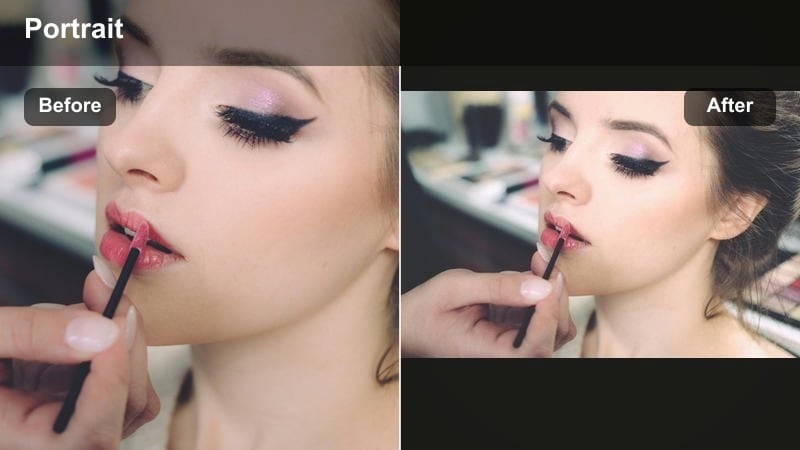
- Effect look: Soft faded highlights with gentle roll-off and slightly desaturated skin for a modern film tone.
- Best for: High-key portraits, beauty shorts, social videos with a soft cinematic polish.
- Editing tip: Pull down global saturation a touch, then add selective saturation back into lips and eyes for subtle emphasis.
Pearl Highlight Fade helps tame harsh or high-key lighting while maintaining a premium, filmic finish. Applied in Filmora, it rolls off bright areas smoothly, slightly pulls down saturation, and produces soft, pearlescent skin that works beautifully for influencers, commercial portraits, and clean brand visuals.
Start by applying the filter to overexposed or bright close-ups, then use Filmoras color tools to selectively boost saturation in lips, eyes, and key wardrobe elements. This keeps the overall frame gentle and cinematic while preserving enough color contrast to make your subject stand out on social feeds and streaming platforms.
Dramatic Shadow & Contrast Portraits
Noir Face Contrast
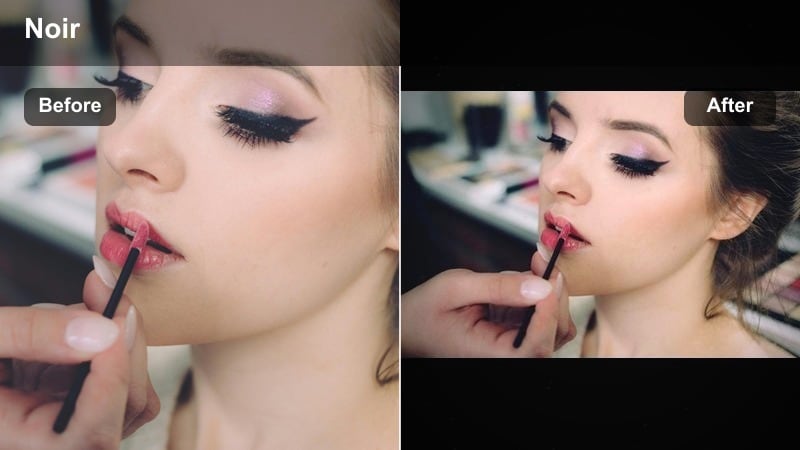
- Effect look: High contrast, deep blacks, and focused light on the face for a noir-inspired movie look.
- Best for: Dramatic close-ups, thriller short films, intense monologues.
- Editing tip: Use masks to keep eyes and key facial features slightly brighter than the rest for maximum emotional punch.
Noir Face Contrast delivers a classic, shadow-rich aesthetic that instantly increases tension and mystery in your close-ups. In Filmora, it deepens blacks, heightens contrast, and draws the viewers attention toward the lit portions of the face, evoking vintage noir and modern thrillers alike.
Apply this filter to pivotal emotional beats or interrogation-style scenes, then refine with Filmoras masking tools to keep the eyes and mouth slightly brighter than the surrounding shadows. The result is a focused, dramatic portrait cinematic tone that works well for trailers, narrative shorts, and stylized YouTube storytelling.
Copper Shadow Tone
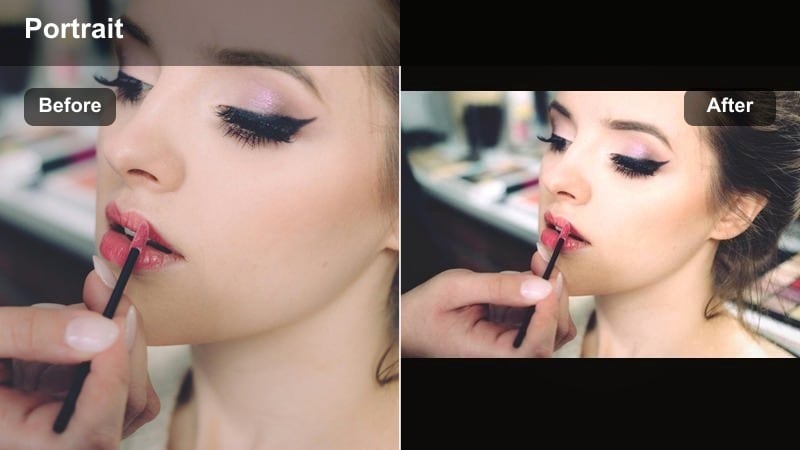
- Effect look: Warm copper shadows with slightly cool highlights for a stylized cinematic split-tone on faces.
- Best for: Moody character studies, dusk exterior portraits, emotional close-ups.
- Editing tip: Fine-tune the warmth in shadows to match the scenes practical lights so the grade feels naturally integrated.
Copper Shadow Tone builds a sophisticated split-tone look by blending warm, copper-tinted shadows with cooler highlights. In Filmora, this creates depth and color contrast across the face, giving your portraits a rich, cinematic finish without overwhelming natural skin detail.
Use it for dusk exteriors, lamplit interiors, or any scene where mixed color temperatures are part of the storytelling. After applying the filter, adjust the temperature and tint controls to align shadow warmth with practical lights on set, ensuring the stylization supports the narrative instead of feeling disconnected from the environment.
Charcoal Drama Matte
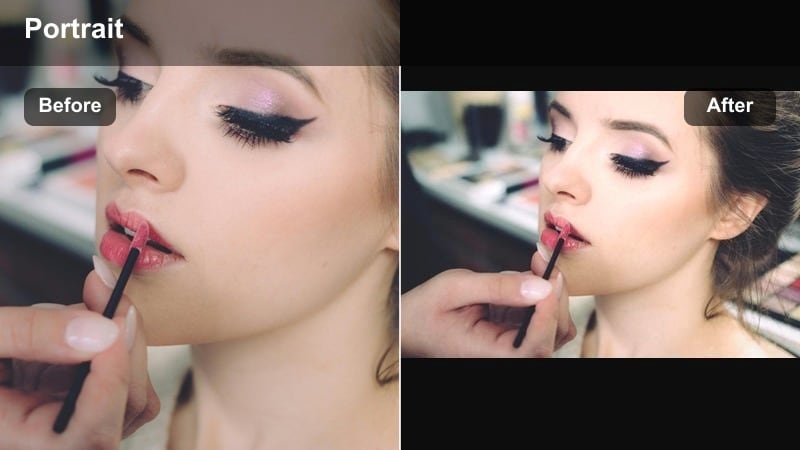
- Effect look: Crushed blacks, matte shadows, and low saturation for a gritty, filmic character portrait.
- Best for: Urban shorts, crime scenes, introspective character close-ups.
- Editing tip: Add a subtle push to midtone contrast to maintain shape in the face, avoiding a flat or muddy look.
Charcoal Drama Matte is built for raw, character-driven stories that need weight and atmosphere. In Filmora, it crushes blacks, reduces saturation, and flattens highlights slightly, leaving you with portraits that feel edgy and grounded, ideal for urban or crime-driven narratives.
Apply it to low-key setups or night exteriors and then gently lift midtones to preserve facial shape and expression. You can combine this portrait cinematic tone with Filmoras film grain or texture overlays to reinforce the gritty mood while still maintaining clarity where it matters most.
Warm Filmic Skin Tones
Sunset Amber Skin
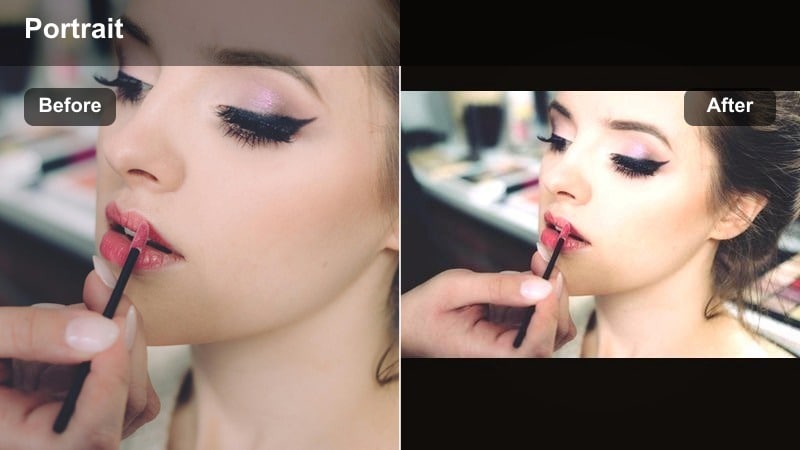
- Effect look: Warm amber midtones and soft contrast that mimic golden-hour film portraits.
- Best for: Outdoor short films at sunset, romantic close-ups, lifestyle content.
- Editing tip: Dial back orange saturation if skin starts to look too tanned and add a tiny bit of magenta to balance.
Sunset Amber Skin replicates the flattering warmth of golden hour even when you did not shoot at that time. In Filmora, this filter warms midtones, eases contrast, and adds a gentle glow to faces, giving your portraits a cinematic, sun-kissed quality.
Use it on outdoor sequences, elopement-style films, or lifestyle vlogs where emotion and warmth are central. After applying, use the HSL or color controls to moderate orange saturation and add a hint of magenta to maintain natural-looking, filmic skin tones across diverse complexions.
Candlelit Portrait Glow
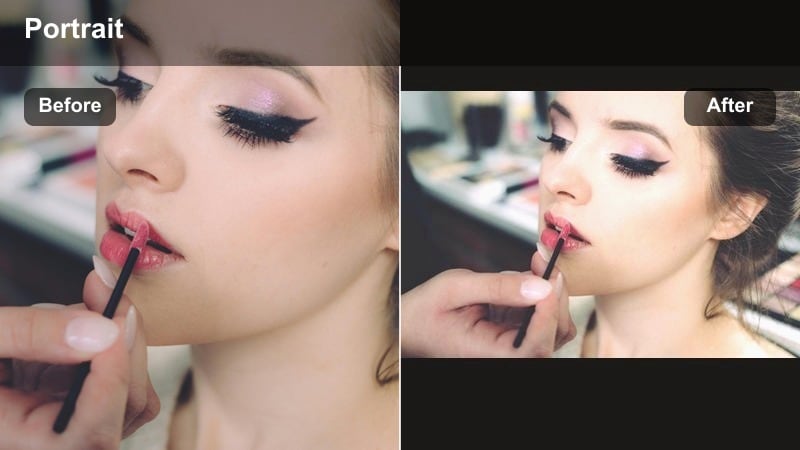
- Effect look: Soft, low-contrast warmth with glowing highlights that mimic candle or practical light on faces.
- Best for: Interior dialogue, intimate scenes, candlelit or lamp-lit close-ups.
- Editing tip: Lift shadows a bit to keep detail in dark areas, and reduce highlight clipping for smoother roll-off.
Candlelit Portrait Glow is made for intimate, interior storytelling where warmth and subtlety drive the mood. In Filmora, it wraps faces in cozy warmth, softens contrast, and enhances small highlights from candles, lamps, or practicals in the scene.
Apply this filter to dinner-table dialogues, night-time confessions, or cozy creator setups. Keep an eye on shadow detail and highlight clipping, adjusting exposure and curves to maintain a gentle roll-off so your portraits feel cinematic rather than overly hazy or blown out.
Honey Film Stock
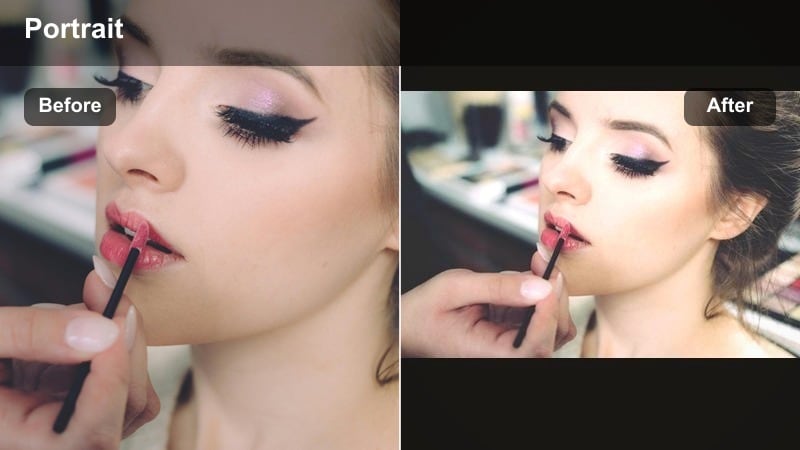
- Effect look: Subtle warm shift with light film-style contrast and gently lifted blacks.
- Best for: Narrative shorts, branded portraits, cinematic creator reels.
- Editing tip: Add a touch of film grain and slightly lower saturation to sell the movie look video filter vibe.
Honey Film Stock delivers a soft, nostalgic finish that mimics classic film emulsions. In Filmora, it warms the image slightly, lifts blacks for a gentle fade, and introduces film-style contrast that flatters a wide range of skin tones.
Use it as a unifying look for entire short films or branded content series where cohesion matters. Add subtle grain and a small saturation reduction to push the filmic illusion further, and then adjust filter strength per scene to balance against changing lighting conditions while keeping the same core honey-toned palette.
Cool Modern Cinematic Portraits
Teal City Portrait
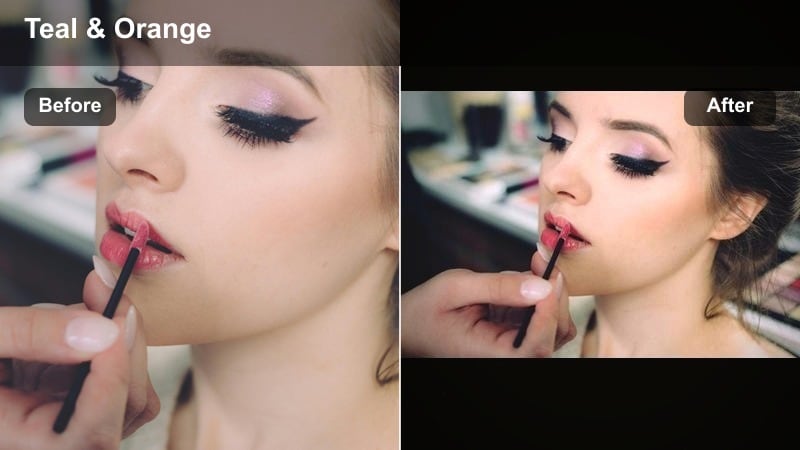
- Effect look: Cool teal shadows with neutral skin and crisp contrast for a modern urban movie look.
- Best for: Night city scenes, neon-lit close-ups, music video portraits.
- Editing tip: Reduce saturation in the greens to keep complexions natural while letting teal live mostly in the background.
Teal City Portrait gives your urban portraits a contemporary, cinematic split between cool environments and clean, natural skin. In Filmora, this filter pushes shadows and backgrounds toward teal while reserving more neutral tones for faces, achieving the popular blockbuster-inspired palette without heavy manual grading.
Apply it to night city B-roll, music video close-ups, and creator videos shot among storefronts or LED-lit streets. Use Filmoras HSL controls to rein in green saturation so skin stays believable, and consider adding a light background blur or glow effect to separate the subject from busy city details.
Silver Cool Matte
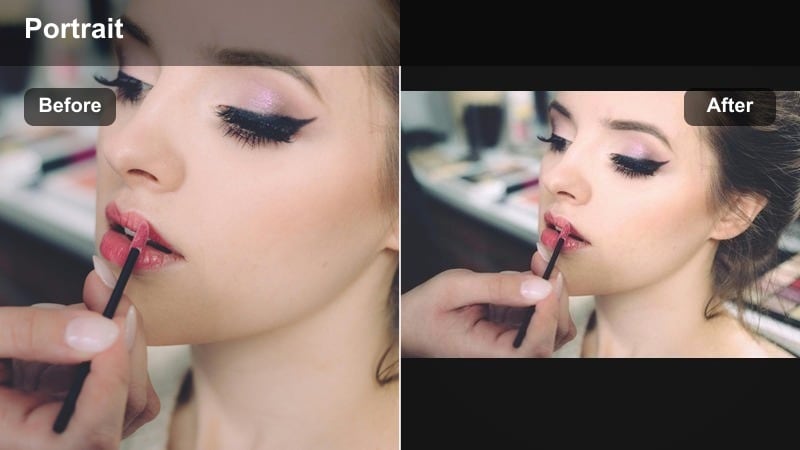
- Effect look: Cool, desaturated palette with subtle silver tones and flat highlights.
- Best for: Sci-fi shorts, minimalist fashion portraits, introspective close-ups.
- Editing tip: Lift exposure slightly on the eyes and lips to avoid a lifeless feel in very desaturated setups.
Silver Cool Matte leans into a refined, minimal aesthetic by lowering saturation and infusing the frame with silver-blue tones. In Filmora, it flattens highlights and cools the overall palette, turning portraits into sleek, modern visuals suited for sci-fi, design-forward branding, or reflective character pieces.
After applying the filter, raise exposure or add local brightness masks to the eyes and lips so the subject retains a sense of life within the cool palette. This combination of matte highlights and targeted emphasis creates a distinctive portrait cinematic tone that feels both stylish and emotionally controlled.
Midnight Neon Face
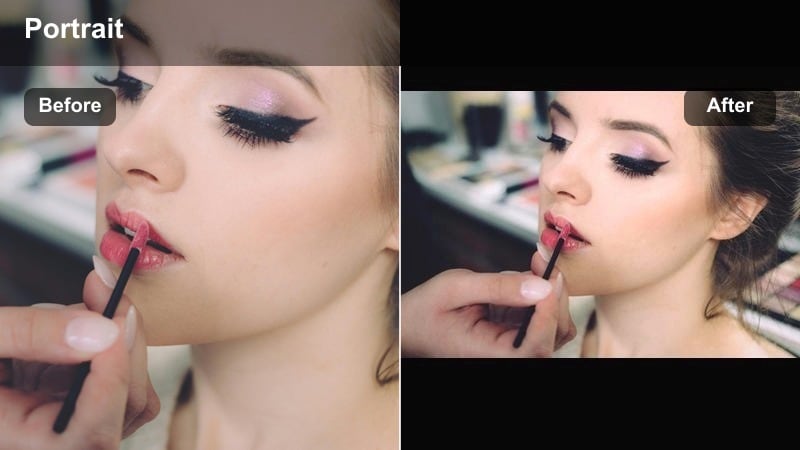
- Effect look: Bold cool highlights and saturated color accents that react strongly to neon and LED lights.
- Best for: Neon portraits, music videos, experimental short films with stylized lighting.
- Editing tip: Use HSL tools to selectively tame any color channel that distracts from the eyes or facial expression.
Midnight Neon Face is built to amplify colorful, stylized lighting setups, especially neon and LED-driven scenes. In Filmora, it boosts saturation in key hues, enhances cool highlights, and keeps facial contrast strong enough that expressions remain readable under aggressive color.
Use it in music videos, cyberpunk shorts, or creative reels where color is part of the storytelling language. Once the filter is applied, fine-tune individual hues with Filmoras HSL tools, dialing back any color that steals attention from the face while keeping surrounding neon signage and LEDs vibrant and expressive.
Tips for Using Portrait Cinematic Tone Filters in Filmora
- Shoot portraits slightly underexposed to protect highlights, then use cinematic portrait video filters to lift midtones and shape skin.
- Keep a consistent filter across all close-ups of the same character to avoid distracting shifts in dramatic face tones.
- Lower filter intensity on wide shots and keep it stronger on close-ups where facial emotion is the focus.
- Combine portrait filters with subtle vignettes and background blur to emphasize eyes and expressions.
- Export a graded still frame to use as a visual reference when matching portrait looks across your entire short film.
- Use Filmoras AI color matching to quickly align portrait tones when shooting with multiple cameras or in changing light.
- Save your favorite filter and color adjustments as custom presets to speed up grading on future projects.
Cinematic portrait video filters in Filmora give filmmakers and cinematic creators a fast way to build filmic skin tones, controlled contrast, and expressive depth in every close-up.
Use these presets as a foundation, then refine exposure, color, and texture so your short films and dramatic portraits carry a cohesive, story-driven visual signature.
secure downloadNext: Explore Aesthetic Portrait Video Filters for Stylized Looks
