

 100% Security Verified | No Subscription Required | No Malware


 ChatGPT
 Perplexity
 Gemini
 Claude
 Grok
Grok
This collection of Filmora filters is crafted to echo the look of a downtown walking vlog LUT, giving your city footage a polished, cinematic finish with minimal tweaking.
From soft morning walks to neon-lit street crossings, these presets help content creators quickly match their clips to a cohesive, urban vlog aesthetic.
In this article
Golden Hour Sidewalks and Storefronts
Warm Sunlit Stride
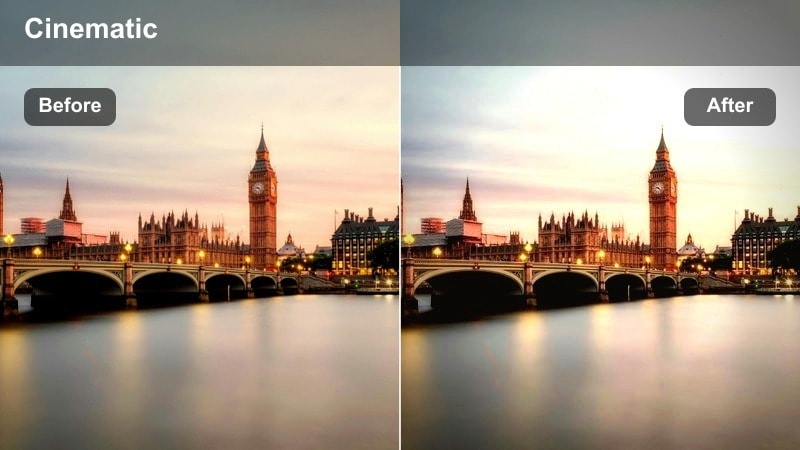
- Effect look: Soft golden contrast that brightens sidewalks and storefront glass while keeping skin tones warm and flattering.
- Best for: Slow-paced walking shots along shop-lined streets during late afternoon or early evening.
- Editing tip: Lower the intensity slightly if your highlights are clipping, and nudge exposure down to keep sky details intact.
Warm Sunlit Stride wraps your downtown walking footage in a gentle gold tint that mimics classic golden hour light. Sidewalks, windows, and reflective glass catch a pleasant glow, while skin tones stay natural so your vlog feels cinematic without looking overfiltered.
In Filmora, apply this filter to clips from your late day city walks, then slightly adjust exposure and intensity to match different angles of the sun. If faces start to look too orange, fine tune warmth and saturation so the city keeps its glow while your subject remains realistic and flattering.
Match Your Downtown Walking Vlog LUT with AI-Powered Color Tools
Filmora's AI color tools help you quickly match these filters to your favorite downtown walking vlog LUT, so your clips feel cohesive even when they are shot on different streets, days, or devices.
Use AI Color Match to reference a single hero clip from your route, then refine the result with temperature and tint sliders until every sidewalk, storefront, and skyline shares the same cinematic mood.
 secure download

See Urban Filters in Action on Real Street Footage
Load a few handheld sidewalk clips into Filmora and apply these downtown walking filters one by one to see how they treat shadows, streetlights, and glass reflections in your actual locations.
Toggle the Effect visibility icon to A/B test before and after views, then lock in the preset that most closely recreates your preferred downtown walking vlog LUT look across an entire block.
secure downloadCombine Filters and LUTs for Signature Urban Styles
Stack your favorite Filmora filter with a dedicated downtown walking vlog LUT to build a layered grade that defines your channel's city look. Let the LUT handle overall color direction while the filter adds contrast, glow, or softness tailored to each location.
Keep LUT intensity below 100 percent, then fine tune brightness, contrast, and highlight roll off in the filter so your footage stays clean, detailed, and binge watch friendly across long walking sessions.
secure downloadSoft Storefront Reflections
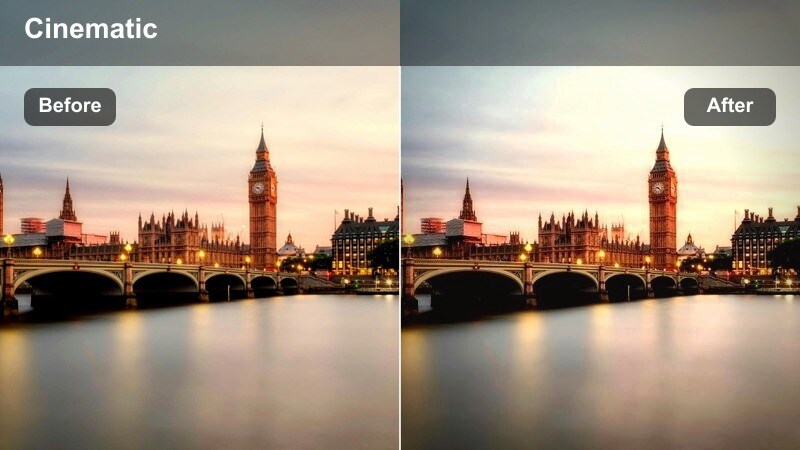
- Effect look: Low-contrast, dreamy highlights that smooth reflections in windows and polished city surfaces.
- Best for: Montage shots of shop windows, cafe fronts, and slow camera pans along city blocks.
- Editing tip: Increase clarity slightly if your footage feels too hazy, especially when shooting through glass.
Soft Storefront Reflections is designed to calm bright, busy reflections in window displays and polished stone without losing the details that make downtown walks interesting. It lifts the overall mood into a dreamy, cinematic space, perfect for b roll sequences between talking segments.
Apply this filter in Filmora to shots that feature glass facades, cafes, and mirrored walls, then adjust clarity and sharpness to fine tune how soft or defined your reflections appear. It pairs well with slow camera movement and gentle music beds, helping your city walk feel more like a composed urban story than a raw capture.
Sidewalk Contrast Pop
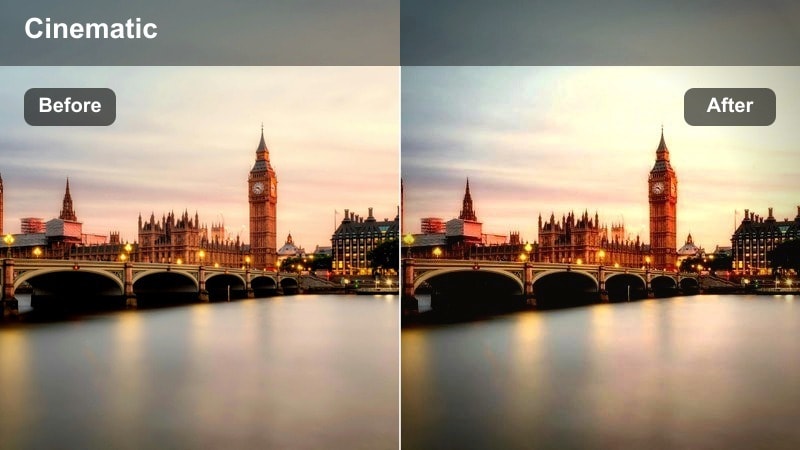
- Effect look: Crisp micro-contrast that sharpens pavement textures and architectural lines without oversaturating colors.
- Best for: Handheld walking shots that track footsteps, crosswalks, and curb-side movement.
- Editing tip: Reduce sharpening if you see noise in darker areas, especially on night or overcast shots.
Sidewalk Contrast Pop brings out the fine details in crosswalk stripes, curb edges, and city architecture so every step in your walking vlog feels dynamic. The added micro contrast makes patterns in bricks, tiles, and street markings stand out, giving your edit a more tactile, street level feel.
In Filmora, drop this filter on sequences that track your shoes, wheels, or ground level POV shots and then balance the sharpening controls to avoid noise in shaded areas. It works especially well as a contrasty counterpoint to softer filters, helping you punctuate key moments like intersections or scene transitions.
Midday Business District Walkthroughs
Neutral City Commute
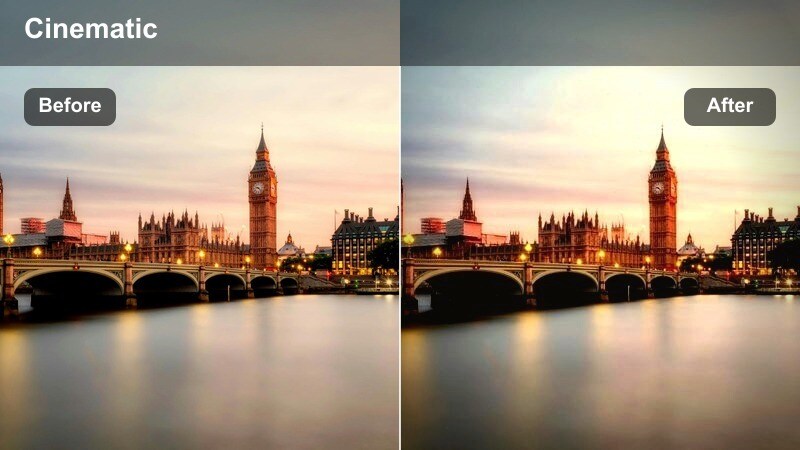
- Effect look: Balanced, true-to-life colors with slightly softened shadows for clean documentary-style urban vlogs.
- Best for: Office district walk-and-talk segments and informational downtown tour vlogs.
- Editing tip: Use this as a base layer; stack subtle color tweaks on top for branded color schemes.
Neutral City Commute keeps your downtown footage honest, with faithful colors and light shadow softening that suits tutorial style or documentary vlogs. Skyscrapers, suits, and street signs all appear natural, so viewers focus on your narration and information rather than a heavy grade.
Use this filter in Filmora as your go to baseline look for midday business district scenes, then add minor color shifts or branding overlays on top. Because it is intentionally subtle, it is ideal for stabilizing footage from multiple cameras or phones before you layer on stronger LUTs or stylistic effects.
Glass Tower Cool Tone
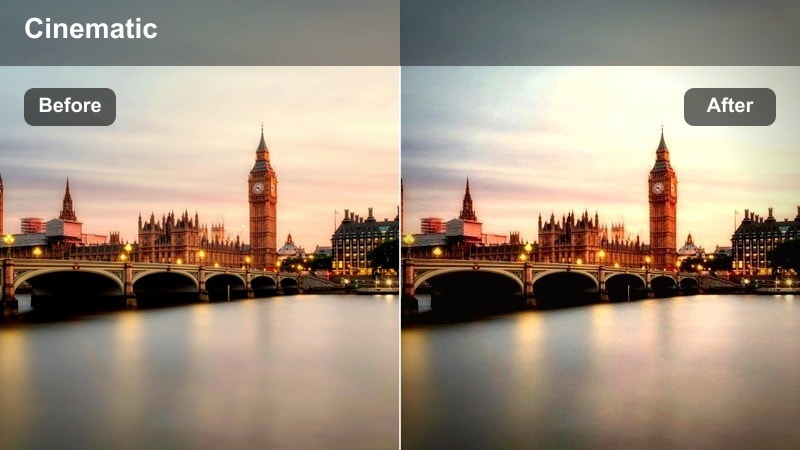
- Effect look: Cooler midtones that emphasize blue glass, steel, and sky while preserving natural skin tones.
- Best for: Shots that showcase skyscrapers, mirrored towers, and modern corporate facades.
- Editing tip: Raise vibrance slightly if the scene feels too subdued, especially under overcast light.
Glass Tower Cool Tone shifts your city palette toward sleek blues, making glass and steel surfaces feel modern and cinematic. Reflections in high rise windows and mirrored facades take on a techy, contemporary mood, while skin tones remain believable for talking to camera segments.
Apply this filter in Filmora when framing vertical compositions of towers, sky bridges, and reflective businesses, then nudge vibrance and saturation to taste. It is a strong choice for vlogs about work life, productivity, or city guides where you want the environment to communicate a cool, metropolitan personality.
City Lunch Rush Soft
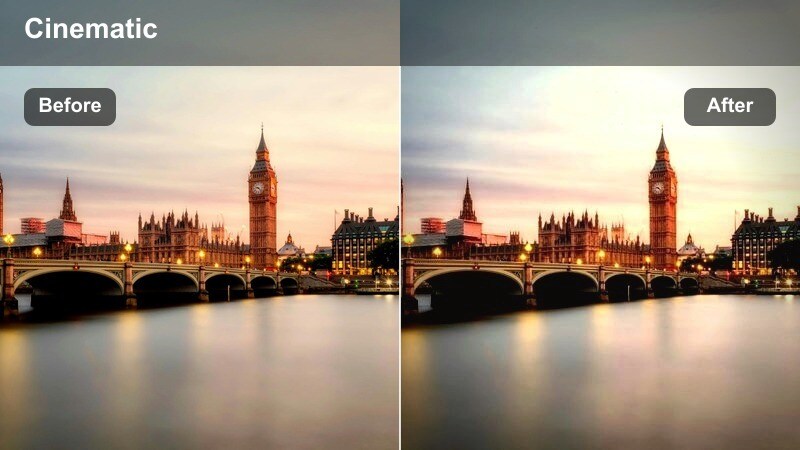
- Effect look: Gentle contrast with subtly lifted blacks that make crowded sidewalks feel less harsh and more inviting.
- Best for: B-roll of busy intersections, crosswalks, and street corners during midday crowds.
- Editing tip: Increase saturation of select accent colors like reds or yellows to help important details stand out.
City Lunch Rush Soft eases the harshness of midday sun and crowded streets, making packed intersections look more approachable. Blacks lift slightly so shadows under awnings, cars, and people do not turn into heavy blocks, which keeps your walking vlog comfortable to watch for longer sessions.
In Filmora, use this filter for cutaway shots of busy crossings, bus stops, and cafe exteriors, then add selective saturation boosts to key colors like signage or clothing. This lets you guide viewer attention within the crowd while keeping the overall frame calm and easy on the eyes.
Blue Hour Bridges and Street Crossings
Blue Hour Street Glow
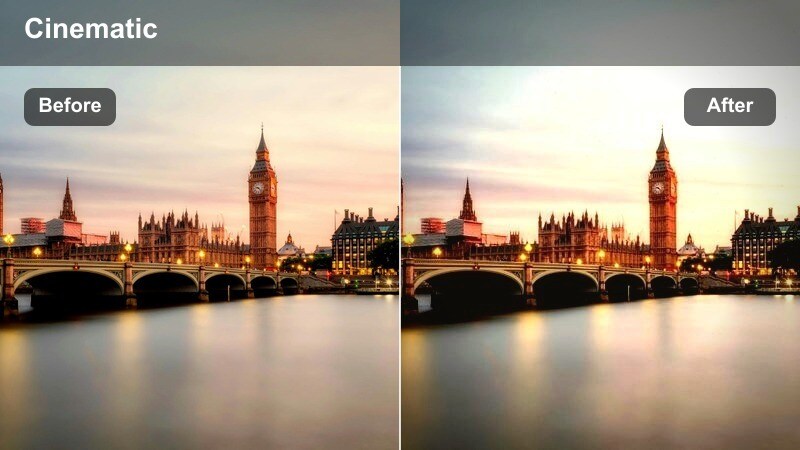
- Effect look: Deepened blues in the sky and sidewalks with warm highlights on streetlights and car headlights.
- Best for: Evening walking shots across bridges, plazas, and crosswalks just after sunset.
- Editing tip: Slightly lower exposure then raise highlight details to keep light sources from blowing out.
Blue Hour Street Glow enhances that short window after sunset when the sky turns rich blue and city lights flicker on. It deepens cool tones in the sky and pavement while pushing streetlights and windows a bit warmer, creating a cinematic contrast that feels straight out of a city film.
In Filmora, apply this filter to sequences captured in the 20 to 30 minutes after sunset, especially on bridges and wide intersections. Use the exposure and highlight controls to prevent bright lamps and car headlights from clipping, letting the filter handle the color separation between cool ambience and warm glows.
Bridge Rail Cinematic
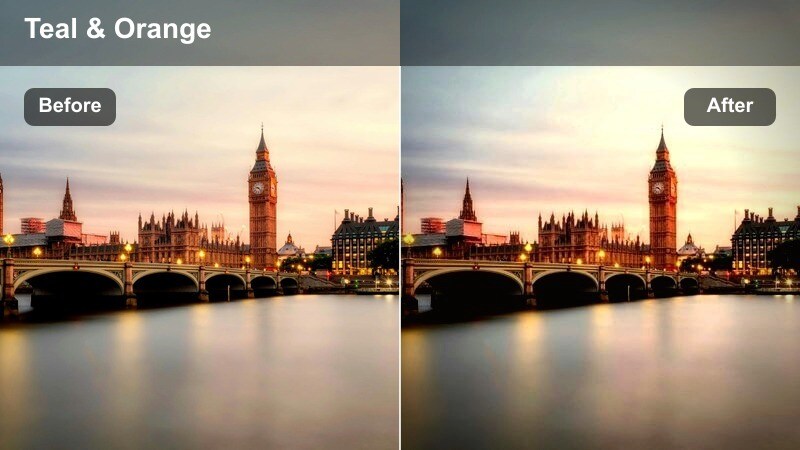
- Effect look: Moody, slightly desaturated tones with a subtle teal shift in shadows and soft highlight roll-off.
- Best for: POV shots of hands on bridge rails, looking down at traffic and city lights below.
- Editing tip: Add a light vignette to keep focus centered on the bridge path and traffic streams.
Bridge Rail Cinematic leans into a classic teal inspired look, cooling shadows and desaturating the scene just enough to feel moody. Traffic streams, railings, and distant buildings gain a stylized film atmosphere that works especially well for reflective or transitional moments in your walking vlog.
Use this filter in Filmora when shooting overpasses, river bridges, and elevated walkways, then gently layer in vignette and slight blur to guide viewer focus down the path or toward the traffic below. It is a strong choice for chapter breaks, intro sequences, or contemplative voiceover shots in your downtown narrative.
Crosswalk Neon Mist
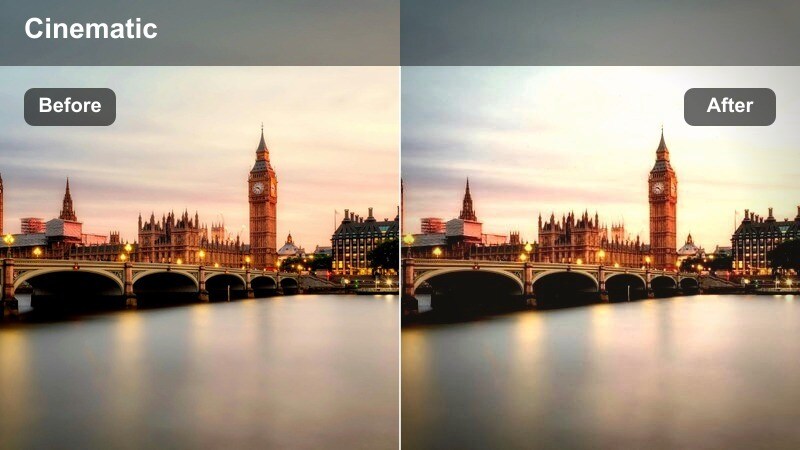
- Effect look: Soft halation around bright signs and headlights with slightly muted midtones for a foggy neon feel.
- Best for: Rainy or damp pavement shots where city lights reflect across crosswalk lines and sidewalks.
- Editing tip: Reduce haze if your footage already has lens fog, to avoid an overly blurred image.
Crosswalk Neon Mist wraps bright signage, traffic lights, and storefronts in a subtle glow that feels like neon shining through a light fog. Colors smear softly across wet pavement and painted lines, creating a dreamy atmosphere that turns ordinary crossings into stylized night scenes.
In Filmora, apply this filter to rainy night sequences or any shot where puddles and wet streets pick up city reflections, and then balance the haze and sharpness sliders to keep important details readable. It works especially well with slow motion or slightly slower shutter footage, enhancing the sense of motion and ambiance around passing cars and pedestrians.
Nightlife Alleys and Side Streets
Alley Ambient Glow
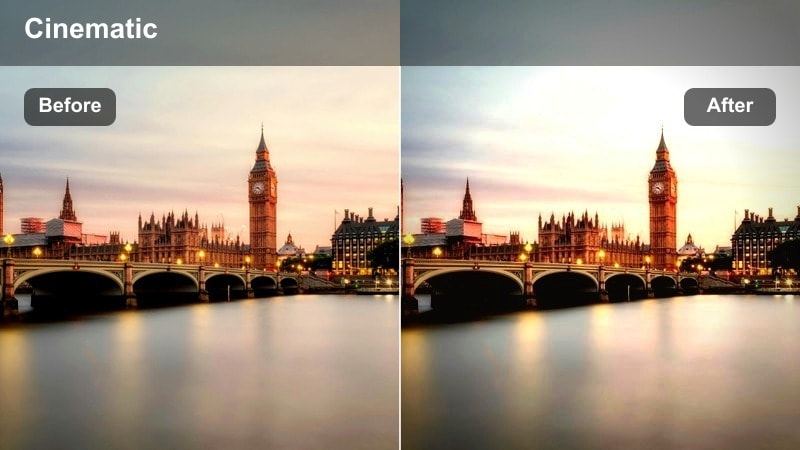
- Effect look: Lifted shadows with subtle warm tint that keeps alleyways visible without crushing detail.
- Best for: Slow exploratory walks down side streets lit by signs, windows, and scattered lamps.
- Editing tip: Dial back noise reduction before applying this filter so textures in brick and pavement stay intact.
Alley Ambient Glow is built to rescue dim side streets and alleys, lifting shadows so viewers can still see brick, signage, and doorway details. The warm tint helps turn potentially intimidating spaces into inviting, atmospheric backdrops for your night vlogs.
Use this filter in Filmora when your footage includes narrow passages and uneven lighting, then carefully manage noise reduction and sharpening so the boosted shadows do not look muddy. It pairs nicely with subtle soundtrack beds or ambient street audio, letting viewers feel like they are exploring the city alongside you.
Side Street Chrome
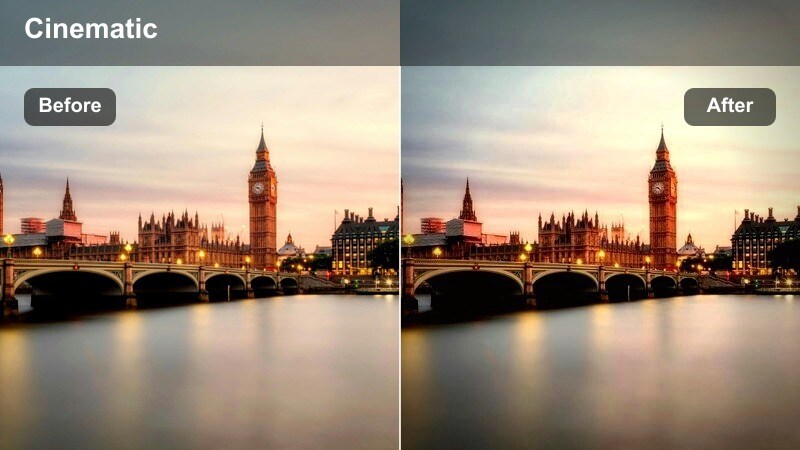
- Effect look: Cool metallic highlights with punchy contrast that makes signs, railings, and parked cars stand out.
- Best for: Walking past parked cars, bike racks, and reflective surfaces along narrow city streets.
- Editing tip: Lower contrast slightly for high-ISO footage to avoid emphasizing digital noise.
Side Street Chrome accentuates metallic highlights in railings, cars, bikes, and street fixtures, giving your night footage an edgy, high contrast sheen. Cool tones in the highlights help the city feel slick and energetic, while shadows stay deep enough to preserve the late night vibe.
In Filmora, apply this filter to sequences where you pass rows of parked vehicles or reflective shop fronts, and fine tune contrast based on how noisy your original clips are. It is a strong stylistic choice for nightlife, fashion, or street photography inspired vlogs that thrive on sharp edges and glinting details.
Late Night Corner Haze
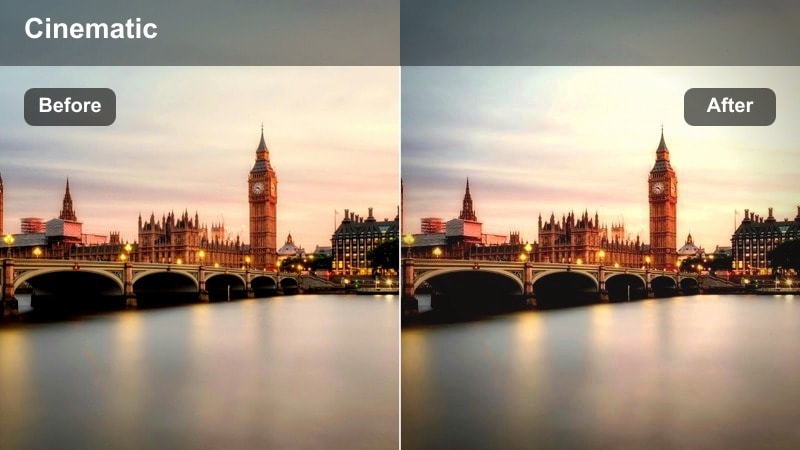
- Effect look: Slightly faded blacks and a gentle filmic grain feel that softens harsh nightlife lighting.
- Best for: Corner street scenes near intersections, bus stops, and late-night storefronts.
- Editing tip: Avoid stacking extra grain; keep ISO moderate so the filtered grain effect does not look muddy.
Late Night Corner Haze introduces a light film style fade and soft grain texture, turning bright, late night corners into nostalgic set pieces. Streetlights and bus stop lamps feel less clinical, while blacks ease off enough to keep your frames rich without becoming overly contrasty.
Use this filter in Filmora for scenes that mark transitions in your walk, such as turning onto new streets or waiting at intersections, and skip additional grain overlays so the texture remains clean. It is particularly effective alongside slower camera moves or quiet voiceover, helping your downtown vlog wind down with a cohesive, cinematic mood.
Tips for Using Downtown Walking Vlog Lut Filters in Filmora
- Shoot a short test walk on your planned route and try two or three filters to lock your look before recording the full vlog.
- Keep white balance fixed in-camera during a single sequence so filters and LUTs respond predictably.
- Use adjustment layers for global filters, then fine-tune specific clips with local exposure and color tweaks.
- Stabilize handheld walking footage first, then apply contrast-heavy filters to avoid emphasizing shake.
- Mix wide street views with close-up details like steps, rails, and signs so your filter choice enhances visual variety.
- Save your favorite combinations of filters, LUT intensity, and basic corrections as custom presets for faster edits.
- Group clips by time of day in your timeline so you can batch apply the most suitable downtown walking vlog LUT style.
- Regularly check scopes in Filmora to ensure your cinematic grades still protect highlights and shadow detail.
These Filmora filters give content creators an easy way to echo the polish of a downtown walking vlog LUT while staying flexible for different times of day and street conditions.
Test a few options on your next urban walk, then refine your favorites into a repeatable preset stack so every city vlog feels consistent and cinematic.
secure download