

 100% Security Verified | No Subscription Required | No Malware


 ChatGPT
 Perplexity
 Gemini
 Claude
 Grok
Grok
Eclipse Violet is a deep, cinematic purple that feels both mysterious and modern. It carries the emotional weight of night skies and neon city lights, making it ideal for storytelling, nostalgia, and futuristic aesthetics. Used well, this color suggests depth, creativity, and a slightly otherworldly mood that stands out on any screen.
For video creators and designers, Eclipse Violet works beautifully in intros, color grading, thumbnails, lower thirds, and channel branding. Below you will find ready to use Eclipse Violet color palettes with HEX codes for Filmora users and other creators, so you can copy paste each combo straight into your edits, overlays, and design projects.
In this article
Soft And Dreamy Eclipse Violet Color Palettes
Moonlit Lavender Haze
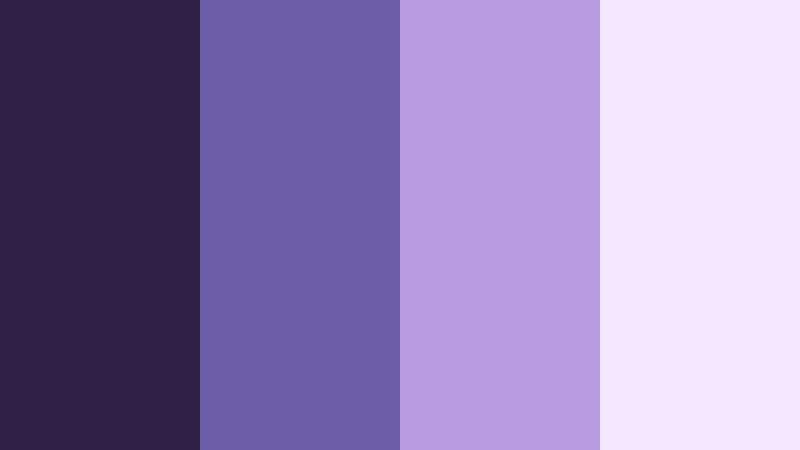
- HEX Codes: #2f2145, #6b5ca8, #b79adf, #f3e7ff
- Mood: Soft, dreamy, and slightly mysterious with a gentle cinematic glow.
- Use for: Perfect for romantic vlog sequences, dreamy b-roll, and soft spoken word intros.
Moonlit Lavender Haze glides from a deep Eclipse Violet base into light lavender and milky highlights. It feels like standing under a clear night sky with soft city glow in the distance, adding a touch of magic without overpowering your footage.
Use this palette to color grade romantic vlogs, poetry reels, and storytelling edits where you want gentle contrast and a creamy, pastel finish. In Filmora, you can pull the darkest tone into your backgrounds or drop shadows, keep mid tones for titles, and use the lightest shades for highlight text, thumbnails, and intro cards so everything feels cohesive.
Pro Tip: Build a Cinematic Eclipse Violet Look in Filmora
When working with Moonlit Lavender Haze in Filmora, start by sampling the darkest Eclipse Violet as your base for backgrounds, overlays, and lower thirds. Then, apply the mid lavender tones to text and icons so they stand out while still feeling soft and cohesive. Use the pale highlight shade for borders, glow effects, and buttons across your intro, b roll, and end screen so your audience instantly recognizes your style.
Save this combination as a preset in Filmora so every new sequence uses the same Eclipse Violet look. That way, your timeline, social cuts, and thumbnails all carry one unified visual identity, from your main video to Shorts and Reels.
AI Color Palette
If you have a reference image or color card based on Moonlit Lavender Haze, you can use Filmora to spread that Eclipse Violet vibe across your entire video. Filmora's AI Color Palette feature analyzes your reference frame and matches the colors to other clips in one click.
Simply choose a graded frame that perfectly represents this palette, then use AI Color Palette to sync the same soft violets and lavenders to talking head shots, b roll, and cutaways. This keeps your edit consistent, even if you shot content at different times or with different cameras.
 secure download

HSL, Color Wheels & Curves
To refine your Eclipse Violet tones in Filmora, head to the advanced color panel. With HSL, you can shift purples slightly toward blue for a more cinematic night feel, or toward red for a warmer, romantic mood. Use the color wheels to cool down shadows while keeping midtones soft and creamy, so faces still look flattering.
Curves let you gently lift highlights in the lavender range while protecting the deep Eclipse Violet shadows from getting washed out. Combined with Filmora's detailed color tools shown in the advanced color correction tutorial, you can fine tune this palette for every shot, from close ups to wide cityscapes.
secure download1000+ Video Filters & 3D LUTs
If you want to move faster, you can stack this Eclipse Violet palette on top of Filmora's existing looks. Filmora's video filters and 3D LUTs make it easy to add glow, grain, or a soft pastel finish that enhances Moonlit Lavender Haze without rebuilding everything from scratch.
Try a cinematic LUT to deepen your shadows, then fine tune the result by adjusting saturation and tint so your violets stay in the Eclipse Violet range. This workflow is perfect for intros, highlight reels, and YouTube thumbnails where you want a signature look in minutes.
secure downloadStarlit Studio Nights
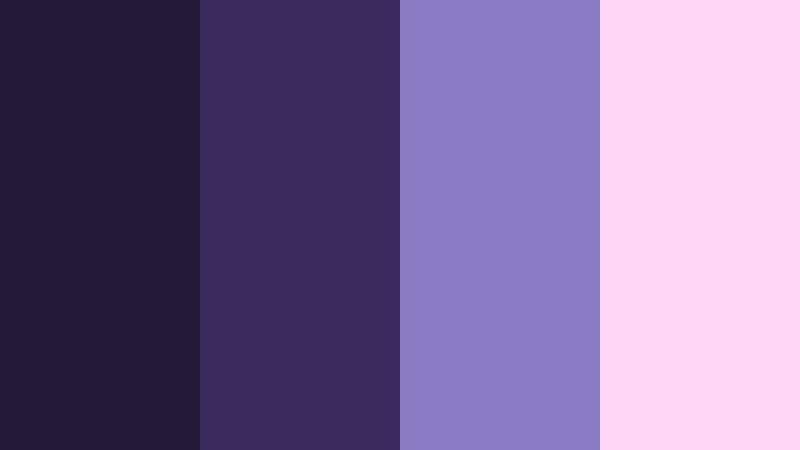
- HEX Codes: #251938, #3a2b5c, #8a7cc4, #ffd6f5
- Mood: Cozy, reflective, and creative, like late-night editing sessions.
- Use for: Use in channel art, editing tutorials, and behind-the-scenes studio content to keep things soft but focused.
Starlit Studio Nights feels like a desk lamp glowing over your keyboard while the rest of the room fades into Eclipse Violet shadows. The deep purples support a gentle lilac and blush accent, which keeps things cozy yet productive.
Apply the darkest tones to backgrounds and overlays in your editing tutorials, then use the lilac and blush for chapter titles, progress bars, and callouts. It is an excellent choice for YouTube banners, tutorial thumbnails, and subtle animations in Filmora that show off your workflow without visual clutter.
Dusk Window Reflections
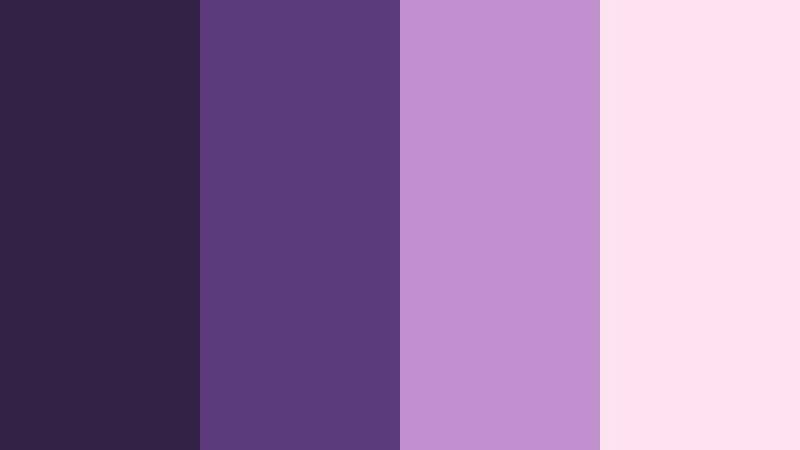
- HEX Codes: #332246, #5a3a7a, #c08fd0, #ffe4f0
- Mood: Introspective and nostalgic, like watching the city at blue hour.
- Use for: Ideal for storytelling shorts, lo-fi lyric videos, and reflective lifestyle edits.
Dusk Window Reflections drifts from blue leaning Eclipse Violet into warm orchid and a soft shell pink. It captures that in between moment at blue hour, when city lights start to glow and memories feel a little sharper.
Use this palette to grade lo fi lyric videos, journaling shots, or quiet lifestyle vlogs. The darker tones are great for background plates and overlays, while the orchid and pinks highlight text, waveform visualizers, and thumbnail typography. In Filmora, combine this palette with slow zooms and gentle blur to push the dreamy, introspective feeling further.
Velvet Cloud Reverie
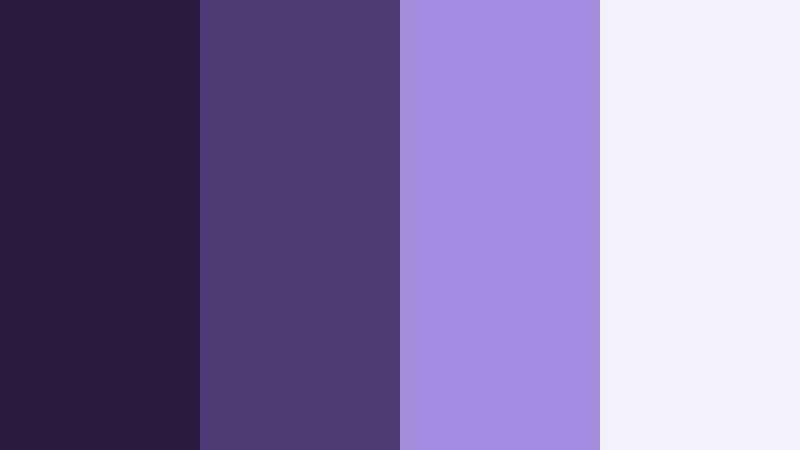
- HEX Codes: #281b3e, #4d3b73, #a38ddf, #f5f0ff
- Mood: Calm, airy, and comforting with a plush, velvety base.
- Use for: Great for intro cards, beauty content, and aesthetic study with soft overlays.
Velvet Cloud Reverie layers plush Eclipse Violet shadows under airy periwinkle and near white mist. It feels like soft fabric in color form, adding a gentle velour softness to your visuals.
This palette is perfect for beauty reels, skincare demos, and ASMR thumbnails where you want a calming atmosphere. Use the lightest shade as a clean backdrop for product shots or text, anchor your frames with the deepest violet in borders or corners, and keep your lower thirds in the mid periwinkle so they stay legible on both light and dark clips.
Midnight Lilac Lullaby
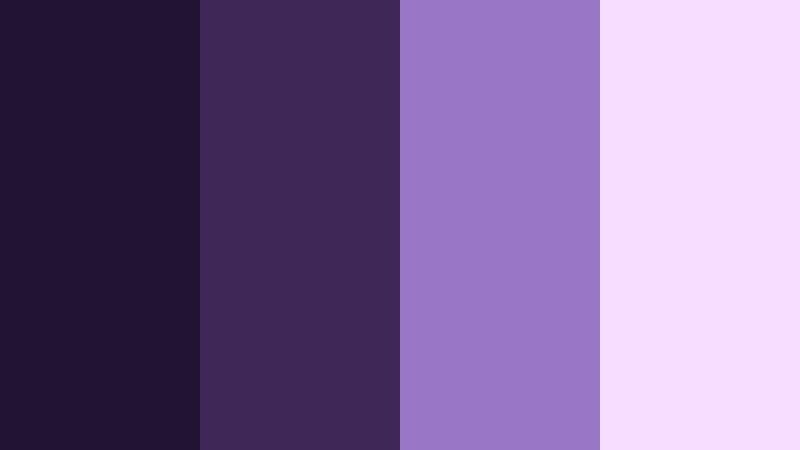
- HEX Codes: #221332, #3f2758, #9a76c7, #f7ddff
- Mood: Gentle and soothing, perfect for relaxing and sleep-friendly visuals.
- Use for: Use for meditation videos, sleep playlists, and calm explainer animations.
Midnight Lilac Lullaby starts with a hush of deep Eclipse Violet, then slowly melts into lilac and soft orchid highlights. It feels like a night light for your content, guiding viewers into a calmer headspace.
For sleep playlists, meditation tracks, or slow explainer animations, use the darkest shade in backgrounds and the lighter lilacs for soft typography and iconography. In Filmora, pair this palette with slow fades, low contrast filters, and gentle motion graphics so your visuals stay relaxing and easy on tired eyes.
Bold And Cinematic Eclipse Violet Color Palettes
Neon Arcade Nights
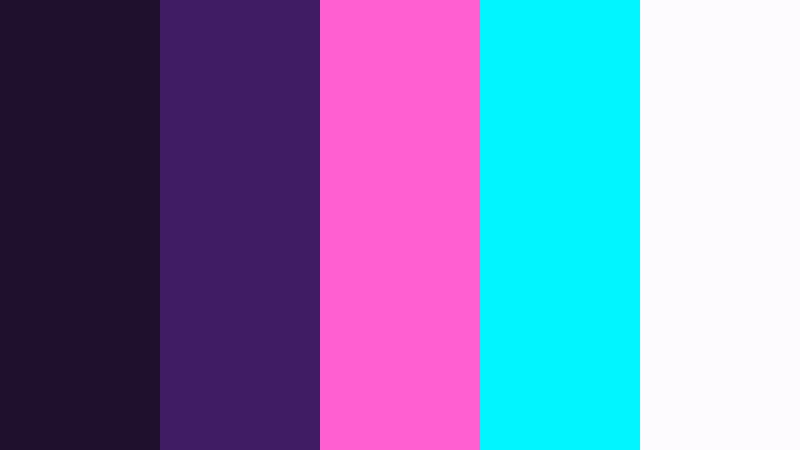
- HEX Codes: #1f102e, #3f1c63, #ff5fd1, #00f5ff, #fefbff
- Mood: High-energy, retro-futuristic, and electric with neon drama.
- Use for: Perfect for gaming intros, glitch transitions, and high-impact thumbnails.
Neon Arcade Nights throws inky Eclipse Violet behind hot magenta and cyan neon, with a pale white highlight to make everything pop. It has a strong retro arcade energy that feels straight out of a synthwave music video.
Use the violets as your base for backgrounds and shadows, then reserve the magenta and cyan for accents on titles, scoreboards, and animated HUD elements in Filmora. This palette works especially well for gaming intros, glitch transitions, tech reviews, and attention grabbing thumbnails that need to stand out in a crowded feed.
Cyber Purple Voltage
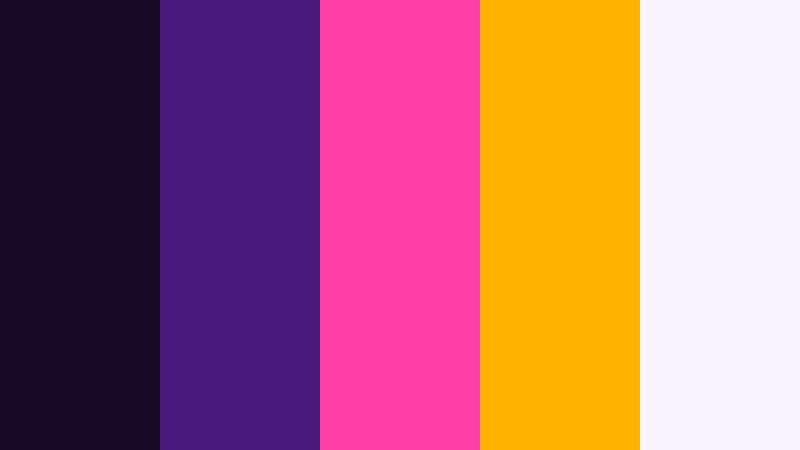
- HEX Codes: #160b24, #4a1b7a, #ff3ea5, #ffb100, #f9f4ff
- Mood: Charged, futuristic, and bold with dramatic contrast.
- Use for: Use for tech explainers, product launches, and kinetic typography sequences.
Cyber Purple Voltage crashes deep Eclipse Violet with hot pink and amber sparks, giving your visuals a charged, futuristic presence. The pale neutral at the end keeps the palette grounded and easy to integrate into UI inspired layouts.
Use the violets as your background and shadow colors, then bring in the pink and amber to highlight key stats, pricing, or call to action text. In Filmora, this palette shines in kinetic typography, logo reveals, product launch teasers, and any edit where you want your brand to feel cutting edge and high energy.
Cinematic Galaxy Gradient

- HEX Codes: #140b22, #39205a, #7a4dda, #ffc857, #ffffff
- Mood: Epic, expansive, and cinematic with a hint of blockbuster flair.
- Use for: Ideal for trailer-style edits, travel montages, and cinematic openers.
Cinematic Galaxy Gradient sweeps from dark Eclipse Violet shadows through rich purple into a bold golden highlight, finishing on bright white. It feels like a movie poster in palette form, instantly adding scale and drama.
Use the deep tones as sky or space inspired backdrops, with the gold and white for title text, logo reveals, and light flares. In Filmora, this palette works beautifully on travel montages, cinematic openers, or faux trailers, especially when you pair it with lens flare effects and slow, sweeping camera moves.
Night Market Lights
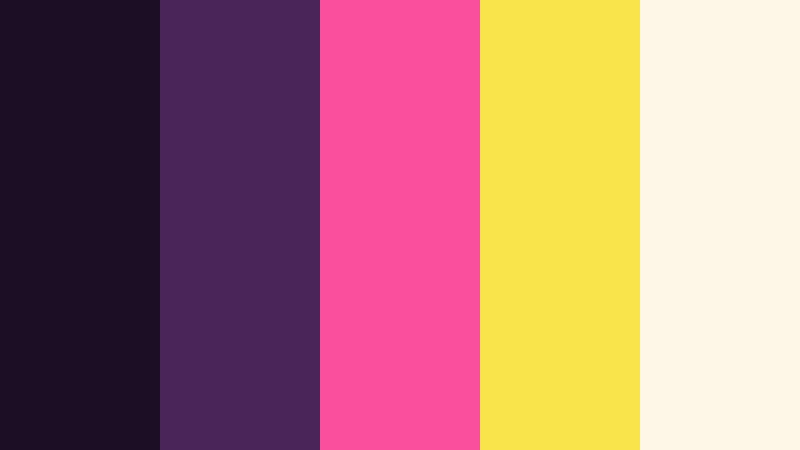
- HEX Codes: #1c0e24, #4a255a, #f94f9c, #f9e44b, #fef6e7
- Mood: Vibrant, busy, and lively, like a festival or neon market street.
- Use for: Use on travel vlogs, street food content, and festival highlight reels.
Night Market Lights sets smoky Eclipse Violet against hot pink stalls and lantern yellow highlights, finished with a warm cream. It captures the mix of shadows and bright signage you see in busy night markets.
This palette is great for travel vlogs, street food features, and festival highlight reels where you want to emphasize energy and color. In Filmora, lean on the dark violets for gradient overlays and vignette effects, and reserve the pink and yellow for animated labels, map pins, subtitles, and thumbnail callouts.
Electric Studio Spotlight

- HEX Codes: #1a1025, #472971, #9d4edd, #ff6b6b, #fef0ff
- Mood: Confident and performance ready, like a stage lit for a show.
- Use for: Great for music videos, performance reels, and bold creator branding.
Electric Studio Spotlight combines concert style Eclipse Violet shadows with punchy purple and coral red, tied together by a pale highlight. It feels like stage lights cutting through a dark venue.
Use the darker tones behind performers, titles, and overlays, then hit beats or scene changes with flashes of purple and coral. In Filmora, this palette works well with light leaks, beat synced text, and bold lower thirds for dancers, musicians, or any creator whose brand is built around performance.
Elegant And Modern Eclipse Violet Color Palettes
Studio Brand Minimal
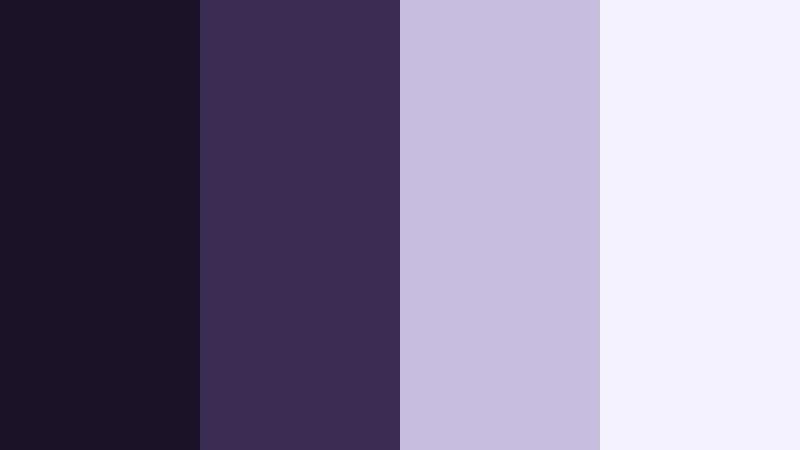
- HEX Codes: #1b1228, #3a2c52, #c7bddf, #f5f2ff
- Mood: Clean, modern, and professional with a subtle creative edge.
- Use for: Ideal for channel branding, logos, lower thirds, and portfolio reels.
Studio Brand Minimal balances rich Eclipse Violet with softer dove purples and off white. It feels refined and modern, with just enough color to show personality without losing professionalism.
Use the darker tones as your brand base for backgrounds, header bars, and end screens, while keeping text in the lighter purples and near white for readability. In Filmora, you can standardize your lower thirds, logo sting, and portfolio reels with this palette so your whole channel or agency looks unified.
Luxury Night Premiere
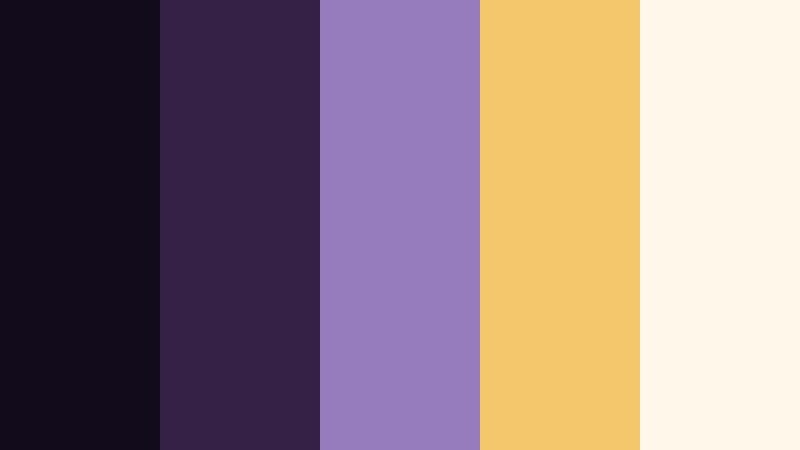
- HEX Codes: #120b1c, #352046, #967bbd, #f5c76c, #fff8ea
- Mood: Luxurious and polished, like a red carpet premiere poster.
- Use for: Use for film premiere graphics, sponsorship bumpers, and high end intros.
Luxury Night Premiere pairs dark Eclipse Violet with muted gold and soft cream, echoing red carpet posters and premium packaging. It immediately signals a high end, cinematic feel.
Use the violets to frame your content and the gold accents for titles, sponsor logos, and call to action buttons. In Filmora, this palette is ideal for brand deals, film premiere announcements, or channel intros where you want to position yourself as polished and professional.
Editorial Violet Monochrome
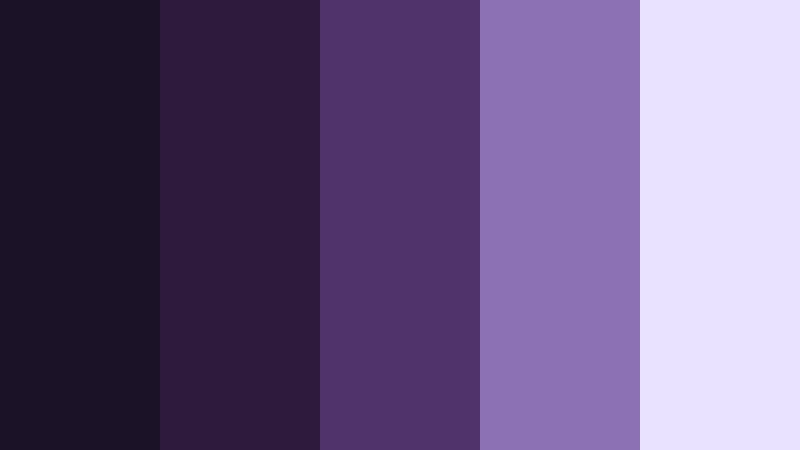
- HEX Codes: #1c1227, #2e1b3c, #503368, #8c71b5, #eae3ff
- Mood: Sophisticated, editorial, and focused on nuanced monochrome tones.
- Use for: Great for fashion lookbooks, interview frames, and typography based designs.
Editorial Violet Monochrome stacks multiple Eclipse Violet tones into a sculpted, monochrome range. With no strong contrasting accent, the focus stays on shape, layout, and typography.
This palette is perfect for fashion lookbooks, style guides, interviews, and magazine inspired title sequences. In Filmora, you can build lower thirds, split screens, and text heavy frames entirely from these tones, creating a sophisticated, on brand look that feels curated and thoughtful.
Minimal Creator Workspace
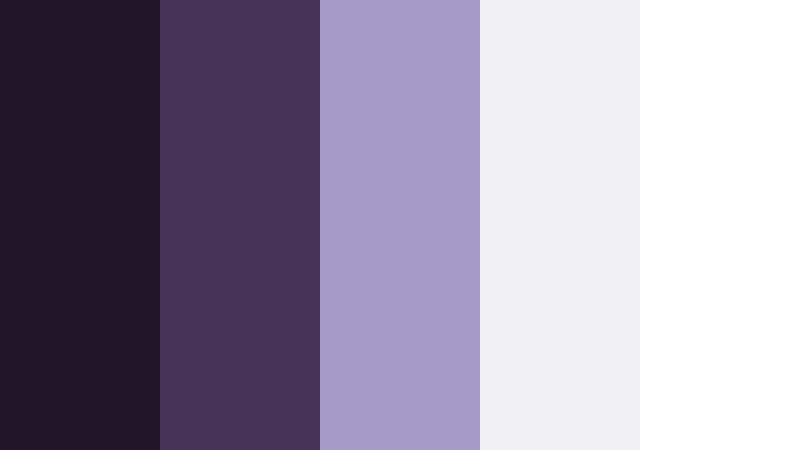
- HEX Codes: #211529, #463357, #a69ac8, #f0f0f5, #ffffff
- Mood: Clutter free, airy, and creative with a subtle tech vibe.
- Use for: Use for productivity vlogs, notion style dashboards, and UI mockups in video.
Minimal Creator Workspace anchors gentle greys and whites with Eclipse Violet. It feels like a clean digital desk setup, perfect for productivity focused content.
Use the deep purples for nav bars, section titles, and key icons, then lean on the greys and white for backgrounds and content areas. In Filmora, this palette is ideal for Notion style dashboards, app walkthroughs, productivity vlogs, and channel overlays that should feel modern and distraction free.
Playful And Pastel Eclipse Violet Color Palettes
Cotton Candy Nightfall
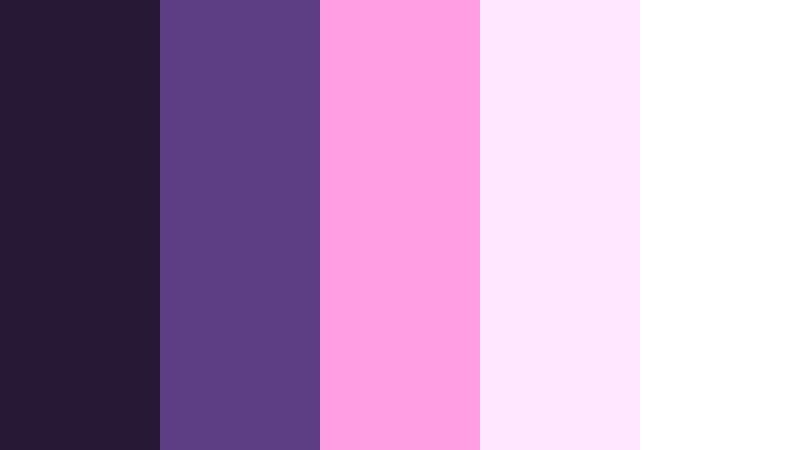
- HEX Codes: #251936, #5d3e84, #ff9ee2, #ffe7ff, #ffffff
- Mood: Playful and nostalgic, like carnival lights against a soft evening sky.
- Use for: Perfect for lifestyle vlogs, aesthetic shorts, and playful title cards.
Cotton Candy Nightfall mixes Eclipse Violet with bubblegum pink and marshmallow white, channeling a pastel carnival at dusk. It is soft, sweet, and instantly nostalgic.
Use the violets as your backdrop for text and frames, and keep the pinks for stickers, doodles, and animated titles. In Filmora, this palette is great for lifestyle vlogs, GRWM clips, and aesthetic shorts where you want a cute, dreamy look that still has enough contrast to stay readable on mobile.
Retro Vaporwave Dream

- HEX Codes: #211330, #5a3c92, #ff8ad2, #7fffd4, #fdf9ff
- Mood: Nostalgic, quirky, and internet core with a vaporwave twist.
- Use for: Use for meme edits, retro intros, and nostalgic montage sequences.
Retro Vaporwave Dream sets Eclipse Violet shadows under pink and aqua accents, finished with a soft off white. It channels classic vaporwave posters and early web aesthetics.
Use the violets as your base, then bring in pink and aqua for grids, retro UI elements, and bold 80s style type. In Filmora, this palette is perfect for meme edits, retro intros, synthwave playlists, and nostalgic montage sequences that lean into internet culture.
Tips for Creating Eclipse Violet Color Palettes
Eclipse Violet is versatile, but it works best when you balance depth, contrast, and readability. These tips will help you combine Eclipse Violet with supporting colors for video and design that looks polished on every screen.
- Pair Eclipse Violet with a clear highlight color (white, cream, or very pale lavender) so text and icons stay readable in thumbnails and lower thirds.
- Add one accent color, such as Cosmic Amber, pink, or cyan, for calls to action and important details instead of using many competing brights.
- Check your designs on mobile; Eclipse Violet can look darker on small screens, so lift shadows slightly or lighten your text color if needed.
- Use deeper Eclipse Violet tones for backgrounds and overlays and keep mid to light tones for text, buttons, and logo marks.
- When grading footage, keep skin tones natural and let Eclipse Violet appear mostly in shadows, backgrounds, and overlays to avoid unnatural faces.
- Create a simple brand system in Filmora by saving presets that lock in your Eclipse Violet HEX values across titles, lower thirds, and transitions.
- For cinematic looks, combine Eclipse Violet with subtle film grain and vignettes; for modern UI looks, pair it with neutral greys and plenty of white space.
- Test your palette in both light and dark scenes; adjust saturation and contrast so your Eclipse Violet still reads clearly in low light footage.
Eclipse Violet color palettes can transform the feel of your videos and designs, from soft and dreamy to bold and cinematic. By choosing the right combinations and accents, you can tell more emotional stories, boost your click through rate with stronger thumbnails, and build a recognizable visual identity.
All of the palettes above come with ready to use HEX codes, so you can drop them straight into Filmora for titles, overlays, and color grading. Save your favorite Eclipse Violet looks as presets, then reuse them across intros, shorts, and social edits to keep your brand consistent.
Open Filmora, experiment with these Eclipse Violet palettes, and combine them with the built in color tools, filters, and LUTs until you find a look that feels like your channel. Once it is saved, you will be able to apply it in just a few clicks on every new project.
secure download