

 100% Security Verified | No Subscription Required | No Malware


 ChatGPT
 Perplexity
 Gemini
 Claude
 Grok
Grok
These Filmora-ready filters are designed to mimic a food macro detail video LUT, helping content creators turn close-up shots of dishes, ingredients, and textures into cinematic visuals with rich color, depth, and clarity.
Use them to polish everything from sizzling pans to plated desserts, so that every droplet, crumb, and garnish pops on screen without losing a natural, mouthwatering look.
In this article
Sizzling Pan Closeups and High-Heat Details
Golden Sizzle Crisp
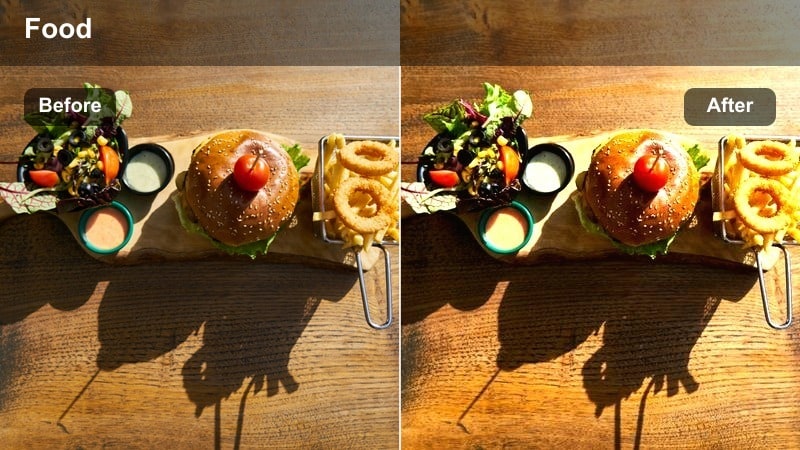
- Effect look: Warm, contrasty glow that emphasizes browning and crispy textures
- Best for: Macro shots of searing meat, grilling vegetables, or frying food in a pan
- Editing tip: Lower overall saturation slightly if bright red ingredients start to clip while keeping the warm highlights intact.
Golden Sizzle Crisp gives your high-heat cooking shots a rich, appetizing warmth, pushing golden browns forward while keeping edges sharply defined. In Filmora, this works especially well on closeups of sizzling steaks, stir-fries, and pan-fried sides where tiny bubbles of oil and crispy edges tell the story of flavor and texture.
Apply this filter to your tight pan macros, then fine-tune exposure so highlights on oil and browning do not blow out. Combine it with clean cuts on key sizzle moments and synced sound effects to create punchy, cinematic beats in recipe shorts, TikToks, and YouTube cooking sequences.
Match Your Food Macro Filters Across a Full Video
Use Filmora's AI color tools to keep your food macro detail shots consistent from prep to plating, even if they were captured under different lighting setups or cameras. Once you dial in a warm, crisp look for your pan macros, AI can quickly propagate that style to wider kitchen shots and garnish closeups.
After choosing a favorite food macro detail video LUT-style filter, let Filmora analyze a reference clip and match the mood across your entire edit. This keeps your cooking videos feeling cohesive from the first sizzle to the final plated reveal.
 secure download

Preview Filters on Food Macro Clips Instantly
Filmora lets you hover and preview filters directly on your timeline clips, so you can immediately see how each look treats steam, oil, and crispy texture. This is ideal for food macros, where tiny differences in contrast or warmth can completely change how appetizing a dish appears.
Drop a closeup cooking clip into your project, then quickly audition several LUT-style filters back-to-back. Once you find a combination that makes your browning, sear marks, or sauce sheen stand out, commit it as the base look for the rest of your sequence.
secure downloadBuild a Signature Food Macro Look with LUT-Style Filters
Even without external LUT files, you can combine Filmora filters and color controls to create a signature food macro grade. Fine-tune contrast, saturation, and color temperature for your pans, preps, and plated shots, then save that setup as a reusable preset for future videos.
By pairing LUT-style filters with HSL and tone adjustments, you can keep greens, browns, and highlights behaving consistently across multiple recipes. This makes your channel or brand instantly recognizable whenever viewers see your macros in their feeds.
secure downloadSteam Rise Clarity
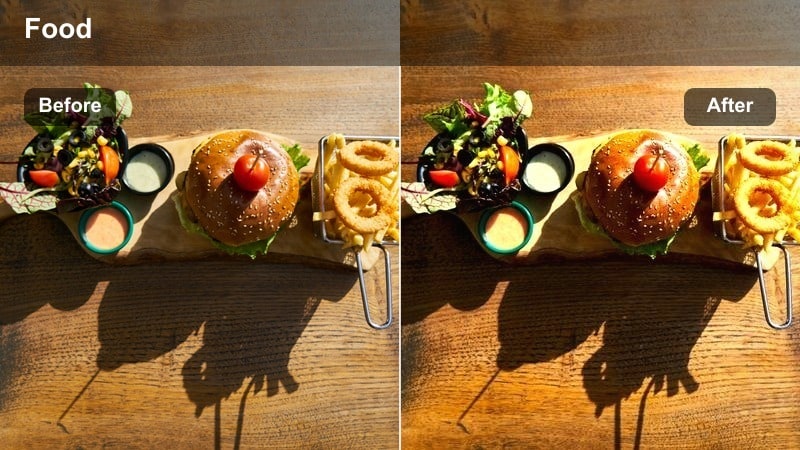
- Effect look: Clean, slightly cool contrast that defines steam and micro-droplets over the food surface
- Best for: Macro detail of boiling sauces, soups, or noodles with visible rising steam
- Editing tip: Use subtle slow motion with this filter to make the steam trails more dramatic and easier to read on screen.
Steam Rise Clarity is designed to carve out delicate steam trails and condensation so hot dishes feel vividly alive on screen. The slightly cool contrast balances warm food tones, helping each wisp of vapor stand out against the background without muddying the frame.
In Filmora, pair this filter with gentle slow motion and backlit setups for noodle bowls, ramen, broths, or simmering sauces. Trim your clips to moments when the steam is strongest, then layer in crisp audio so viewers almost feel the heat coming off their screens.
Caramel Edge Focus
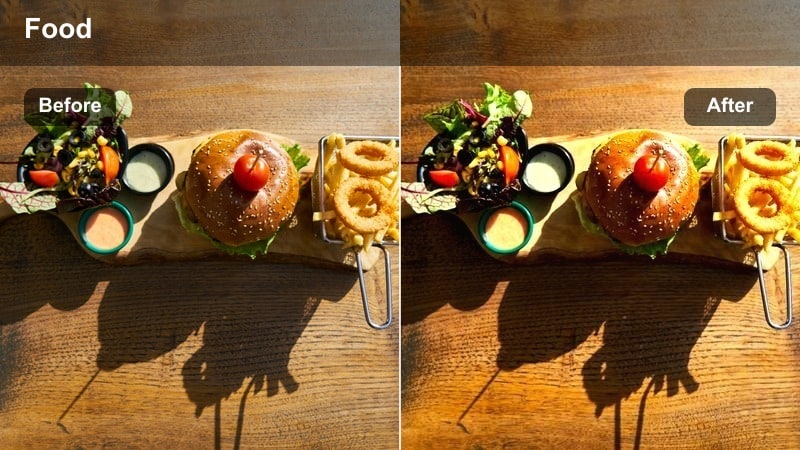
- Effect look: Rich caramel tones, deeper shadows, and boosted edge sharpness on browned surfaces
- Best for: Closeup browning of cheese, crusts, and caramelized sauces in pans or on grills
- Editing tip: Increase micro-contrast slightly to reveal tiny bubbles and char lines without over-darkening the frame.
Caramel Edge Focus pushes rich ambers, deep browns, and sharp edges to showcase caramelization in extreme closeups. It excels on cheese pulls, bubbling lasagna tops, seared crusts, and any surface where char, blistering, and Maillard reaction detail matter.
Apply this filter near the end of your cooking process shots in Filmora and cut between wider views of the pan and tight macros. By lifting shadows slightly and nudging texture, you can reveal every tiny bubble, crust crack, and char line without making the image feel burned or muddy.
Ingredient Prep and Knife-Work Macros
Fresh Cut Crisp
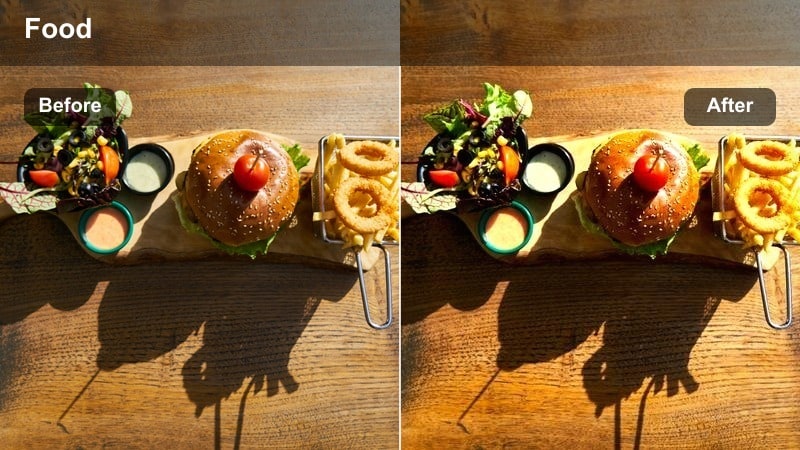
- Effect look: Neutral-bright filter with clean whites and crisp edges for chopped ingredients
- Best for: Macro shots of slicing vegetables, herbs, fruits, and other colorful ingredients on a board
- Editing tip: Slightly raise midtone clarity to reveal moisture beads and fibrous details on each cut surface.
Fresh Cut Crisp keeps colors true while brightening your frame and sharpening edges around knives and ingredients. It is ideal for prep montages where onions, peppers, fruits, and proteins need to look clean, fresh, and studio-bright without overly stylized color shifts.
Use this filter in Filmora to unify all your cutting-board shots across a recipe video. Sync each chop or slice to music beats, trim on impact frames, and let the crisp edge definition highlight the precision of your knife work for ASMR-style or fast-cut cooking edits.
Fiber Grain Detail
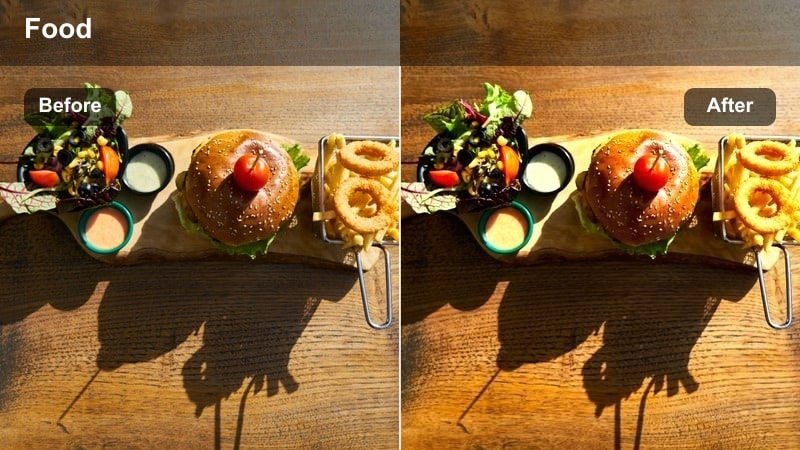
- Effect look: Subtle contrast and fine sharpening aimed at showing fibers, seeds, and grain detail
- Best for: Closeups of bread crumbs, grains, seeds, and textured ingredient surfaces
- Editing tip: If your footage is noisy, apply mild noise reduction before this filter so it enhances texture, not sensor grain.
Fiber Grain Detail focuses on micro-texture, pulling out the fine lines, pores, and patterns in dry ingredients and surfaces. From seeds and grains to crumb coatings and crusty loaves, it adds clarity without making the image look oversharpened or harsh.
In Filmora, place this filter on insert shots that explain ingredients or highlight texture-focused steps, like breading or toasting. Keep your ISO low in-camera, then use a touch of noise reduction before the filter so the enhanced texture looks clean and intentional on big and small screens.
Herb Green Pop
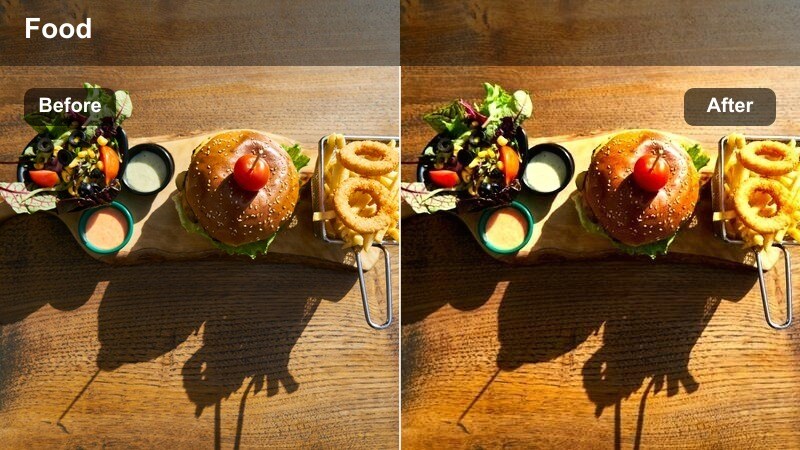
- Effect look: Targeted saturation and clarity for greens to make herbs and leafy details stand out
- Best for: Macro chopping of herbs, garnishing plates, or sprinkling green toppings in slow motion
- Editing tip: Dial back overall saturation if the greens start to look fluorescent, keeping the focus on realistic leaf color.
Herb Green Pop selectively lifts greens, giving basil, parsley, cilantro, and leafy garnishes a vivid, just-picked appearance. It keeps the rest of the frame relatively neutral so that viewers focus on the freshness and texture of the herbs themselves.
Use this filter in Filmora for chopping sequences, final herb sprinkles, or salad toss macros. Combine it with shallow depth of field and a contrasting cutting board color in your footage, then lightly adjust saturation so your greens look vibrant but still natural on every display.
Plating, Garnish, and Final Touch Macros
Sauce Drip Cinematic
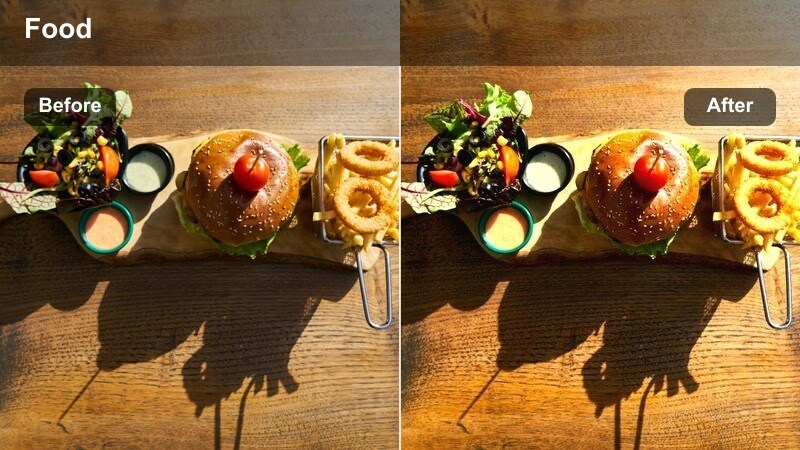
- Effect look: Soft cinematic contrast with emphasized highlights on glossy sauces and drizzles
- Best for: Slow-motion pours, drizzles, and streaks of sauces or syrups over finished dishes
- Editing tip: Pair this filter with a slight slow-motion and cut tightly around the moment the drip hits the surface.
Sauce Drip Cinematic softens overall contrast while amplifying glossy highlights so each drizzle or pour feels dramatic and luxurious. It is perfect for chocolate, caramel, vinaigrettes, and reductions that need to catch the light as they fall onto a dish.
In Filmora, slow your footage down slightly and trim close around the impact moment when sauce meets the surface. This filter shines in vertical content and hero reels, where a single slow drip can become the centerpiece of your plated macro storytelling.
Garnish Spark Focus
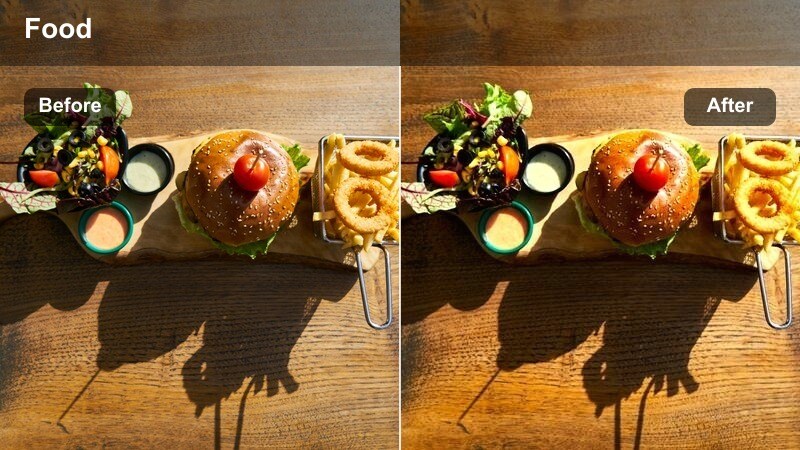
- Effect look: Selective clarity and mild vignette that centers attention on toppings and final sprinkles
- Best for: Macro shots of placing garnishes, sprinkling spices, or adding crunchy toppings
- Editing tip: If hands distract from the garnish, slightly lower shadow contrast on skin tones while keeping toppings sharp.
Garnish Spark Focus adds a gentle vignette and selective clarity so that final sprinkles, herbs, and toppings become the unmistakable focal point. Hands and background elements soften slightly, directing the viewer's gaze to where flavor and texture are being finished.
Apply this filter in Filmora for final salt pinches, cheese showers, nut sprinkles, and crumb toppings. Cut from a wider reveal to this macro, then onward to a static hero shot, using the focused clarity to mark the exact moment the dish becomes camera-ready.
Plate Glow Soft
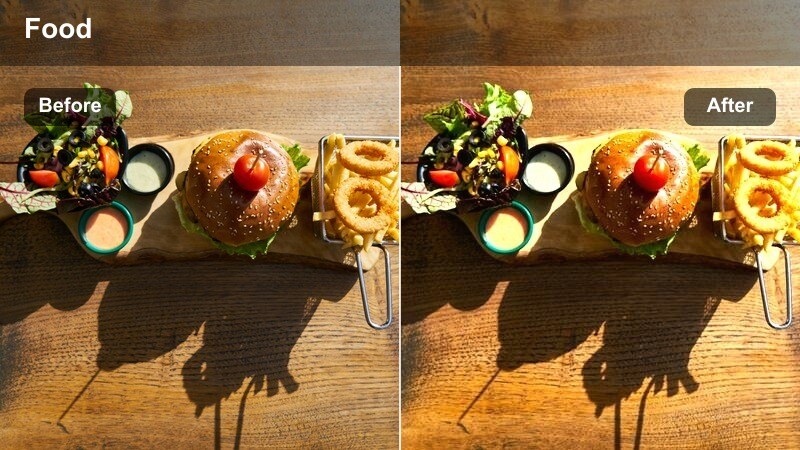
- Effect look: Gentle, warm glow with softened edges to make plated dishes feel inviting and polished
- Best for: Macro hero shots of completed plates, especially comfort foods and cozy meals
- Editing tip: Avoid stacking multiple glow effects; use this filter alone and fine-tune exposure so highlights do not blow out.
Plate Glow Soft wraps your final dishes in a subtle warmth and glow that feels cozy, inviting, and professionally lit. It works especially well on comfort foods, desserts, and home-style plates where you want viewers to imagine taking a bite immediately.
Use this filter in Filmora as your go-to grade for hero shots and thumbnails. Keep camera movement slow and steady, adjust exposure to preserve highlight detail, and let the softened edges draw attention naturally to the tastiest elements in the center of the frame.
Baking, Crumb, and Dessert Macros
Crumb Structure Enhance
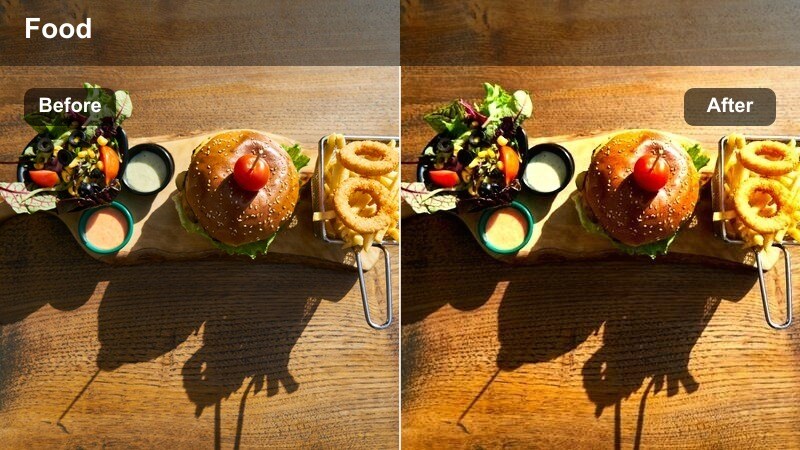
- Effect look: High micro-contrast and fine sharpening focused on crumb and flaky layers
- Best for: Macro shots of sliced cakes, breads, pastries, and flaky crusts
- Editing tip: Keep camera iso low so this detail-oriented filter enhances crumb texture instead of noise.
Crumb Structure Enhance is tuned to highlight the internal architecture of baked goods, from open-crumb sourdough to layered croissants and cakes. It lifts micro-contrast so each air pocket, flake, and layer becomes clearly visible in macro closeups.
In Filmora, cut from the slicing moment into a tight shot treated with this filter to reveal the inside story of your bake. Use it for reels showcasing recipe tests, bread reveals, or bakery promos, and keep exposure balanced so the deepest areas of the crumb still show intricate detail.
Glaze Gloss Highlight
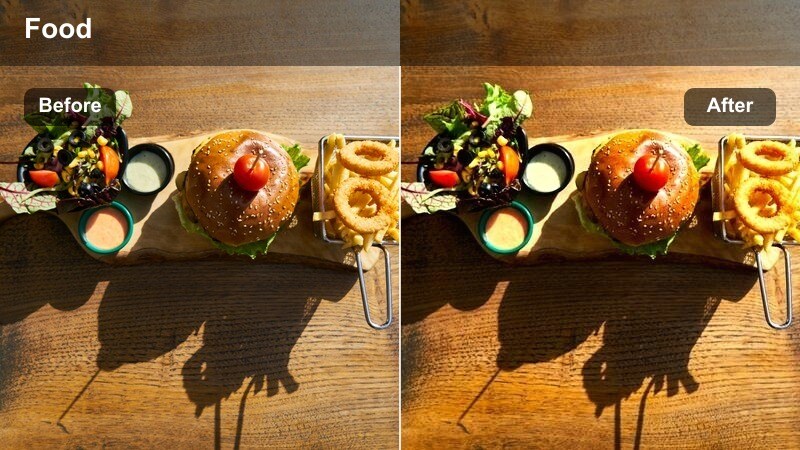
- Effect look: Bright, reflective emphasis on glossy glazes, icings, and shiny dessert surfaces
- Best for: Macro detail of cake glazes, fruit coatings, and shiny dessert toppings
- Editing tip: Reduce highlight intensity slightly if white glazes start to lose detail under bright lights.
Glaze Gloss Highlight targets reflective surfaces, intensifying sheen and highlight lines on icings, mirror glazes, and fruit coatings. It is perfect for dessert content where smoothness and shine communicate freshness and indulgence.
Apply this filter in Filmora to slow dessert pans, closeups of drip cakes, and macro fruit tarts. Angle your light to rake across the glaze in-camera, then use the filter to refine brightness so highlights shimmer without clipping, making every dessert look bakery-window ready.
Powder Dust Dreamy
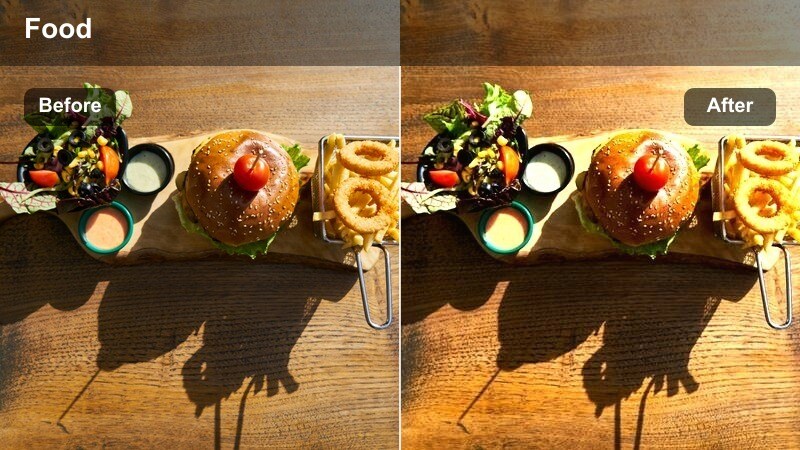
- Effect look: Soft, slightly desaturated tone with clear emphasis on powdered sugar or cocoa dust
- Best for: Macro shots of dusting sugar, cocoa, or fine powders over desserts or baked goods
- Editing tip: Use a slightly higher shutter speed to freeze the powder motion while this filter softens the overall mood.
Powder Dust Dreamy softens the overall image while keeping floating powder particles sharp and legible, creating a whimsical, cinematic feel. It is ideal for dusting moments with sugar, cocoa, flour, or spice over cakes, cookies, and pastries.
In Filmora, combine this filter with backlit footage and a slightly higher shutter speed to capture each particle clearly. Trim your clips to the most elegant arcs and falls of powder, then place these moments as transitions into hero shots to give your dessert videos a magical finishing touch.
Tips for Using Food Macro Detail Video Lut Filters in Filmora
- Shoot food macros with stable, soft lighting and low ISO so detail-focused filters enhance appetizing texture instead of emphasizing digital noise.
- Plan a visual story from raw ingredients to plated dish and assign a consistent LUT-style look or filter group to each stage for a cohesive edit.
- Use shallow depth of field in-camera so filters can accentuate a single macro subject such as a garnish, crumb, drizzle, or steam trail.
- Trim clips tightly around key cooking actions like slicing, sprinkling, dripping, or cutting to maximize the cinematic impact of each filter.
- Mix complementary filters across your timeline, using texture-focused looks for prep and glow-style filters for plated hero shots.
- Export a short test sequence with several filters applied in Filmora before grading an entire recipe video, then pick the most appetizing combination.
- Save your favorite color and filter combinations as Filmora presets to quickly recreate a signature food macro detail video LUT look on future projects.
With the right food macro detail video LUT-style filters in Filmora, every close-up of searing, slicing, and garnishing can look cinematic while staying true to the real colors of your dish.
Experiment with these presets across your whole cooking process so viewers recognize your signature style from the first sizzling pan shot to the final plated macro hero frame.
secure download