

 100% Security Verified | No Subscription Required | No Malware


 ChatGPT
 Perplexity
 Gemini
 Claude
 Grok
Grok
These free LUT-style filters for street video in Filmora help creators and editors quickly give urban footage a polished, cinematic look without deep color grading skills.
From gritty night alleys to warm golden-hour sidewalks, you can drop these filters onto your clips to match different street moods and keep your whole video looking consistent.
In this article
Soft Morning Streets and Commute Vibes
Soft Sunrise Haze
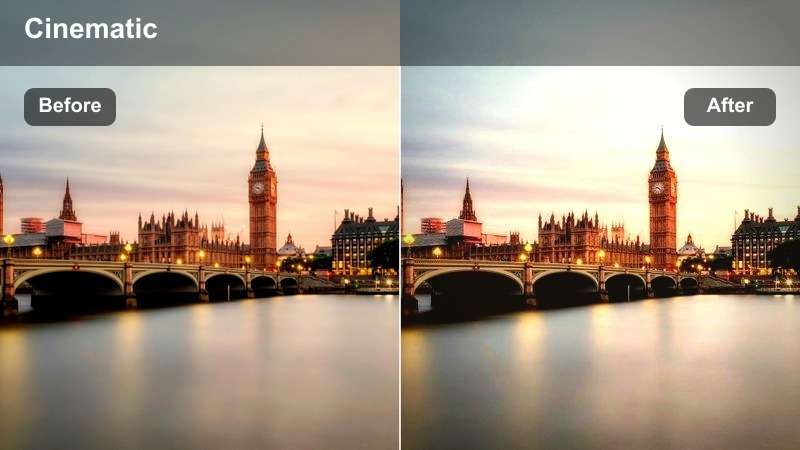
- Effect look: Gentle low-contrast glow with warm highlights that soften harsh early-morning shadows on the street.
- Best for: Early commute scenes, quiet side streets, joggers and cyclists in soft morning light.
- Editing tip: Lower the filter intensity to around 60 percent and slightly increase clarity so faces stay crisp while the background stays dreamy.
Soft Sunrise Haze wraps your street footage in a subtle glow that flattens harsh contrast and leans into warm, pastel highlights. It is ideal for turning simple commute shots and empty sidewalks into cinematic openers, especially when you shoot into the sun or across long shadows.
In Filmora, add this free LUT-style filter to your clip, then use the Basic or Color panel to dial back contrast just a touch while boosting clarity on your subject. This balance lets you keep the romantic morning atmosphere without losing fine detail in hair, clothing textures, or bike spokes.
Match Street Filters with Filmora's AI Color Tools
After choosing a free LUT-style street filter, use Filmora's AI color tools to quickly normalize exposure and white balance before you fine-tune the creative look. AI analysis can keep your skyline, sidewalks, and skin tones consistent even when you shoot across several blocks or different cameras.
Let AI handle the technical balance, then rely on your chosen filter to push the scene toward warm, cool, or gritty street moods without breaking continuity between shots.
 secure download

Preview Street Filters in Real Time
Filmora lets you hover over each street filter preset to preview the look directly on your selected clip, so you can compare free LUT-style options in a few seconds. This saves time when you are testing multiple moods for the same sidewalk or intersection shot.
Use this real-time preview to quickly move between soft, neutral, and high-contrast city looks on the same footage until you find the one-click grade that matches your story.
secure download1000+ Video Filters and 3D LUTs
Beyond these free LUT-style street presets, Filmora includes a large library of built-in filters, 3D LUTs, and HSL controls for custom color work. You can start with a street filter, then shift hues, saturation, and luminance per color to fine-tune city skies, bricks, and neon signs.
Stack multiple effects on a clip, save them as your own preset, and reuse that signature urban look across vlogs, travel reels, and branded street campaigns.
secure downloadPastel City Mist
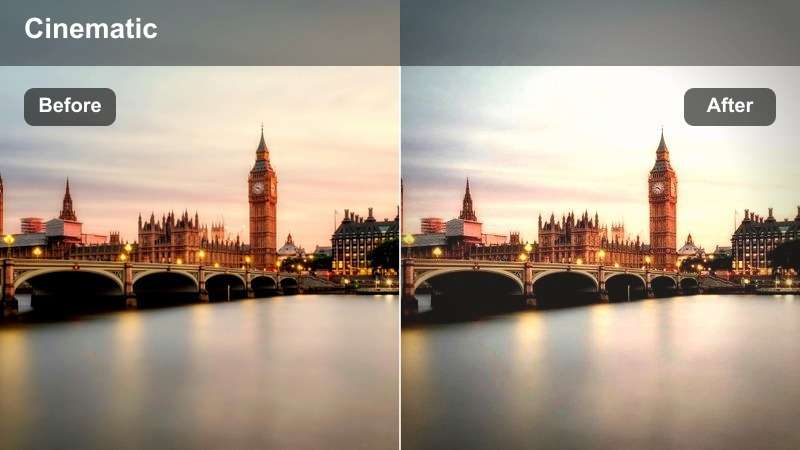
- Effect look: Muted pastel color grading with a slight cool tint, lifting shadows to create a soft, airy street tone.
- Best for: Lifestyle-style city walks, vlog intros on sidewalks, and slow-motion shots of traffic starting to move.
- Editing tip: Drop saturation a bit in the color controls so skin tones look natural while buildings and signs stay pleasantly desaturated.
Pastel City Mist lowers contrast and pulls busy city colors into gentle, airy tones so your street footage feels relaxed rather than chaotic. It softens hard edges on buildings and traffic while keeping just enough detail to anchor your viewer in the city environment.
Apply this free LUT-style preset in Filmora to B-roll walking shots, then tweak global saturation and temperature until your skin tones float naturally against softer backgrounds. It works especially well with slow motion or gimbal footage where smooth camera motion matches the calm pastel grade.
Golden Sidewalk Glow
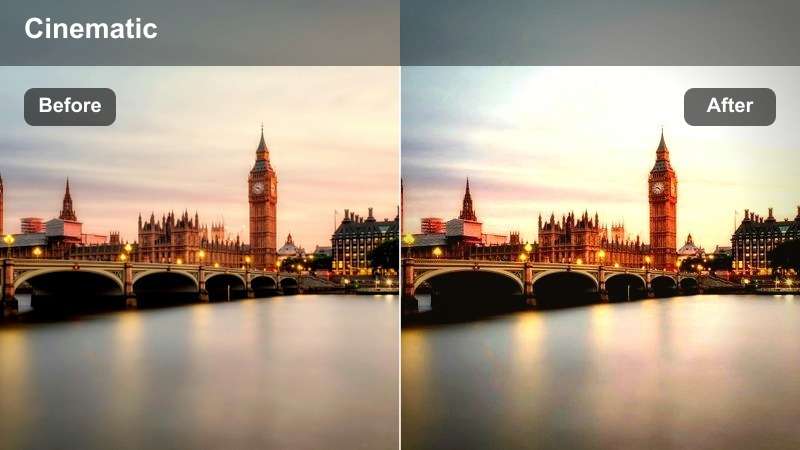
- Effect look: Rich golden highlights with lifted mids that make sidewalks, street signs, and windows feel warm and inviting.
- Best for: Golden-hour walks, handheld vlogs on city blocks, and B-roll of people waiting at crosswalks.
- Editing tip: If skin gets too orange, pull back temperature slightly in Color Correction while keeping the filter at full strength.
Golden Sidewalk Glow leans hard into that late-afternoon warmth, boosting highlights and midtones so every reflection on glass, cars, and windows feels sun-soaked. It is ideal for turning routine errands or walk-and-talk vlogs into dreamy, cinematic street sequences.
In Filmora, drop this preset on all of your golden-hour clips, then balance white balance and tint so faces stay flattering while pavement and buildings carry most of the warmth. For extra polish, add a gentle vignette and a bit of stabilization on handheld footage to keep attention on your subject as they move through the light.
High-Energy Midday Streets and Crosswalks
Punchy Crosswalk Contrast
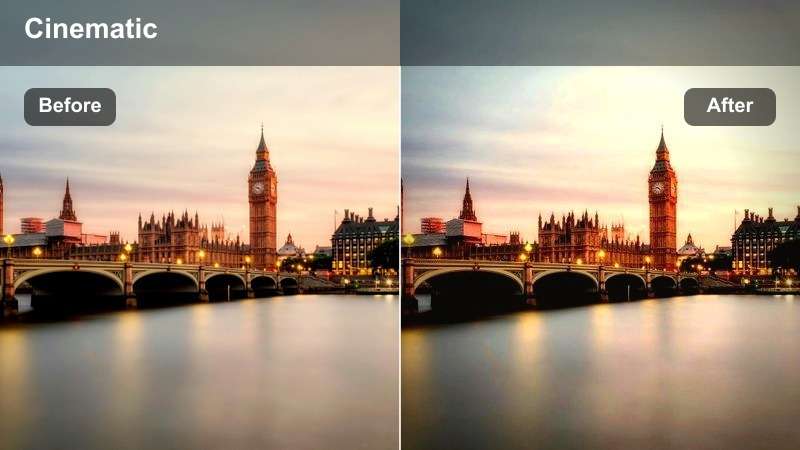
- Effect look: Strong contrast with crisp whites and saturated primary colors that make crosswalks and cars pop.
- Best for: Busy intersections, time-lapses of traffic, and overhead shots of people crossing streets.
- Editing tip: Increase sharpness slightly to enhance lines on road markings, but keep noise reduction on for cleaner shadows.
Punchy Crosswalk Contrast turns your mid-day city footage into bold, graphic frames where white stripes, car roofs, and signage jump off the screen. The strong contrast helps emphasize rhythm and movement as people and vehicles flow across intersections.
Use this filter in Filmora on wide or overhead shots, especially time-lapses where the high contrast makes motion more readable at speed. Leave the preset at relatively high intensity, then refine with sharpening and mild noise reduction so fine details like lane lines and pedestrian silhouettes stay clean.
Urban Neon Pop
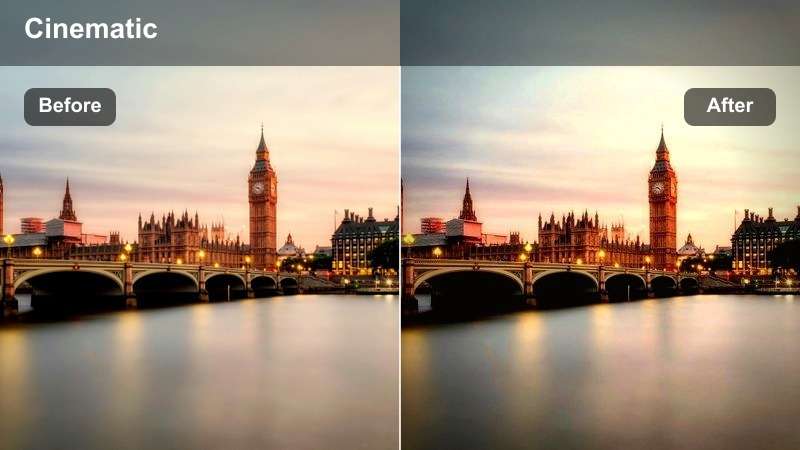
- Effect look: High saturation with deep blacks and vibrant accent colors that make street ads and storefronts jump out.
- Best for: Shopping streets, colorful murals, and handheld clips walking past bright storefront signs.
- Editing tip: Use masking to apply the filter mainly to background areas so your subject's skin tones remain controlled.
Urban Neon Pop supercharges color in your city scenes, driving up saturation and contrast so murals, billboards, and shopfronts look vivid and attention-grabbing. Deepened blacks give extra depth to shadows, helping bright colors stand out even more.
In Filmora, combine this free LUT-style filter with masks or adjustment layers, letting the environment carry the bold color while you keep skin tones more natural. This approach is especially effective for fashion or brand vlogs where you want outfits or signage to match the same high-energy palette as the street around them.
Clean Concrete Clarity
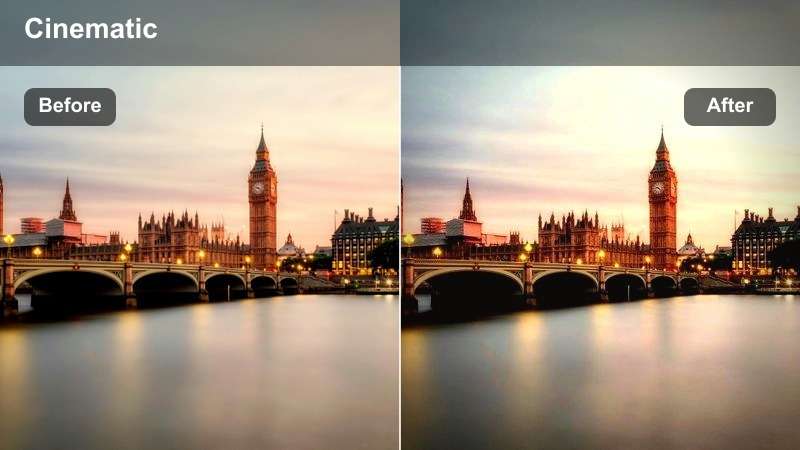
- Effect look: Neutral, slightly cool tone with enhanced micro-contrast that sharpens building edges and sidewalk texture.
- Best for: Architectural street shots, skateboarding on concrete, and tracking shots along city blocks.
- Editing tip: Pair this filter with a small boost in dehaze to bring out distant building detail without over-darkening shadows.
Clean Concrete Clarity keeps your color palette realistic while adding crispness to lines, bricks, and concrete textures. The subtle cool shift gives cityscapes a modern, polished look without pushing into stylized or trendy color casts.
Apply this preset in Filmora when you want viewers to notice architecture, rails, and pavement detail, especially in skate edits or tracking shots down long avenues. Fine-tune exposure and dehaze for each clip so clouds, glass reflections, and far-off buildings stay clear but not overly contrasty.
Blue Hour Streets and Night City Lights
Blue Hour Cinema
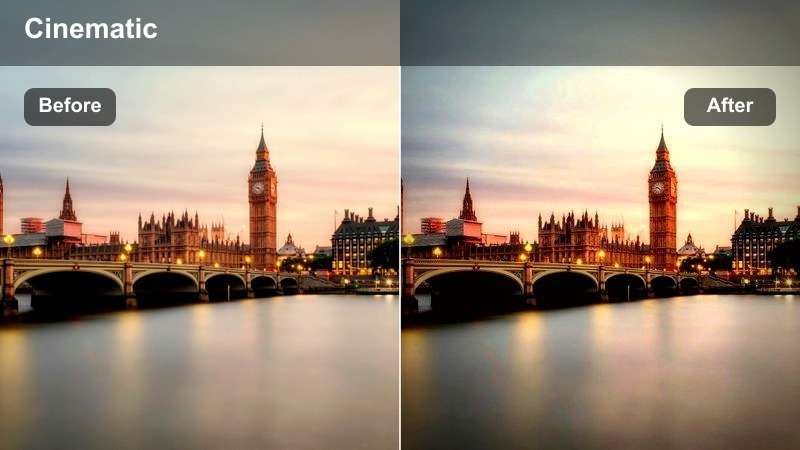
- Effect look: Cool teal shadows with balanced highlights that bring out the twilight sky and glowing windows.
- Best for: Early evening street walks, skyline views from bridges, and silhouettes against city lights.
- Editing tip: Drop exposure slightly and pull up contrast so street lamps and windows sparkle without clipping too much.
Blue Hour Cinema pushes your dusk footage toward teal and deep blue, giving sidewalks, buildings, and skies a cohesive cool tone while preserving warm window lights. This contrast between cool shadows and warm practical lights delivers an instant cinematic feel.
In Filmora, apply the filter across all twilight shots so the color story stays unified as the sun goes down. Then, nudge exposure, contrast, and highlights until car lights, windows, and signs glow without losing detail, especially in skyline or bridge views.
Gritty Night Alley
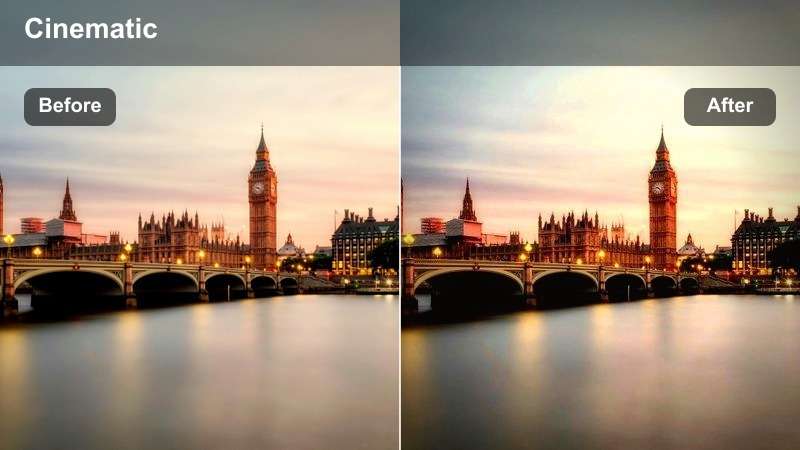
- Effect look: Deep contrast with desaturated colors and greenish shadows that mimic gritty, filmic night streets.
- Best for: Back alleys, parking lots, subway entrances, and handheld night walks under street lamps.
- Editing tip: Dial down saturation further and add subtle grain in Filmora to sell the raw, street-documentary vibe.
Gritty Night Alley drains some color from your frame, pushes shadows slightly green, and adds heavy contrast for a raw, film-inspired night look. It is perfect for sequences where you want the city to feel rough, underground, or documentary-style.
Use this preset in Filmora on clips with strong, directional light from lamps, storefronts, or subway entrances so your subject stays visible while the background falls into textured darkness. Layer in a touch of Filmora's grain and maybe a handheld shake effect to enhance the street-level realism.
Neon Rain Reflection
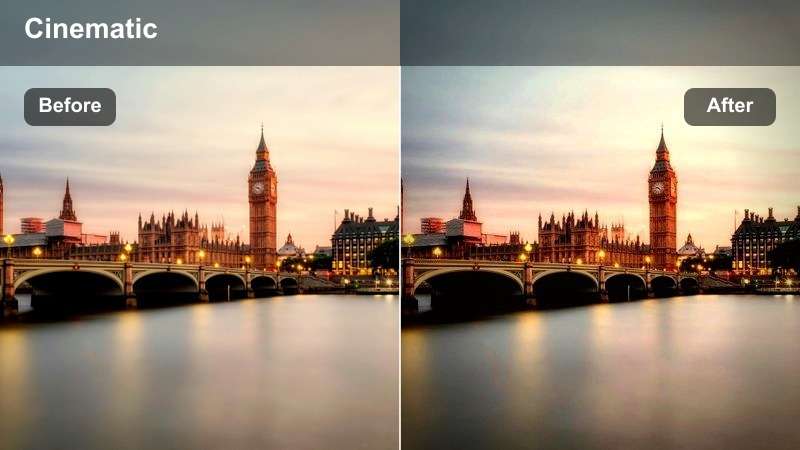
- Effect look: Wet-look contrast with saturated neon tones that emphasize reflections on asphalt and sidewalks.
- Best for: Rainy city nights, puddle reflections, and motorcycle or car shots in downtown streets.
- Editing tip: Slow down the clip or use ramping so lights streak smoothly and the filter's neon colors have time to breathe.
Neon Rain Reflection is designed for wet streets and glossy surfaces, pulling neon, LED, and traffic lights into bold, colorful streaks. It boosts contrast and saturation specifically in bright areas so reflections on asphalt and puddles feel dramatic and stylized.
In Filmora, pair this LUT-style filter with slow motion, speed ramping, or smooth camera moves to let the colors stretch and blend as cars or bikes pass through the frame. Clean up noise first with Filmora's denoise tools, then apply the filter so your neon tones stay crisp rather than muddy.
Monochrome, Minimal, and Stylized Street Stories
High Contrast Street Mono
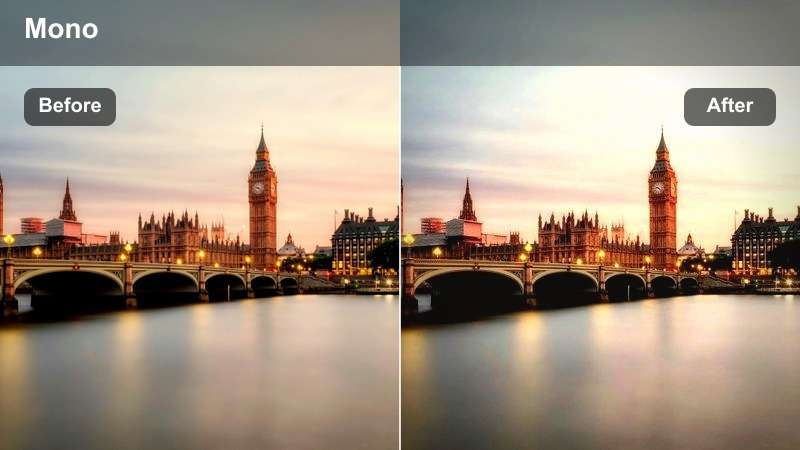
- Effect look: Bold monochrome with deep blacks and bright whites that emphasize silhouettes and shadows.
- Best for: Street portraits, silhouettes against buildings, and strong shadow patterns from railings or trees on sidewalks.
- Editing tip: Crop to tighter compositions so lines and shapes carry the story without relying on color.
High Contrast Street Mono strips out color entirely and leans into stark black-and-white contrast, turning shadows, patterns, and silhouettes into your primary storytelling tools. It is a strong choice when you want timeless, photojournalistic city footage.
Apply this filter in Filmora to clips with bold lighting, like midday sun casting sharp shapes across walls and sidewalks. Then refine exposure and blacks so you keep detail in faces or key textures while still letting deep shadows and bright highlights drive the graphic look.
Washed Film Street
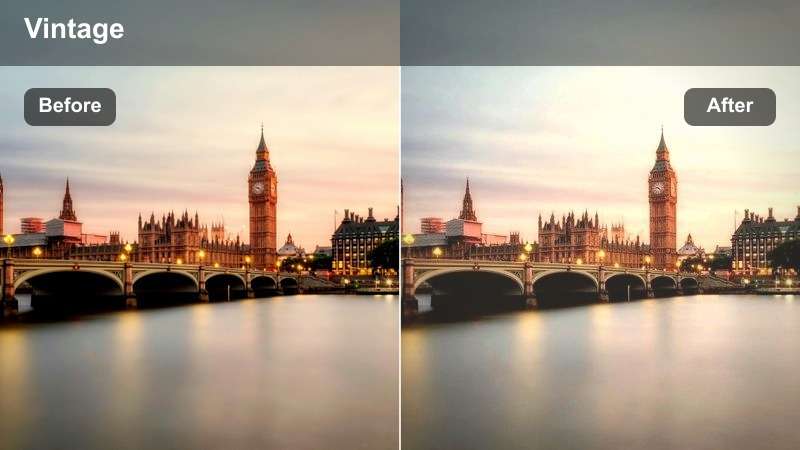
- Effect look: Faded contrast with a subtle warm curve and slight grainy feel that mimics old street film photos.
- Best for: Retro-style city montages, skate clips, and handheld shots of old neighborhoods or vintage storefronts.
- Editing tip: Lower clarity slightly and add a tiny bit of blur to the background so the film vibe feels more authentic.
Washed Film Street softens your contrast, lifts blacks, and warms midtones to create a gentle, nostalgic street aesthetic. The subtle faded look suggests aged film stock, making modern cities feel like they were shot decades ago.
In Filmora, combine this filter with handheld or slightly imperfect camera moves so the grade feels organic rather than artificial. Add light grain and soften clarity on background elements while keeping your subject reasonably sharp, then repeat the same preset across your sequence to tie together different locations into a single retro story.
Minimal City Desaturate
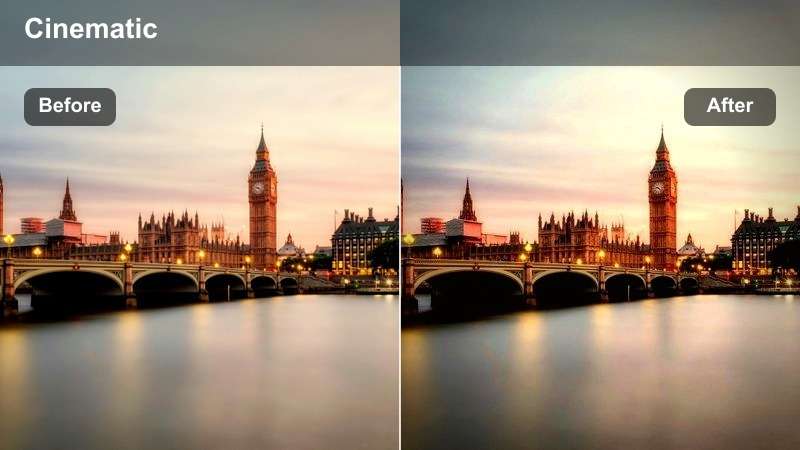
- Effect look: Low-saturation, slightly cool grade that keeps a few accent colors while muting everything else.
- Best for: Minimalist street edits, fashion walking shots, and clean architectural compositions with few bold colors.
- Editing tip: Use color tuning to protect one accent color like red or yellow while letting the filter mute the rest of the scene.
Minimal City Desaturate dials down most colors in your frame while leaving a few accents with more strength, creating a sleek, modern look. The mild cool tint and low saturation reduce visual noise in busy streets so architecture, wardrobe, or a single prop can stand out.
Within Filmora, start by applying the filter, then open HSL or color tuning tools to selectively boost the one color you want to highlight, such as a jacket, bag, or sign. This makes it easy to guide the viewer's eye through fashion walks, product-focused B-roll, or clean architectural compositions.
Tips for Using Free Luts For Street Video Filters in Filmora
- Shoot a short reference clip for each new location, test several free LUT-style street filters in Filmora, and lock your favorite before filming long takes.
- Group similar street scenes on the timeline and apply the same filter preset and intensity so your color story stays consistent across the project.
- Use keyframes in Filmora to gradually fade between two filters when your edit moves from bright day streets into dusk or night cityscapes.
- Dial filter intensity down instead of disabling it on close-ups; this keeps continuity with your wide shots while protecting skin tones and fine details.
- Always check how free LUTs affect skin tones, then correct with Filmora's basic color tools or masks so faces look natural and flattering.
- Stack street filters with Filmora's AI color balance and HSL tools so technical corrections happen first and the creative LUT-style grade sits cleanly on top.
- Save your favorite street filter plus color tweaks as a custom preset in Filmora to reuse the same urban style across future vlogs and reels.
- Export short test clips with different filters applied and view them on your phone to see how your street colors hold up on smaller screens.
These free LUT-style filters for street video give creators and editors fast ways to shape the mood of any city scene, from soft morning walks to neon-soaked nights. By choosing a small set of presets that match your style, you can keep editing simple while still landing on a polished, cinematic color grade.
Test several options in Filmora, pick a consistent look for each project, and then explore free LUTs for lifestyle video to bring the same professional finish to more personal, everyday storytelling outside of the streets.
secure download