

 100% Security Verified | No Subscription Required | No Malware


 ChatGPT
 Perplexity
 Gemini
 Claude
 Grok
Grok
These free LUTs for lifestyle video are designed for creators and editors who want clean, on-trend looks for vlogs, daily routines, and aesthetic B-roll without spending hours color grading.
Browse the curated filters below, each with a clear use case, best footage match, and a practical editing tip so you can quickly find the right style for your lifestyle projects in Filmora.
In this article
Soft Mornings and Coffee Runs
Soft Cream Morning Glow
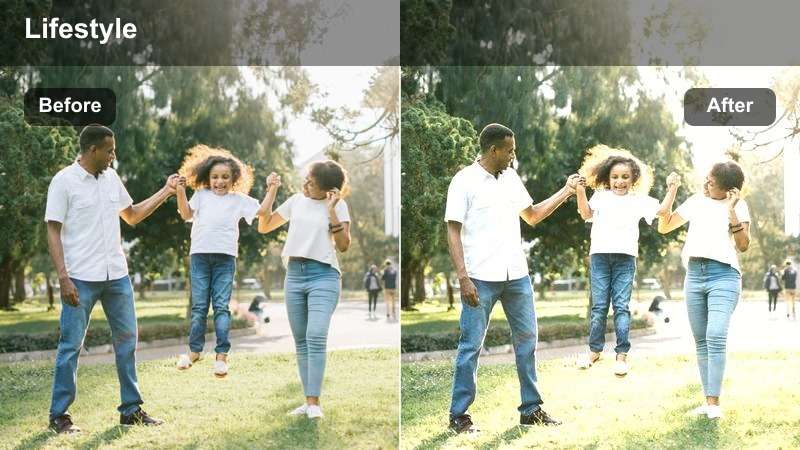
- Effect look: Warm, low-contrast cream tone that softens shadows and brightens skin for cozy mornings.
- Best for: Morning routines, getting-ready vlogs, desk setups near a window, and coffee shop lifestyle shots.
- Editing tip: Lower the filter intensity to around 60–70% and slightly reduce highlights to avoid washing out white mugs and laptops.
Soft Cream Morning Glow wraps your lifestyle footage in a gentle, creamy warmth that flatters skin and bright surfaces without making the image feel heavy. Whites stay soft instead of stark, which is perfect for minimal apartments, breakfast shots, and overhead clips of planners or laptops in morning light.
In Filmora, apply this LUT-style filter to all your morning clips, then fine-tune exposure and highlights on a few reference shots so the whites on bedding, mugs, and screens stay detailed. Keep contrast and sharpness moderate to preserve the cozy, dreamy vibe, and reuse the same preset across your entire routine so the video feels consistent from first coffee pour to final desk shot.
Match Lifestyle LUTs to Your Aesthetic with AI Color Tools
Use Filmora's AI-powered color tools to quickly match these free LUT-style filters to your existing lifestyle footage, even if scenes were shot in very different lighting. AI can level out exposure and white balance so your Soft Cream mornings, neutral desks, and cozy nights all feel like part of the same series.
By letting AI analyze your clips first, every filter you apply will look more intentional and consistent across vlogs, B-roll, and talking segments, reducing the need for clip-by-clip corrections.
 secure download

Preview Filters on Real Lifestyle Scenes
Before you commit to a look, drop several of these filters onto short test clips from your mornings, apartment, city walks, and travel weekends. Scrub through to see how each LUT-style filter treats skin, whites, and background colors across different lighting conditions.
Filmora's real-time preview and side-by-side comparison make it easy to decide which aesthetic feels most aligned with your channel, whether you lean toward soft cream tones or crisp neutrals.
secure downloadBuild a Reusable Lifestyle Filter Pack in Filmora
Filmora includes 1000 plus video filters and 3D LUTs, so you can stack these free lifestyle looks with additional effects to refine your brand. Once you have a combination that works for morning routines, interiors, and city walks, save it as a preset you can reuse in every vlog.
Over time, your custom filter pack becomes a visual shortcut: drop it onto new clips, adjust intensity, and you are ready to export cohesive lifestyle edits much faster.
secure downloadLatte Tan City Walk
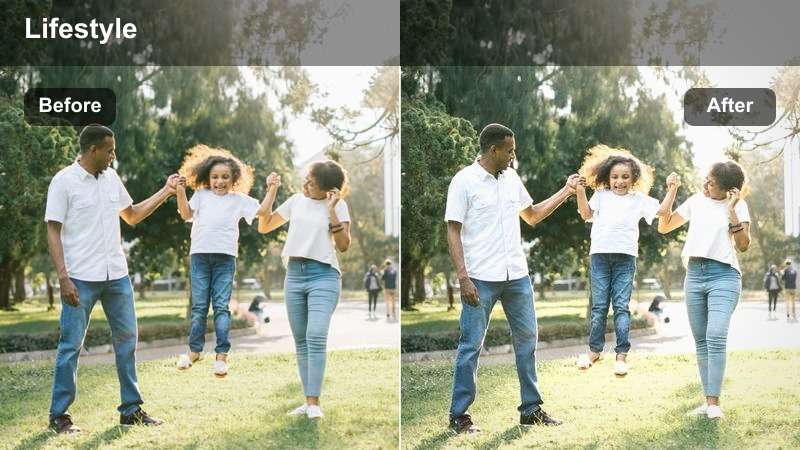
- Effect look: Muted urban contrast with tan highlights that make coffee browns and beiges pop against the city.
- Best for: Handheld coffee runs, walking-and-talking vlogs, cafe exteriors, and sidewalk lifestyle B-roll.
- Editing tip: Stabilize your clips in Filmora first, then apply the filter and slightly boost saturation for storefront signs.
Latte Tan City Walk adds a subtle tan cast that flatters beige outfits, coffee cups, and neutral city tones while keeping overall contrast mellow. It pulls down overly bright colors so your subject and coffee details stand out against busier backgrounds like storefronts and traffic.
In Filmora, stabilize your handheld clips before dropping this filter on a walking sequence, then nudge saturation on oranges and yellows so signage and warm highlights remain readable. Save a custom preset at slightly reduced intensity for clips filmed in harsh midday sun, where you may want a more understated latte look.
Minimal White Desk Daylight
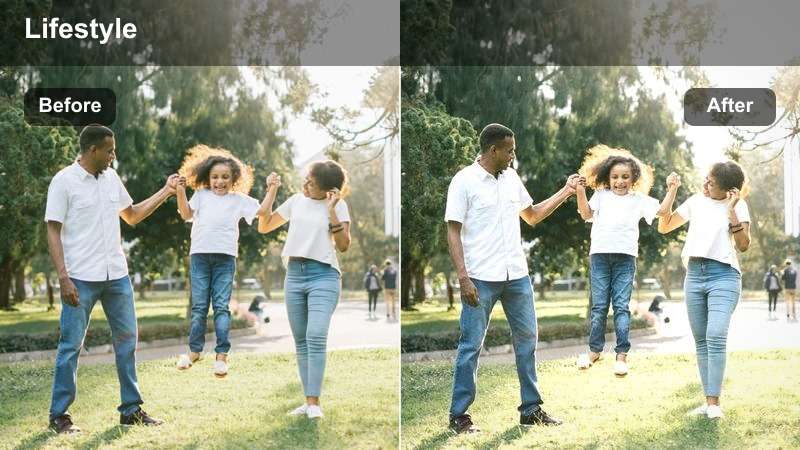
- Effect look: Bright, crisp whites with cool-neutral tones that emphasize clean lines and tech on a desk.
- Best for: Work-from-home lifestyle shots, overhead desk B-roll, unboxings, and planning sessions.
- Editing tip: Lower the shadows to define objects on the desk, and avoid adding too much sharpness to keep it minimal.
Minimal White Desk Daylight is built to make your workspace look editorial and organized, with cool-neutral whites that keep paper, keyboards, and screens looking clean. It subtly reduces warmth, which helps mixed lighting setups feel more consistent across different desk angles and close-ups.
Apply this LUT-style filter in Filmora to all your top-down and side-angle desk shots, then gently darken shadows to separate tech and stationery from the background. Keep additional enhancements like clarity and sharpening modest so the frame retains a soft, premium feel ideal for productivity vlogs and aesthetic desk tours.
Cozy Homes and Apartment Aesthetic
Apartment Beige Haven
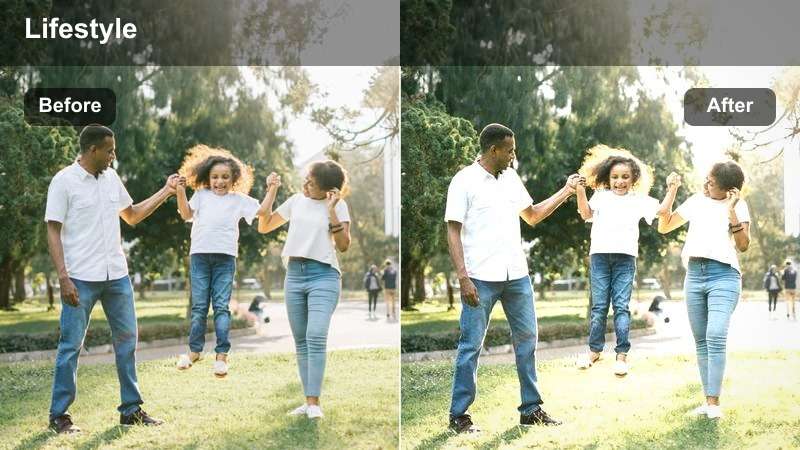
- Effect look: Soft beige tint with lifted blacks that creates a calm, airy atmosphere in small spaces.
- Best for: Living room montages, cleaning vlogs, shelf styling, and cozy evenings on the couch.
- Editing tip: Slightly lower saturation on bright decor so the beige tone stays consistent across your video.
Apartment Beige Haven gently warms your footage with a light beige tint while lifting the blacks so shadows never feel too heavy in compact rooms. This makes small apartments look brighter and more spacious, especially when filming neutral furniture, throws, and decor.
In Filmora, use this filter across your home sequences, then tame any overly colorful decor by reducing saturation on specific hues so the beige wash remains dominant. If certain corners feel too dark, add masks and localized exposure tweaks before or after the filter so the overall frame still feels soft and inviting.
Evening String Light Glow
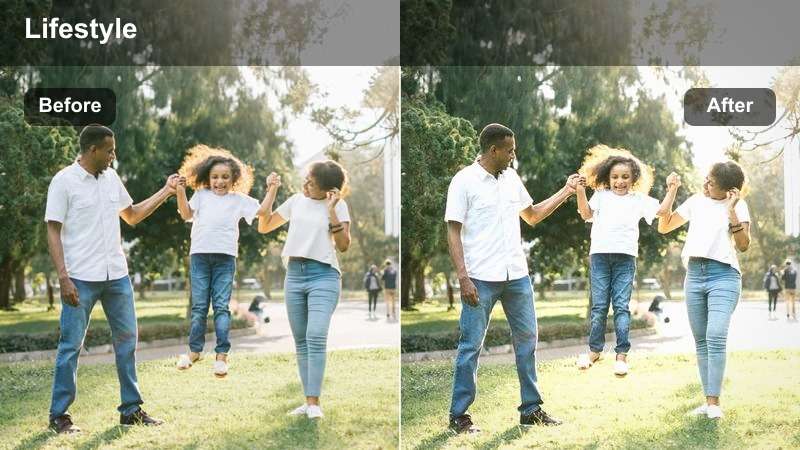
- Effect look: Golden highlights and gentle bloom on bright areas to emphasize fairy lights and lamps.
- Best for: Nighttime bedroom vlogs, reading nooks, and cozy movie-night sequences in the living room.
- Editing tip: Expose slightly darker in-camera, then apply the filter and gently lift the midtones in Filmora to keep glow without clipping.
Evening String Light Glow is tuned for low-light scenes where fairy lights, candles, and lamps are the stars, wrapping them in a warm, golden halo. The filter enhances glow on highlights while keeping midtones soft, which is ideal for intimate, end-of-day storytelling.
When editing in Filmora, apply this look to your night clips and then bring up midtones just enough to reveal faces and cozy textures without blowing out the bulbs. If you want an even more nostalgic feel, stack a subtle film grain or vignette effect on top, saving the combo as a preset for all your evening routines and movie-night vlogs.
Neutral Shelf Styling Edit
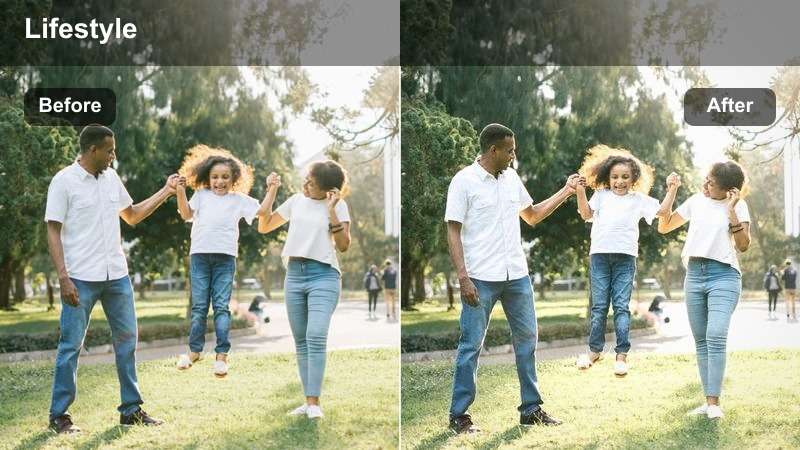
- Effect look: Neutral, low-saturation tones with slightly enhanced texture to emphasize decor and lines.
- Best for: Shelf styling B-roll, home decor tours, and minimalist interior shots.
- Editing tip: Use slower cuts and add subtle push-in keyframes in Filmora to let the texture and decor details stand out.
Neutral Shelf Styling Edit tones down strong colors and gently emphasizes texture so books, ceramics, and frames look refined rather than busy. With its low-saturation, neutral palette, it works especially well for close-ups of decor details and minimalist corners.
In Filmora, pair this filter with slow, deliberate camera moves and subtle keyframed zooms so viewers can appreciate the shapes and surfaces on screen. Keep transitions simple, then save the effect as a decor preset you can quickly apply to any home tour or styling B-roll to maintain a gallery-like mood.
Outdoor Walks and Urban Lifestyle
City Neutral Street Diary
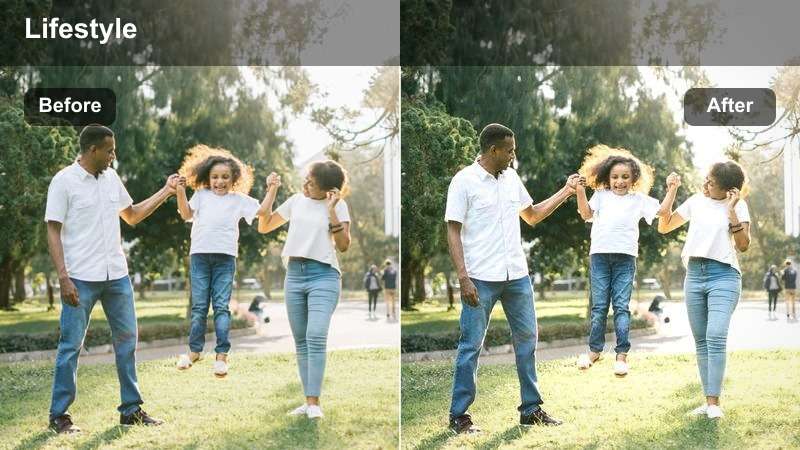
- Effect look: Balanced contrast with slightly cooled shadows that keeps buildings crisp and skin tones natural.
- Best for: Walking diaries, talking to camera on sidewalks, and city B-roll from everyday commutes.
- Editing tip: Use Filmora's motion tracking to keep text labels pinned to buildings or streets while this filter keeps edges sharp.
City Neutral Street Diary brings a subtle coolness to shadows while preserving realistic skin tones, giving your urban walks a clean, polished look. Buildings, crosswalks, and street details stay crisp, making it perfect for day-in-the-life vlogs shot while moving through the city.
In Filmora, apply this LUT-style filter to all your commuting and street-talking clips, then use motion tracking to attach captions or location tags to buildings without color shifts. If certain shots feel too cold, slightly warm the white balance after the filter so the city stays modern while your face remains flattering on camera.
Weekend Park Stroll
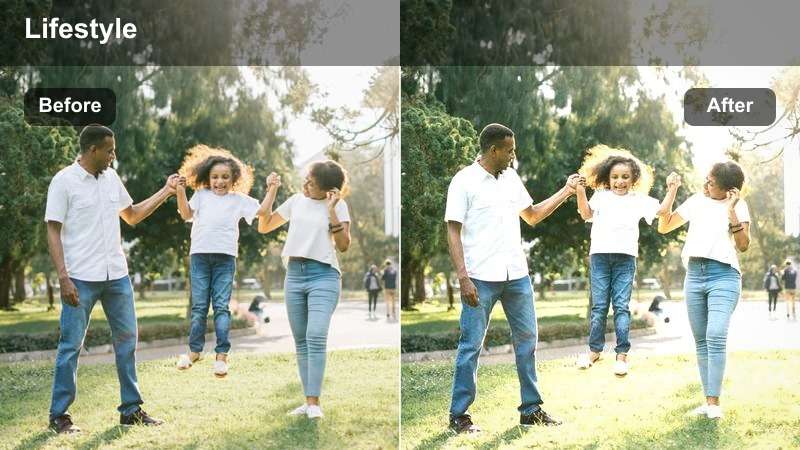
- Effect look: Soft greens and warm highlights that smooth skin while keeping trees and paths natural.
- Best for: Casual park walks, bench chats, outdoor journaling, and bike path lifestyle clips.
- Editing tip: If your greens are too strong, lower saturation of the green channel in Filmora before applying this filter.
Weekend Park Stroll gently warms highlights and tames greens so your outdoor clips feel relaxed and inviting, not overly vibrant. Skin tones look soft and pleasant while grass, trees, and paths retain a natural feel that suits casual picnics or walking shots.
When editing in Filmora, consider pre-adjusting the intensity of the greens if your camera tends to oversaturate foliage, then lay this filter over the corrected clips. Add a light contrast boost if the scene looks too flat, and use this same preset across all your park segments to keep the day feeling like one continuous, calm outing.
Commuter Train Window Vibes
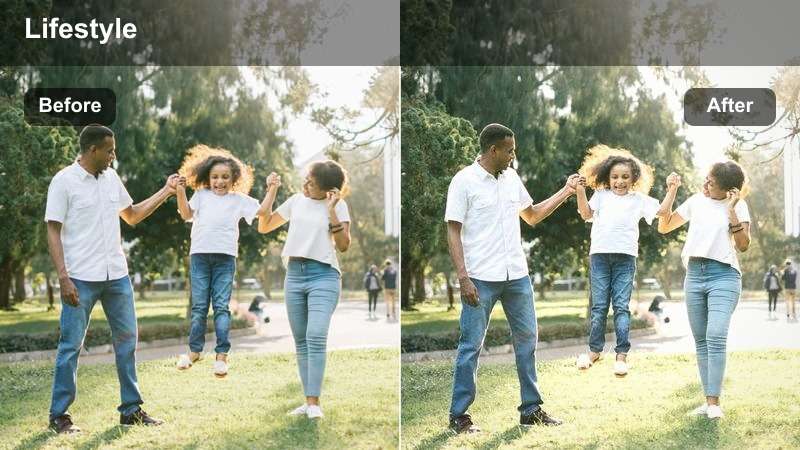
- Effect look: Slightly desaturated background with subtle fade that keeps focus on the subject by the window.
- Best for: Train rides, bus windows, metro escalators, and everyday commute B-roll.
- Editing tip: Slow your clips to 50% speed if shot at higher frame rates, then add the filter for dreamy movement.
Commuter Train Window Vibes softens and slightly desaturates the passing scenery while keeping your subject by the window gently prominent. The faded contrast adds a reflective, almost nostalgic tone that works well for voiceovers or music-driven sequences.
In Filmora, slow down higher-frame-rate clips to create smooth motion outside the window, then apply this filter to unify the tones between interior and exterior. Add a subtle zoom or pan keyframe across each shot to enhance the introspective mood, and keep audio minimal so visuals and color carry the emotion.
Weekend Trips and Travel Lifestyle
Roadtrip Passenger Seat
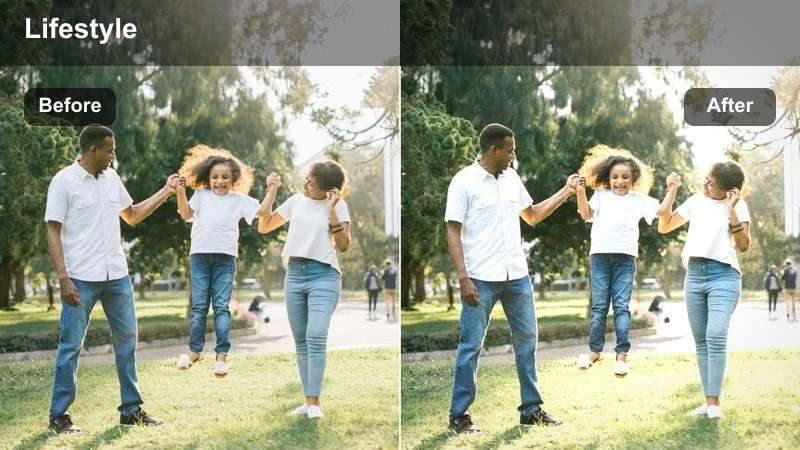
- Effect look: Warm road tones with lifted shadows that bring out dashboards, sky, and subtle sun flares.
- Best for: Car B-roll, hands out the window, dashboard shots, and gas station travel moments.
- Editing tip: Sync your cuts to music beats in Filmora, then apply the filter to the whole sequence for a consistent mood.
Roadtrip Passenger Seat infuses your driving footage with warm, sun-kissed tones while gently lifting shadows so interiors and skies remain visible. It highlights flares, window reflections, and dashboard details, turning otherwise ordinary car moments into cinematic travel beats.
In Filmora, build a short montage of your best car clips, trim them to your soundtrack, and then apply this filter to the full sequence so color stays consistent from scene to scene. If certain shots feel too dark, lightly raise exposure before the filter, and save your final settings as a preset for future roadtrip series or weekend getaways.
Weekend City Break Hotel
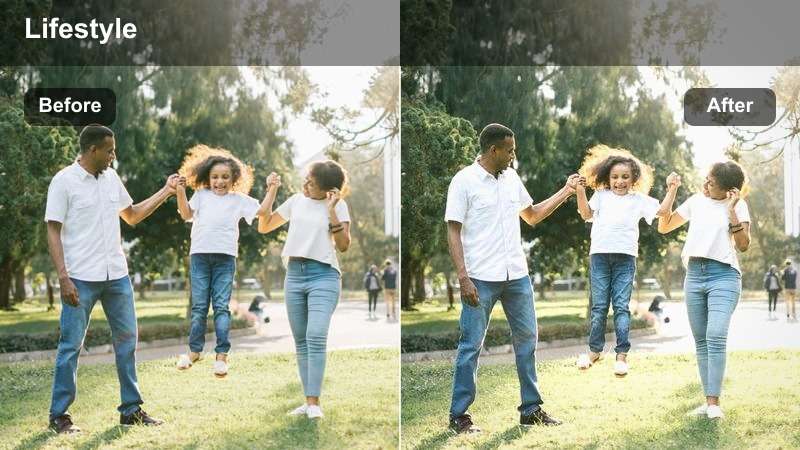
- Effect look: Clean neutral whites with subtle warm skin tones tailored for hotel interiors and city views.
- Best for: Hotel room tours, mirror OOTD shots, balcony views, and suitcase packing clips.
- Editing tip: Use Filmora's straighten and crop tools first to fix lines in walls and windows, then add the filter.
Weekend City Break Hotel is designed for hotel lighting, balancing bright whites from bedding and walls with soft, warm skin tones. It keeps interiors looking polished and modern while letting window views of the skyline remain clear and neutral.
In Filmora, first correct any tilted horizons or leaning door frames using crop and straighten tools, then apply this filter to unify the room tour, mirror shots, and balcony scenes. If the room uses mixed lighting, fine-tune white balance after the LUT so both indoor lamps and outdoor views feel cohesive within the same vlog.
Sunset Boardwalk Stroll
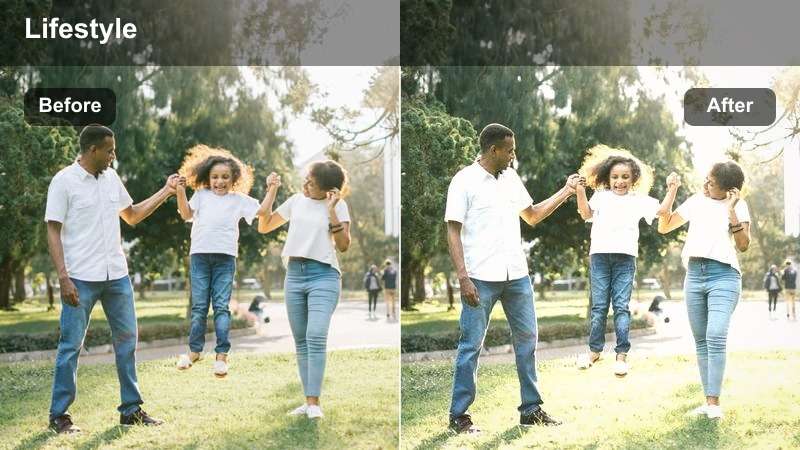
- Effect look: Golden, slightly pastel highlights with gentle contrast made for sunset horizons and silhouettes.
- Best for: Evening walks on promenades, rooftop hangouts, and sunset lifestyle B-roll with friends.
- Editing tip: Expose for the sky so you keep color in the sunset, then apply the filter and lift shadows to reveal faces.
Sunset Boardwalk Stroll enhances golden-hour footage with pastel-like highlights and soft contrast, ideal for silhouettes, reflections, and backlit portraits. It preserves the gradient in the sky while warming skin and boardwalk details for an end-of-day, cinematic mood.
In Filmora, prioritize keeping sky detail by lowering exposure in-camera or in post, then apply this LUT-style look and gently raise shadows so people are still visible. Add slow fades and minimal transitions between your sunset clips, and consider using this same preset for rooftops, beaches, and city overlooks to give all your golden-hour scenes a consistent, dreamy palette.
Tips for Using Free Luts For Lifestyle Video Filters in Filmora
- Group your clips by lighting type, such as morning window, indoor lamps, and outdoor sun, and apply lifestyle filters separately to each group for smoother results.
- Keep filter intensity adjustable in Filmora; starting around 60–80 percent usually delivers a natural look for day-in-the-life content.
- Shoot with a slightly flatter picture profile when possible so these free LUT-style filters have more room to shape contrast and color.
- Maintain consistent white balance while filming similar scenes to avoid jarring shifts when you apply the same filter across multiple clips.
- Use Filmora's basic color correction tools to balance exposure and white balance before dropping on your chosen lifestyle LUT.
- Test each filter on a short timeline of mixed clips, then save your favorite settings as reusable presets to speed up future edits.
- Combine subtle ambient audio and music with your color grade so the overall mood of your lifestyle video feels cohesive.
These free LUT-style filters for lifestyle video give creators and editors a fast way to create a cohesive, on-brand aesthetic across morning routines, cozy home scenes, city walks, and weekend getaways.
Download or build your favorites in Filmora, turn them into reusable presets, and you will spend less time color grading and more time telling everyday stories that feel cinematic and authentic.
secure download