

 100% Security Verified | No Subscription Required | No Malware

Influencer video filters for Instagram are the secret sauce behind polished feeds, cinematic Stories, and branded Reels that stop the scroll. With the right mix of color, contrast, and subtle glow, you can turn everyday footage into content that looks ready for a campaign.
Below you will find a curated set of Filmora filters and creator-style looks inspired by popular Instagram influencer filters, IG creator LUT styles, and clean influencer color grades. Use them as a toolkit for Instagram influencer posts, Stories, and brand content that feel cohesive and on-brand.
In this article
Soft Aesthetic Glow Filters for Influencer Feeds
Pastel Soft Glow
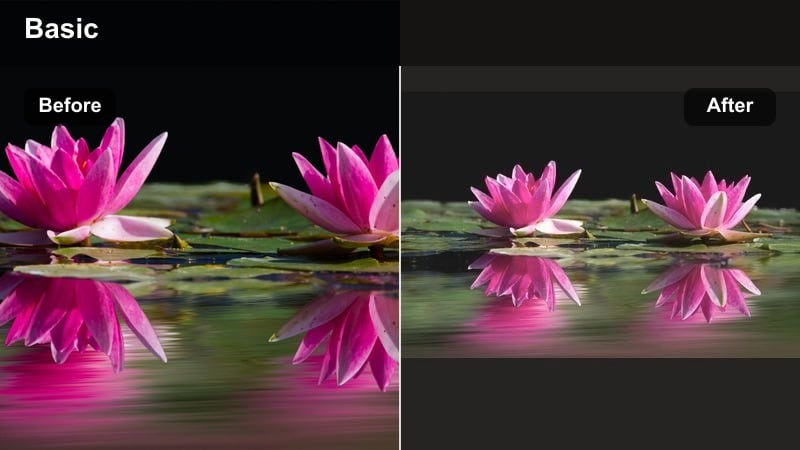
- Effect look: Low-contrast pastel tones with a creamy highlight roll-off and subtle glow over skin tones.
- Best for: Lifestyle influencer posts, morning routines, soft fashion hauls, and airy product flatlays.
- Editing tip: Lower saturation slightly and lift shadows to keep the pastel feeling; avoid over-sharpening so the glow stays dreamy.
Pastel Soft Glow is a creamy pastel influencer filter that wraps your footage in soft whites and gentle color, perfect for light, dreamy grids. In Filmora, this look helps even budget smartphone clips feel like polished aesthetic content without losing the natural texture of your scene.
Apply this filter to clips with plenty of daylight or diffused artificial light, then fine-tune exposure so highlights stay bright but not blown out. When you batch edit content for Instagram, keep the strength of Pastel Soft Glow consistent across your morning routines, soft fashion hauls, and flatlays so your entire feed feels cohesive.
Pro Tip - Match your grid with consistent pastel contrast
Export one short clip graded with Pastel Soft Glow and use it as a visual reference while editing the rest of your feed videos. Match exposure and contrast first, then apply the filter so every post aligns with your grid.
For Stories, reduce the filter intensity slightly so text overlays remain crisp and easy to read against the softer background.
Use AI to Lock In a Consistent Influencer Color Palette
Filmora’s AI-powered color tools help you quickly match the mood of popular Instagram influencer filters across multiple clips. Instead of manually guessing exposure and contrast, you can analyze one reference video and apply a similar balance to all your feed content.
This is especially useful when you mix smartphone and camera footage, or shoot in different locations. Once AI evens out your base look, you can layer your favorite influencer video filters for Instagram on top and keep your grid, Stories, and Reels visually consistent. Open your next video in Filmora and try AI color matching before adding presets to see how much cleaner your influencer feed can look.
 secure download

Preview Filters on Real Instagram Scenarios
Before committing to a filter as your signature look, preview it on the content you actually post: talking-to-camera clips, product shots, B-roll, and Story snippets. Filmora makes it easy to drag and drop filters, then compare different options side-by-side.
Test how each look behaves on skin tones, brand colors, and low-light shots. You will quickly see which filters work for sponsored content, which feel best for casual Stories, and which deserve a permanent place in your Reels editing workflow. Import a short mix of clips into Filmora and run a quick filter demo session to find your go-to influencer Instagram filter stack.
secure download1000+ Video Filters and 3D LUTs
Filmora includes a large library of video filters and cinematic 3D LUTs so you can build creator-level grades without starting from scratch. You can combine subtle glow filters, influencer-style color grades, and IG creator LUTs to design a look that fits your personal brand.
By keeping LUT intensity moderate and using filters for final polish, your videos stay natural on mobile while still looking curated. This approach makes it easy to adapt the same base style for feed posts, Reels, and Stories by just tweaking contrast or intensity per format.
secure downloadPeachy Skin Pop
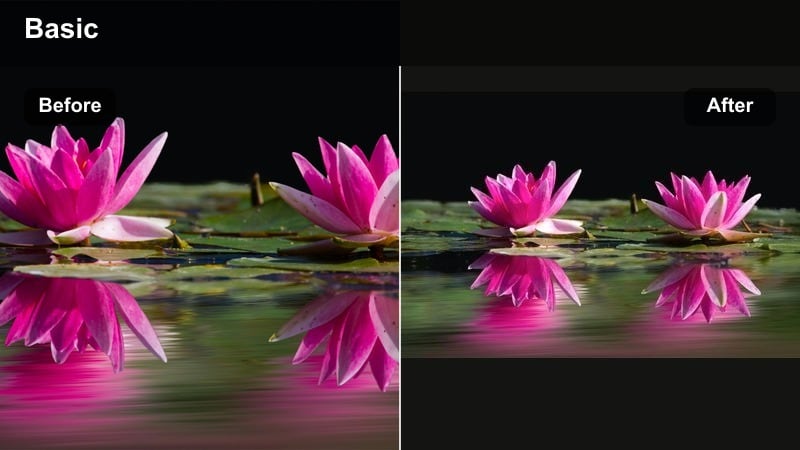
- Effect look: Warm peach midtones that enhance skin tones with a gentle contrast boost and clean whites.
- Best for: Beauty and skincare videos, GRWMs, and talking-to-camera brand content where faces are the focus.
- Editing tip: Reduce orange saturation slightly and increase luminance on skin tones so the glow feels natural, not oversaturated.
Peachy Skin Pop is designed to give faces a flattering glow that reads well on every screen, especially in close-up beauty and skincare content. In Filmora, you can apply this filter to GRWM videos or skincare routines to smooth out minor color inconsistencies while keeping detail in makeup and texture.
After adding the filter, use Filmora’s color controls to nudge orange saturation down and lift midtone brightness, so your skin stays dimensional instead of flat. This combination works especially well for sponsored beauty content where accurate shade representation matters as much as an influencer-worthy glow.
Pro Tip - Dial in flattering creator-style skin tones
Shoot near a window or softbox and keep your white balance slightly cool when recording. Then apply Peachy Skin Pop to warm skin without making the overall frame too yellow.
If you batch-film content, save this look as a custom preset in Filmora so every clip matches your main influencer Instagram color grade.
Creamy Neutral Feed
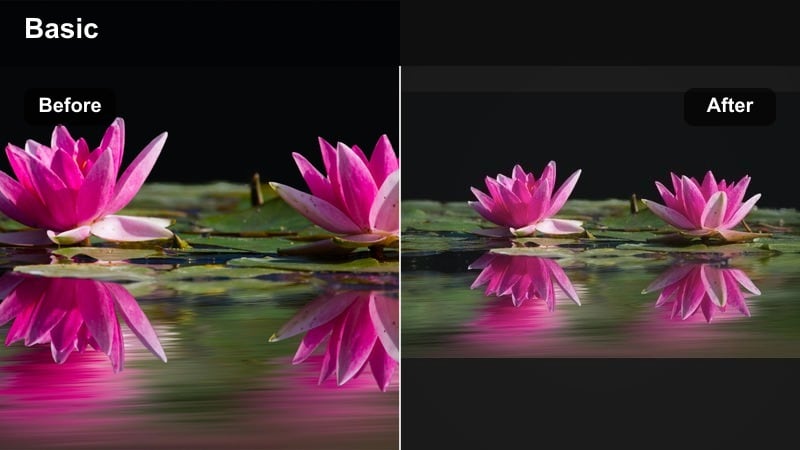
- Effect look: Muted neutral colors with lifted blacks, soft highlights, and a creamy, desaturated background.
- Best for: Minimalist fashion content, aesthetic home tours, and brand collabs that need a clean, premium vibe.
- Editing tip: Pull back saturation on greens and blues, and slightly warm the highlights while keeping midtones neutral.
Creamy Neutral Feed strips away harsh colors and strong contrast to give your videos a curated, high-end look. In Filmora, this filter is ideal for outfit-of-the-day clips, home decor tours, or luxury product showcases where you want beige, white, and soft neutral tones to dominate.
Start by neutralizing any color cast with Filmora’s white balance tools, then apply the filter and push greens and blues further down for a cohesive neutral palette. This look helps transform mixed indoor environments into a seamless aesthetic, making your whole grid feel more like a styled lookbook than a casual feed.
Pro Tip - Turn mixed lighting into a neutral aesthetic
If you shot in mixed indoor lighting, use white balance correction first to neutralize color casts, then apply the Creamy Neutral Feed filter so your beiges and whites stay consistent.
For carousel-style video posts, copy and paste color settings across clips before exporting to avoid subtle color jumps between frames.
Bold, Brand-Ready Filters for Sponsored Content
Punchy Product Pop
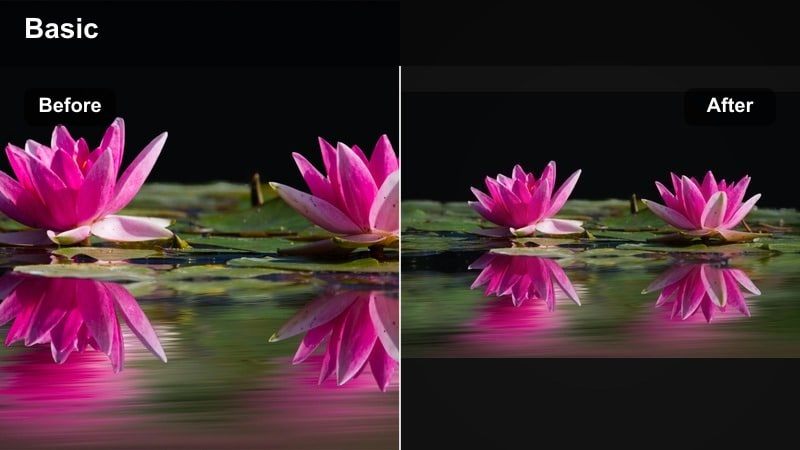
- Effect look: High-contrast, vivid colors with crisp edges that make logos and packaging stand out on screen.
- Best for: Sponsored product videos, unboxings, and brand content that needs bold color and clarity.
- Editing tip: Use subtle sharpening and clarity rather than overdoing saturation; keep skin tones natural while boosting product colors selectively.
Punchy Product Pop is built to make product details jump out in the feed, from logo designs to fine print on packaging. In Filmora, this filter adds a commercial-style punch that helps your sponsored unboxings and product demos look more like ad campaign assets.
Apply the filter, then use HSL controls to selectively intensify the brand’s main colors while leaving skin tones more natural. This strategy keeps the viewer’s eye locked on the product and logo while your face still looks flattering and true-to-life in talking segments.
Pro Tip - Separate product color from skin tones
Use Filmora’s HSL controls to target the main product color and boost its saturation and luminance before applying Punchy Product Pop, so the product stands out without affecting your face.
For Reels, keep backgrounds slightly desaturated to guide viewers’ eyes to the product while the filter adds overall crispness.
Cool Brand Contrast
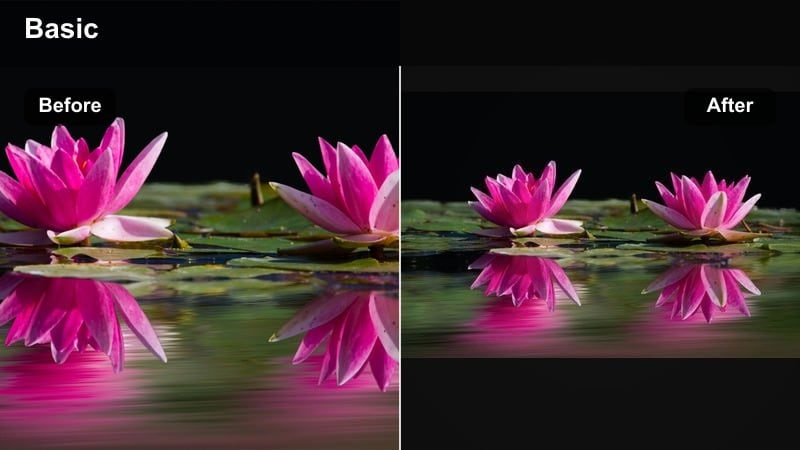
- Effect look: Cool-leaning highlights with strong contrast and clean blacks for a techy, modern brand feel.
- Best for: Tech, fitness, and creator tool promos where a sharp, modern influencer Instagram color grade is needed.
- Editing tip: Balance contrast with midtone detail; add a subtle vignette to keep focus on the product or on-screen text.
Cool Brand Contrast gives your sponsored posts a sleek, modern edge that works well for apps, gadgets, fitness gear, and other performance-driven products. In Filmora, this filter sharpens lines, deepens blacks, and tilts highlights slightly cool to suggest a futuristic, campaign-ready tone.
After applying the filter, refine midtones so faces and product textures retain detail instead of crushing into pure black. Layer in animated text, callouts, and UI overlays in Filmora to complete the polished tech-creator style your audience expects from high-end promos.
Pro Tip - Make on-screen text look like a paid campaign
Apply Cool Brand Contrast first, then design lower-thirds and captions with bright, brand-aligned colors that cut through the cooler background.
For Stories, leave more negative space and keep the filter intensity slightly lower so swipe-up CTAs and stickers remain clear.
Vibrant Brand Story
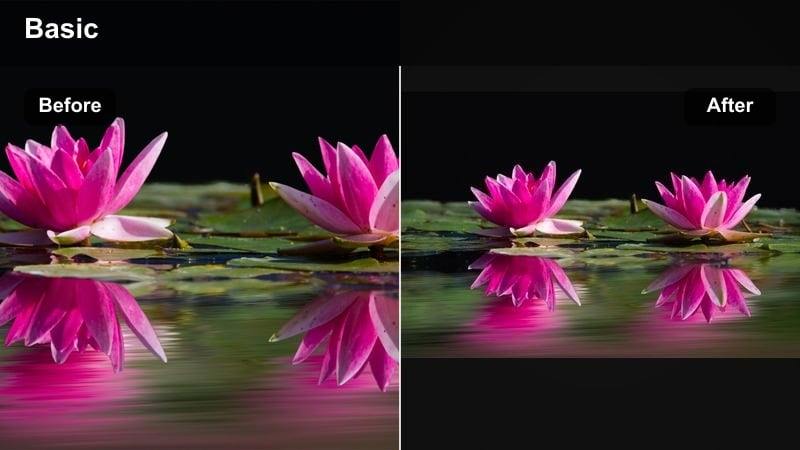
- Effect look: Rich saturation with warm midtones and punchy highlights that create energetic, story-driven visuals.
- Best for: Day-in-the-life sponsored vlogs, event recaps, and brand Story takeovers.
- Editing tip: Stabilize your clips and slightly slow down key shots; the vibrant look works best on smooth, intentional camera moves.
Vibrant Brand Story is made for fast-paced, colorful content like event recaps, launch days, and branded vlogs where energy matters. In Filmora, this filter adds warmth and saturation that make banners, outfits, and signage pop while keeping enough contrast for depth.
Stabilize your handheld shots and use gentle slow motion on key moments, such as crowd reactions or product close-ups, to let the vivid color palette breathe. This combination of smooth motion and rich color creates Story and Reel sequences that feel curated, not chaotic, even when you shoot in busy environments.
Pro Tip - Keep energy high without over-saturating
If your location is already colorful, decrease overall saturation before adding Vibrant Brand Story to avoid clipping reds and oranges in signage or outfits.
Use this filter in short bursts across multiple clips so your audience stays engaged without feeling visually overwhelmed.
Cinematic Filters for Reels and Storytelling
Teal & Tan Creator
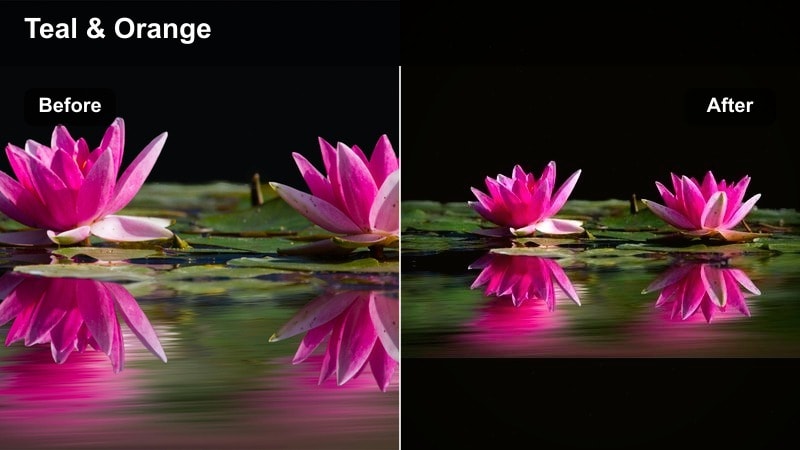
- Effect look: Modern teal shadows with warm tan skin tones creating a cinematic influencer reel aesthetic.
- Best for: Travel Reels, cinematic B-roll, and moody storytelling content that needs a filmic feel.
- Editing tip: Keep exposure slightly under when filming; bring up shadows in Filmora after applying the filter to preserve detail.
Teal & Tan Creator gives your Reels an instant movie-trailer vibe by cooling shadows and warming skin, a combination audiences associate with modern cinema. In Filmora, this filter is perfect for travel montages, lifestyle B-roll, and narrative sequences where you want every frame to feel intentional.
When editing, stack this filter with a bit of film grain and gentle vignetting to emphasize depth and mood. Cut your footage to the beat of your audio, letting the teal shadows tie together varied locations so the whole Reel feels like one cohesive story instead of separate clips.
Pro Tip - Use teal shadows to unify messy backgrounds
If your locations and lighting change a lot in one Reel, apply Teal & Tan Creator to unify shadows and keep everything within one cohesive color story.
Pair with subtle film grain and slower cuts in Filmora to emphasize the cinematic mood without losing Instagram-native pacing.
Soft Film Story
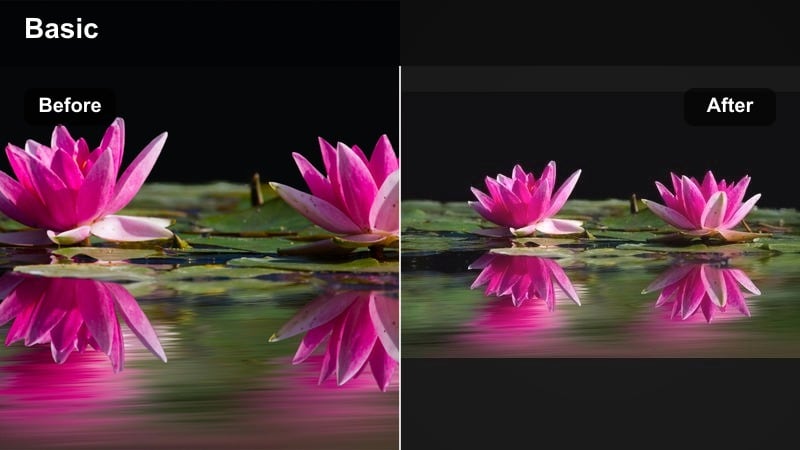
- Effect look: Gentle fade in blacks, warmer highlights, and subtle grain that mimic soft 35mm film.
- Best for: Storytime videos, relationship content, and emotional brand storytelling pieces.
- Editing tip: Lower contrast slightly and add a tiny bit of blur to the background so your subject remains the emotional focal point.
Soft Film Story brings a nostalgic, analog charm to your Reels and long-form Story sequences. In Filmora, it softens hard edges, warms highlights, and introduces a light grain texture that makes talking-to-camera clips feel more cinematic and intimate.
Use this filter on close-ups, voiceover storytime edits, and heartfelt brand campaigns where emotion is the main hook. Combine it with slower cuts, subtle zooms, and quieter background music so your audience naturally leans in and focuses on what you are saying.
Pro Tip - Lean into softness for emotional impact
Shoot at a higher frame rate for smooth motion, then apply Soft Film Story and reduce sharpness slightly so expressions and eye contact feel softer and more cinematic.
Use this look for pinned Reels or highlight Stories where you want your audience to slow down and listen.
Urban Night Glow
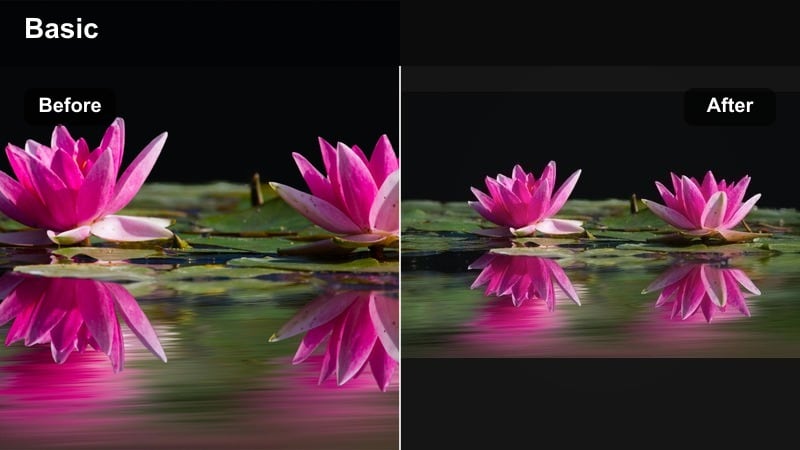
- Effect look: Deep contrast with lifted neon colors and glowing highlights in streetlights and signs.
- Best for: Nightlife vlogs, city B-roll, and fashion Reels shot under neon or streetlights.
- Editing tip: Reduce digital noise first, then push saturation on cyans, magentas, and yellows to accentuate neon details.
Urban Night Glow is tailored for moody city scenes and neon-lit nights, transforming grainy handheld clips into stylized night sequences. In Filmora, it deepens blacks while brightening colorful signs, reflections, and headlights so your footage feels intentional rather than low-light by accident.
Run Filmora’s stabilization and noise reduction first, then apply the filter and fine-tune saturation on key neon hues. Cropping vertically for Reels with strong leading lines, like streets or building edges, helps center attention on the glowing elements the filter enhances.
Pro Tip - Turn grainy night clips into cinematic vibes
Stabilize handheld night footage in Filmora, then apply Urban Night Glow with moderate intensity so neon tones stand out without amplifying noise.
Crop vertically with intentional framing for Reels to keep signs, faces, and reflections centered in the glow effect.
Effortless Filters for Stories and Everyday Posts
Clean Daily Vlog
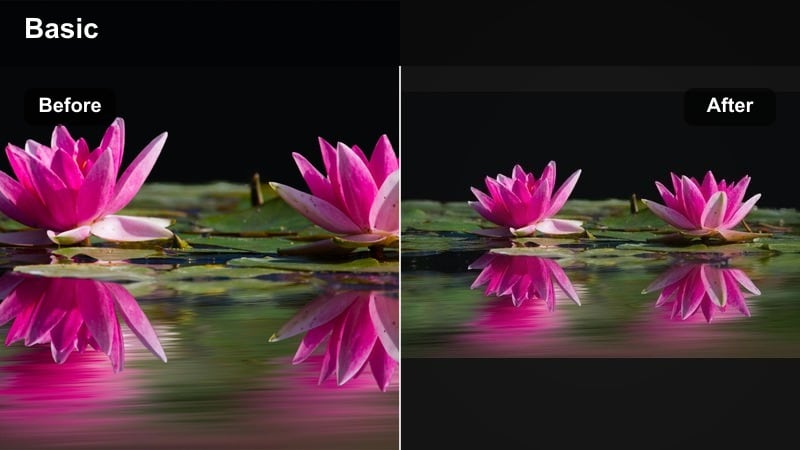
- Effect look: Balanced contrast, neutral color, and a slight clarity boost for a real-life but polished look.
- Best for: Day-in-the-life Stories, casual Reels, and filler content that still needs to look on-brand.
- Editing tip: Use auto color correction first, then apply the filter lightly so the vibe stays authentic and not over-produced.
Clean Daily Vlog is your go-to everyday influencer filter when you want clips to feel natural yet subtly elevated. In Filmora, it smooths out small exposure issues, cleans colors, and adds a touch of clarity so even quick updates look considered.
Apply this look as a base grade for most unsponsored Stories and behind-the-scenes Reels, then layer stickers, subtitles, and music on top. Over time, viewers will recognize the consistent tone and associate it with your personal brand, even in fast, casual uploads.
Pro Tip - Create a signature everyday look
Choose Clean Daily Vlog as your default IG creator LUT-style base, and use it on almost all unsponsored Stories to make your audience instantly recognize your content.
Save your settings as a custom preset in Filmora and apply in one click before exporting batches of quick clips.
Warm Coffee Journal
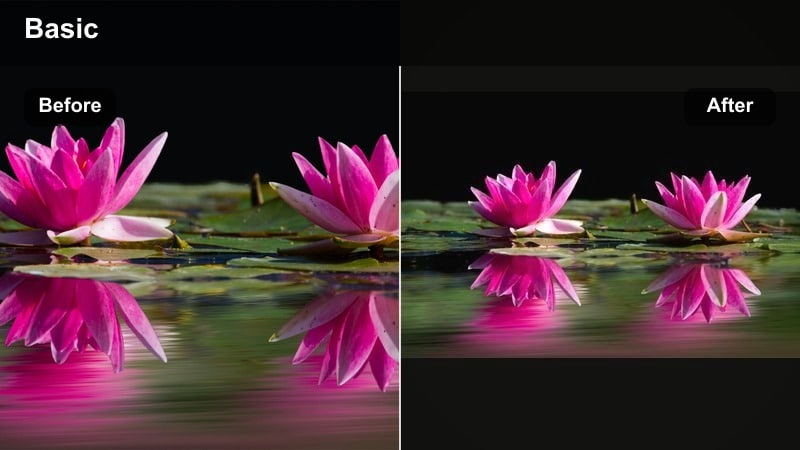
- Effect look: Cozy warm temperature, soft shadows, and slightly muted saturation for cafe and desk aesthetics.
- Best for: Journaling clips, cafe check-ins, and coworking Stories that highlight your routine.
- Editing tip: Lift shadows gently and mute greens so wooden tables, notebooks, and coffee cups feel warm and inviting.
Warm Coffee Journal wraps your routine shots in a comforting, amber-toned atmosphere that suits cafes, workspaces, and slow mornings. In Filmora, this filter is ideal for top-down desk shots, latte close-ups, and ambient B-roll under voiceovers.
Apply the filter, then slightly lift the shadows and back off on green saturation so plants and outdoor reflections do not overpower the warm browns. Use these aesthetic loops between more educational or promotional clips to keep your audience engaged and your Stories feeling cohesive.
Pro Tip - Make your routine feel like a ritual
Film small looping motions like pouring coffee or turning a page, then apply Warm Coffee Journal to turn ordinary actions into soothing, aesthetic visuals.
Use these clips as B-roll layered under voiceovers to keep your audience watching longer while you share value or updates.
Fresh Outdoor Story
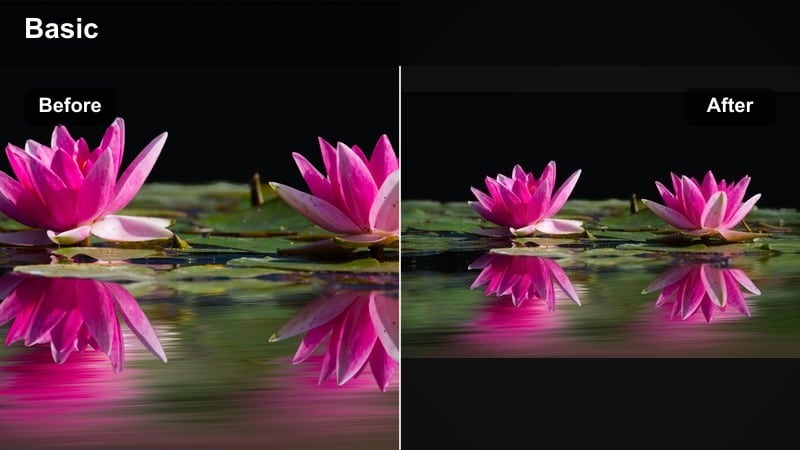
- Effect look: Bright, slightly cool highlights with natural greens and blues that keep outdoor scenes fresh and clean.
- Best for: Walk-and-talk Stories, park content, outfit-of-the-day clips, and travel snapshots.
- Editing tip: Lower contrast a touch and protect highlights so skies do not blow out; adjust saturation of greens to avoid neon grass.
Fresh Outdoor Story is tuned for bright exteriors, enhancing skies and foliage while keeping your skin tone believable. In Filmora, it helps tame harsh daylight and pull outdoor footage into a consistent, influencer-ready aesthetic that works across parks, streets, and travel spots.
Use highlight and white controls to protect detail in bright clouds or reflective surfaces before or after applying the filter. Dial in greens so trees and grass look fresh but not neon, then add subtitles or stickers to keep your walk-and-talk Stories engaging even for viewers watching on mute.
Pro Tip - Fix harsh midday light in outdoor clips
If you filmed under harsh sun, bring down highlights and whites in Filmora before applying Fresh Outdoor Story so your skin and sky retain detail.
Pair this look with subtitles and stickers to keep outdoor walk-and-talk Stories engaging even when viewers watch on mute.
Tips for Using Influencer Video Filter Instagram Filters in Filmora
- Shoot with consistent lighting and white balance so your influencer video filters for Instagram enhance your footage instead of fixing exposure problems.
- Create two or three signature looks in Filmora and reuse them for specific formats: one for feed posts, one for Stories, and one for brand or campaign content.
- Keep filter intensity slightly lower for sponsored posts so brand colors and product packaging remain accurate but still polished.
- Export a 5–10 second reference clip for each filter and keep them in a private highlight so you can quickly compare new content against your chosen aesthetic.
- When repurposing Reels to Stories, reframe vertically and slightly adjust filter intensity to keep text, stickers, and CTAs readable.
- Batch edit multiple clips from the same shoot in Filmora using copy-paste color settings, then only tweak the filter strength per clip if needed.
Influencer video filters for Instagram are more than just a finishing touch; they are a visual language that helps your audience recognize your content instantly across posts, Stories, and Reels.
Build a small, reliable set of Filmora filters and IG creator-style looks, then apply them consistently so every video from casual updates to high-budget brand collabs feels cohesive, professional, and unmistakably you.
secure downloadNext: Influencer Video Filters for Reels: Make Every Second Cinematic
