

 100% Security Verified | No Subscription Required | No Malware


 ChatGPT
 Perplexity
 Gemini
 Claude
 Grok
Grok
This Portrait Warm Tone Cinematic LUT filter collection is designed for content creators who want skin tones to look rich, flattering, and cinematic in just a few clicks. Each preset builds on gentle warmth, soft contrast, and subtle film-style color to give portraits an emotional, story-driven feel.
Use these filters for talking-head videos, studio portraits, vlogs, and social content where faces are the focus. Simply apply a preset, fine-tune exposure and white balance, and you are ready to publish polished, cinematic portraits without heavy color grading skills.
In this article
Golden Hour Portrait Moments
Soft Honey Glow
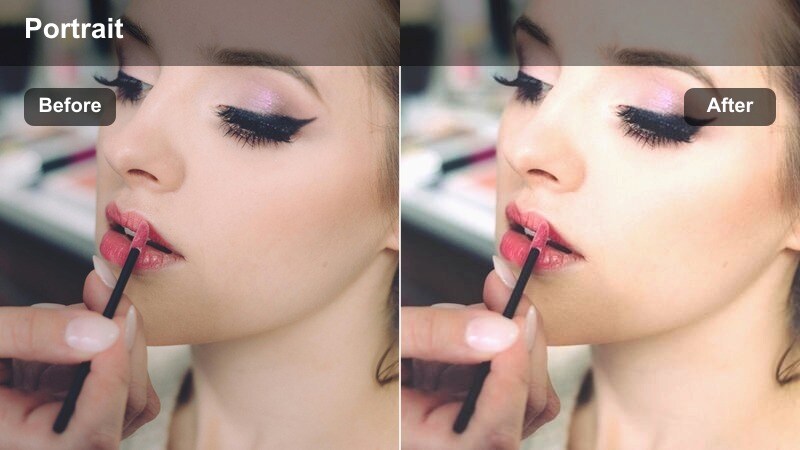
- Effect look: Creamy warm cast with velvety highlights and gently lowered contrast for flattering skin tones.
- Best for: Golden hour outdoor portraits, lifestyle vlogs, and close-up shots with backlighting.
- Editing tip: Slightly reduce saturation on orange tones if skin starts to look too intense under strong sunset light.
Soft Honey Glow wraps faces in a subtle, cinematic warmth that enhances natural skin tone while smoothing out harsh transitions between light and shadow. In Filmora, this LUT is ideal when your golden hour footage looks a bit flat or dull and you want a quick way to add depth, gentle contrast, and a polished finish without heavy manual grading.
Apply the filter to your portrait clips, then fine-tune exposure and white balance so the warmth feels intentional rather than overpowering. Use Filmoras HSL controls to slightly tame orange and yellow channels on shots with very strong sunset light, and lift midtones to keep skin texture natural instead of waxy while still enjoying that honeyed glow.
Fast Portrait Grading with AI-Powered Color Tools
Filmoras AI-driven color tools can automatically detect faces and balance exposure, contrast, and basic tones before you apply any Portrait Warm Tone Cinematic LUT. This gives you a clean, consistent starting point so that each warm filter looks more natural on every skin tone.
By combining AI color correction with your favorite portrait LUTs, you can quickly fix mixed lighting, match multiple camera angles, and keep warm skin tones cohesive across an entire video or series of talking-head clips.
 secure download

Preview Portrait Filters in Real Time
Inside Filmora, you can hover over each Portrait Warm Tone Cinematic LUT to see how it will affect your portrait clips directly in the preview monitor. This real-time preview lets you compare subtle differences in warmth, contrast, and softness without committing to any one look until you are confident.
Dragging a few portrait clips onto the timeline and scrolling through the warm LUT collection makes it simple to pair each scene with the right cinematic tone, whether you are grading a soft lifestyle vlog or a more dramatic close-up.
secure downloadBuild a Signature Portrait Look with LUTs
Filmora supports 1000 plus video filters and 3D LUTs, including this Portrait Warm Tone Cinematic LUT collection, so you can stack multiple effects to craft a unique signature look. Start with a warm portrait LUT, then refine your style using color wheels, curves, and HSL to customize how skin tones and backgrounds interact.
Once you have dialed in a look that fits your brand or channel, save it as a custom preset. This way, every future portrait, interview, or talking-head video can be graded in seconds with the same cinematic warmth and consistency.
secure downloadSunset Amber Frame
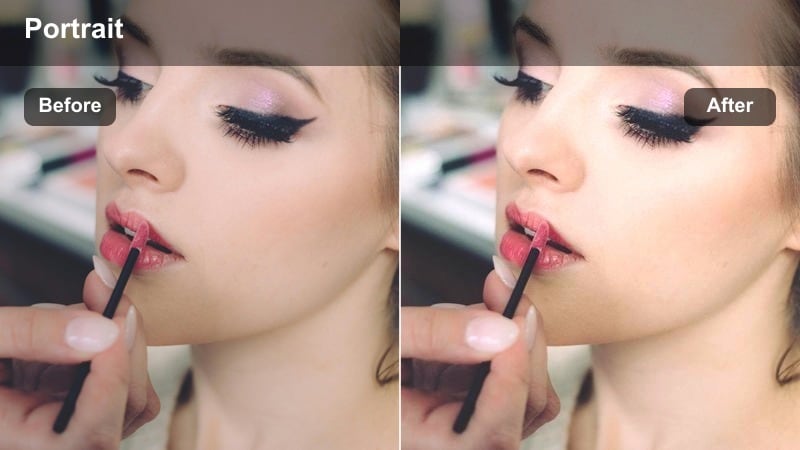
- Effect look: Amber-tinted highlights with a subtle vignette that frames the subject in cinematic warmth.
- Best for: Romantic couple portraits, storytelling reels, and narrative intros shot during sunset.
- Editing tip: Increase the vignette strength slightly on medium shots to pull more focus onto the eyes and face.
Sunset Amber Frame pushes golden light toward a richer amber tone while adding a soft vignette that naturally guides attention to your subjects face. In Filmora, this LUT is perfect when you want your sunset portraits or narrative intros to feel more emotional and cinematic, especially in wide or medium shots.
After you apply the filter, fine-tune vignette strength in Filmora to match your framing, subtly darkening the outer edges so the eyes stay central. Combine it with gentle negative fill on set or light contrast adjustments in post to give your portraits more dimensional shadows without losing the cozy warmth.
Golden Backlight Bloom
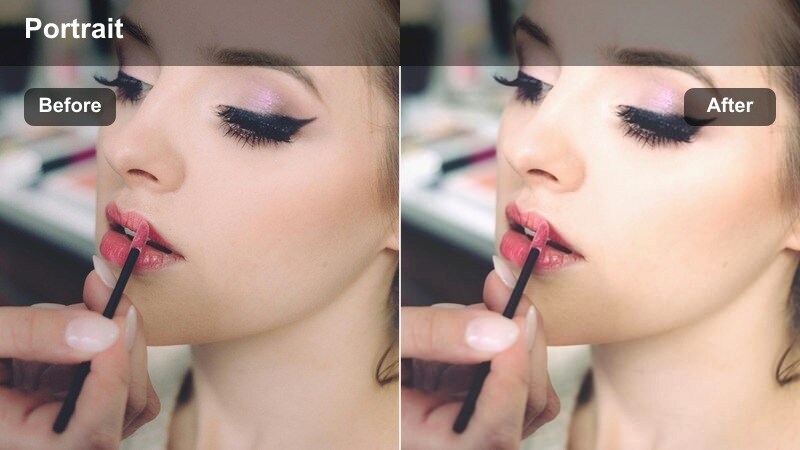
- Effect look: Warm golden tint with softened highlights and a gentle bloom effect around bright edges.
- Best for: Backlit hair-light portraits, dreamy lifestyle shots, and cinematic thumbnails.
- Editing tip: Lower clarity just a touch on the background while keeping micro-contrast on the subject's face for a dreamy yet sharp result.
Golden Backlight Bloom enhances any natural or artificial rim light by adding a warm glow and subtle bloom to bright edges, creating an ethereal, cinematic feel. It is especially useful in Filmora when working with backlit portraits that look too harsh or washed out straight from the camera.
Apply the LUT, then slightly reduce clarity or sharpness on the background while preserving detail on the face using Filmoras masking or adjustment layers. By exposing for the face and gently lowering highlights before grading, you can keep skies and hair detail intact while still enjoying a radiant golden halo around your subject.
Studio and Indoor Portrait Sessions
Candlelit Amber Skin
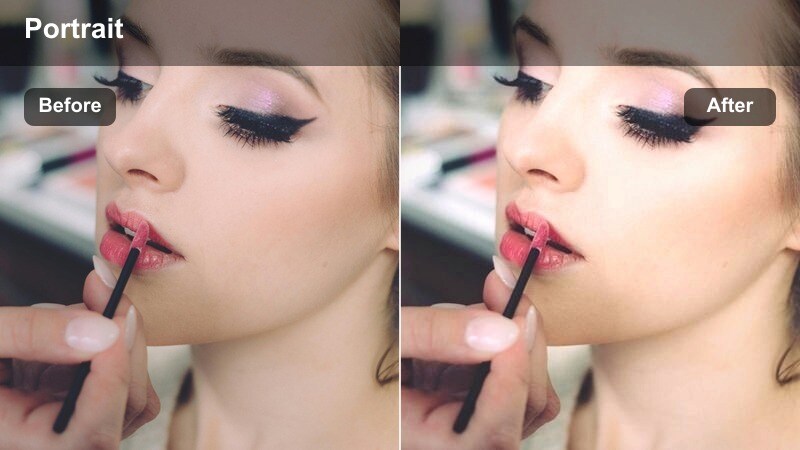
- Effect look: Warm candlelight-inspired tones with rich midtones and slightly softened shadows on skin.
- Best for: Indoor talking-head videos, podcast shots, and cozy studio portraits with controlled lighting.
- Editing tip: Use subtle noise reduction to keep the warm shadows clean while preserving fine skin detail.
Candlelit Amber Skin mimics the glow of a single warm light source, deepening midtones and softening shadow transitions to flatter faces in indoor setups. In Filmora, it is ideal for interviews, podcasts, and creator intros where you want a welcoming, intimate feel without complex lighting rigs.
After you add the LUT, fine-tune exposure and shadow levels so cheeks and jawlines retain shape while remaining smooth. If your camera introduces noise in low light, apply Filmoras noise reduction sparingly in the darker areas to keep the warm ambiance intact while protecting important details like eyes and hair texture.
Studio Caramel Contrast
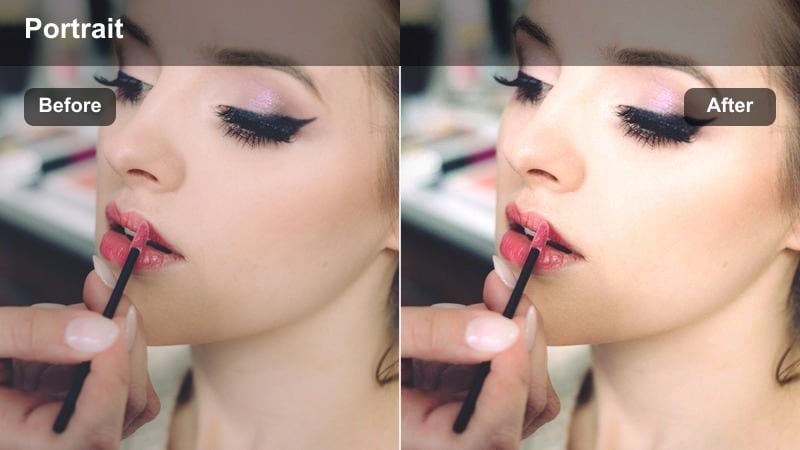
- Effect look: Balanced warm midtones with crisp but controlled contrast, ideal for clean studio setups.
- Best for: YouTube explainers, product-plus-face shots, and brand videos filmed against seamless backdrops.
- Editing tip: Fine-tune shadows to match your backdrop color so the subject pops without harsh edges.
Studio Caramel Contrast delivers a polished, commercial-ready warmth that keeps skin tones caramel and backgrounds clean, making it perfect for branded content. In Filmora, this LUT shines when used on evenly lit studio setups, product demos, and explainers where clarity and professionalism matter.
Apply the LUT, then adjust shadows and blacks to complement your backdrop color so your subject feels naturally separated rather than cut out. If your backdrop carries specific brand hues, use Filmoras HSL tools to protect or slightly desaturate those colors while letting the warm midtone treatment focus attention on the face.
Soft Espresso Shadow
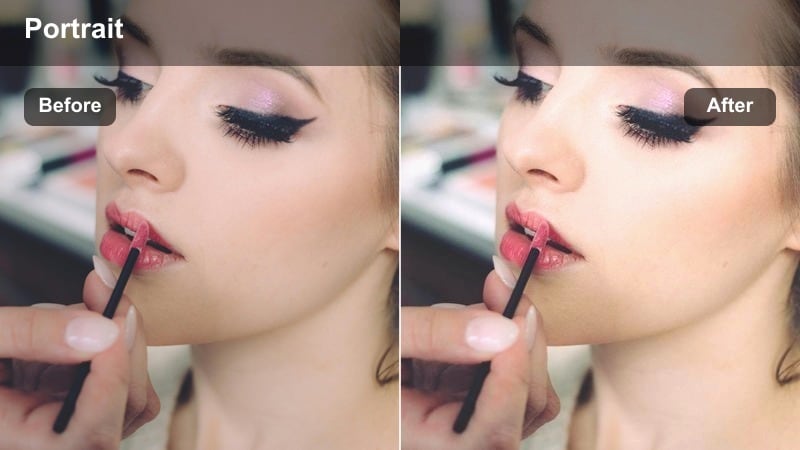
- Effect look: Deep, espresso-like shadows with warm highlights that emphasize facial structure without looking harsh.
- Best for: Moody indoor portraits, character-driven interviews, and short-film close-ups.
- Editing tip: Push blacks just slightly upward if your camera has very contrasty footage to preserve detail in darker areas.
Soft Espresso Shadow is designed for dramatic portraits and narrative interviews where you want richer, deeper shadows paired with inviting warm highlights. It sculpts facial features by adding subtle depth to cheekbones and jawlines, making character-driven content feel more cinematic in Filmora.
Once the LUT is applied, gently lift the black level or reduce contrast if your source footage is already punchy, so important detail is not lost in the shadows. Combine it with thoughtful, directional lighting on set and minor noise reduction on darker regions to achieve a refined, film-like mood that still feels clean and modern.
Urban Night and Neon Portraits
City Sodium Glow
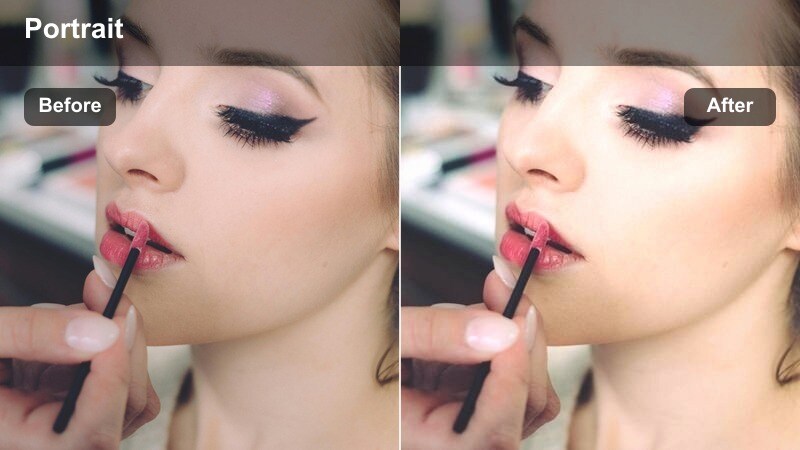
- Effect look: Warm streetlamp-inspired hues with lifted shadows and subtle halation around bright streetlights.
- Best for: Night portraits under urban streetlights, handheld city vlogs, and alleyway character scenes.
- Editing tip: Cool down the background slightly while keeping the subject warm to separate them from the city environment.
City Sodium Glow turns ordinary streetlamp lighting into a stylized, cinematic sodium wash that flatters faces while keeping the city atmosphere intact. In Filmora, it is perfect for handheld vlogs, alleyway portraits, and nighttime B-roll where you want to transform mixed orange lighting into a cohesive, story-ready look.
After adding the LUT, selectively cool your background using color wheels or HSL so buildings and streets lean slightly toward neutral or blue while the subject remains warmly lit. This warm-foreground, cool-background contrast helps your subject stand out, and the subtly lifted shadows prevent night scenes from becoming muddy or underexposed.
Neon Amber Focus
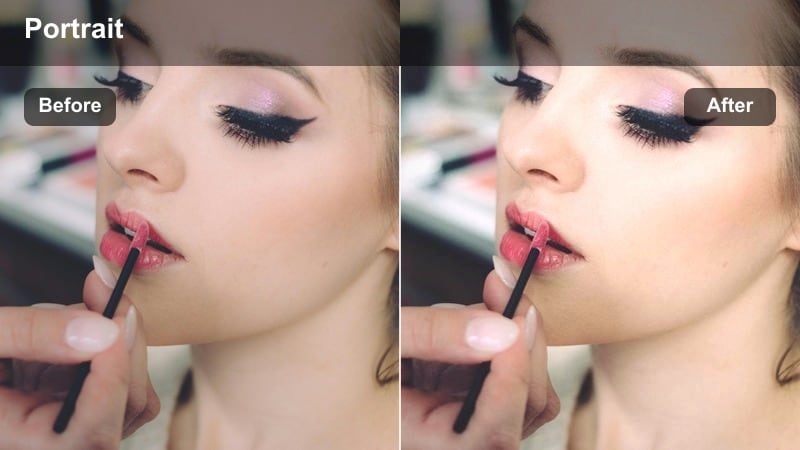
- Effect look: Warm amber skin tones with controlled saturation that keeps neon signs from overpowering the portrait.
- Best for: Neon street portraits, nightlife content, and music video shots in city districts.
- Editing tip: Reduce saturation of magenta and cyan slightly so the face remains the hero amid colorful neon.
Neon Amber Focus is built for nightlife and music-inspired visuals, balancing rich neon color with warm, natural-looking skin tones. In Filmora, it helps you keep the face readable and flattering even when magenta, cyan, and blue signs dominate the frame.
Once you apply the LUT, gently lower saturation in the magenta and cyan channels so the neon becomes a soft, cinematic backdrop rather than a distraction. Pair this with a shallow depth of field on set and a touch of sharpening on facial features in Filmora to ensure your subject stays the clear focal point in every urban night shot.
Underground Warm Film
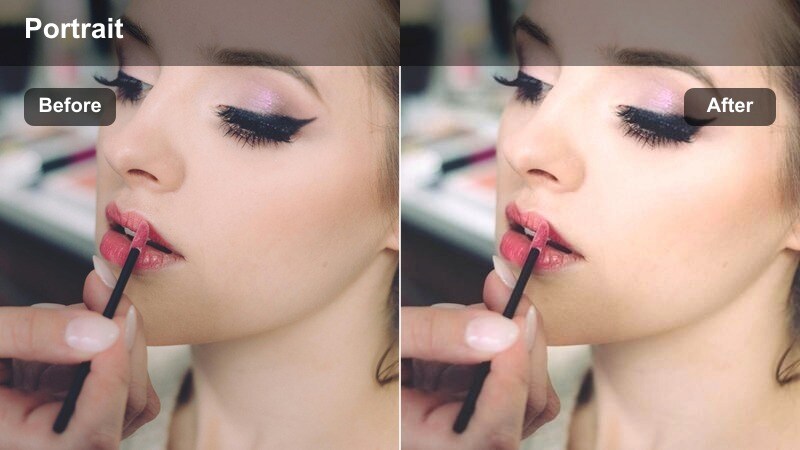
- Effect look: Subtle film-style grain with warm skewed midtones and slightly desaturated city backgrounds.
- Best for: Subway platform portraits, underground parking scenes, and moody narrative vlogs.
- Editing tip: Dial back contrast a little if your camera footage is already high contrast to keep the filmic softness.
Underground Warm Film gives dimly lit locations a nostalgic, movie-like character by adding gentle grain, warmer midtones, and slightly muted backgrounds. In Filmora, this LUT works especially well for subway platforms, tunnels, and parking garages where you want a grounded yet cinematic aesthetic.
After applying the LUT, reduce overall contrast if your camera profile is punchy so that the soft grain and warm palette do not feel overly harsh. Combine it with moderate sharpening and careful noise reduction so the film-style texture remains intentional and flattering on skin rather than looking like digital noise.
Outdoor Storytelling and Lifestyle Portraits
Storyteller Warm Matte
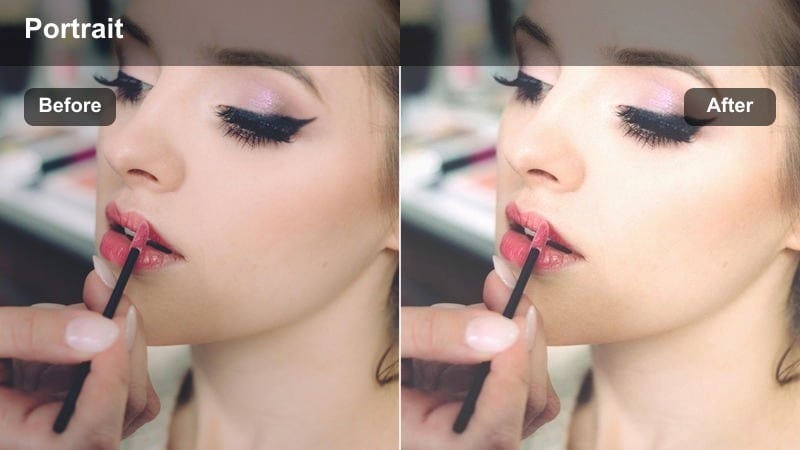
- Effect look: Gentle warm cast with a soft matte curve in the shadows for an editorial, lifestyle feel.
- Best for: Daytime lifestyle portraits, creator self-portraits, and documentary-style vlogs in natural light.
- Editing tip: Lift blacks only slightly if you want a more modern look, or push them higher for a stylized editorial finish.
Storyteller Warm Matte brings a subtle, editorial-style matte finish to outdoor portraits by lifting shadows and adding a smooth warm tone. In Filmora, it is ideal for lifestyle creators and documentary-style vlogs where you want a cohesive, filmic texture across a sequence of naturally lit shots.
Apply the LUT to a hero clip, then copy its settings across your timeline for consistency, making only minor tweaks to exposure per shot. Adjust how far you lift the blacks in Filmora to dial in your preferred look, from a modern, slightly matte result to a more pronounced, fashion-inspired fade that still keeps skin flattering and expressive.
Sun-kissed Travel Frame
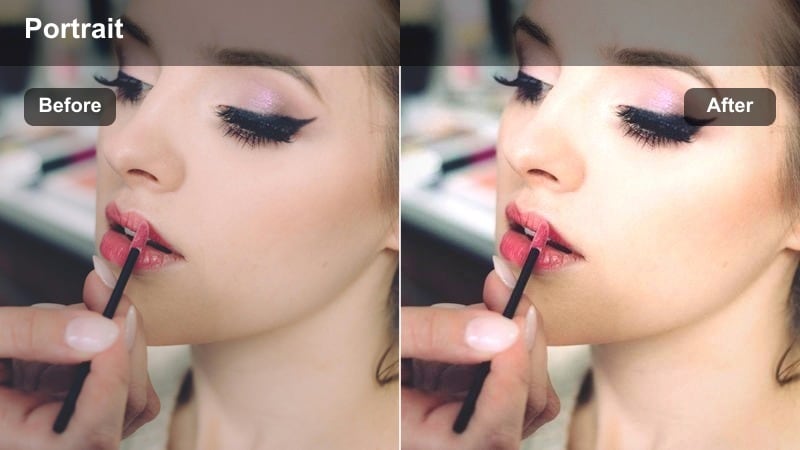
- Effect look: Bright, sun-kissed highlights with warm, slightly saturated skin tones and clear skies.
- Best for: Travel portraits, creator thumbnails, and outdoor reels shot in open shade or direct sun.
- Editing tip: Lower highlights a bit if shooting in hard midday sun to keep detail on cheeks and forehead.
Sun-kissed Travel Frame is designed for bright outdoor locations, enhancing natural sunlight with warm, vibrant skin tones and crisp skies. It is particularly useful in Filmora for thumbnails, travel vlogs, and scenic portraits where you want your subject to pop against a clear, bright background.
After applying the LUT, pull back highlights and whites slightly to avoid clipping on cheeks, forehead, and reflective surfaces, especially from midday shoots. Combine this with a touch of saturation control on blues to keep skies vivid but not oversaturated, ensuring your travel portraits maintain a premium, cinematic feel across platforms.
Heritage Warm Cinema
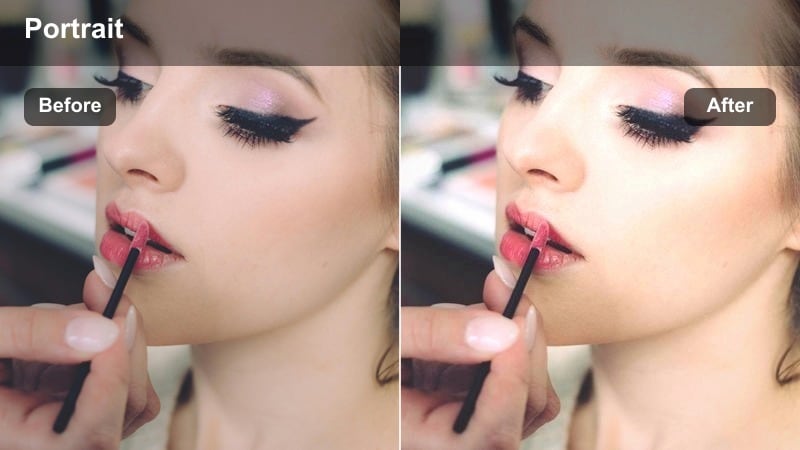
- Effect look: Classic warm cinema palette with gentle contrast and subtle color separation between subject and environment.
- Best for: Story-driven portrait sequences, personal documentaries, and family or heritage-focused content.
- Editing tip: Slightly desaturate background greens or blues so the subject's face and wardrobe remain the narrative center.
Heritage Warm Cinema evokes timeless movie grading, with balanced warmth, mild contrast, and careful separation between subject and surroundings. In Filmora, it is well suited to personal stories, family pieces, and heritage projects where emotional tone is as important as technical polish.
Once you add the LUT, gently lower saturation on background greens and blues so that faces, hands, and key wardrobe elements feel like the center of the frame. For longer narrative sequences, keep white balance consistent across clips and allow only subtle shifts in warmth to support story beats, creating a unified cinematic arc from start to finish.
Tips for Using Portrait Warm Tone Cinematic Lut Filters in Filmora
- Shoot in a flat or neutral picture profile so the Portrait Warm Tone Cinematic LUT filters have more dynamic range and color detail to work with.
- Always white-balance for the subject's skin tone on set, then fine-tune warmth in Filmora instead of trying to fix heavily tinted footage later.
- Adjust exposure and contrast before adding sharpening to avoid crunchy textures on skin under warm, contrasty filters.
- Use a small amount of Filmora's skin smoothing only after color grading, and keep it subtle so natural pores and detail remain visible.
- Match the warmth level across different camera angles by copying filter settings and adjusting only temperature and tint per clip.
- Add a light vignette after applying warm portrait filters to gently frame the subject and reduce distractions near the edges of the frame.
- If teeth or eyes pick up too much warmth, selectively reduce saturation in the yellow and orange channels rather than cooling the whole image.
- Export test clips at your usual social resolution and watch them on a phone to confirm that the warmth still looks natural on smaller screens.
The Portrait Warm Tone Cinematic LUT filter collection in Filmora gives content creators a fast, reliable way to achieve flattering, story-driven portraits without deep color-grading skills.
Experiment with different presets for golden hour, studio, urban night, and lifestyle scenes, then save your favorite combos as reusable looks so every portrait you publish feels consistently cinematic and on-brand.
secure download