

 100% Security Verified | No Subscription Required | No Malware


 ChatGPT
 Perplexity
 Gemini
 Claude
 Grok
Grok
Stormy Teal sits between blue and green with a smoky gray undertone, which makes it feel calm, intelligent, and slightly mysterious. It suggests depth and professionalism without being as cold as pure blue. In videos and graphics, Stormy Teal instantly adds a cinematic, moody polish that works for travel vlogs, branding, intros, and thumbnails that need to stand out while still feeling refined.
For creators and Filmora users, this guide gathers 15 Stormy Teal color palettes with HEX codes you can copy straight into your titles, overlays, and color grading. Use them to design cohesive YouTube channels, social media templates, cinematic cuts, and stylish thumbnails that keep your teal tones consistent across every frame.
In this article
Moody Cinematic Stormy Teal Color Palettes
Harbor Nightframe
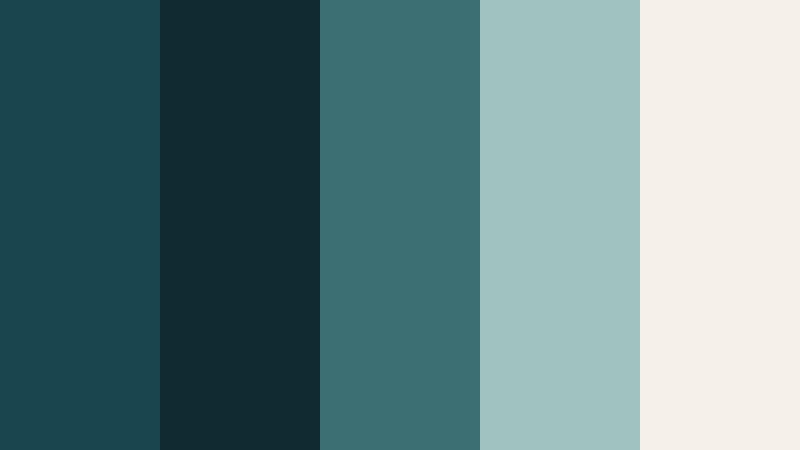
- HEX Codes: #18454e, #0f2a30, #3b6f73, #a0c3c0, #f5f1ea
- Mood: Brooding, cinematic, and quietly intense.
- Use for: Perfect for dramatic travel vlogs, drone shots over cities, and moody documentary intros.
Harbor Nightframe blends deep Stormy Teal with inky blue greens and a soft neutral highlight. It feels like watching a city harbor after rain, with reflections on the water and distant lights in the fog. The darker tones give your footage a serious, filmic base, while the pale beige highlight stops everything from turning too heavy or flat.
Use this palette when you want your videos to feel expensive and intentional. Apply the deeper teals to shadows in your color grade, choose the mid teal for text accents or UI elements, and reserve the light neutrals for titles, lower thirds, and logo lockups. It works beautifully for cinematic intros, cohesive YouTube banners, and thumbnails that promise a moody story rather than a loud clickbait vibe.
Pro Tip: Build a Cinematic Stormy Teal Look in Filmora
To keep a Harbor Nightframe style consistent across an entire project, start by sampling the HEX values from this palette and applying them to your Filmora titles, overlays, and background mattes. Use the deepest teal for your background shapes or subtle vignette layers, and the lightest neutral for main text so your typography stays readable on any shot.
Once you have a base look, save your title and overlay presets in Filmora and reuse them for intros, chapter cards, and end screens. This keeps every video in a series unified around the same Stormy Teal mood, whether you are editing long cinematic travel films or short, vertical social clips.
AI Color Palette
You can also capture this Stormy Teal mood directly from a reference frame. Import a still from your favorite Harbor Nightframe style shot into Filmora and use Filmora's AI Color Palette feature to apply that color balance to every clip in your timeline. This is especially helpful when you shoot on different cameras or in mixed lighting, but want the final edit to share the same teal heavy atmosphere.
Just select your reference clip, then choose the clips you want to match. Filmora automatically transfers the color character, pushing your shadows toward deep teal and balancing highlights so they sit closer to the warm neutrals from this palette. You can dial back the strength if you want a softer grade, or lean in for a dramatic cinematic look.
 secure download

HSL, Color Wheels & Curves
After matching color, refine your Stormy Teal look with HSL, color wheels, and curves. In Filmora, gently shift the cyan and green HSL channels toward teal, then reduce their saturation a bit for that stormy, desaturated finish. Use the color wheels to cool your shadows and keep midtones neutral so skin tones stay natural against the teal backdrop.
If you want more depth, create a soft S curve on the RGB curves panel to add contrast while protecting highlight detail. For a more technical walkthrough, you can follow tutorials that demonstrate advanced grading using color wheels and curves inside Filmora on YouTube, then adapt the steps to anchor your edit around Stormy Teal.
secure download1000+ Video Filters & 3D LUTs
If you prefer a faster route, Filmora's video filters and 3D LUTs make it easy to drop a Stormy Teal mood onto raw footage. Start with a teal and orange, sci fi, or urban night LUT, then adjust intensity until the look sits close to this Harbor Nightframe palette. You can fine tune from there with HSL to nudge the colors into your exact HEX values.
Stack creative filters for glow, grain, or vignettes on top of your grade to reinforce the sense of depth and drama. Save your favorite combination as a custom preset so every new project can instantly inherit the same Stormy Teal identity.
secure downloadRain-Slicked Asphalt
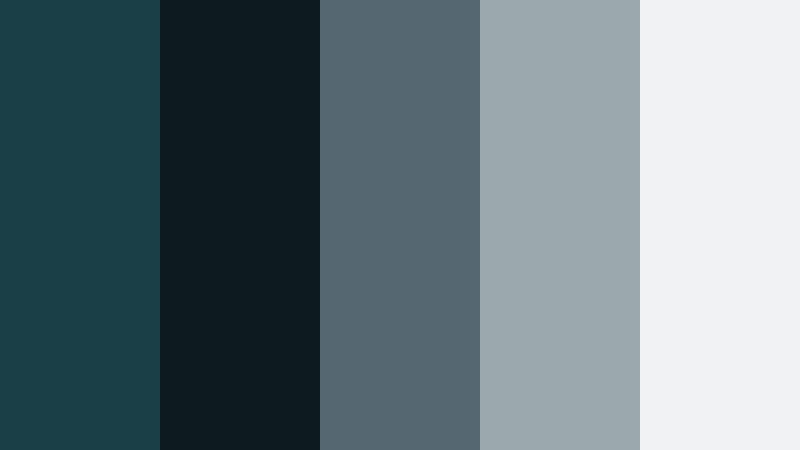
- HEX Codes: #1a3f46, #0d1b20, #556871, #9ba8ac, #f0f2f3
- Mood: Urban, reflective, and slightly futuristic.
- Use for: Works well for tech reviews, cyberpunk-inspired b-roll, and night street photography edits.
Rain-Slicked Asphalt turns Stormy Teal into a city nightscape: deep teal greens, near black shadows, and a range of wet pavement grays. The palette feels sleek and modern, like neon lights bouncing off a freshly rained-on street. The high-key gray keeps captions, icons, and logos readable on top of darker footage.
This is a strong choice for tech content, gadget reviews, or cinematic B roll of streets and cars. Use the darkest tone as a background for titles and end screens, the mid grays for panels and lower thirds, and the light gray for main text. For thumbnails, contrast a cool teal background with bright product photos or portraits to instantly communicate a modern, tech forward brand.
Tidal Noir
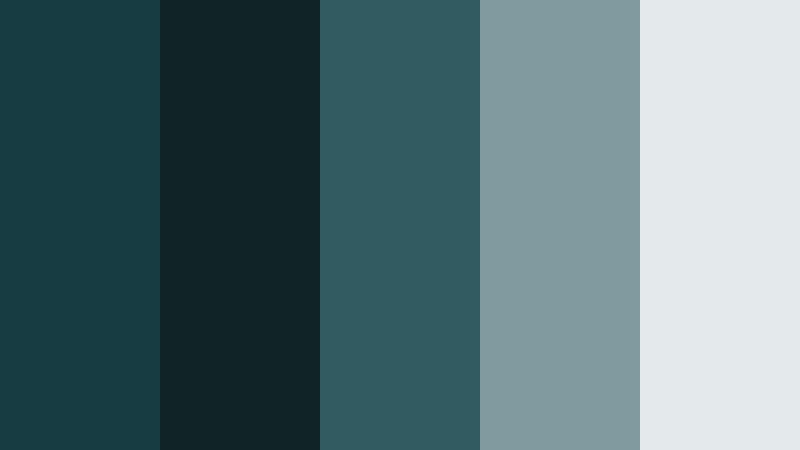
- HEX Codes: #173c42, #102326, #315b60, #7f9ba0, #e4e9eb
- Mood: Mysterious, oceanic, and suspenseful.
- Use for: Strong choice for thriller trailers, mystery documentaries, and atmospheric title cards.
Tidal Noir leans into dark teal blues and muted steel tones, evoking a stormy ocean at dusk. The contrast between the near black green and the misty light gray creates a slow tension that feels perfect for suspenseful storytelling.
Use this palette when you want viewers to sense intrigue from the first frame. Grade your footage toward the deep teals in the shadows, then reserve the pale gray for title cards, chapter headings, and subtitles. For thumbnails and channel art, combine the darker hues as a vignette with a central subject lit in softer, cooler midtones for a moody, noir inspired look.
Submerged Echo
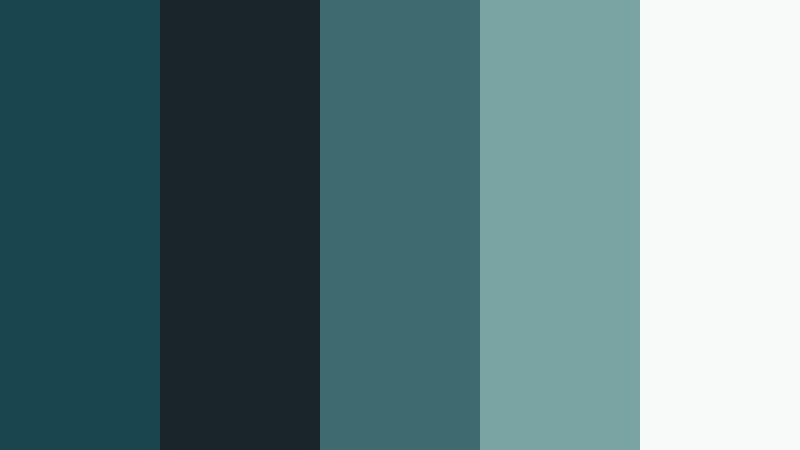
- HEX Codes: #19464e, #1a2529, #3e6b70, #7aa3a4, #f7faf9
- Mood: Immersive, introspective, and cool.
- Use for: Great for underwater footage, slow aesthetic b-roll, and reflective voiceover segments.
Submerged Echo feels like sinking under the surface into a quiet, blue green world. Deep aquatic teals pair with soft, misty highlights to create a calm yet emotionally rich atmosphere. It is cool and controlled, but still inviting rather than harsh.
This palette is ideal for underwater scenes, slow motion b roll, study with me content, or journal style voiceover videos. Use the darker tones for gradients and overlays that frame your subject, while the lighter teal and off white support simple titles and chapter markers. For branding, it works well for wellness, mindfulness, and educational channels that want a thoughtful, modern look.
Industrial Mist
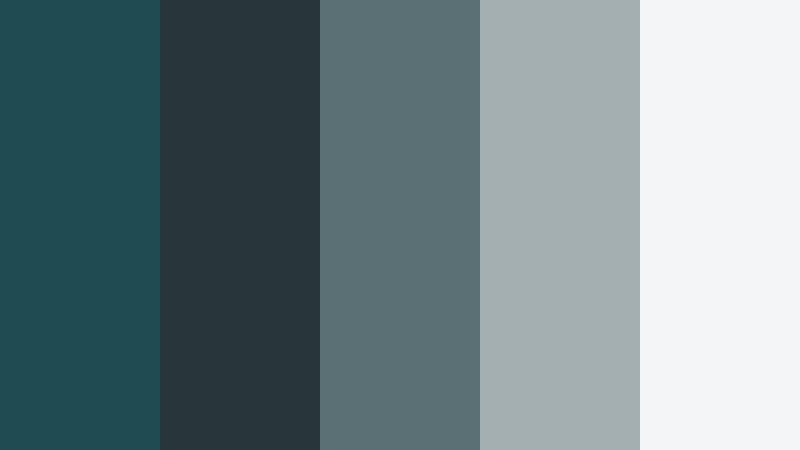
- HEX Codes: #214b52, #28353a, #5b7074, #a3afb1, #f3f5f6
- Mood: Minimal, industrial, and modern.
- Use for: Use in product cinematics, workspace tours, and sleek motion graphics lower thirds.
Industrial Mist pairs Stormy Teal with gunmetal grays and soft concrete whites. It has a clean, industrial edge that feels suitable for architecture, productivity, and tech focused content. The muted tones avoid visual noise and keep attention on your subject or product.
For video, apply the darker hues to your background plates and overlay shapes, and lean on the light gray and white for text, icons, and UI elements. This palette is excellent for modern channel branding, about pages, and minimal thumbnails where you showcase products against cool, understated environments.
Soft Coastal Stormy Teal Color Palettes
Foggy Harbor Dawn
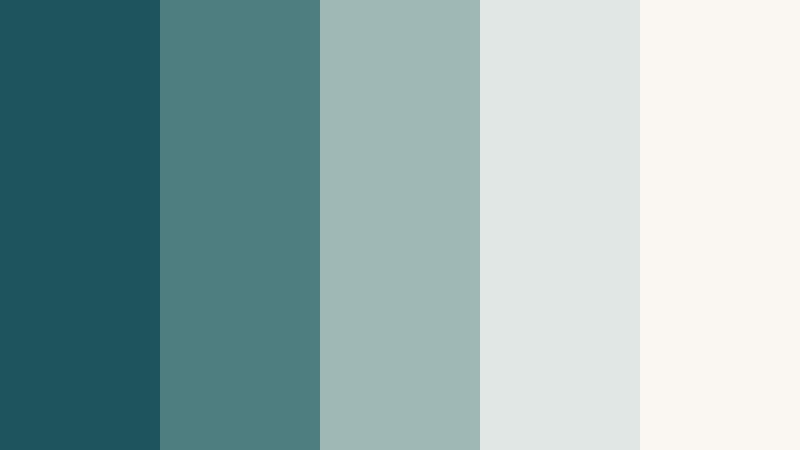
- HEX Codes: #1e555d, #4f7e80, #9fb8b6, #e0e7e4, #faf7f2
- Mood: Gentle, coastal, and quietly hopeful.
- Use for: Perfect for lifestyle vlogs, coastal travel reels, and calming YouTube channel art.
Foggy Harbor Dawn softens Stormy Teal with seafoam midtones and cloudy whites, creating the feel of an early morning by the water. It is serene and fresh without looking washed out, making it great for channels that want calm, friendly visuals.
Use the mid teals for backgrounds and gradient overlays, and keep the paler tones for text and UI. This palette works well for lifestyle vlogs, morning routines, productivity content, and any channel that leans into slow living, coastal travel, or gentle storytelling. For thumbnails, pair soft teal skies with warm, natural imagery to keep things inviting.
Sea Glass Stories
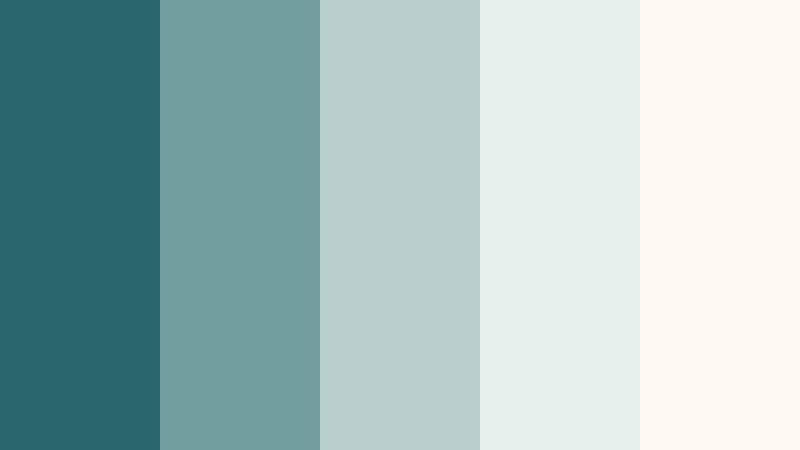
- HEX Codes: #2a666e, #6f9e9d, #b8cfcc, #e8f0ee, #fffaf4
- Mood: Airy, nostalgic, and a bit whimsical.
- Use for: Nice for DIY tutorials, journaling videos, and Pinterest-style shorts with handwritten overlays.
Sea Glass Stories layers Stormy Teal with lighter sea glass greens and soft off whites. It feels nostalgic and slightly dreamy, like a collection of polished glass pieces found on the beach. The palette is light enough for delicate hand drawn graphics and overlays.
Use this for DIY, journaling, scrapbooking, and craft based channels that want a gentle but recognizable color identity. Let the deeper teal anchor your titles and graphic accents, while the pale hues give you clean canvas space for handwritten fonts, stickers, and subtle doodle elements in thumbnails and reels.
Clifftop Overcast
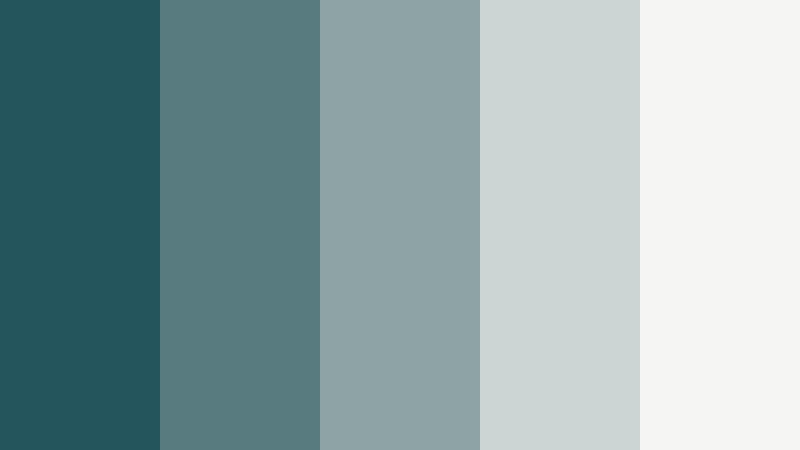
- HEX Codes: #24545c, #577b7e, #8ea3a4, #cdd5d4, #f5f6f4
- Mood: Quiet, windswept, and contemplative.
- Use for: Works for reflective travel monologues, cinematic timelapses, and nature b-roll overlays.
Clifftop Overcast captures muted teals and stone grays that recall a cloudy coastline. The palette is soft but still slightly moody, making it ideal when you do not want your visuals to feel too bright or too dark.
For video, push your landscape footage slightly toward teal in the shadows and keep skies and clouds close to the lighter grays. Use the mid hues for lower thirds and map overlays in travel vlogs, and the palest tone for subtitles and minimalist titles. It is a versatile base for nature, hiking, and mindful travel content.
Driftwood Calm
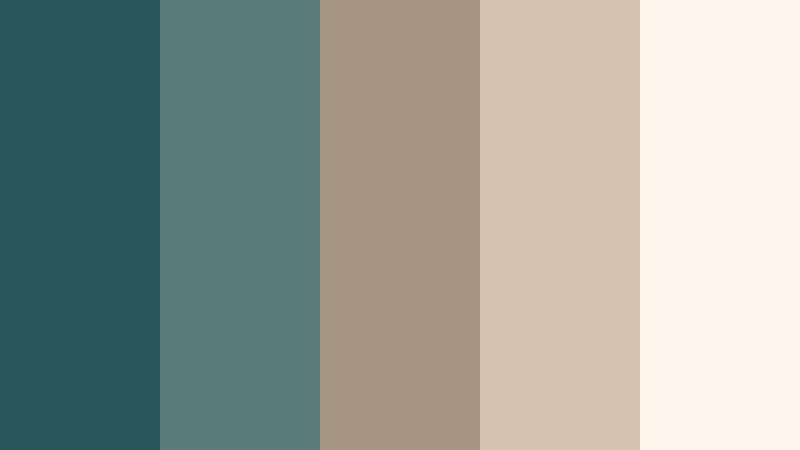
- HEX Codes: #27555b, #5a7c7a, #a89684, #d6c3ae, #fbf5ec
- Mood: Organic, cozy, and grounded.
- Use for: Great for interior tours, home decor lookbooks, and brand stories with a natural feel.
Driftwood Calm brings together Stormy Teal with warm driftwood beiges and sandy creams. The contrast of cool and warm tones creates a coastal cottage aesthetic that feels both relaxed and sophisticated.
Use the teals for accent elements like buttons, dividers, and key typography, and the warm neutrals for backgrounds and product shots. It works especially well in interior design tours, home makeovers, and brand videos for eco friendly or handmade products. For thumbnails, overlay teal titles on top of warm, cozy images to catch the eye without losing the natural vibe.
Misty Marina Fade
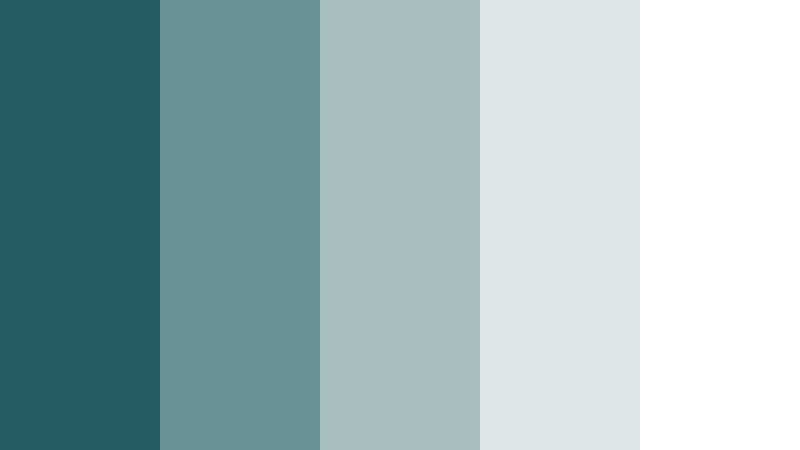
- HEX Codes: #285c63, #699296, #a9bec0, #dde6e5, #ffffff
- Mood: Light, clean, and mildly nautical.
- Use for: Ideal for clean channel branding, minimal title slides, and travel intros with yacht or harbor scenes.
Misty Marina Fade is a breezy, marina inspired mix of Stormy Teal and pale grays fading into white. It offers a light, camera ready look that feels polished but not overly corporate. The balance of teal and neutral makes it easy to integrate with footage in many different lighting conditions.
Choose this palette for clean minimal channels, sailing or harbor related content, and travel intros that want a subtle nautical hint. Use the deepest teal for brand accents and the midtones for subtle background blocks, keeping text mostly in soft gray or white for clarity on thumbnails, end screens, and channel banners.
Bold Modern Stormy Teal Color Palettes
Neon Dockline
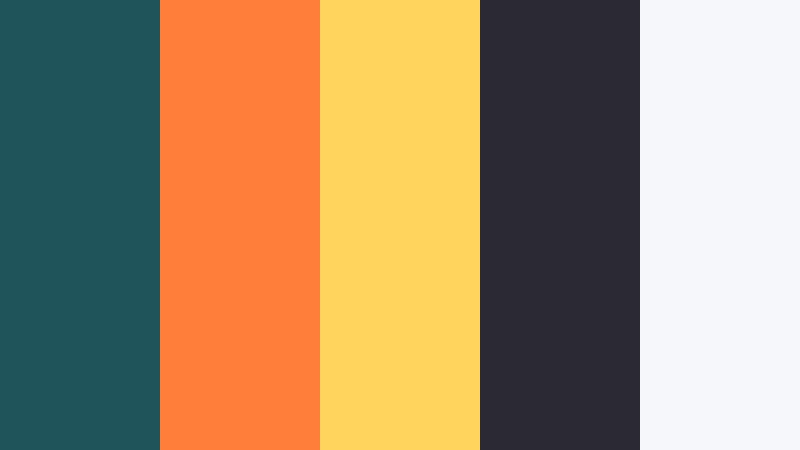
- HEX Codes: #1f545a, #ff7f3a, #ffd55c, #2b2a33, #f6f7fb
- Mood: Bold, energetic, and urban-cool.
- Use for: Great for eye-catching thumbnails, gaming overlays, and high-energy channel intros.
Neon Dockline ignites Stormy Teal with punchy orange and yellow accents over a dark charcoal base. The cool teal stabilizes the palette while the warm neons deliver strong contrast and energy, perfect for content that needs to stop the scroll.
Use teal and dark gray for your base backgrounds and UI frames, and reserve the orange and yellow for calls to action, buttons, and key headline words in thumbnails. This palette shines in gaming intros, energetic vlogs, music edits, and bold social graphics where you want clear hierarchy and dynamic contrast.
Teal Voltage
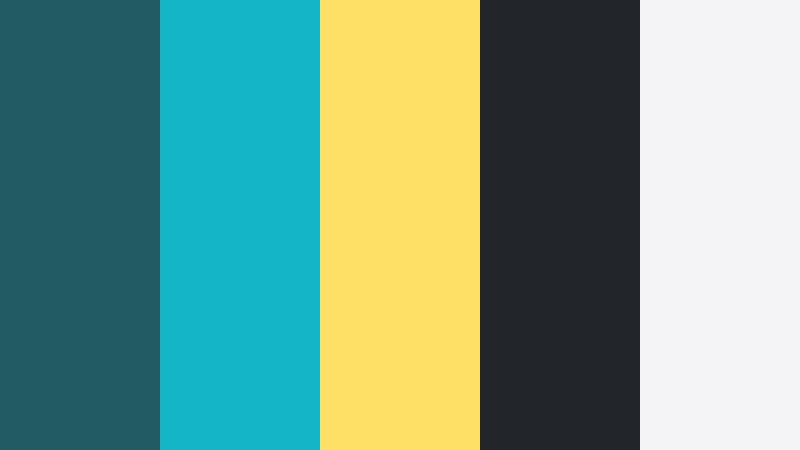
- HEX Codes: #235b62, #13b5c6, #ffe066, #22252a, #f4f4f6
- Mood: Electric, confident, and tech-forward.
- Use for: Perfect for app promos, startup explainers, and motion graphics UI mockups.
Teal Voltage turns Stormy Teal into a future ready brand system. A vivid cyan and bright warm yellow ride alongside deep charcoal and soft off white, giving you everything you need for dashboards, charts, and interface elements that feel alive but controlled.
Use the darkest tone as your background for UI inspired lower thirds, then highlight important metrics, features, or CTAs with the yellow. The bright cyan is ideal for icons, progress bars, and futuristic accents in explainers or product demos. For thumbnails, combine dark backgrounds with glowing teal and yellow lines to suggest tech, speed, and innovation.
Urban Graffiti Teal
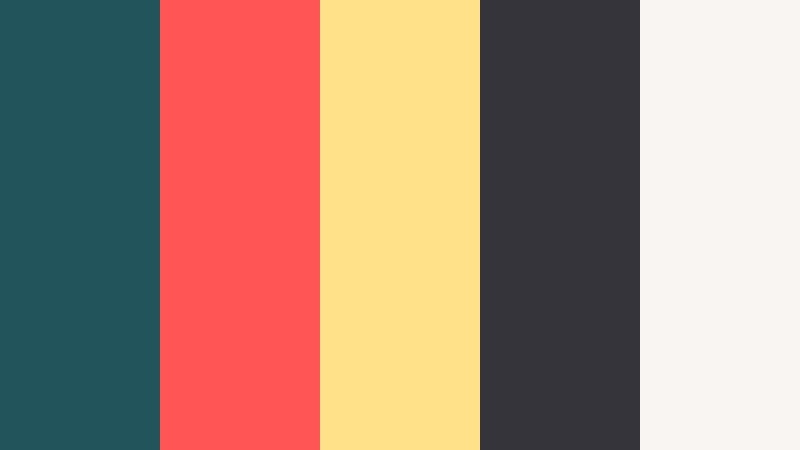
- HEX Codes: #21545b, #ff5555, #ffe28a, #34343a, #f9f5f3
- Mood: Street-smart, edgy, and expressive.
- Use for: Nice for hip-hop edits, dance videos, and bold title cards on shorts or reels.
Urban Graffiti Teal collides Stormy Teal with graffiti style reds and yellows on a dark asphalt backdrop. It feels raw and energetic, like a city wall full of tags and posters. The off white adds just enough softness for legible text and UI.
Choose this palette for dance, music, street photography, or lifestyle content that carries attitude and rhythm. Use teal and charcoal as your main canvas, and throw in flashes of red and yellow for beat drops, transitions, and bold words in your titles. The result is a dynamic, expressive visual identity that works especially well on shorts and reels.
Studio Skyline Glow

- HEX Codes: #21555d, #4f7ad7, #9fd2ff, #181a22, #f2f4ff
- Mood: Sleek, professional, and slightly futuristic.
- Use for: Use in tech reviews, creator studio tours, and modern podcast title sequences.
Studio Skyline Glow blends Stormy Teal with electric blues and crisp near whites over a deep midnight base. It feels like a lit up skyline or a modern studio with RGB lighting, perfect for professional creator content.
Apply the darkest shade for backgrounds and transitions, the teal for brand accents, and the bright blues for highlights on icons, keywords, or waveform animations. It is an excellent choice for podcasts, reaction channels, and studio tours where you want a high production, current look that still feels grounded in a cool teal axis.
Teal Ember Contrast

- HEX Codes: #21565d, #f76b3c, #fbbf77, #262229, #f7f2ef
- Mood: Warm vs. cool, dramatic, and cinematic.
- Use for: Perfect for cinematic trailers, brand reveals, and title cards that need strong emotional impact.
Teal Ember Contrast is a bold teal and orange style palette built around Stormy Teal and fiery ember oranges. Deep charcoal shadows and soft off white highlights complete the cinematic structure, giving you strong contrast and emotional punch.
This is ideal for trailers, brand reveals, and high impact intros. Use teal in shadows and environment overlays, then reserve the oranges for subjects, light flares, and key typography. In thumbnails, place warm subjects against a cool teal background to immediately draw the eye and communicate drama and depth.
Tips for Creating Stormy Teal Color Palettes
Stormy Teal is flexible enough to feel cinematic, coastal, or ultra modern, depending on what you pair it with. A few intentional choices will help you turn raw HEX codes into a consistent visual language for your videos and designs.
- Balance cool and warm tones: combine Stormy Teal with warm neutrals or oranges when you want emotional warmth, and with grays or blues when you want a cooler, more technical mood.
- Protect readability: always test title and subtitle colors on top of your footage. Use light neutrals or white for text over dark teal, and darker charcoal tones over pale teal backgrounds.
- Set one anchor color: let Stormy Teal be the hero shade in your brand, and use accent colors sparingly for CTAs, important words, or interface highlights.
- Match footage and graphics: when grading in Filmora, push shadows and midtones gently toward your chosen Stormy Teal HEX so your overlays, titles, and footage all feel like one palette.
- Control saturation: Stormy Teal often looks more cinematic slightly desaturated. Pull back color intensity in HSL to avoid neon plastic tones unless you want a bold, graphic style.
- Use value contrast in thumbnails: pair very dark teals with bright highlights or skin tones so subjects pop even on small mobile screens.
- Stay consistent across platforms: reuse the same HEX codes for YouTube banners, Instagram covers, and video overlays so viewers instantly recognize your brand.
- Save presets: in Filmora, save your favorite color grades, fonts, and overlay styles as presets so every project automatically follows your Stormy Teal system.
Stormy Teal is one of those rare colors that can be moody, soft, or high energy depending on what you match it with. The palettes above give you ready made combinations and HEX codes for everything from cinematic trailers to cozy decor vlogs and bold tech branding.
Try dropping one of these palettes into your next Filmora project as a simple style guide: pick your main Stormy Teal, your highlight neutral, and one accent color, then reuse them for titles, lower thirds, transitions, and overlays. With a few saved presets, your entire channel can carry a unified Stormy Teal identity without extra effort.
As you experiment, adjust saturation and contrast to fit your footage and niche, but keep your core HEX values steady. Over time, viewers will start to associate that specific teal tone with your name, whether they are watching on YouTube, TikTok, or any other platform.
secure download