

 100% Security Verified | No Subscription Required | No Malware


 ChatGPT
 Perplexity
 Gemini
 Claude
 Grok
Grok
Urban reels live or die by mood. Harsh neon signs, rainy sidewalks, subway shadows, and golden hour reflections all need the right filter to feel cinematic instead of flat and noisy.
This guide breaks down a complete set of urban street filters for Reels creators and street videographers using Filmora, so you can quickly choose the right look, style your city footage, and keep your edit workflow fast for Instagram Reels street content and urban reels.
In this article
Gritty Neon Street Looks
Neon Noir Grit
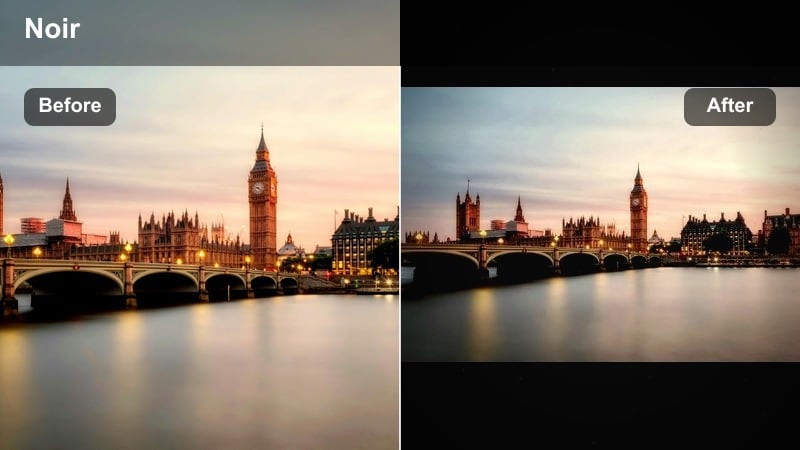
- Effect look: High contrast, crushed blacks, sharpened details, and boosted neon signs with deep magenta and cyan for a moody night-city vibe.
- Best for: Night street reels with neon store fronts, rain reflections on asphalt, traffic lights, and handheld shots around bars or food trucks.
- Editing tip: Lower exposure slightly, then raise contrast and clarity; mask faces or skin with a softer tone curve so they are not oversaturated by neon colors.
Neon Noir Grit is built for tense, cinematic city nights where light sources are small but intense. In Filmora, this filter deepens shadows, pumps up neon signage, and sharpens fine details like raindrops and asphalt texture so your night reels feel bold instead of muddy.
Apply it to clips of rain-soaked sidewalks, traffic lights, and glowing storefronts, then fine-tune exposure with Filmora color controls. Use masks or adjustment layers around faces to gently soften contrast and saturation on skin, keeping people natural while the city around them goes full neon drama.
Pro tip: Control neon bloom for cleaner night reels
In Filmora, apply the filter first, then soften highlights with a slight highlight reduction so neon signs glow without clipping to pure white.
Add a light vignette to pull attention to your subject and keep messy backgrounds from distracting viewers who are watching your Reels on small phone screens.
Let Filmora’s AI guide your urban color choices
Filmora’s AI tools can quickly balance exposure, contrast, and color before you apply any urban street filter, so your reels start from a solid base grade. This makes it easier for bold looks like Neon Noir Grit to stay clean instead of crushing detail.
Use AI Color Correction or auto-enhance first, then layer these street-focused filters on top to keep skin tones natural while your city backgrounds gain style and mood.
 secure download

Preview street filters in real time on your reels
Filmora lets you preview filters live in the viewer, so you can scrub your Reels timeline and instantly see how each urban look reacts to motion and lighting changes. This is ideal for night footage where neon intensity shifts from clip to clip.
Test gritty neon, daytime grit, and cinematic tones side by side, then save your favorite combinations as custom presets tailored to your city and shooting style.
secure downloadCombine filters with LUTs for advanced urban grades
If you already use a street reel LUT or cinematic urban LUT pack, you can stack Filmora filters on top for quick finishing touches like contrast tweaks and color accents. This is great when you want to keep a consistent LUT base but still add unique character to each reel.
Keep LUT intensity moderate, then apply one of these filters at a lower strength to refine your final look without overprocessing the image.
secure downloadSubway Contrast Push
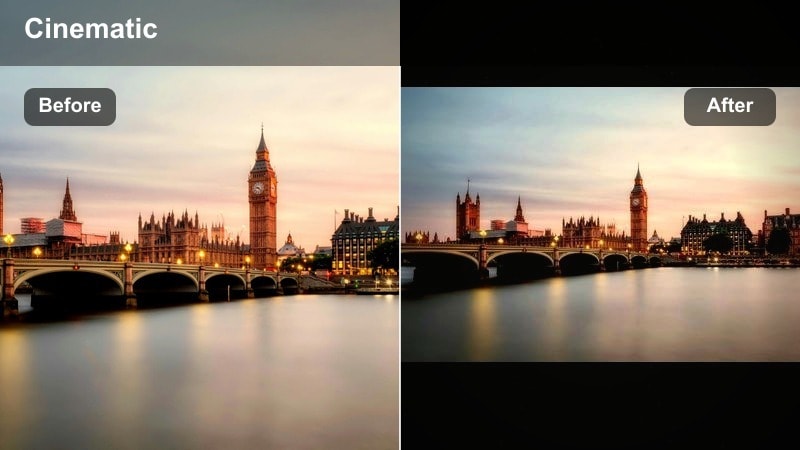
- Effect look: Punchy contrast, desaturated backgrounds, and neutral mids that emphasize tunnel lines, metal textures, and fluorescent lights.
- Best for: Subway platforms, train interiors, escalators, and underground walk-through shots where geometry and patterns matter more than color.
- Editing tip: Reduce saturation overall, then bring back only one accent color like yellow or red using HSL to create a graphic, editorial feel in the reel.
Subway Contrast Push is designed to sculpt light and shadow in tight underground spaces. In Filmora, it boosts structure in tunnel walls, rails, and platform edges while pulling color back slightly so your compositions feel graphic and intentional.
Apply it to moving train shots, escalator rides, and walking POVs, then use Filmora HSL controls to isolate one strong accent color like a safety line or train door. This selective color approach turns ordinary commutes into stylized, editorial Reels that stand out in the feed.
Pro tip: Use leading lines to enhance tension
Compose shots so rails, ceilings, and platform edges converge toward the subject, then apply this filter to amplify depth and perspective.
Trim clips tight around movement like train doors closing or people entering frame to keep your urban reels fast-paced and gripping.
Rainy Asphalt Glow
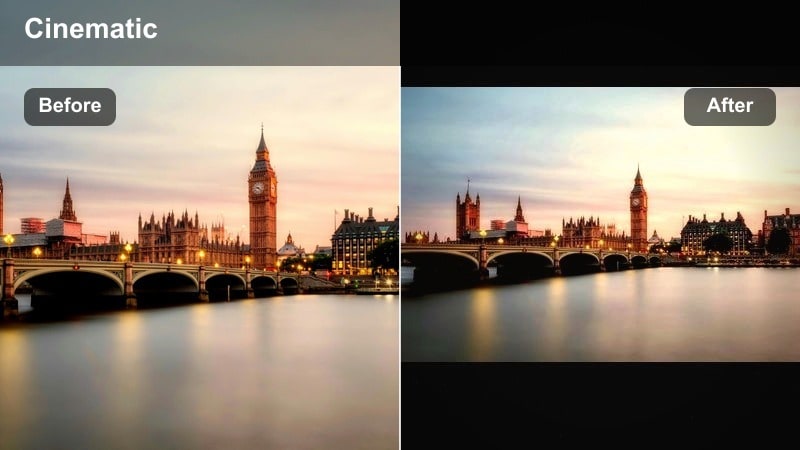
- Effect look: Soft halation around lights, lifted shadows, and saturated reflections in puddles with a cooler blue-teal cast.
- Best for: Rainy street walks, car light streaks, crosswalks at night, and slow-motion shots of footsteps in puddles for poetic urban reels.
- Editing tip: Shoot slightly underexposed to save highlights, then use the filter and add a subtle glow or blur in Filmora to enhance reflections without losing detail.
Rainy Asphalt Glow is all about turning wet streets into painterly light pools. In Filmora it adds gentle bloom to headlights, traffic signals, and shop lights, while lifting shadows enough that details in the pavement and puddles stay visible.
Use it on slow-motion steps, car passes, and umbrella shots, then add Filmora glow or Gaussian blur on a low setting to emphasize reflections. Keep your exposure slightly dark before grading so highlights have room to breathe once the glow and saturation kick in.
Pro tip: Mix speed ramps with reflective shots
Alternate between slow-motion steps through puddles and normal speed traffic shots, using this filter to keep all clips visually unified.
Add subtle sound design like rain and city ambience under your music so the visuals and filter mood feel fully immersive on Reels.
Daytime City Grit and Contrast
Hardlight Crosswalk Pop
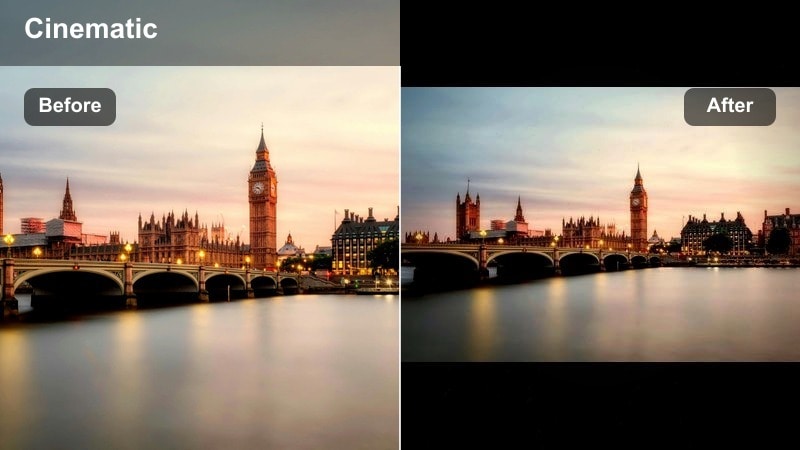
- Effect look: Crisp whites, strong midtone contrast, and boosted local clarity to make crosswalk lines, shadows, and clothing details pop.
- Best for: Midday city walks, busy crosswalks, street fashion reels, and fast-paced B-roll of shoes, signage, and street textures.
- Editing tip: Turn down overall saturation slightly, then selectively increase saturation for brand colors or outfit accents to keep the street around your subject subdued.
Hardlight Crosswalk Pop is optimized for harsh sun and hard shadows that usually look unflattering on camera. In Filmora, it cleans up whites, sharpens edges, and gives crosswalk stripes, long shadows, and fashion details a strong graphic punch.
Apply it to walking shots, outfit close ups, and moving B roll of signage. Lower global saturation a touch, then raise saturation only for your brand or outfit colors so your subject stands out while the city background stays controlled and stylish.
Pro tip: Use shadows as part of your composition
Frame long shadows and crosswalk stripes as patterns, then use this filter to sharpen their edges for more visual rhythm in short Reels.
Cut on motion such as footsteps or passing cars to keep the crosswalk sequence dynamic while the filter holds a consistent visual style.
Concrete Film Soft
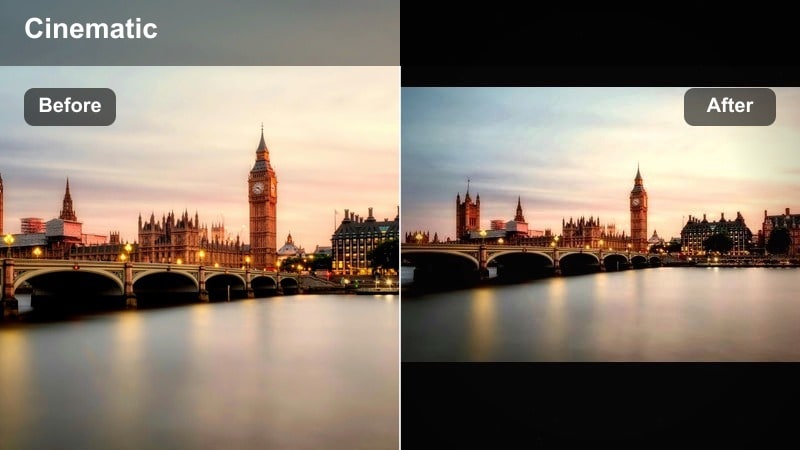
- Effect look: Muted colors, gentle contrast, and a subtle film-like softness that tames harsh concrete and midday skies.
- Best for: Vlogs, talking-to-camera reels in the city, skate spots, and walking tours where you want a relaxed, cinematic documentary feel.
- Editing tip: Reduce sharpness slightly after applying the filter, then warm midtones a bit to keep skin looking natural while buildings stay neutral.
Concrete Film Soft is a great base for creators who want cinematic, but not overdone, daytime city visuals. In Filmora, it rolls off contrast, mutes loud colors, and adds a hint of softness that feels like subtle film diffusion.
Use it across vlog A roll and B roll so your storytelling feels cohesive. After applying, nudge down sharpness and push midtones slightly warm; this keeps skin friendly and natural while concrete, glass, and sky remain calm and understated.
Pro tip: Balance talking shots with B-roll
Use this filter on both your A-roll and B-roll to avoid jarring visual shifts, then intercut short texture shots of concrete, signs, and traffic.
Keep exposure slightly on the darker side so the film softness does not wash out details, especially on overcast days.
Market Hustle Warm
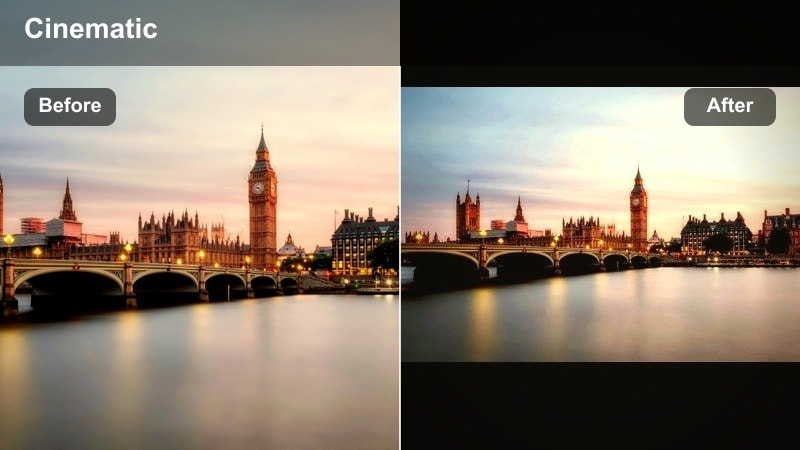
- Effect look: Warm midtones, rich reds and yellows, and a gentle contrast curve that adds life to street markets and sidewalk vendors.
- Best for: Street food reels, market walks, outdoor vendors, and any urban scene where people, color, and motion are the focus.
- Editing tip: Use slightly faster shutter speeds for crisp movement, then apply this filter and subtly brighten midtones so faces and food stand out in busy frames.
Market Hustle Warm is tuned for crowded, colorful scenes packed with people and details. In Filmora it adds warmth and richness to reds, yellows, and skin tones, bringing food stalls and vendor interactions to life without blowing out highlights.
Apply it to handheld walkthroughs, closeups of food, and money changing hands. Use a faster shutter while shooting, then in Filmora lift midtones slightly so faces and key subjects stay bright and readable amid the chaos of the market.
Pro tip: Guide the eye in busy frames
Place your subject on thirds and slightly brighten their exposure with Filmora keyframing or selective adjustments so they stand out in the crowd.
Layer quick, three to five frame cutaways of food, money changing hands, and signage to keep energy high while the warm filter ties everything together.
Cinematic Urban Storytelling Tones
Teal Orange City Cinema
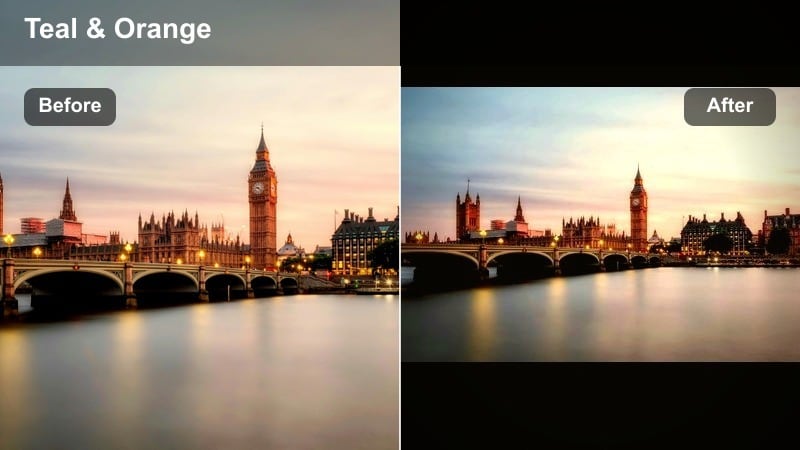
- Effect look: Cinematic teal shadows with warm orange highlights that separate skin tones from cool city backgrounds.
- Best for: Character-driven reels, fashion walks, music promos, and narrative urban reels where the subject must pop from the environment.
- Editing tip: Dial the filter strength back slightly if skin starts to look too orange, and keep white balance neutral so buildings do not shift to unnatural colors.
Teal Orange City Cinema delivers the classic blockbuster color split in an urban context. In Filmora, it pushes shadows towards teal and warms highlights, giving skin a flattering glow while concrete, glass, and sky fall into cooler tones behind your subject.
Use it for hero shots, music performances, and walk-and-talk sequences where separation from the background is key. Keep your white balance neutral and adjust filter intensity until faces look rich but not cartoonish, then fine-tune saturation in Filmora if any colors feel too aggressive.
Pro tip: Use depth for cinematic separation
Shoot with foreground elements like railings or cars slightly out of focus, then apply this filter to push cool tones into the background and foreground.
Combine with Filmora’s subtle blur or depth-of-field effects to reinforce separation between your subject and the city around them.
Muted Urban Drama
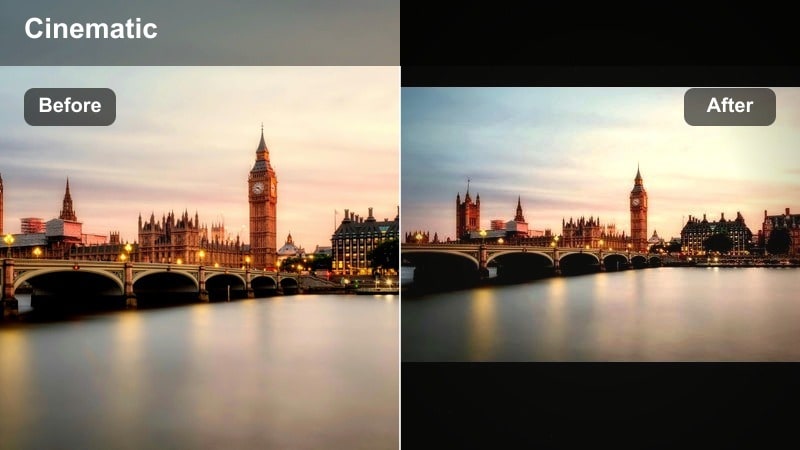
- Effect look: Desaturated colors, soft contrast, and cool shadows that give city streets a serious, dramatic tone.
- Best for: Narrative reels, moody B-roll sequences, street poetry voiceovers, and cinematic travel diaries focused on mood instead of brightness.
- Editing tip: Trim color noise in the shadows after applying the filter, and keep movement slow or stabilized so the muted palette feels intentional and composed.
Muted Urban Drama strips away bright color so your audience focuses on composition and emotion. In Filmora it cools shadows, softens contrast, and gently desaturates the image, turning busy streets into quiet, cinematic stages.
Apply it to slow push-ins, locked-off frames, and reflective moments paired with voiceovers. Use Filmora’s noise reduction or color noise controls to clean up darker areas and lean into slower camera moves so the subdued palette reads as deliberate, not dull.
Pro tip: Pair with slower pacing and sound design
Use longer shots, gentle push-ins, and holding frames a little longer than usual to let the muted tones sink in.
Add subtle ambient sounds like traffic hum, footsteps, and wind to match the calm, introspective feeling of the filter.
Golden Hour Highline
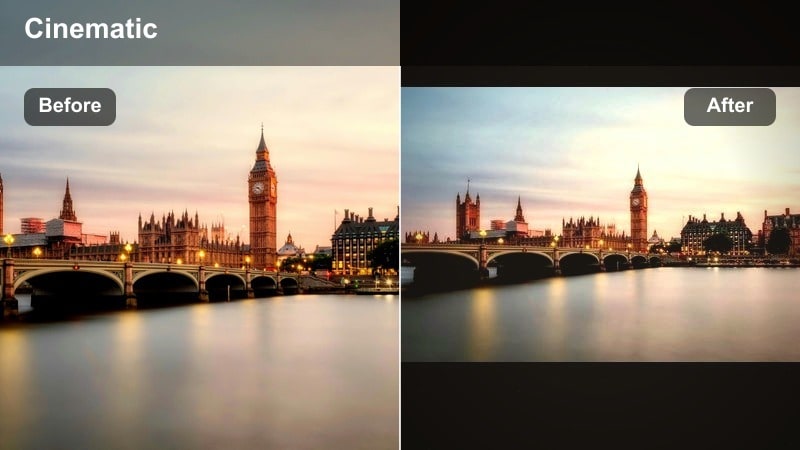
- Effect look: Warm highlights, soft bloom, and slightly lifted blacks that make sunset light over rooftops and parks feel dreamy.
- Best for: Rooftop reels, skyline walks, dates, and lifestyle reels filmed during golden hour with long shadows and low sun.
- Editing tip: Expose for the sky, then apply this filter and gently raise the shadows to keep your subject visible while preserving the sun’s warm glow.
Golden Hour Highline is built to maximize the magic of low-angle sun over the city. In Filmora, it enhances warm highlights, adds a touch of bloom, and lifts blacks for a soft, inviting feel that suits couples, lifestyle, and rooftop reels.
Expose slightly for the sky in-camera, then in Filmora raise shadows and tweak contrast after applying the filter so faces stay visible without losing the gradient and glow in the clouds. Slow, stable camera moves pair especially well with this dreamy look.
Pro tip: Shoot into the sun for silhouette drama
Frame your subject against the skyline with the sun backlighting them, then let this filter bloom highlights for a dreamy halo effect.
Use slow camera moves and match them to the tempo of your audio track so the golden hour mood feels smooth and intentional.
Social-First Urban Reels Filters
Creator Neutral Clean
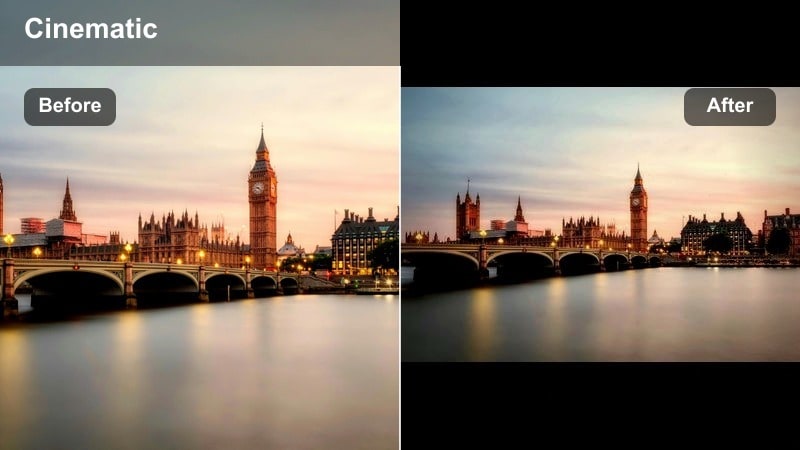
- Effect look: Balanced contrast, natural colors, and subtle sharpening tailored for vertical Reels with faces and text on screen.
- Best for: Talking reels, quick tips, city-based storytelling, and mixed clips where you combine urban B-roll with on-camera explanations.
- Editing tip: Keep saturation natural and slightly lift exposure so faces are clear on mobile screens, then add text overlays with high contrast against the background.
Creator Neutral Clean is your everyday workhorse filter for social-first content. In Filmora, it adds light sharpening and balanced contrast without pushing color too far, giving you a polished but flexible look designed for vertical viewing.
Apply it across your whole Reel when mixing A roll city commentary with B roll. Lift exposure a bit to make faces pop on small screens, and then use Filmora titles or subtitles with strong contrast colors so your on-screen text is readable at a glance.
Pro tip: Design for small screens first
Keep your subject centered or slightly off-center, leaving safe space for subtitles and captions above or below them.
Use this filter across all clips in the reel so viewers focus on your message and storytelling rather than sudden color or contrast changes.
Vertical Grain Stories
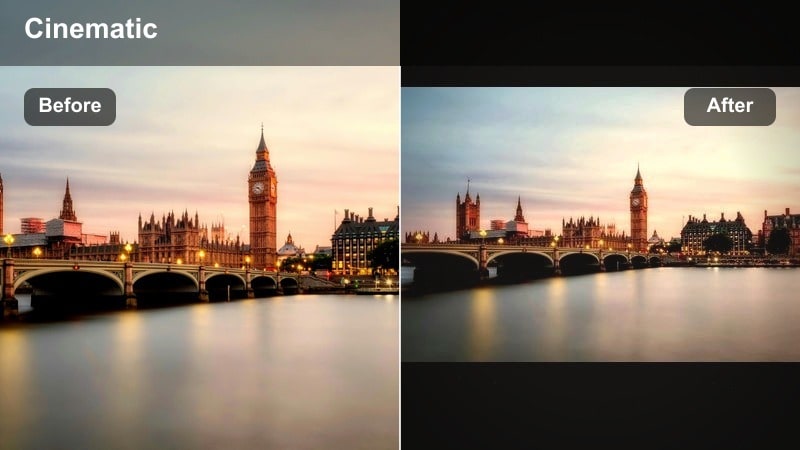
- Effect look: Soft contrast with a touch of film grain and subtle fade in blacks to mimic vertical film scans of city life.
- Best for: Street diaries, handheld POV reels, behind-the-scenes content, and lo-fi storytelling with a nostalgic city vibe.
- Editing tip: Keep clips short and handheld, then apply the filter and enable only a light amount of grain so compression on Reels does not make footage look noisy.
Vertical Grain Stories adds a nostalgic, analog layer to your handheld street footage. In Filmora it softens contrast, fades blacks slightly, and introduces a fine film grain that feels like a scanned diary or mini documentary.
Use it on POV walks, behind-the-scenes snippets, and quick street observations. Keep the grain level low so Instagram compression does not exaggerate noise, and let natural camera shake and imperfections stay in to enhance the authentic, diary-style feel.
Pro tip: Embrace imperfections for authenticity
Keep small camera shakes, focus pulls, and incidental details like passing strangers to reinforce the documentary feeling of the filter.
Layer diary-style captions or time stamps and let the grain and faded blacks tie the entire reel together visually.
Reels Hype Cut
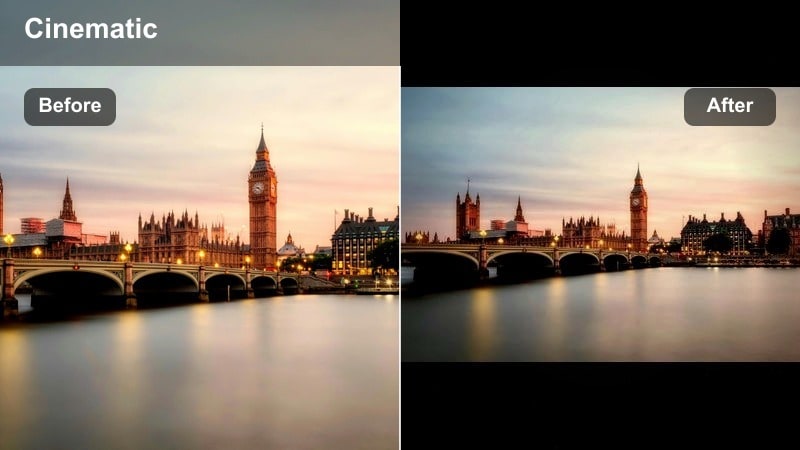
- Effect look: High saturation, bright highlights, and fast-feeling contrast that makes movement and transitions feel more energetic.
- Best for: Hype edits, skate reels, parkour, dance videos, and fast city cutdowns synced tightly to music.
- Editing tip: Apply the filter after rough cutting, then tweak brightness on the highest-motion clips to avoid clipping while still looking bold and dynamic.
Reels Hype Cut is tuned for speed, motion, and impact. In Filmora it boosts saturation and adds snappy contrast, so each cut and transition feels more intense, perfect for skate, dance, and parkour edits.
Do your rough cut first, sync to the beat, and then add this filter so you can adjust exposure clip by clip where highlights risk clipping. Combine with speed ramps, motion blur, and whip transitions in Filmora to fully match the energetic visual tone.
Pro tip: Cut to the beat with visual accents
Sync clips to snare hits or bass drops, using camera whips, jump cuts, or speed ramps to match the aggressive look of the filter.
Sprinkle in a few slower, detailed shots to give viewers a breather, but keep the same filter so the reel still feels cohesive from start to finish.
Tips for Using Urban Street Reels Filter Filters in Filmora
- Shoot with consistent white balance on location so your urban street filters for reels apply evenly across all clips.
- Leave a little headroom in exposure, especially at night, to avoid clipping neon signs when you boost contrast with gritty filters.
- Match your filter choice to the story of the reel, using warmer looks for lifestyle content and cooler, muted tones for serious or reflective pieces.
- Export at the highest quality Instagram Reels supports so that grain, shadows, and subtle color shifts from your filters remain clean after compression.
- Use Filmora adjustment layers to apply the same urban filter across multiple clips, keeping your whole reel visually consistent.
- Combine filters with Filmora speed ramps, transitions, and sound design so the pacing of your reel matches the mood of the grade.
- Save your favorite urban combinations as custom presets in Filmora to speed up grading future street reels.
- Test your reel on a phone screen before posting to ensure contrast, text, and skin tones look right in real mobile viewing conditions.
Well-chosen urban street filters can transform everyday sidewalks, crosswalks, and skylines into cinematic reels that hold attention in the feed.
Use Filmora to test, layer, and refine these looks until you have a small set of go-to presets that match your city, your style, and your pace of editing for Instagram Reels street content.
secure download