

 100% Security Verified | No Subscription Required | No Malware

This Urban Street Minimal Color LUT filter collection is designed for content creators who want clean, modern city visuals without overdone color grading.
Use these subtle filters to keep your urban footage neutral, polished, and cinematic while preserving natural skin tones and authentic street atmosphere.
In this article
Soft Dawn Commute Streets
Soft Gray Crosswalk
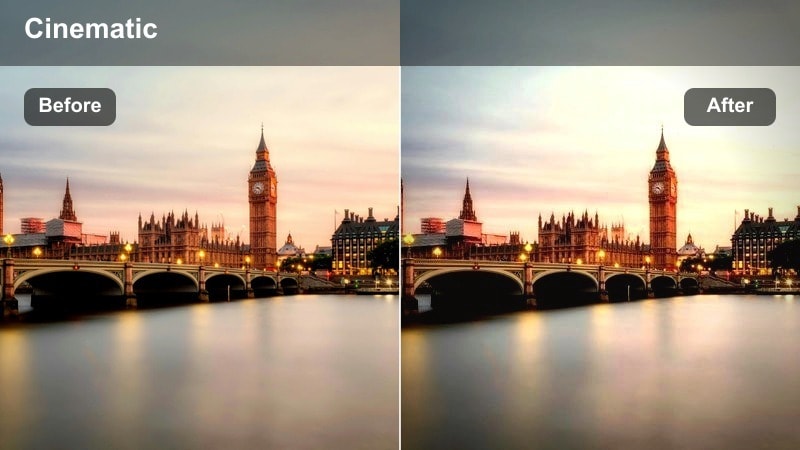
- Effect look: Muted contrast with soft shadows for a calm, early-morning street feel
- Best for: Quiet city B-roll of crosswalks, sidewalks, and subtle motion before rush hour
- Editing tip: Lower saturation a touch more on greens and yellows to keep signage from pulling focus.
Soft Gray Crosswalk gives your dawn commute clips a neutral, low-key mood by gently flattening contrast and cooling off bright colors. It is ideal when you want the structure of the street and the flow of pedestrians to read clearly without bold hues or hard shadows stealing attention.
In Filmora, drop this LUT onto your early-morning crosswalk or sidewalk shots, then slightly lift shadows so building details remain visible. Use basic color controls to pull back saturation in greens and yellows, keeping traffic lights and signage from overpowering your frame while you maintain realistic skin tones.
Let Filmoras AI Keep Your Urban Palette Minimal
Combine these Urban Street Minimal Color LUT filters with Filmoras AI color tools to maintain a consistent, understated palette across your entire timeline. The AI engine analyzes your reference shot and matches the look on neighboring clips, saving you from manual adjustment on every cut.
This is especially useful when your city footage comes from multiple cameras or different streets and times of day. A single minimal LUT plus AI color matching can unify the whole project so your vlog or montage feels like one clean, cohesive story.
 secure download

Preview Urban Street Minimal Filters in Real Time
Filmora lets you hover over each filter in the library and preview how it transforms your clip before applying it. This makes it easy to test different levels of minimalism on the same crosswalk, alley, or rooftop shot without constantly undoing changes.
By comparing looks in real time, you can quickly decide whether a softer, pastel LUT or a cooler, more muted option better fits the mood of your current sequence and keeps your visual style consistent.
secure downloadMix Filters and LUTs for Consistent City Branding
Use these minimal filters as a fast starting point, then layer additional LUTs or manual adjustments when you need finer control. In Filmora, you can combine a base Urban Street Minimal Color LUT with small tweaks in exposure, contrast, and color wheels to lock in a signature city look.
Once you have a combination that matches your channel identity, save it as a custom preset. That way, every new street vlog, montage, or B-roll sequence can start from the same clean baseline and stay on-brand with just a couple of clicks.
secure downloadPastel Skyline Minimal
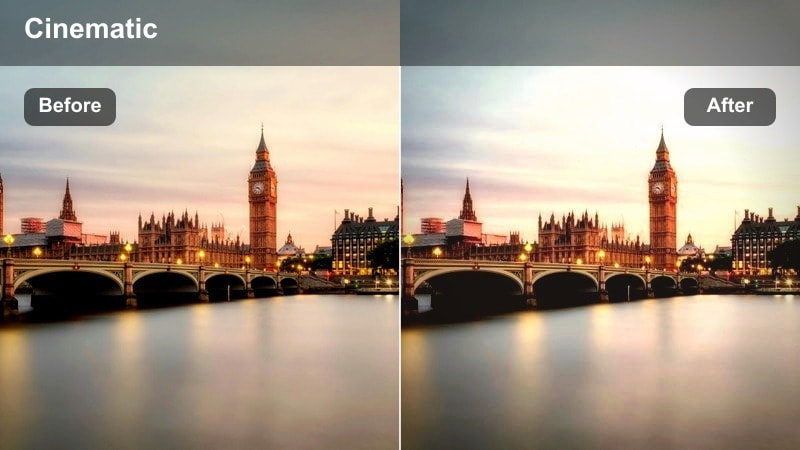
- Effect look: Soft pastel blues and desaturated oranges for understated skyline shots
- Best for: Rooftop scenes, skyline time-lapses, and establishing shots in soft morning light
- Editing tip: Dial back clarity slightly to avoid harsh edges on distant buildings and keep the image dreamy.
Pastel Skyline Minimal smooths out strong color differences in your skyline footage, turning bright sunrises into soft blends of blue and muted orange. It is perfect for opening shots, rooftop B-roll, or time-lapses where you want an airy, modern mood without heavy saturation.
In Filmora, apply this LUT to your skyline clips, then reduce clarity or sharpness just a bit so distant buildings do not look overly crisp. Slightly underexpose the sky before grading, then let the filter preserve gradient details and give your city intros a dreamy but controlled color palette.
Quiet Station Platform
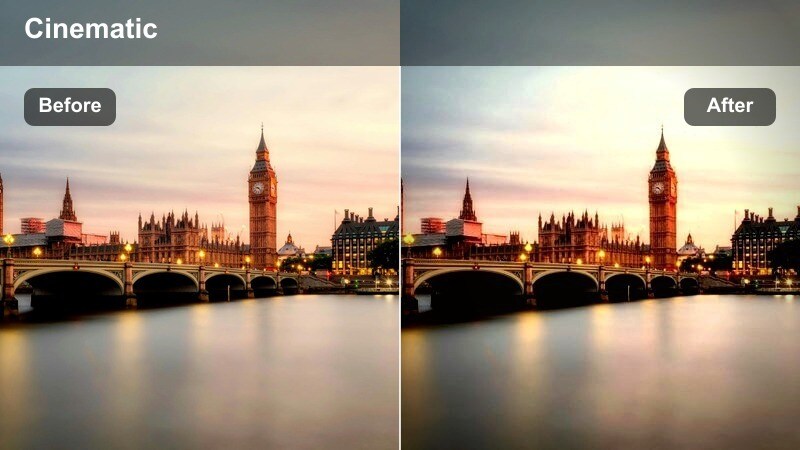
- Effect look: Neutral tones with slightly cool shadows and reduced saturation for transit scenes
- Best for: Subway or train platforms, escalators, and wide shots of station architecture
- Editing tip: Add gentle motion blur or slow shutter footage to emphasize movement while the colors stay minimal.
Quiet Station Platform is built for transit environments where overhead lights, advertising, and signage can quickly clutter the frame. The LUT cools shadows slightly and pulls back saturation so the architecture, tracks, and commuters feel organized and understated.
Use it in Filmora on subway platforms, escalators, or station wide shots to keep your color consistent from clip to clip. Set white balance on a neutral wall before grading, then add motion blur or use slowed footage to highlight movement while your palette stays clean and minimal.
Clean Midday City Flow
Concrete Neutral Matte
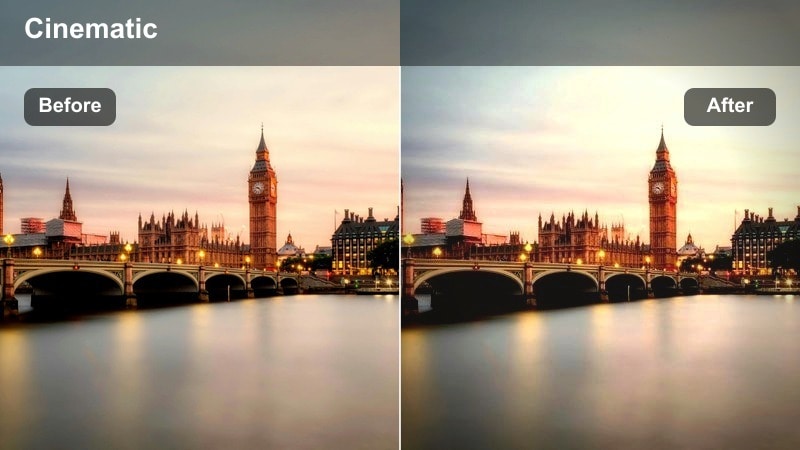
- Effect look: Flat, low-contrast matte finish that softens harsh midday light on concrete surfaces
- Best for: Street-level walking shots, bike rides, and handheld city exploring at noon
- Editing tip: Add a slight S-curve after the filter if you need more punch while still keeping the overall matte style.
Concrete Neutral Matte controls the strong highlights and deep shadows that appear on city streets in the middle of the day. By giving your footage a flat, matte finish, it keeps concrete, asphalt, and building facades from looking too harsh while still maintaining detail.
In Filmora, apply this LUT to walking or biking clips shot in bright sun, exposing for faces first. If the image feels too flat, add a gentle S-curve in the color panel to bring back a touch of contrast while preserving the neutral, minimal vibe your urban footage needs.
Minimal Cross-City Traffic
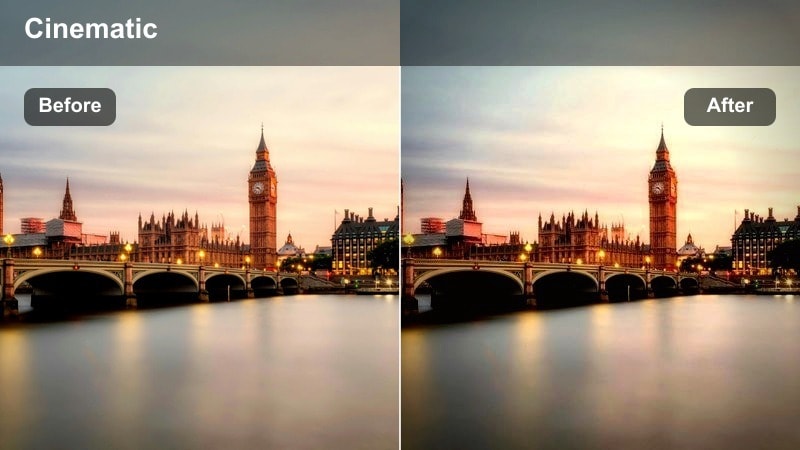
- Effect look: Desaturated colors with crisp lines, keeping cars and buses from visually overpowering the frame
- Best for: B-roll of intersections, traffic timelapses, and overhead street shots
- Editing tip: Use a slightly faster shutter or speed ramp to emphasize motion streaks while the color palette stays controlled.
Minimal Cross-City Traffic is designed for busy intersections and road scenes where bright vehicle colors can easily dominate. The LUT reduces saturation and keeps lines crisp, turning hectic traffic into clean, graphic motion that supports your story instead of distracting from it.
In Filmora, pair this LUT with top-down or long-lens shots of streets and junctions, then experiment with speed ramps or timelapse playback to accentuate movement. With colors tamed, you can add subtle radial blur or framing crops to guide the viewers eye to the center of the action.
Glass Facade Minimal
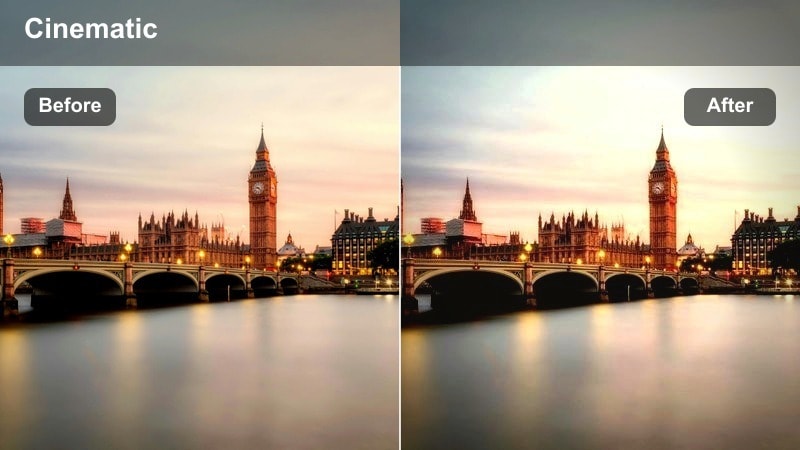
- Effect look: Cool, restrained city blues with soft reflections on glass and metal surfaces
- Best for: Office buildings, modern architecture, and reflections on glass facades
- Editing tip: Reduce highlights slightly to retain reflection detail and avoid blown-out windows.
Glass Facade Minimal focuses on modern architecture, emphasizing clean lines and reflections without oversaturating sky or city tones. It cools the overall palette and adds a subtle polish to glass and metal, making your office towers and corporate districts look refined and minimal.
In Filmora, apply this LUT to low-angle or reflection-heavy shots of buildings, then pull down highlights to keep window detail intact. If reflections feel busy, darken midtones slightly and adjust framing so the composition leans into simple geometric shapes and calm, controlled color.
Minimal Blue-Hour Cityscapes
Blue Hour Subtle Neon
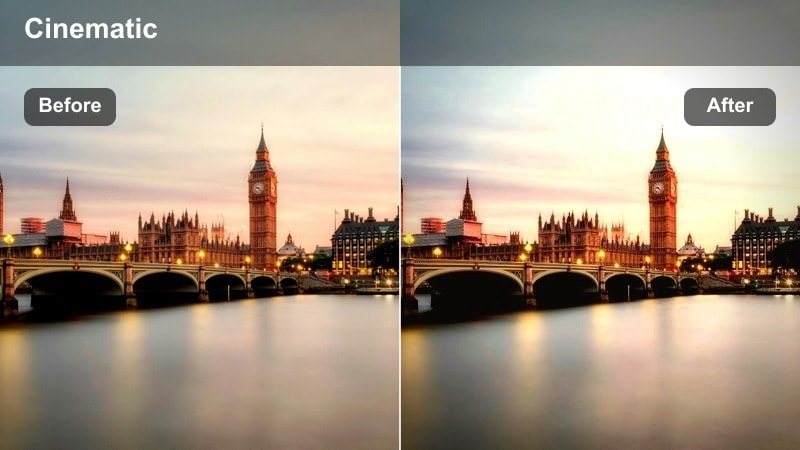
- Effect look: Soft teal-blue base with tamed neon highlights for gentle city glow
- Best for: Evening storefronts, street signs, and walking vlogs just after sunset
- Editing tip: Keep ISO as low as possible; this filter works best on cleaner footage with visible shadow detail.
Blue Hour Subtle Neon is tuned for that short window after sunset when city lights turn on but the sky still holds color. It builds a soft teal-blue base and tones down neon highlights so shopfronts, billboards, and street signs glow without blowing out or overwhelming your scene.
Use this LUT in Filmora on evening vlogs and storefront B-roll, making sure to start with low-noise footage. After applying it, you can fine-tune individual neon hues in HSL if one sign is still too strong, then add a touch of film grain to keep your minimal palette rich and cinematic.
Bridge Lights Minimal
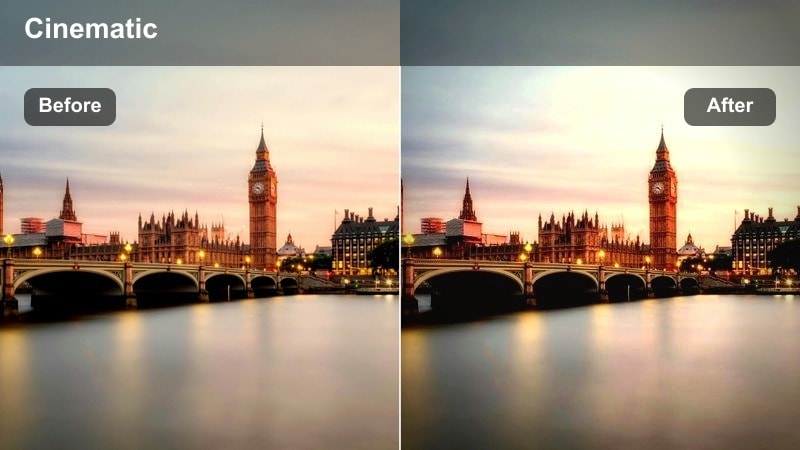
- Effect look: Clean, low-saturation night look that protects highlights on bridge and street lights
- Best for: City bridges, overpasses, and long-lens shots of light lines from cars
- Editing tip: Push exposure slightly lower than usual, then raise shadows so the light shapes feel precise, not blown out.
Bridge Lights Minimal controls bright street lamps and car trails so your night bridges and overpasses stay sharp and graphic. By lowering saturation and guarding highlights, it keeps light bloom under control and emphasizes the clean shapes of railings, cables, and road lines.
In Filmora, apply this LUT to tripod or stabilized footage with long exposures, then slightly reduce overall exposure before lifting shadows. This workflow preserves detail in light sources while still letting you brighten darker areas, resulting in a minimal yet striking city nightscape.
Rooftop Chill Minimal
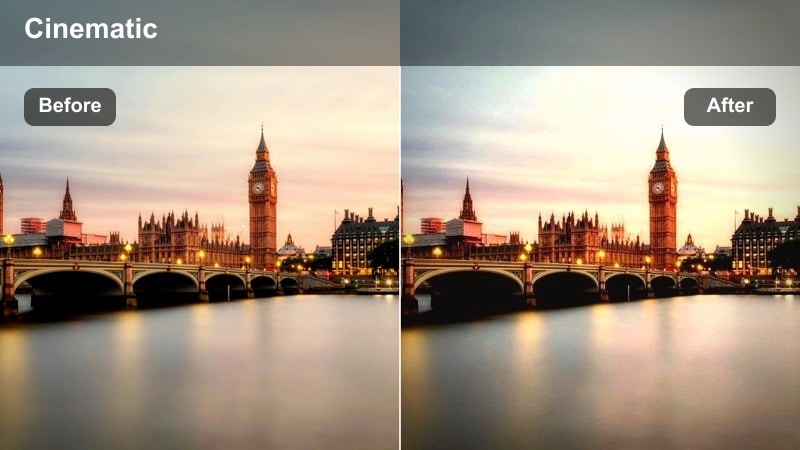
- Effect look: Soft contrast with balanced skin tones against cool city backgrounds
- Best for: Rooftop vlogs, lifestyle shots, and hanging out clips overlooking the city at dusk
- Editing tip: Use subtle background blur or crop-in to keep the subject dominant while the city stays calm and minimal.
Rooftop Chill Minimal is crafted for lifestyle content and vlogs where people share the frame with a moody city backdrop. It keeps contrast gentle, protects skin tones, and cools the skyline so your subject stands out while the urban lights remain soft and unobtrusive.
In Filmora, expose for your subject first, then add this LUT to rooftop clips shot around dusk or early night. If the skyline feels busy, apply a light vignette, reduce blue saturation slightly, and experiment with tighter crops or background blur to maintain a clean, relaxed composition.
Urban Night Street Minimalism
Quiet Alley Minimal Noir
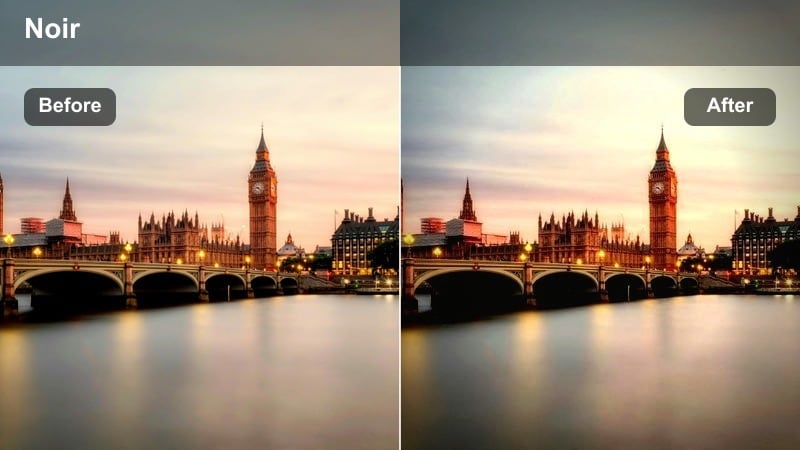
- Effect look: Low-saturation, slightly lifted blacks for a soft noir-inspired street look
- Best for: Back alleys, side streets, and moody handheld walking shots at night
- Editing tip: Reduce sharpness slightly to avoid digital noise from standing out in darker areas.
Quiet Alley Minimal Noir gives your night streets a subtle noir attitude without pushing all the way to full black and white. It lifts blacks a bit, lowers saturation, and focuses on mood, making dim alleys and side streets feel cinematic but still grounded in reality.
In Filmora, run noise reduction on your dark footage first, then apply this LUT to maintain smooth gradients in the shadows. If blacks look washed out, gently pull down the very bottom of the curve while keeping midtones soft, and reduce sharpness to keep digital noise from becoming distracting.
Minimal Street Signs
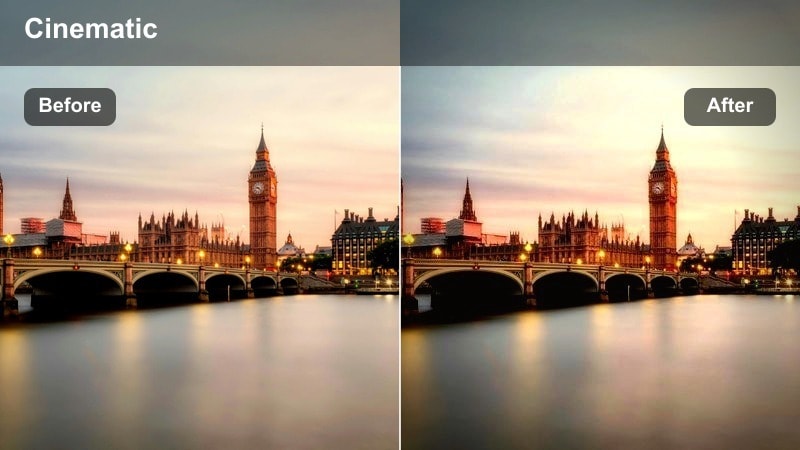
- Effect look: Selective desaturation that calms bright signs while keeping text and icons readable
- Best for: Street signs, wayfinding symbols, and city navigation shots in vlogs
- Editing tip: Crop vertically for shorts and reels, letting the simplified colors make the graphics feel bold and clean.
Minimal Street Signs is tailored for navigation shots where clusters of signs and icons can overwhelm a frame. The LUT selectively reduces saturation so the graphics remain clear and legible but no single color shouts louder than the rest.
Use it in Filmora when cutting in quick sign close-ups to show where you are heading in a vlog. Apply the LUT, then crop vertically for shorts or reels, and add minimal text overlays that match the sign colors so your on-screen graphics blend smoothly with the graded footage.
Late Night Bus Stop
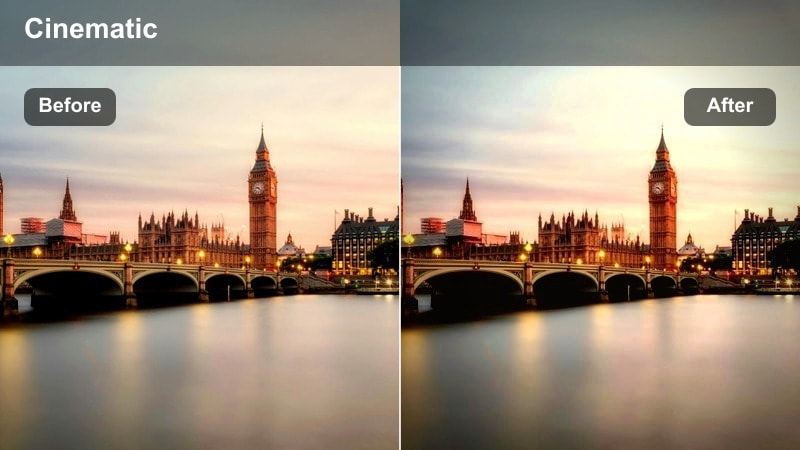
- Effect look: Muted warm highlights from street lamps with cooler, calm shadows
- Best for: Bus stops, tram lines, and waiting shots during late-night city trips
- Editing tip: Stabilize handheld footage slightly so the minimal palette and subtle light contrast stay pleasing.
Late Night Bus Stop is made for quiet, contemplative waiting shots lit by street lamps and shelter lights. It softens warm highlights, cools the shadows, and keeps your palette controlled so these simple, reflective moments feel intimate instead of noisy.
In Filmora, stabilize your handheld clips a bit, then add this LUT to bus stop, tram line, or platform shots recorded late at night. Layer in ambient city audio and use slower cuts or gentle zooms so viewers have time to absorb the subtle warm pools of light within your minimal color grade.
Tips for Using Urban Street Minimal Color Lut Filters in Filmora
- Shoot with a slightly flatter in-camera profile so these Urban Street Minimal Color LUT filters have more dynamic range and detail to work with in Filmora.
- Keep white balance consistent across different city locations to avoid color shifts when you apply the same minimal LUT to multiple clips.
- Use slower, more deliberate camera movements, such as walking gimbal shots or stable pans, so the subtle grading and restrained colors can be fully appreciated.
- Avoid pushing saturation too high after applying a minimal filter or LUT, or you will lose the calm, clean aesthetic these looks are designed to create.
- Build a simple shot list of crosswalks, skylines, alleys, and rooftop views that you know respond well to minimal color treatment in your edit.
- Test a few LUTs on a short reference sequence first, then use Filmoras presets and AI tools to match that look across your entire project.
- Combine minimal LUTs with gentle vignettes and selective focus to guide attention without needing bold, distracting colors.
Urban Street Minimal Color LUT filters give content creators a clean, modern way to present city stories without heavy color distractions.
Try a few of these filters on your next urban vlog, then refine your favorites into a signature look you can reuse across your channel.
secure download