

 100% Security Verified | No Subscription Required | No Malware


 ChatGPT
 Perplexity
 Gemini
 Claude
 Grok
Grok
Staring at a stunning image you want to recreate, you struggle to describe it in words that AI can understand. The lighting, textures, and mood feel impossible to capture manually. This is where the image to prompt by Hugging Face becomes a game-changer. It lets you convert visuals into structured, high-quality prompts in seconds.
Instead of guessing keywords, you get accurate descriptions that improve AI-generated results instantly. Whether you're a designer, content creator, or AI enthusiast, this approach simplifies prompt creation. It boosts creativity, helping you achieve more precise, visually appealing outputs without the usual trial-and-error. Read the article till the end to know all about this tool.
In this article
Part 1. What Is Hugging Face Image to Prompt and Why Do People Use It?
Hugging Face's image-to-prompt model analyzes an image and automatically generates a descriptive text prompt. These systems rely on image captioning and multimodal models to convert visual details into structured text. The prompt can then be reused in AI tools to generate or edit images more accurately.
Why People Use It
- Time Efficiency: Users save valuable time by generating prompts instantly instead of writing them from scratch.
- Better Accuracy: Detailed and precise descriptions help improve the quality of AI-generated results.
- Consistency: Structured prompts ensure more reliable and repeatable outputs across different tools.
- Ease of Use: The process becomes simpler, especially for those who find prompt writing challenging.
- Enhanced Creativity: New ideas and perspectives emerge by analyzing visuals more descriptively.
Part 2. How to Use Hugging Face for Image-to-Prompt Tasks
After learning about the image-to-prompt of Hugging Face in detail, let us have a look at the steps for using it:
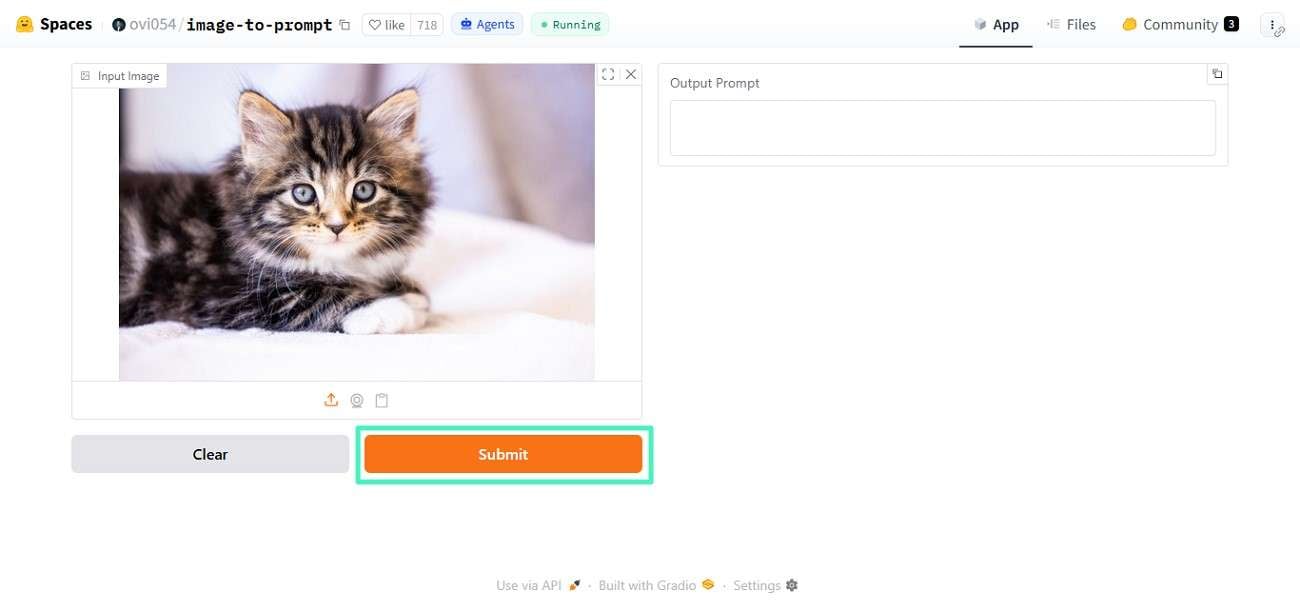
Step 1. Access the "Image to Prompt" function from your browser and upload the image for which you want to generate a prompt. Next, press the "Submit" button and let the tool execute the process.
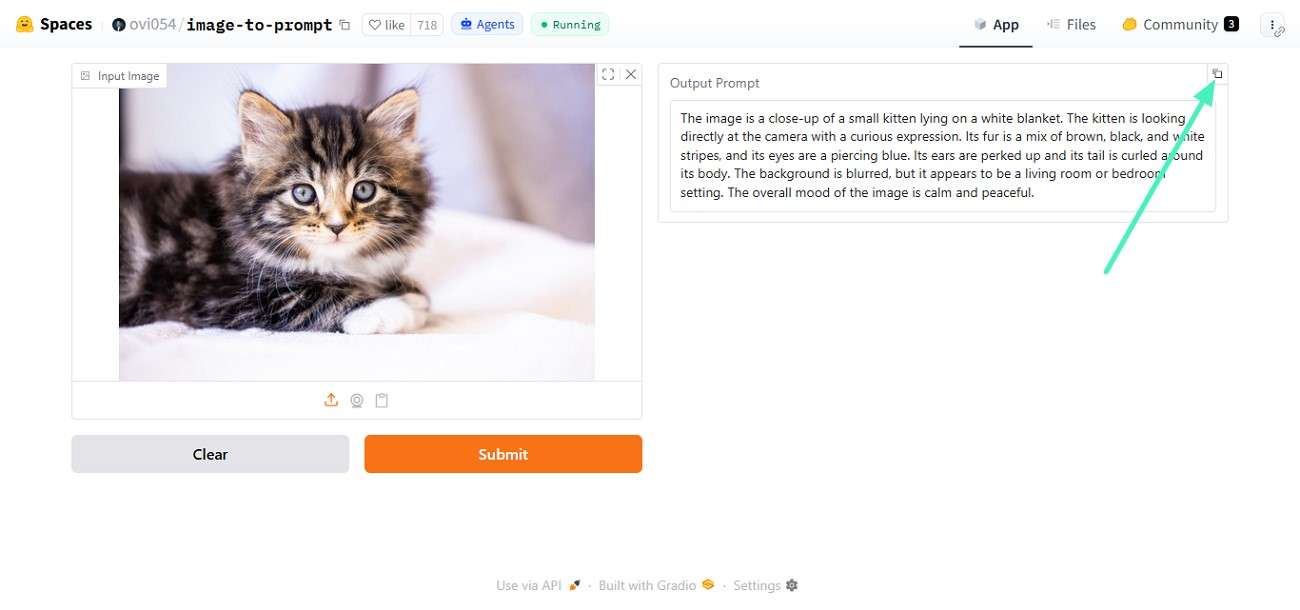
Step 2. Once the prompt is generated in the designated field, press the "Copy" icon to paste it anywhere you want.
Part 3. Key Benefits and Limits of Hugging Face Tools
Moving beyond basic functionality, it's important to understand both the strengths and the trade-offs of using Hugging Face Image to Text prompt tools for image-to-prompt workflows:
Key Benefits
- Open-Source Flexibility: Many models are open source, enabling customization and experimentation.
- Wide Model Variety: A large library of models supports different use cases and skill levels.
- Multimodal Capabilities: Supports text, image, and even audio-based AI tasks.
- Scalability: Suitable for both small projects and enterprise-level applications.
- Pretrained Models: Ready-to-use models reduce development time significantly.
Limitations
- Model Accuracy Varies: Not all models produce consistent or high-quality prompts.
- Limited Control: Generated prompts may lack fine-tuned customization in some cases.
- Inconsistent Outputs: Results may vary depending on the model and input quality.
- Data Bias Risks: Outputs may reflect biases present in training datasets.
Part 4. Why Pair Hugging Face With Filmora
While Hugging Face image-to-prompt excels at generating detailed prompts from images, pairing it with Wondershare Filmora takes your creative workflow a step further. Filmora is a powerful yet beginner-friendly video editing tool designed to transform ideas into polished visual content. It offers a wide range of AI-driven features, including image-to-text and smart editing tools that simplify complex tasks.
 secure download

Image-to-Prompt Tool
An image-to-prompt tool is an AI-powered solution that converts visual content into descriptive text prompts. By analyzing elements like objects, colors, lighting, and composition, it generates structured descriptions that can be reused in AI platforms. Tools available on Hugging Face make this process fast and efficient. This helps users create accurate prompts for better and more consistent AI-generated results.
Better Creator Workflow
A better creator workflow emerges when image-to-prompt tools streamline the process of turning visuals into usable AI prompts. Instead of manually describing an image, creators can quickly generate structured text that feeds directly into design or video tools like Wondershare Filmora. This reduces guesswork, speeds up production, and improves consistency across projects. The generated prompt can then be used in the text-to-image of Hugging Face.
Part 5. How to Use Filmora Image-to-Prompt With Hugging Face
After exploring how image-to-prompt tools extract detailed descriptions from visuals, the next step is understanding how to combine their capabilities. Provided below is the step-by-step guide on how to use Filmora Image to prompt with Hugging Face:
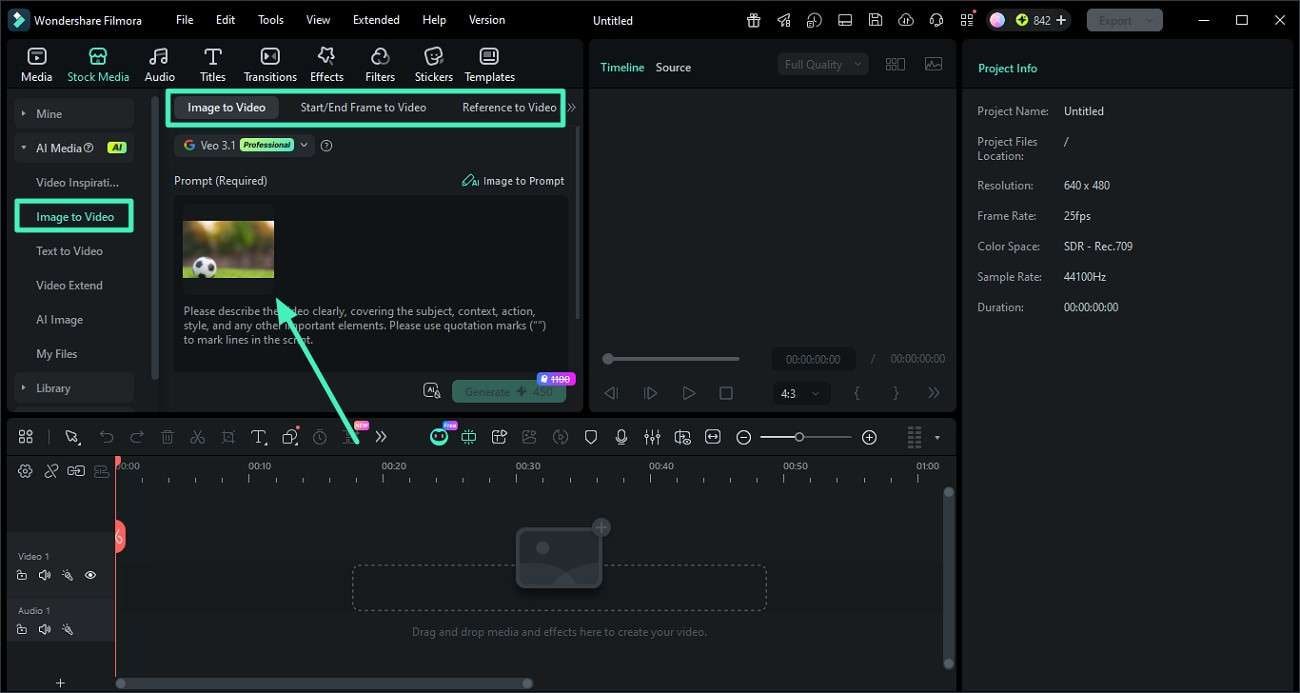
Step 1. Upload an Image Into Filmora Image-to-Prompt Tool
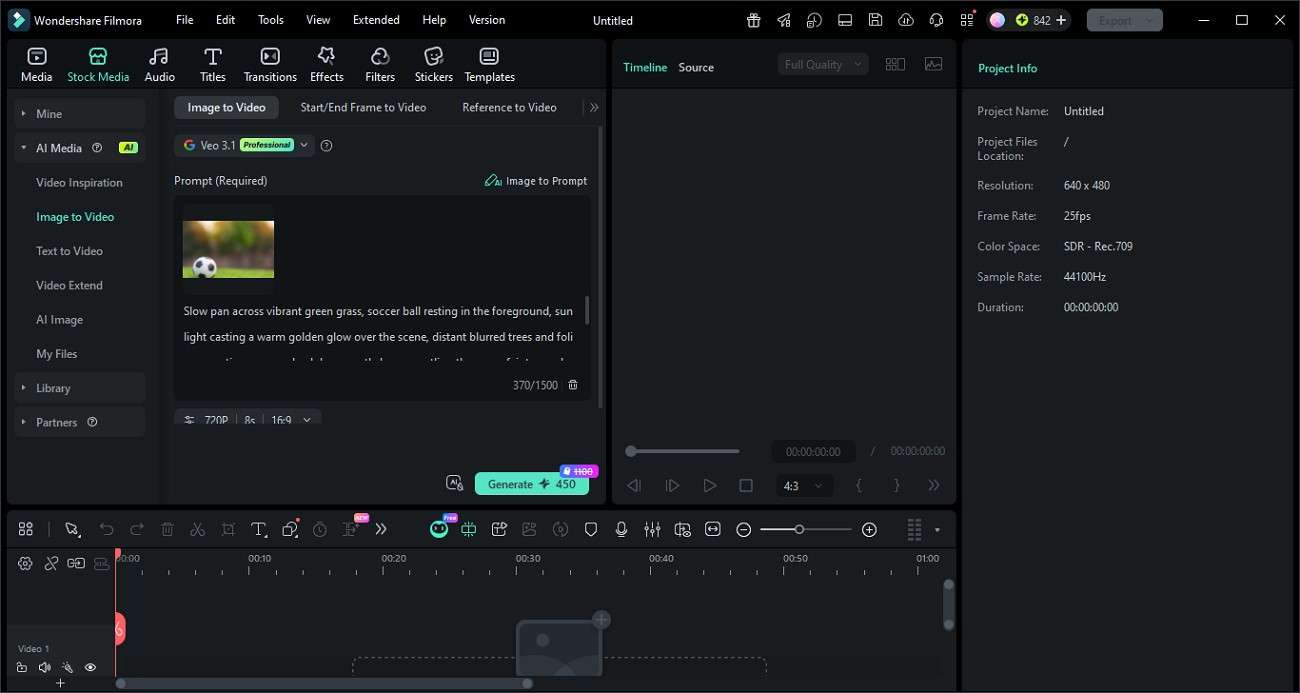
After creating a project on Filmora, head to its main interface and select the "Image To Video" feature from the left. Now choose the generation mode such as "Image to Video," "Start/End Frame," or "Reference to Video." Then upload the image into the tool's interface using the available upload option.
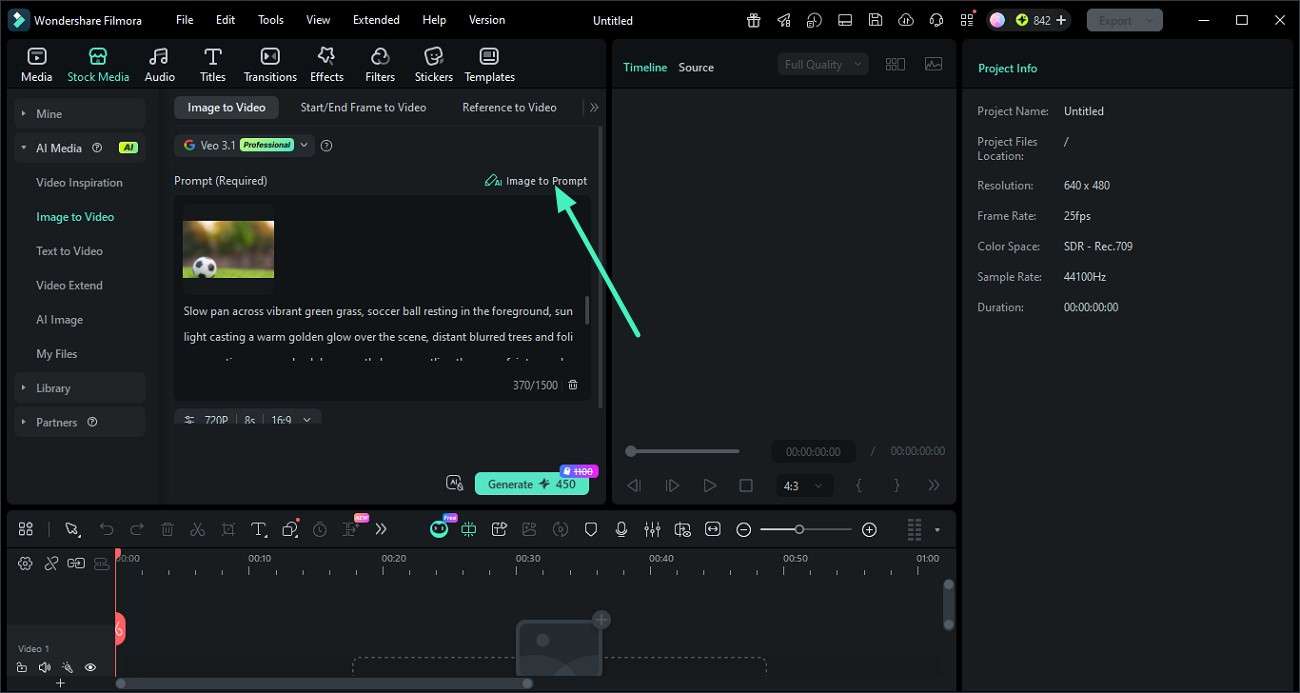
Step 2. Generate Detailed AI Prompts From the Image
Once the image is imported, locate and click the "Image to Prompt" button to automatically generate a prompt from the image.
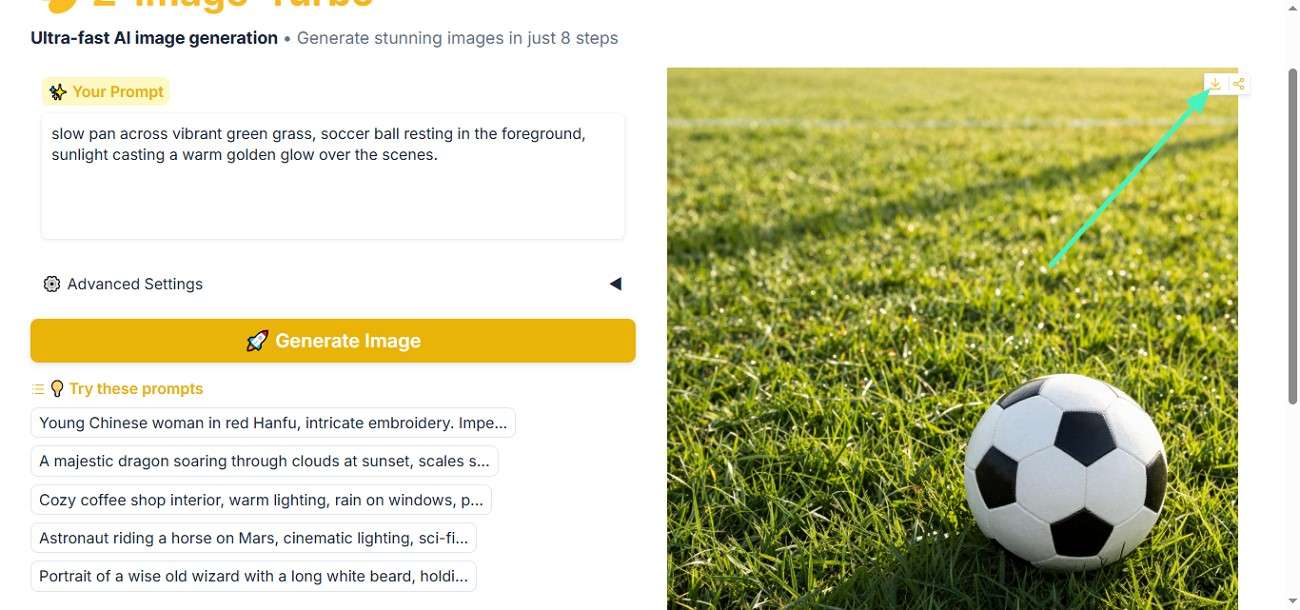
Step 3. Copy and Use the Generated Prompt in Hugging Face
After the prompt is generated, copy it and paste it into a Hugging Face model or prompt-based generation tool. Then, proceed to run the model to create results based on the prompt.
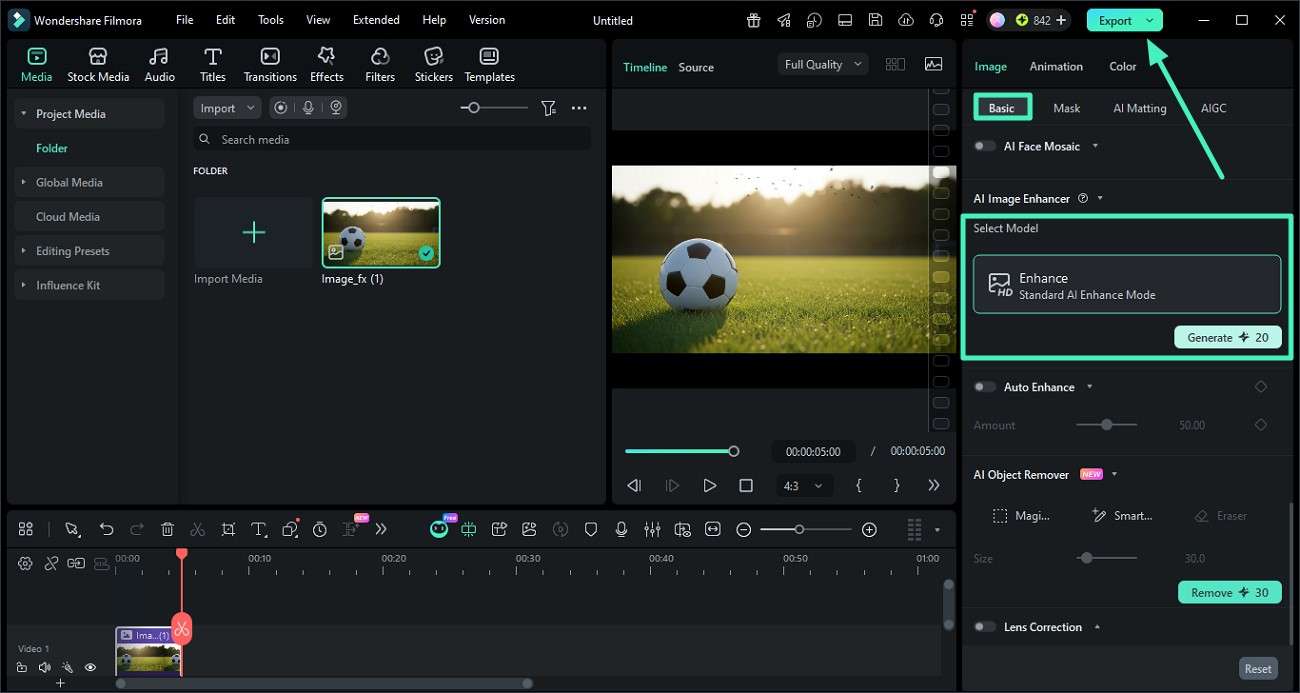
Step 4. Enhance Final Visuals Using Filmora Editing Tools
After the image is successfully generated, import it back into Filmora's interface and press the "AI Enhance" option under the "Basic" section on the right, then click on "Generate". Once the image is enhanced, press the "Export" button to save the results to your device.
 secure download
 Part 6. Filmora vs Hugging Face: What's the Difference?
After understanding how both tools handle image-to-prompt workflows, the next step is comparing their overall capabilities and purpose. This comparison will help clarify how Filmora and Hugging Face image to prompt differ and which one fits your specific needs.
Main Differences
The table below shows the main differences between the two tools to help you make an informed decision:
| Feature | Filmora | Hugging Face |
|---|---|---|
| Primary Purpose | Focused on video editing and content creation with built-in AI tools | Focused on AI model hosting, testing, and development |
| User Interface | Simple, visual, and beginner-friendly interface | Technical interface designed for developers and AI users |
| Ease of Use | Very easy, no coding required | Requires basic to advanced technical knowledge |
| Workflow Style | All-in-one editing and creation platform | Model-based experimentation and integration platform |
Best for Beginners
Filmora is better suited for beginners because it offers a simple, visual interface with ready-to-use tools that require no coding experience. Users can quickly generate, edit, and export content without dealing with technical setup or model configurations.
Best for Creators
Filmora is also a strong choice for creators who want to produce high-quality content quickly and efficiently. Its AI-powered tools, including editing features, effects, and prompt-based generation, help streamline the entire creative process.
Conclusion
To sum it up, this article provided a detailed review of image to prompt Hugging Face and how it helps convert visuals into structured AI prompts for better results. It also highlighted its benefits, limitations, and practical workflow applications. For users who want an easier and more creative end-to-end solution, Wondershare Filmora is highly recommended as it combines prompt generation with powerful editing tools in one platform.
secure download Frequently Asked Questions
-
1. What is image to prompt Hugging Face used for?
An image to prompt Hugging Face is used to convert images into detailed text prompts that can be reused in AI tools for generating or editing visuals more accurately. -
2. Is Hugging Face suitable for beginners?
Yes, but beginners may need some time to understand model selection and setup, as the platform is more technical compared to simple editing tools. -
3. Can I combine Filmora with Hugging Face?
Yes, you can use Hugging Face to generate prompts and then use Wondershare Filmora to turn those ideas into polished videos with effects and enhancements. -
4. Which tool is better for creating videos from prompts?
For a complete and easy workflow, Wondershare Filmora is a better choice because it combines AI features, editing tools, and export options in one platform.
