
Hindi Neon Text Templates & Guides
Discover powerful tools and tutorials to perfect your Hindi neon intro text
Loading more Hindi neon text examples...
 Category:
 Duration:
 Aspect Ratio:
Everything You Need to Put Hindi Neon Text on Video
A well-placed Hindi neon text effect can turn an ordinary clip into a polished, professional-looking video. Filmora gives you a full library of Hindi neon text templates with built-in text animation presets that drop straight into your timeline. Whether you're labeling a tutorial step, opening a vlog, or adding a scene title to a short film, Filmora's tools give you the control to match any visual style. Pick a layout, type your words, and publish directly to your preferred platform.
Design Striking Hindi Glowing Text Effects Instantly
Design Striking Hindi Glowing Text Effects Instantly
Avoid the hassle of complex node-based compositing by leveraging our optimized Hindi neon text templates designed directly for Filmora. You can rapidly integrate bright, glowing aesthetics into your video projects while modifying color grading parameters and intensity to match your specific scene. Elevate your creative vision with intuitive video filters that complement your vibrant typography.
- Select from dozens of pre-configured Hindi neon titles to immediately establish a vibrant atmosphere.
- Adjust the glow radius and core brightness to ensure your Hindi neon typography stands out.
- Enhance your gaming intros with seamless animations that make every word pulse with energy.
Animate Your Hindi Neon Titles With Precision
Animate Your Hindi Neon Titles With Precision
Bring your Hindi neon intro text to life by utilizing advanced keyframing and built-in motion graphics tools within the Filmora interface. From flickering neon sign simulation to smooth kinetic typography movements, you have total command over how your words enter and exit the frame. Enhance the overall production quality by applying precise color correction to blend the neon light naturally with your footage.
- Apply dynamic flickering effects to simulate authentic electrical neon signs within your sequence.
- Control the exact timing of your animations using intuitive frame-by-frame keyframe adjustments.
- Layer multiple Hindi neon title templates together to build sophisticated three-dimensional glowing designs.
Generate Unique Backgrounds With AI Image Generation

Generate Unique Backgrounds With AI Image Generation
Pair your Hindi neon gaming text with breathtaking, custom-generated environments using the powerful Filmora AI Image Generator. By utilizing advanced models like GPT Image 2 internally, you can effortlessly create futuristic cyberpunk streets or dark alleyways that perfectly frame your glowing typography. You can also seamlessly add titles over these AI-generated backdrops to maximize viewer engagement.
- Prompt the integrated GPT Image 2 model to produce highly detailed cinematic backgrounds instantly.
- Combine your Hindi neon text effects with AI-generated visual assets for a truly unique aesthetic.
- Utilize the built-in AI copywriting tools to brainstorm catchy phrases for your glowing titles.
Frequently Asked Questions About Hindi Neon Text Effects
How to Create Hindi Neon Text Effects in Filmora
Launch Filmora, select a vibrant template, customize your glowing colors, and easily export your dynamic Hindi neon typography.
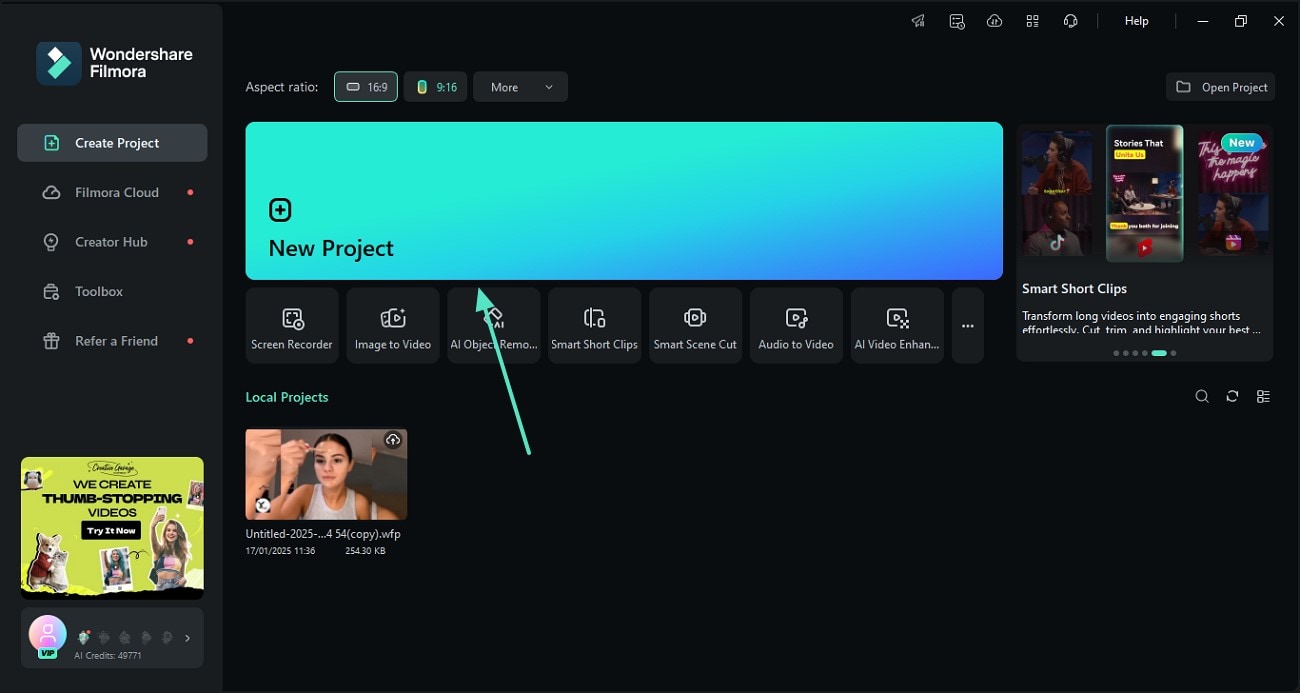
Step 1 Launch Filmora and Import Your Media
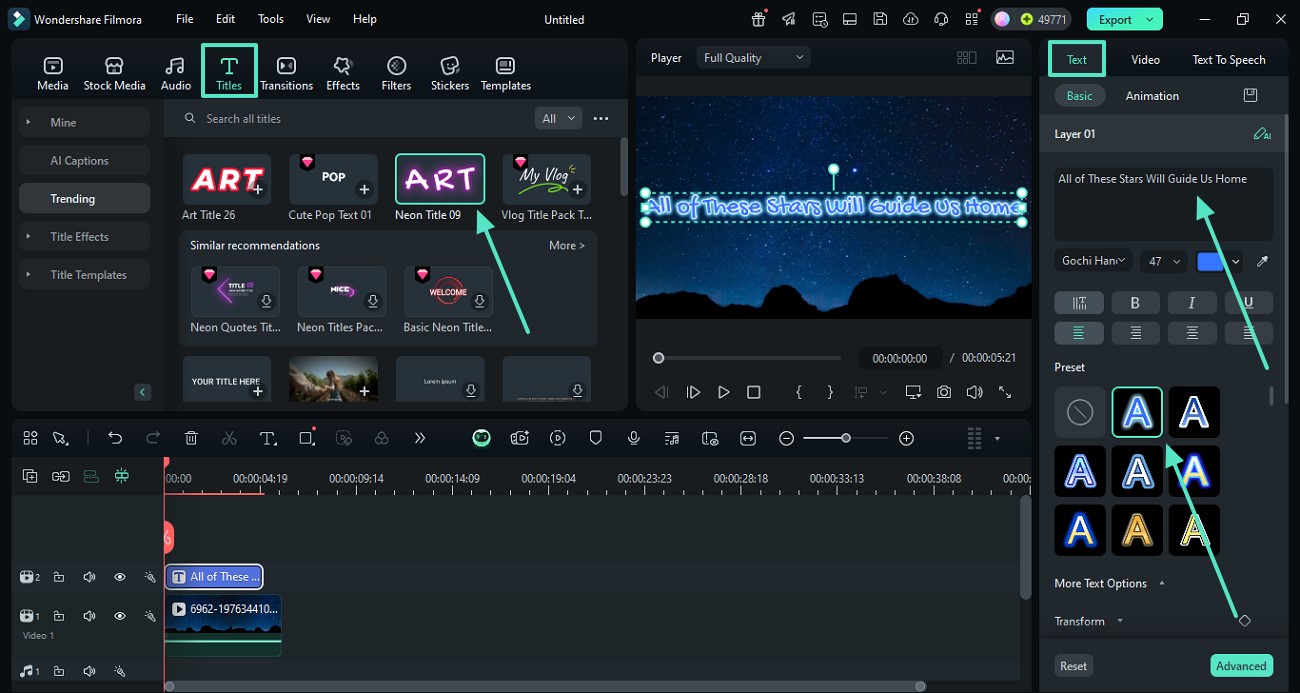
Step 2 Choose Hindi Neon Text Templates
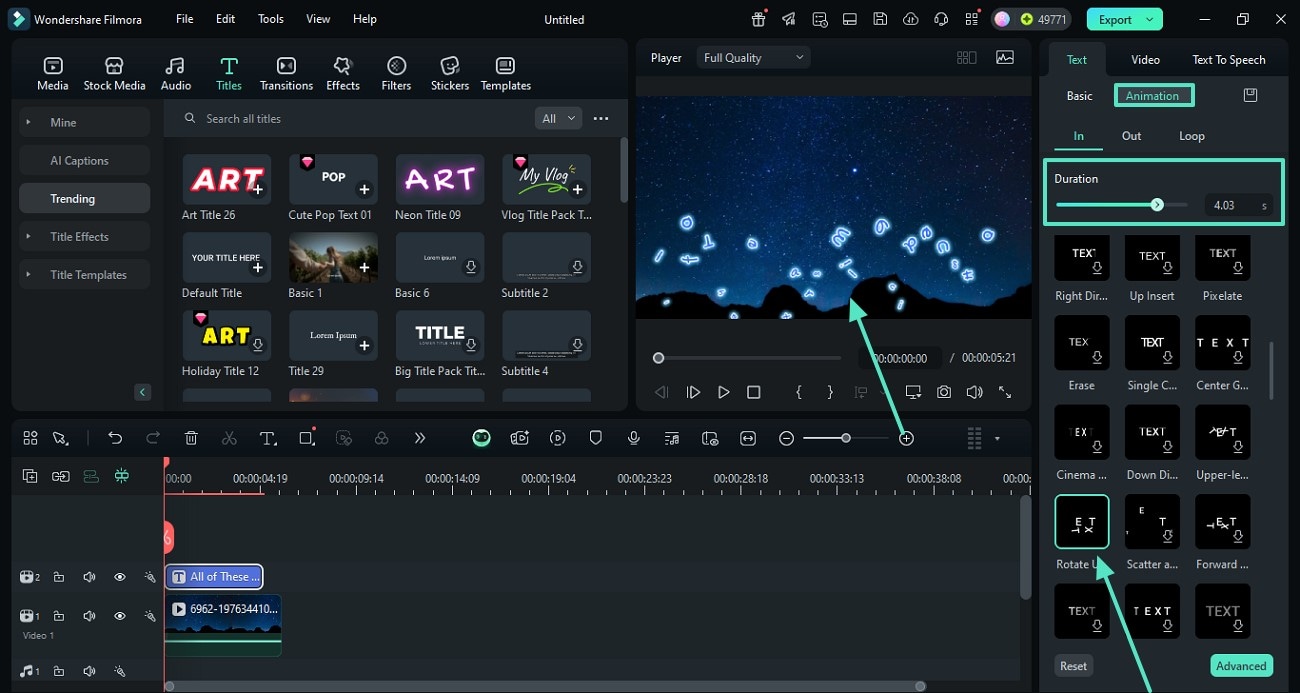
Step 3 Customize the Glow and Export
-
1: Launch Filmora and Import Your Media
Start your new project, drag your footage to the timeline, and prepare to add stunning Hindi neon titles. -
2: Choose Hindi Neon Text Templates
Find the perfect Hindi neon intro text layout in the library and drag it directly onto your editing timeline. -
3: Customize the Glow and Export
Modify the glow radius and color to suit your style, then seamlessly export your dynamic Hindi neon gaming text.
Elevate Your Edits With More AI Features
Creating captivating Hindi neon text effects is just the beginning of your creative journey. Filmora offers a robust suite of advanced AI tools to completely transform your content. From generating stunning visual backdrops utilizing the integrated GPT Image 2 model to effortlessly crafting engaging scripts with AI Copywriting, our platform empowers you to push the boundaries of digital art. Combine your vibrant Hindi glowing text effects with dynamic audio generated by the AI music generator for an immersive viewer experience.








