

 100% Security Verified | No Subscription Required | No Malware


 ChatGPT
 Perplexity
 Gemini
 Claude
 Grok
Grok
Cinematic Ink sits in the deep blue-black space between shadow and light. It feels sleek, intelligent, and slightly mysterious, which is why it shows up so often in title cards, dark UIs, and film-inspired branding. Used well, it can make your shots feel more expensive, your thumbnails more clickable, and your on-screen text more focused and legible.
For editors, designers, and Filmora users, Cinematic Ink is a powerful base color that pairs beautifully with cool grays, muted pastels, or neon accents. Below you will find ready-made Cinematic Ink color palettes with HEX codes, crafted for intros, b-roll, YouTube thumbnails, channel branding, and cinematic edits so you can plug them straight into your workflow.
In this article
Moody Cinematic Ink Color Palettes
Midnight Director Cut

- HEX Codes: #10131a, #1f2933, #0b1120, #5b5f73, #c9d1e3
- Mood: Dark, tense, and cinematic with a subtle cool glow.
- Use for: Use for thriller intros, suspenseful trailers, and dramatic title cards that need depth and contrast.
Midnight Director Cut layers near-black ink tones with cool steel and soft blue-gray highlights. It feels like an edit bay at 2 a.m., lit only by the glow of the monitors and the tension of the story you are crafting.
Use the deep shades for backgrounds, frame bars, and lower thirds, then let the lighter hues pick out text, UI lines, and logo marks. This palette works especially well for suspenseful YouTube intros, thriller-style video essays, and cinematic thumbnails where you want the subject to pop against controlled darkness.
Pro Tip: Enhance Your Midnight Cinematic Ink Visuals With Filmora
To keep a tight Midnight Director Cut look from scene to scene, set your darkest ink shade as the base for overlays, backgrounds, and titles in Filmora. Then sample the lighter blues and grays for text, accent lines, and animated shapes so your entire timeline feels like one continuous nocturnal world.
You can save these color choices inside custom title presets and effects, so every new intro, b-roll sequence, and social cut you export keeps the same inky, suspenseful identity without rebuilding the look each time.
AI Color Palette
If you have a style frame, poster, or color card that nails your ideal Midnight Cinematic Ink mood, you can turn it into a reusable grade. Filmora's AI Color Palette feature lets you grab the color style from a reference clip and apply it across multiple shots, so everything from your opening title to your closing screen feels consistent.
Import your reference image or hero shot, match its tones to the rest of the footage, then fine-tune intensity so the inky shadows stay rich without crushing detail. This is powerful for multi-camera projects, vlog series, and trailers where you want one signature palette to define the whole edit.
 secure download

HSL, Color Wheels & Curves
To refine your Cinematic Ink tones, use Filmora's HSL controls to gently desaturate blues and cyans while lifting luminance in your highlight color. Then use color wheels to push shadows slightly toward blue and midtones toward neutral gray, keeping skin tones natural but your environment moody and cool.
A subtle S-curve in the curves panel deepens contrast without clipping, while a lifted toe keeps some detail in the darkest ink areas. You can see how similar steps work in practice in Filmora's color grading tutorials on YouTube, then adapt them to your own Midnight palette.
secure download1000+ Video Filters & 3D LUTs
Once your Cinematic Ink base is in place, you can quickly try different flavors of mood using Filmora's filters and LUTs. A subtle teal-and-orange LUT will keep your inky shadows but warm up skin tones, while film-inspired filters add grain, halation, or faded contrast for a more analog thriller feel.
Filmora's video filters and 3D LUTs make it easy to audition multiple looks over the same Midnight palette. Stack gentle filters on adjustment layers, toggle them on and off, and save the combinations you like as presets for future series, trailers, or recurring segments.
secure downloadStudio Backlot Storm

- HEX Codes: #141821, #202634, #3b4253, #768099, #f5f5f7
- Mood: Brooding and atmospheric with a hint of polished studio light.
- Use for: Use for cinematic b-roll, city montages, and tech reviews that lean into a dramatic, professional tone.
Studio Backlot Storm feels like a cloudy shoot day on a studio lot, where steel blues and charcoal ink tones wrap everything in soft drama. The near-white highlight keeps it from becoming too heavy, adding just enough polish to feel professional and high-end.
Use the deeper colors for backgrounds, overlays, and gradient vignettes, while the mid blues carry icons and subtle UI graphics. The lightest shade is ideal for text on thumbnails, end cards, and lower thirds in tech reviews, cinematic b-roll sequences, and sleek product showcases.
Rain On The Lens

- HEX Codes: #12131a, #222632, #3c4657, #8ea2bd, #e4edf7
- Mood: Melancholic and reflective with a soft rainy-day filter.
- Use for: Use for emotional vlogs, indie film sequences, and reflective travel edits with a moody vibe.
Rain On The Lens moves from inky shadows into misty blue midtones and pale, almost fog-like highlights. It instantly suggests wet pavements, blurred city lights, and slow, thoughtful pacing.
Apply the darker hues to letterbox bars, overlays, and subtle gradients, then let the softer blues wash over b-roll of streets, trains, and windows. For titles, use the lightest tone against mid-blues to keep your emotional vlogs, reflective travel films, and indie edits readable but still drenched in mood.
Celluloid Noir Echo
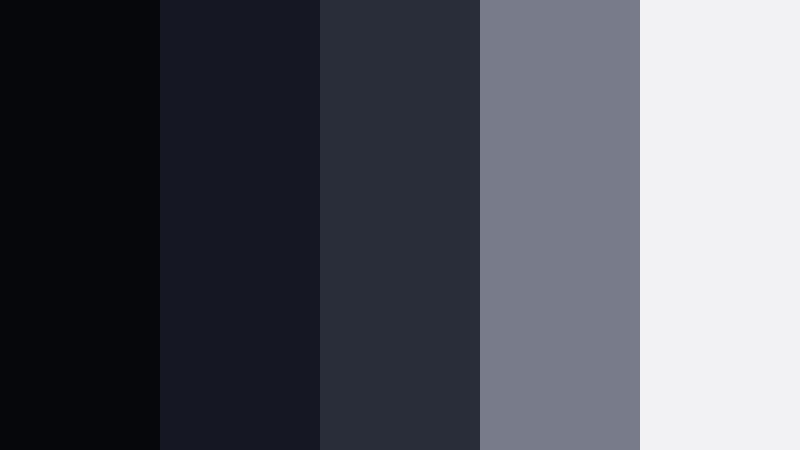
- HEX Codes: #05070b, #151822, #292d3a, #777b8a, #f2f2f4
- Mood: Classic film noir with modern clarity and subtle coolness.
- Use for: Use for crime stories, podcast visuals, and monochrome-inspired branding with a cinematic twist.
Celluloid Noir Echo feels like a black-and-white movie updated for HD. Deep near-black ink, cool grays, and crisp off-whites give you a noir look that still reads clearly on modern screens and social feeds.
Use the darkest tones in backgrounds, drop shadows, and vignette overlays, reserving the brightest whites for text, waveform graphics, or logo marks. It is a strong choice for true crime intros, podcast cover art, documentary thumbnails, and minimal channel branding that leans into monochrome with a hint of blue coolness.
Backstage Haze

- HEX Codes: #171821, #252639, #40425b, #9a96ad, #f7f2f8
- Mood: Dreamy and slightly surreal with backstage softness.
- Use for: Use for behind-the-scenes content, fashion reels, and artistic performance edits.
Backstage Haze combines smoky ink tones with muted lilac-grays and a soft, almost powdery highlight. It feels like faded stage lights catching dust in the air, giving your footage an intimate, dreamy edge.
Use the darker colors for background plates and overlays behind titles, then let the mid and pale tones color your text, frames, and subtle glow effects. This palette suits fashion reels, rehearsal diaries, behind-the-scenes vlogs, and artistic performance edits where you want everything to feel slightly softened and surreal.
Elegant Cinematic Ink Color Palettes
Premiere Night Velvet
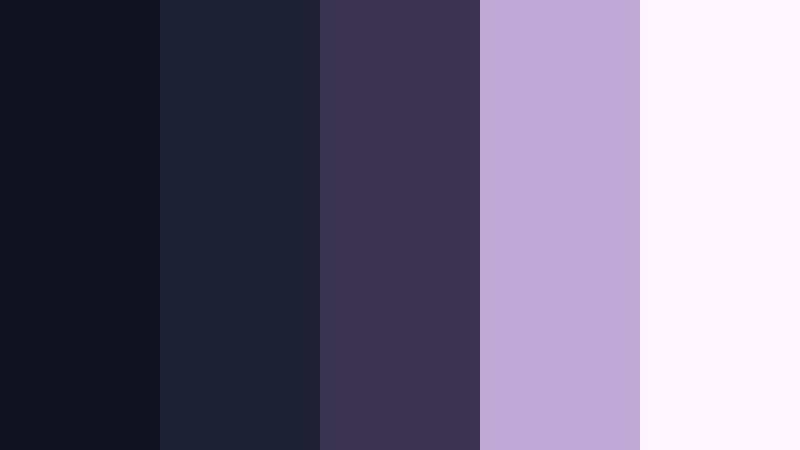
- HEX Codes: #111320, #1f2233, #3b3450, #c0a9d6, #fdf5ff
- Mood: Luxurious and sophisticated with a soft velvet glow.
- Use for: Use for event highlights, red carpet recaps, and premium brand intros that need an upscale look.
Premiere Night Velvet wraps deep ink bases in plush purples and champagne-tinted highlights. It instantly suggests velvet ropes, spotlights, and a curated guest list, perfect for anything that wants to feel premium and exclusive.
Anchor your backgrounds and overlays with the dark tones, then reserve the soft purple and lightest shade for text, logo locks, and accent shapes. This palette is ideal for gala recaps, film festival highlight reels, wedding trailers, or any brand intro that wants the luxury of a premiere night aesthetic.
Editor Suite Marble

- HEX Codes: #181b24, #262a35, #5b6272, #ccd0db, #ffffff
- Mood: Clean, minimal, and refined with editorial coolness.
- Use for: Use for software tutorials, productivity content, and sleek portfolio reels.
Editor Suite Marble balances inky blues with marble-like whites and cool neutrals. It feels tidy, organized, and confidently minimal, like a well-designed edit suite or creative agency website.
Use the darker shades for UI frames, backgrounds, and sidebars, while the mid gray-blues can highlight callouts and icons. The brightest whites are perfect for crisp text, diagrams, and screen capture overlays in tutorials, productivity vlogs, and portfolio or showreel titles.
Faded Script Romance
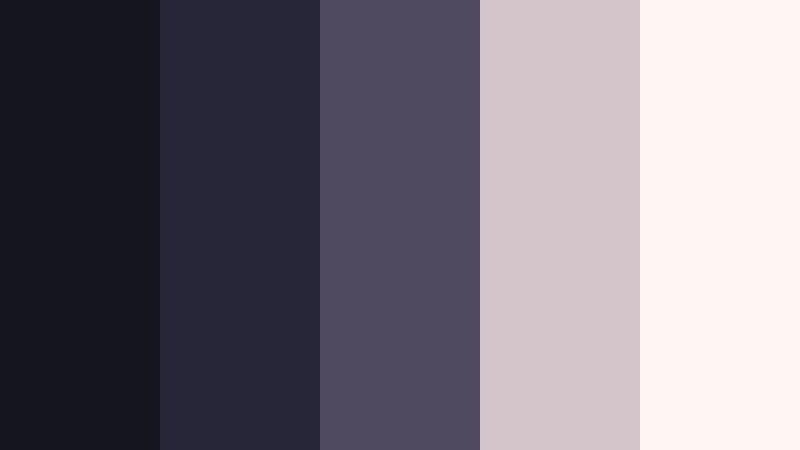
- HEX Codes: #151520, #272538, #4f4a60, #d3c5c9, #fff5f2
- Mood: Softly nostalgic with handwritten letter warmth.
- Use for: Use for wedding highlights, love stories, and nostalgic family compilations.
Faded Script Romance combines deep inky charcoals with dusty rose and warm ivory tones. It recalls old letters, printed photo albums, and soft, vintage lighting without feeling overly sepia or dated.
Let the ink tones carry your backgrounds, subtle vignettes, and thin frames, while the rosy neutrals add warmth to text, flourishes, and simple graphic accents. This palette is made for wedding highlight films, anniversary slideshows, proposal stories, and family compilations that aim for emotional but grounded storytelling.
Indigo Screening Room

- HEX Codes: #101322, #1e2340, #37406a, #9ea8c7, #f8f9ff
- Mood: Refined and serene with a premium screening-room feel.
- Use for: Use for documentaries, educational content, and brand films that aim for trust and calm authority.
Indigo Screening Room moves from deep ink blues to airy periwinkle whites. It feels like a quiet preview theater or a high-end streaming interface, calm and authoritative without being cold.
Use the darker tones for backdrops, chapter cards, and info panels, with the mid indigos supporting charts, timelines, or map graphics. The lighter colors keep titles and body text highly readable, making this palette a strong choice for documentaries, brand explainers, educational series, and leadership video.
Festival Program Luxe
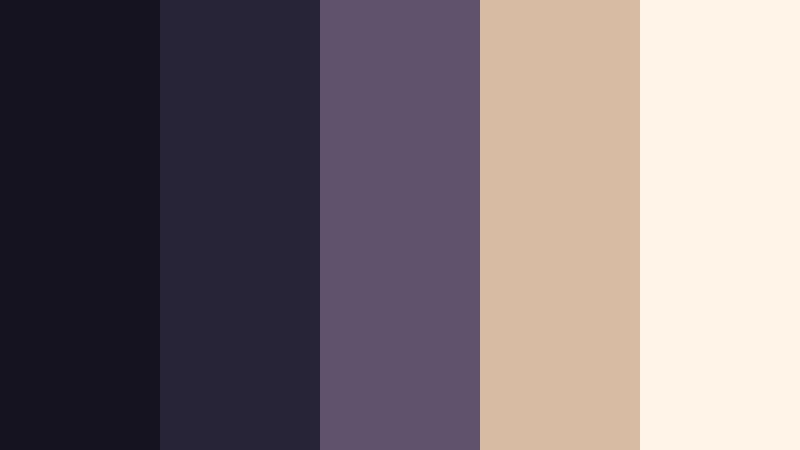
- HEX Codes: #14131f, #272438, #5e526c, #d8bba3, #fff4e7
- Mood: Art-house chic with warm editorial highlights.
- Use for: Use for film festival bumpers, art reels, and curated playlist thumbnails.
Festival Program Luxe mixes inky violets and muted plum with warm beige accents. It captures the feeling of a printed festival catalog or an art magazine spread, sophisticated but still welcoming.
Place the darkest tones behind logos, laurels, and selection badges, then let the warm neutrals highlight category labels, pull quotes, and title typography. This palette is ideal for festival bumpers, curated playlist graphics, arthouse reels, and editorial-style thumbnails that showcase a refined cinema taste.
Bold Cinematic Ink Color Palettes
Neon Trailer Pulse
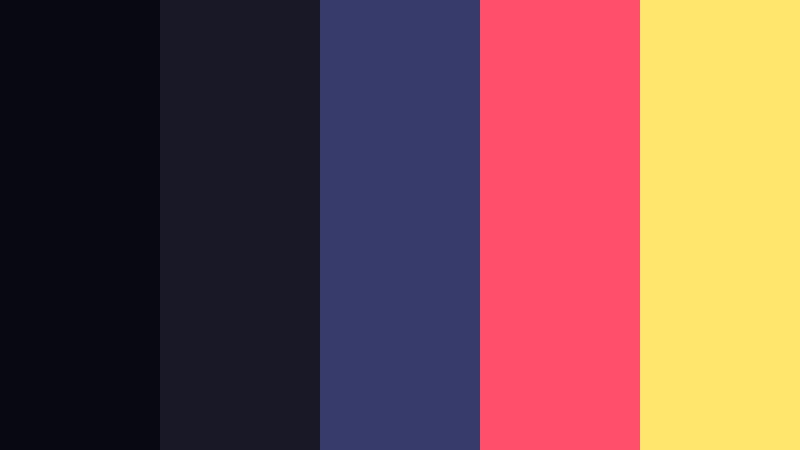
- HEX Codes: #070811, #181827, #363b6b, #ff4f6a, #ffe66d
- Mood: High-energy and electrified with neon pops over inky shadows.
- Use for: Use for gaming intros, music videos, and high-impact promo teasers.
Neon Trailer Pulse lays hot pink and neon yellow accents over a base of dark Cinematic Ink and saturated blue. It feels like a city at night seen through glitchy neon signs and fast-moving cuts.
Let the inky tones dominate your backgrounds and motion graphics, then hit key beats with bold neon pops on titles, call-to-action buttons, and animated strokes. This palette is perfect for gaming intros, EDM or hip-hop music videos, high-impact channel trailers, and thumbnails that need to stand out in a crowded feed.
Action Slate Impact

- HEX Codes: #111217, #1c2230, #324b5f, #ff6b35, #ffd8c2
- Mood: Dynamic and punchy with blockbuster contrast.
- Use for: Use for action trailers, sports highlights, and bold channel branding.
Action Slate Impact combines inky blue bases with fiery orange accents and a soft peach highlight. It echoes the classic blockbuster contrast between cool shadows and warm explosions or stadium lights.
Use the blues as your constant backdrop across intros, lower thirds, and overlays, while the orange shades are reserved for impact moments: score numbers, hit markers, title reveals, and subscribe prompts. It works brilliantly for sports highlight reels, stunt or parkour edits, fitness branding, and any channel that leans into high-energy storytelling.
Arcade Night Rush

- HEX Codes: #050814, #171a2b, #31416a, #12d6ff, #ffe8ff
- Mood: Retro-futuristic and playful with glowing cyan highlights.
- Use for: Use for tech reviews, retro gaming edits, and cyberpunk-inspired shorts.
Arcade Night Rush layers deep ink blues with electric cyan and a soft pastel pinkish-white. It feels like a retro arcade cabinet updated for a modern streaming overlay, playful but still sleek.
Let the dark blues carry your backgrounds and panels, then trace edges, icons, and HUD graphics with the cyan accent. The lightest tone softens text and UI elements so they remain readable against intense glows. This palette suits retro gaming edits, tech reviews, cyberpunk shorts, and channel branding that nods to synthwave and neon nostalgia.
Soft Cinematic Ink Color Palettes
Screenwriter Dawn

- HEX Codes: #171822, #26283a, #5c627a, #d6dde9, #fbfcff
- Mood: Quiet, hopeful, and contemplative like early morning pages.
- Use for: Use for productivity vlogs, writing montages, and calm storytelling sequences.
Screenwriter Dawn blends muted ink bases with gentle sky-like blues and almost pure white. It feels like the first light hitting a blank page, calm and focused rather than dramatic.
Use the darker tones for subtle frames, task lists, or timeline bars, while the pale hues support text, icons, and light overlays. This palette is ideal for productivity and study vlogs, writing or drawing montages, and calm narrative sequences where you want clarity and a sense of quiet momentum.
Studio Softbox Bloom

- HEX Codes: #141722, #2a2c3c, #6b6f86, #f3e6f4, #ffffff
- Mood: Bright yet soft with diffused studio lighting.
- Use for: Use for beauty content, product demos, and lifestyle reels aiming for softness without losing depth.
Studio Softbox Bloom sits between inky shadows and pastel lilac highlights, topped with clean white. It feels like a well-lit studio set where softboxes smooth out harsh edges but the image still has depth.
Keep the inky shades in the corners and edges of your frame with gentle vignettes, and use the mid grays for interface elements or captions. The pastel and white tones work well for text, product callouts, and overlay cards in beauty tutorials, lifestyle reels, and product demos that should look soft, flattering, and modern.
Quiet Cinema Seat

- HEX Codes: #191b24, #2b2d3a, #4d5263, #b4bac8, #f5f6f9
- Mood: Cozy, introspective, and intimate like an empty theater.
- Use for: Use for commentary videos, essay films, and calm talking-head setups.
Quiet Cinema Seat pairs soft inky blues with upholstered grays and a gentle off-white. It feels like sinking into a seat in an almost empty theater, quiet and focused on the story.
Use the darker shades as a constant frame around your talking head shots or essay graphics, and let the lighter tones support chapter titles, pull quotes, and minimal icons. This palette is perfect for commentary channels, film analysis essays, narrative podcasts on YouTube, and any voice-driven content that should feel intimate but clean.
Tips for Creating Cinematic Ink Color Palettes
When you build your own Cinematic Ink color palette for video or design, aim for a balance between deep, inky bases and carefully chosen highlight colors that stay readable on any screen.
- Choose one primary ink shade to use consistently in backgrounds, overlays, and frame bars so your entire channel or series feels unified.
- Always test text contrast on mobile: pair your darkest inks with near-white or very light neutrals, and avoid midtone-on-midtone combinations for titles and captions.
- Add one accent color only: a neon, warm beige, or pastel can carry calls to action, buttons, and key icons without overwhelming your Cinematic Ink base.
- Match your grade to your palette: in Filmora, gently cool your shadows toward blue and keep skin tones neutral so your footage supports, not fights, your graphic colors.
- Use gradients between two ink tones for lower thirds and title cards; this keeps them dimensional without cluttered textures.
- Keep branding elements like logo marks, subscribe buttons, and recurring titles locked to the same HEX codes so your audience instantly recognizes your style.
- Check your palette against both light and dark YouTube or app themes to make sure thumbnails and titles stay legible in different interfaces.
- Save your chosen HEX codes as presets or custom styles in Filmora so every new project can load your Cinematic Ink look in seconds.
Cinematic Ink palettes give you a flexible foundation for everything from moody thrillers to soft productivity vlogs. By pairing deep blue-black tones with carefully chosen highlights and accents, you can shape mood, guide attention, and build a recognizable visual identity across all your videos and designs.
Try these 15 palettes as starting points, then tweak the HEX codes, saturation, and brightness inside Filmora until they match your story and brand. Whether you are grading footage, designing titles, or building thumbnails, a consistent Cinematic Ink palette will help your work look more intentional and cinematic.
Open a new project in Filmora, drop in your favorite palette from this guide, and start experimenting with AI Color Palette, HSL, and filters to lock in a signature look you can reuse across intros, series, and social clips.
secure download