

 100% Security Verified | No Subscription Required | No Malware


 ChatGPT
 Perplexity
 Gemini
 Claude
 Grok
Grok
These Filmora city video filters for Reels are built for fast, cinematic grades that make every street, skyline, and subway shot look intentional and on-brand. Whether you are filming handheld walks, drone flyovers, or quick B-roll of city life, the right filter can instantly turn flat footage into a polished, cinematic urban reel.
Below you will find 12 curated filters designed for Instagram Reels city content and urban reels, with clear guidance for when to use each look and how to tweak it inside Filmora so your city clips feel cohesive, modern, and scroll-stopping.
In this article
Bright Daytime City Reels Filters
City Glow Soft Warm
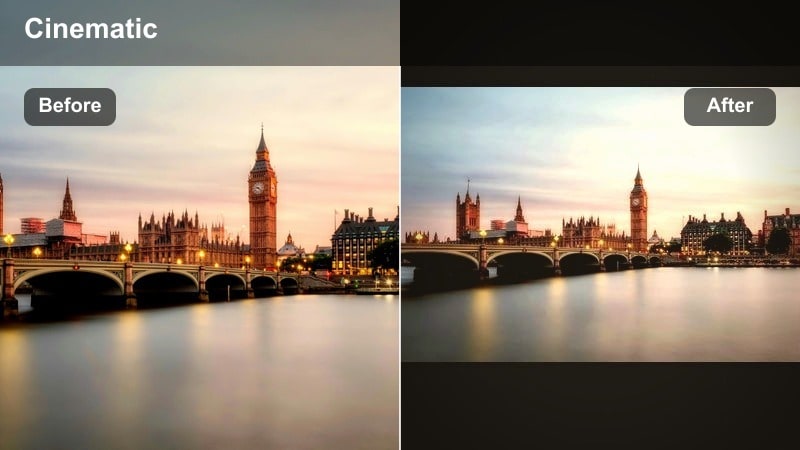
- Effect look: Soft warm contrast that brightens faces and storefronts while keeping backgrounds slightly hazy and flattering.
- Best for: Instagram Reels city content filmed on sunny days, coffee runs, lifestyle walking shots, and cozy downtown vlogs.
- Editing tip: Lower the intensity slightly for overexposed shots and nudge saturation up just on reds and oranges to make signage and cafe tones pop.
City Glow Soft Warm is the go to filter when you want your daytime streets to feel friendly, cinematic, and ready for lifestyle content. It gently lifts mids and adds a golden tint so skin looks healthy, while storefronts and sidewalks gain a soft glow that feels perfect for Instagram Reels city content.
Inside Filmora, drop this filter onto clips from coffee runs, window shopping, or casual walk and talk vlogs. Use the filter intensity slider to dial back the warmth on clips that are already bright, then fine tune red and orange saturation so street signs, coffees, and brick facades stand out without overpowering the scene.
Match Your City Aesthetic with AI Color Tools
Filmora AI color tools let you quickly adapt these city video filters for reels to any brand palette, from cooler corporate blues to warm lifestyle neutrals. Instead of rebuilding every grade, you can start with City Glow Soft Warm and steer it toward your preferred aesthetic.
Import a reference frame from your favorite reel or mood board, then use AI color matching and HSL controls to remap tones while keeping contrast and softness intact. This workflow gives you a repeatable, on brand look even when clips come from different phones or cameras.
 secure download

See City Filters in Action on Real Reels Footage
To understand how each city video reels filter handles skin, sky, and concrete, drop a short vertical clip into Filmora and cycle through the presets. Watching City Glow Soft Warm, Concrete Clean Neutral, or Urban Noir Matte in real time helps you quickly find the look that fits your story.
Use split screen or snapshot previews to compare before and after grades. This side by side view makes it easy to see which filter protects highlight detail, which one gives you the strongest mood, and which feels best for your chosen audio.
secure downloadCombine Filters and LUTs for Cinematic Urban Reels
Filmora includes 1000 plus video filters and 3D LUTs, so you can stack creative looks on top of your favorite cityscape reel LUT for consistent, cinematic grading. Start with a base LUT that defines your overall tone, then add a city filter at low intensity for final polish.
This layered approach keeps your brand look stable from reel to reel while giving each edit its own mood. You can reserve stronger filters for transitions or hero shots, and keep background clips more subtle but still stylized.
secure downloadConcrete Clean Neutral
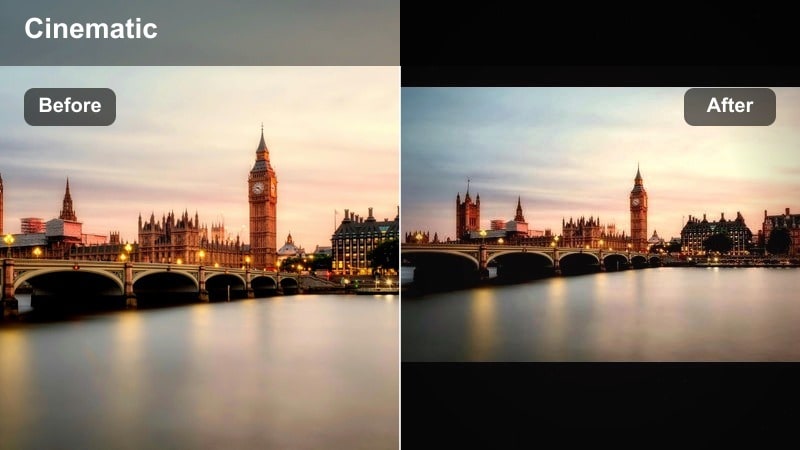
- Effect look: Crisp neutral contrast with gentle desaturation that makes concrete, glass, and steel feel modern and minimal.
- Best for: Urban reels focused on architecture, street photography style clips, and cityscape B roll for brand or product Reels.
- Editing tip: Increase sharpness slightly and add a touch of film grain for a subtle editorial vibe that works great with text overlays and graphics.
Concrete Clean Neutral is ideal when your reel is about shapes, lines, and structure rather than bold color. It lightly desaturates the scene and adds clean contrast so concrete, glass, and steel look sharp without appearing harsh or overprocessed.
In Filmora, use this filter on architectural B roll, skyline cutaways, and product shots framed against city backdrops. Increase sharpness just enough to emphasize edges, then add fine grain and bold titles or UI overlays for a design forward aesthetic that feels both modern and timeless.
City Vibrance Pop
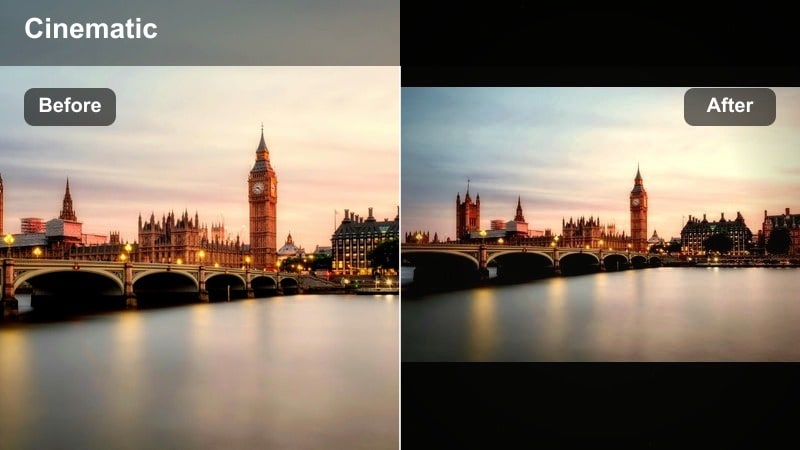
- Effect look: Punchy saturation and targeted contrast that makes street art, billboards, and clothing colors stand out without crushing shadows.
- Best for: Fast paced cinematic urban reels featuring markets, murals, fashion walks, and colorful street life.
- Editing tip: Use keyframed intensity to start the reel more muted and then ramp up the filter as the beat drops or the action increases.
City Vibrance Pop turns busy streets into bold, energetic visuals where murals, neon signs, and outfits take center stage. It boosts saturation intelligently so colors feel lively while shadows retain enough detail for Reels that are heavy on transitions and movement.
Apply it in Filmora to clips from markets, festivals, or fashion walks, then keyframe the filter intensity so the grade grows stronger as your music or pacing builds. Protect faces by slightly reducing saturation in red and orange ranges, and let blues, greens, and purples carry the high energy city palette.
Moody and Cinematic Urban Filters
Urban Noir Matte
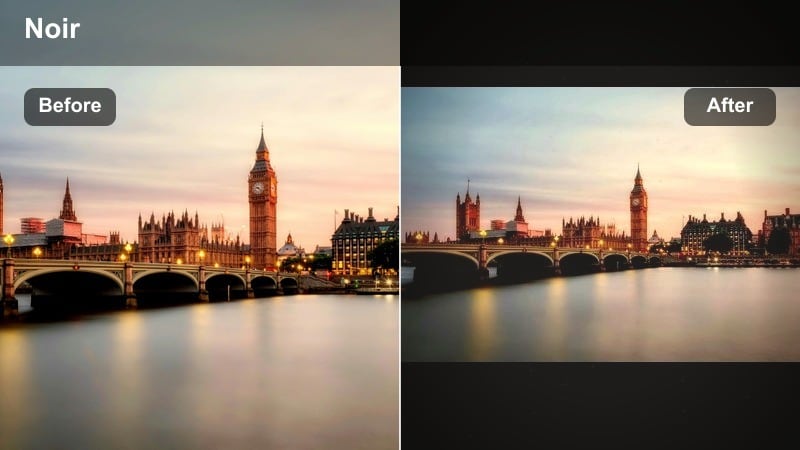
- Effect look: Low contrast matte shadows with cool midtones and a subtle fade that adds a cinematic, slightly vintage street film vibe.
- Best for: Cinematic urban reels, rainy day alleys, subway scenes, and storytelling edits that need mood and atmosphere.
- Editing tip: Drop highlights a touch more and add vignetting to focus attention on your subject in crowded or messy frames.
Urban Noir Matte is built for storytelling, giving ordinary corners, tunnels, and alleys a soft, cinematic fade. It raises the blacks, cools midtones, and slightly mutes saturation so reflections, puddles, and shadows feel dramatic without looking too heavy.
Use it in Filmora on narrative style reels, low light walks, or moody subway sequences. Slightly underexpose in camera if possible, then let the filter lift shadows while you reduce highlights and add a vignette. This guides focus toward your subject and text overlays, perfect for voiceover based city stories.
Steel Blue City
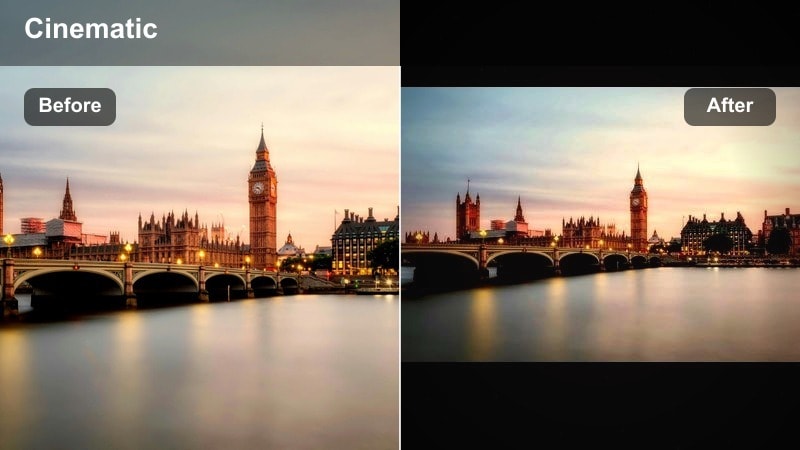
- Effect look: Cool blue cast with lifted shadows and crisp contrast that emphasizes steel, glass, and overcast skies.
- Best for: City video filters for reels featuring business districts, corporate buildings, and minimalist commuter shots.
- Editing tip: Use Filmora’s color temperature slider to fine tune warmth on skin tones while keeping backgrounds cool and futuristic.
Steel Blue City gives your urban reels a sleek, tech forward feel, cooling the overall image while preserving clarity in windows, steel, and cloud covered skies. It works especially well for financial districts, office towers, and commuter montages.
In Filmora, drop the filter on clips shot on cloudy days or in glass heavy environments, then slightly warm your subject with color temperature or selective masks. This contrast between cooler architecture and warmer people makes your reels feel like polished campaign content while staying viewer friendly on small screens.
Gritty Street Fade
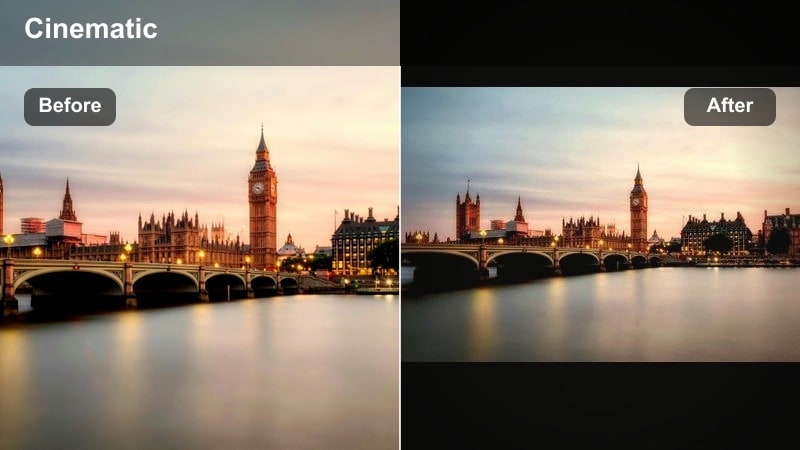
- Effect look: Muted tones with lifted blacks, slight grain, and a greenish urban cast that makes sidewalks and brick walls feel raw and textured.
- Best for: Street culture reels, skate clips, graffiti shots, and handheld documentary style urban footage.
- Editing tip: Combine with a small amount of motion blur or speed ramping to emphasize movement and give the footage gritty energy.
Gritty Street Fade is designed for raw, culture driven city reels where texture matters more than perfect color. It flattens contrast slightly, lifts blacks, and adds a hint of green so bricks, asphalt, and graffiti feel rough and documentary like.
Apply it in Filmora to skate clips, freestyle sessions, and handheld street captures. Layer in mild motion blur, speed ramps, or handheld style transitions so the lifted blacks and grain read as intentional energy. A bit of midtone sharpening will keep key details clear while the overall image stays authentically imperfect.
Warm Golden-Hour City Filters
Sunset Avenue Glow
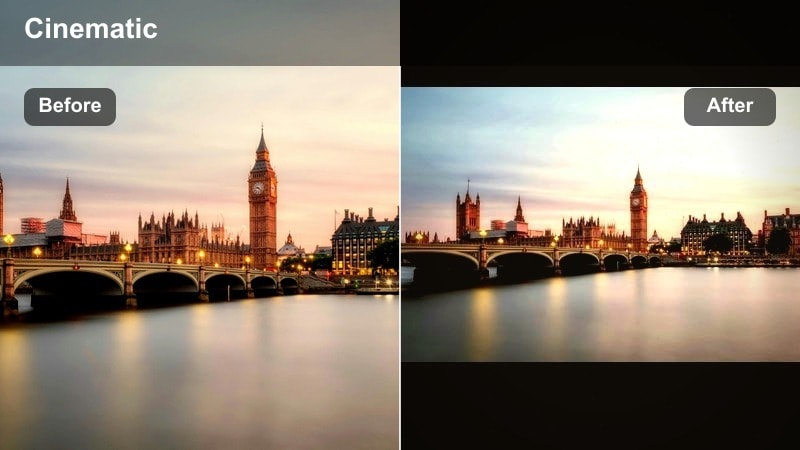
- Effect look: Rich golden highlights with gentle contrast and a subtle bloom effect that makes the sun flare feel dreamy and cinematic.
- Best for: Golden hour rooftop reels, bridge walks, couples in the city, and lifestyle creator B roll.
- Editing tip: Underexpose your footage slightly in camera, then let the filter lift highlights and mids to avoid blown out skies.
Sunset Avenue Glow enhances late afternoon and early evening light, adding warmth and a delicate bloom that wraps around subjects and skylines. It is perfect for romantic walks, rooftop hangs, and reflective lifestyle moments where the sun is low.
In Filmora, use it on backlit silhouettes, bridge crossings, or skyline cutaways. If your footage is a bit dark, the filter will naturally lift mids and highlights; then you can fine tune exposure and contrast so the sky keeps its gradient while faces remain readable in fast cuts.
Amber Street Soft
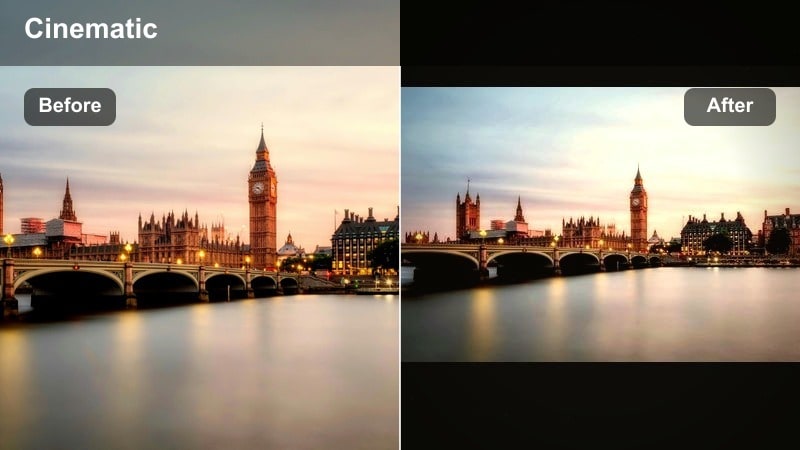
- Effect look: Soft, low contrast amber tone with smoothed highlights that flatters skin and tames harsh side light from windows and storefronts.
- Best for: Creator talking head Reels filmed on balconies, sidewalk cafes, or near large city windows during late afternoon.
- Editing tip: Reduce clarity slightly and add a subtle vignette for a beauty style look that keeps attention on the subject’s face.
Amber Street Soft is a flattering choice for creators who film talking head content surrounded by city scenery. It wraps skin in a gentle amber tone, softens bright edges, and lowers contrast just enough to smooth imperfections without losing detail.
Apply it in Filmora to balcony intros, cafe chats, or window side monologues. Slightly reduce clarity and add a modest vignette so the background city blur feels dreamy, while your face, captions, and stickers stay sharp and easy to read in vertical format.
Golden Haze Cityscape
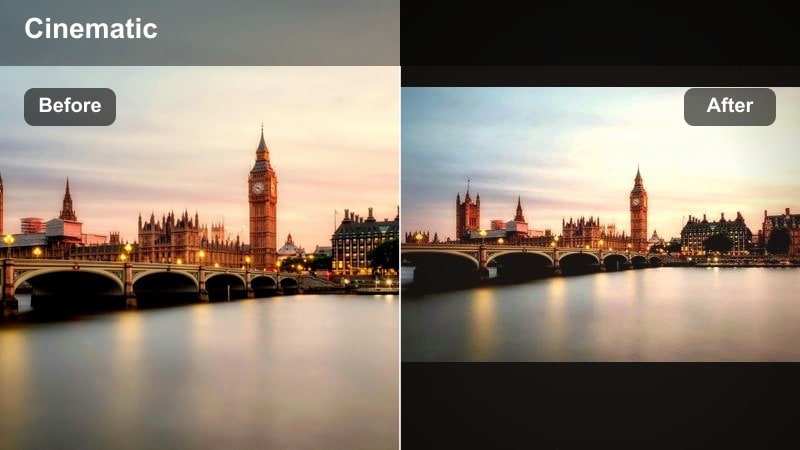
- Effect look: Hazy glow on highlights, gentle filmic contrast, and warm mids that make skyscrapers and skyline silhouettes feel cinematic.
- Best for: Cityscape reel LUT style grades, drone skyline passes, time lapses, and establishing shots for longer Reels edits.
- Editing tip: Add subtle speed changes or reverse clips to make sunset clouds and traffic flow feel more dynamic with the hazy effect.
Golden Haze Cityscape is tailored for skyline shots and establishing clips that set the tone of your reel. It adds a warm haze to highlights and a filmic contrast curve so towers, bridges, and distant streets feel like part of a cinematic opening sequence.
In Filmora, use it on drone passes, time lapses, or static city views between scenes. Apply gentle speed ramps or clip reverses to clouds and traffic, letting the hazy glow emphasize motion. Keep this filter consistent across all your establishing shots to unify longer edits.
Dynamic City Motion and Transit Filters
Metro Motion Cool
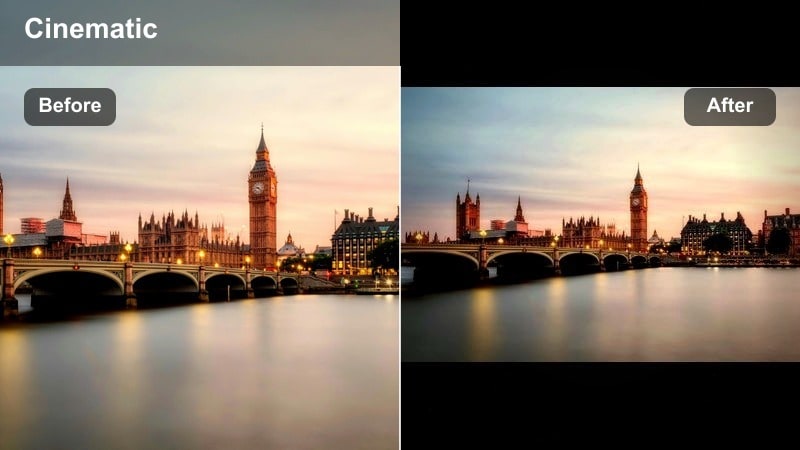
- Effect look: Cool, contrasty look with punchy shadows and clean highlights that makes moving trains, escalators, and traffic feel sharp and kinetic.
- Best for: Subway transitions, escalator shots, train station reels, and high speed city commute edits.
- Editing tip: Pair with Filmora speed ramps and motion blur to emphasize direction lines like rails, tunnels, and platforms.
Metro Motion Cool is designed to make transit clips look fast, modern, and precise. The cool cast and firm contrast highlight direction lines in tracks, escalators, and tunnels, giving your commute footage a high energy, music video style feel.
Use it in Filmora on shots of trains arriving, crowds moving through stations, or POV rides. Combine the filter with speed ramps, motion blur, and beat synced cuts so rails and platforms form dynamic leading lines that pull viewers through the reel.
Traffic Trails Warm
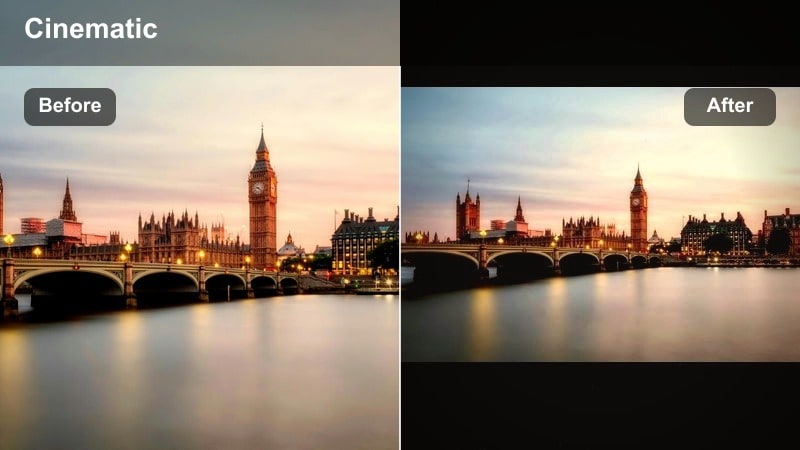
- Effect look: Warm highlights with deep, clean shadows that make car lights, buses, and bike lanes feel energetic and directional.
- Best for: Time lapse style reels of intersections, quick hyperlapse walks across crosswalks, and POV scooter or bike rides.
- Editing tip: Boost saturation on reds and yellows for lights and signage, but keep greens slightly muted to avoid color overload.
Traffic Trails Warm focuses on headlamps, brake lights, and illuminated signage, adding richness to warm tones while keeping shadows solid and controlled. It is ideal for dusk intersections, bridges, and moving POV shots where light streaks create natural transitions.
In Filmora, apply it to time lapses or hyperlapses, then fine tune saturation so reds and yellows glow while greens stay restrained. Add subtle stabilization and motion blur for handheld clips; the warm highlights will make motion feel deliberate and cinematic instead of shaky.
Urban Rush Hybrid
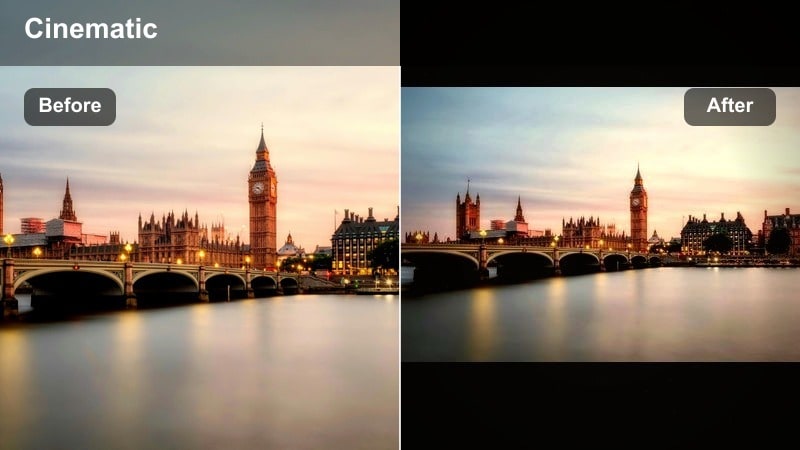
- Effect look: Balanced warm cool split with medium contrast that keeps both sky and street tones readable while emphasizing movement.
- Best for: Mixed lighting city routes where you move from outdoor streets into tunnels, stations, or malls in a single reel.
- Editing tip: Cut on motion and use direction based transitions like whip pans so the filter ties together very different locations.
Urban Rush Hybrid is a flexible city video reels filter built for route based edits where lighting changes constantly. It balances warm and cool tones, holding detail in both sky and street while offering enough contrast for quick, energetic cuts.
Use it in Filmora across clips that travel from open streets into covered walkways, malls, or transit hubs. Keep the same filter on every shot and rely on exposure tweaks per clip so the grade stays consistent. Then cut on motion and use whip pans or match cuts to make the whole journey feel like one continuous rush through the city.
Tips for Using City Video Reels Filter Filters in Filmora
- Shoot with slightly flatter or reduced contrast settings in camera so Filmora city video filters for reels have more latitude to shape your final look.
- Keep exposure as consistent as possible across clips in the same reel to avoid distracting brightness jumps once you apply a single filter.
- Use the same filter family on both A roll and B roll so talking shots and city cutaways feel like one cohesive story instead of separate videos.
- Export a short test reel with two or three different filters and review it on your phone to see which look holds detail best in vertical playback.
- If signage, traffic lights, or brand colors matter, adjust saturation and HSL after applying your chosen reels city filter rather than swapping filters.
- Combine filters with Filmora stabilization, speed ramps, and motion blur to make even quick handheld footage feel intentional and cinematic.
- Save your favorite city video reels filter settings as custom presets in Filmora so you can reuse a consistent, on brand grade in future reels.
- When mixing clips from different cameras or phones, use AI color matching first, then apply one filter over everything for a unified city aesthetic.
City video filters for reels give you a fast way to turn casual urban clips into cinematic, branded content that stands out in crowded feeds.
Save a few favorite presets in Filmora, build a simple grading routine around them, and your followers will quickly recognize your city reels by their consistent color and mood.
secure downloadNext: Best Night Video Filters to Make Your City Lights Stand Out
