

 100% Security Verified | No Subscription Required | No Malware


 ChatGPT
 Perplexity
 Gemini
 Claude
 Grok
Grok
This Food Vlog Handheld Style Filter pack is designed for content creators who shoot on the go, capturing bites, table shots, and chef moments with a natural handheld feel.
Use these presets to smooth out rough clips, add tasty warmth, and keep your food colors looking real and appetizing, even in challenging restaurant lighting.
In this article
Cozy Indoor Dining and Restaurant Tables
Warm Table Glow
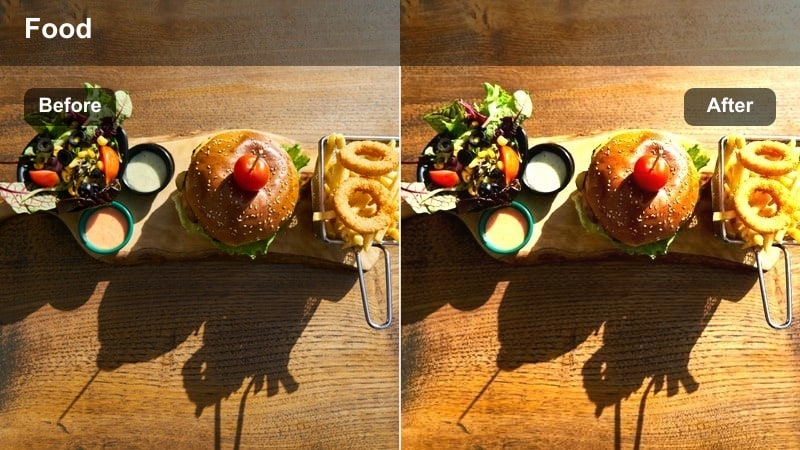
- Effect look: Soft, warm contrast that brightens plates while keeping the handheld motion intact.
- Best for: Dim restaurant interiors, candle-lit dinners, and close-up shots of shared plates.
- Editing tip: Lower the filter intensity to around 60% if skin tones start to look too orange in your vlog.
Warm Table Glow adds a cozy, table-side ambiance that enhances the natural warmth of restaurant lighting while preserving your handheld movements. In Filmora, this preset gently boosts contrast and warmth around the midtones so plates and dishes immediately feel more inviting without pushing the scene into an overly stylized look.
Apply it to your close-ups of shared dishes or intimate dinner vlogs, then fine-tune strength with the Effect controls to keep skin tones balanced. After applying, pull back highlights slightly so white plates stay detailed, and add a soft vignette in Filmora to guide the viewers eye to the hero dish at the center of your handheld frame.
Keep Food Colors True with Smart Color Balance
These Food Vlog Handheld Style Filters are tuned to protect natural food tones while still giving your footage a cinematic push. They work especially well when paired with Filmoras AI color tools to correct tricky indoor or mixed lighting in seconds.
Apply a filter first, then use AI-powered color correction to quickly refine white balance, plate whites, and skin tones so every dish looks appetizing and natural across your vlog.
 secure download

See the Handheld Food Filters in Action
Test each preset on short clips from your latest cafe visit, home cooking session, or night market run to quickly see which one matches your channels vibe. Toggling filters on and off in Filmora helps you judge how color, contrast, and motion feel compared to your original handheld footage.
Drag a filter onto your timeline and preview it on key clips before committing to a full-sequence grade. This lets you refine intensity, white balance, and stabilization per shot while staying true to your handheld style.
secure downloadBlend Filters with LUTs for a Signature Food Vlog Look
Pair these handheld style filters with subtle LUTs in Filmora to build a recognizable, series-wide aesthetic for your food channel. Let the filter handle most of the contrast and color shaping, then use a LUT at low intensity to add final polish and consistency across episodes.
Experiment with different LUTs on top of your favorite food preset, keeping their strength modest so food colors stay accurate and appetizing while your overall vlog look feels cohesive.
secure downloadCozy Bistro Handheld
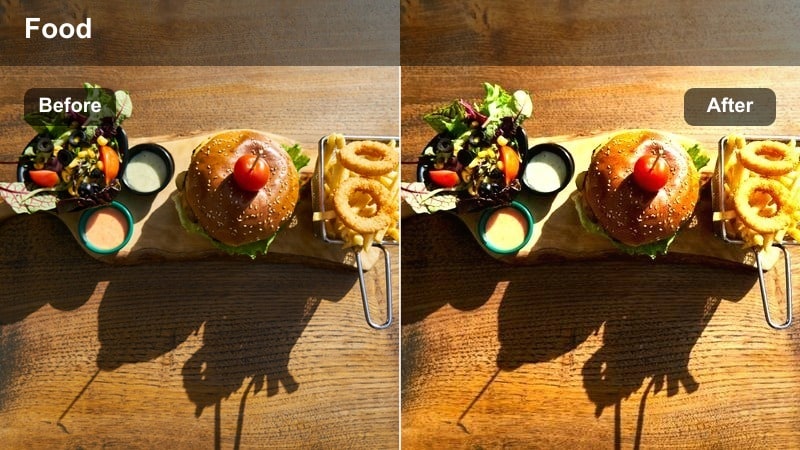
- Effect look: Gently lifted shadows with a subtle amber tint that flatters wooden tables and indoor decor.
- Best for: Bistro-style cafes, brunch tables, and casual sit-down food vlogs.
- Editing tip: If the room looks too yellow, slightly reduce saturation in the yellow channel while keeping reds intact for food.
Cozy Bistro Handheld adds a relaxed, brunch-ready warmth that works beautifully with wood, brick, and soft indoor lighting. In Filmora, this preset lifts shadows so details in table settings and background decor remain visible even in dim corners.
Use it on full table scenes and conversational clips where you want plates, mugs, and faces to share the same gentle warmth. If your space leans too yellow, jump into advanced color settings and selectively desaturate yellows while preserving reds and oranges so coffee, eggs, and pastries keep their rich, appetizing tones.
Plate Focus Soft Grain
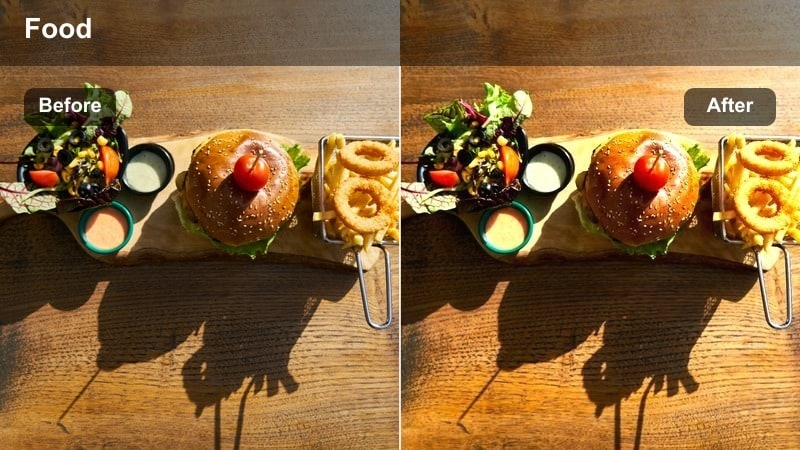
- Effect look: Softened highlights with very light grain that emphasizes the plate while preserving motion shake.
- Best for: Close-ups of dishes, handheld hero shots of the main plate, and plating details.
- Editing tip: Cut the grain strength in half for short-form videos where compression may exaggerate noise.
Plate Focus Soft Grain is designed to make your hero dishes feel cinematic while still keeping the organic handheld feel. In Filmora, the subtle grain and softened highlights help draw attention to textures like crusts, glazes, and garnishes without blowing out reflections on glossy plates.
Apply this preset to tight shots of plating and final reveals, especially in low-light restaurants where digital noise can show up. If you are editing for TikTok, Reels, or Shorts, reduce grain strength so compression does not over-amplify texture, and keep sharpening modest so the overall image stays smooth and filmic.
Street Food Stalls and Busy Markets
Street Bite Pop
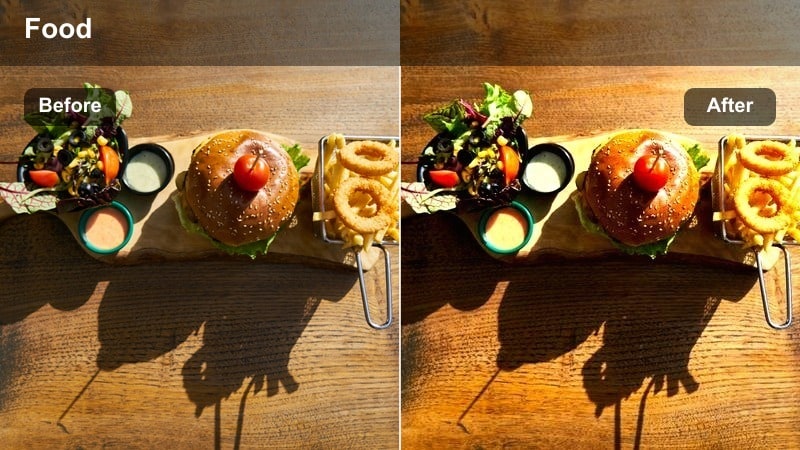
- Effect look: Punchy contrast and saturation that make street snacks stand out against busy backgrounds.
- Best for: Outdoor street food stalls, night markets, and colorful grab-and-go bites.
- Editing tip: Trim saturation on greens and blues if neon signs or tarps start to distract from the food.
Street Bite Pop gives your handheld market footage an energetic, colorful punch that immediately highlights the snack in your hand. In Filmora, the added contrast and saturation separate food from crowded backgrounds, helping skewers, wraps, and cups of noodles stand out clearly.
Use this preset when you are moving quickly through markets and want every bite to look intense and flavorful. If vendor signs or tents become too eye-catching, open the color adjustment panel and gently reduce green and blue saturation so viewers focus on the food, not the surroundings.
Market Ambient Soft
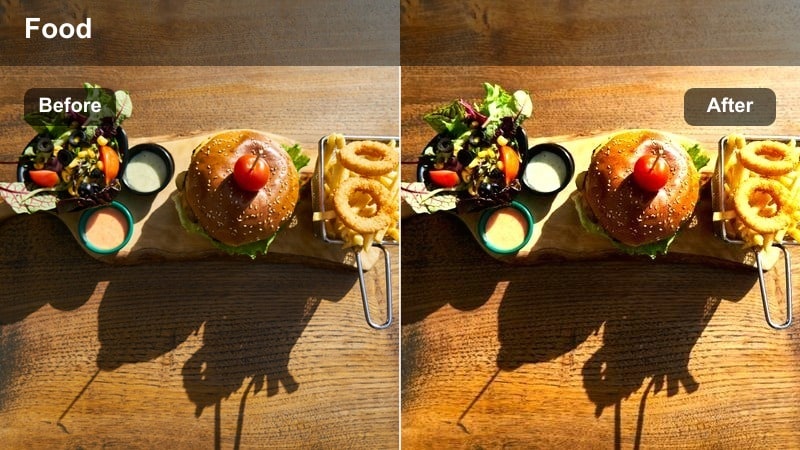
- Effect look: Gentle, low-contrast profile that tames harsh outdoor light while keeping colors true to life.
- Best for: Midday market runs, handheld walking shots between stalls, and vendor interactions.
- Editing tip: Raise exposure slightly after applying if your camera underexposed to save the highlights.
Market Ambient Soft is ideal for bright daytime shoots where sun and shade constantly change as you walk between stalls. In Filmora, this preset pulls back contrast and subtlety rolls off highlights so the overall image stays easy on the eyes while preserving realistic color.
Apply it to walking tours, vendor chats, and context shots of the market layout. If you shot a little dark to protect the sky, bump exposure slightly in the Color panel after applying the filter so faces and dishes are clearly visible without sacrificing highlight detail.
Neon Night Snacks
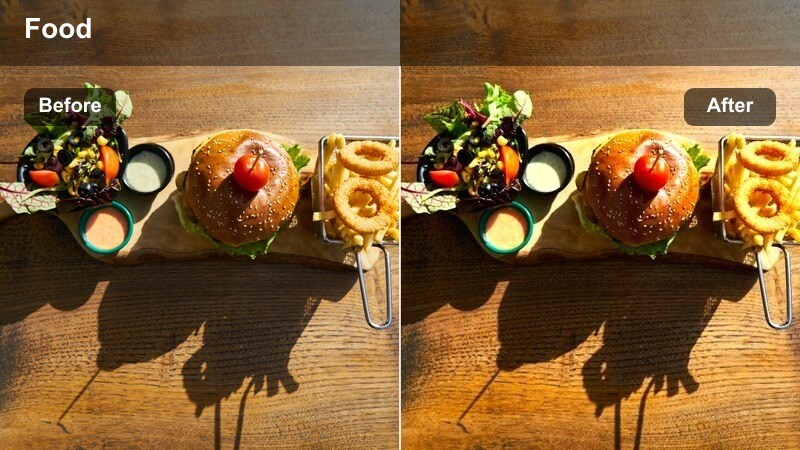
- Effect look: Cool-toned shadows with crisp highlights that make night market lights and food details pop.
- Best for: Night street food, handheld walk-and-talk segments, and moody vendor shots.
- Editing tip: Use keyframed exposure to keep faces visible as you move between bright signs and darker alleys.
Neon Night Snacks gives your nighttime market vlogs a stylish, modern feel with cool shadows and clean, bright highlights. In Filmora, it enhances neon signs and LED glows while keeping food textures crisp enough to see every sprinkle and grill mark.
Use this preset for walk-and-talk segments, sizzling grills, and moody close-ups around neon-lit stalls. To avoid losing faces when lighting changes, keyframe exposure or brightness along the clip so you stay well lit as you move from bright shopfronts to darker walkways.
Home Kitchen Cooking and Prep
Countertop Daylight Clean
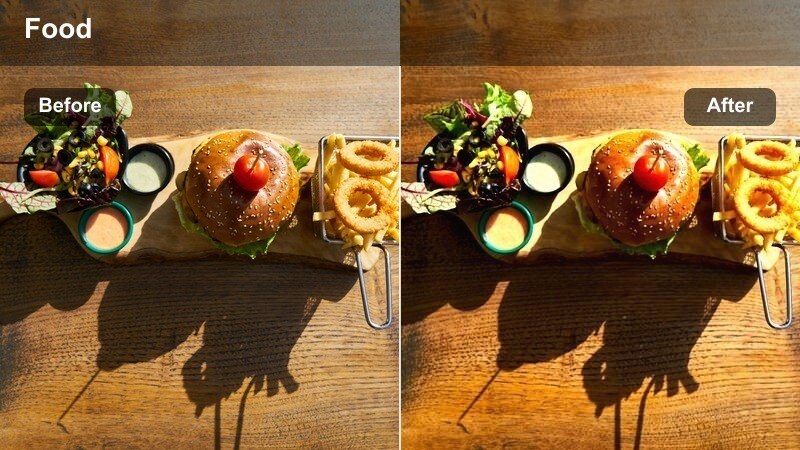
- Effect look: Bright, neutral look with clean whites that works well with window light and handheld overhead shots.
- Best for: Home kitchen prep, cutting boards, and mixing ingredients near a window.
- Editing tip: If your walls are colored, reduce saturation in that hue to stop them from casting onto the food.
Countertop Daylight Clean is designed for home cooks filming in natural light, giving your chopping, mixing, and prepping shots a fresh, airy quality. In Filmora, this preset balances exposure and keeps whites neutral so cutting boards, bowls, and plates do not look tinted.
Apply it to top-down and eye-level shots near windows where daylight shifts throughout your shoot. If you have colored walls or cabinets, reduce saturation for those hues in the color controls so they do not spill onto your ingredients and alter how the food looks on camera.
Stove Side Cozy
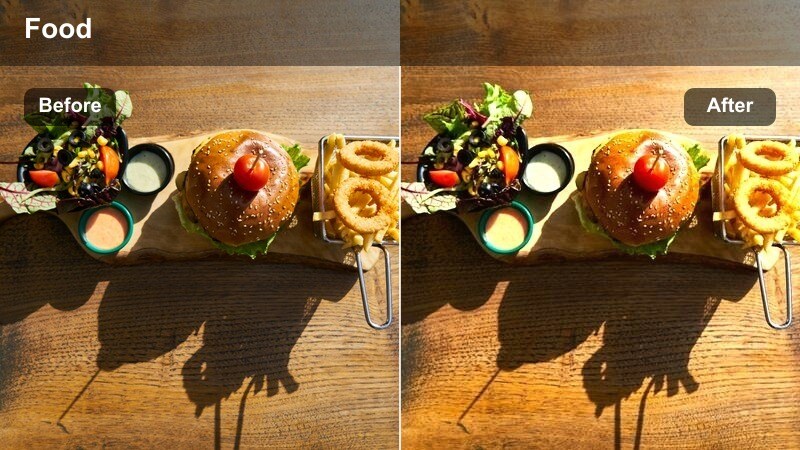
- Effect look: Warm mids and soft contrast that flatter stove-top scenes and handheld tasting moments.
- Best for: Cooking at the stove, simmering pots, and quick taste-test reactions.
- Editing tip: Use gentle stabilization only on clips where the pot or pan is the main focus to avoid warping steam.
Stove Side Cozy adds a comforting, home-cooked warmth to your simmering pots, frying pans, and tasting reactions. In Filmora, the filter gently warms midtones and softens contrast so steam, sauces, and bubbling textures remain visible without looking harsh.
Use it on medium and close-up shots around the stove where you want to emphasize comfort food vibes. Apply only light stabilization to clips focused on the pan so steam and heat waves stay natural, and cut to tighter shots during sizzles or steam bursts to maximize sensory impact.
Fridge Grab Realism
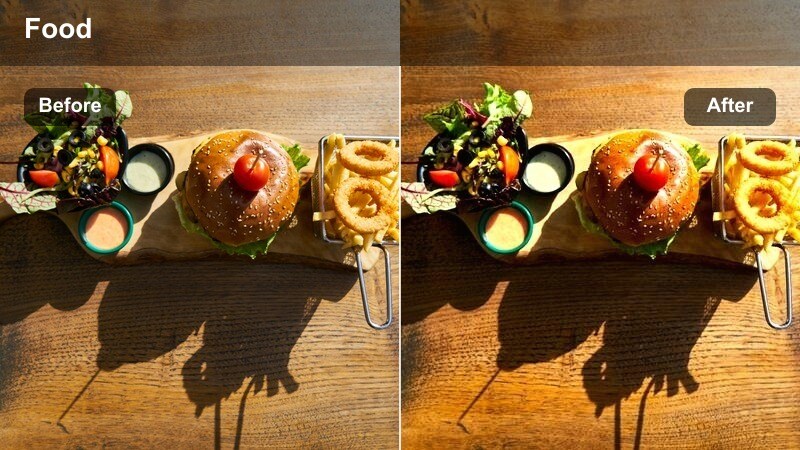
- Effect look: True-to-life color with slight contrast, perfect for quick, candid handheld movements.
- Best for: Opening the fridge, grabbing ingredients, and quick kitchen transitions.
- Editing tip: Use this filter at full strength for grab shots, then crossfade into a more stylized preset for cooking stages.
Fridge Grab Realism keeps your in-between moments clean and honest, making quick handheld grabs from the fridge or pantry feel natural. In Filmora, this preset subtly refines contrast and color without pushing a strong look, so it blends smoothly with other styles.
Use it on short transition clips that link major recipe steps, like opening drawers, rinsing vegetables, or closing the fridge. Let it run at full strength for those candid shots, then crossfade into your chosen cooking preset so the visual story flows without distracting jumps in style.
Cafe Table Shots and On-the-Go Bites
Window Seat Latte Vibe
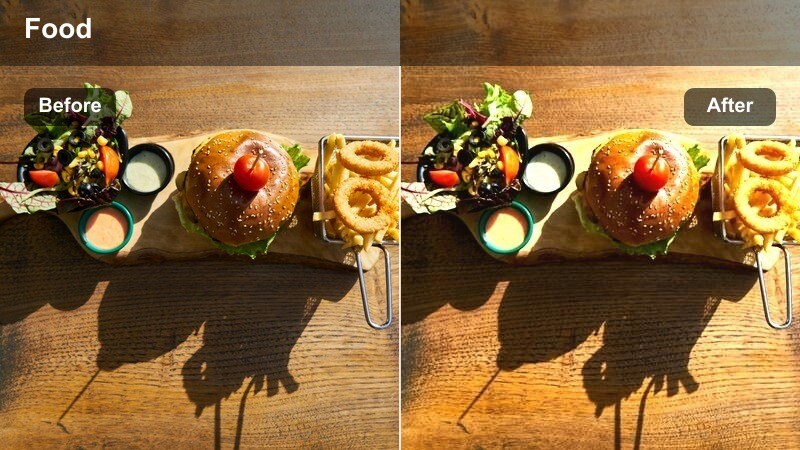
- Effect look: Soft highlights with warm-neutral tones that flatter drinks, pastries, and table setups by a window.
- Best for: Cafe table scenes, latte close-ups, and handheld bites by the window.
- Editing tip: If your background is overexposed, drop highlights while keeping midtones bright for the food.
Window Seat Latte Vibe is tailored for cozy cafe scenes, giving your coffees, teas, and pastries a soft, inviting glow. In Filmora, the filter smooths highlights from bright windows while keeping midtones warm and balanced so foam, crumbs, and ceramic textures read clearly.
Apply it to sit-down shots facing the window, as well as close-ups of latte art and plated desserts. If the outside view blows out, lower highlights and whites in the Color panel while preserving midtone brightness so the food remains the star and the background stays pleasantly soft.
To-Go Box City Walk
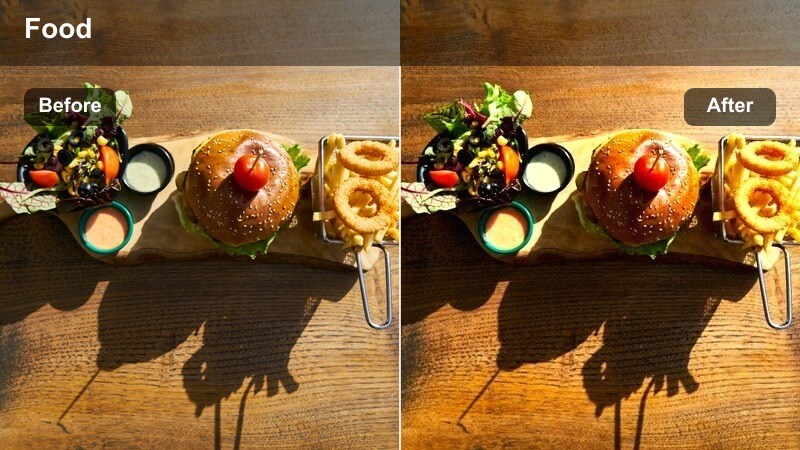
- Effect look: Balanced contrast with slightly cooler shadows that complement city sidewalks and handheld walk-and-eat shots.
- Best for: Walking with a to-go meal, curbside benches, and quick bites shot in motion.
- Editing tip: Avoid heavy stabilization; instead, use short clips to keep the energetic handheld feel.
To-Go Box City Walk is built for urban vlogs where you are eating on the move, giving your handheld shots a clean, city-ready finish. In Filmora, its balanced contrast and lightly cool shadows match concrete, glass, and street scenes without dulling food colors.
Use it for POV clips holding takeout, curbside tastings, and quick bites during city walks. Rather than over-stabilizing, trim clips tighter and cut to the beat of your music so the natural bumps feel rhythmic and energetic while the food stays clearly visible.
Minimal Menu Flatlay
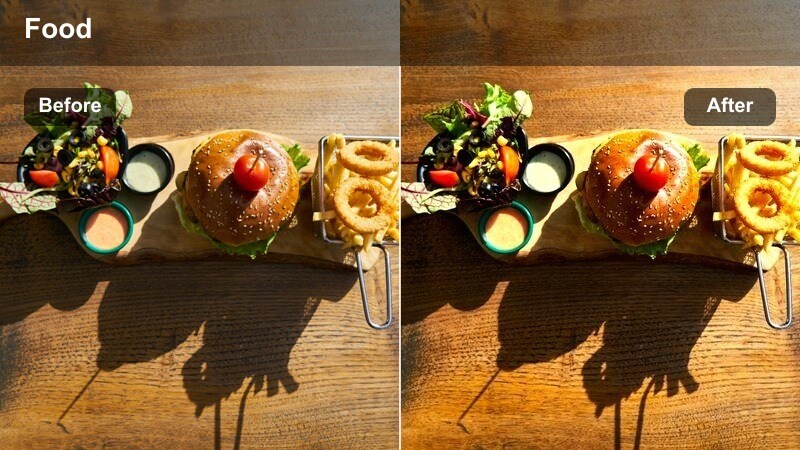
- Effect look: Clean, slightly desaturated style that keeps menus, plates, and table details crisp from above.
- Best for: Flat-lay shots of full orders, menu overviews, and cafe table layouts.
- Editing tip: Boost clarity slightly to separate individual items when filming multiple dishes in one frame.
Minimal Menu Flatlay is perfect for overhead spreads where you want every item to look organized and easy to scan. In Filmora, the clean, lightly desaturated look keeps text, plates, and cutlery crisp while preventing the frame from feeling cluttered or overly colorful.
Apply it to full-table reveals, menu pans, and flat-lay shots of multiple dishes. Gently increase clarity or sharpness so individual items stand out from one another, then mix wide overheads with quick close-ups in the same preset to build a simple, cohesive mini-story around your cafe order.
Tips for Using Food Vlog Handheld Style Filter Filters in Filmora
- Shoot with a slightly flatter in-camera profile so these handheld food filters have more latitude to shape contrast and color.
- Keep ISO as low as possible in restaurants and cafes to minimize noisy shadows when you add warmth or grain.
- Record a few seconds of steady table shots between handheld moves to give yourself natural cut points during editing.
- Use different presets for indoor, outdoor, and night food scenes so each environment feels consistent within your vlog.
- Always double-check skin tones and plate whites after applying a filter to ensure food stays appetizing and people look natural.
- Test filter intensity at several levels, then pick the softest version that still delivers the style you want for your channel.
- Combine filters with Filmora stabilization only on the shakiest clips so you retain an authentic handheld feel.
- Save your favorite filter and color tweaks as custom presets in Filmora to keep your food vlog look consistent across episodes.
With the Food Vlog Handheld Style Filter pack, you can keep the authentic feel of shooting on the go while giving every plate, sip, and bite a polished, appetizing look.
Experiment with different presets for restaurants, markets, home kitchens, and cafes until you find the handheld style that perfectly matches your channel's vibe.
secure downloadNext: Cafe Outdoor Seating Lut
