

 100% Security Verified | No Subscription Required | No Malware


 ChatGPT
 Perplexity
 Gemini
 Claude
 Grok
Grok
Moody Indigo sits between deep blue and shadowy violet, carrying a calm yet dramatic energy. It feels cinematic, mysterious, and slightly nostalgic, which is why it works so well for storytelling, late-night cityscapes, and introspective content. In design and video, it can instantly make your visuals look more premium and emotionally rich.
For creators and Filmora users, Moody Indigo is perfect for cinematic vlogs, YouTube thumbnails, opening titles, and cohesive branding across platforms. Below you will find 15 curated Moody Indigo color palettes with HEX codes you can plug straight into your edits, overlays, and channel assets.
In this article
Cinematic Moody Indigo Color Palettes
Midnight Studio Noir

- HEX Codes: #1b203a, #252b4d, #0f111b, #a6a7ba, #f5f5f7
- Mood: Cinematic, introspective, and subtly luxurious.
- Use for: Use for dramatic film-style intros, narrative vlogs, and documentary titles where you want a premium, moody look.
Midnight Studio Noir wraps your frames in deep, inky Indigo with soft gray highlights, like a studio lit only by key lights and screen glow. The darker tones (#1b203a, #252b4d, #0f111b) create rich shadows, while the lighter grays (#a6a7ba, #f5f5f7) keep text, logos, and UI elements readable.
This palette works beautifully for cold opens, cinematic title cards, and talking-head shots with a serious tone. Use the darkest shade for backgrounds, the mid gray for lower thirds, and the lightest white for text in your Filmora projects, thumbnails, channel banners, and end screens to keep everything cohesive.
Pro Tip: Build a Cinematic Moody Indigo Look in Filmora
To keep Midnight Studio Noir consistent across your edit, use the same HEX values for titles, shapes, and overlay graphics inside Filmora. Pick one Indigo as your background, one gray for accent bars, and reserve the brightest shade for important calls to action like Subscribe or Download links.
You can also save this as a custom preset by combining color grading adjustments with text styles. That way, every intro, b-roll montage, and reel you export has the same Moody Indigo signature, even when your footage comes from different cameras or locations.
AI Color Palette
If you have a reference frame or color card using Midnight Studio Noir, you can turn it into a look for your whole video. Filmora's AI Color Palette feature analyzes that reference shot and applies similar hues, contrast, and saturation to the rest of your clips.
Drop your hero shot on the timeline, use it as the style source, and match multiple clips in one step. This keeps Indigo shadows, soft grays, and highlight balance uniform from your opening shot to the final end screen.
 secure download

HSL, Color Wheels & Curves
Once your base look is matched, refine the Moody Indigo tones with Filmora's HSL, color wheels, and curves. Slightly desaturate blues and push shadows toward Indigo to deepen the noir feel. Use the midtone wheel to keep skin tones natural against the dark background so your subject still stands out.
You can follow step-by-step color grading workflows in many tutorials that show how to adjust contrast with curves and sculpt color with HSL for a cinematic finish, then save your settings as a reusable preset for future Moody Indigo projects.
secure download1000+ Video Filters & 3D LUTs
To speed things up, you can start from a ready-made cinematic base and then nudge it toward your Indigo palette. Filmora's video filters and 3D LUTs make it easy to add film-like contrast, cool shadows, or teal-and-orange style grading, then fine-tune hue and saturation to fit Midnight Studio Noir.
Stack a filter that enhances contrast with a LUT that cools shadows, then adjust opacity until the dark Indigo feels rich but not crushed. This approach works well for intros, trailers, short films, and music videos where you want a fast but consistent Moody Indigo treatment.
secure downloadRainy City Skyline

- HEX Codes: #222742, #38405c, #6b7695, #9fa8c7, #e3e6f2
- Mood: Urban, reflective, and gently melancholic.
- Use for: Use for city travel vlogs, establishing shots, and tech content needing a sophisticated metropolitan tone.
Rainy City Skyline layers cool Indigo and steel blue to capture that wet pavement glow under overcast skies. The darker tones frame your footage, while the paler blue-gray (#e3e6f2) keeps text sharp against moody backgrounds.
Use this palette for time-lapse skylines, street b-roll, or tech explainers with an urban edge. In Filmora, you can tint overlays and titles with the lighter hues and reserve the deepest Indigo for borders, lower thirds, and channel watermarks.
Indigo Cinema Grain

- HEX Codes: #171b33, #252b4b, #4c5678, #c3c6d8, #f7f7fb
- Mood: Retro cinematic with a modern polish.
- Use for: Use for film-review channels, short films, and montage edits that mimic analog cinema with clean digital legibility.
Indigo Cinema Grain combines deep, muted blues with dusty midtones to echo vintage film stocks. The gentle contrast between #171b33 and #4c5678 gives you room to add grain and vignettes without losing detail.
This palette is ideal for review channels, essay-style videos, and retro-inspired credits. Pair the soft whites (#f7f7fb) with serif fonts for title cards, and apply the darker hues to background plates, frames, and storyboard-style transitions.
Foggy Harbor Lights

- HEX Codes: #1d2238, #2f3a55, #5a6c80, #b6c3cf, #f1f4f7
- Mood: Calm, nautical, and quietly hopeful.
- Use for: Use for travel reels, sailing footage, and reflective lifestyle edits with misty morning vibes.
Foggy Harbor Lights balances deep Moody Indigo with soft, misty grays, like early morning light diffused through sea fog. The midtones (#5a6c80, #b6c3cf) keep things gentle and airy while still feeling cool-toned.
Use it to color grade drone shots over water, quiet travel sequences, or reflective lifestyle montages. In thumbnails and intros, let the lighter shade (#f1f4f7) carry your main headline, with Indigo bands or frames to anchor the scene.
Soft & Romantic Moody Indigo Color Palettes
Indigo Velvet Dusk
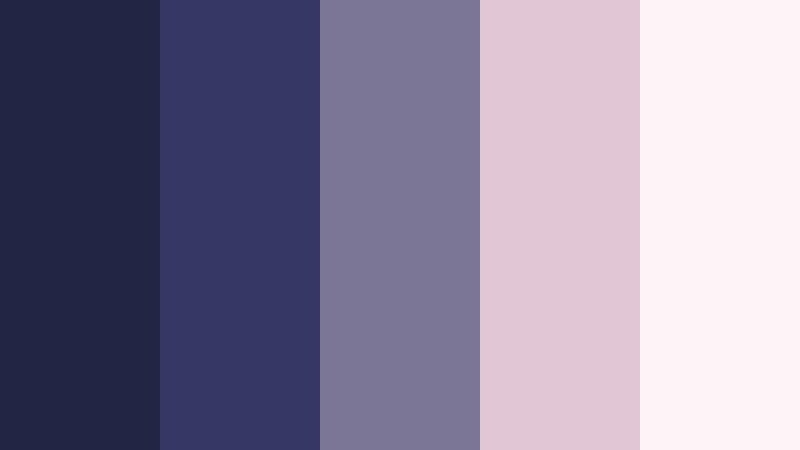
- HEX Codes: #222544, #353862, #7b7695, #e1c6d5, #fdf4f7
- Mood: Romantic, plush, and slightly nostalgic.
- Use for: Use for wedding highlight reels, engagement announcements, and dreamy montage sequences.
Indigo Velvet Dusk pairs plush Indigo shadows with mauve and blush highlights, creating a soft-focus dusk ambience. The combination of #353862 and #e1c6d5 feels both cinematic and intimate, perfect for emotional storytelling.
Apply the darker tones behind couples, rings, and detail shots, then use the blush and off-white for titles, quotes, and overlays. In Filmora, you can create gradient backgrounds for slideshows and Instagram reels that move smoothly from Indigo to blush for a gentle, romantic transition.
Twilight Balcony Glow
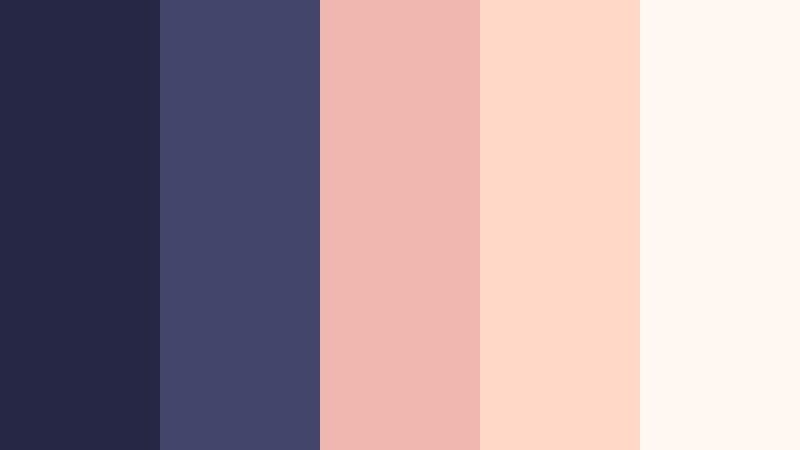
- HEX Codes: #262745, #43456a, #f0b7b1, #ffd8c8, #fff7f2
- Mood: Intimate, warm, and cinematic-romantic.
- Use for: Use for lifestyle vlogs, date-night shorts, and narrative scenes with cozy city lights.
Twilight Balcony Glow contrasts deep Indigo with warm peach and blush, echoing city lights at blue hour. The cool bases (#262745, #43456a) keep the frame grounded, while the warm accents attract attention to text and faces.
This palette is effective for thumbnails and intros where you want both drama and warmth. Use the warm tones for animated highlights, notification badges, or call-to-action buttons, and let Indigo sit behind your footage or hero image for a rich, moody backdrop.
Moonlit Letters Home

- HEX Codes: #20233f, #3a3e64, #8f90af, #f0e0cf, #fff9ec
- Mood: Tender, nostalgic, and handwritten-diary soft.
- Use for: Use for journaling channels, study-with-me videos, and calm storytelling edits with a personal tone.
Moonlit Letters Home blends cool Indigo with parchment creams, like ink on paper under a bedside lamp. The muted midtones (#8f90af) sit gently behind overlays and graphics, making this palette ideal for text-heavy scenes.
Use it for chapter screens, annotations, and journaling aesthetics in your videos. In thumbnails, combine a cream background with Indigo script-style fonts to suggest a personal, diary-like narrative that feels calm and inviting.
Winter Solstice Romance

- HEX Codes: #1b2138, #3a4560, #a8b6cc, #f3d4e3, #fef5fb
- Mood: Cozy, wintry, and softly cinematic.
- Use for: Use for winter wedding films, holiday vlogs, and aesthetic reels with snow and candlelight.
Winter Solstice Romance softens Moody Indigo with frosted lavender and pink, capturing candlelight on snow and cold air outside a warm room. The cool bases support a wintry vibe, while the pale pinks stop it from feeling too cold emotionally.
Try it on holiday cards, seasonal intro sequences, and wedding highlight reels shot in low light. Use the Indigo shades in your Filmora color grading to cool shadows, then accent key text and elements with the pastel tones for a cozy yet cinematic finish.
Bold & Modern Moody Indigo Color Palettes
Neon Alley Indigo
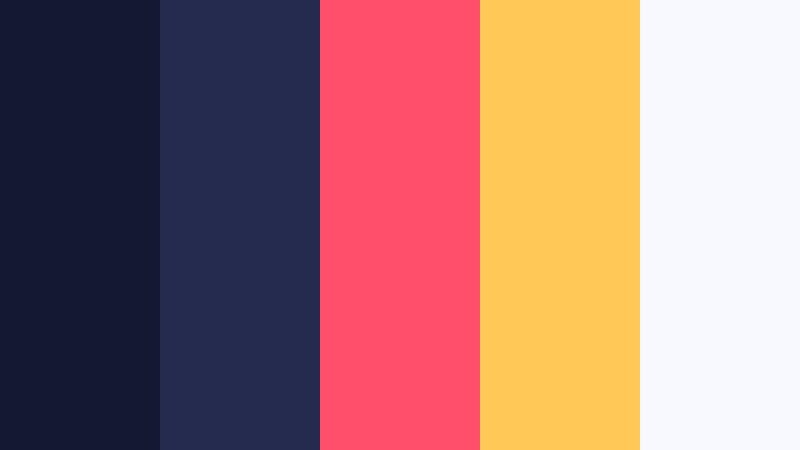
- HEX Codes: #151833, #252b4f, #ff4f6a, #ffc857, #f8f9ff
- Mood: Bold, energetic, and cyberpunk-urban.
- Use for: Use for gaming intros, tech breakdowns, and music visualizers needing punchy contrast on dark backgrounds.
Neon Alley Indigo ignites deep Indigo backdrops with hot neon pink and amber. The high contrast between #252b4f and #ff4f6a instantly draws the eye, even at small thumbnail size.
Use this palette for energetic intros, glitch transitions, and bold lower thirds in gaming or tech content. Let Indigo fill most of the frame, then use neon accents sparingly on text, icons, and progress bars to avoid visual overload while still feeling electric.
Indigo Tech Interface

- HEX Codes: #161b30, #293252, #4abdd9, #6bf0ff, #f3fbff
- Mood: Futuristic, clean, and innovation-focused.
- Use for: Use for app promos, SaaS explainers, and UI mockups in motion graphics.
Indigo Tech Interface combines cool, dark Indigo with bright cyan accents that feel like HUD elements on a digital dashboard. The neon-like turquoise (#6bf0ff) is perfect for highlighting key stats or buttons.
Use this palette for product demos, data visualizations, and overlay graphics that mimic app interfaces. In Filmora, you can color shapes, lines, and icons with the accent blues while keeping backgrounds in #161b30 for a sleek, professional tech look.
Indigo Gold Premiere

- HEX Codes: #191d36, #252b4c, #f3b23a, #ffe6a3, #fdf9f0
- Mood: Premium, confident, and red-carpet ready.
- Use for: Use for channel rebrands, course launches, and luxury product promos with a cinematic edge.
Indigo Gold Premiere marries rich Indigo with luminous gold, mimicking theater spotlights and award-show lighting. The dark bases project authority, while the gold tones feel exclusive and aspirational.
Use this palette for logo reveals, launch trailers, and hero headers on your channel. Keep most elements Indigo, letting gold handle key lines of text, badges, and animated strokes that underline your brand name or offer.
Night Drive Synthwave
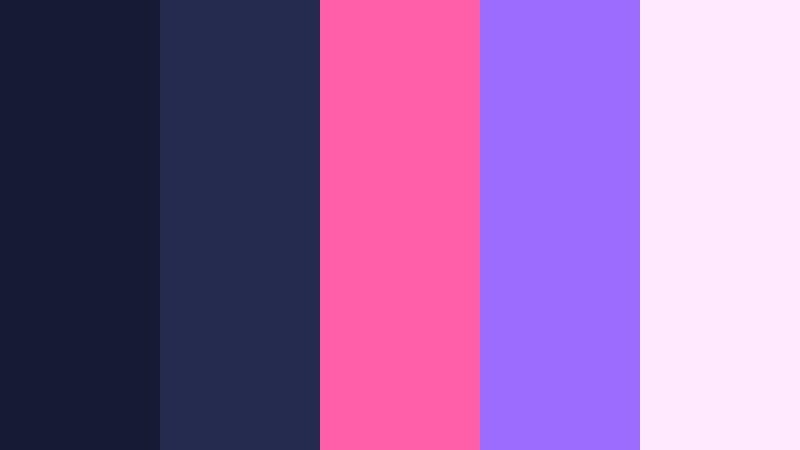
- HEX Codes: #171a33, #252b4e, #ff5ea8, #9c6bff, #ffe9ff
- Mood: Retro-futuristic, energetic, and nostalgic.
- Use for: Use for music videos, retro edits, and aesthetic reels with 80s-inspired transitions and titles.
Night Drive Synthwave puts Moody Indigo highways under glowing magenta and violet neons. The palette recalls 80s album covers and arcade neon lights, making it ideal for nostalgic but modern edits.
Use Indigo for skyline silhouettes or car interiors, then overlay magenta and violet gradients for titles and motion graphics. Thumbnails with a dark Indigo base and a diagonal streak of #ff5ea8 will pop instantly in crowded feeds.
Minimal & Professional Moody Indigo Color Palettes
Conference Room Indigo

- HEX Codes: #1d2337, #2d3450, #6a7691, #d0d5e2, #fafbff
- Mood: Professional, grounded, and quietly authoritative.
- Use for: Use for business presentations, LinkedIn content, and corporate explainers that need trust and clarity.
Conference Room Indigo blends steady blue-grays with soft whites, creating a boardroom-ready aesthetic. The colors feel reliable and neutral without slipping into boring.
Use the darker shades for slide backgrounds, chart bases, and lower thirds under talking heads. Reserve the lightest white (#fafbff) for headings and key numbers to keep your messaging clear in webinars, pitch videos, and corporate training content.
Indigo Minimal Workspace

- HEX Codes: #20243a, #303854, #7c8aa5, #f0f2f8, #ffffff
- Mood: Clean, minimalist, and productivity-driven.
- Use for: Use for study-with-me, productivity tips, and Notion-style workspace tours and tutorials.
Indigo Minimal Workspace pairs cool Indigo with crisp whites to mirror a tidy desk setup. The muted midtone (#7c8aa5) works nicely for subtle dividers and icons.
Use this palette for screen recordings, productivity tutorials, and channel branding where you want clarity and focus. In Filmora, apply the darker blues behind sidebars or text boxes, using white and near-white for the main content area so your tips are easy to read on any device.
Studio Podcast Indigo

- HEX Codes: #1c2136, #2e3650, #5a6786, #f3e3d0, #ffffff
- Mood: Warm-professional, relaxed, and conversational.
- Use for: Use for podcast clips, interview shows, and talking-head shorts where audio and clarity matter.
Studio Podcast Indigo mixes cool Indigo backdrops with soft studio beige, striking a balance between professional and approachable. The beige (#f3e3d0) keeps the overall feel from becoming too cold.
Use the darker blues for studio walls, overlays, or virtual backdrops, and highlight guest names or chapter titles with the lighter warm tone. This palette is great for social clips and audiograms where you want legible text against a subtle, branded background.
Indigo Brand Blueprint

- HEX Codes: #161b30, #252c47, #4a5a7a, #9fb2cf, #f5f7fb
- Mood: Strategic, reliable, and brand-focused.
- Use for: Use for brand strategy decks, logo explorations, and cohesive channel identity packages.
Indigo Brand Blueprint uses layered blues and soft whites to create a structured, trustworthy system. The progression from #161b30 to #f5f7fb gives you a full range, from strong hero backgrounds to gentle UI surfaces.
Use this palette to build consistent thumbnails, logo stings, and style frames for your channel. In Filmora, stick to one or two Indigo shades for most elements and let the lighter blues handle highlight bars, icons, and data callouts for a cohesive, strategic look.
Tips for Creating Moody Indigo Color Palettes
When you build your own Moody Indigo color combinations for video and design, aim for balance between depth, readability, and emotional tone. Here are practical tips to guide your choices.
- Pair Moody Indigo with at least one light neutral (off-white or pale gray) so text and UI elements remain readable on thumbnails and mobile screens.
- Decide on a temperature: mix Indigo with warm accents (gold, peach, blush) for romantic or premium vibes, or keep accents cool (cyan, silver, lavender) for techy or calm moods.
- Limit strong accent colors to one or two per palette so your frames do not feel crowded; use them only for calls to action, buttons, and key metrics.
- Check contrast by shrinking your design to thumbnail size; if titles disappear, brighten your light color or darken the Indigo background.
- Keep branding consistent by reusing the same HEX codes across intros, lower thirds, end screens, and social posts so your audience recognizes you instantly.
- Match your color palette to your footage: if your clips are already warm, lean into warm Indigo combinations; if they are cool, choose palettes with grays and blues instead of pinks.
- Use gradients to blend Indigo into lighter hues for backgrounds; this can add depth without needing complex textures or heavy effects.
- Save palette presets and style templates in Filmora so you can apply your Moody Indigo look quickly to new videos, shorts, and platform-specific edits.
Moody Indigo color palettes can reshape how your content feels, from quiet and reflective to bold and cinematic. By pairing deep Indigo with carefully chosen neutrals and accents, you can build a recognizable visual identity that supports your story and brand.
Whether you are designing thumbnails, grading b-roll, or building a full channel rebrand, these 15 palettes offer ready-made combinations you can tweak to match your style. Try them inside Filmora, save your favorite looks as presets, and keep your visuals consistent across YouTube, Instagram, TikTok, and beyond.
As you experiment, pay attention to how Indigo influences mood in different scenes. With the right grading, titles, and overlays, this color can turn everyday footage into something atmospheric and memorable.
secure download