

 100% Security Verified | No Subscription Required | No Malware


 ChatGPT
 Perplexity
 Gemini
 Claude
 Grok
Grok
Warm mountain video filters are perfect for turning cool, flat alpine footage into cinematic scenes filled with glowing light and rich color. With the right presets, your hiking vlogs and mountain photography clips can capture the golden peaks, cozy sunsets, and autumn tones exactly as you remember them.
This guide introduces the Warm Mountain Filter. Golden Peaks preset and 11 more warm alpine looks tailored for hikers and travelers. Use them in Filmora to quickly grade drone shots, ridge walks, campsite evenings, and autumn mountain trails with consistent, warm color styling.
In this article
Golden Evening Warm Mountain Filters
Warm Mountain Filter. Golden Peaks
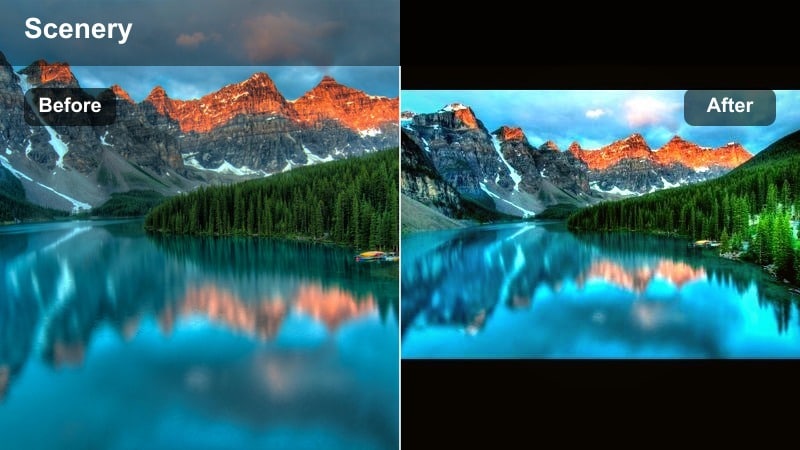
- Effect look: Rich golden glow with gentle contrast that wraps mountain ridgelines and snow caps in warm evening light.
- Best for: Hiking vlogs at sunset, drone passes over golden mountain ranges, and slow pans across warm alpine landscapes.
- Editing tip: Slightly lower highlights to keep snow detail and increase saturation in oranges for extra glow on sunlit peaks.
This signature warm mountain video filter adds a golden highlight rolloff and soft contrast that instantly makes alpine footage feel cinematic. Cool, neutral ridgelines pick up a sunlit sheen, while snow caps keep detail instead of clipping to pure white.
In Filmora, apply Warm Mountain Filter. Golden Peaks to your hero shots first, such as drone reveals or slow tripod pans, then adjust exposure and highlight sliders to taste. Use it as the anchor grade for your hiking vlog, and then color-match other clips to this look so the entire adventure shares the same golden alpine mood.
Let Filmora's AI keep your mountain colors consistent
When you mix sunrise clips, forest trails, and cabin interiors in one hiking vlog, color temperatures can jump from cool to warm between shots. Filmora's AI color tools help you build a unified warm mountain look across the entire timeline.
Apply your favorite warm mountain video filter to a reference clip, then use AI color matching to bring other shots closer to that style. This is especially useful for hikers and travelers filming with different cameras or phones on the same trip.
 secure download

Preview warm mountain filters in one click
Instead of guessing how each filter will affect your alpine footage, use Filmora's live preview to scroll through warm presets directly on your clip. You can instantly see how Golden Peaks, autumn mountain looks, and campfire styles change your scene.
This makes it easy to pick different warm filters for sunrise, mid-day hikes, and nighttime camps while still keeping a coherent color story in your travel video.
secure downloadSave your warm alpine look as a reusable LUT
After stacking filters, color tweaks, and light adjustments to perfect your golden mountain style, you can export that grade as a LUT in Filmora. This lets you reuse the same warm alpine look on every new hiking vlog.
Using a custom LUT means your followers recognize your style instantly, whether you are filming golden ridges, autumn valleys, or cozy cabin evenings.
secure downloadPro tip: Balance warmth with clean whites
If the Warm Mountain Filter. Golden Peaks preset makes snow or clouds look too yellow, nudge the white balance slightly cooler while keeping the filter applied.
Combine this with a minor decrease in saturation for yellows to keep snow crisp while preserving the warm glow on rock faces and vegetation.
Alpine Golden Hour
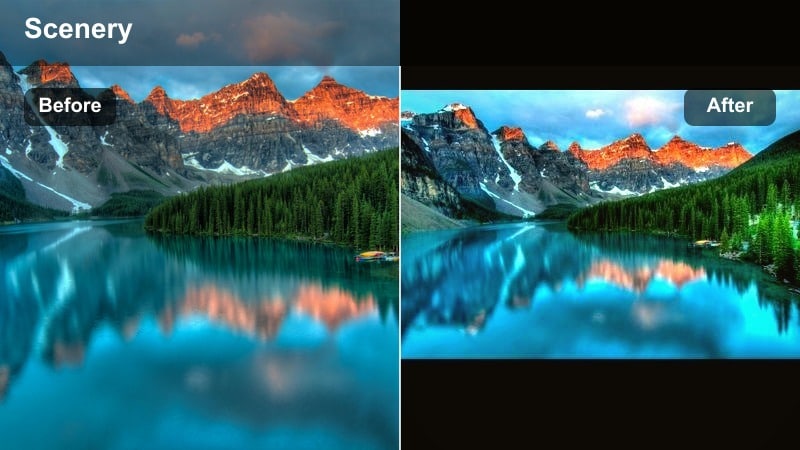
- Effect look: Soft, hazy warmth with lifted shadows that makes ridges and valleys feel bathed in late-afternoon light.
- Best for: Walking shots on exposed ridges, campsite clips, and handheld hiking vlogs in backlit conditions.
- Editing tip: Add a subtle vignette to draw attention to faces and tent details, and reduce sharpness slightly for a dreamy look.
Alpine Golden Hour blends gentle warmth with airy contrast to flatter both landscapes and skin tones in the mountains. It smooths harsh midday contrast, making your ridge walks and campsite B roll feel like they were filmed during peak golden hour.
In Filmora, drop this preset onto clips where the sun sits behind your subject or just off-frame. Pair it with a small vignette effect and reduced sharpness for a cinematic, memory-like look, then fine-tune exposure to keep faces bright without losing the soft glow in the background.
Pro tip: Use with backlit footage
Apply this filter to clips where the sun is behind your subject to smooth out harsh contrast and add softness to rim light.
Boost midtone contrast slightly afterward so the scene keeps depth while staying gentle and warm.
Sunset Ridge Glow
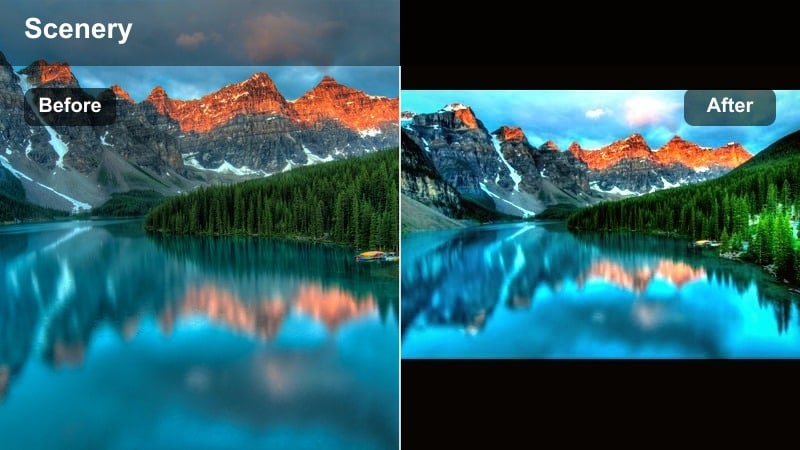
- Effect look: Deep amber highlights with strong contrast, giving dramatic silhouettes and richly colored skies.
- Best for: Sunset time-lapses, silhouettes of hikers on ridgelines, and moody establishing shots of mountain peaks.
- Editing tip: Underexpose your base clip slightly before applying the filter to protect bright skies and emphasize silhouettes.
Sunset Ridge Glow turns late-day scenes into bold, high-impact visuals with rich amber skies and clean silhouettes. It pushes warmth in the brightest parts of the frame while deepening shadows for graphic, poster-like ridge lines.
In Filmora, use this filter on clips where you want the sky to be the star: time-lapses, wide establishing shots, and hero frames of hikers standing on a ridge. Slightly lower the clip exposure before applying, then refine saturation in the reds and oranges so the final sunset feels intense but not artificial.
Pro tip: Pair with time-lapse footage
Apply this preset to time-lapse clips of clouds rolling over peaks to emphasize movement in the sky and color gradients.
Keep saturation controlled by pulling back reds slightly so the sunset looks intense but still natural.
Autumn Mountain Warmth for Trails and Forests
Autumn Ridge Rust
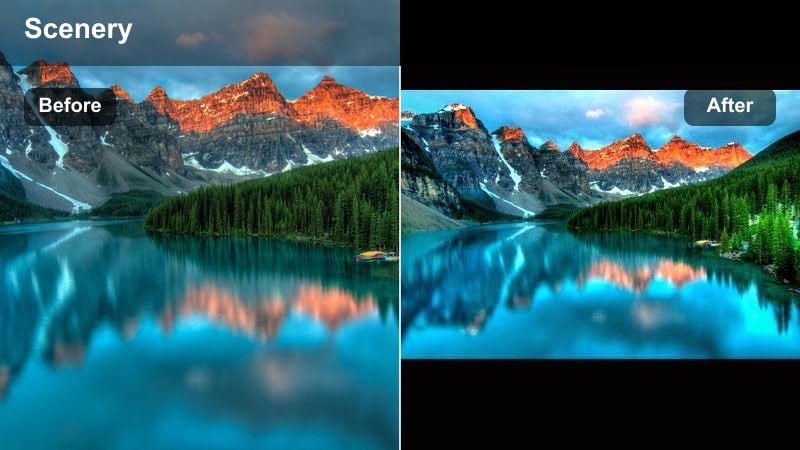
- Effect look: Emphasizes oranges, reds, and browns while softening greens to create rich autumn mountain palettes.
- Best for: Autumn mountain hikes, forest trail sequences, and views over colorful valleys from high viewpoints.
- Editing tip: Use HSL adjustments to fine-tune orange and yellow saturation so foliage pops without oversaturating skin tones.
Autumn Ridge Rust is designed to make fall colors in the mountains look deep and painterly. It lifts oranges and reds, softens greens, and adds moderate warmth so valleys full of trees feel rich and layered.
In Filmora, apply this filter to forest path shots, drone passes over fall valleys, and static tripod frames of colorful hillsides. Then open the HSL panel to tweak orange and yellow channels, keeping foliage vivid while dialing back saturation where it affects skin tones or gear colors.
Pro tip: Shoot slightly flat, grade warm later
Record autumn scenes with a flatter picture profile if possible, then apply this filter to build warmth and contrast in post.
This preserves more detail in bright leaves and allows the filter to create smoother color transitions across the forest.
Copper Valley Hike
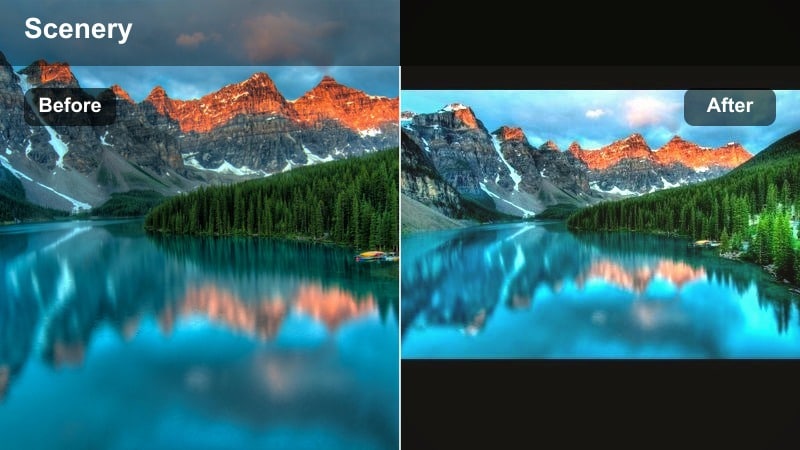
- Effect look: Copper-tinted warmth with gentle fade in blacks for a nostalgic, film-like autumn hiking vibe.
- Best for: Trail POV shots, trekking pole views, and walking sequences through mixed forest and open slopes. li>
Editing tip:
- Increase stabilization and add a subtle film grain layer to match the soft, nostalgic feel of the color grade.
Copper Valley Hike adds a cozy, vintage cast to your footage, with soft blacks and coppery highlights that feel like an old travel film. It works especially well on handheld POV shots where the trail and boots fill the frame.
In Filmora, turn on video stabilization first to smooth out steps, then apply this filter and add a gentle film grain overlay. This combination hides minor motion imperfections and enhances the nostalgic, journal-style storytelling of your autumn hikes.
Pro tip: Match B-roll and talking clips
Apply this preset consistently to both B-roll and talking-to-camera shots so your hiking vlog feels cohesive.
If faces look too red, slightly reduce orange saturation and lift exposure on skin tones only using masking tools.
Golden Larch Trail
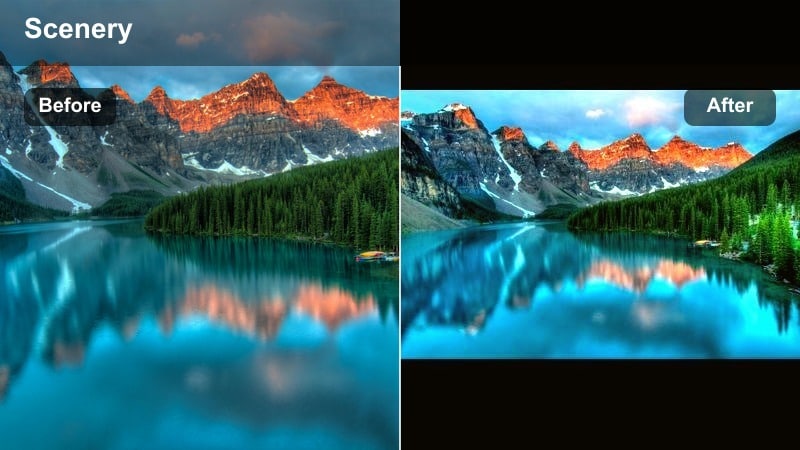
- Effect look: Bright golden highlights with subtle green shift that makes larches and alpine meadows glow.
- Best for: High alpine larch forests, late-season backpacking trips, and sunrise hikes above the treeline.
- Editing tip: Increase local contrast on the foreground while keeping the background slightly softened for depth.
Golden Larch Trail emphasizes the luminous yellows of larch needles and dry alpine grasses while keeping the overall image clean and bright. It is ideal for late-season treeline hikes where the forest floor and branches shimmer with gold.
In Filmora, apply this preset to wide landscape shots and tracking clips that move through larch stands. Boost local contrast or clarity on the foreground using masks, while adding a touch of blur or reduced clarity to distant trees to create a strong sense of depth and separation.
Pro tip: Protect blue skies
When applying this filter to wide landscape shots, use HSL controls to keep blues from turning too teal or muted.
Slightly reduce luminance in the blue channel so the sky keeps detail and balances the bright golden trees.
Campfire and Cabin Warmth Filters
Campfire Embers Glow
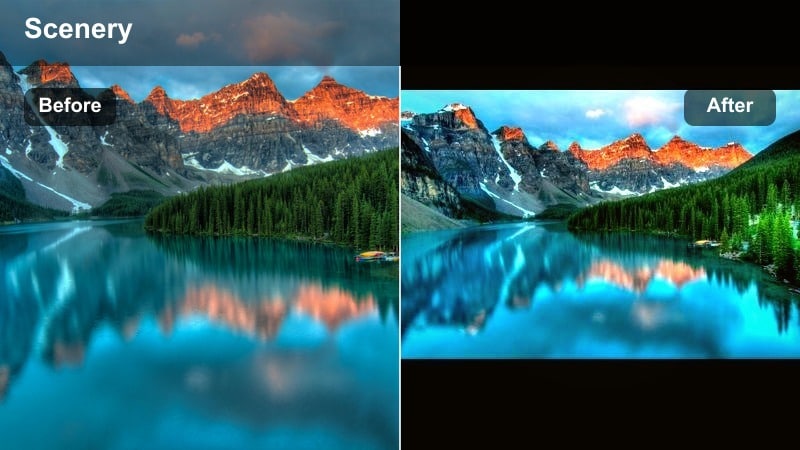
- Effect look: Intense orange warmth with deep shadows that emphasizes firelight, lanterns, and cozy nighttime scenes.
- Best for: Campfire stories, cooking sequences, and evening campsite shots in the mountains.
- Editing tip: Raise shadow detail slightly so faces stay visible while allowing the background to fall into a rich, dark tone.
Campfire Embers Glow leans into the natural orange of flames and lanterns, deepening the surrounding darkness for an intimate, cozy feel. It keeps the brightest embers punchy while letting tents and trees recede into soft shadows.
In Filmora, use this filter for all your nighttime campsite scenes, especially when people sit around the fire. Adjust the shadow and black levels so faces are clear enough for storytelling, but allow the background to remain dark to preserve atmosphere and reduce visible noise.
Pro tip: Control digital noise
Low-light campfire clips often contain noise; apply noise reduction before adding this warm filter.
After grading, add a touch of film grain to unify the image and make any remaining noise look intentional.
Alpine Cabin Cozy
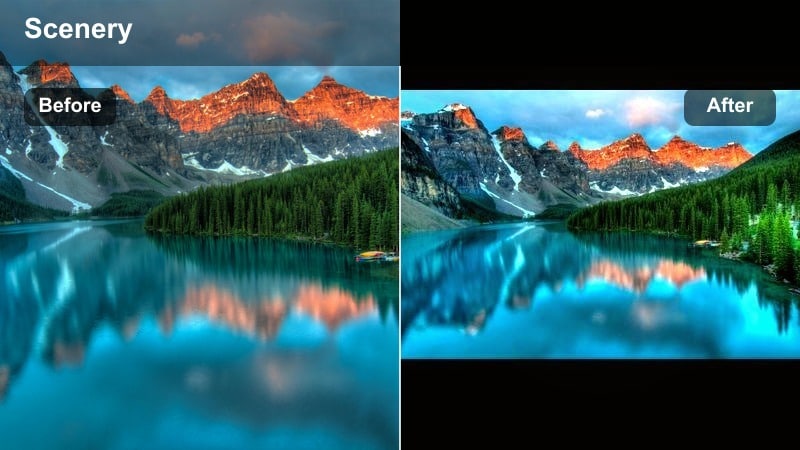
- Effect look: Soft golden interior warmth with slightly desaturated greens for a clean, lodge-like aesthetic.
- Best for: Mountain hut overnights, cabin interiors, gear-laydown shots, and morning coffee sequences by the window.
- Editing tip: Use gentle exposure adjustments to keep window highlights under control so outside mountain views stay visible.
Alpine Cabin Cozy enhances warm wood tones, lamp light, and natural window light to make any hut or lodge feel calm and inviting. It pulls back greens slightly so interiors look polished and uncluttered, even with a lot of gear in frame.
In Filmora, apply this filter to your interior montages and storytelling clips, then balance exposure with curves or simple highlight sliders to avoid blowing out bright windows. This lets you keep both the snug cabin feel and the mountain scenery outside in the same shot.
Pro tip: Mix interior and exterior shots
Apply this preset to interior shots and a slightly cooler variant to exteriors, then blend them in the edit.
This keeps your vlog visually consistent while still making outside snow scenes look clean and crisp.
Tent Lantern Warm
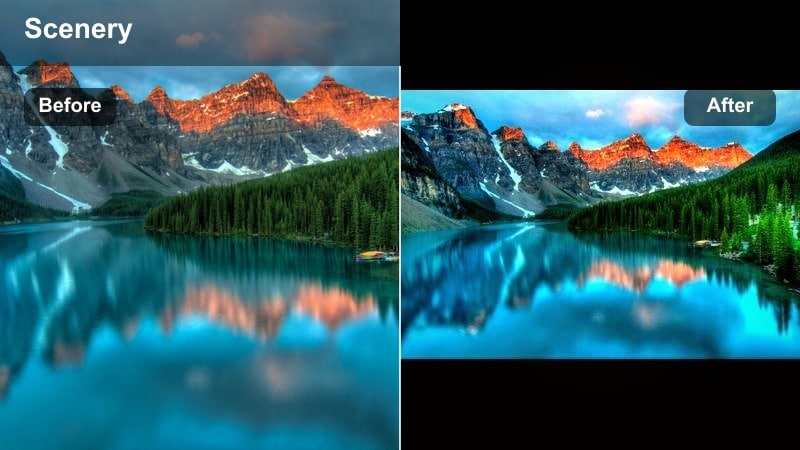
- Effect look: Focused warmth around lantern and headlamp highlights, keeping shadows deep but not crushed.
- Best for: Inside-tent shots, gear sorting at night, and cozy storytime clips before sleep on the mountain.
- Editing tip: Mask around faces and lanterns to add subtle exposure boosts while leaving the tent corners darker for mood.
Tent Lantern Warm is built for intimate interior tent scenes, enhancing the glow around lanterns and headlamps while maintaining rich, moody shadows. It helps small light sources feel stronger and more cinematic without flattening the entire frame.
In Filmora, use this preset on handheld clips from inside your tent, then add masks to selectively raise exposure on faces, books, or gear while keeping corners dark. This creates a natural vignette effect that draws the eye where you want it and retains the sense of being tucked away in the mountains.
Pro tip: Keep color temperatures consistent
If you mix headlamps, lanterns, and string lights, set your camera white balance manually so the filter works predictably.
Avoid auto white balance in these scenes, as it can neutralize the warm mood the filter is designed to enhance.
Sunrise and High-Alpine Warm Filters
Sunrise Alpine Blush
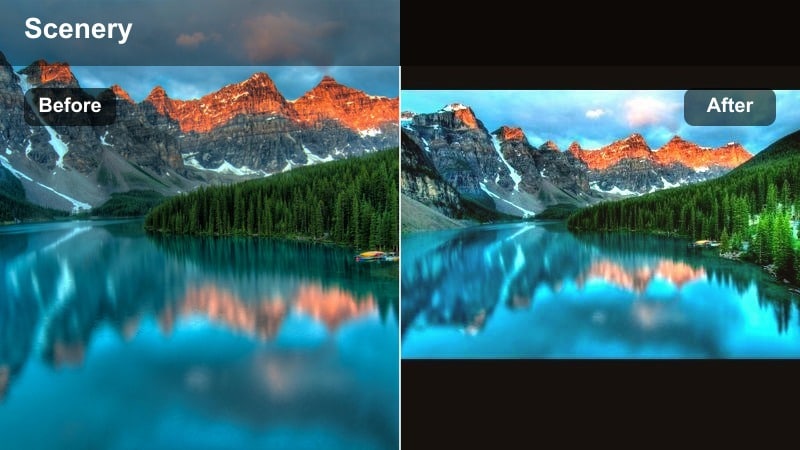
- Effect look: Gentle magenta and peach tones in highlights with soft contrast for delicate dawn scenes.
- Best for: Pre-dawn approaches, first light on snowy peaks, and quiet sunrise timelapses on mountain summits.
- Editing tip: Slightly cool the shadows while keeping warm highlights so snow retains a natural, clean tone.
Sunrise Alpine Blush captures the subtle pinks and peaches that appear on snowy peaks just as the sun rises. It keeps contrast gentle so the mood feels calm and airy, rather than harsh or overly saturated.
In Filmora, apply this filter to early-morning summit clips and timelapses, then fine-tune white balance so snow looks clean while the sky and clouds carry the soft blush. Cooling the shadows a touch can help keep the scene realistic while still leaning into the dreamy warm tones.
Pro tip: Bracket exposure for sunrise
Capture multiple exposures of the same sunrise frame when possible and choose the best balanced take for grading.
This filter works best when the base clip already preserves detail in both sky and foreground snow.
High Ridge Warmth
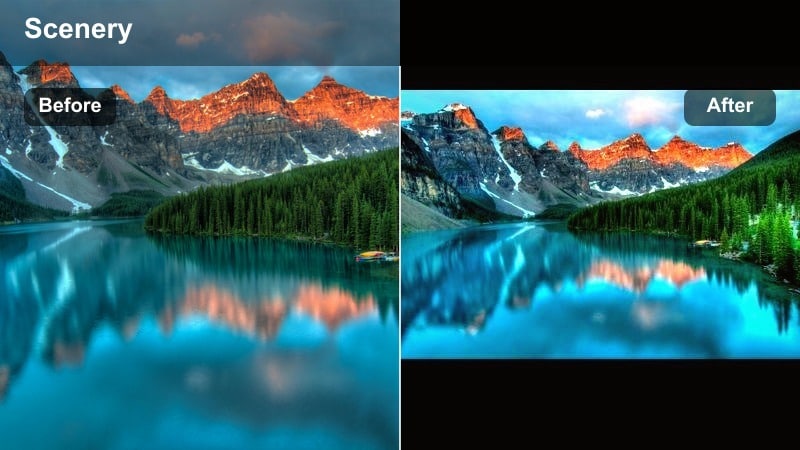
- Effect look: Clear, crisp warmth that boosts midtone contrast and clarity on rock textures and ridgelines.
- Best for: Exposed ridge scrambles, summit selfies, and wide drone pulls across alpine peaks.
- Editing tip: Use selective sharpening on rocks and ridge lines while keeping the sky slightly softer to avoid halos.
High Ridge Warmth is made for high, rocky environments where texture and detail matter. It adds controlled warmth and enhances midtone contrast so cracks in rocks, gravel, and ridge edges stand out without looking overly crunchy.
In Filmora, apply this preset to drone shots and ridge walks, then add selective sharpening to the terrain with masking or adjustment layers. Keep the sky softer and slightly less sharp to prevent haloing along the horizon and to focus attention on the path or peak.
Pro tip: Stabilize drone and ridge shots
Because this filter increases clarity, any camera shake becomes more noticeable, especially in drone footage.
Apply stabilization first, then add the filter and adjust contrast so movement feels smooth and intentional.
Glowing Summit Hues
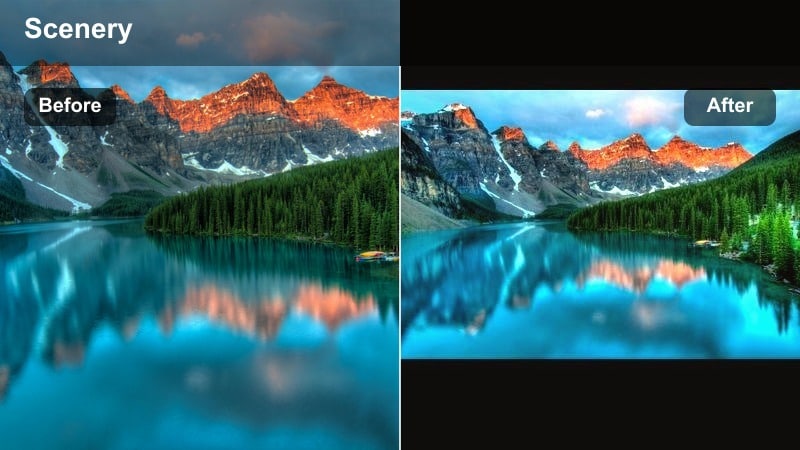
- Effect look: Warm, saturated summit tones with a slight fade that softens the horizon and distant layers.
- Best for: Summit panoramas, celebratory clips at the top, and sweeping 360-degree spins on peak tops.
- Editing tip: Slow your footage slightly and add subtle motion blur to match the smooth, glowing color grade.
Glowing Summit Hues is your hero-shot filter, designed to make summit moments look cinematic and triumphant. It saturates warm colors, slightly fades the overall contrast, and softens distant layers to create a dreamy, almost postcard-like look.
In Filmora, drop this preset on your summit reveals and slow spins, then adjust clip speed to be a bit slower for more emotional impact. Add a touch of motion blur if you are panning quickly so the smooth, glowing grade matches the motion in the frame.
Pro tip: Shoot for dynamic range
When planning summit hero shots, expose for the sky so clouds and distant peaks keep detail after grading.
You can always raise shadows slightly under this filter to bring back detail in jackets and backpacks.
Tips for Using Mountain Warm Filters in Filmora
- Shoot with a slightly flatter profile so warm mountain filters have more detail to work with in bright snow and skies.
- Lock white balance in-camera on mountain trips to avoid sudden shifts when you apply warm presets later.
- Group clips by time of day in your timeline and apply sunrise, day, and evening warm filters separately for better control.
- Always check skin tones after adding strong warmth and adjust orange saturation so faces stay natural.
- Use masks to keep snow, glaciers, and clouds slightly cooler while warming rocks, trees, and hikers.
- Stabilize handheld ridge and trail shots before adding high-clarity warm filters to prevent jittery footage.
- Combine subtle film grain with warm filters on hiking vlogs to give mountain scenes a timeless travel-film feel.
- Export a short color test of your edit and watch it on a phone and laptop to confirm the warmth looks good on multiple screens.
Warm mountain video filters give hikers and travelers an easy way to turn raw trail clips into golden, cinematic memories. With presets like the Warm Mountain Filter. Golden Peaks and its companion looks, you can match the feeling of standing on a sunlit ridge, wandering through autumn forests, or relaxing by a cabin fire.
Try these presets on your next mountain photography montage or hiking vlog in Filmora, then refine exposure and color balance so every peak, valley, and campsite tells a cohesive warm alpine story from sunrise to sunset.
secure download