

 100% Security Verified | No Subscription Required | No Malware


 ChatGPT
 Perplexity
 Gemini
 Claude
 Grok
Grok
The Rooftop City View Cinematic LUT filter pack in Filmora is built for content creators who love framing skylines, high-rise terraces, and city rooftops with a dramatic, film-like finish.
These filters help you quickly dial in moody tones, rich contrast, and polished color grades, so your rooftop city vlogs, b-roll, and cinematic sequences look cohesive and ready to publish with minimal tweaking.
In this article
Golden Hour Rooftop Skylines
Sunset Haze Rooftop
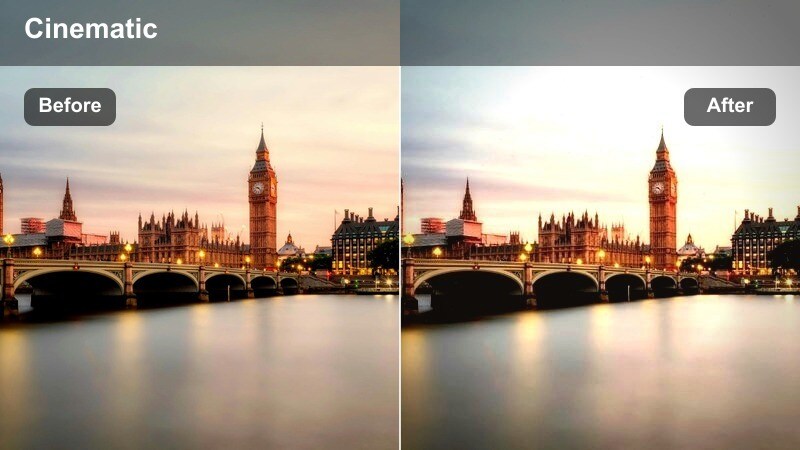
- Effect look: Soft, warm cinematic glow with gentle highlights and pastel skyline tones.
- Best for: Rooftop vlogs during late afternoon, skyline b-roll, and lifestyle talking-head shots against the city horizon.
- Editing tip: Lower contrast slightly and lift shadows to keep skin tones flattering while preserving sunset colors in the sky.
Sunset Haze Rooftop is designed to wrap your skyline in a soft glow, smoothing out harsh highlights while emphasizing the warm color gradient in the evening sky. In Filmora, this look helps blend skin tones with the ambient sunset light so your subject feels naturally integrated into the rooftop environment instead of pasted over it.
Use this filter when shooting golden hour vlogs, slow-motion b-roll of city edges, or relaxed lifestyle segments against high-rise backgrounds. Combine it with gentle camera moves and Filmora transitions to create dreamy rooftop sequences that feel cinematic without heavy manual color grading.
Match Rooftop Looks with AI Color Tools
Filmora s AI-driven color tools make it simple to refine Sunset Haze Rooftop so the sky stays luminous while faces remain natural and detailed. Let AI automatically balance exposure and white balance, then apply the LUT to enhance warmth and contrast with precision.
After the AI pass, you can fine-tune highlights and shadows with curves or basic color controls, locking in a consistent sunset look across all your rooftop clips.
 secure download

Preview Rooftop Filters in Real Time
With Filmora, you can hover over each rooftop city view cinematic LUT and see the result instantly in the Viewer before applying anything. This makes it easy to compare warm golden hour looks with cooler, moodier styles on the same rooftop clip.
Scrub through your timeline, pause on a key frame, and quickly test multiple filters until you find the one that best serves your story and lighting conditions.
secure downloadCombine Filters and LUTs for Signature Rooftop Styles
Filmora includes 1000 plus video filters and 3D LUTs, giving you plenty of room to build a signature rooftop style that matches your channel or brand. Start with a Rooftop City View Cinematic LUT, then layer additional LUTs, HSL tweaks, and curves for a tailored finish.
Once you create a combination that fits your skyline footage, you can save it as a custom preset and reuse it on future rooftop projects for fast, consistent grading.
secure downloadAmber Skyline Glow
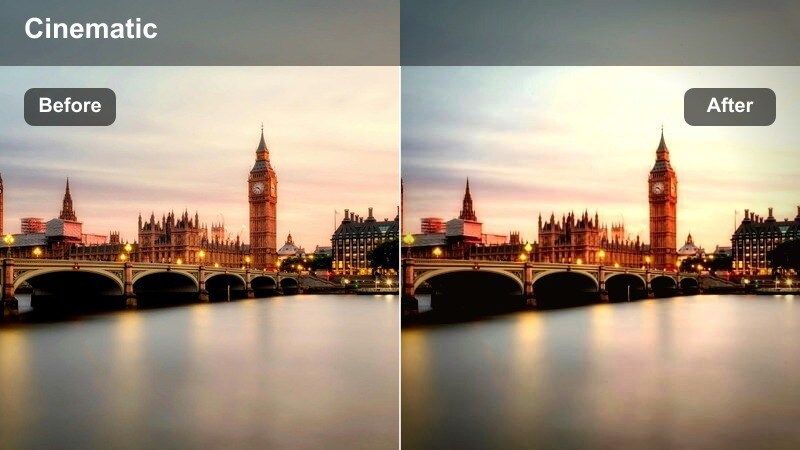
- Effect look: Rich amber tones in the midtones, deepened blues, and slightly lifted blacks for a gentle filmic wash.
- Best for: Travel vlogs, cinematic b-roll of high-rise rooftops, and drone shots passing over city buildings at dusk.
- Editing tip: Increase saturation on oranges slightly to emphasize window reflections while keeping overall color subtle and unified.
Amber Skyline Glow is ideal for dusk or early evening when city lights start to appear but the sky still holds color. Applying it in Filmora wraps your buildings in a warm, nostalgic tone while preserving enough contrast to keep edges and reflections sharp.
Use this LUT on establishing shots, drone flyovers, and time-lapses of the skyline to create a smooth transition from daylight to night scenes. Pair it with gentle speed ramps and Filmora s built-in stabilizer to create dreamy travel intros and outros that flow naturally.
Golden Edge Contrast
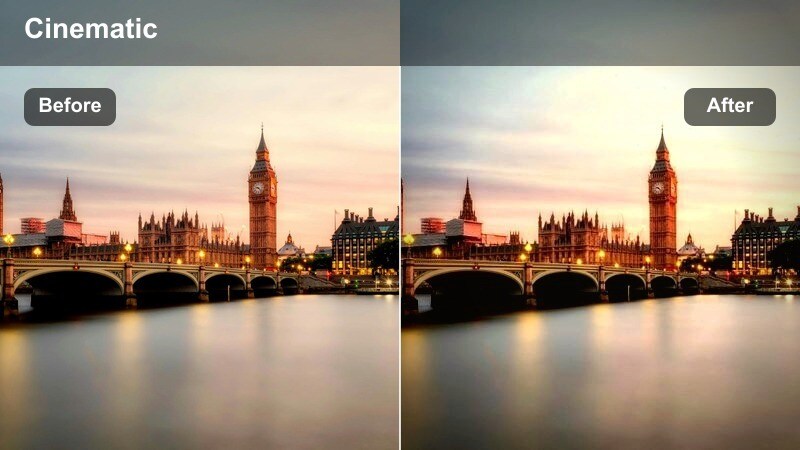
- Effect look: Punchy contrast with golden highlights and crisp, detailed city edges for a sharp cinematic profile.
- Best for: Stylized rooftop montages, product shots on terraces, and urban fashion reels shot against skylines.
- Editing tip: Dial back highlight intensity if skyscraper windows start clipping, and add a touch of clarity for extra building detail.
Golden Edge Contrast is built to make your rooftop compositions pop, especially when the sun hits the edges of skyscrapers or glass railings. In Filmora, it creates strong separation between sky, buildings, and subject, which works well for fast-paced edits and social media reels.
Apply this filter to product showcases, fashion walks, or energetic b-roll where you want the skyline to feel bold and graphic. Combine it with tighter cuts, beat-synced transitions, and Filmora s speed tools for dynamic rooftop sequences that stand out on small screens.
Moody Overcast Rooftop Stories
Urban Fog Cinema
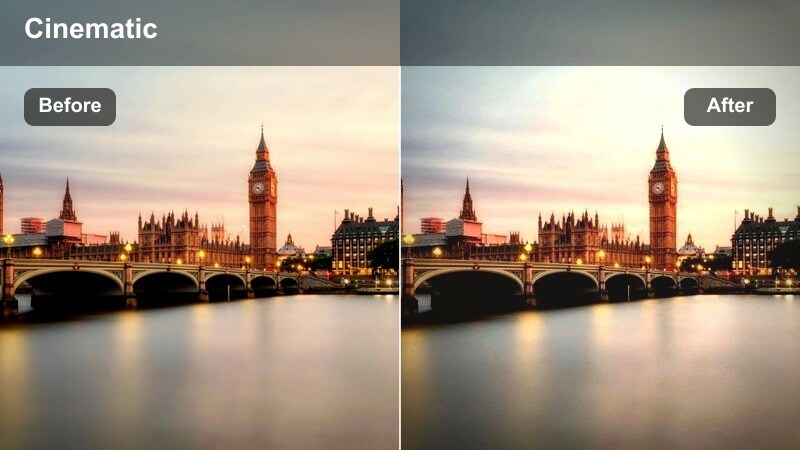
- Effect look: Desaturated, cool tones with gently lifted blacks for a soft, cinematic haze over the city.
- Best for: Story-driven vlogs, reflective monologues, and b-roll on cloudy days when the skyline lacks strong color.
- Editing tip: Lower saturation on greens and raise midtone contrast to keep the city feeling dramatic without looking flat.
Urban Fog Cinema leans into overcast light, converting flat rooftop footage into intentionally moody visuals. The lifted blacks and reduced saturation give your skyline a soft, filmic haze that feels designed rather than accidental.
Use this LUT in Filmora for reflective talking-head segments, quiet b-roll of empty rooftops, or narrative sequences that rely on mood. Add slower cuts, subtle zooms, and minimal music to let the look and ambient city sounds carry the emotional tone of the scene.
Steel Blue Rooftop
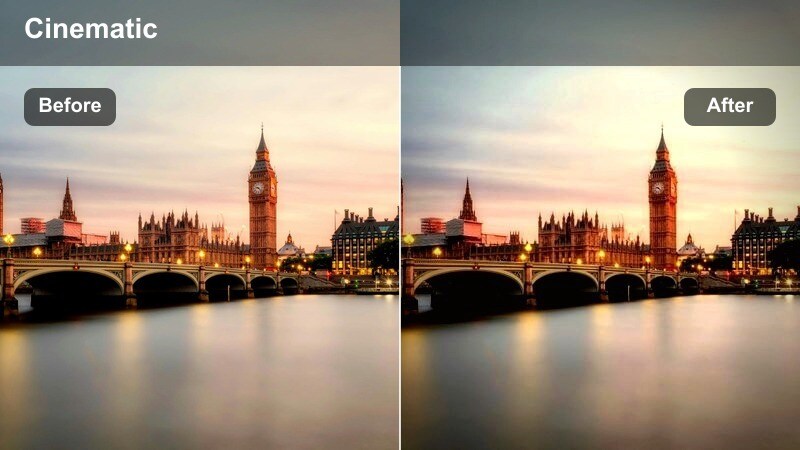
- Effect look: Cool blue-grayed palette with muted saturation and slightly deepened shadows for a serious, grounded feel.
- Best for: Tech reviews, productivity vlogs, and cinematic intros shot on rooftops with industrial or business-district backdrops.
- Editing tip: Keep exposure balanced on the subject s face and add a tiny warm white balance shift if skin starts to look too cold.
Steel Blue Rooftop gives your city background a sleek, corporate tone, making it ideal for professional or tech-oriented content. The cool palette subtly plays up glass, metal, and office-tower textures without overwhelming the viewer.
In Filmora, apply this LUT to rooftop intros for tech reviews, startup stories, or productivity content where you want the environment to feel modern and focused. Combine it with clean titles, lower-thirds, and minimal motion graphics to keep the visual language aligned with a professional brand.
Concrete Dream Matte
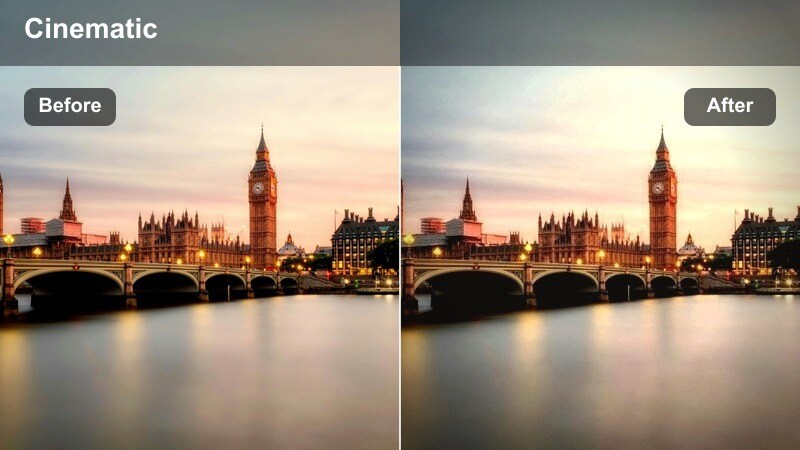
- Effect look: Matte shadows, lowered clarity, and subtle cool tint that turns concrete rooftops into film-style frames.
- Best for: Indie-style rooftop performances, dance videos, and cinematic B-roll of stairwells, ledges, and rooftop textures.
- Editing tip: Reduce sharpness on overly detailed shots and layer a bit of grain if you want a retro, analog rooftop aesthetic.
Concrete Dream Matte softens harsh lines and reduces contrast to create an indie-film atmosphere on even the most ordinary rooftop. Its matte shadows and gentle cool tint work particularly well with concrete floors, brick walls, and metal railings.
Apply it in Filmora when you are shooting dance performances, music sessions, or experimental B-roll that relies on texture and movement. Add a subtle film grain overlay and slower cuts to underline the analog, dreamy vibe this LUT brings to urban locations.
Night Rooftop and Neon City Lights
Neon Skyline Pulse
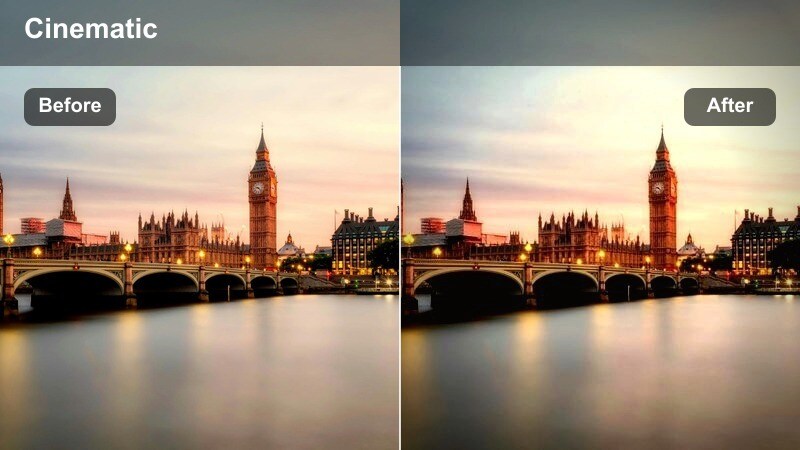
- Effect look: Vibrant neon blues and magentas with rich blacks and punchy contrast for energetic night scenes.
- Best for: Night rooftop vlogs, city timelapses, and b-roll of glowing billboards and traffic from above.
- Editing tip: Boost saturation on magenta and blue channels while keeping highlights in check to avoid neon signs blowing out.
Neon Skyline Pulse is tailored for nightlife, making city lights feel vivid and electric while keeping shadows deep and dramatic. It is especially effective on rooftops that overlook busy districts, billboards, and colorful traffic trails.
In Filmora, use this LUT on time-lapses, hyperlapses, or music-driven edits that thrive on color and motion. Pair it with speed ramps, light leak overlays, and beat-matched cuts to create energetic sequences for music videos or city-night vlogs.
Midnight Rooftop Cool
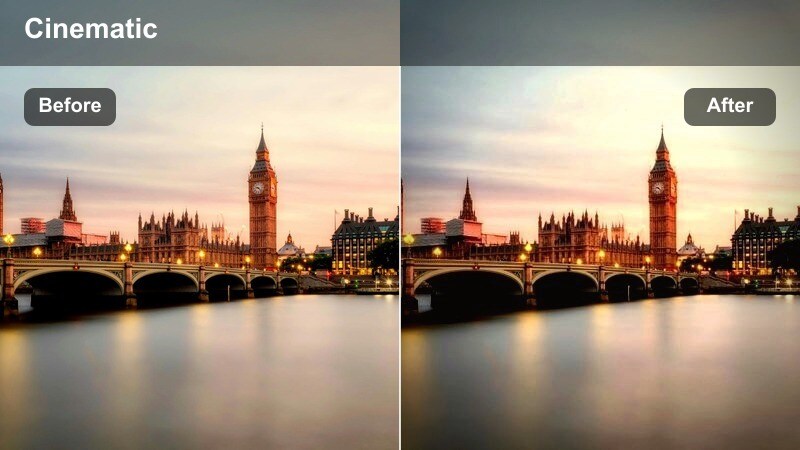
- Effect look: Deep cool blue shadows with slightly subdued highlights for a calm, cinematic night atmosphere.
- Best for: Quiet rooftop conversations, narrative scenes, and contemplative walking shots near ledges and railings.
- Editing tip: Raise exposure just enough to keep faces visible while letting the background stay dark and moody.
Midnight Rooftop Cool leans away from neon intensity and into quieter, more intimate night scenes. The blue-toned shadows and restrained highlights keep the focus on your subjects while the city glows softly in the distance.
Apply this LUT in Filmora for dialogue scenes, reflective monologues, or cinematic sequences where emotion matters more than spectacle. Add subtle vignettes, gentle camera moves, and carefully balanced audio to maintain a focused, atmospheric feel throughout the scene.
Noir City Rooftop
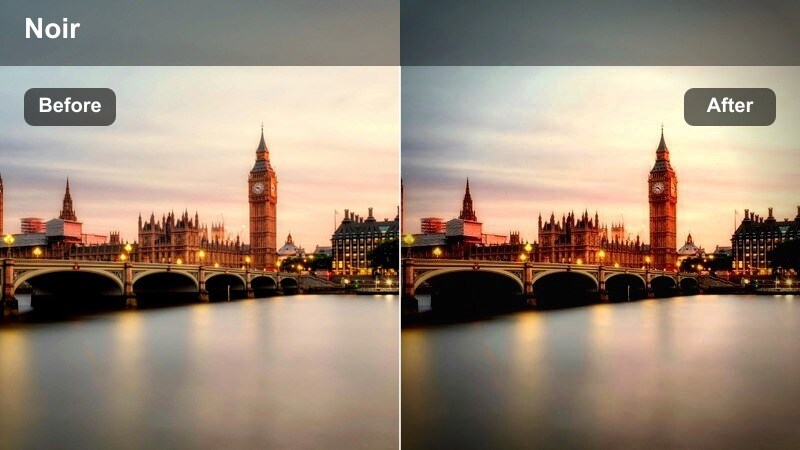
- Effect look: High-contrast monochrome-inspired color grade with deep blacks and subtle tints for a modern noir mood.
- Best for: Cinematic storytelling, title sequences, and dramatic rooftop confrontations or monologues.
- Editing tip: Fine-tune blacks to avoid banding in the sky and add a slight vignette for a stronger noir framing.
Noir City Rooftop captures the mood of classic film noir while keeping a contemporary edge. The heavy contrast and nearly monochrome palette emphasize silhouettes, negative space, and strong graphic shapes across your rooftop frames.
In Filmora, use this LUT for narrative shorts, title cards, and stylized sequences where you want drama and mystery. Combine it with slow camera moves, minimal color accents, and sound design elements like footsteps, wind, or distant traffic to complete the noir-inspired rooftop experience.
Dynamic Rooftop Vlogs and Travel Edits
Travel Rooftop Clean
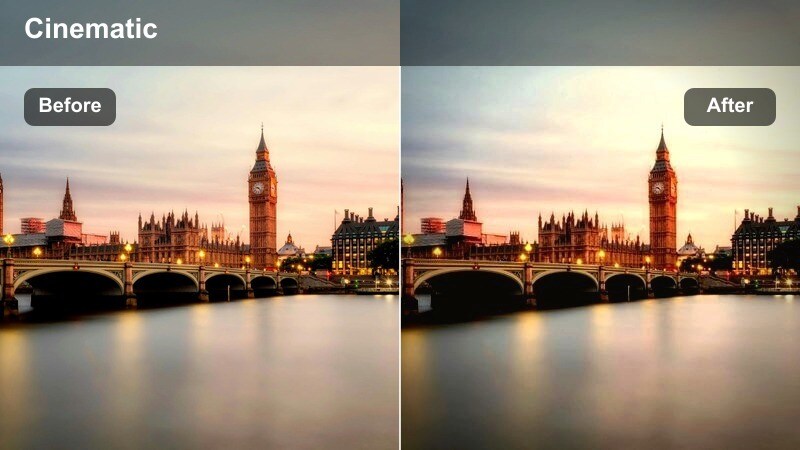
- Effect look: Bright, clean color with neutral tones and mild contrast for versatile city vlog use.
- Best for: Daily vlogs, travel intros, and quick city updates filmed on accessible rooftops and terraces.
- Editing tip: Slightly increase vibrance instead of saturation to keep colors natural while the city still looks lively.
Travel Rooftop Clean is a flexible, everyday LUT that keeps your footage polished without leaning too stylized. It preserves natural skin tones and city colors, making it a great baseline grade for consistent vlogs or series content.
Apply it in Filmora across your intros, outros, and B-roll from different rooftop locations to keep episodes visually unified. Then, make light adjustments to exposure and white balance per clip to account for changing weather and time of day while still maintaining your core look.
Hustle City Rooftop
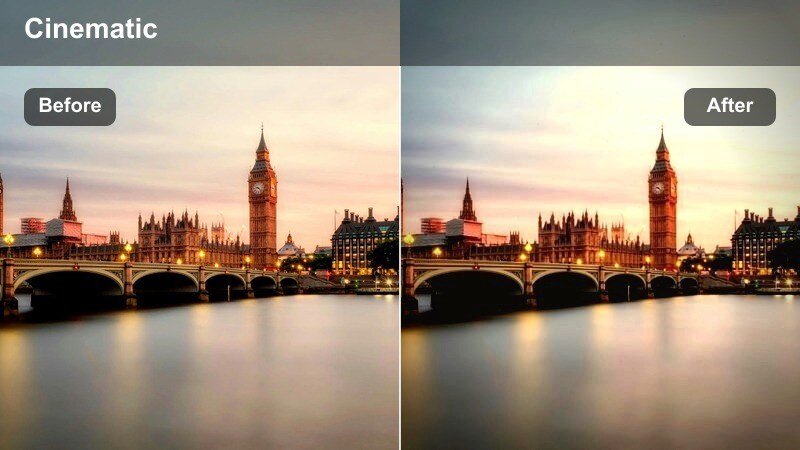
- Effect look: High-energy contrast with slightly boosted saturation and crisp details that highlight the busy city below.
- Best for: Entrepreneurship content, hustle montages, and motivational monologues with bustling streets in the distance.
- Editing tip: Use this filter on timelapses of traffic from the rooftop and keep shutter faster for sharper light trails.
Hustle City Rooftop emphasizes movement, light, and detail, perfect for content built around ambition and city energy. It sharpens building lines and traffic patterns so the background visually supports your motivational message.
In Filmora, combine this LUT with fast-paced editing, jump cuts, and split-screen layouts showing both you and the streets below. Add animated text or callouts synced to your key points so the visual intensity matches the energy of your script.
City Breeze Soft
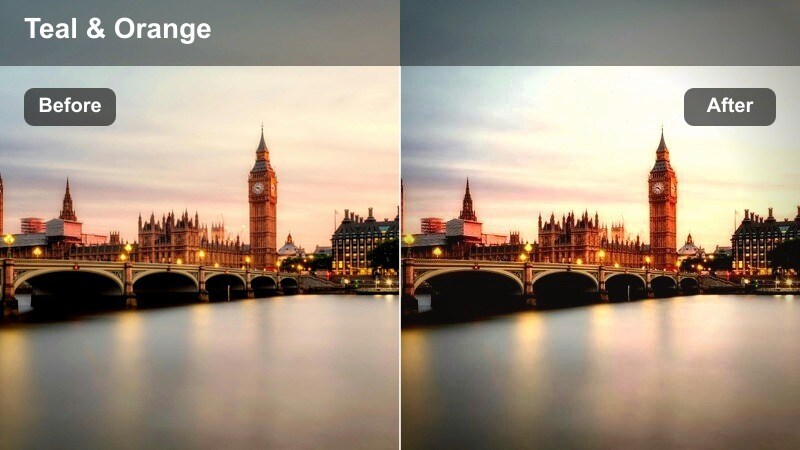
- Effect look: Softened contrast with gentle highlights and a hint of teal-and-orange balance for a relaxed cinematic vlog feel.
- Best for: Lifestyle vlogs, rooftop hangouts, and casual conversations with friends against the skyline.
- Editing tip: Slightly warm the white balance and reduce sharpness for an easygoing, handheld vlog aesthetic.
City Breeze Soft brings a laid-back, cinematic finish to casual rooftop moments, smoothing contrast and adding a subtle teal-and-orange balance. It is well suited to handheld clips, group shots, and spontaneous conversations filmed on terraces or building tops.
Use it in Filmora for lifestyle vlogs or travel diaries where the emphasis is on connection and atmosphere rather than drama. Keep cuts a bit longer, add gentle background music, and avoid overly flashy transitions so the soft grade and natural interactions stay front and center.
Tips for Using Rooftop City View Cinematic Lut Filters in Filmora
- Shoot rooftop city footage with a slightly flatter picture profile in-camera so Filmora s rooftop LUTs have more dynamic range and detail to enhance.
- Monitor sky and building highlights in your waveform or preview, adjusting exposure before applying high-contrast filters to avoid clipping.
- If your skyline appears too intense after grading, lower vibrance first instead of overall saturation to preserve realistic skin tones.
- Mix wide establishing rooftop shots with mid-shots and close-ups so each cinematic filter helps tell a complete visual story.
- Use Filmora s stabilization tools on handheld rooftop footage before adding LUTs so motion does not distract from your color grade.
- Test different rooftop LUTs on the same clip using Filmora s hover preview to quickly decide which mood best matches your narrative.
- Save your favorite rooftop LUT and adjustment combinations as presets so you can keep your urban style consistent across multiple videos.
The Rooftop City View Cinematic LUT filter pack in Filmora gives content creators a fast way to turn everyday city terraces, balconies, and high-rise rooftops into polished cinematic scenes.
By pairing the right rooftop filter with simple exposure tweaks and consistent color choices, you can build a recognizable urban visual style that keeps your vlogs, travel films, and cinematic edits looking professional across every upload.
secure download