

 100% Security Verified | No Subscription Required | No Malware


 ChatGPT
 Perplexity
 Gemini
 Claude
 Grok
Grok
Slate Navy sits between deep blue and charcoal, giving it a grounded, modern feel that works beautifully on screens. It suggests trust, logic, and quiet confidence, which is why you see it so often in tech branding, finance visuals, and cinematic night scenes. On thumbnails and intros, Slate Navy instantly adds polish without feeling too harsh or flat.
For creators and Filmora users, Slate Navy is a powerful base for cool tone color grading, cinematic YouTube thumbnails, and cohesive channel branding. Below are 15 ready made Slate Navy color palettes with HEX codes you can plug straight into your thumbnails, titles, overlays, and LUTs for consistent, on brand visuals.
In this article
Modern Minimal Slate Navy Color Palettes
Urban Nightfall

- HEX Codes: #1b2230, #2f3f5b, #6c7a92, #f5f5f7, #c9d1dd
- Mood: Moody, clean, and metropolitan.
- Use for: Perfect for tech channel intros, app promo videos, and minimalist YouTube banners.
Urban Nightfall blends deep Slate Navy with cool grays and soft off white, giving your visuals a polished city at night aesthetic. The darker tones are ideal for backgrounds, while the lighter grays and off white make text, icons, and UI elements pop without feeling loud.
Use this palette for sleek thumbnails, app demos, or productivity content where you want sharp contrast and a professional tone. In Filmora, you can apply the darker shades to your background layers or overlays, then use the mid grays for titles, callouts, and lower thirds to keep the entire frame cohesive across intros, tutorials, and social cutdowns.
Pro Tip: Enhance Your Slate Navy Visuals with Filmora
To keep an Urban Nightfall look consistent from your intro to your end screen, build a simple color system in Filmora. Use the darkest Slate Navy as your background or vignette tone, then lock in text templates using the mid gray and off white shades for maximum readability.
Save these settings as custom presets for titles, elements, and overlays. That way, every new thumbnail, short, or tutorial you edit in Filmora automatically follows the same Slate Navy driven style, giving your channel a strong, recognizable visual identity.
AI Color Palette
If you have a screenshot or style frame that nails your Urban Nightfall aesthetic, you can use Filmora's AI Color Palette feature to spread that exact look across an entire video. Simply choose the reference clip with your preferred Slate Navy tones, then match it to your other shots.
This is especially useful when combining camera footage, screen recordings, and stock clips. AI Color Palette quickly harmonizes contrasts and hues so your dark blues and grays stay consistent, even if the original clips were shot under very different lighting conditions.
 secure download

HSL, Color Wheels & Curves
To refine your Slate Navy tones, use Filmora's color tools to control saturation and contrast precisely. In HSL, slightly desaturate blues and cyans to keep the palette calm and minimal, then in the color wheels, cool down shadows while leaving midtones more neutral so skin tones and UI elements stay natural.
You can also follow tutorials on advanced grading with Filmora's color wheels and curves, like the one in this cinematic color grading walkthrough, and adapt the techniques to your own Slate Navy look. Gentle S curves deepen the dark navy areas without crushing detail, while raising highlights preserves that crisp, modern feel.
secure download1000+ Video Filters & 3D LUTs
If you want to build a Slate Navy aesthetic quickly, Filmora's video filters and 3D LUTs make it easy to test different moods. Start from a cool, cinematic LUT, then fine tune the result so your dark blues, grays, and whites match the Urban Nightfall HEX codes.
You can combine LUTs with subtle filters like vignettes, glows, or film grain to give your Slate Navy edits extra depth. Save your favorite combinations as custom presets and reuse them across intros, reels, and community posts to keep your channel style instantly recognizable.
secure downloadStudio Grid
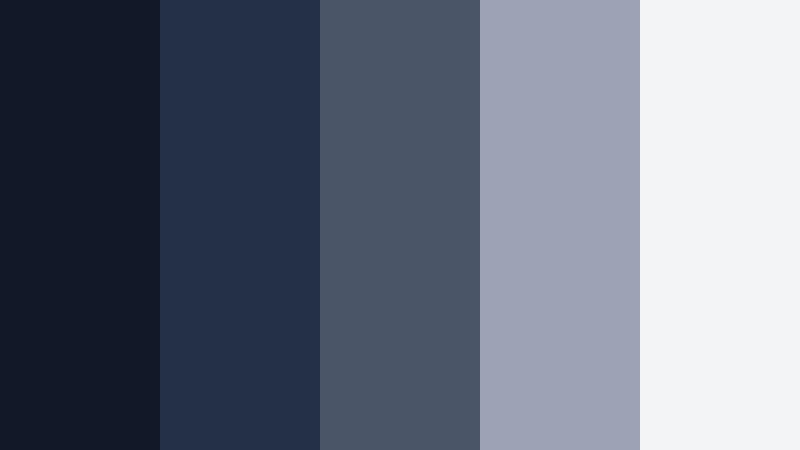
- HEX Codes: #111827, #243047, #4b5568, #9ca3b5, #f3f4f6
- Mood: Structured, professional, and sharp.
- Use for: Great for motion graphics templates, lower thirds, and channel branding for tutorials or productivity content.
Studio Grid layers strong Slate Navy bases with steel and cloud tones for a very organized visual rhythm. The darker shades are excellent for clean backgrounds or fullscreen slides, while the medium and light grays keep text blocks and infographics crisp and easy to follow.
Apply this palette to tutorial intros, overlay frames, and charts inside your videos. It works particularly well with grid based layouts and UI inspired motion graphics in Filmora, giving your educational content a smart, structured identity that viewers will associate with clarity and quality.
Monolith Interface
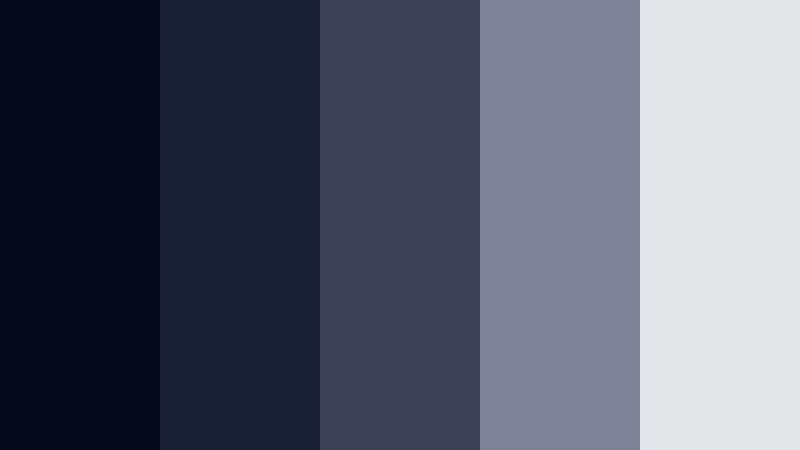
- HEX Codes: #050816, #182132, #3b4253, #7d8595, #e5e7eb
- Mood: Futuristic, technical, and understated.
- Use for: Use in UI demos, software walkthroughs, and sleek sci fi motion graphics where clarity and depth matter.
Monolith Interface leans into very dark Slate Navy with layered interface grays to mimic modern operating systems and dashboards. The palette feels technical and minimal, making it perfect for screen heavy content where you want the software to be the star.
In videos, you can use the inkiest tones as letterbox bars or backgrounds, then bring in lighter grays for panels, popups, and key callouts. The cool neutrality of this palette helps your footage look expensive and future facing without distracting from the actual information on screen.
Minimal Harbor Frame
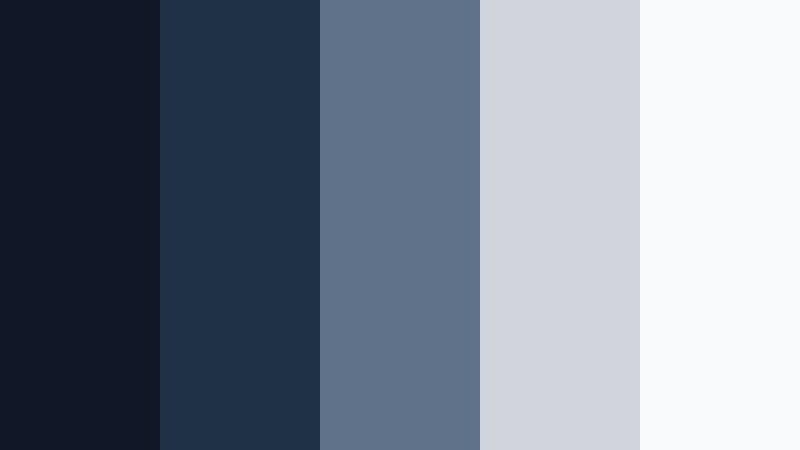
- HEX Codes: #101827, #1f3145, #60728a, #d1d5db, #f9fafb
- Mood: Calm, tidy, and design forward.
- Use for: Perfect for clean logo stings, portfolio reels, and minimalist explainer videos.
Minimal Harbor Frame combines Slate Navy with soft neutrals for a clean, harbor inspired look. The blues feel anchored and stable, while the pale grays and whites bring in air and space, which is ideal for brands that want minimalism without feeling cold.
Use this palette for logo animations, portfolio highlights, and simple title cards. The lighter tones make text readable even over darker footage, and the mid blue is great for accent lines, progress bars, and iconography in Filmora driven explainers.
Slate Circuit
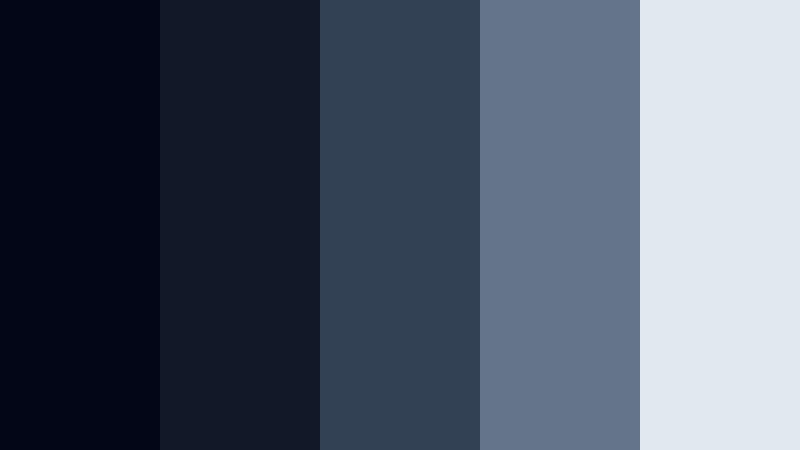
- HEX Codes: #020617, #111827, #334155, #64748b, #e2e8f0
- Mood: Cool, high tech, and confident.
- Use for: Ideal for tech reviews, gadget b roll color grades, and modern typography driven sequences.
Slate Circuit layers graphite deep tones with Slate Navy and cool blue grays, echoing circuit boards and high tech interfaces. The result is a palette that feels precise and contemporary, perfect for tech heavy content.
Use the darkest shades for negative space around your gadgets, the mid blues for on screen text and shapes, and the lightest tone for highlights or clean backgrounds. This combination makes devices, LEDs, and metallic textures pop, especially when you grade your b roll in Filmora to lean into cooler shadows.
Elegant & Cinematic Slate Navy Color Palettes
Midnight Cinema Luxe
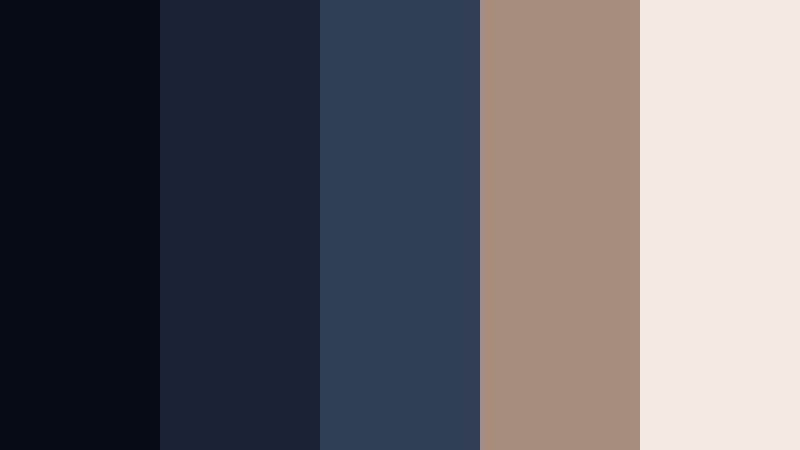
- HEX Codes: #070b15, #1a2335, #2f3e54, #a58f7a, #f3ebe1
- Mood: Luxurious, cinematic, and dramatic.
- Use for: Great for film style trailers, fashion lookbooks, and dramatic title sequences.
Midnight Cinema Luxe pairs inky Slate Navy shadows with warm champagne highlights, creating a visually rich contrast that feels like a premium theater experience. The cool blues add depth, while the gold toned neutrals add a touch of luxury.
This palette is ideal for stylized trailers, fashion edits, or story driven intros. Use the darker blues for backgrounds and vignettes, then bring in the warm tones for text, logo marks, and subtle light leaks. It works beautifully in Filmora when you want your thumbnails and opening frames to suggest drama and sophistication.
Tidal Glass Noir
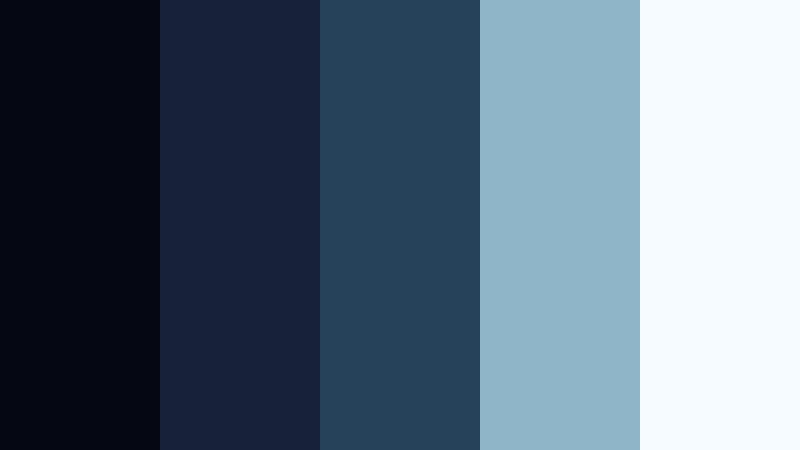
- HEX Codes: #050712, #172139, #26415a, #8fb6c8, #f5fbff
- Mood: Moody, crystalline, and refined.
- Use for: Use for travel films, coastal drone edits, and moody brand openers needing an elevated, glassy blue tone.
Tidal Glass Noir blends deep oceanic Slate Navy with pale aqua and icy whites, creating a glassy shoreline mood. It feels premium yet cool, as if your footage is bathed in translucent sea light.
Apply this palette to travel or drone shots over water, city skylines at dusk, or luxury product b roll. Darker tones can frame the scene, while the lighter blues and whites highlight waves, reflections, or typography. It is a strong choice when you want a moody yet polished look on thumbnails or cinematic intros.
Velvet Observatory
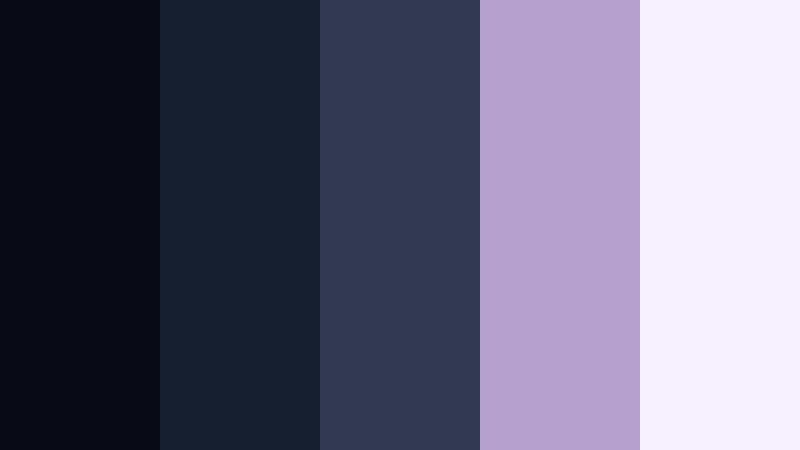
- HEX Codes: #080b16, #161f30, #313a52, #b6a0ce, #f6f0ff
- Mood: Dreamy, starry, and sophisticated.
- Use for: Perfect for cinematic vlogs, night sky sequences, and story driven intros with subtle gradients.
Velvet Observatory uses soft Slate Navy night tones with dusty lilac highlights, evoking a starry sky above an observatory. The blues keep things grounded and cinematic, while the muted purple whites add a dreamy twist.
Use this palette when editing star timelapses, city neon at night, or introspective vlogs. In Filmora, set your backgrounds and shadows to the darker blues and add the lilac shades to titles, glows, or gradient overlays to suggest magic and wonder without losing professionalism.
Gilded Docklights
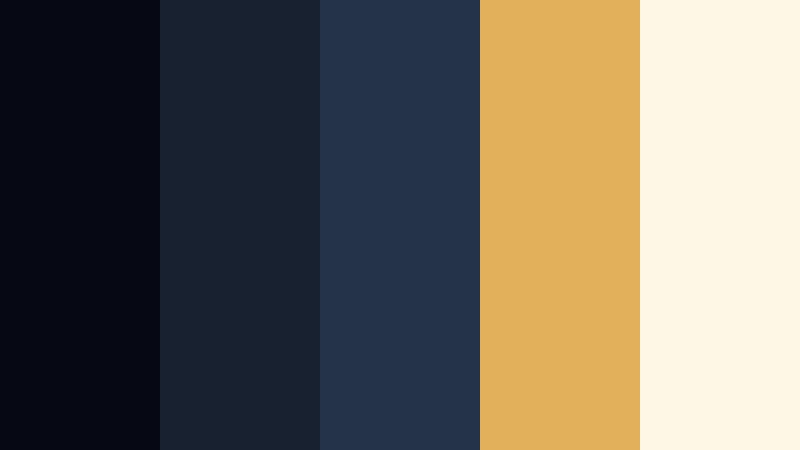
- HEX Codes: #060914, #172130, #243348, #e0b15a, #fff7e5
- Mood: Warm, nostalgic, and upscale.
- Use for: Ideal for wedding highlight reels, luxury brand bumpers, and golden hour b roll with cooler shadows.
Gilded Docklights contrasts cool Slate Navy shadows with soft gold and cream, like dock lights glowing over deep water at dusk. The combination feels nostalgic yet refined, perfect for emotional storytelling.
Use the dark navies to shade your footage and the warm tones for flares, text, or decorative elements. This is a great palette for weddings, lifestyle reels, or luxury product launches where you want romance and class in the same frame.
Cathedral Echo

- HEX Codes: #050713, #141b29, #2a364b, #8f9aad, #eaeef7
- Mood: Reverent, spacious, and calm.
- Use for: Great for documentary titles, ambient music videos, and slow paced aesthetic edits.
Cathedral Echo builds layers of Slate Navy and soft stone grays, evoking quiet halls, stained glass shadows, and long echoes. It feels spacious and meditative, ideal for slower, reflective projects.
Use this palette for documentary title cards, ambient music visualizers, or minimal B roll edits focused on architecture and landscapes. The lightest gray works well for body text, while the mid blues are strong anchors for headings, frames, or subtle gradient backgrounds.
Soft & Atmospheric Slate Navy Color Palettes
Foggy Harbor Morning
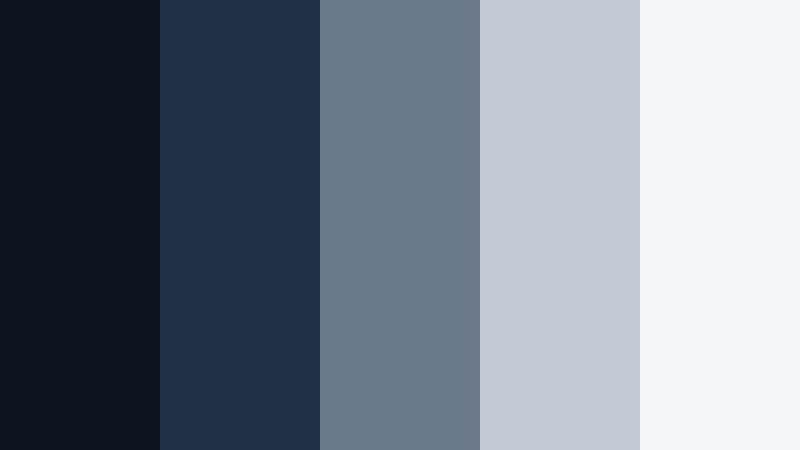
- HEX Codes: #0c1420, #1f3044, #6b7a8b, #c1c9d4, #f4f6fa
- Mood: Quiet, misty, and introspective.
- Use for: Perfect for cinematic travel vlogs, reflective storytelling, and lo fi study edits.
Foggy Harbor Morning softens Slate Navy into misty blues and pale grays, like a port just before sunrise. It lowers contrast slightly, giving your footage a gentle, reflective quality that suits slower narratives.
Use the deeper blues for foreground elements and text, then let the lighter grays fill backgrounds, overlays, or blurred b roll. It is a strong choice for study with me clips, reflective travel diaries, or calm montage sequences where you want atmosphere more than punch.
Rainy Window Journal
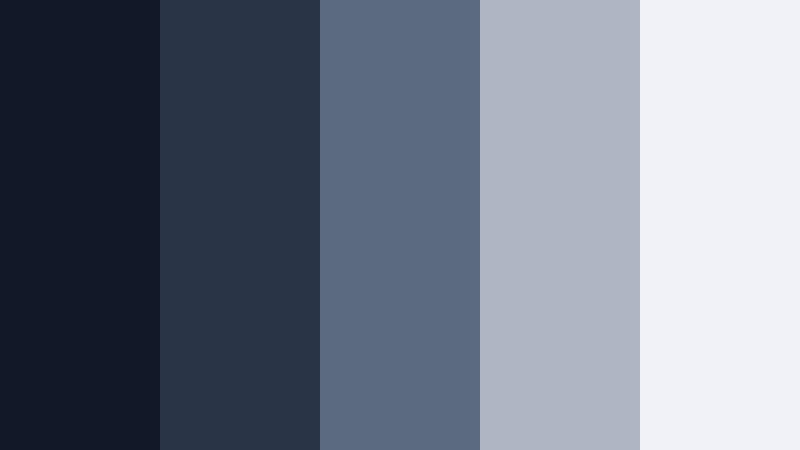
- HEX Codes: #111827, #293547, #5b6a80, #aeb6c4, #f0f2f7
- Mood: Cozy, reflective, and soothing.
- Use for: Great for journaling content, podcast visuals, and slow day in the life vlogs.
Rainy Window Journal uses Slate Navy and blurred gray blues to mimic raindrops on glass. It feels cozy and introspective, ideal for content built around thoughts, routines, and audio.
Use darker tones for text or frame elements around footage, while the mid and light blues work nicely as soft backgrounds for quotes, timestamps, or podcast cover visuals. Pair it with gentle motion in Filmora, like slow pans and cross dissolves, to enhance the rainy day mood.
Paper Boat Drift

- HEX Codes: #0f1926, #233247, #4d6781, #c3d4e4, #ffffff
- Mood: Playful, nostalgic, and airy.
- Use for: Use in family vlogs, kids craft videos, and lighthearted storytelling animations.
Paper Boat Drift mixes nautical Slate Navy with sky blues and clean white, evoking paper boats and childhood rivers. It feels light and optimistic, but still grounded enough for clear storytelling.
Use the deeper blues for simple borders, lower thirds, or containers, and let the white and pale blue dominate the background. It is a great choice for family content, kids projects, and whimsical animations, especially when combined with hand drawn elements and soft transitions in Filmora.
Twilight Study Desk

- HEX Codes: #121826, #283349, #55627a, #c8cedc, #f7f8fc
- Mood: Focused, calm, and studious.
- Use for: Ideal for study with me videos, productivity time lapses, and playlist cover art.
Twilight Study Desk blends softened Slate Navy shadows with powdery grays, like a desk lit by late evening light. It is easy on the eyes, which is important for long form content your viewers watch for hours.
Use the mid blues behind text or widgets like timers and to do lists, and keep backgrounds in the light grays and off white. This palette is perfect for productivity channels and playlist thumbnails where you want viewers to feel calm and focused, not overstimulated.
Soft Tide Notebooks

- HEX Codes: #101522, #202b3f, #52627a, #9fb3c7, #f9fbff
- Mood: Gentle, organized, and creative.
- Use for: Great for planners, aesthetic note taking reels, and calm branding for education channels.
Soft Tide Notebooks combines tidy Slate Navy bases with seafoam tinged blues and airy whites. It feels like a stack of neatly arranged notebooks on a quiet shoreline, which suits organized yet creative content.
Use the darker blues for headers, borders, and icons, then fill backgrounds with the softer blues and whites. It works well for educational branding, Notion walkthroughs, or planning videos where you want an aesthetic that feels both calm and productive.
Tips for Creating Slate Navy Color Palettes
When building your own Slate Navy color palette for video and design, think about balance, contrast, and how your colors will behave on different screens. Slate Navy is versatile, but small tweaks in saturation and warmth can change the mood completely.
- Pair Slate Navy with at least one light neutral (off white or pale gray) to keep text and UI elements readable on thumbnails and lower thirds.
- Add a single warm accent (gold, beige, or muted coral) if you want contrast and emotional warmth without losing the cool, professional base.
- Check your palette on mobile by zooming your thumbnail down to a small size; if the Slate Navy background swallows the text, brighten or lighten your type color.
- Use different shades of Slate Navy to build hierarchy: darkest for backgrounds, medium for shapes and containers, lightest for subtitles or secondary text.
- Keep brand consistency by saving HEX codes and reusing them in Filmora titles, elements, and color grading presets so every upload feels connected.
- Match your grade to your graphics: if your overlays and titles use cool Slate Navy, cool down the shadows in your footage so the whole frame feels unified.
- Limit your palette to 4 or 5 colors per project (one dark base, one mid, one light, plus 1 to 2 accents) to avoid busy or messy visuals.
- Test your palette in both dark and light modes: try a dark Slate Navy background with light text, then invert it with a pale background and Slate Navy type to see which fits your channel better.
Slate Navy is one of the most flexible colors for creators. It can feel techy and minimal, cinematic and luxurious, or soft and atmospheric, depending on which supporting tones you choose. With the right palette, your channel art, intros, and thumbnails start to look like they belong to the same visual story.
Use these 15 palettes as ready made starting points in Filmora. Drop the HEX codes into your titles and overlays, then adjust your color grading so footage and graphics sit in the same Slate Navy family. Over time, viewers will recognize your style instantly, even before they read your channel name.
Experiment, save your favorite combinations as presets, and refine them as your content evolves. A consistent Slate Navy aesthetic can quietly level up your brand while keeping the focus on the stories you tell.
secure downloadNext: Blue Ash Color Palette
