

 100% Security Verified | No Subscription Required | No Malware


 ChatGPT
 Perplexity
 Gemini
 Claude
 Grok
Grok
Cadet Blue sits between teal and gray, carrying a calm, slightly nostalgic energy that works beautifully on screens. It feels coastal and modern at the same time, which is why so many creators use Cadet Blue for soft cinematic grades, subtle user interfaces, and thumbnails that look relaxed but still professional. In color psychology, this hue suggests stability, trust, and quiet confidence, making it ideal for channels that want to feel grounded rather than loud.
Below you will find ready made Cadet Blue color palettes with HEX codes you can copy straight into your brand kit, thumbnails, titles, lower thirds, and intros. Whether you grade videos and vlogs in Filmora or design channel art in another tool, these Cadet Blue color combinations are organized by mood so you can quickly match them to your story.
In this article
Calm & Coastal Cadet Blue Color Palettes
Misty Harbor Dawn
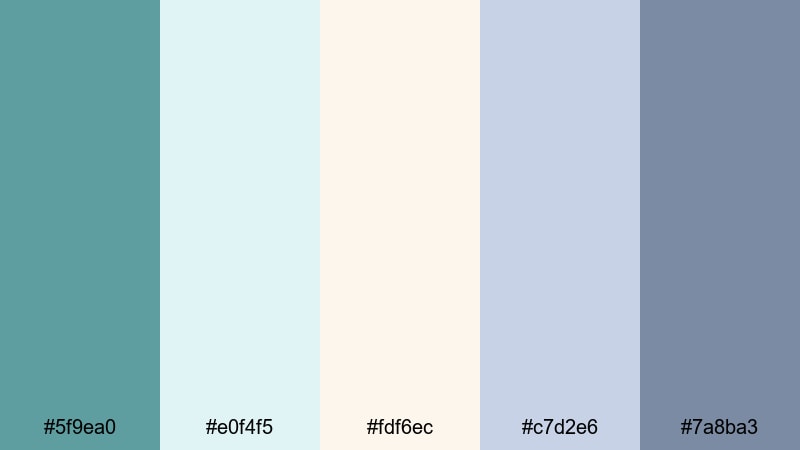
- HEX Codes: #5f9ea0, #e0f4f5, #fdf6ec, #c7d2e6, #7a8ba3
- Mood: Soft, airy, and reflective like a quiet morning by the sea.
- Use for: Ideal for vlog openers, travel diaries, and calming B-roll overlays that need a gentle coastal vibe.
Misty Harbor Dawn is a light, misty mix of oceanic blues and warm sunlit neutrals. It feels like standing on a harbor just after sunrise, when the water is still and the light is diffused through soft clouds. The pale blues and creams make Cadet Blue feel fresh and breathable rather than heavy.
Use this palette for soothing lifestyle content, minimalist travel vlogs, or reflective talking head videos where you want the visuals to calm viewers instantly. It works beautifully for YouTube thumbnails with soft gradients, pastel lower thirds, or intro titles in Filmora that sit over slow coastal B roll and ambient soundscapes.
Pro Tip: Keep Your Coastal Cadet Blue Look Consistent in Filmora
Once you pick a palette like Misty Harbor Dawn, consistency is what makes your channel feel cinematic and intentional. In Filmora, you can save this Cadet Blue scheme as a custom preset for titles, elements, and overlays so every opener, B roll label, and end screen shares the same gentle harbor mood.
Apply the lighter tones to backgrounds and shape elements, then reserve the deeper Cadet Blue and slate shades for text, outlines, or buttons. When you copy and paste color settings between clips and templates inside Filmora, your vlogs, Shorts, and channel trailer all feel like they belong to the same quiet coastal world.
AI Color Palette
If you have a reference photo of a foggy harbor or a screenshot of this palette, you can turn it into a full video look with Filmora. Filmora's AI Color Palette feature analyzes your reference colors and automatically applies them across your timeline, matching the tones of different cameras and scenes.
Import your clip, choose a frame or image that represents your ideal Cadet Blue mood, and let AI spread that soft, misty harmony to the rest of your footage. It is a fast way to keep your sunrise vlogs, B roll, and A roll all sitting in the same calm, coastal color space.
 secure download

HSL, Color Wheels & Curves
Even within a soft Cadet Blue palette, small tweaks in HSL, color wheels, and curves can dramatically change the mood. In Filmora, gently reduce saturation in the blues for a more muted, documentary feel, or lift the midtones with the color wheels to make skin tones look warmer against the cool harbor backdrop. Tools like these are covered in depth in Filmora's color correction tutorials, and they are perfect for dialing in the exact level of haze or clarity you want.
Use the curves panel to add a soft S curve for contrast, keeping highlights creamy rather than harsh. Push shadows slightly toward teal and highlights toward a gentle warm tint, and your Cadet Blue color grading will feel cinematic while still staying true to the original palette.
secure download1000+ Video Filters & 3D LUTs
If you want to move faster, Filmora offers ready made looks that still respect your Cadet Blue palette. Filmora's video filters and 3D LUTs make it easy to apply cinematic contrast, light leaks, or vintage fades while you keep Cadet Blue as the anchor color for your brand.
Layer a gentle film LUT over Misty Harbor Dawn to add grain and depth, or use a pastel filter to push it even more into dreamy territory for lifestyle and wellness channels. You can stack effects, then fine tune opacity so your Cadet Blue color combinations stay visible but gain extra polish.
secure downloadSeagrass Boardwalk

- HEX Codes: #5f9ea0, #98c1a3, #f4eada, #c0a280, #2f4f4f
- Mood: Earthy, coastal, and grounded with touches of sea air and sun.
- Use for: Perfect for beach vlogs, nature documentaries, and channel art that blends land and sea tones.
Seagrass Boardwalk brings together Cadet Blue with muted greens, driftwood tans, and a deep, earthy accent. It feels like walking along a weathered pier lined with dune grass and sun warmed planks, where ocean breeze meets sandy paths.
This palette is great for creators who want a natural, organic look without going too bright or tropical. Use it for beach vlog thumbnails, eco travel branding, subtle lower thirds in nature documentaries, and cover images where you mix coastal footage with lifestyle shots in Filmora.
Driftwood Tides

- HEX Codes: #5f9ea0, #e2d8c3, #b59b82, #3b5866, #f7f3eb
- Mood: Nostalgic, weathered, and gently cinematic.
- Use for: Great for storytelling videos, vacation recaps, and branded intros with a relaxed, mature seaside feel.
Driftwood Tides pairs Cadet Blue with warm, faded browns and off white tones that echo sun bleached wood. The combination feels mature, nostalgic, and slightly cinematic, as if your footage has already lived in a memory for a few years.
Use this aesthetic Cadet Blue palette for story driven vacation recaps, reflective voiceovers, or brand intros that lean into maturity and calm. In Filmora, you can color match your B roll to these hues, then design title cards and thumbnails that echo the same weathered seaside character.
Sailcloth Horizon
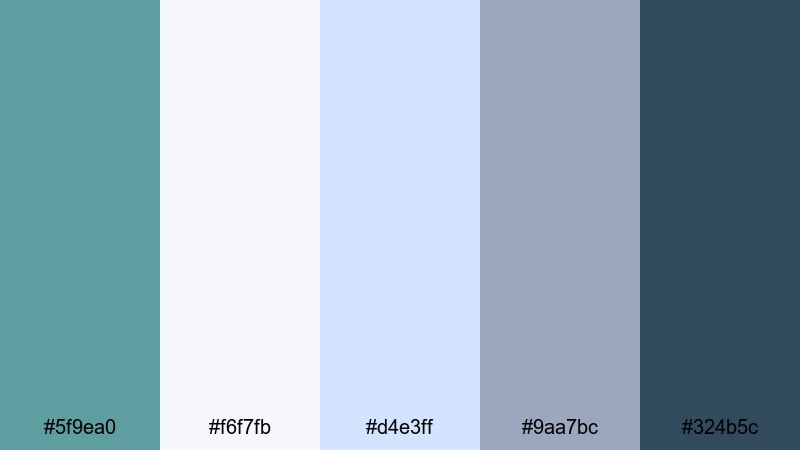
- HEX Codes: #5f9ea0, #f6f7fb, #d4e3ff, #9aa7bc, #324b5c
- Mood: Fresh, breezy, and optimistic like a clear day under raised sails.
- Use for: Use for clean channel branding, tutorial backgrounds, and titles that need a crisp nautical clarity.
Sailcloth Horizon uses crisp whites, clear sky blues, and Cadet Blue anchored by a darker navy accent. The palette feels open, airy, and optimistic, like looking out over a calm sea on a bright day.
This is a strong choice for channels that want a clean, nautical inspired identity. Try it for simple, legible tutorial backgrounds, channel banners, and lower thirds in Filmora. The deeper accent color keeps text readable on thumbnails, while the lighter hues give your layouts a fresh, professional edge.
Coastal Storm Glow
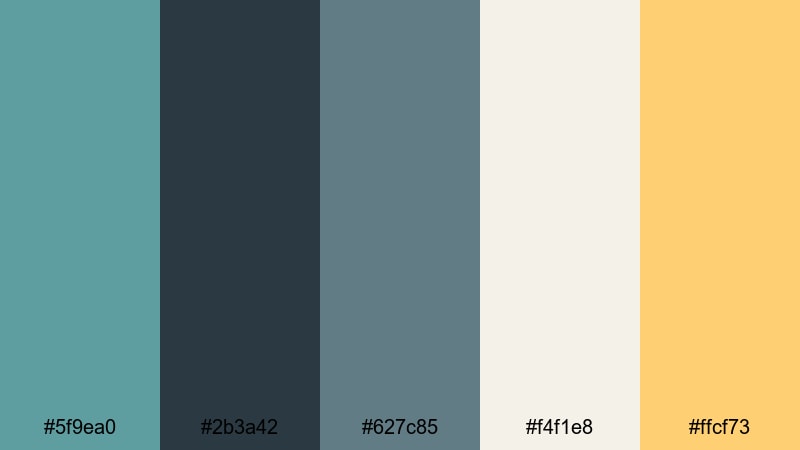
- HEX Codes: #5f9ea0, #2b3a42, #627c85, #f4f1e8, #ffcf73
- Mood: Moody skies with a warm, golden break in the clouds.
- Use for: Ideal for cinematic travel reels, moody vlog chapters, and thumbnails that hint at drama with a soft highlight.
Coastal Storm Glow mixes stormy blues and grays with a warm, golden accent that looks like sunlight breaking through heavy clouds. The Cadet Blue core keeps everything grounded while the gold adds just enough drama and energy.
Use this Cadet Blue themed video palette for cinematic travel sequences, rainy day city vlogs, or chapter cards that mark a turning point in your story. In thumbnails, place your subject against the darker tones and use the warm gold for titles or arrows to guide the eye.
Modern & Minimal Cadet Blue Color Palettes
Urban Loft Calm
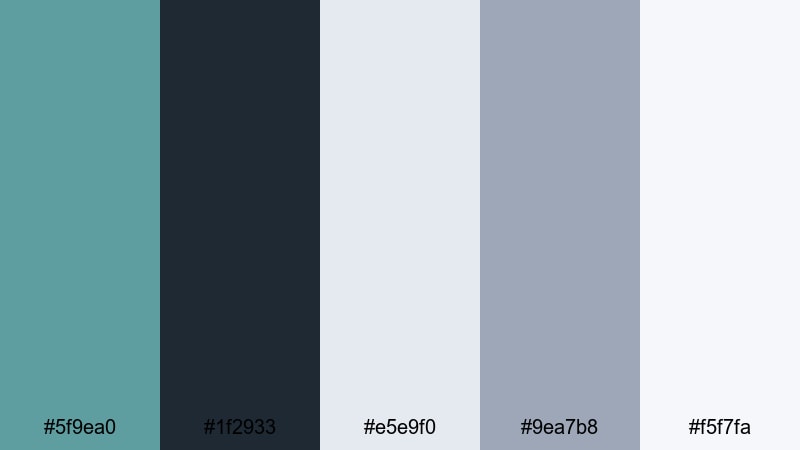
- HEX Codes: #5f9ea0, #1f2933, #e5e9f0, #9ea7b8, #f5f7fa
- Mood: Clean, modern, and quietly sophisticated.
- Use for: Great for tech explainers, productivity channels, and UI-inspired lower thirds that need a subtle, professional vibe.
Urban Loft Calm combines Cadet Blue with charcoal and a range of soft grays, echoing a minimalist city apartment or a well designed SaaS dashboard. It feels intentional, calm, and professional without ever looking cold.
This palette is ideal for creators in tech, productivity, or personal development who want their visuals to feel ordered and trustworthy. Use the lighter grays for backgrounds, Cadet Blue for accents and UI shapes, and the dark tones for text in your Filmora title templates, info cards, and explainer thumbnails.
Nordic Interface
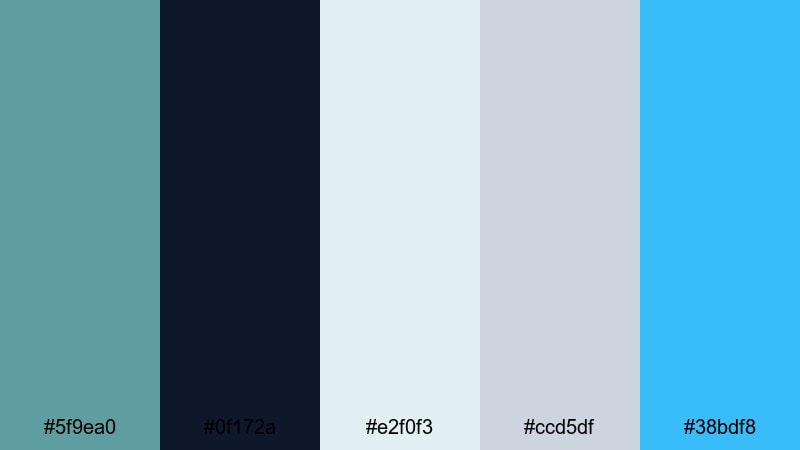
- HEX Codes: #5f9ea0, #0f172a, #e2f0f3, #ccd5df, #38bdf8
- Mood: Cool, digital, and highly functional with a Nordic tech feel.
- Use for: Perfect for app demos, software tutorials, and sleek motion graphics with a clean Scandinavian mood.
Nordic Interface leans into crisp contrast between deep navy, Cadet Blue, and icy near whites, with a bright cyan accent. It has that Scandinavian tech feel: efficient, bright, and minimal with just a touch of playfulness.
Use this Cadet Blue hex palette for on screen UI animations, app walkthroughs, and product demo thumbnails. In Filmora, you can design motion graphics overlays that mimic a clean interface, using the bright cyan to highlight buttons or progress bars while Cadet Blue carries your brand identity across platforms.
Glass Panel Skies
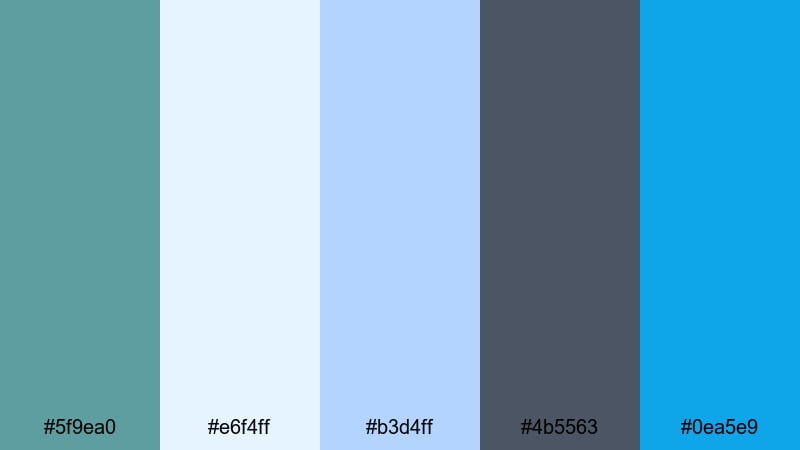
- HEX Codes: #5f9ea0, #e6f4ff, #b3d4ff, #4b5563, #0ea5e9
- Mood: Bright, glassy, and slightly futuristic.
- Use for: Great for title cards, animated infographics, and SaaS promo videos with a light-tech energy.
Glass Panel Skies feels like sunlight hitting a glass skyscraper: bright, reflective blues contrasted with a grounded dark accent. Cadet Blue sits in the middle, calming the brighter sky tones while keeping the palette modern.
This is an excellent match for light tech branding, animated infographics, and soft futuristic visuals. In Filmora, combine transparent shapes, simple icon animations, and this palette to build polished title cards, explainer intros, and YouTube thumbnail backgrounds for your software or business content.
Monoline Blueprint
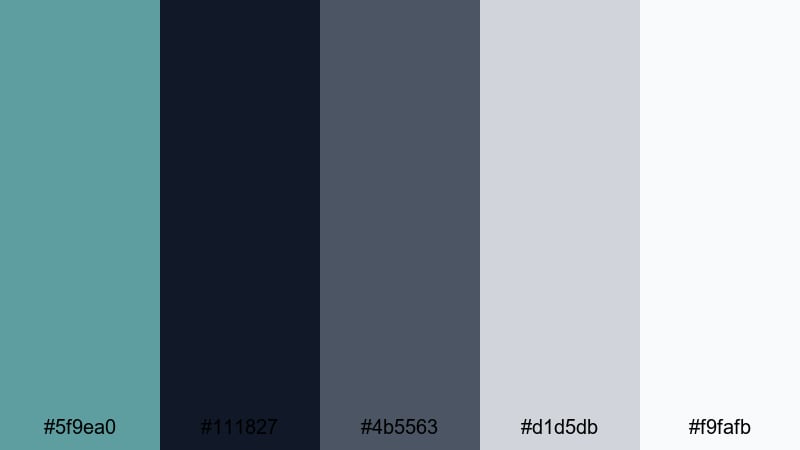
- HEX Codes: #5f9ea0, #111827, #4b5563, #d1d5db, #f9fafb
- Mood: Precise, structured, and design-forward like an architectural draft.
- Use for: Use for line-art animations, logo stings, and tutorial frames that lean into structure and clarity.
Monoline Blueprint echoes technical drawings and architectural plans, using deep graphite tones, Cadet Blue, and soft neutrals. It feels highly structured and design focused, perfect for creators who want to highlight precision and craft.
Use this palette for logo reveal animations, step by step tutorials, or design breakdowns. In Filmora, you can overlay line art elements, grids, and schematic icons colored in Cadet Blue over neutral backgrounds, reinforcing the feeling of clarity and expertise in your videos and channel graphics.
Cloud Sync Minimal
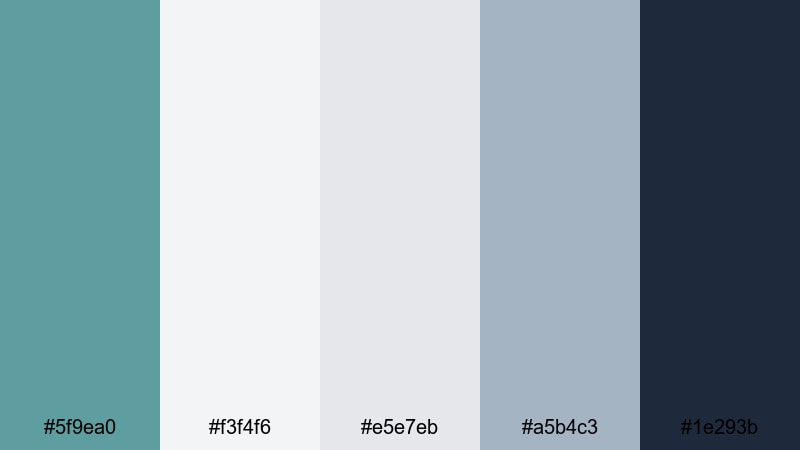
- HEX Codes: #5f9ea0, #f3f4f6, #e5e7eb, #a5b4c3, #1e293b
- Mood: Softly corporate, calm, and trustworthy.
- Use for: Ideal for brand intros, presentation videos, and product explainers that should feel reliable without being harsh.
Cloud Sync Minimal keeps things light and corporate, pairing Cadet Blue with cloud like grays and a deep navy anchor. It feels like a SaaS homepage translated into a video palette: calm, clean, and quietly authoritative.
Use it for product explainers, pitch decks turned into video, and professional looking YouTube intros. In Filmora, design slide like scenes with off white backgrounds, Cadet Blue icons, and navy headlines to keep your messaging clear and your brand instantly recognizable.
Moody & Cinematic Cadet Blue Color Palettes
Neon Rain Alley
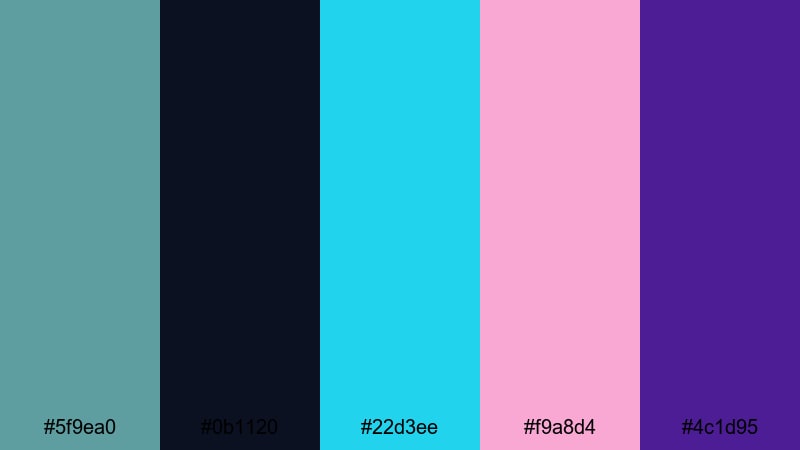
- HEX Codes: #5f9ea0, #0b1120, #22d3ee, #f9a8d4, #4c1d95
- Mood: Electric, rainy-night cyberpunk with reflective neon glows.
- Use for: Perfect for music videos, gaming intros, and motion posters that need a neon-soaked, cinematic edge.
Neon Rain Alley sets Cadet Blue against inky shadows and punchy neon teals, pinks, and violets. It feels like a rainy cyberpunk street scene, where every highlight bounces off wet pavement and glass.
This palette is perfect for high energy content: gaming intros, synthwave lyric videos, futuristic channel trailers, or music driven edits. In Filmora, pair glitch transitions, light streak overlays, and bold typography colored with the neon accents while Cadet Blue provides a cooler midtone balance in your frames.
Midnight Control Room
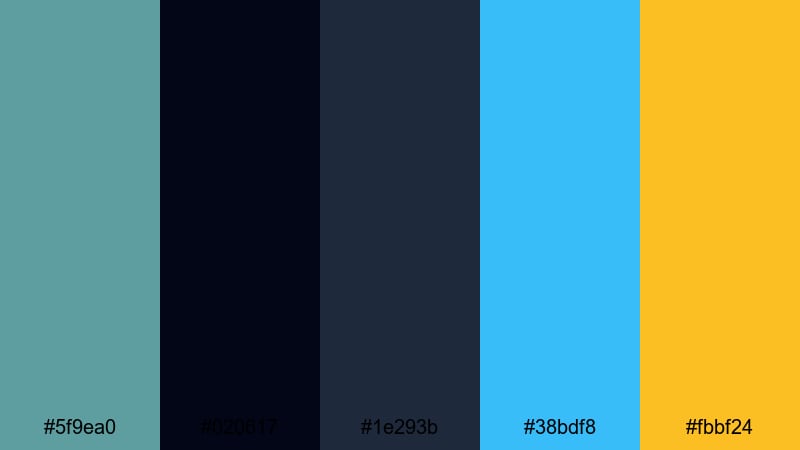
- HEX Codes: #5f9ea0, #020617, #1e293b, #38bdf8, #fbbf24
- Mood: High-tech, tense, and cinematic like a late-night mission briefing.
- Use for: Great for tech thrillers, sci-fi edits, channel trailers, and overlays with dynamic HUD elements.
Midnight Control Room uses near black, deep navy, sharp cyan, and warning amber around a Cadet Blue base. It feels like a dimly lit operations center, full of glowing screens and critical data.
Use this palette when you want tension and urgency in your visuals: sci fi edits, hacker themed videos, channel trailers for tech content, or motion graphics with HUD overlays. In Filmora, try blending animated grids and data style titles using cyan and amber over dark backgrounds, keeping Cadet Blue as the main UI color for continuity.
Noir Harbor Lights
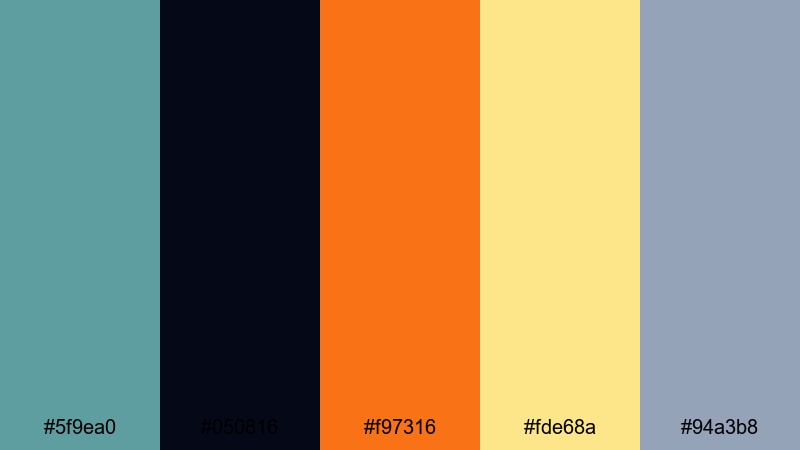
- HEX Codes: #5f9ea0, #050816, #f97316, #fde68a, #94a3b8
- Mood: Gritty, cinematic noir with warm harbor lights cutting through fog.
- Use for: Ideal for narrative shorts, city vlogs, and title cards that need a filmic, story-first look.
Noir Harbor Lights contrasts shadowy blues and grays with warm amber and soft yellow light, all anchored by Cadet Blue. It feels like an old harbor at night, lit by vintage lamps and framed by mist.
Choose this palette for story heavy vlogs, short films, or city portraits where you want a hint of classic noir. Use the dark tones for backgrounds, Cadet Blue for secondary elements like frames or lines, and the warm highlights for title text, accent shapes, and light flares in your Filmora edits.
Submerged Echo
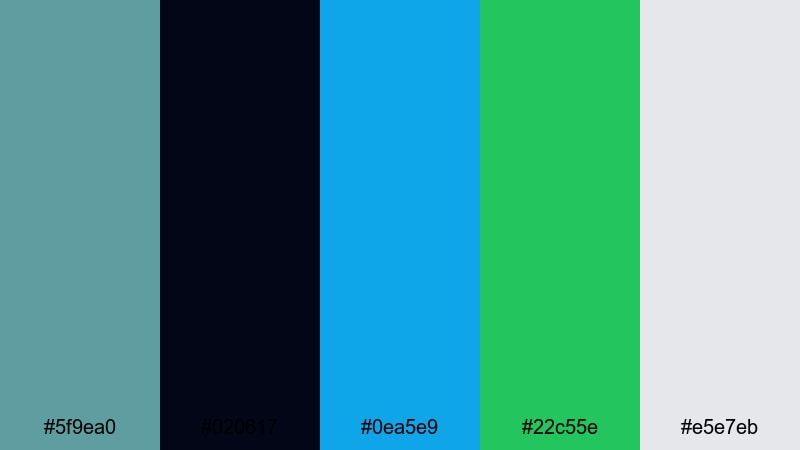
- HEX Codes: #5f9ea0, #020617, #0ea5e9, #22c55e, #e5e7eb
- Mood: Deep, underwater, and slightly surreal with hints of bioluminescence.
- Use for: Great for underwater scenes, abstract edits, lyric videos, and experimental visuals that feel immersive.
Submerged Echo pushes Cadet Blue underwater, pairing it with deep black blue shadows, bright teal, bioluminescent green, and a soft neutral highlight. It feels immersive and slightly surreal, as if your footage is floating in a dark ocean or a sci fi lab tank.
This palette works well for underwater footage, ambient music visuals, and abstract edits where light pulses against darkness. In Filmora, combine slow motion clips, particle overlays, and this palette in your titles and graphics to create an otherworldly, immersive aesthetic.
Dystopian Skyline Fade
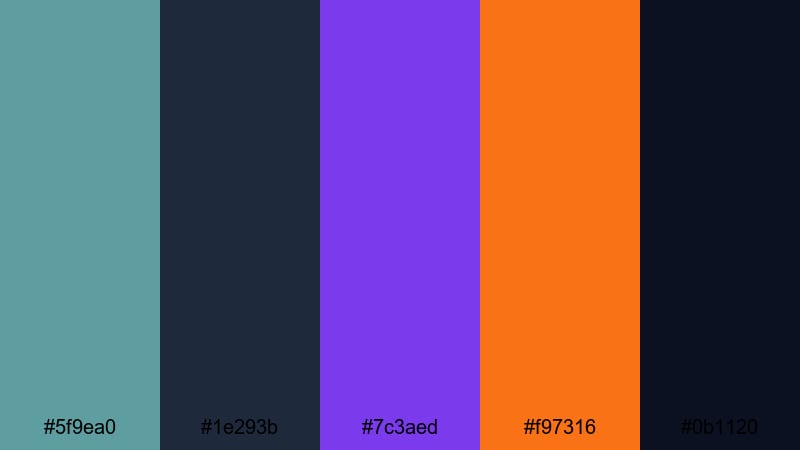
- HEX Codes: #5f9ea0, #1e293b, #7c3aed, #f97316, #0b1120
- Mood: Epic, futuristic, and slightly ominous like a city frozen at twilight.
- Use for: Perfect for cinematic trailers, game highlights, and title sequences that aim for a bold, dystopian style.
Dystopian Skyline Fade surrounds Cadet Blue with twilight navy, electric violet, fiery orange, and deep black blue. The contrast is bold and dramatic, evoking a futuristic skyline locked in permanent dusk.
Use this palette for cinematic trailers, game highlight reels, or any intro that needs a strong, dystopian punch. In Filmora, build layered title sequences with silhouettes, light streaks, and motion blur, using violet and orange for focal elements while Cadet Blue and navy handle the base of your aesthetic color palette for vlogs and edits.
Tips for Creating Cadet Blue Color Palettes
Cadet Blue is flexible enough to go coastal, corporate, or cyberpunk depending on what you pair it with. A few simple rules will help you build your own Cadet Blue color combinations that look clean on video and in design.
- Decide on a mood first: pair Cadet Blue with warm neutrals for calm lifestyle content, with grays for modern minimalism, or with neons for moody cinematic edits.
- Keep text readable: use the darkest color in your palette for titles and the lightest for backgrounds, ensuring strong contrast on thumbnails and lower thirds.
- Limit accent colors: 1 to 2 accent hues (like gold bronze, orange, or cyan) are enough to add energy without breaking your Cadet Blue theme.
- Match your footage: when color grading in Filmora, nudge your shadows and midtones slightly toward Cadet Blue so your footage naturally blends with your graphic elements.
- Stay consistent across platforms: reuse the same HEX codes in your YouTube thumbnails, channel banner, end screens, and social posts to build recognizability.
- Use saturation carefully: keep Cadet Blue slightly desaturated for mature, cinematic looks, or boost it gently if you want a fresher, more youthful brand feel.
- Test on mobile: always preview your palettes on small screens to check that text remains legible and details are not lost in dark blues.
- Create presets in Filmora: save your favorite Cadet Blue grades, title styles, and overlays as presets so new videos automatically match your established palette.
Cadet Blue is one of those rare colors that can feel calm and cinematic at the same time. With the right palette, it can turn a simple vlog into a cohesive visual story, give a tech channel a trustworthy identity, or push a gaming edit into full dystopian drama.
Experiment with these 15 Cadet Blue color palettes inside Filmora: use them for thumbnail backgrounds, motion graphics, intros, chapter cards, and subtle color grading. As you refine your favorite combinations, you will build a visual language that viewers recognize before they even read your channel name.
Save your go to HEX codes, turn them into Filmora presets, and keep iterating until your Cadet Blue look feels like your signature style.
secure download