

 100% Security Verified | No Subscription Required | No Malware


 ChatGPT
 Perplexity
 Gemini
 Claude
 Grok
Grok
Contrast Navy sits between deep ocean blue and inky black, which makes it powerful, calm, and dramatic at the same time. It instantly adds depth, trust, and focus, which is why you see it so often in cinematic color grading, premium branding, and clean user interfaces.
For creators and Filmora users, Contrast Navy is a perfect base color for intros, lower thirds, YouTube thumbnails, and title cards. Below are 15 ready-made Contrast Navy color palettes with HEX codes you can plug straight into your video overlays, channel branding, and social posts.
In this article
Cinematic Contrast Navy Color Palettes
Midnight Studio Depth
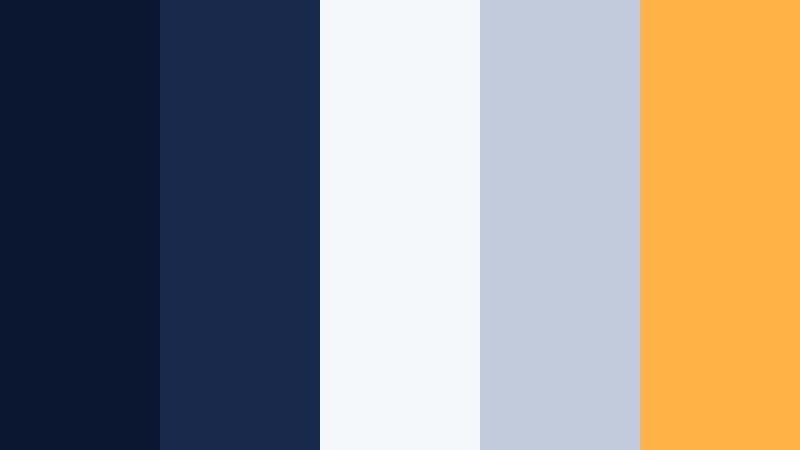
- HEX Codes: #0a1630, #17294a, #f5f7fb, #c0cadb, #ffb347
- Mood: Moody and cinematic with a hint of studio warmth.
- Use for: Use for cinematic intros, documentary titles, and dramatic vlog sequences that need depth with a subtle highlight.
Midnight Studio Depth combines inky navy tones with soft blue-grays and a single amber highlight. It feels like stepping into a dark studio where the key light shapes every edge, perfect for creating polished storytelling visuals.
Use the darkest navies (#0a1630, #17294a) as your background for intros, lower thirds, and end screens, then let #ffb347 pick out important text, subscribe buttons, or logo accents. The light neutrals (#f5f7fb, #c0cadb) are ideal for legible titles, captions, and UI-style overlays in Filmora.
Pro Tip: Build a Cinematic Contrast Navy Look in Filmora
To keep a consistent Midnight Studio Depth look across your edit, start by designing one hero frame in Filmora, such as your main title card. Use the darkest navy as your background color, sample it into your shapes and text outlines, and then add the warm accent only where you want the viewer to look first.
Once that hero frame is set, you can reuse it as a template for your intro, transitions, and end cards. Copy the same color codes into your text styles, elements, and overlays so every scene in your vlog, documentary, or channel trailer shares the same Contrast Navy identity.
AI Color Palette
You can turn Midnight Studio Depth into a full video grade with Filmora's AI tools. Grab a still frame or a simple graphic that uses these HEX codes, then let Filmora's AI Color Palette feature analyze it and apply that mood to the rest of your clips.
This is especially useful when you mix camera sources or work with stock footage. AI Color Palette helps pull everything toward the same deep navy base and warm highlight, so your intros, B roll, and thumbnails all share the same cinematic character.
 secure download

HSL, Color Wheels & Curves
Once you have a base look, fine tune the Contrast Navy tones with Filmora's HSL sliders, color wheels, and curves. Gently shift blues toward a richer navy, lower saturation in midtones for a classy studio feel, and lift highlights so white text and skin tones stay clean.
You can also use the curves panel to deepen shadows while protecting details in the midtones, giving your footage that professional, cinematic roll off around your navy backgrounds. The combination of AI tools and manual grading lets you land exactly on the Midnight Studio Depth mood you want.
secure download1000+ Video Filters & 3D LUTs
If you want to push Midnight Studio Depth even further, Filmora's video filters and 3D LUTs make it easy to stylize. Apply a subtle cinematic LUT to deepen blues, then stack a vignette or glow filter to accent the warm highlight color.
You can save your favorite combination as a custom preset and reuse it across intros, talking head shots, and B roll. That way, every new upload keeps the same Contrast Navy branding without repeating the entire color grading process from scratch.
secure downloadHarbor Noir Frames

- HEX Codes: #091424, #16324f, #4b6a88, #f0f3f7, #f4a261
- Mood: Sophisticated and coastal with a film-noir twist.
- Use for: Ideal for travel vlogs, seascape b roll, and refined channel branding overlays.
Harbor Noir Frames leans into cool, coastal navies with a misty gray sky and a warm amber accent. It feels like standing on a pier at night, with city lights reflecting on the water.
Use the darker blues (#091424, #16324f) as backgrounds for lower thirds and watermark logos, while #4b6a88 and #f0f3f7 handle text and icons. Drop #f4a261 into call to action buttons, timeline markers, or key words in your YouTube thumbnails to draw the eye.
Urban Neon Contrast
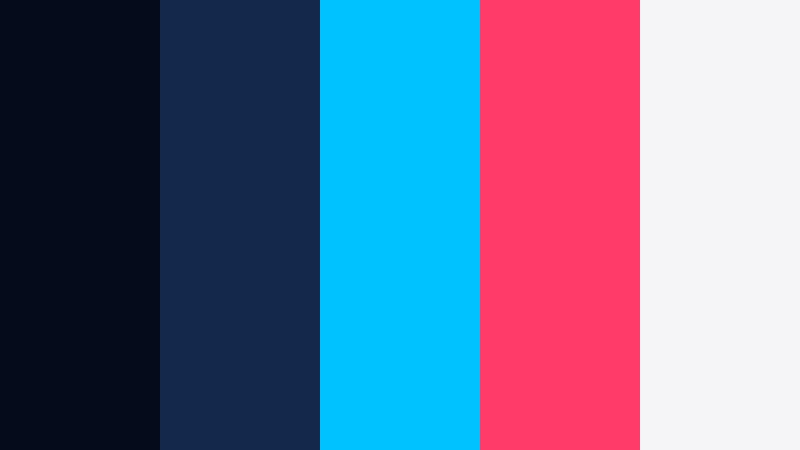
- HEX Codes: #050b1a, #13294b, #00c2ff, #ff3b6a, #f5f5f7
- Mood: High-energy, cyberpunk, and bold.
- Use for: Great for tech reviews, gaming intros, and fast-paced montage edits needing punchy contrast.
Urban Neon Contrast throws electric cyan and magenta onto a deep navy night sky. It feels fast, digital, and slightly futuristic, like a cyberpunk city dripping in neon signs.
Use the dark blues (#050b1a, #13294b) for your base layers and transitions, and then let #00c2ff and #ff3b6a power your titles, glitch effects, and animated elements in Filmora. The soft white (#f5f5f7) keeps UI overlays and captions readable against the moody background.
Stormcut Editorial

- HEX Codes: #0b1322, #1b2740, #6c7a92, #e0e4ec, #ffdd9b
- Mood: Dramatic yet editorial and polished.
- Use for: Use for cinematic B roll, product reveals, and stylish reels with a fashion edge.
Stormcut Editorial balances stormy navy foundations with smoky grays and a muted gold highlight. The palette has the feel of a fashion magazine spread or a high-end lookbook video.
Lean on #0b1322 and #1b2740 for background blocks, split screens, and letterboxed bars. Use #6c7a92 and #e0e4ec for refined typography, then add #ffdd9b to accent brand logos, product edges, or subtle glow effects in Filmora.
Cinema Scope Indigo

- HEX Codes: #070f1f, #182749, #34568b, #e3e7f2, #ffb3c1
- Mood: Classic cinematic with a soft romantic accent.
- Use for: Perfect for narrative shorts, wedding highlight films, and emotional story sequences.
Cinema Scope Indigo wraps rich indigo navies around gentle pastel highlights. It feels timeless and romantic, like a classic film with modern color grading.
Use the three blues as your gradient base (#070f1f, #182749, #34568b) for backgrounds and overlays. The pastel tones (#e3e7f2, #ffb3c1) are lovely for titles, elegant lower thirds, and delicate flourishes in wedding edits or story-driven vlogs.
Modern Minimal Contrast Navy Color Palettes
Navy Slate Interface

- HEX Codes: #0c172a, #223554, #5c708a, #f4f6fa, #3ddc97
- Mood: Clean, modern, and trustworthy with a fresh accent.
- Use for: Great for app promos, software walkthroughs, and UI-themed motion graphics.
Navy Slate Interface uses layered navies and soft slate grays to mimic a sleek digital dashboard. The pop of mint green adds freshness and suggests interactivity.
Use the dark blues (#0c172a, #223554) as the background for mock interfaces, then place panels and callouts in #5c708a and #f4f6fa. Reserve #3ddc97 for buttons, progress bars, and subscribe prompts in your Filmora motion graphics.
Contrast Navy Grid
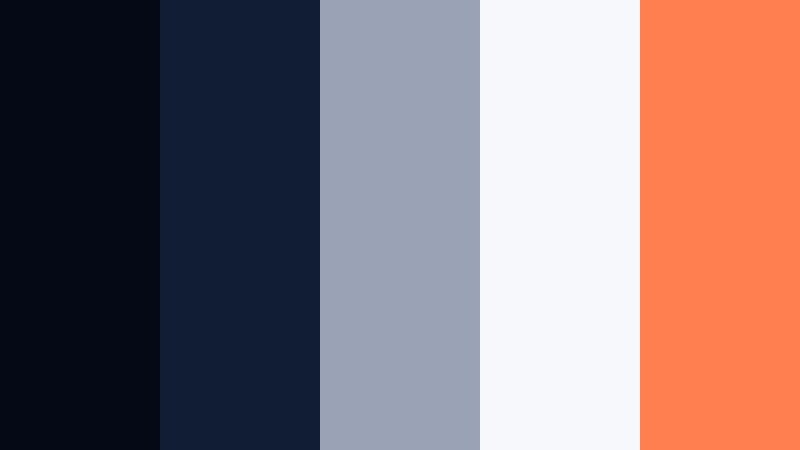
- HEX Codes: #050915, #111d33, #9aa3b5, #f7f8fc, #ff7f50
- Mood: Technical, precise, and slightly futuristic.
- Use for: Use in explainer videos, data visualizations, and typography-led title cards.
Contrast Navy Grid combines very dark blues with pale grays, giving you a clean, information-first layout. A vibrant coral accent (#ff7f50) keeps charts and callouts from feeling dull.
Use #050915 and #111d33 for backgrounds behind charts or text, #9aa3b5 and #f7f8fc for labels and axis lines, and coral for key data points or keywords. It works well for tutorial slides and infographic-style sequences built in Filmora.
Minimal Crestline
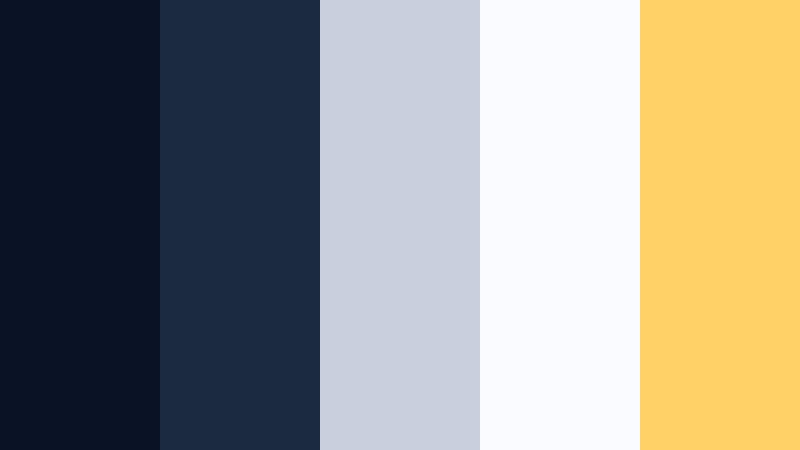
- HEX Codes: #091325, #1c2a3f, #c8d0de, #fafbff, #ffd166
- Mood: Airy, minimal, and optimistic with structure.
- Use for: Ideal for personal branding, portfolio reels, and clean channel aesthetics.
Minimal Crestline anchors light and airy whites with confident navy tones. The soft yellow accent feels friendly and optimistic without being childish.
Build a clean base using #091325 and #1c2a3f for frames or sidebars, then let #c8d0de and #fafbff dominate the central area of your slides, intros, and end screens. Highlight key text, icons, or your name in #ffd166 to create a recognizable signature look.
Blueprint Overlay

- HEX Codes: #061120, #12315a, #4b84c4, #dfe8f5, #f2f2f2
- Mood: Professional, engineered, and reliable.
- Use for: Great for tutorials, architecture walkthroughs, and business explainers needing a structured feel.
Blueprint Overlay mirrors technical drawings, with navy backgrounds and crisp light blue lines. It communicates structure, planning, and precision.
Use #061120 and #12315a as strong grounding colors for full-screen backgrounds or letterbox bars. Then layer diagrams, flowcharts, and titles in #4b84c4, #dfe8f5, and #f2f2f2 for maximum clarity in your Filmora projects.
Deep Focus Monochrome

- HEX Codes: #050910, #0f1a2b, #1b2940, #3a4a63, #f5f6f8
- Mood: Focused, calm, and minimal.
- Use for: Perfect for text-heavy slides, low distraction tutorials, and serious brand identities.
Deep Focus Monochrome strips things back to shades of navy and a soft white. Without bright accents, the viewer is guided purely by content hierarchy and motion.
Use the gradient of blues (#050910 to #3a4a63) to create subtle depth in your backgrounds, containers, and titles. Keep main text in #f5f6f8 for strong contrast. This palette is great for educational content, corporate explainers, or any channel that wants a calm, focused look.
Warm & Cozy Contrast Navy Color Palettes
Cabin Lantern Night
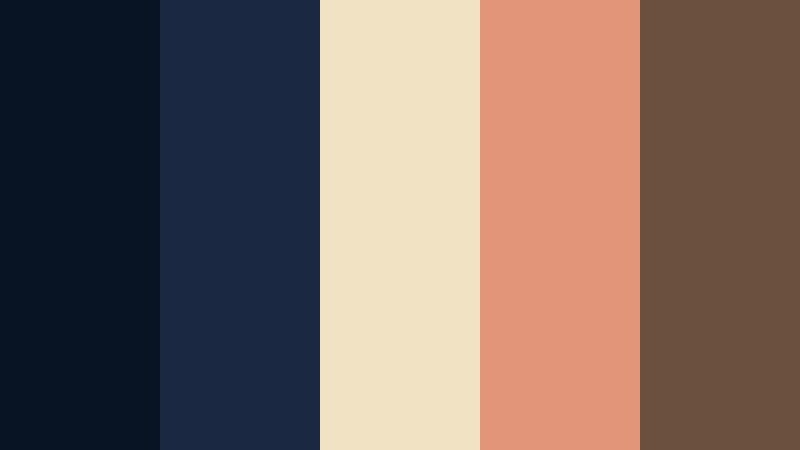
- HEX Codes: #081323, #1a2941, #f2e2c4, #e29578, #6b4f3f
- Mood: Cozy, nostalgic, and story-driven.
- Use for: Use in storytelling vlogs, lifestyle content, and autumn or winter themed edits.
Cabin Lantern Night pairs deep night blues with lantern golds and rustic browns. It feels like sitting by a fire, telling stories while the wind blows outside.
Use #081323 and #1a2941 to darken your backgrounds and letterboxes, then add #f2e2c4 and #e29578 to warm up text, badges, and simple shapes. #6b4f3f is perfect for subtle dividers, frames, or logo marks that hint at wood and leather textures.
Coffeehouse Midnight
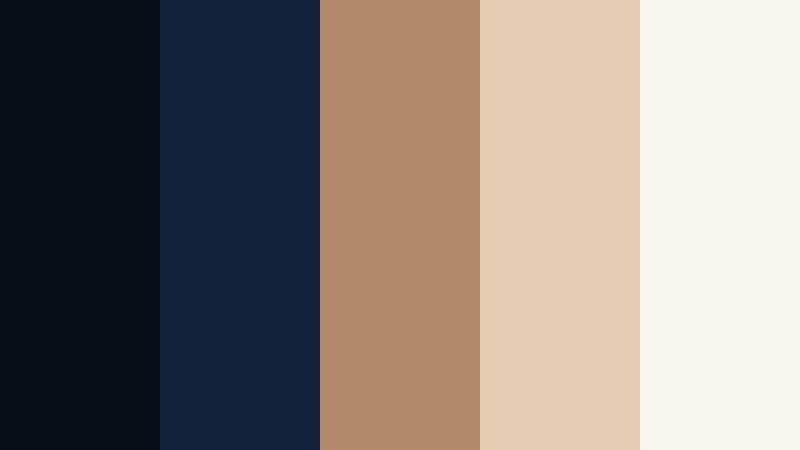
- HEX Codes: #070e18, #13223a, #b08968, #e6ccb2, #f9f5ef
- Mood: Warm, inviting, and slightly vintage.
- Use for: Great for cafe vlogs, study-with-me videos, and soft spoken commentary channels.
Coffeehouse Midnight blends cool navy shadows with latte browns and creamy highlights. It has a soft, late night atmosphere that feels calm and welcoming.
Use the navy tones (#070e18, #13223a) behind your talking head shots or as subtle sidebars. Let #b08968 and #e6ccb2 color your titles, timestamps, and chapter markers, then keep large text areas on #f9f5ef to maintain gentle readability.
Golden Tide After Dark
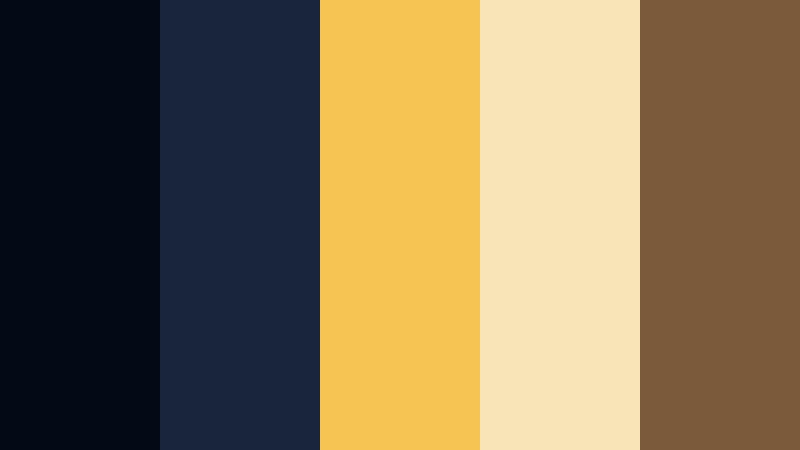
- HEX Codes: #040a15, #18253b, #f6c453, #f9e4b7, #7a5a3a
- Mood: Glowing, cinematic, and luxurious.
- Use for: Perfect for luxury product showcases, jewelry reels, and dramatic brand reveals.
Golden Tide After Dark sets inky navy seas against molten gold highlights. It feels premium and theatrical, ideal for reveals and hero shots.
Use #040a15 and #18253b as rich, velvety backgrounds, then spotlight products or text with #f6c453 and #f9e4b7. The earthy brown #7a5a3a can ground logo marks, borders, or captions so the gold does not overpower your visuals.
Sunset Deck Horizon
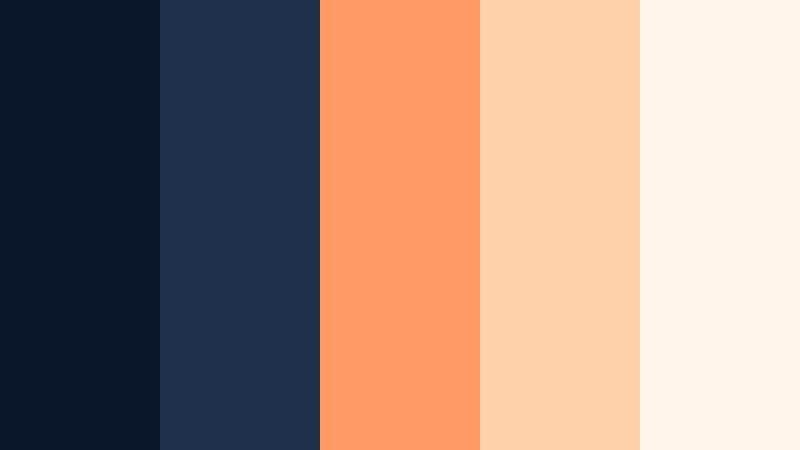
- HEX Codes: #091528, #1e304a, #ff9966, #ffd1a9, #fff5eb
- Mood: Relaxed, sunset-washed, and friendly.
- Use for: Ideal for travel diaries, sunset b roll, and upbeat lifestyle channels.
Sunset Deck Horizon layers evening navies with warm oranges and peaches. It captures the feeling of a slow sunset over water, soft and relaxed but still colorful.
Let #091528 and #1e304a frame your footage or act as lower thirds, and keep warm gradients in #ff9966 and #ffd1a9 for titles and badges. The off-white #fff5eb works beautifully for text blocks, playlist covers, and thumbnail backgrounds.
Creative Contrast Navy Accent Palettes
Indie Poster Pop
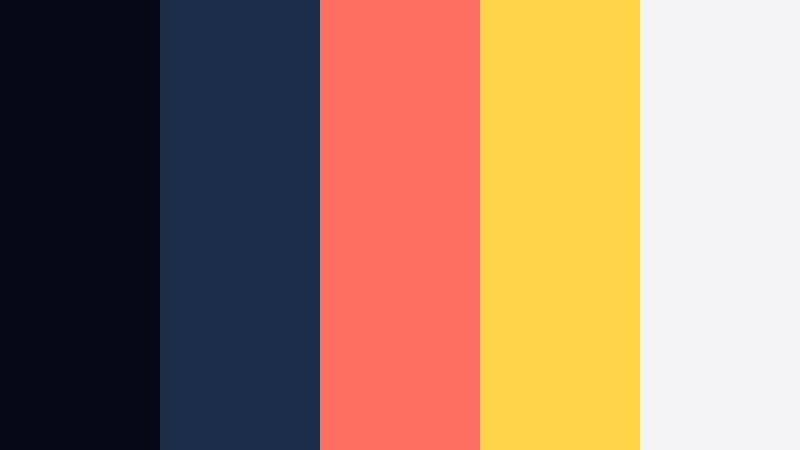
- HEX Codes: #050816, #1c2d4a, #ff6f61, #ffd447, #f4f4f6
- Mood: Playful, bold, and a bit retro.
- Use for: Use for music video lyrics, bold thumbnails, and kinetic typography sequences.
Indie Poster Pop mixes strong navies with punchy coral and yellow, echoing vintage gig posters and bold album art. It feels energetic and fun, with a hint of nostalgia.
Use #050816 and #1c2d4a as your base for lyric videos or title sequences, then alternate #ff6f61 and #ffd447 for key words, icons, and animated shapes. Keep backgrounds or large text zones in #f4f4f6 when you need breathing space, especially for busy thumbnails.
Tips for Creating Contrast Navy Color Palettes
When you build your own Contrast Navy color palettes for video and design, focus on balancing depth, readability, and emotion so your visuals stay clear and on brand.
- Pair deep navy with at least one light neutral (off white or pale gray) to keep titles, captions, and UI elements easy to read on any screen.
- Limit yourself to one or two bright accent colors so your thumbnails and intros feel intentional, not chaotic.
- Check contrast on mobile by viewing your designs at small sizes; if text disappears into the navy, increase brightness or lighten the background.
- Match your footage to the palette by adjusting white balance and saturation so blues do not drift into teal or purple unintentionally.
- Use navy for backgrounds, frames, and letterbox bars, then keep faces, key objects, and text in lighter tones to guide the eye.
- Keep branding consistent by reusing the same HEX codes for logos, lower thirds, and end cards across multiple videos.
- Test how your palette looks in both dark mode and light mode layouts if you use it for channel banners, websites, and social posts.
- Create a few palette variations (cinematic, minimal, and warm) around the same core navy so you can switch moods while staying on brand.
Contrast Navy palettes are powerful tools for shaping mood, focus, and brand identity. Whether you want a moody cinematic intro, a clean tech explainer, or a cozy late night vlog, the right navy combination will hold your visuals together.
Try dropping these HEX codes into Filmora for your overlays, titles, and filters, then refine them with color grading tools until they match your footage perfectly. With a few saved presets, your channel can keep a recognizable Contrast Navy style from video to video.
As you experiment with different palettes above, pay attention to how viewers respond in watch time and clicks. Let that feedback guide which Contrast Navy combinations become your signature look in Filmora.
secure download