

 100% Security Verified | No Subscription Required | No Malware


 ChatGPT
 Perplexity
 Gemini
 Claude
 Grok
Grok
Cyan sits between blue and green on the color wheel, blending the calm of ocean blues with the freshness of mint and teal. In color psychology, cyan is linked to clarity, trust, innovation, and a cool sense of energy, which makes it a favorite for tech brands, wellness creators, and futuristic visuals. Used well, it can make your channel feel clean, modern, and easy to watch.
Whether you are designing YouTube thumbnails, animated intros, lower-thirds, or a full channel rebrand, a well-chosen cyan color palette keeps everything consistent. Below you will find 15 ready-to-use cyan color palettes with HEX codes, tailored for video creators, designers, and Filmora users who want reliable cyan color combinations for vlogs, shorts, overlays, and branding.
In this article
Soft & Serene Cyan Color Palettes
Lagoon Morning Mist
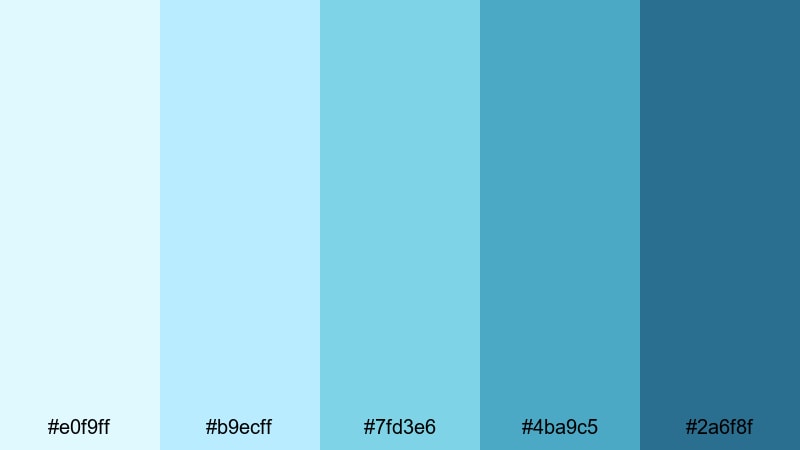
- HEX Codes: #e0f9ff, #b9ecff, #7fd3e6, #4ba9c5, #2a6f8f
- Mood: calm, airy, and refreshing
- Use for: Use for calm travel vlogs, morning routines, and wellness channel branding where you want a soft, ocean-inspired look.
Lagoon Morning Mist blends pale cyan and muted teal into a soft gradient that feels like early light over still water. The lightest tones work beautifully for backgrounds, white-space areas, and gentle overlay cards, while the deeper teal anchors titles, icons, and small accents.
Use this palette for morning routine intros, spa or mindfulness tutorials, or travel vlogs that focus on calm beach scenes. In your thumbnails and lower-thirds, keep text in white or very dark teal against the lighter cyan shades to keep everything legible but soothing.
Pro Tip: Build Calm Cyan Scenes In Filmora
To keep this gentle lagoon look consistent, use Filmora to build a simple visual system: pick one light cyan for backgrounds, one mid-tone for shapes and panels, and the deepest teal for text or logo accents. Save these as custom colors in Filmora so you can reuse them across intros, b-roll captions, and end screens without guessing HEX codes every time.
When editing, combine this palette with slow crossfades, minimal motion graphics, and soft blur effects. This keeps your cyan visuals from feeling harsh and supports relaxing content like ASMR, wellness tips, and slow travel edits.
AI Color Palette
If you have a reference image of a misty lagoon or a cyan mood board, you can match that look across all your clips with Filmora. Filmora's AI Color Palette feature lets you sample colors from one frame and smoothly apply the same palette to the rest of your timeline.
Import your hero shot, let Filmora extract the color style, and then apply it to A-roll, B-roll, and cutaway scenes. This keeps skin tones natural while pushing your blues and cyans toward the same calm, airy vibe throughout the whole video.
 secure download

