

 100% Security Verified | No Subscription Required | No Malware


 ChatGPT
 Perplexity
 Gemini
 Claude
 Grok
Grok
Deep Rosewood sits between burgundy and cocoa, a rich, emotional hue that instantly feels cinematic. It suggests romance, warmth, and a touch of mystery, which makes it perfect for storytelling formats like vlogs, wedding films, and narrative short videos. In branding, Deep Rosewood adds a premium, mature feel to logos, channel art, and packaging, especially when paired with soft blush, champagne, or smoky neutrals.
For creators and Filmora users, the right Deep Rosewood color palette can tie together intros, thumbnails, lower thirds, and color grading so every frame feels on-brand. Below are 15 carefully crafted Deep Rosewood color palettes with HEX codes you can plug directly into your thumbnails, overlays, and video edits to build a cohesive, memorable aesthetic.
In this article
Romantic Deep Rosewood Color Palettes
Twilight Rosewood Romance
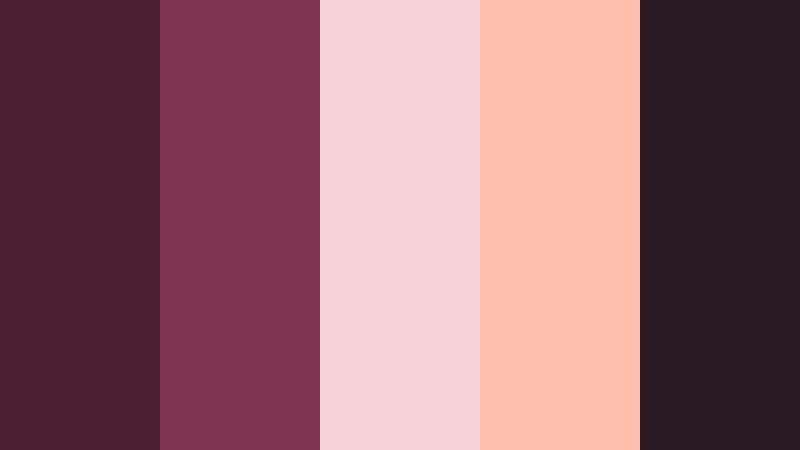
- HEX Codes: #4b1f2f, #7e3451, #f7d3d9, #ffbfae, #2a1a24
- Mood: Tender, nostalgic, and cinematic with a dusky warmth.
- Use for: Perfect for romantic vlog sequences, wedding highlight reels, and dreamy channel banners.
Twilight Rosewood Romance feels like the soft glow right after sunset, when colors mute slightly and every highlight turns rosy. Deep Rosewood anchors the palette, while blush and peach add a gentle haze that flatters skin tones and makes stories feel intimate and emotional.
Use this palette for romantic b-roll of city lights, close-up details at weddings, or dreamy lifestyle intros. In thumbnails, pair the darker rosewood (#4b1f2f, #2a1a24) as a background with light text in #f7d3d9 or #ffbfae for high readability. For branding, keep Deep Rosewood as your core logo color and use the lighter pastels across end screens, lower thirds, and Instagram covers for a consistent, romantic identity.
Pro Tip: Build a Cinematic Deep Rosewood Look in Filmora
To keep this twilight-inspired palette consistent from intro to outro, start by setting Deep Rosewood as your visual anchor inside Filmora. Use the darker swatches for titles and overlay elements, then warm up your footage with gentle color grading so skin tones lean into the peach and blush notes. This keeps every clip living inside the same romantic universe, from talking-head shots to b-roll transitions.
You can also save custom title presets with Deep Rosewood backgrounds and pastel captions, so every future upload automatically matches your chosen palette. Over time, your channel will gain a recognizable cinematic look that audiences associate with your name.
AI Color Palette
If you already have a mood board or screenshot using Twilight Rosewood Romance, you can turn that reference into a full video grade. Filmora's AI Color Palette feature lets you sample colors from an image and apply that palette across clips in just a few clicks.
Import your reference image, let AI detect the key tones, then match your entire edit to those Deep Rosewood and blush hues. This is especially powerful for wedding films, couple vlogs, and cinematic shorts where you want every cut to share the same warm, romantic feeling.
 secure download

HSL, Color Wheels & Curves
To refine Deep Rosewood tones, head to Filmora's advanced color controls. In HSL, slightly desaturate reds and magentas for a more cinematic look, then shift them a few points towards orange to keep skin tones warm and flattering. Use the color wheels to cool off shadows while keeping midtones warm, which adds depth and contrast without breaking the Twilight Rosewood Romance mood.
For even more control, shape the contrast curve into a soft S to deepen the darker rosewood values without crushing detail. This combination of HSL, color wheels, and curves, as shown in Filmora's YouTube tutorials, helps you land a polished, filmic grade that still respects your chosen HEX codes.
secure download1000+ Video Filters & 3D LUTs
Once your base colors are dialed in, you can speed up styling with Filmora's filter and LUT library. Many presets are already tuned around warm, romantic tones, so they blend naturally with Deep Rosewood and blush. Apply them lightly to add glow, texture, or subtle vignettes while keeping your HEX-coded palette recognizable.
Filmora's video filters and 3D LUTs make it easy to save and reuse a favorite Rosewood look across multiple projects. This is ideal for wedding filmmakers or lifestyle channels that need to batch-edit episodes without losing that signature dusky warmth.
secure downloadBlush Velvet Letters
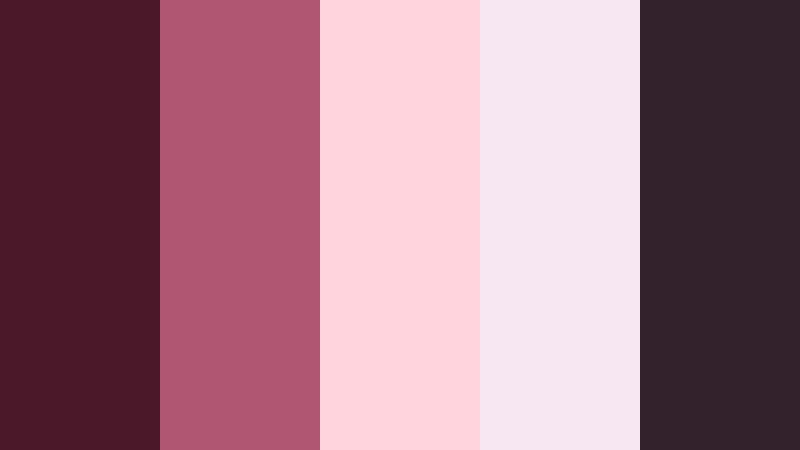
- HEX Codes: #4a1829, #b05672, #ffd4dd, #f6e7f2, #33222b
- Mood: Softly intimate, handwritten-love-letter vibes.
- Use for: Use in title cards, lower thirds, and thumbnail text for storytime vlogs or personal documentaries.
Blush Velvet Letters layers Deep Rosewood with powdery blushes and soft mauves, creating the feeling of vintage stationery and ink. The darker tones bring depth and focus, while the pale pinks keep everything light, romantic, and easy to read.
Use the near-black #33222b for body text or borders on thumbnails, and let #ffd4dd and #f6e7f2 handle backgrounds or caption boxes. In Filmora, this palette works well for storytime vlogs, voiceover essays, or personal documentaries where you want titles and lower thirds to feel intimate and handwritten rather than corporate.
Candlelit Rosewood Evening
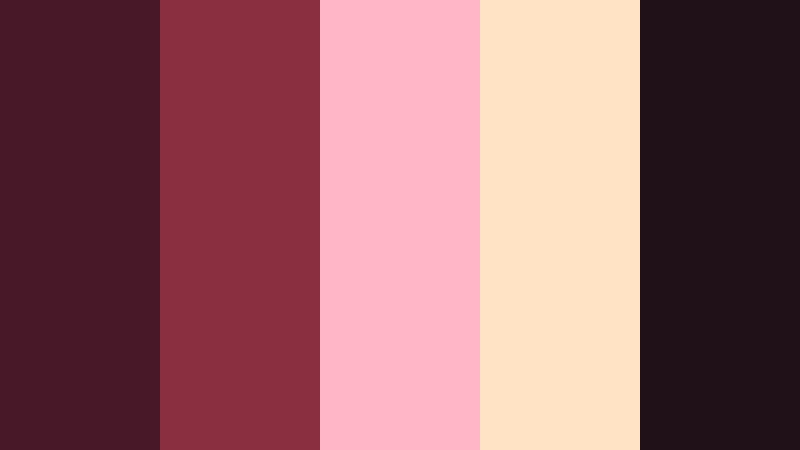
- HEX Codes: #461828, #8a2f3f, #ffb7c5, #ffe3c4, #201119
- Mood: Warm, intimate, and softly dramatic like dinner by candlelight.
- Use for: Ideal for cinematic b-roll, cooking channels, and cozy ambience shorts or reels.
Candlelit Rosewood Evening mixes Deep Rosewood with peaches and creams that mimic flickering candlelight against dark wood. The palette is warm and inviting, but the deep shadows keep it sophisticated and a bit dramatic.
Use the dark #461828 and #201119 for frames, vignettes, and text outlines, while #ffb7c5 and #ffe3c4 highlight steam, food details, or glowing text boxes. In cooking shows or ambience shorts, grade your footage warmer and lean into these HEX colors for overlays and titles to make every scene feel like a quiet dinner by candlelight.
Rosewood Garden Stroll
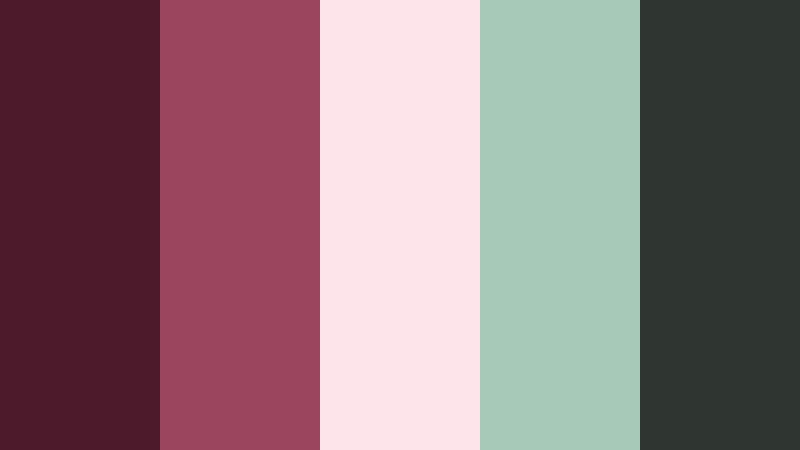
- HEX Codes: #4c1a2b, #9b455f, #fce4ea, #a7c9b8, #2f3530
- Mood: Gentle, hopeful, and slightly whimsical.
- Use for: Great for nature vlogs, mindful journaling videos, and soft brand intros.
Rosewood Garden Stroll softens Deep Rosewood with dusty greens and pale florals, evoking quiet paths and soft morning air. The greens balance the reds, so the palette stays calm and grounded instead of overly sweet.
In nature vlogs or wellness content, use #a7c9b8 for accent shapes and icons, #fce4ea for text backgrounds, and #4c1a2b for typography that stands out. This combination translates beautifully into channel banners, intro animations, and journaling overlays where you want a hint of romance but also a sense of calm and clarity.
Vintage Love Letter Rosewood
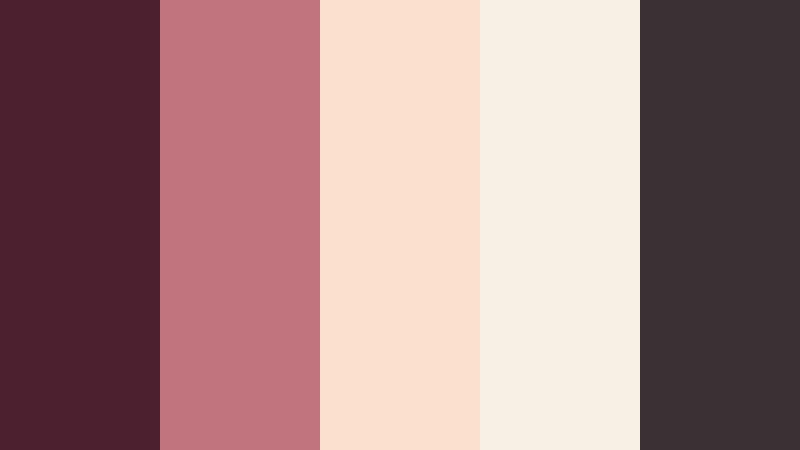
- HEX Codes: #4d202f, #c1747e, #fbe1cd, #f6f1e4, #3b3033
- Mood: Nostalgic, tender, and slightly vintage.
- Use for: Perfect for montage sequences, memory videos, and retro-inspired branding overlays.
Vintage Love Letter Rosewood pairs inky Deep Rosewood with faded creams and blush tones that feel like aged paper. The result is a nostalgic palette that suits memory-driven edits, anniversary recaps, and retro-themed videos.
Use #fbe1cd and #f6f1e4 as background blocks behind old photos or clips, and type titles in #4d202f or #3b3033 for that handwritten-letter vibe. In Filmora, combine this palette with subtle film grain, vignette, and slower transitions to amplify the nostalgic storytelling effect.
Moody & Cinematic Deep Rosewood Palettes
Noir Rosewood Cinema
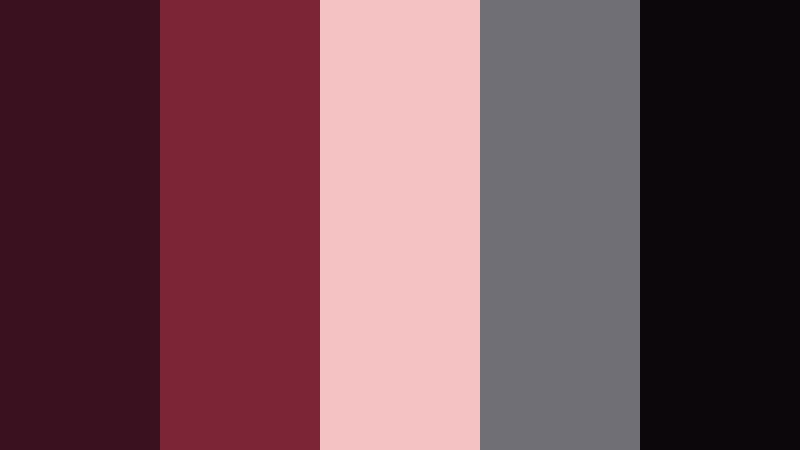
- HEX Codes: #3a111f, #7c2536, #f4c2c2, #706f76, #0b070a
- Mood: Dark, cinematic, and slightly mysterious.
- Use for: Use for film-style color grading, thriller intros, and cinematic title sequences.
Noir Rosewood Cinema wraps Deep Rosewood in charcoal grays and pale rose to create a moody, film-noir look. The almost-black #0b070a is ideal for letterboxed bars or background plates, while #f4c2c2 adds just enough softness to prevent the frame from feeling too harsh.
Apply this palette to thriller intros, commentary channels with serious topics, or cinematic breakdowns. In thumbnails, keep most of the frame dark with #3a111f and #0b070a, then use #f4c2c2 for titles and key callouts so they cut through the shadows without breaking the moody aesthetic.
Stormy Rosewood Skyline
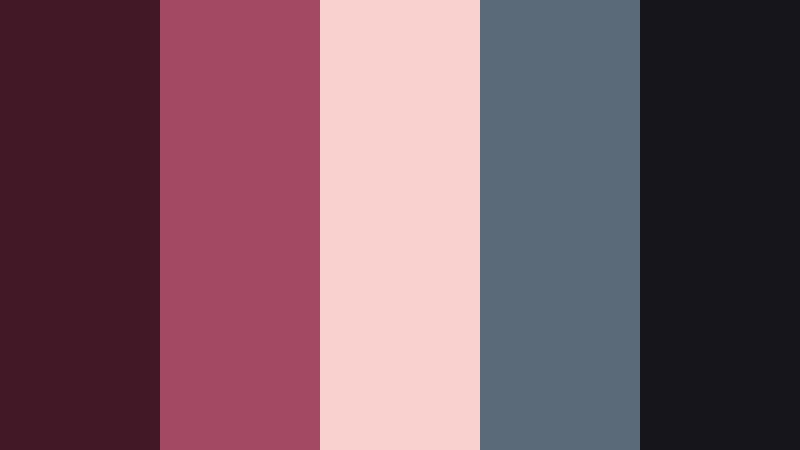
- HEX Codes: #421726, #a34963, #f9d1cf, #5a6a78, #16151c
- Mood: Brooding yet romantic, like a city just after rain.
- Use for: Ideal for urban b-roll, travel vlogs, and dramatic intro animations.
Stormy Rosewood Skyline combines rosy reds with slate blues and stormy grays, mirroring neon reflections on wet streets. The palette feels urban and dramatic but still has a romantic undertone thanks to the pinkish #f9d1cf.
Use #5a6a78 and #16151c for backgrounds, shadows, or gradient overlays, and let #a34963 and #f9d1cf highlight titles, map graphics, or navigation elements in your travel vlogs. With the right grade in Filmora, night drives and skyline shots will feel cohesive, stylish, and slightly melancholic.
Ember Rosewood Glow
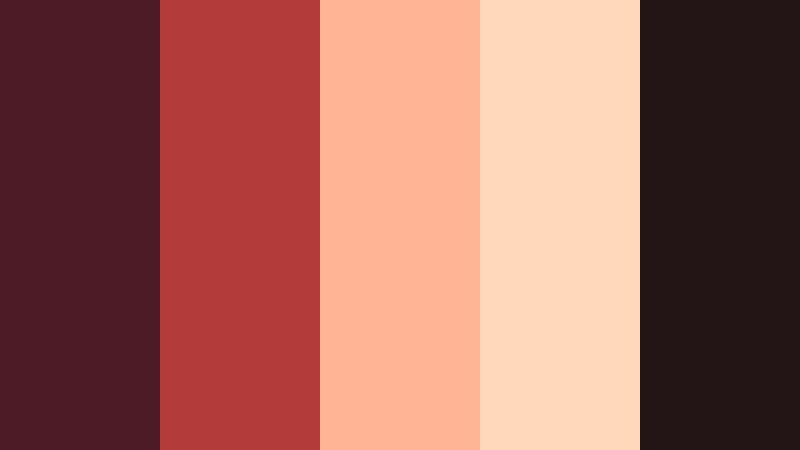
- HEX Codes: #4d1b25, #b33b3a, #ffb596, #ffd7ba, #231416
- Mood: Smoldering, energetic, and bold.
- Use for: Great for music video graphics, dynamic YouTube outros, and eye-catching thumbnails.
Ember Rosewood Glow turns Deep Rosewood into a smoldering, fire-lit look using bold red and molten orange tones. The bright #b33b3a and #ffb596 inject energy, while #231416 keeps things grounded in a rich, shadowy base.
For music videos or hype outros, use the darker hues for background gradients and #ffb596 or #ffd7ba for bold text and motion graphics. This palette also works well for attention-grabbing thumbnails where you want intensity and warmth without leaning into neon.
Midnight Rosewood Lounge
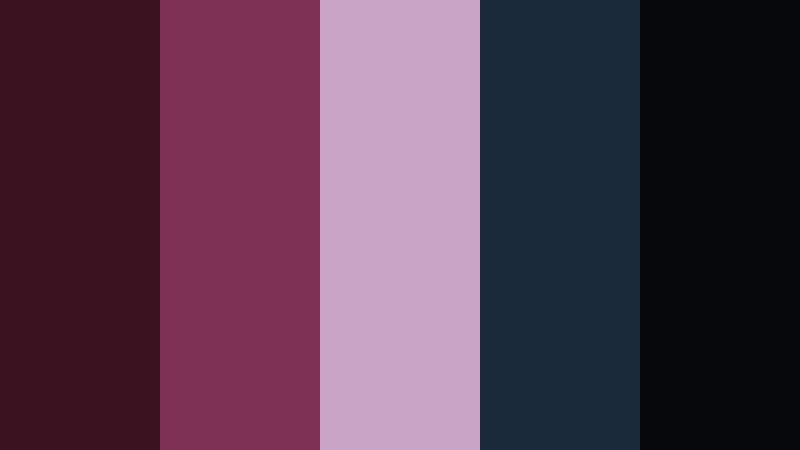
- HEX Codes: #3b1220, #7e3155, #c9a4c6, #1b2a3a, #07080c
- Mood: Luxurious, late-night, and a bit enigmatic.
- Use for: Use for podcast cover art, night-life vlogs, and refined intro sequences.
Midnight Rosewood Lounge blends Deep Rosewood with deep blues and mauve highlights, evoking a dim cocktail bar or late-night studio. It is luxe and refined, ideal for creators who want their visuals to feel premium and slightly enigmatic.
Use #07080c and #1b2a3a as your main background tones, then accent with #7e3155 and #c9a4c6 in logos, waveform animations, or chapter markers. This palette works beautifully for podcast cover art, nightlife recaps, or sophisticated intros that lead into long-form discussions.
Crimson Rosewood Thriller
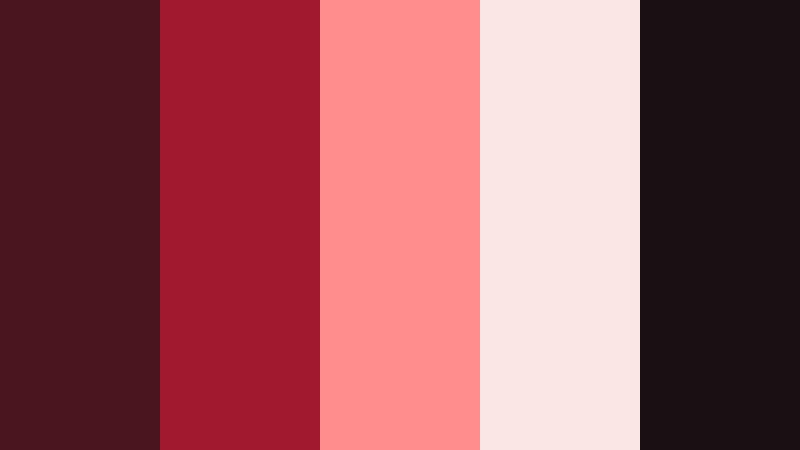
- HEX Codes: #4a151f, #a0192f, #ff8d8d, #fbe6e6, #1a1013
- Mood: Tense, bold, and cinematic with a thriller edge.
- Use for: Perfect for suspense intros, commentary channels, or dramatic reaction thumbnails.
Crimson Rosewood Thriller pushes Deep Rosewood into sharper crimson territory, balanced by pale highlights that keep frames readable. The palette feels tense and urgent, making it perfect for thrillers, true crime, or high-stakes commentary.
Use #4a151f and #1a1013 for deep backgrounds and borders, while #a0192f and #ff8d8d pick out key text and reaction faces in thumbnails. In Filmora, a subtle vignette plus a cooler grade in the shadows can increase suspense while the crimson accents guide the viewer's eye.
Modern & Elegant Deep Rosewood Palettes
Rosewood Minimal Luxe
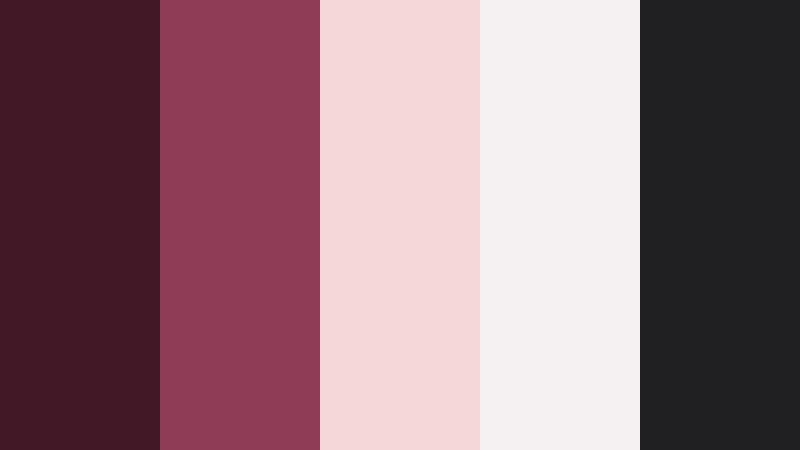
- HEX Codes: #421827, #8f3d56, #f6d7d8, #f5f1f3, #202023
- Mood: Clean, refined, and quietly luxurious.
- Use for: Great for minimalist channel branding, logo animations, and UI-style overlays.
Rosewood Minimal Luxe combines Deep Rosewood with soft neutrals and pale blush to create a high-end, uncluttered look. It feels modern and polished, without the coldness of pure gray-and-black palettes.
Use #421827 and #202023 for primary text and logo marks, while #f6d7d8 and #f5f1f3 serve as clean backgrounds for lower thirds, end cards, and UI-inspired overlays. This palette suits design channels, productivity content, and any brand that wants to look premium yet approachable.
Slate and Rosewood Signature
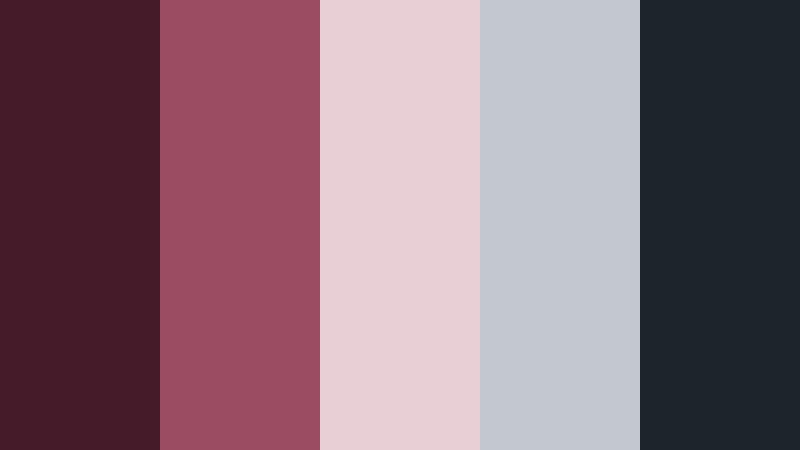
- HEX Codes: #451a29, #9b4c62, #e8cfd6, #c2c7d0, #1e242b
- Mood: Professional, polished, and slightly artistic.
- Use for: Use for signature lower thirds, portfolio reels, and design-forward presentations.
Slate and Rosewood Signature pairs Deep Rosewood with cool slate grays and soft mauves, walking the line between creative and corporate. It is professional enough for clients, yet expressive enough for artists and filmmakers.
Use #1e242b and #451a29 for key typography and logo accents, while #e8cfd6 and #c2c7d0 shape backgrounds, charts, and info boxes. This palette is ideal for portfolio reels, case study videos, and pitch decks exported from Filmora where you want your visuals to look cohesive and brand-ready.
Champagne Rosewood Soiree
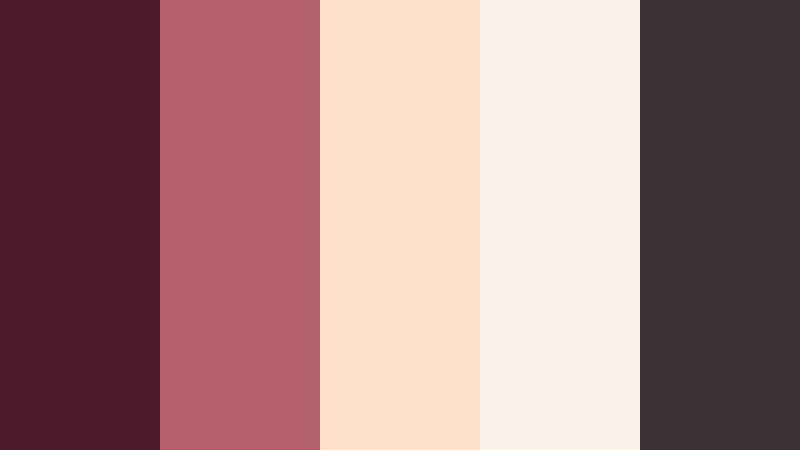
- HEX Codes: #4b1b29, #b3616e, #ffe0c8, #f9f3e9, #3a3035
- Mood: Festive, elegant, and welcoming.
- Use for: Perfect for event promos, wedding invites, and stylish announcement videos.
Champagne Rosewood Soiree fuses Deep Rosewood with champagne golds and creamy neutrals for a celebratory yet tasteful vibe. It feels like an invitation to a curated event rather than a loud party.
Employ #4b1b29 and #3a3035 for typography and logo marks, and let #ffe0c8 and #f9f3e9 fill backgrounds, frames, or animated confetti shapes. In Filmora, this palette is perfect for wedding invitations, save-the-date edits, launch announcements, or any content where you want to suggest luxury and warmth.
Rosewood Studio Monochrome
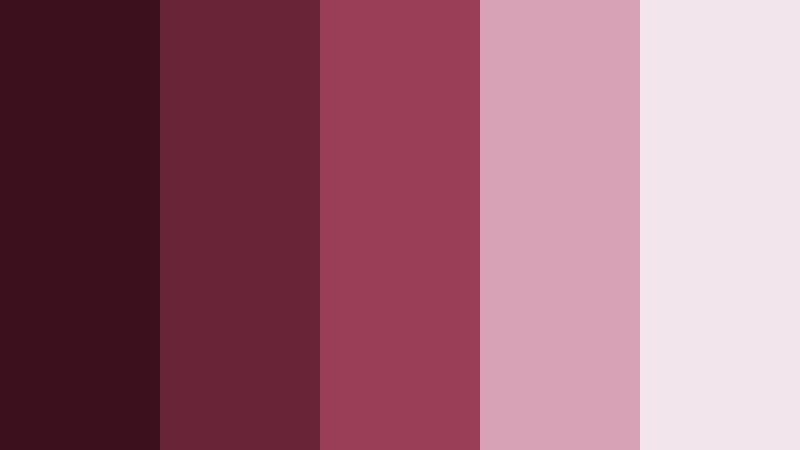
- HEX Codes: #3c111d, #6a2437, #9a3e57, #d7a1b6, #f3e5ec
- Mood: Stylish, cohesive, and content-creator ready.
- Use for: Ideal for cohesive channel branding, banner art, and filter presets across content.
Rosewood Studio Monochrome explores a full range of rosewood tones from deep to pale, creating a unified, monochrome aesthetic. Without competing hues, the result is incredibly cohesive and easy to apply across every asset on your channel.
Use darker tones for backgrounds and typography, and lighter ones for highlight shapes, buttons, and info cards. Because all five colors belong to the same family, you can safely mix them in thumbnails, intros, and overlays without clashing, giving your brand a distinct and easily recognizable signature.
Soft & Cozy Deep Rosewood Palettes
Rosewood Cocoa Retreat
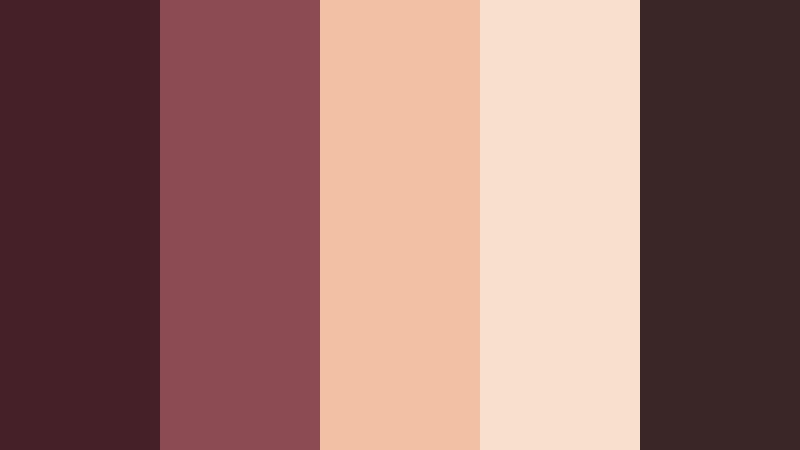
- HEX Codes: #462029, #8b4b52, #f2c0a2, #f8e0cf, #3a2626
- Mood: Cozy, comforting, and inviting like a weekend retreat.
- Use for: Use for home vlog series, cozy reading nooks, and lifestyle thumbnails.
Rosewood Cocoa Retreat wraps Deep Rosewood in cocoa browns and caramel neutrals, creating an instant feeling of comfort. It evokes blankets, coffee, and soft lighting, making it ideal for slow living and home-focused content.
Use #3a2626 and #462029 for text and dividers, and let #f2c0a2 and #f8e0cf soften backgrounds and highlight callout boxes. For home vlogs, room tours, or reading nook videos, this palette can guide your thumbnail design, intro animations, and lower thirds so everything feels warm and welcoming.
Morning Latte Rosewood
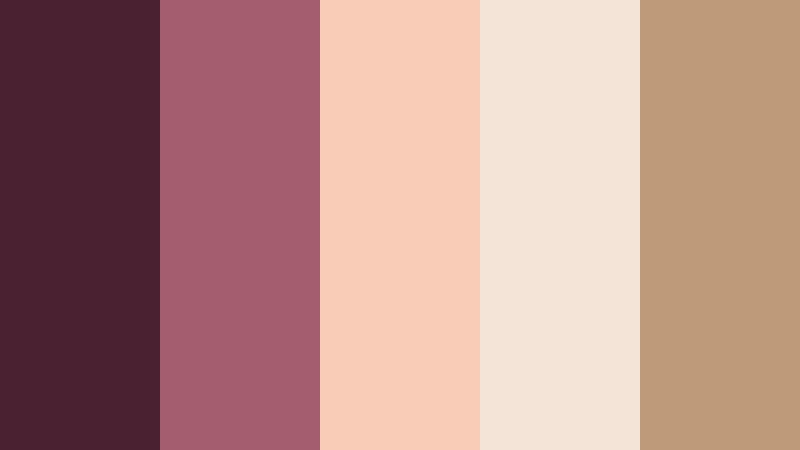
- HEX Codes: #4a2130, #a45c6f, #f9ccb7, #f3e4d7, #bf9a7a
- Mood: Gentle, uplifting, and soft-morning calm.
- Use for: Ideal for morning routines, productivity vlogs, and calm educational content.
Morning Latte Rosewood lightens Deep Rosewood with latte creams and warm tans, capturing the calm of early hours and fresh coffee. The palette is soft and positive, great for routines, planning sessions, and gentle advice videos.
Use #4a2130 for headers and logos, #bf9a7a and #f9ccb7 for accent shapes, and #f3e4d7 for clean, airy backgrounds. In Filmora, combine this palette with simple transitions and natural light footage to give your productivity or study content a calm, welcoming visual identity.
Tips for Creating Deep Rosewood Color Palettes
Deep Rosewood is versatile, but it works best when you balance its richness with lighter, complementary tones and smart design choices. Use these tips to build or customize your own palettes for video, branding, and social content.
- Pair Deep Rosewood with light neutrals (ivory, blush, champagne) to keep layouts readable and avoid overly dark thumbnails.
- Use the darkest Rosewood or near-black tone for text, outlines, and borders so typography remains crisp on both mobile and desktop.
- Reserve the brightest accent color in your palette for CTAs, subscribe buttons, and key on-screen graphics to draw the eye.
- Keep 1 to 2 main colors visible in every frame (titles, overlays, background) to maintain branding consistency across videos.
- When grading footage in Filmora, warm midtones slightly so skin tones harmonize with Deep Rosewood overlays and do not clash.
- Test your palette in both light and dark thumbnails; check legibility at small sizes to ensure text and icons still read clearly.
- Limit each design to 3 to 5 active colors from your palette to avoid visual noise, especially in busy thumbnails.
- Create reusable presets in Filmora (titles, lower thirds, filters) using your chosen HEX codes so every new project automatically stays on-brand.
Deep Rosewood color palettes can transform your videos from casual uploads into cohesive, cinematic stories. Whether you lean into romantic blush tones, moody noir shadows, or cozy latte neutrals, these combinations help shape mood, emotion, and brand identity in a way viewers instantly recognize.
Experiment with these 15 palettes, then fine-tune them inside Filmora using AI Color Palette, HSL controls, and LUTs. As you reuse the same Deep Rosewood combinations across thumbnails, intros, and social edits, your channel or brand will gain a clear, memorable visual signature.
Try mixing and matching elements from different palettes, saving your favorite looks as presets, and testing how they feel across short-form and long-form content. The more consistently you apply your color choices, the stronger and more professional your visual identity will become.
secure download