

 100% Security Verified | No Subscription Required | No Malware


 ChatGPT
 Perplexity
 Gemini
 Claude
 Grok
Grok
Family moments deserve more than a flat, dull look. The right family video filters can keep skin tones natural while adding warmth, softness, and a hint of nostalgia to every hug, birthday, and weekend adventure.
Below are 12 family-friendly filters designed for parents and family vloggers who want cozy, timeless home videos that look great on phones, TVs, and YouTube without overediting or losing the real feeling of the moment.
In this article
Warm Nostalgia Filters for Cozy Family Memories
Golden Living Room Glow
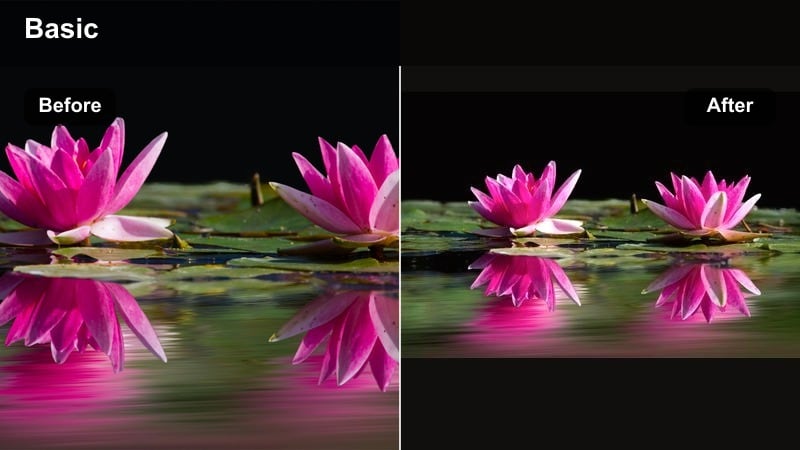
- Effect look: Soft golden warmth with gentle contrast that brightens indoor scenes without making them look orange.
- Best for: Evening living room hangouts, board games, movie nights, and family gatherings around warm lamps.
- Editing tip: Lower intensity to around 60-70 percent if your bulbs are already very warm so skin tones stay natural and not too yellow.
Golden Living Room Glow is designed to make your lounge and family room clips feel like a cozy hug. It lifts shadows, adds a gentle golden cast, and smooths contrast so table lamps and floor lamps feel warm without turning everything into a heavy orange wash.
In Filmora, apply this filter to your timeline clips, then use the intensity slider to fine tune how strong the warmth feels. If faces start to look too yellow, slightly cool the white balance or reduce saturation in the orange tones instead of removing the filter altogether, so you keep the inviting glow while protecting natural skin tones.
Pro Tip: Balance Warmth with White Balance
If the scene looks too orange after applying this filter, slightly cool down the white balance instead of reducing the filter strength completely. This way you keep the cozy feel while correcting any color cast on walls and skin.
Let AI Suggest Matching Family Video Filters
If you mix phones, cameras, and different rooms, Filmora s AI tools can help you find a consistent look across your entire family video. You can analyze a favorite clip that already looks the way you love and use it as a reference for the rest of your footage.
Filmora s AI Color Palette feature scans that reference clip and recommends similar filters and color styles for your other scenes. This keeps living room, kitchen, and backyard shots feeling like they all belong to the same warm memory, even if they were filmed on different days or devices.
 secure download

Preview Filters on Real Family Moments
Before you commit to a look for an entire vlog or family montage, it helps to test several filters on the same clip. Filmora makes it easy to drop a short living room or playroom shot into the timeline and quickly try different presets.
Cycle through warm, neutral, and playful filters while watching how they treat skin tones, indoor lighting, and bright toy colors. Once you see them side by side, it becomes obvious which filter feels natural and which ones are too heavy for your family style.
secure downloadSave Your Favorite Looks as Reusable Presets
Once you land on a filter strength, exposure, and saturation combo that makes your family videos feel warm and consistent, turn it into a preset inside Filmora. That way, every new vlog can start from the same trusted base look.
Saving a preset such as Family Video Filters: Natural Skin Tones and Warm Memories lets you apply the same style across months of footage. You can still tweak brightness or color per clip, but most of the work is already done with one click.
secure downloadSunset Memory Wash
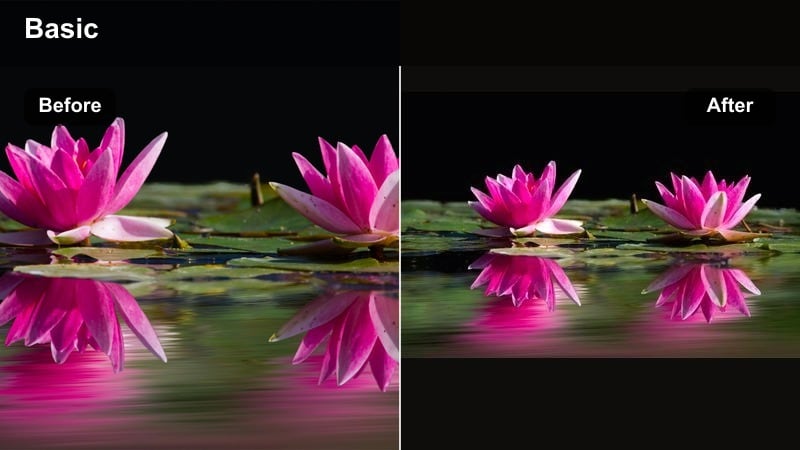
- Effect look: Soft, hazy warmth with a subtle pink-orange tint that mimics golden hour at home.
- Best for: Backyard playtime, golden-hour walks, and slow-motion shots of kids running or blowing bubbles.
- Editing tip: Add a slight vignette after this filter to pull attention toward the center of the frame for emotional moments.
Sunset Memory Wash recreates the flattering feel of golden hour even if your light was not perfect when you filmed. It adds a hazy glow, lifts highlights, and adds a pink-orange tint that flatters skin while giving the whole scene a dreamy, end-of-day vibe.
In Filmora, apply this filter to outdoor family clips, especially when the sun is behind your subjects or skimming across the frame. Combine it with a soft vignette and a small reduction in highlights to avoid blown skies, and consider slowing clips slightly to let the gentle haze and motion sink in emotionally.
Pro Tip: Shoot Toward the Light
Use this filter on clips where the sun is behind your subjects or just out of frame to enhance the natural glow. Underexpose slightly when filming to keep highlights from blowing out once you add the warm haze.
Cozy Kitchen Mornings
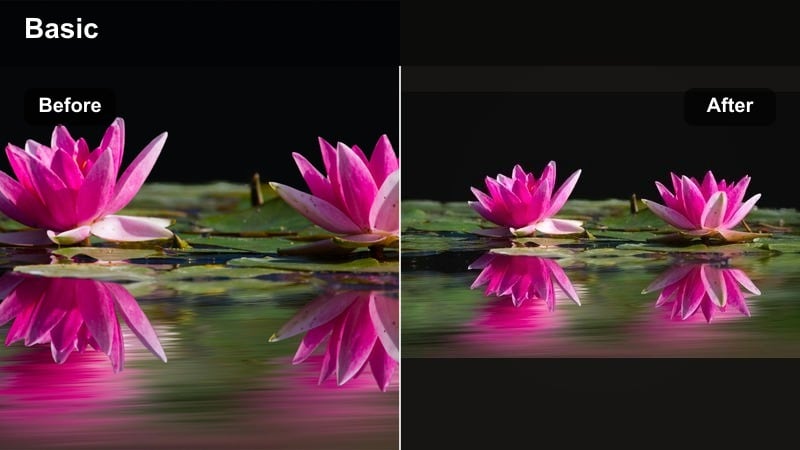
- Effect look: Warm, slightly brightened tones that smooth shadows and make morning light feel more inviting.
- Best for: Breakfast routines, kids helping cook, coffee moments, and Sunday brunch at home.
- Editing tip: Pair with a small clarity boost and light sharpening on faces so the food and smiles both pop.
Cozy Kitchen Mornings is tailored for breakfast tables, coffee counters, and simple everyday routines. It gently brightens your footage, softens harsh morning shadows, and adds a delicate warmth that makes cereal bowls and coffee mugs feel like part of a cherished tradition.
Inside Filmora, apply this filter to your cooking and table clips, then tweak clarity and sharpness just enough to keep steam, textures, and smiles crisp. If white cabinets or plates drift too yellow, use HSL or color tuning tools to lower saturation in warm tones while keeping that inviting glow on faces.
Pro Tip: Keep Whites Looking Clean
If white plates or cabinets start to look yellow, slightly reduce saturation in the warm tones only. This keeps the cozy atmosphere while preserving a clean, modern kitchen look.
Natural Skin Tone Filters for Realistic Family Clips
True Tone Family Portrait
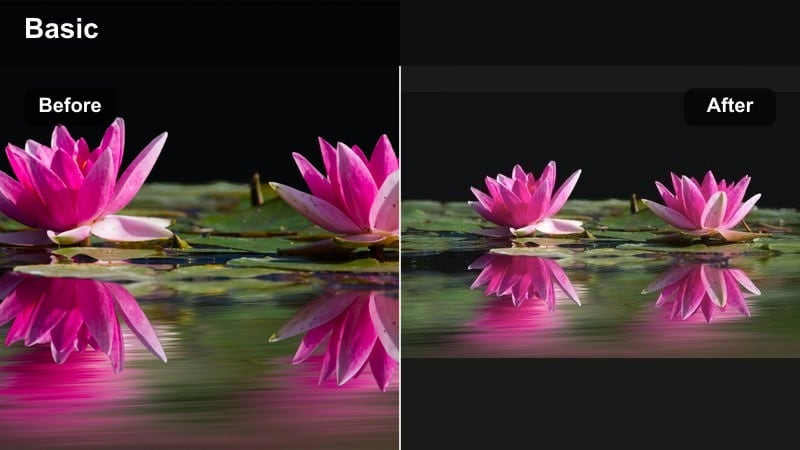
- Effect look: Balanced colors with gentle uplift, keeping skin tones realistic and flattering across different lighting.
- Best for: Talking-to-camera vlogs, family introductions, and interviews with grandparents or kids.
- Editing tip: Use this as your base look for all A-roll so your channel has a consistent, trustworthy visual style.
True Tone Family Portrait focuses on keeping skin tones honest and flattering while giving the whole frame a light polish. It avoids heavy stylization, so your audience feels like they are really in the room with you, which is perfect for family intros, updates, and heartfelt monologues.
In Filmora, drop this filter onto your A-roll clips and then fine tune exposure and white balance to taste. Because it is neutral, you can reuse it across multiple episodes to build a consistent channel look, and then decorate your B-roll with warmer or more nostalgic filters without losing overall cohesion.
Pro Tip: Match Clips from Different Cameras
Apply this filter to footage from phones and cameras, then fine-tune exposure and white balance per clip. This helps different devices blend together for a seamless family vlog episode.
Soft Daylight Balance
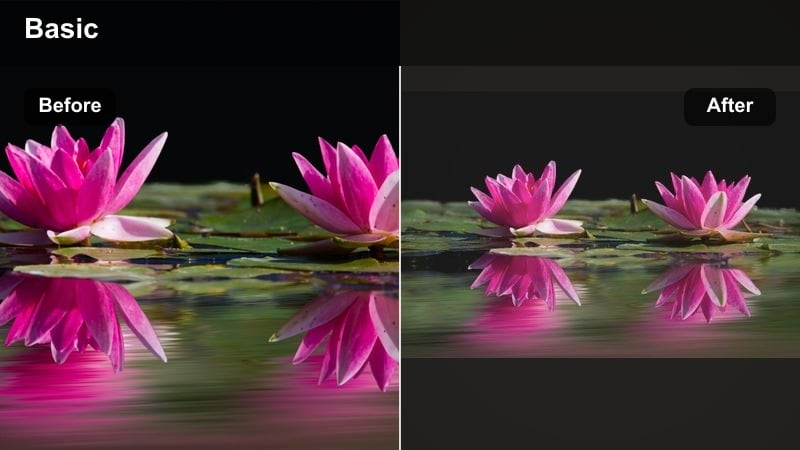
- Effect look: Neutral, soft contrast look that tames harsh daylight and keeps faces from looking washed out.
- Best for: Park visits, playground runs, school drop-offs, and bright backyard activities.
- Editing tip: Slightly lower highlights after adding this filter to bring back sky detail and avoid shiny foreheads.
Soft Daylight Balance is built for sunny, high-contrast scenes where kids are running around under a bright sky. It gently softens contrast and pulls back harsh highlights so faces keep their color and detail instead of going pale or shiny.
Use this filter in Filmora for playground and sports clips, then lower the highlights slider to protect skies and bright clothing. If shadows get too deep, lift them slightly to recover details in hair and eyes, keeping the whole frame easy on the eyes while still feeling fresh and bright.
Pro Tip: Face-Focused Exposure
Expose for faces when filming; let the background go a bit bright and fix it later with this filter. This ensures your family s expressions are clear while the filter handles the rest.
Living Room Neutral Pop
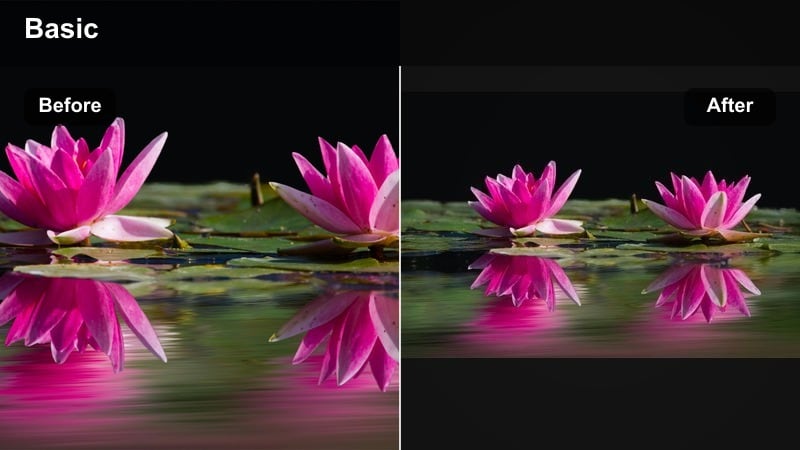
- Effect look: Clean, true-color look with a subtle contrast bump that makes eyes and smiles stand out.
- Best for: Toy unboxings, game nights, and any sit-down family content filmed indoors.
- Editing tip: Combine with a slight saturation boost on reds and yellows only to make toys and decor more playful.
Living Room Neutral Pop takes your indoor clips and gives them a subtle lift without skewing colors away from reality. It boosts contrast just enough to make eyes sparkle and smiles pop while leaving skin tones and wall colors believable.
In Filmora, apply this filter to unboxings, board games, and sit-down family chats. For extra fun, slightly increase saturation on reds and yellows in the color controls so toys, books, and pillows feel more playful, while leaving sharpening and overall saturation at moderate levels to keep kids faces soft and natural.
Pro Tip: Avoid Over-sharpening Kids Faces
If you add extra sharpness, keep it low so young skin stays soft and natural. Let the contrast and color do the work instead of heavy sharpening on faces.
Soft, Dreamy Filters for Memory-Focused Edits
Memory Journal Soft Focus
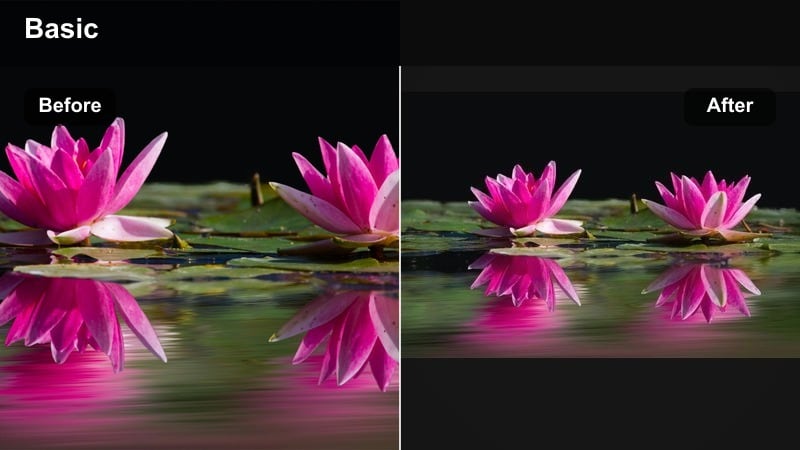
- Effect look: Gentle blur in highlights and slightly muted colors that feel like flipping through an old photo album.
- Best for: Montages of baby s first year, birthday recaps, and year-in-review family videos.
- Editing tip: Use this filter on B-roll only, and keep A-roll crisp so viewers can still connect clearly with your story.
Memory Journal Soft Focus turns everyday clips into emotional, diary-like visuals. It softens highlights, introduces a light bloom, and mutes saturation a bit so your footage feels like tender memories rather than live reportage.
Inside Filmora, apply this filter to B-roll sequences such as cuddles, first steps, or candid glances, while keeping your talking segments sharp and clean. Combining the soft-focus B-roll with gentle music and slower cuts creates a cinematic recap that feels personal and timeless.
Pro Tip: Slow Down the Footage
Combine this filter with slow motion on simple actions like holding hands or a quick hug. The slower pacing makes the soft focus feel intentional and cinematic instead of blurry.
Storybook Pastel Memories
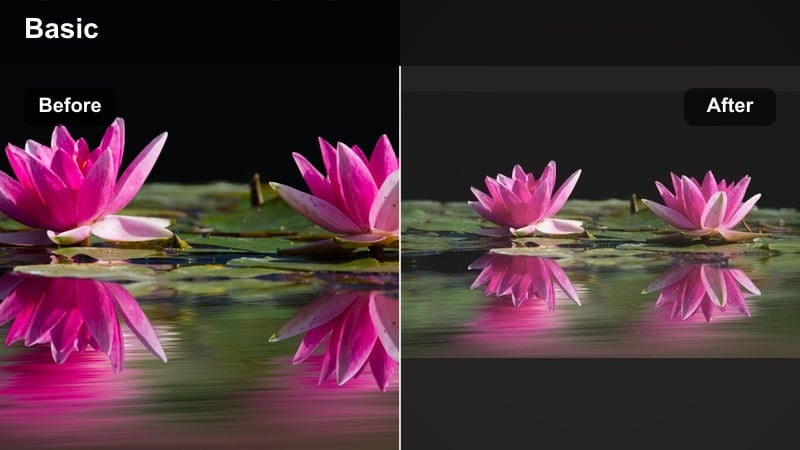
- Effect look: Light pastel colors with gentle desaturation and a soft lift in the shadows for a dreamy, storybook feel.
- Best for: Baby showers, first birthdays, Easter egg hunts, and gentle outdoor play.
- Editing tip: Keep text overlays simple and white so titles sit softly on the pastel background.
Storybook Pastel Memories leans into soft colors and lifted shadows to make your footage feel like pages from a picture book. It works especially well with balloons, pastel decorations, and light clothing, giving parties and celebrations a whimsical finish.
In Filmora, pair this filter with minimalistic white titles and gentle transitions so the visuals remain clean and dreamy. Brighten darker clips before applying it, and avoid heavy contrast adjustments afterward to keep that airy, pastel atmosphere intact.
Pro Tip: Use on Light, Airy Clips
This filter works best on footage with plenty of natural light and soft colors in the scene. If the footage is dark, brighten it first so the pastel tones do not look muddy.
Home Movie Film Fade
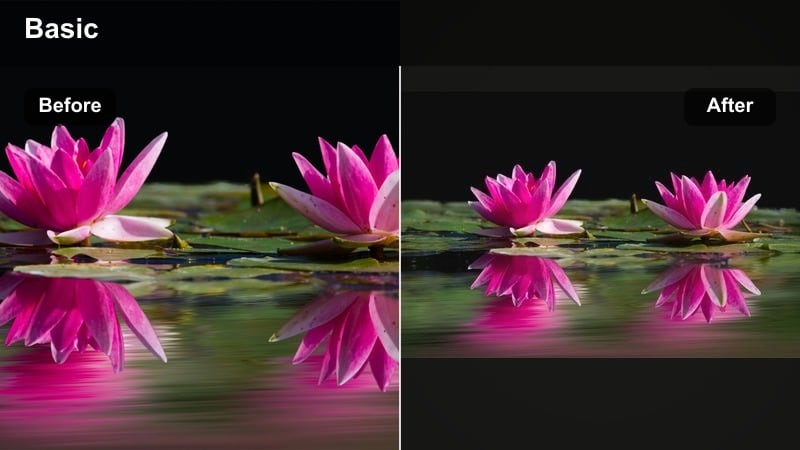
- Effect look: Subtle grain, faded contrast, and slightly warm shadows that mimic old home movie film reels.
- Best for: Old photo recreations, grandparent stories, and milestone recap videos.
- Editing tip: Trim clips a bit shorter than usual so the vintage fade feels charming, not slow or heavy.
Home Movie Film Fade gives modern footage the charm of classic home videos. It pulls back contrast, adds a touch of grain, and warms shadows so your clips feel gently aged without becoming overly stylized.
Use this filter in Filmora for flashback sequences, anniversary montages, or videos where family members tell stories from the past. Apply it consistently across a full project, add subtle projector or tape sounds under the music, and keep clips snappy so the nostalgic look feels light and engaging.
Pro Tip: Add Project-Wide for Themed Videos
Apply this filter to every clip in a special recap video to create a consistent, nostalgic theme. Use subtle projector sound or soft music to complete the old home movie experience.
Fun, Playful Filters for Kids and Family Vlogs
Playroom Color Pop
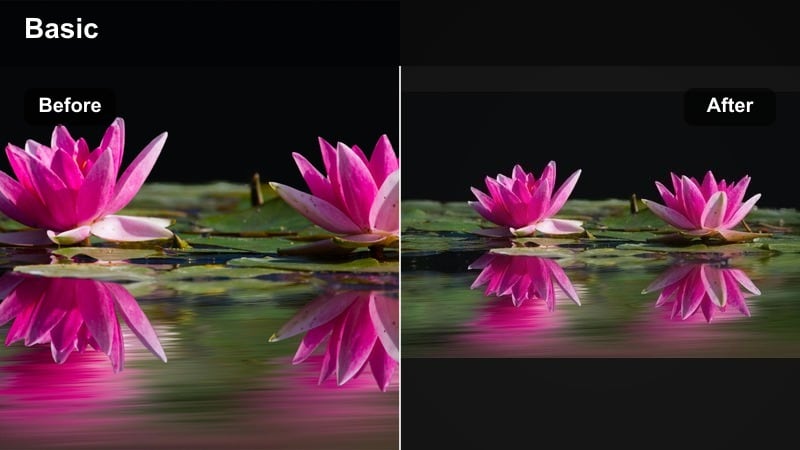
- Effect look: Punchy, saturated colors that make toys, balloons, and crafts stand out without breaking skin tones.
- Best for: Toy reviews, craft projects, messy play, and birthday parties.
- Editing tip: Use this filter lightly on clips with already bright walls to avoid distracting, oversaturated backgrounds.
Playroom Color Pop is all about fun, turning colorful toys, balloons, and art supplies into the visual stars of your video. It increases saturation and contrast in a controlled way so faces still look natural while the environment feels lively and energetic.
In Filmora, dial in this filter for party recaps, unboxings, and craft sessions. If you are filming in a room with bold wall colors, reduce the overall filter intensity or selectively lower saturation on those hues in HSL controls so the background does not steal attention from your kids expressions.
Pro Tip: Emphasize Key Colors
If a brand color or party theme color matters, increase saturation for that hue only after applying this filter. This keeps the video fun without turning the whole frame into a rainbow.
Weekend Adventure Boost
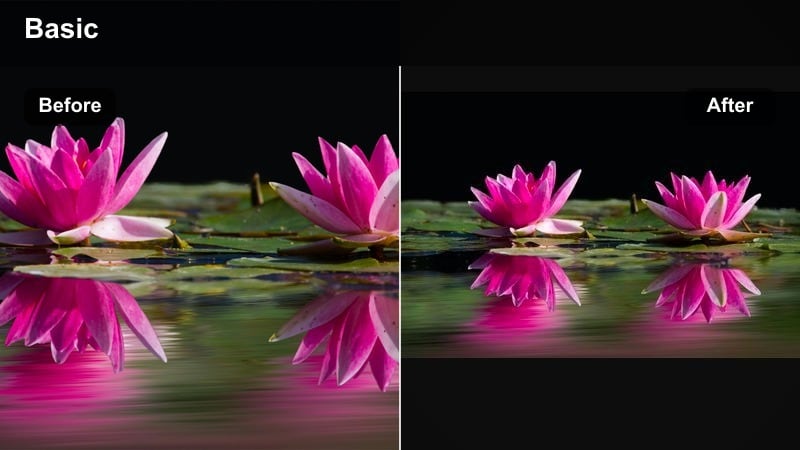
- Effect look: Crisp contrast and boosted midtones for energetic, outdoorsy vlogs that feel action-packed.
- Best for: Theme park trips, zoo visits, hikes, bike rides, and sports days.
- Editing tip: Stabilize shaky clips before applying this filter so the added contrast does not exaggerate camera movement.
Weekend Adventure Boost is built for movement and excitement. It adds punchy contrast and lifts midtones so rides, attractions, and outdoor scenery feel bold and adventurous, matching the energy of your day out with the family.
In Filmora, run stabilization on shaky clips before adding this filter, then trim shots to match the beats of your music track. The stronger contrast will make motion feel sharper and more intense, so quick cuts and rhythmic editing help keep the excitement controlled and enjoyable.
Pro Tip: Sync with Music Beats
When editing adventure vlogs, cut clips on the beat of the music to match the high-energy look of this filter. Short, snappy shots keep kids engaged and make the filter feel dynamic, not overwhelming.
Rainy Day Soft Color
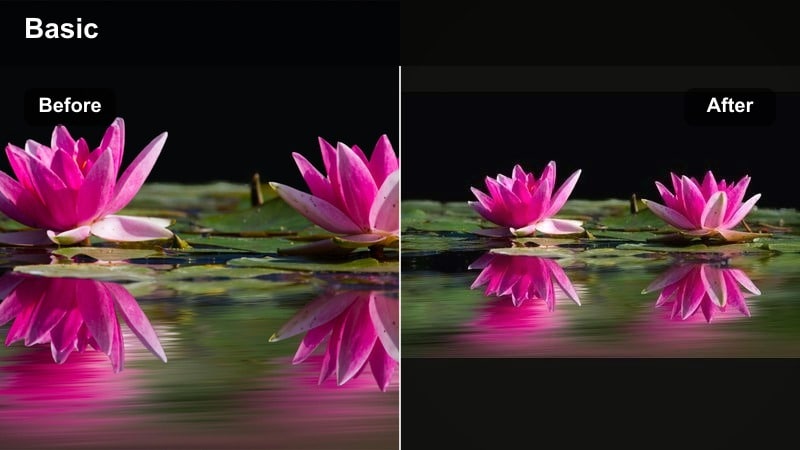
- Effect look: Gentle color lift and warmth that brightens gray, rainy-day footage without losing the cozy mood.
- Best for: Indoor forts, reading time, baking days, and rainy window shots.
- Editing tip: Reduce contrast slightly after applying this filter to keep shadows soft and comforting.
Rainy Day Soft Color rescues gray, overcast footage by adding a touch of warmth and color without erasing the cozy atmosphere. It makes indoor forts, books, and baking sessions feel inviting while still honoring the quiet mood of a rainy day.
Within Filmora, add this filter to your indoor storytime and baking clips, then slightly reduce contrast so shadows stay smooth and comforting. Capture close ups of hands, pages, and raindrops, and mix them with wider family shots to create a layered, intimate rainy-day story.
Pro Tip: Capture Little Details
Use close-up shots of hands, books, or raindrops on windows and apply this filter for intimate B-roll. Mix these with wider family shots to tell a fuller story of your quiet day indoors.
Tips for Using Family Video Memory Filters in Filmora
- Keep skin tones as your first priority and adjust warmth and saturation only after faces look natural.
- Choose one or two signature filters for your channel so your audience starts to recognize your visual style.
- Lower filter intensity on dark footage; fix exposure first so details are not crushed or noisy.
- Use softer, nostalgic filters for recap montages and more neutral looks for day-to-day vlogs.
- Batch apply filters to similar clips, then tweak per shot to save time while staying consistent.
- Always preview filters on both phone and TV screens to be sure colors feel right in real family spaces.
With the right family video filters, everyday moments at home can look warm, intentional, and timeless while still feeling real. Focus on natural skin tones first, then layer in warmth, softness, or playful color to match each memory.
As you keep filming family moments and home videos, build a small library of go-to looks you trust, then adjust them for different rooms, seasons, and stories to keep your family memories looking beautiful on YouTube and beyond.
secure download