

 100% Security Verified | No Subscription Required | No Malware


 ChatGPT
 Perplexity
 Gemini
 Claude
 Grok
Grok
These Filmora filters are crafted to work like Instagram portrait LUTs that keep skin tones natural, flattering, and consistent without making your subject look over-edited.
Whether you shoot selfies, creator portraits, or brand campaigns for Instagram, use these looks to gently refine color, soften distractions, and keep skin tone true to life across your feed.
In this article
Soft Daylight Portraits for Everyday Instagram Shots
Soft Cream Glow
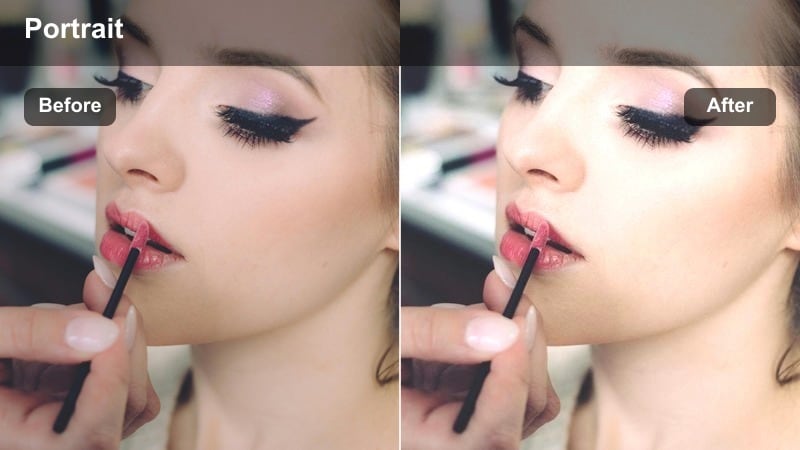
- Effect look: Gentle brightening with a soft cream tint that keeps skin tone neutral and smooth.
- Best for: Window light selfies, lifestyle portraits, and everyday Instagram stories.
- Editing tip: Lower the intensity to around 40-60 percent and add slight clarity to keep facial details crisp.
Soft Cream Glow is ideal when you want that subtly polished, everyday-portrait aesthetic without pushing exposure so far that faces look washed out. In Filmora, it gently evens out midtones and softens transitions between highlights and shadows, so skin appears smoother while undertones stay neutral instead of drifting too warm or too cool.
Apply this filter on clips or photos filmed in soft window light, then fine-tune intensity with the Filmora adjustment sliders to match the rest of your Instagram grid. Combine it with a touch of clarity and minimal sharpening on the face so pores and lashes remain defined, helping your portrait look naturally bright rather than overly airbrushed.
Use AI to Protect Natural Skin Tone
Filmoras AI-powered color tools can automatically detect faces and protect skin tones while you experiment with creative portrait looks. This lets you add glow, contrast, and color shifts to the background without sacrificing realistic skin detail.
Enable AI portrait or face detection, then layer Soft Cream Glow and other Instagram-style filters on top to keep complexions consistent across multiple clips and photos in the same project.
 secure download

Preview Filters on Your Instagram Portraits in Seconds
Filmora makes it easy to test how Soft Cream Glow and other portrait filters react to different complexions and lighting. You can drop several clips or photos onto the timeline, switch filters on and off, and compare snapshots side by side to see which look keeps skin the most natural.
This quick preview workflow is especially useful for creators who post frequently and need one or two reliable baseline looks that work across selfies, Reels, and carousel images.
secure download1000+ Video Filters and 3D LUTs
Beyond these portrait-focused looks, Filmora includes a large library of filters and 3D LUTs you can stack and customize to build your own Instagram-ready styles. Start with a natural skin tone base, then blend film, cinematic, or seasonal looks on top to match each photoshoot or campaign.
When you discover a combination that works, save it as a preset so you can recreate the same skin-friendly look later, effectively turning it into your personal Instagram portrait LUT.
secure downloadNeutral Daylight Balance
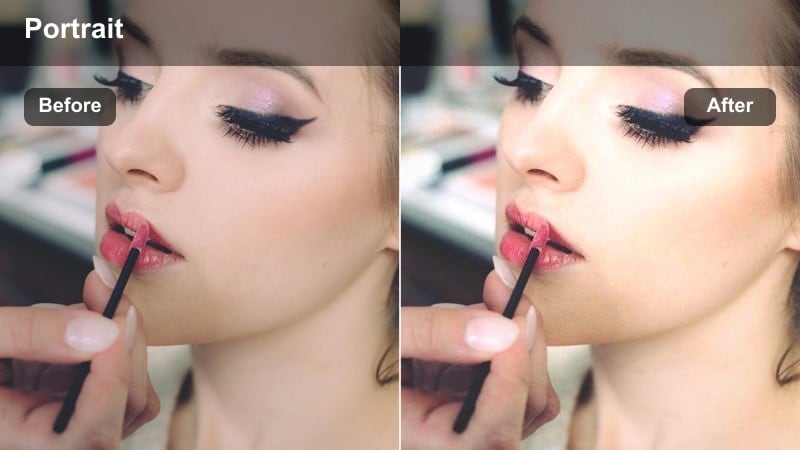
- Effect look: Clean, true-to-life color with balanced warmth and minimal contrast shifts.
- Best for: Natural light portraits, creator headshots, and brand profile photos.
- Editing tip: Use the white balance eyedropper on a gray or white object first, then apply the filter for the most accurate skin tones.
Neutral Daylight Balance is designed to keep outdoor portraits looking as close to real life as possible while still smoothing out distracting color variations. It gently evens white balance and contrast so skin tones remain trustworthy, which is essential for profile photos, LinkedIn exports, and brand-facing Instagram content.
In Filmora, start by correcting your footage with the white balance eyedropper or temperature and tint sliders, then layer Neutral Daylight Balance on top. This workflow lets the filter act as a subtle polish rather than a heavy correction, giving you consistent, natural skin tone LUT behavior across different shoots and locations.
Subtle Rosy Lift
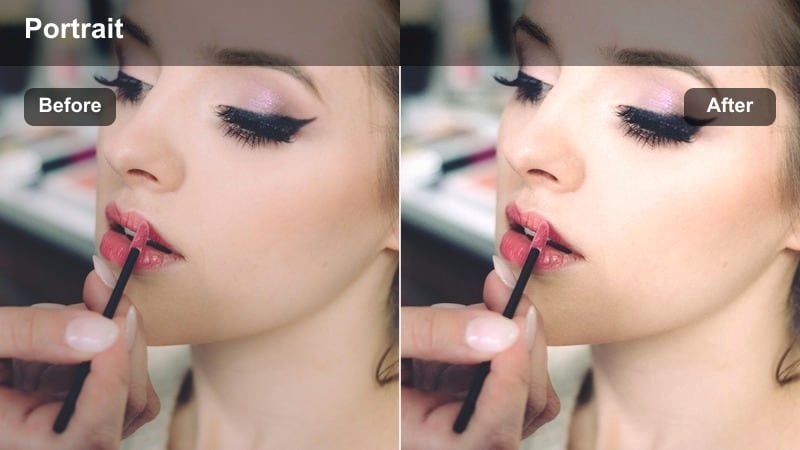
- Effect look: Soft lift in midtones with a delicate rosy tint to cheeks and lips without shifting overall skin color.
- Best for: Beauty content, GRWM portraits, and close-up Instagram Reels.
- Editing tip: Mask the filter on the face only if the background begins to feel too pink or saturated.
Subtle Rosy Lift adds a gentle touch of life to cheeks and lips, perfect for beauty creators and GRWM content that lives in close-up framing. It gives the impression of a light flush without repainting your entire skin tone, so undertones stay accurate on camera.
To use it effectively in Filmora, apply the filter and then refine it with masks if needed, focusing the rosy lift on the face while leaving the background more neutral. You can combine it with Filmoras detail and sharpening controls to keep eye makeup and lash lines crisp, ensuring your portrait feels both flattering and realistic on Instagram.
Golden Hour Portraits With Realistic Warmth
Sunset Warm Soft
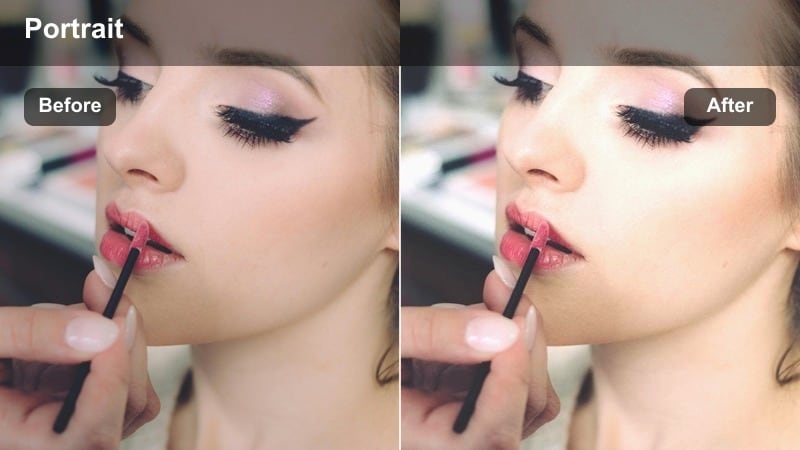
- Effect look: Warm, creamy highlights with gentle contrast that mimics golden hour while protecting skin from orange casts.
- Best for: Golden hour rooftop shoots, backlit portraits, and romantic Instagram posts.
- Editing tip: Lower highlight saturation slightly so bright sun on the face does not turn too orange on camera.
Sunset Warm Soft enhances natural golden hour light while carefully avoiding the common problem of overly orange or red skin tones. It enriches the sky and background glow, softens high-contrast edges, and keeps facial highlights controlled so your subject remains the focus.
In Filmora, use this filter on both photo and video portraits shot near sunset, then tweak highlight saturation and warmth in the color panel to fine-tune the effect. This approach gives you a soft, cinematic Instagram look that feels romantic and warm while still preserving realistic skin color and detail.
Honey Film Portrait
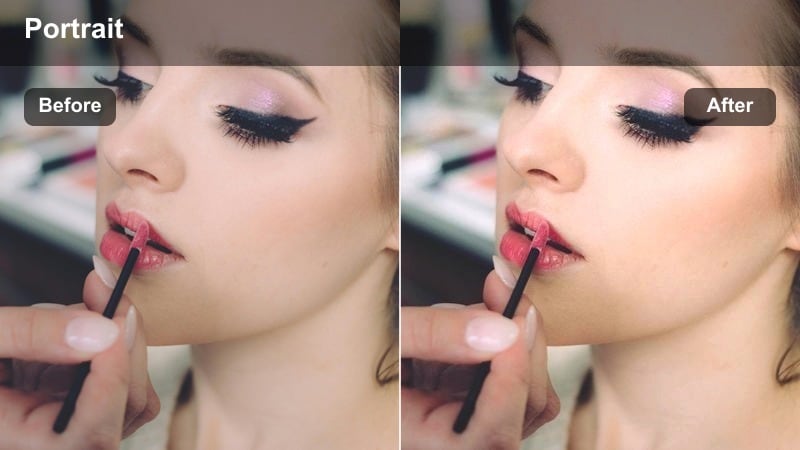
- Effect look: Subtle film-style warmth with soft grain and gentle halation in highlights around hair and edges.
- Best for: Cinematic Instagram portraits, couples sessions, and storytelling Reels at dusk.
- Editing tip: Apply a very light vignette after the filter to focus attention on the face while keeping the frame cinematic.
Honey Film Portrait brings a nostalgic, film-inspired character to your golden hour and dusk portraits while leaving skin tones grounded and believable. The warmth leans into honey and amber hues in the background, while gentle grain and halation give highlights around hair and shoulders a soft glow.
Inside Filmora, stack this filter with a subtle vignette and light grain adjustment to complete the film look without overpowering your subject. Keep an eye on how the grain behaves at different export resolutions; for Reels, you may prefer lower grain and slightly stronger sharpening to maintain a clean, natural look on faces after Instagram compression.
Warm Street Glow
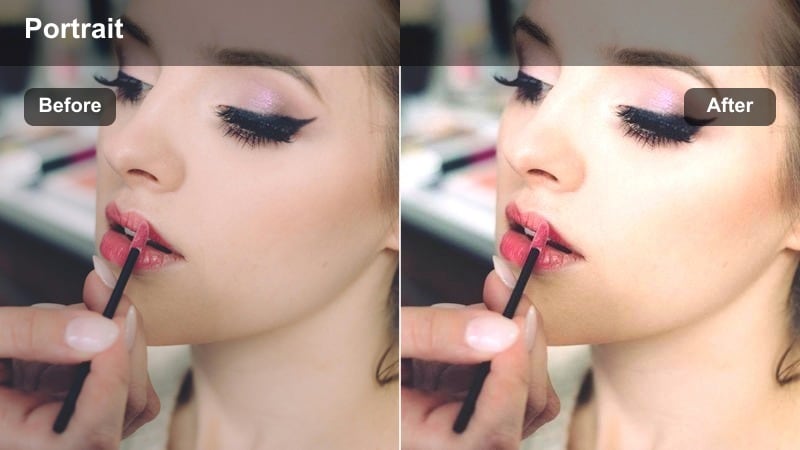
- Effect look: Mixed warm and neutral tones that tame harsh side light while preserving skin highlights and shadows.
- Best for: Street-style portraits, fashion content, and city sunset walks.
- Editing tip: Use a radial mask over the face to slightly reduce exposure where direct sun hits hardest.
Warm Street Glow is tailored for city portraits where light bounces off buildings, glass, and streets, creating complex highlights and shadows. The filter smooths out harsh transitions and adds a warm, street-lit feel, but is calibrated to keep facial skin from looking blown out or overly contrasty.
Use it in Filmora on fashion and lifestyle shoots captured at sunset or early evening, combining the filter with masks to selectively dial back exposure on the face. You can keep the urban background rich and warm while preserving natural skin tone, giving your Instagram feed a consistent city aesthetic without sacrificing realism.
Indoor Creator Spaces and Studio Portraits
Studio Soft Neutral
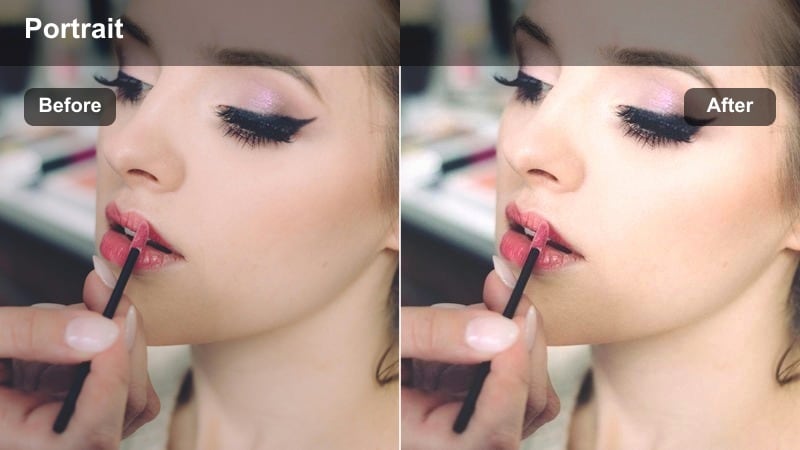
- Effect look: Even, low-contrast look that smooths harsh LEDs while keeping skin undertones accurate.
- Best for: Desk setups, talking-to-camera Reels, and podcast studio portraits.
- Editing tip: Slightly lower contrast and increase midtone clarity to keep facial features defined in flat studio lighting.
Studio Soft Neutral is built for LED-lit creator spaces, where light can be bright but unforgiving. It gently reduces contrast and tames color spikes from different bulbs or panels so face shadows are softer and skin undertones remain consistent across your entire video or photo set.
In Filmora, apply this filter to talking-head clips, then fine-tune with midtone clarity to recover fine details like hair texture and eyes. The result is a calm, studio-ready look that feels professional and flattering for Instagram Reels, YouTube shorts, and cross-posted content.
Creator Desk Warmth
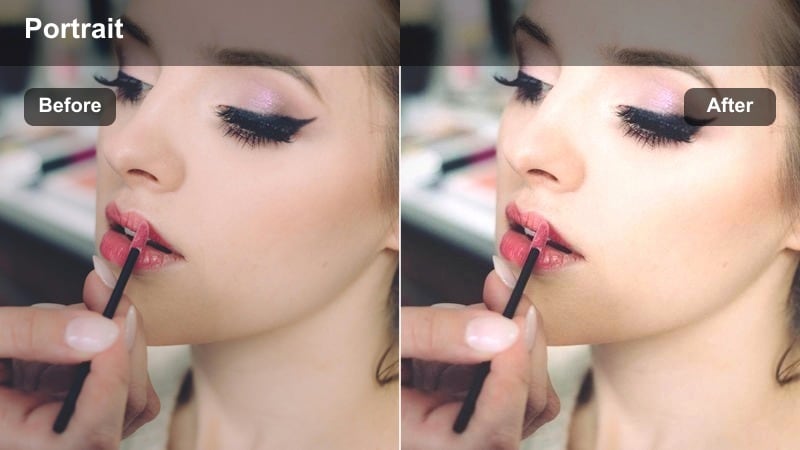
- Effect look: Cozy, slightly warm tone curve that flatters faces while keeping whites and backgrounds from turning orange.
- Best for: Study-with-me Reels, livestream teasers, and desk selfies for Instagram Stories.
- Editing tip: Pull down orange saturation just a touch to keep skin realistic under tungsten or warm strip lights.
Creator Desk Warmth brings a cozy, inviting feeling to your workspace portraits without letting the scene drift into heavy orange or yellow color casts. It gently lifts warmth in skin and background lights while protecting neutral elements like paper, monitors, and walls.
In Filmora, this filter works well paired with slight adjustments in the orange and yellow saturation channels to keep your complexion looking believable under warm bulbs. Use it on vertical footage for Stories or Reels to create a consistent, on-brand look for your study sessions, live Q and A clips, or casual check-ins.
Minimal Loft Portrait
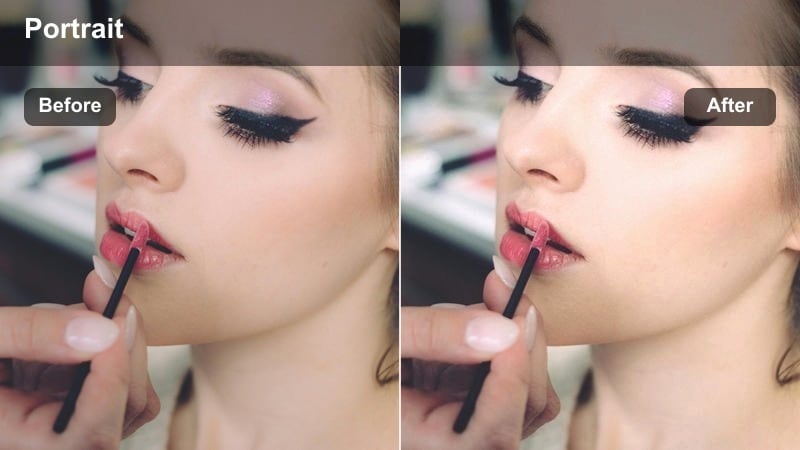
- Effect look: Cool-neutral aesthetic with soft contrast that works well in white lofts and minimalist indoor setups.
- Best for: Minimalist brand portraits, indoor outfit posts, and clean creator workspaces.
- Editing tip: If skin begins to look too cool, slightly increase warmth but keep the tint near neutral for a balanced look.
Minimal Loft Portrait emphasizes clean lines, white walls, and airy interiors while keeping skin tones grounded and soft. The cool-neutral palette suits minimalist brands and aesthetic feeds, giving your portraits a refined look that does not overemphasize color.
Use it in Filmora for outfit-of-the-day posts, product shots with you in frame, or workspace tours. After applying the filter, gently nudge temperature if necessary to maintain realistic skin tone while preserving the cool, crisp atmosphere that makes minimalist Instagram grids feel cohesive.
Night and Low-Light Portraits for Instagram
City Night Neutral
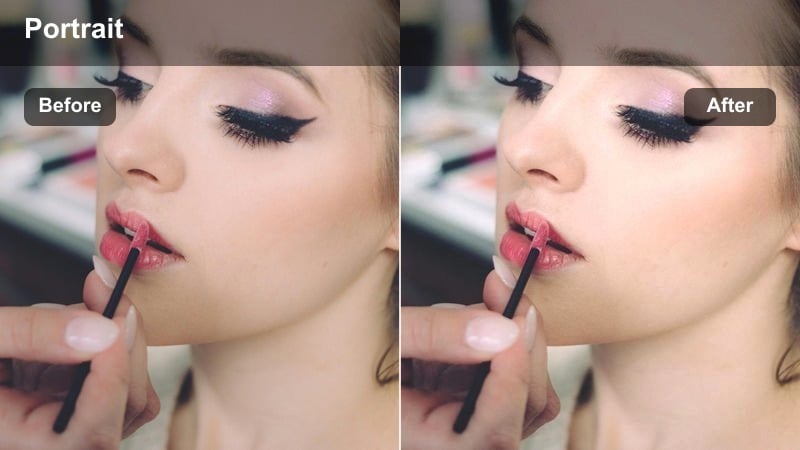
- Effect look: Balanced low-light look that keeps neon colors under control and skin from going muddy or overly magenta.
- Best for: City night portraits, street-style Reels, and neon sign backdrops.
- Editing tip: Reduce saturation primarily in blues and magentas to separate skin from neon backgrounds.
City Night Neutral is made for neon-lit streets and busy nightlife backdrops where colors can easily overpower your subject. The filter reins in saturation and contrast just enough to keep skin clear, separating faces from colorful signage and reflections while preserving a vibrant city feel.
In Filmora, apply this filter to your night portraits, then refine individual color channels like blue, cyan, and magenta to control how aggressively neon lights compete with your subject. This workflow helps maintain a natural skin tone LUT look that is reliable across various night locations and lighting conditions.
Evening Street Soft
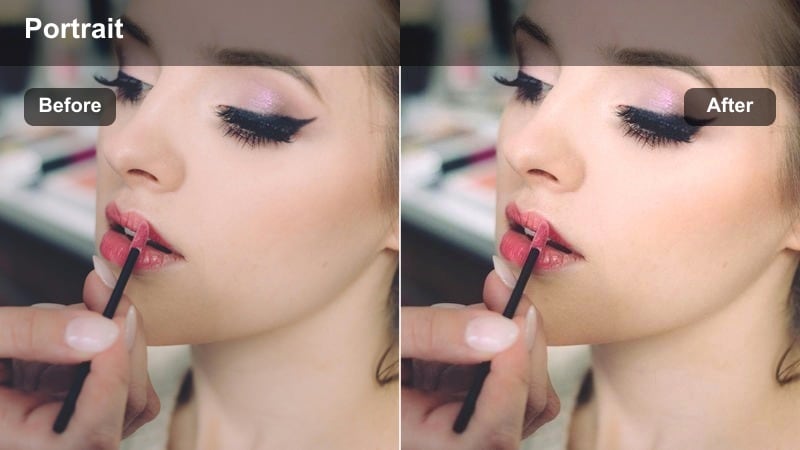
- Effect look: Softened contrast with gentle warm highlights from streetlights and shop windows.
- Best for: Evening walks, cafe fronts, and casual street portraits after sunset.
- Editing tip: Increase exposure slightly on the face only so background lights stay moody while the subject remains visible.
Evening Street Soft leans into the cozy mood of late-day city scenes, warming up shop-window light and softening shadow edges without crushing detail. It is especially useful when you want to keep the background atmospheric but still have your subject read clearly in the frame.
In Filmora, combine this filter with selective exposure adjustments on the face to balance subject visibility and background ambiance. The result is a relaxed, cinematic portrait style that looks flattering and consistent when posted as a series of evening shots or Reels on Instagram.
Indoor Ambient Portrait
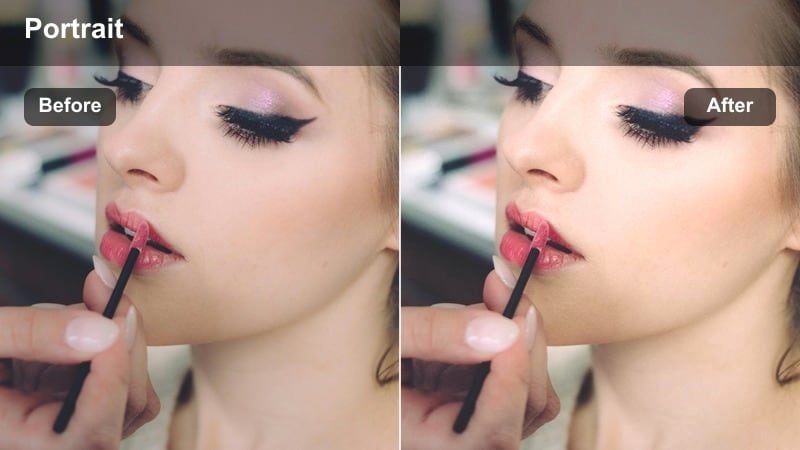
- Effect look: Balanced warm indoor look that corrects strong color casts from lamps and screens.
- Best for: Dim living rooms, bedroom portraits, and late-night creator check-in posts.
- Editing tip: Use tint to pull skin back from green or purple shifts caused by cheap LEDs, then apply the filter to refine.
Indoor Ambient Portrait is designed for low-light interiors lit by lamps, TVs, and phone screens, where mixed color temperatures often push skin toward green or magenta. The filter normalizes these casts while maintaining the cozy, intimate feel of the original room lighting.
In Filmora, correct any extreme green or purple shifts with the tint slider first, then add Indoor Ambient Portrait to even out the rest of the scene. This setup lets you keep your nighttime check-in posts feeling warm and personal on Instagram while ensuring that skin tones stay believable and flattering.
Tips for Using Instagram Portrait Luts Natural Skin Tone Filters in Filmora
- Shoot with the most neutral lighting you can manage, then use filters mainly for subtle enhancement instead of heavy color correction.
- Always check how your edited portrait looks on multiple devices, since skin tone can shift slightly between screens.
- Reduce saturation first in problematic color channels like orange or magenta before adjusting global saturation on the entire image.
- Use masks to apply filters primarily to the background when you want dramatic color while keeping skin tones nearly untouched.
- Export a short test clip or image sequence at your usual Instagram resolution to verify that compression does not break the look of your skin.
- Save side-by-side before and after frames to build your own reference library of what a natural skin tone looks like in your style.
- If you create content for diverse skin tones, test each filter on at least three different complexions and tweak channel saturation individually.
- Keep your white balance close to neutral, then let the filter provide the stylistic warmth or coolness instead of extreme temperature changes.
Natural-looking skin is what makes Instagram portraits feel trustworthy, and these Filmora filters give you an easy way to refine color, reduce harshness, and keep faces true to life without losing your creative style.
Build a repeatable workflow around one or two favorites, then fine-tune per shoot so every selfie, creator headshot, and portrait reel in your grid looks consistent, flattering, and authentically you.
secure download