

 100% Security Verified | No Subscription Required | No Malware


 ChatGPT
 Perplexity
 Gemini
 Claude
 Grok
Grok
This collection is inspired by Instagram travel LUTs with a tropical aesthetic, turning your beach days, palm-fringed sunsets, and island adventures into consistently stylized content for Reels and posts.
Each Filmora filter below is tuned for a specific tropical scenario so content creators can quickly match clips, keep a cohesive grid, and deliver cinematic vacation vibes without complex color grading.
In this article
Golden Coast Sunsets and Blue Hour Shores
Sunset Saffron Glow
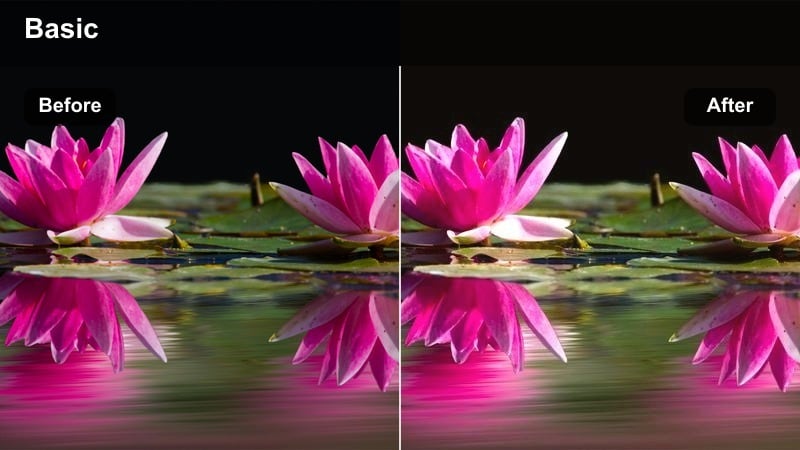
- Effect look: Warm, saffron-toned filter that deepens oranges and magentas while keeping skin tones soft and flattering.
- Best for: Beach sunsets, pier walks, and golden hour portraits against the ocean horizon.
- Editing tip: Lower the filter intensity to around 60% and slightly reduce highlights to keep skies from clipping while preserving the glow.
Sunset Saffron Glow is designed to mimic the rich, fiery tones you see in the best Instagram travel LUTs with a tropical aesthetic. In Filmora, this filter wraps your frame in deep oranges and magentas while gently protecting skin tones, so both landscapes and portraits look cinematic instead of oversaturated.
Apply it to your golden hour beach clips, then fine-tune with Filmoras exposure and highlight sliders to keep cloud texture intact. For Reels, combine this filter with slow-motion walks along the shore or close-up details like waves and footprints to create a cohesive warm-toned sequence that feels intentional across your grid.
Match every clip with AI-powered tropical color balance
Filmoras AI color tools help you keep turquoise seas, golden sunsets, and palm greens consistent across all your footage, even when lighting changes between shots. Instead of manually tweaking every clip, AI analyzes your reference frame and brings the rest of your timeline in line with that tropical mood.
Use AI-assisted color matching to align new clips with your favorite tropical filter look so your Instagram travel grid always feels curated and cohesive, no matter which camera or phone you shot on.
 secure download

Preview tropical filters in real time before you post
Filmora lets you hover and preview filters on your clips so you can quickly compare different tropical aesthetics without committing. You can test how a warm sunset style looks against the same beach shot you are grading with a cool aqua filter, then lock in whichever vibe best matches your Instagram travel story.
Move through your timeline and audition multiple presets back to back, allowing you to build a consistent aesthetic for Reels, Stories, and feed videos in just a few clicks instead of endless trial and error.
secure download1000+ video filters and 3D LUTs for a custom Instagram travel look
Beyond these tropical presets, Filmora includes an extensive library of video filters and 3D LUTs so you can build a signature Instagram travel style. Mix cinematic LUTs with subtle glow, grain, or haze filters to dial in everything from turquoise waters to golden skin tones.
Use filters to establish your base mood, then layer 3D LUTs at low intensity to refine color balance or push specific hues in your beach and jungle footage. Once you are happy, save the combo as a custom preset so future trips match your established brand look in a few clicks.
secure downloadCoral Horizon Fade
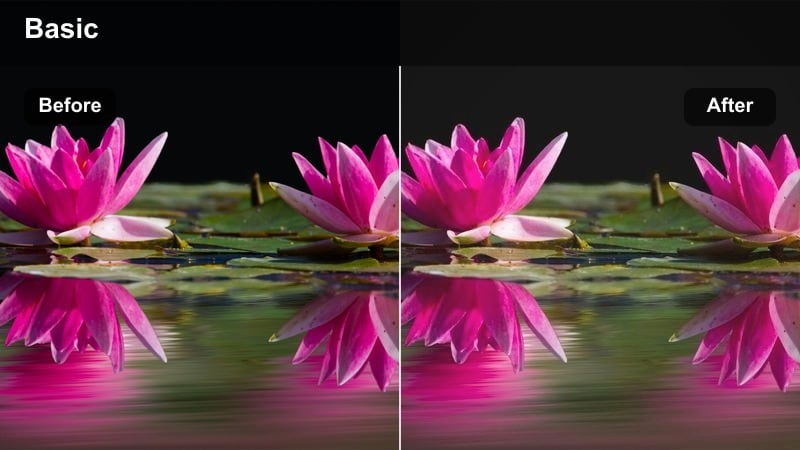
- Effect look: Soft coral and peach tones with gentle fade in shadows for a dreamy editorial beach look.
- Best for: Wide ocean landscapes, cliff viewpoints, and slow-motion waves at dusk.
- Editing tip: Use a light vignette and increase contrast slightly after applying the filter to keep the faded look from feeling washed out.
Coral Horizon Fade adds a romantic, editorial sheen to your coastal shots by pushing skies and horizons toward peachy corals while delicately lifting the shadows. This creates that nostalgic, film-inspired wash often seen in curated Instagram travel feeds without sacrificing clarity in important details.
In Filmora, pair this filter with slow drone moves or slider shots along cliffs and shorelines. After applying, nudge contrast and vignetting just enough to keep the frame focused on the horizon line, and consider adding a touch of film grain for extra texture that still survives Instagram compression.
Azure Blue Hour Tide
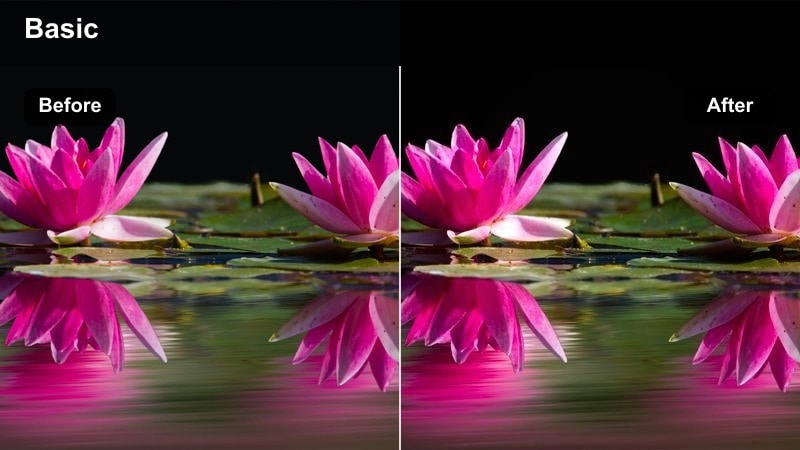
- Effect look: Deep azure blues with cool highlights and slightly lifted blacks for a moody, cinematic blue hour style.
- Best for: Blue hour beach walks, harbors, and city-side tropical waterfronts after sunset.
- Editing tip: Raise exposure a touch to avoid crushed details, and add a subtle teal tint in shadows for an extra cinematic feel.
Azure Blue Hour Tide turns your post-sunset footage into moody, cinematic scenes where deep blues dominate but do not overwhelm. The slightly lifted blacks keep detail in the shadows, so piers, boats, and silhouettes retain shape even when the light drops.
In Filmora, use this filter on clips shot just after sunset around harbors and seaside promenades, then adjust exposure and shadow tint to taste. Combine it with slow pans, gentle zooms, and ambient music to emphasize the reflective, end-of-day mood that performs well on Reels and Stories.
Palm-Fringed Beach Days and Turquoise Seas
Turquoise Tide Pop
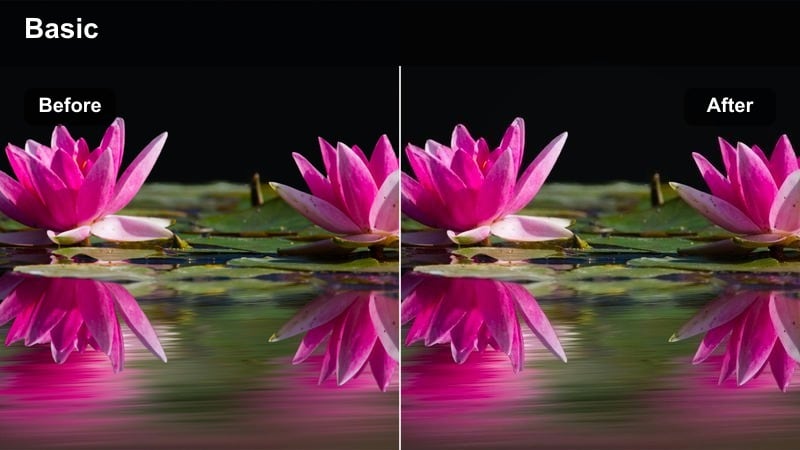
- Effect look: Punchy turquoise waters with boosted cyan and slightly muted greens for a clean, modern tropical feed.
- Best for: Aerial shots of lagoons, snorkeling clips, and bright midday beach scenes.
- Editing tip: Dial back overall saturation if skies look too electric, and use local adjustments to brighten only the water.
Turquoise Tide Pop is all about making ocean water the hero of your frame. By boosting cyan and slightly calming down greens, it creates that crisp, tropical pool color that feels aspirational yet still believable on Instagram.
Apply it in Filmora to drone flights over lagoons, sandbar walks, or snorkeling clips, then fine-tune saturation to avoid neon skies. Use masking or local adjustment tools to selectively brighten the water so boats, swimmers, and sandbars stand out clearly in both feed posts and vertical Reels.
Palm Shade Soft Focus
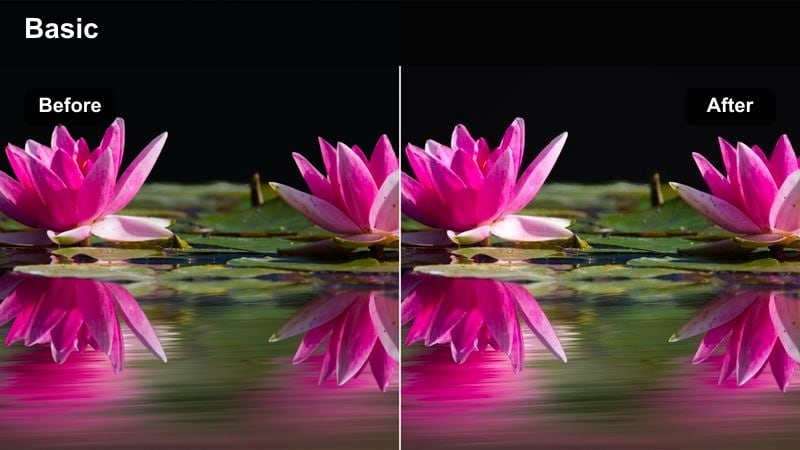
- Effect look: Soft contrast, slightly warm shadows, and gentle bloom in highlights for relaxed under-the-palms footage.
- Best for: Hammock shots, loungers under palm trees, and shaded cabanas by the beach.
- Editing tip: Decrease clarity slightly and add a small amount of blur to the background to emphasize a dreamy, laid-back mood.
Palm Shade Soft Focus leans into the calm, sleepy side of tropical travel by lowering contrast and letting highlights bloom softly. This creates an inviting, lifestyle-friendly look that works especially well for content featuring people relaxing, reading, or sipping drinks under palm trees.
In Filmora, pair this filter with gentle camera moves and close-ups of details such as hammocks, drinks, or sun hats. If skin tones start to look too flat, add a bit of midtone contrast and micro sharpening on faces only, keeping the background creamy and out of focus for a premium, editorial feel.
Coconut Crisp Clear
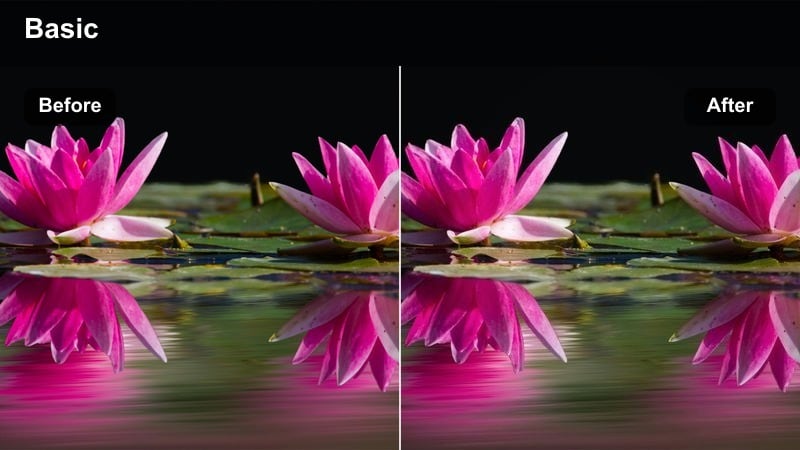
- Effect look: Clean, bright filter that boosts whites, clarifies details, and keeps colors neutral with a light tropical freshness.
- Best for: Poolside content, resort walkthroughs, and villa room tours with ocean views.
- Editing tip: Pull down highlights slightly to avoid blown-out pool reflections and increase sharpness for architecture shots.
Coconut Crisp Clear is a go-to filter when you need a bright, polished look that still keeps colors true to life, which is ideal for brand work and resort collaborations. It lifts whites and clarity just enough to make tiles, linens, and architecture feel pristine without shifting them into unrealistic tones.
Use it in Filmora on room tours, lobby walkthroughs, and pool sequences where you want a clean, luxury aesthetic. Balance highlight and shadow levels to preserve texture in water and walls, and add subtle stabilization to handheld shots so the crisp, neutral palette pairs with smooth motion for professional-looking Instagram content.
Lush Jungle Paths and Tropical Island Towns
Jungle Emerald Mist
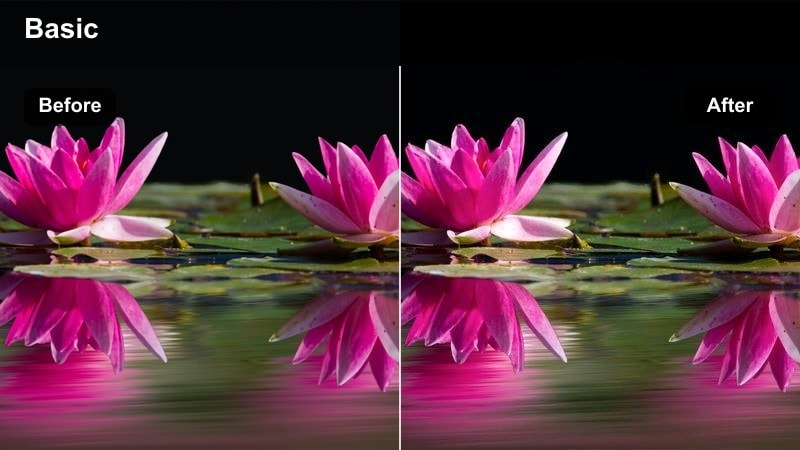
- Effect look: Rich emerald greens with soft lifted shadows and subtle haze, perfect for humid tropical forests.
- Best for: Hiking trails, hidden waterfalls, and jungle paths leading to secluded beaches.
- Editing tip: Reduce green saturation slightly if foliage dominates the frame, and add a bit of dehaze to keep details visible.
Jungle Emerald Mist emphasizes the lush, saturated greens of tropical forests while adding a light atmospheric haze that suggests humidity and depth. The lifted shadows prevent darker areas from turning into blocks of pure green, helping your subject stand out against dense foliage.
In Filmora, apply this filter to hiking and waterfall footage, then fine-tune saturation if leaves start to overpower the subject. Use vignettes and selective brightness on your traveler or key objects, and mix in gentle camera movement to guide the viewers eye through the scene for dynamic, story-driven jungle Reels.
Island Pastel Streets
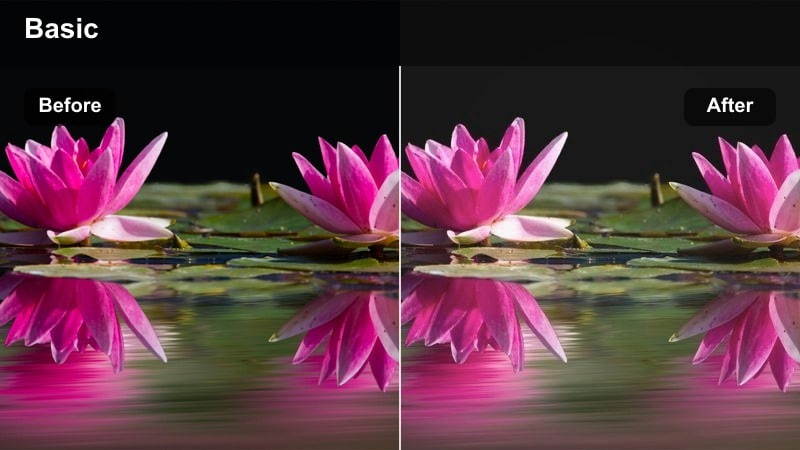
- Effect look: Soft pastel tones with slightly desaturated primaries and bright, airy highlights for tropical town scenes.
- Best for: Colorful island streets, scooter rides, and seaside promenades in coastal villages.
- Editing tip: Increase shadows a touch to keep details in doorways and alleys, and keep saturation moderate for a pastel feel.
Island Pastel Streets turns bold, sunlit town colors into soft, shareable pastels perfect for a cohesive travel grid. By slightly desaturating primary colors and brightening highlights, it delivers that airy, lifestyle aesthetic common in influencer city guides and day-in-the-life Reels.
In Filmora, use this filter on scooter rides, storefronts, and colorful houses along coastal streets. Gently raise shadows to keep detail in doors and alleyways, stabilize handheld clips, and cut between wide street views and close-ups of textures like tiles or plants to tell a fuller story of the island town.
Market Sun Haze
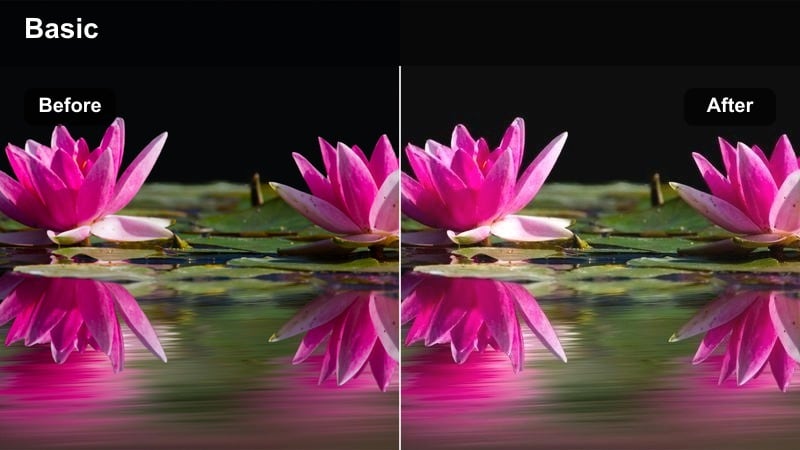
- Effect look: Warm, slightly hazy filter that softens contrast and shifts midtones towards golden browns and soft oranges.
- Best for: Open-air tropical markets, seaside cafes, and busy island plazas in afternoon light.
- Editing tip: Lower blacks a bit if the image feels too foggy, and gently boost local contrast around your main subject.
Market Sun Haze captures the warmth and bustle of tropical markets by wrapping scenes in a golden, softened glow. Midtones lean into browns and oranges, which flatter wooden stalls, sunlit faces, and food details while keeping the overall look cinematic rather than harsh.
In Filmora, apply this filter to cafe scenes, plazas, and market walkthroughs, then pull blacks down slightly if the image feels too low-contrast. Use local contrast tools to subtly emphasize your main subject while letting the surrounding crowd stay slightly hazy for a dreamy, storybook take on busy travel locations.
Boat Days, Island Nights, and Resort Lights
Sailboat Aqua Breeze
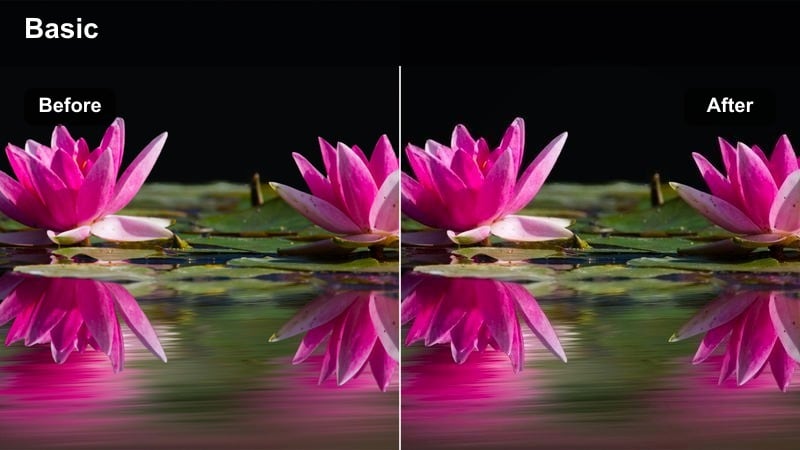
- Effect look: Bright aqua tones with crisp whites and a light teal tint in shadows for breezy ocean adventures.
- Best for: Boat days, yacht decks, and ferry rides between tropical islands under clear skies.
- Editing tip: Increase stabilization and add a slight motion blur so choppy boat movement feels smooth and intentional.
Sailboat Aqua Breeze focuses on vivid aqua seas and clean, crisp whites to give your boat days a refined yet playful look. The subtle teal tint in the shadows ties sky, water, and deck into a unified palette that feels perfect for aspirational sailing and island-hopping content.
In Filmora, use this filter on yacht decks, ferry rides, and over-the-rail ocean shots. Add stabilization and a touch of motion blur to smooth out bumps from waves, then control highlights on sails and decks to prevent clipping so the bright, breezy look stays polished on Instagram.
Tropical Neon Nights
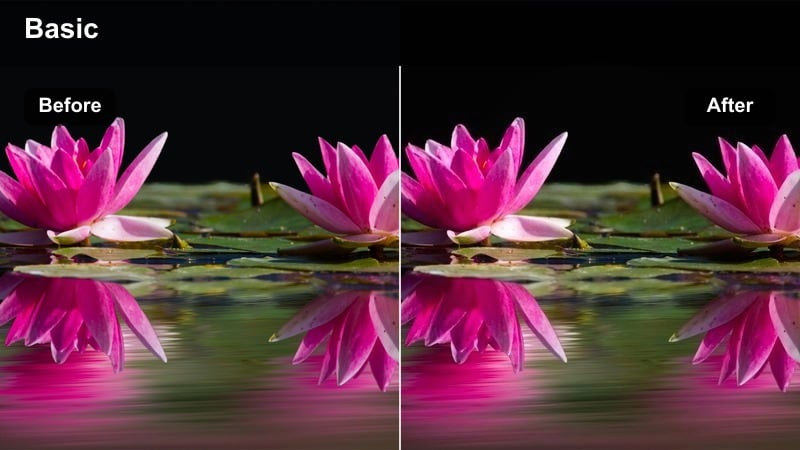
- Effect look: Punchy neon blues and pinks with lifted shadows and strong contrast suited for tropical nightlife.
- Best for: Beach bars, rooftop parties, and neon-lit coastal streets after dark.
- Editing tip: Reduce noise before applying the filter to avoid grainy neon, and keep exposure slightly under to preserve light details.
Tropical Neon Nights amps up the energy of after-dark scenes with bold blues and pinks that immediately read as nightlife. Lifted shadows keep people, decor, and surroundings visible, while contrast ensures neon signage and light trails pop in a visually striking way.
In Filmora, denoise your clips first, then apply this filter to bar scenes, club entrances, and rooftop views. Keep exposure a touch under to protect highlight detail in neon signs, and cut to the beat of your chosen soundtrack so the punchy color treatment and editing rhythm reinforce each other for high-engagement Reels.
Resort Lantern Glow
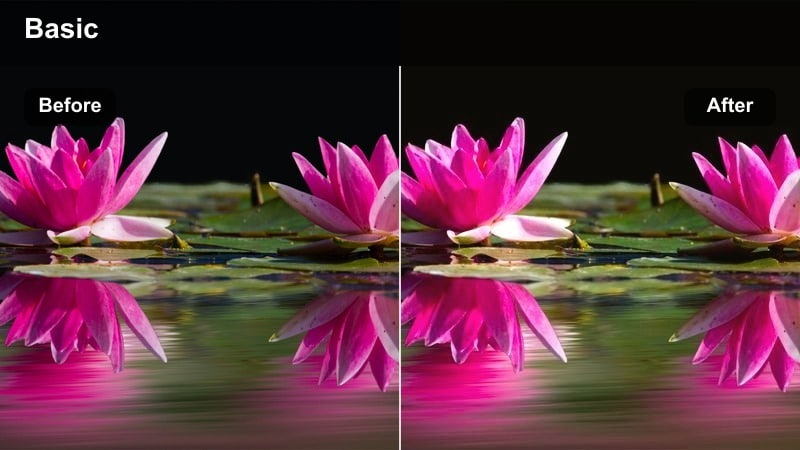
- Effect look: Warm, candlelit tones with softly rolled highlights for cozy resort evenings and poolside dinners.
- Best for: Twilight resort walks, pool bars at night, and terrace dinners overlooking the sea.
- Editing tip: Add a gentle vignette and reduce sharpness slightly to enhance the soft glow and intimate ambiance.
Resort Lantern Glow wraps your evening resort scenes in a soft, golden light that feels romantic and inviting. Highlights are carefully rolled off so lanterns, candles, and decorative lights glow without blowing out, while the rest of the frame settles into warm, flattering tones.
In Filmora, apply this filter to twilight pool shots, candlelit dinners, and evening strolls through resort pathways. Add a subtle vignette and slightly lower sharpness so the scene feels more cinematic than clinical, then pair it with gentle camera moves and mellow music to complete the relaxed tropical night aesthetic.
Tips for Using Instagram Travel Luts Tropical Aesthetic Filters in Filmora
- Shoot slightly flatter in-camera so these tropical filters have more dynamic range to work with and preserve sky and water detail.
- Group clips by similar lighting on your Filmora timeline and apply the same filter batch-wise for faster, more consistent results.
- Keep a close eye on skin tones when boosting turquoise and emerald hues, adjusting orange and red channels separately if needed.
- Export a short test Reel featuring several filter styles and track performance to decide which tropical aesthetic your audience prefers.
- Use vertical framing and center-weighted compositions so key tropical elements like palms and water remain visible on small screens.
- Layer Filmora filters with light LUT intensity, typically around 20 to 40 percent, to build a custom Instagram travel look that stays natural.
- Fine-tune exposure and highlight roll-off after applying filters so bright sand, clouds, and reflections do not lose important texture.
- Save your favorite filter and adjustment combination as a Filmora preset for quick reuse. When the same tropical look is needed in another project or by a collaborator, export the supported color adjustments as a .cube LUT for use in Filmora, DaVinci Resolve, Adobe Premiere Pro, or Final Cut Pro.
With the right combination of Filmora filters, you can easily recreate the Instagram travel LUTs tropical aesthetic and give every beach day, island night, and jungle hike a cohesive cinematic mood.
Experiment with intensity, exposure, and subtle color tweaks, then save your favorite combinations as presets so future tropical trips drop into a fully styled Instagram-ready look in minutes.
secure download