

 100% Security Verified | No Subscription Required | No Malware


 ChatGPT
 Perplexity
 Gemini
 Claude
 Grok
Grok
Malachite is a vivid, gemstone green associated with growth, balance, and renewal. It feels both natural and luxurious, which makes it perfect for brands and creators who want to look fresh, confident, and a little bit premium. On screen, Malachite can suggest eco-conscious values, adventure, and calm focus depending on how you pair it with other tones.
In video editing and design, Malachite works beautifully for YouTube thumbnails, intro animations, logo reveals, lower thirds, and full color grades. Below you will find 15 Malachite color palettes with HEX codes that you can copy directly into your design tools or use as grading references in Filmora, so your entire project feels cohesive from thumbnail to final frame.
In this article
Fresh & Natural Malachite Color Palettes
Rainforest Canopy Glow
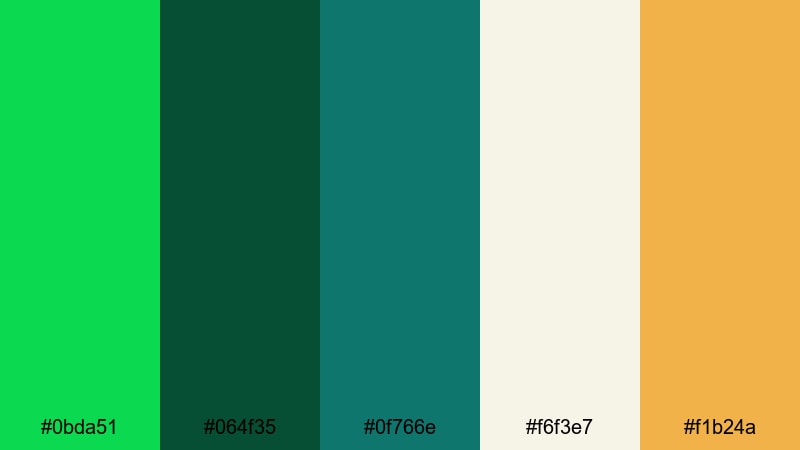
- HEX Codes: #0bda51, #064f35, #0f766e, #f6f3e7, #f1b24a
- Mood: Lush, adventurous, and grounded with a touch of warm sunlight.
- Use for: Perfect for travel vlogs, nature documentaries, and cinematic B-roll transitions that need a rich, organic feel.
Rainforest Canopy Glow combines deep Malachite green with darker forest tones, a teal accent, soft off-white, and a golden highlight. It feels like standing under dense jungle leaves while sunlight leaks through the branches, giving your visuals a grounded yet adventurous atmosphere.
Use this palette for outdoor sequences, eco-focused branding, and thumbnails that need to scream "nature" at a glance. The warm gold and creamy neutral work well for titles, lower thirds, and logo locks in Filmora, while the darker greens can drive your overall color grade or background elements in intros and channel art.
Pro Tip: Build Lush Malachite Visuals With Filmora
To keep a rainforest-inspired Malachite look consistent, design your entire video around these five HEX tones. In Filmora, you can color-tune your A-roll, B-roll, and cutaway shots so that foliage, clothing, and props sit in the same Malachite range, while titles and overlays use the off-white and golden accent.
Create a simple style guide: Malachite and deep green for backgrounds and gradients, warm gold for key callouts, and off-white for body text. Then reuse this structure across your openers, mid-video pop-ups, and end screen templates so every upload feels like part of the same lush series.
AI Color Palette
If you have a favorite rainforest photo, color card, or thumbnail using Rainforest Canopy Glow, you can turn it into a grading preset with Filmora. Filmora's AI Color Palette feature analyzes your reference and applies the same Malachite-driven mood to the rest of your clips.
Import your reference image, pick it as the source, and let Filmora transfer that mix of deep greens, warm light, and soft neutrals onto your footage. This is perfect for keeping a unified green aesthetic across multicam travel vlogs, drone shots, and talking-head segments without manual tweaking for every clip.
 secure download

HSL, Color Wheels & Curves
Once your base Malachite look is in place, refine it with Filmora's HSL controls, color wheels, and curves. You can push greens slightly toward teal for a cooler rainforest mood, deepen the shadows to add cinematic depth, or lift the highlights to make the golden accents pop more. Filmora's color correction tools in Filmora help you balance saturation so skin tones stay natural while greenery stays rich.
Use the curves panel to add a subtle S-curve for contrast, then adjust midtones in the color wheels to keep Malachite as the hero hue. This workflow lets you match the Rainforest Canopy Glow palette even when your original footage was shot under different lighting conditions or on multiple cameras.
secure download1000+ Video Filters & 3D LUTs
To speed up your Malachite styling even more, layer Filmora's filters and LUTs over your custom palette. Subtle film emulation, vintage fades, or cinematic teal-and-green grades can turn the Rainforest Canopy Glow scheme into a complete look with just a few clicks. Filmora's video filters and 3D LUTs make it easy to test different moods while keeping Malachite as your core color.
Try saving a custom preset once you are happy with the combination of LUT, HSL tweaks, and curves. Then you can reuse that preset across future travel episodes, Instagram reels, and shorts so your audience instantly recognizes your lush green brand style.
secure downloadEmerald Spring Water
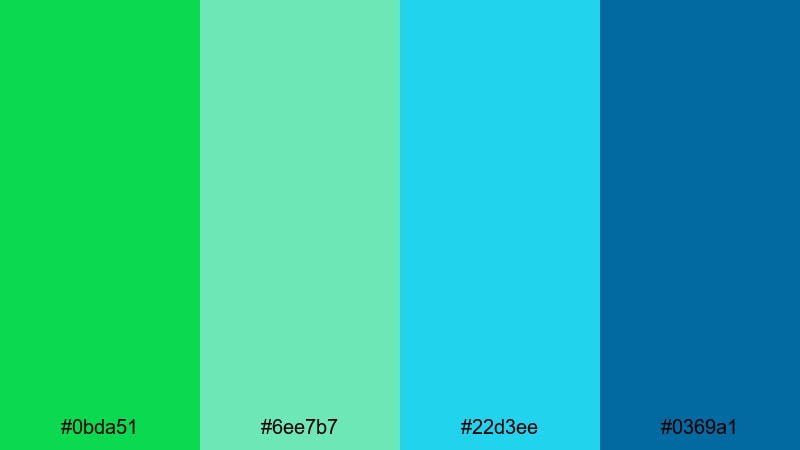
- HEX Codes: #0bda51, #6ee7b7, #22d3ee, #0369a1
- Mood: Fresh, revitalizing, and crystal clear with a hint of cool adventure.
- Use for: Ideal for wellness channels, spa promos, and underwater or travel edits that highlight clarity and energy.
Emerald Spring Water blends Malachite green with glowing aquas and cool blues, creating a palette that feels like a natural spring or an infinity pool at sunrise. It is crisp and energizing, yet still soothing enough for mindful or wellness-centered content.
Use Malachite as your hero for buttons and key text, while the aqua and cyan tones fill backgrounds, overlays, and motion graphics in Filmora. This combination works especially well on thumbnails for health, spa, or travel channels, and for lower thirds on underwater footage or poolside B-roll.
Botanical Studio Light
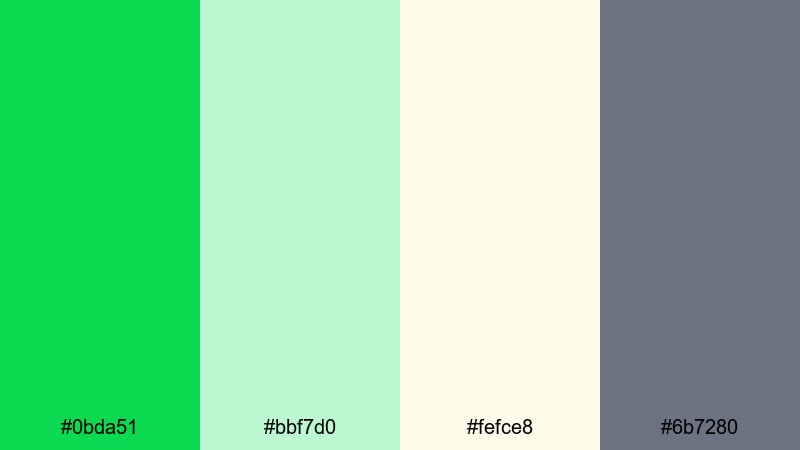
- HEX Codes: #0bda51, #bbf7d0, #fefce8, #6b7280
- Mood: Airy, creative, and softly organic with a professional edge.
- Use for: Great for DIY tutorials, plant-care channels, and minimalist product shots that need a clean, natural backdrop.
Botanical Studio Light feels like a sunlit workspace surrounded by potted plants and neutral props. Malachite brings focus and freshness, pastel greens add softness, the warm off-white keeps everything light, and the muted gray introduces a professional, studio-like contrast.
In video, use this palette for clean tutorial backdrops, creator offices, and product shots. Malachite can highlight key icons, subscribe buttons, and logo marks, while the soft neutrals dominate your frames to keep the focus on your subject and text overlays clear.
Tropical Leaf Breeze
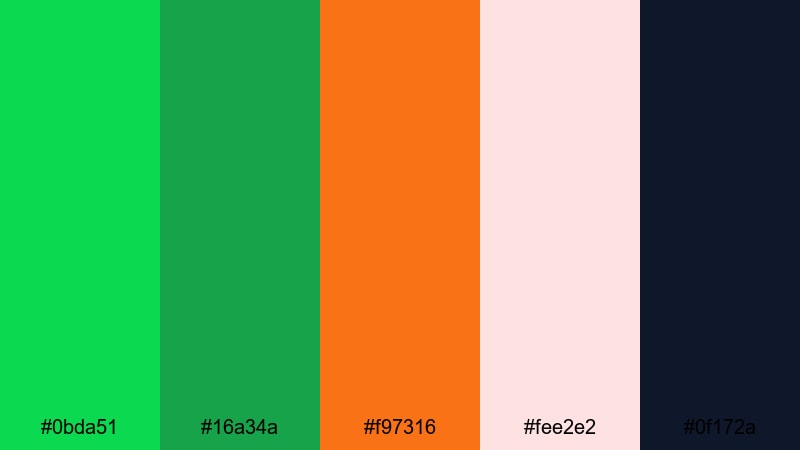
- HEX Codes: #0bda51, #16a34a, #f97316, #fee2e2, #0f172a
- Mood: Playful, sun-drenched, and vibrant with a hint of drama.
- Use for: Perfect for travel reels, summer lookbooks, and energetic channel intros focused on beaches or resort vibes.
Tropical Leaf Breeze layers bright and deep greens with juicy orange, soft blush, and a dark navy anchor. It captures that moment when the sun hits palm leaves and the sky turns warm, creating a palette that is both fun and slightly dramatic.
Use the orange and blush for accents in your titles and stickers, while Malachite and the darker green support foliage or pattern overlays. The deep navy is ideal for text, shadows, or end-screen backgrounds, making your summer thumbnails and intros feel bold but still easy to read.
Mountain Meadow Mist
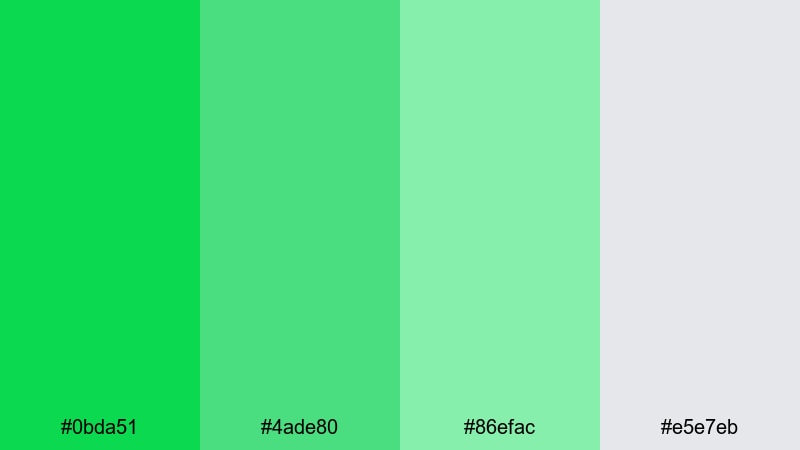
- HEX Codes: #0bda51, #4ade80, #86efac, #e5e7eb
- Mood: Calm, optimistic, and softly open, like an early morning hike.
- Use for: Use for outdoor lifestyle content, quiet vlog moments, and intro cards where you want breezy, peaceful visuals.
Mountain Meadow Mist moves from rich Malachite through soft grassy greens into a cool gray, creating a gentle gradient that feels open and optimistic. It evokes misty hillsides and fresh air, making it perfect for slow-paced storytelling and reflective vlogs.
Apply this palette to title cards, chapter screens, and background shapes around your footage. Malachite can emphasize key text or icons, while the lighter mints and gray keep the overall look light and airy, especially in minimalist thumbnails and end screens.
Bold & Cinematic Malachite Color Palettes
Neo Noir Malachite
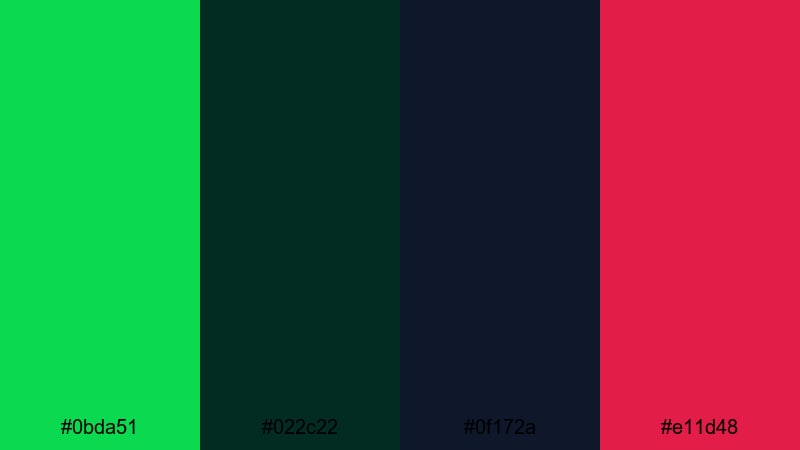
- HEX Codes: #0bda51, #022c22, #0f172a, #e11d48
- Mood: Moody, intense, and cinematic with a sharp hit of neon drama.
- Use for: Best for trailers, music videos, and cyberpunk edits that need a strong color grade and bold contrast.
Neo Noir Malachite plunges Malachite into a dark world of inky greens and midnight blue, lit up by a shocking crimson accent. It feels like a futuristic city alley where one neon sign and a red light cut through the darkness.
Use the darkest tones as your base grade or background, let Malachite glow in UI-style overlays or titles, and reserve the crimson for important beats like drops, transitions, or on-screen calls to action. This palette is ideal for high-impact thumbnails, glitchy intros, and stylized music videos built in Filmora.
Cyber Grid Green
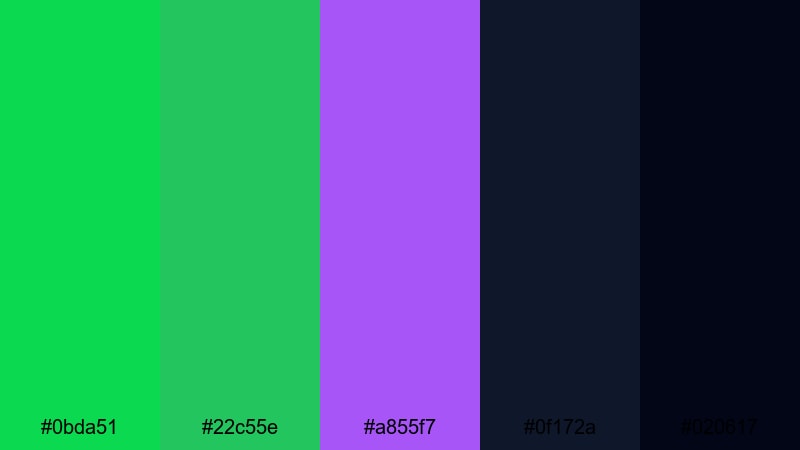
- HEX Codes: #0bda51, #22c55e, #a855f7, #0f172a, #020617
- Mood: High-tech, electric, and fast-paced with a sleek digital feel.
- Use for: Great for gaming intros, tech reviews, glitch transitions, and sci-fi motion graphics.
Cyber Grid Green combines multiple neon greens with a vivid violet over deep night tones. It feels like a holographic HUD or a sci-fi interface, full of motion and energy.
In your edits, let Malachite and the lighter green trace lines, grids, and progress bars, while violet highlights important buttons or score counters. The near-black tones give you plenty of room for legible white text and glowing effects in gaming overlays, techno intros, and hardware review thumbnails.
Urban Night Market
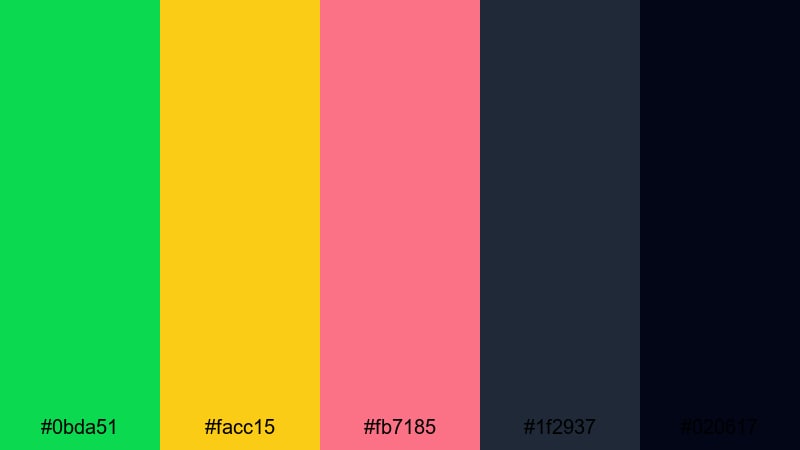
- HEX Codes: #0bda51, #facc15, #fb7185, #1f2937, #020617
- Mood: Energetic, bustling, and colorful with dark city depth.
- Use for: Perfect for city vlog sequences, street food features, and nightlife edits with vibrant signage.
Urban Night Market throws Malachite into a world of glowing yellow, soft pink, and deep charcoal blacks. It suggests neon shop signs, food stalls, and crowds moving through the night.
Use Malachite for logo marks or sign-like text, yellow for prices or key info, and pink to add a friendly, human touch. The dark grays anchor your frames and keep everything readable, especially in busy thumbnails and kinetic title sequences for city-based vlogs and food channels.
Retro Arcade Vibes
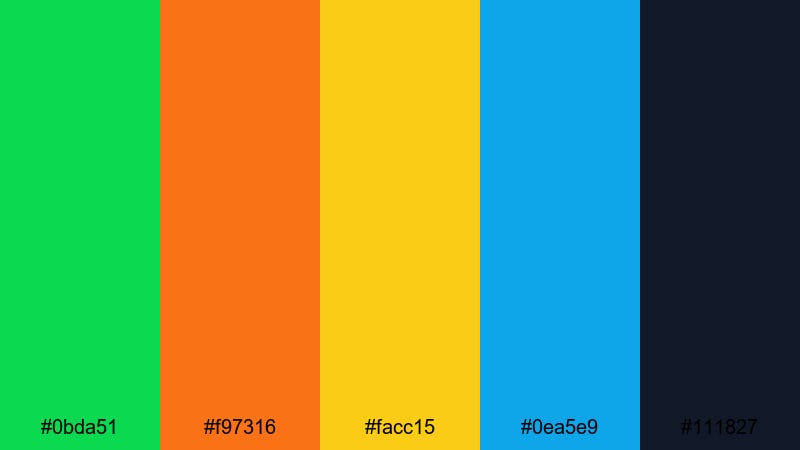
- HEX Codes: #0bda51, #f97316, #facc15, #0ea5e9, #111827
- Mood: Nostalgic, punchy, and fun with a classic arcade glow.
- Use for: Ideal for gaming channels, throwback edits, and high-energy title cards that need vibrant retro flair.
Retro Arcade Vibes balances Malachite with bright orange, yellow, and cyan over a dark navy base. It immediately calls to mind pixel art, old-school consoles, and flashing cabinet screens.
Apply the dark base to your frames, then use Malachite and cyan for UI shapes, score counters, and buttons, while orange and yellow mark wins, combos, or alerts. This palette is a strong choice for channel branding, Twitch highlight reels, and bold 8-bit inspired end screens.
Action Trailer Surge
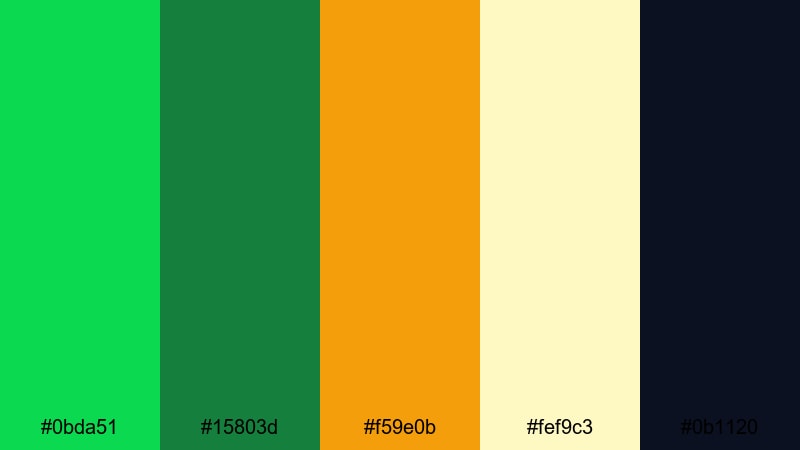
- HEX Codes: #0bda51, #15803d, #f59e0b, #fef9c3, #0b1120
- Mood: Explosive, suspenseful, and heroic with dynamic contrast.
- Use for: Use for cinematic trailers, sports montages, and intense highlight reels that need high-impact grading.
Action Trailer Surge pits layered greens against fiery amber and pale light over a dark indigo base. It feels like a blockbuster trailer, full of tension and dramatic contrast.
Use the deep indigo for backgrounds and shadows, Malachite and the darker green to tint your midtones, and the amber-yellow combo to mark key beats, titles, or countdowns. This scheme works perfectly for sports intros, esports reveals, and dramatic promo videos cut in Filmora.
Minimal & Modern Malachite Color Palettes
Clean UI Malachite
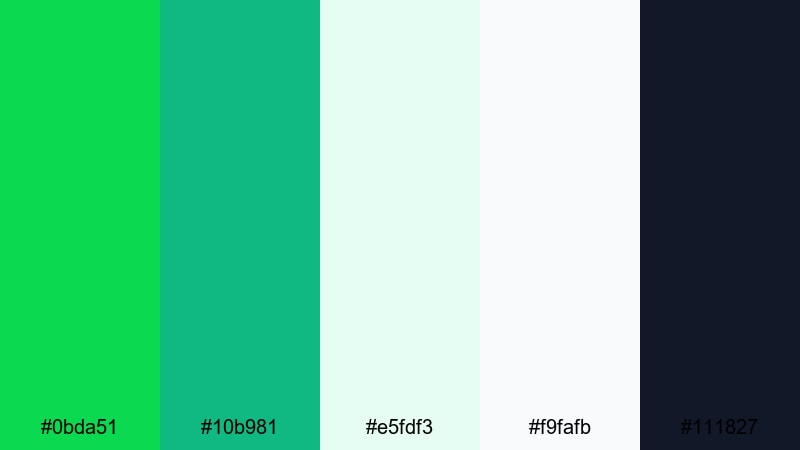
- HEX Codes: #0bda51, #10b981, #e5fdf3, #f9fafb, #111827
- Mood: Crisp, modern, and trustworthy with a lightweight tech feel.
- Use for: Perfect for app previews, SaaS explainers, and channel branding that leans toward clean product design.
Clean UI Malachite pairs strong greens with ultra-light panels and a deep text color, giving you an interface-ready scheme. It looks like a modern dashboard or mobile app, fresh but professional.
Use Malachite and emerald as accent colors for buttons, progress bars, and key icons. Let the pale tones form the background of your screens and overlays in Filmora, and rely on the dark blue-gray for headlines and body text in thumbnails, explainers, and product walkthroughs.
Scandinavian Green Calm
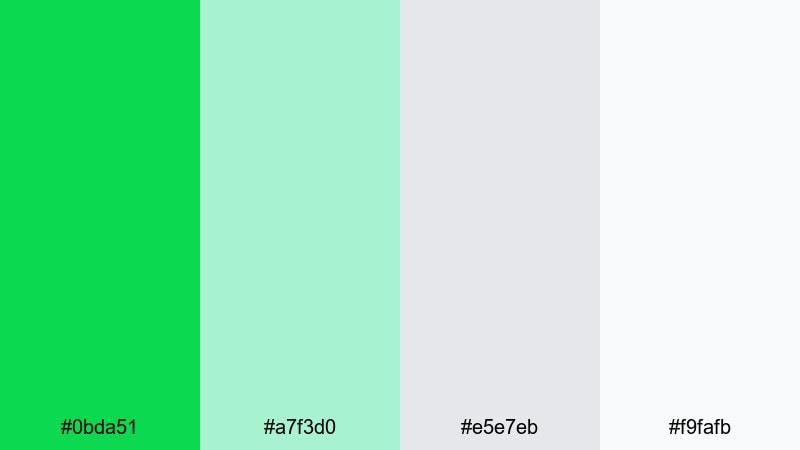
- HEX Codes: #0bda51, #a7f3d0, #e5e7eb, #f9fafb
- Mood: Serene, airy, and understated with a design-forward touch.
- Use for: Great for home decor content, productivity vlogs, and minimalist brand idents with a soft, calming atmosphere.
Scandinavian Green Calm softens Malachite with mint and light neutrals, creating a bright but low-stress look. It brings together freshness and simplicity in a way that feels very lifestyle-oriented.
Use Malachite only as a spot color for logos, key icons, or CTAs in your overlays, letting the mints and grays dominate your scenes. This palette is ideal for clean desk setups, home tours, and calm productivity edits where you want subtle design polish rather than loud color.
Monochrome Malachite Focus
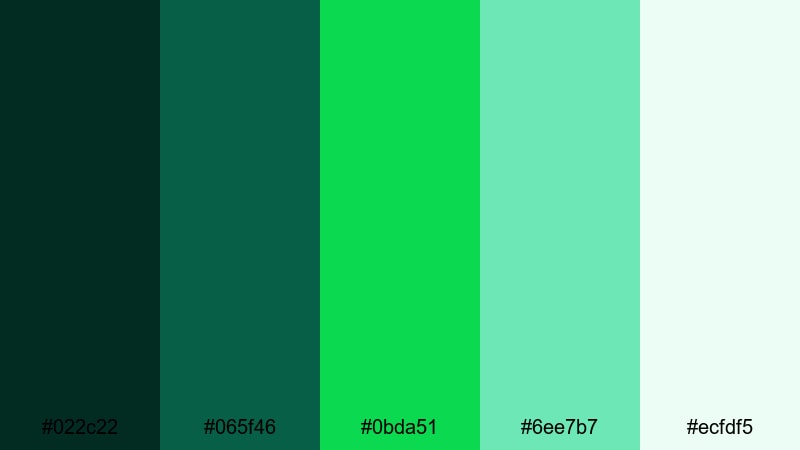
- HEX Codes: #022c22, #065f46, #0bda51, #6ee7b7, #ecfdf5
- Mood: Focused, cohesive, and sophisticated with a tonal green story.
- Use for: Best for branded intros, logo stings, and cohesive channel aesthetics that need a strong yet simple signature color.
Monochrome Malachite Focus moves through a full range of greens, from nearly black forest to airy mint, with Malachite right in the center. It tells one clear color story, which keeps your visuals cohesive without feeling flat.
Use the darkest green for backgrounds or subtle vignettes, middle tones for shapes and UI, Malachite for main highlights, and mint for gentle glow or lines. This palette is strong for brand packs, lower thirds, and logo animations where you want a recognizable signature color scheme.
Soft Brand Intro
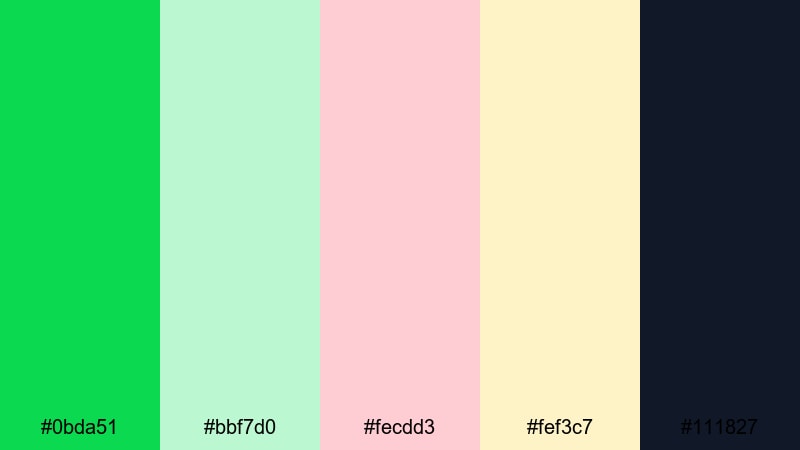
- HEX Codes: #0bda51, #bbf7d0, #fecdd3, #fef3c7, #111827
- Mood: Friendly, welcoming, and polished with a gentle brand feel.
- Use for: Ideal for channel intros, lifestyle brand bumpers, and creator logos that want playful color without losing professionalism.
Soft Brand Intro wraps Malachite in pastel greens, blush pink, and warm cream, then grounds it all with a deep text shade. It feels approachable and modern, like a friendly creator brand that still takes design seriously.
Use Malachite for logo marks, buttons, or key shape accents, letting the pastels fill backgrounds and transitions in your Filmora intro templates. The dark shade works well for titles and body text in thumbnails, social posts, and end cards where you need strong legibility.
Glassmorphism Green Glow
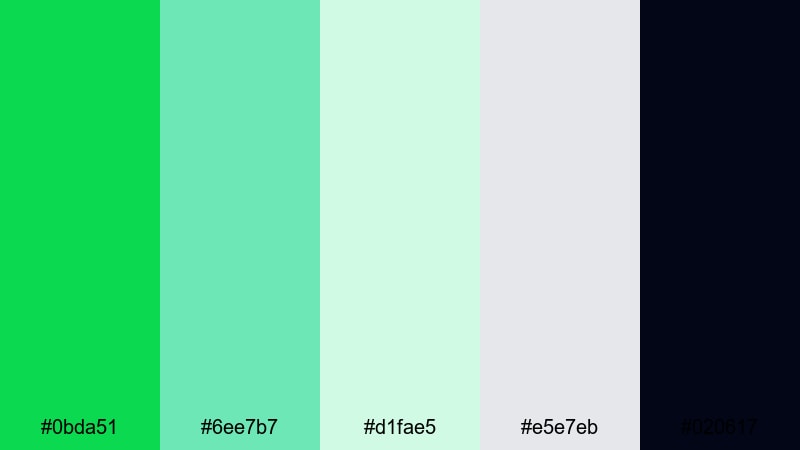
- HEX Codes: #0bda51, #6ee7b7, #d1fae5, #e5e7eb, #020617
- Mood: Sleek, futuristic, and delicate with layered light effects.
- Use for: Use for overlays, lower thirds, and UI-inspired motion graphics with a translucent, glassmorphism aesthetic.
Glassmorphism Green Glow combines sharp Malachite with translucent mint, pale teal, and cool gray over a near-black base. It naturally suggests frosted glass panels, blurred UI, and soft reflections.
In Filmora, you can build semi-transparent shapes using these light tones, set them over the dark background, and edge them with Malachite strokes or icons. This palette works especially well for tech explainers, app promos, and modern channel rebrands where UI and motion graphics play a central role.
Tips for Creating Malachite Color Palettes
Malachite is powerful, so the way you combine it with neutrals, accents, and darks will shape how your audience feels about your video or brand. Use these tips to build palettes that look polished on screen and work smoothly in Filmora.
- Pair Malachite with at least one soft neutral (off-white, light gray, or cream) so thumbnails and titles stay readable and not overly saturated.
- Add a dark anchor color such as charcoal, navy, or deep forest green for text, outlines, and contrast in intros and lower thirds.
- Limit yourself to one or two bright accent colors (like amber, pink, or cyan) so Malachite stays the hero rather than competing for attention.
- Test your palette in grayscale to check contrast; if key text disappears, slightly darken Malachite or lighten your background tone.
- Match your palette to your footage by nudging greens and yellows in Filmora's color tools until foliage, clothing, and overlays sit in the same Malachite family.
- Use consistent color roles: one color for calls to action, another for headlines, another for backgrounds. Repeat that pattern across thumbnails, intros, and end screens.
- Create reusable presets in Filmora so your Malachite grade, filters, and text styles can be applied with one click to new projects.
- Check your palette on mobile by previewing exports on a phone; adjust saturation if Malachite looks too neon or too dull on small screens.
Malachite can feel natural, futuristic, or luxurious depending on how you combine it with light, dark, and accent tones. The 15 palettes above give you ready-made options for vlogs, cinematic edits, gaming content, and modern brand design, all with copyable HEX codes.
Try dropping one of these palettes into your next Filmora project, from the thumbnail design to your color grade and motion graphics. When every element shares the same Malachite-driven mood, your videos feel more intentional, memorable, and on-brand.
Experiment, save your favorite looks as presets, and keep refining until you land on a Malachite color story that your audience immediately recognizes as yours.
secure download