

 100% Security Verified | No Subscription Required | No Malware


 ChatGPT
 Perplexity
 Gemini
 Claude
 Grok
Grok
Metallic Coral sits between a glowing sunset orange and refined rose gold. It feels warm, inviting, and modern at the same time, which is why so many brands use it to communicate creativity, optimism, and a touch of luxury. In video and design, Metallic Coral highlights can instantly draw the eye to titles, buttons, and key moments without feeling harsh or overly saturated.
For creators and Filmora users, Metallic Coral is perfect for thumbnails, channel intros, brand cards, overlays, and cinematic color grading. Below you will find ready-to-use Metallic Coral color palettes with HEX codes, so you can copy them directly into your design tools or color grading workflow and keep your visuals consistent across YouTube, TikTok, Reels, and more.
In this article
Soft And Romantic Metallic Coral Color Palettes
Rose Gold Dawn
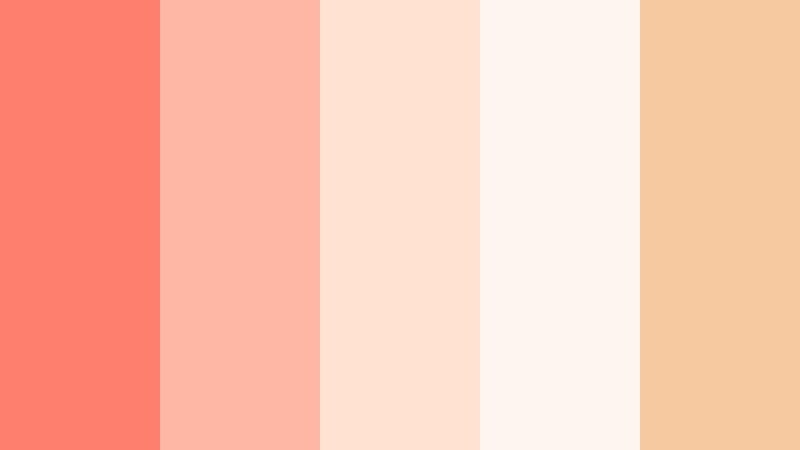
- HEX Codes: #ff7f6f, #ffb7a5, #ffe2d2, #fdf5f0, #f6c9a1
- Mood: Tender, luminous, and gently romantic like an early sunrise.
- Use for: Use for dreamy vlog intros, wedding highlight reels, and soft lifestyle thumbnails.
Rose Gold Dawn wraps Metallic Coral in creamy rose gold neutrals and soft light tones, creating a glow that feels like golden-hour sun on skin. The palette is warm but delicate, perfect when you want romance and softness without losing clarity.
Use it for wedding titles, couple vlog covers, romantic slideshow transitions, or brand intros where you want names and logos to feel intimate and premium. In Filmora, you can pick the deeper coral for text, the mid-tone peach for overlays, and the light Argent White tints for backgrounds, keeping everything tender but easy to read on any screen.
Pro Tip: Build A Cinematic Metallic Coral Sunrise Look In Filmora
To keep a Rose Gold Dawn mood through an entire edit, start by choosing one key clip or thumbnail mockup as your reference. Use that frame to pick your primary Metallic Coral (#ff7f6f) and the lighter supporting tones, then reuse those exact HEX codes for titles, lower thirds, and overlays in Filmora.
Apply subtle gradients using your lightest shades (#ffe2d2, #fdf5f0) behind text and reuse the same accent coral for calls to action. This creates a cinematic through-line from intro to end screen so your channel feels cohesive and recognizable wherever your viewers find you.
AI Color Palette
If you have a photo or mood board that already nails your Metallic Coral aesthetic, Filmora's AI Color Palette feature can match that look across your whole timeline. Import your reference image, let Filmora analyze the colors, and then apply that palette to clips so your A-roll, B-roll, and thumbnails all share the same Rose Gold Dawn atmosphere.
This is especially useful for wedding highlights and romantic vlogs where lighting changes a lot. AI Color Palette helps unify skin tones, backgrounds, and overlays so every scene feels like it belongs to the same soft, coral-tinted story.
 secure download

HSL, Color Wheels & Curves
To refine a Metallic Coral palette like Rose Gold Dawn, open Filmora's advanced color controls and gently nudge the HSL sliders. Slightly lowering saturation in the reds and oranges keeps the coral elegant, while lifting luminance in the warm tones helps skin look soft and flattering. You can also use the color wheels to add a hint of warm tint in the midtones while keeping shadows more neutral for a professional finish.
Use curves to create a subtle S-curve: lift highlights so the Argent White areas bloom softly, and deepen shadows just enough to keep contrast. This is a simple way to turn a flat image into a gentle, cinematic frame while maintaining the signature Metallic Coral glow you set with your palette.
secure download1000+ Video Filters & 3D LUTs
If you want to get to a polished Metallic Coral look even faster, Filmora's video filters and 3D LUTs make it easy to stylize your footage in one click. Start from a warm, cinematic or pastel LUT, then fine-tune the results so they sit nicely with your custom Rose Gold Dawn HEX codes.
You can layer filters for glow, grain, or soft vignettes so your Metallic Coral overlays feel like they are part of the image, not just sitting on top. This is perfect for wedding highlight films, engagement announcements, or romantic reels where you want emotional impact with minimal setup time.
secure downloadBlush Harbor Glow
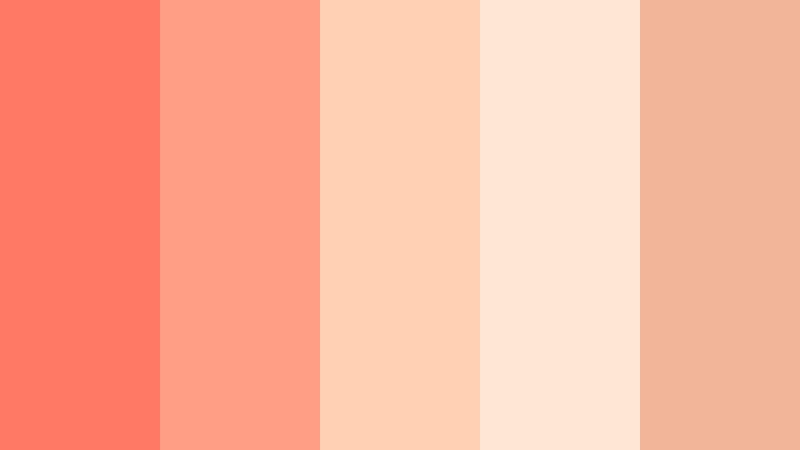
- HEX Codes: #ff7964, #ff9d85, #ffd0b2, #ffe7d6, #f3b59a
- Mood: Cozy, welcoming, and softly radiant.
- Use for: Perfect for travel vlogs at golden hour, warm podcast covers, and personable channel banners.
Blush Harbor Glow balances bright Metallic Coral with sunlit blush and sandy neutrals, capturing the warmth of late afternoon on a harbor. It feels homely and inviting, but still modern enough for a professional channel.
Use this palette for travel vlog thumbnails, podcast cover art, or creator banners where you want to look approachable and friendly. Let the coral shades highlight your face or key text, and reserve the softer tones for backgrounds and panels in Filmora overlays and title cards.
Peach Champagne Kiss
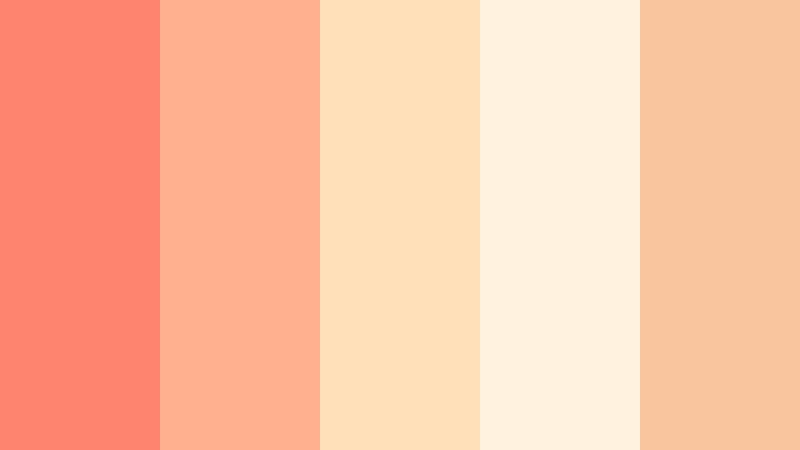
- HEX Codes: #ff8470, #ffb08f, #ffe0b8, #fff3df, #f9c59f
- Mood: Effervescent, flirty, and lighthearted.
- Use for: Use in fun announcement cards, channel trailers, and celebratory Reels or Shorts overlays.
Peach Champagne Kiss sprinkles Metallic Coral with sparkling peach and champagne notes, giving your visuals a fizzy, celebratory feel. It is playful but still elegant, which makes it ideal for launches, birthdays, and big announcements.
Drop these HEX codes into your text, badges, and confetti-style overlays when editing reels or YouTube intros in Filmora. Use the light champagne tones as gentle gradients behind bold coral titles to keep everything bright, readable, and perfect for social media screens.
Coral Veil Serenity
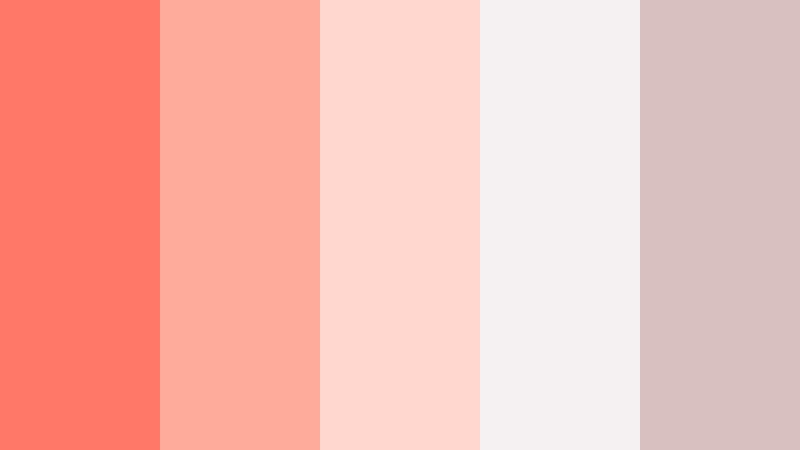
- HEX Codes: #ff7868, #ffab9a, #ffd7cf, #f5f0f2, #d8c0be
- Mood: Calm, intimate, and slightly nostalgic.
- Use for: Best for reflective voiceover videos, journaling aesthetics, and gentle montage sequences.
Coral Veil Serenity softens Metallic Coral with muted greige and blush tones, creating an atmosphere that feels like a quiet, handwritten journal page. It suggests reflection and intimacy rather than loud celebration.
Use this palette for storytelling edits, reflective voiceovers, and morning routine videos. In Filmora, keep the coral accents for key phrases in your subtitles or lower thirds, while using the pale neutrals as background cards and soft vignettes that make your frames feel calm and cohesive.
Sunset Linen Story
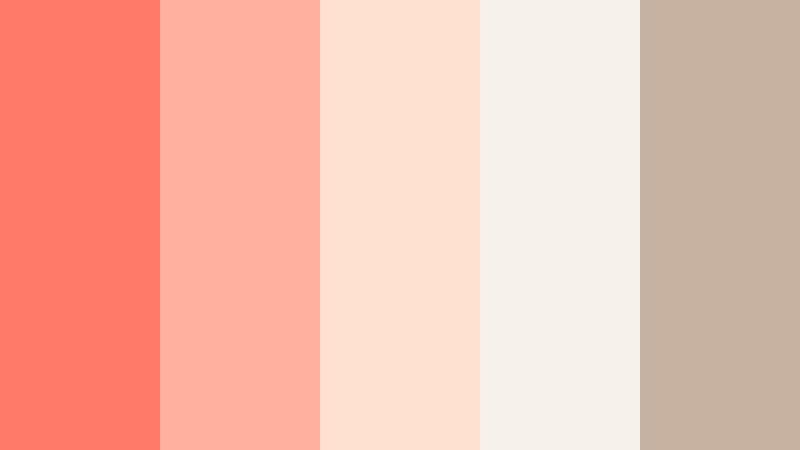
- HEX Codes: #ff7b69, #ffb19d, #ffe1d2, #f6f1ea, #c7b1a0
- Mood: Organic, slow-living, and warmly nostalgic.
- Use for: Great for home decor videos, DIY tutorials, and slow-living vlogs with a cozy editorial look.
Sunset Linen Story folds Metallic Coral into linen-inspired neutrals and warm beiges, echoing handmade crafts and sunlit interiors. It feels grounded and editorial, perfect for creators focused on home, lifestyle, and DIY.
Apply these tones to chapter cards, before-and-after labels, and overlay shapes in your tutorial edits. The coral adds gentle emphasis on important steps, while the linen-inspired shades keep everything soft, airy, and easy to watch on larger screens like TVs and tablets.
Bold And Vibrant Metallic Coral Color Palettes
Neon Coral Splash
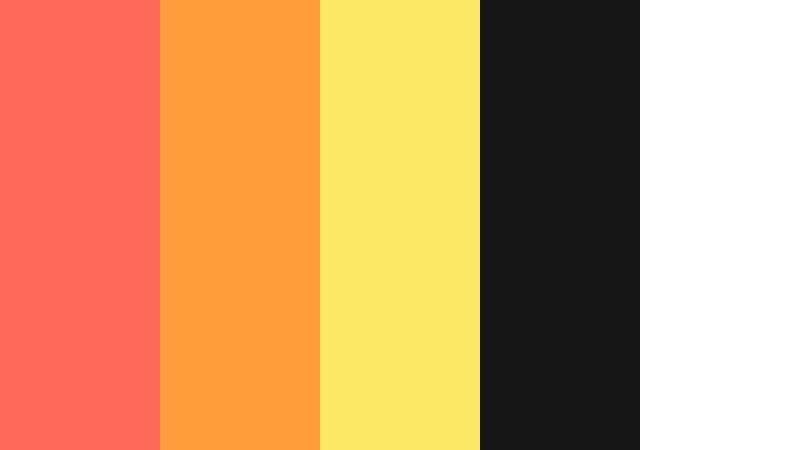
- HEX Codes: #ff6b5a, #ff9d3a, #ffe866, #171717, #ffffff
- Mood: Electric, attention-grabbing, and high energy.
- Use for: Perfect for YouTube thumbnails, gaming intros, and bold sale or promo graphics.
Neon Coral Splash pairs Metallic Coral with electric amber and bright yellow highlights against deep black and white. The result is loud, punchy, and designed to win the click in crowded feeds.
Use the darkest shade (#171717) as your background, Metallic Coral for main titles, and neon yellow accents to highlight discounts, episode numbers, or urgent CTAs. This palette is ideal for gaming, tech promos, and any video where you want maximum impact on small screens.
Tropical Street Lights
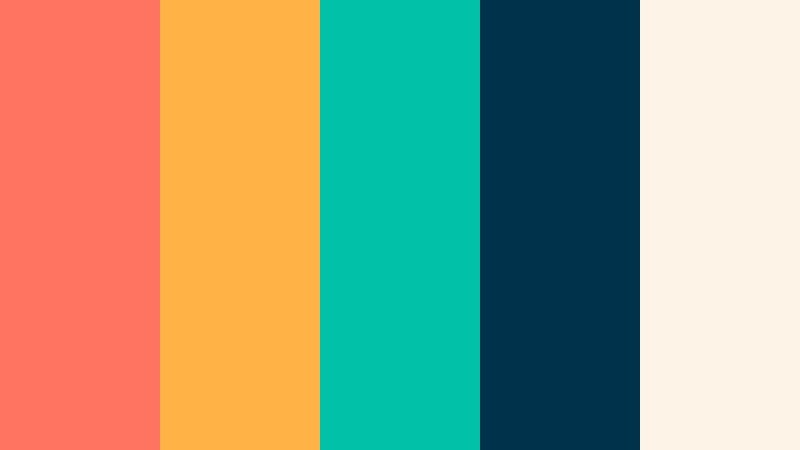
- HEX Codes: #ff7461, #ffb347, #00c2a8, #00324b, #fef3e7
- Mood: Urban, tropical, and nightlife inspired.
- Use for: Use for travel vlogs, festival recaps, and upbeat music videos needing a vivid edge.
Tropical Street Lights mixes Metallic Coral with teal, gold, and deep navy, evoking neon signs and palm trees at night. It feels like a city street after dark but with a bright, tropical twist.
Use the dark navy (#00324b) for backgrounds and frames, then pop Metallic Coral and teal in your text, icons, and motion graphics inside Filmora. This combination is ideal for party recaps, festival montages, and upbeat music videos that move quickly but still look polished.
Coral Pop Arcade
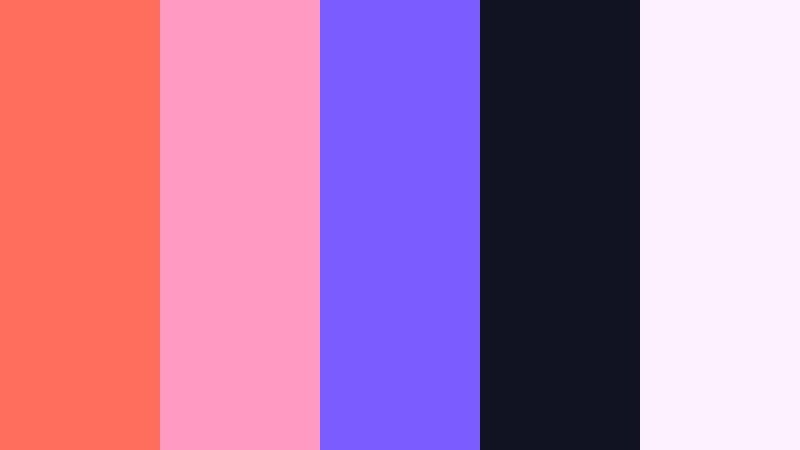
- HEX Codes: #ff6d5c, #ff9bc2, #7b5cff, #111322, #fdf0ff
- Mood: Playful, retro, and pop-art inspired.
- Use for: Ideal for creator intros, gaming channels, and playful animation overlays.
Coral Pop Arcade throws Metallic Coral together with candy pink and neon violet on a dark base, creating a retro arcade and synthwave feel. It is high contrast, nostalgic, and perfect for energetic, youth-focused content.
Use the dark background (#111322) to make your coral titles and violet elements explode off the screen. In Filmora, combine this palette with bold fonts and kinetic transitions for intros, alerts, and subscriber animations that feel like classic arcade title screens.
Solar Coral Pulse
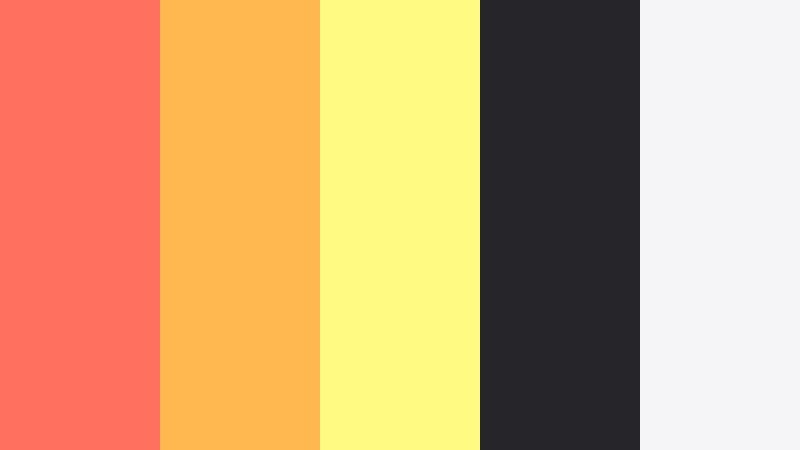
- HEX Codes: #ff705f, #ffb84f, #fffb82, #26252a, #f5f5f7
- Mood: Radiant, dynamic, and optimistic.
- Use for: Use in motivational edits, fitness intros, and bright product launch videos.
Solar Coral Pulse surrounds Metallic Coral with solar yellows, creating a palette that feels like a sunrise burst of motivation. Dark charcoal grounds the look, while light neutrals keep it user-friendly for overlays and infographics.
Use this palette for fitness intros, coaching content, or energetic product launches. Let Metallic Coral lead in your main headlines, use yellow accents to underline key stats or benefits, and reserve charcoal for backgrounds that make text pop across mobile feeds.
Coral Citrus Voltage
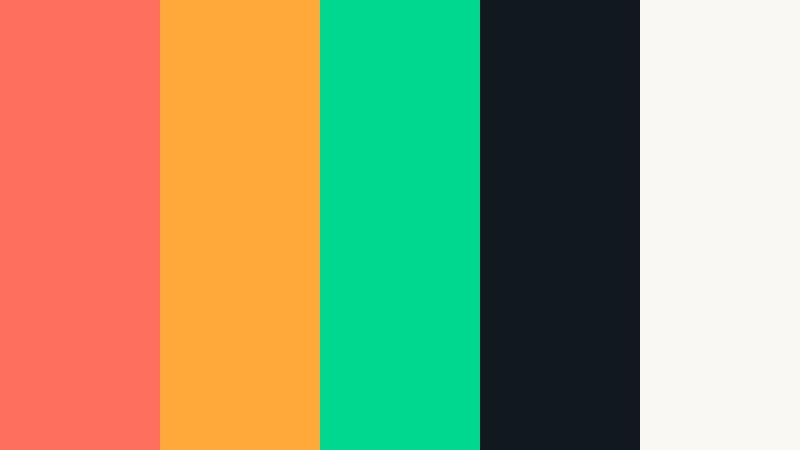
- HEX Codes: #ff6f5d, #ffa93a, #00d88f, #101820, #faf8f2
- Mood: Zesty, modern, and fast-paced.
- Use for: Perfect for tech product promos, quick cuts, and social ads that need bite.
Coral Citrus Voltage combines Metallic Coral with citrus orange and fresh mint green on a deep black base. It feels zesty and techy at the same time, tailor-made for sharp, modern edits.
Use black (#101820) as your canvas in Filmora, then drop in coral and citrus for main messages and buttons. The mint tone is perfect for accent icons, progress bars, or UI-style graphics in app demos, startup explainers, and rapid-fire social ads.
Elegant And Modern Metallic Coral Color Palettes
Coral Marble Luxe
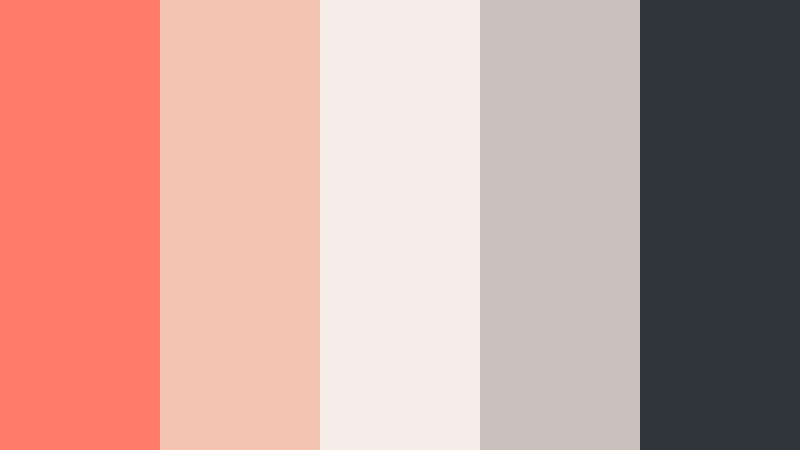
- HEX Codes: #ff7a69, #f3c5b0, #f7ede8, #c9c0ba, #2f3438
- Mood: Refined, editorial, and polished.
- Use for: Great for beauty channels, brand lookbooks, and high-end product promos.
Coral Marble Luxe places Metallic Coral against marble-inspired creams and soft charcoal, giving everything an editorial, magazine-quality finish. It suggests luxury without feeling cold or distant.
Use this scheme for beauty tutorials, fashion lookbooks, and premium product reels. In Filmora, keep backgrounds light and marble-like, then use coral as the hero color for titles and product callouts. Charcoal is ideal for fine text, captions, and subtle dividing lines in your layouts.
Copper Coral Studio
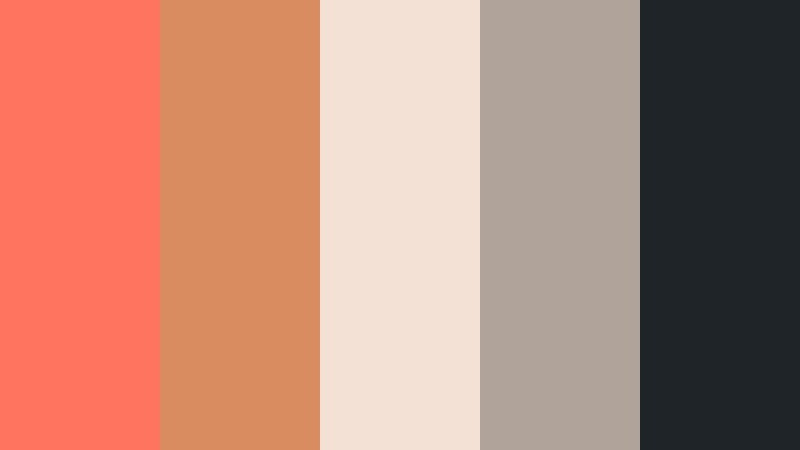
- HEX Codes: #ff745f, #d98c5f, #f3e1d5, #b0a49a, #1f2428
- Mood: Sophisticated, cinematic, and warm.
- Use for: Use for cinematic B-roll sequences, studio tours, and premium course branding.
Copper Coral Studio merges Metallic Coral with copper browns and inked charcoal, creating a warm, cinematic look that feels like a professional studio space. It is perfect when you want your channel to look premium and trusted.
Use charcoal (#1f2428) as a base for titles and frames, add copper and coral to logo stings and section headers, and let the soft neutrals support your B-roll overlays. This palette works especially well in Filmora when paired with smooth camera moves and gentle film grain filters.
Coral Chrome Interface
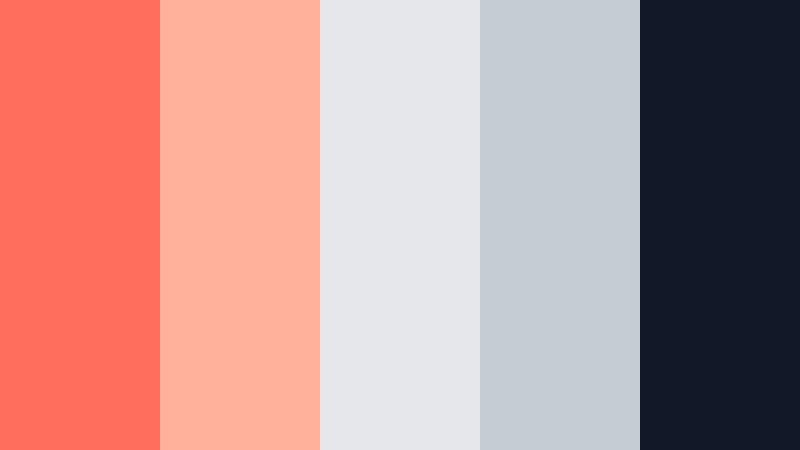
- HEX Codes: #ff6e5c, #ffb29b, #e5e7eb, #c4ccd4, #111827
- Mood: Clean, techy, and confident.
- Use for: Ideal for UI mockups, app explainer videos, and sleek YouTube overlays.
Coral Chrome Interface uses Metallic Coral as a sharp accent against cooler chrome grays and a deep ink background. It feels like a modern app interface or SaaS dashboard brought to life.
Use the darker gray (#111827) as a base for your UI-style backgrounds and screen mockups inside Filmora, then highlight important buttons, charts, or steps with Metallic Coral. The light grays help maintain readability in overlays and explainers, especially for tutorials and product walkthroughs.
Minimal Coral Monogram
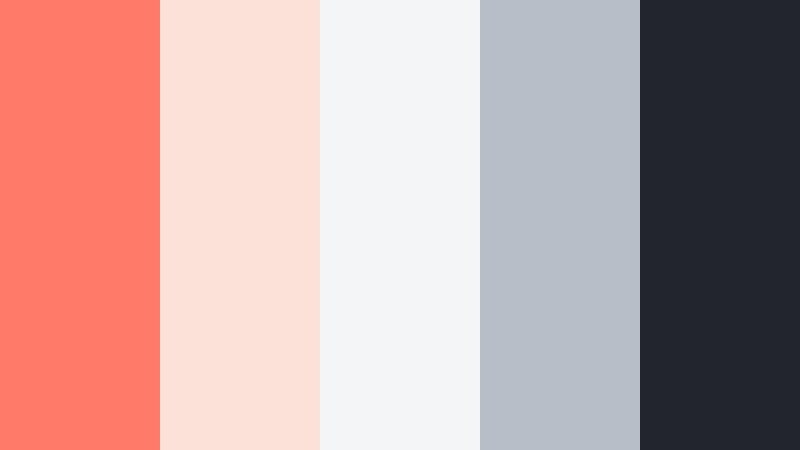
- HEX Codes: #ff7a67, #fbe1d7, #f4f5f7, #b7bec8, #22252b
- Mood: Minimal, branded, and quietly confident.
- Use for: Best for logo stings, classy lower thirds, and minimalist title cards.
Minimal Coral Monogram turns Metallic Coral into a hero accent against soft grays and inky black, creating a minimalist, brand-first look. It is understated but distinctive, which makes it ideal for serious creators who still want warmth.
Use coral sparingly, focusing it on your logo, channel name, or key icons. Let the light neutrals and dark gray handle the rest of the interface in your Filmora templates, from lower thirds to end screens, so your brand mark is always the visual focal point.
Pastel And Dreamy Metallic Coral Color Palettes
Cotton Cloud Coral
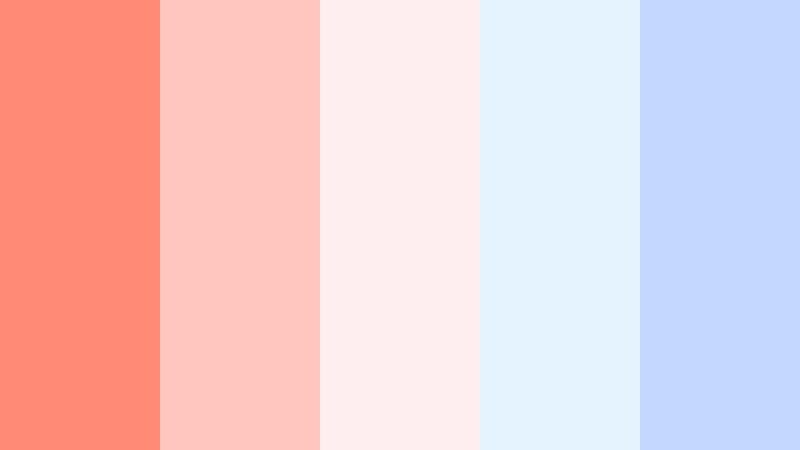
- HEX Codes: #ff8a76, #ffc6c0, #ffeef0, #e5f3ff, #c4d7ff
- Mood: Dreamy, cute, and pastel-soft.
- Use for: Great for kawaii edits, stationery mockups, and gentle creator intros.
Cotton Cloud Coral lets Metallic Coral float into pastel pinks and powder blues, creating a cotton-candy aesthetic. It feels playful, soft, and perfect for cozy or kawaii content.
Use these shades in cute intro sequences, journaling videos, and stationery or planner mockups. In Filmora, make your backgrounds soft blue or pink gradients and keep Metallic Coral for character art, stickers, or animated doodles layered above your footage.
Coral Mist Aurora
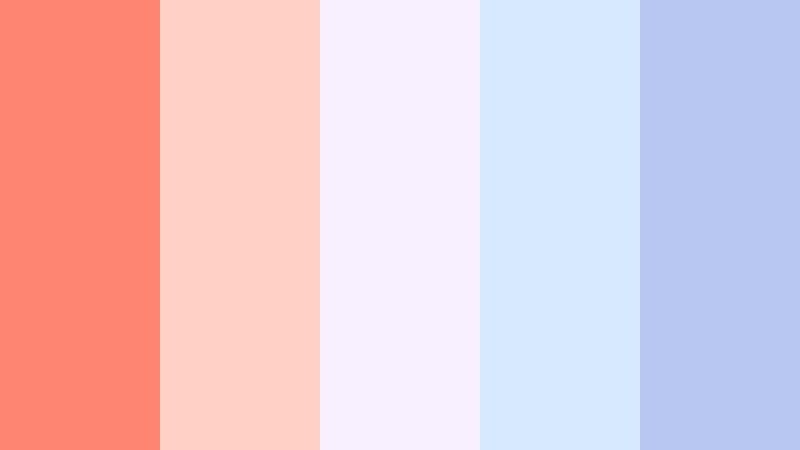
- HEX Codes: #ff8573, #ffd1c6, #f8f0ff, #d7e9ff, #b8c7f2
- Mood: Ethereal, tranquil, and softly magical.
- Use for: Use for meditation videos, lo-fi music loops, and dreamy montage sequences.
Coral Mist Aurora combines Metallic Coral with lavender haze and misty blues, creating an ethereal, slightly magical atmosphere. It is tranquil and soothing, great for content meant to calm or focus viewers.
Use these tones for lo-fi loops, study playlists, and meditation visuals. In Filmora, build slow, cross-faded transitions, then layer gentle title cards using the pastel blues and purples as backgrounds and Metallic Coral for subtle accents on track names, timestamps, or chapter headings.
Tips for Creating Metallic Coral Color Palettes
Metallic Coral is versatile, but it works best when you balance its warmth with thoughtful contrasts and supporting tones. Use these tips to create custom palettes that look great on video, thumbnails, and brand assets.
- Pair Metallic Coral with cool neutrals or blues to avoid your visuals feeling too hot or oversaturated, especially in long-form content.
- Always test text contrast: place coral text over light Argent White backgrounds, and invert it (white on coral) for buttons to maximize readability on mobile.
- Choose one or two supporting neutrals so your coral accents stay special; too many competing colors can dilute your brand impact.
- Match your footage: if your clips are already warm, use slightly softer, less saturated corals to prevent skin tones from going orange.
- Use Metallic Coral strategically for actions and emphasis, such as subscribe buttons, timestamps, or key stats in your overlays.
- Keep a simple hierarchy: primary coral for main titles, a secondary coral or peach for subheads, and neutrals for body text and backgrounds.
- Export a reference frame with your palette applied and reuse it in Filmora as a color grading guide for future videos.
- Check your palette on different devices (phone, tablet, laptop) to ensure Metallic Coral does not shift too red or too pink under various displays.
Metallic Coral can feel romantic, bold, elegant, or dreamy, depending on the colors you pair it with. By choosing the right palette, you shape how viewers experience your channel, your products, and your stories before they even hear a single word.
Experiment with these Metallic Coral color combinations inside Filmora, from thumbnails and intros to lower thirds and full color grades. Save your favorites as presets so your brand look stays consistent across every episode, reel, and short you publish.
With a solid palette and the right tools, Metallic Coral becomes more than a trendy shade: it becomes a recognizable signature for your creative work.
secure download