

 100% Security Verified | No Subscription Required | No Malware


 ChatGPT
 Perplexity
 Gemini
 Claude
 Grok
Grok
Misty Horizon sits between cool grey and soft blue, echoing sea fog, low clouds, and quiet mornings by the coast. Psychologically, it feels calm, composed, and slightly cinematic, which makes it perfect for creators who want a clean, modern look without going full black-and-white. It softens harsh contrasts, keeps attention on your subject, and sets a reflective, premium mood.
Because of this versatility, Misty Horizon works beautifully in video intros, YouTube thumbnails, channel banners, overlays, and brand kits. Below are 15 Misty Horizon color palettes with HEX codes tailored for Filmora users and visual creators. You can use them for color grading, graphics, subtitles, and consistent branding across your edits.
In this article
Soft & Serene Misty Horizon Color Palettes
Morning Fog Over Bay
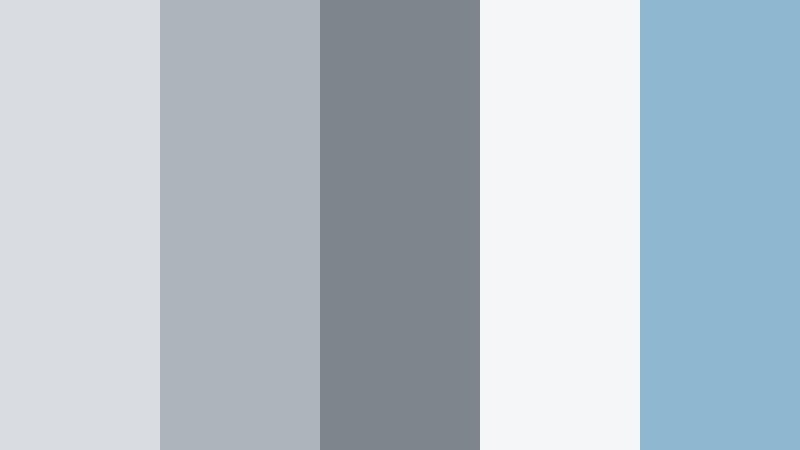
- HEX Codes: #d9dde2, #aeb4bc, #7f858d, #f4f6f8, #8fb8d0
- Mood: Calm, airy, and reflective like a quiet shoreline at dawn.
- Use for: Ideal for cinematic intros, reflective travel vlogs, and minimal lifestyle thumbnails.
This palette layers soft Misty Horizon greys with a light coastal blue, almost like watching fog roll across a bay. The near-white highlight (#f4f6f8) keeps everything bright and breathable, while the deeper grey (#7f858d) adds just enough contrast for text and UI elements.
Use Morning Fog Over Bay for calm openers, b-roll sequences, and low-noise YouTube thumbnails that still look premium. In Filmora, you can base your titles, lower thirds, and background masks on the lighter tones, and reserve the mid-dark grey for crucial buttons, subscribe prompts, and logo marks.
Pro Tip: Build a Cinematic Misty Horizon Look in Filmora
To keep a Misty Horizon look consistent, start by pulling your key colors into Filmora as a simple style guide. Use the lightest grey and off-white for backgrounds, then apply the mid greys to text, frames, and shapes. This helps every scene, from intros to b-roll, feel like part of the same calm visual universe.
For travel vlogs or quiet lifestyle content, combine this palette with soft vignette effects and gentle transitions. Duplicate your intro style across end screens, social cutdowns, and Shorts, so the same Misty Horizon mood follows your audience everywhere they see your content.
AI Color Palette
If you have a still frame or mood board that captures your ideal Misty Horizon vibe, you can use it as a reference inside Filmora. Filmora's AI Color Palette feature lets you sample that look and apply similar tones to all your clips automatically.
Import your reference image, select the clips from your timeline, and let AI Color Palette push them toward the same cool greys and soft blues. This is an easy way to maintain a unified Misty Horizon feel across A-roll, drone shots, and b-roll without manually grading every clip.
 secure download

HSL, Color Wheels & Curves
Once you have a base Misty Horizon grade, use Filmora's HSL, color wheels, and curves to refine it. Gently reduce saturation in greens and yellows to avoid clashing with your greys, and nudge blues toward a softer, coastal tone. On the color wheels, keep midtones cool while letting highlights stay neutral for a natural look.
You can also deepen shadows with a subtle S-curve to add cinematic contrast without losing that airy, coastal feel. For a quick overview of tonal control, you can watch Filmora's tutorials on advanced color correction with HSL and curves to learn how to fine-tune every clip.
secure download1000+ Video Filters & 3D LUTs
To speed up your workflow, combine these Misty Horizon colors with Filmora's built-in presets. Filmora’s video filters and 3D LUTs make it easy to give your footage a consistent, cinematic tone that matches your palette.
Start with a neutral or cool-toned LUT, then adjust intensity until it fits your chosen HEX colors. You can stack subtle filters like soft focus or light leaks to add atmosphere while still keeping the calm, foggy Misty Horizon mood that defines your brand.
secure downloadCoastal Driftwood Calm

- HEX Codes: #e1e3e5, #b7babd, #8a8f93, #f5f1ea, #c5a27c
- Mood: Soft, grounded, and coastal with a touch of organic warmth.
- Use for: Great for slow living vlogs, wellness content, and calm brand explainers.
Coastal Driftwood Calm introduces a gentle driftwood beige (#f5f1ea) and a warm accent (#c5a27c) into Misty Horizon greys. The result feels like a beach house interior on an overcast day: neutral, grounded, and welcoming.
Use the warmer hues for call-to-action buttons, icons, and highlight text in your thumbnails or lower thirds, while the cool greys support backgrounds and overlays. This balance suits wellness channels, guided meditations, and any brand that wants a soft, natural identity rather than a harsh tech look.
Hushed City Skyline
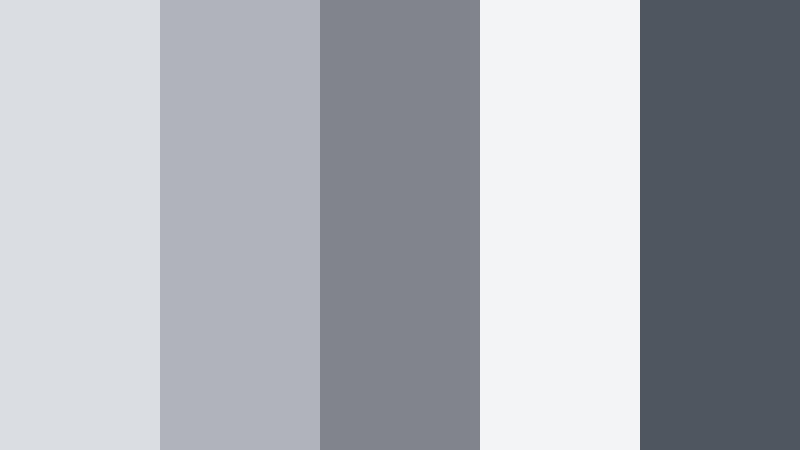
- HEX Codes: #dadde1, #b0b4ba, #81858b, #f2f4f6, #505660
- Mood: Muted, modern, and introspective like a city under soft clouds.
- Use for: Use for urban documentaries, cinematic b-roll reels, and modern channel branding.
Hushed City Skyline leans into cooler steel tones. The deeper slate (#505660) anchors the palette, while the pale grey-white (#f2f4f6) keeps frames bright enough for legible text and UI.
This is a strong pick for city-based vlogs, tech reviews, and documentary-style storytelling. Use the darker shades for titles, progress bars, and thumbnail frames, and grade your footage slightly cooler in Filmora to match the palette. It creates a consistent, thoughtful mood for street footage, office interiors, and rooftop scenes.
Gentle Harbor Mist
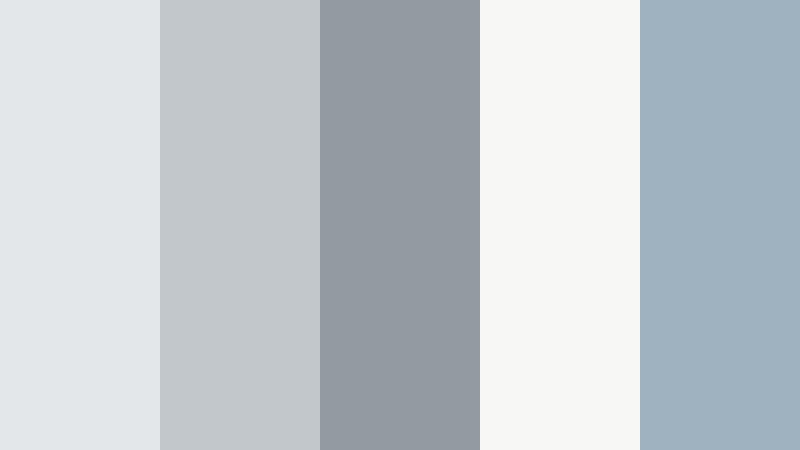
- HEX Codes: #e4e7ea, #c2c7cc, #949aa1, #f7f7f5, #9fb2bf
- Mood: Soothing, balanced, and slightly nautical without feeling cold.
- Use for: Nice for channel banners, subtle lower thirds, and calm tutorial backdrops.
Gentle Harbor Mist adds a muted blue-green (#9fb2bf) to a base of Misty Horizon greys. It feels nautical but not icy, ideal when you want calm visuals that still have a touch of color.
Use this palette for educational videos, how-to tutorials, and screen recordings where you need clean, distraction-free design. The near-white (#f7f7f5) makes great backgrounds for text overlays and callouts, while the blue accent can highlight key steps, timestamps, or chapter markers in your edits.
Cloudsoft Minimal Studio
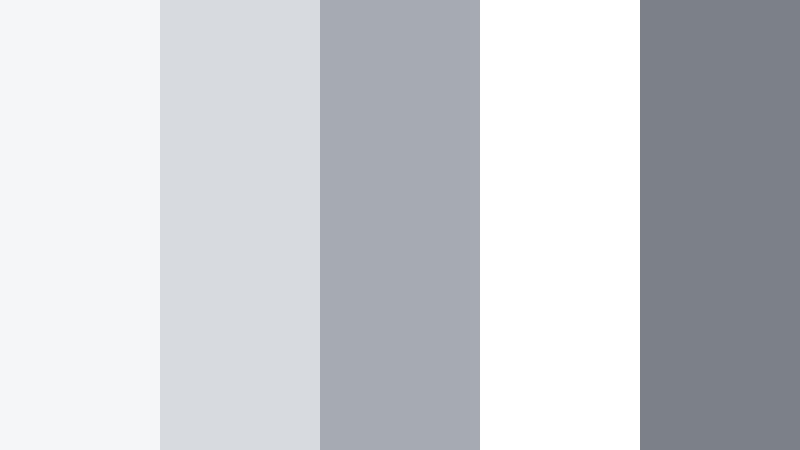
- HEX Codes: #f5f6f7, #d7dadf, #a6aab1, #ffffff, #7c8189
- Mood: Ultra clean, minimal, and softly professional.
- Use for: Perfect for tech unboxings, productivity content, and SaaS demo screens.
Cloudsoft Minimal Studio is almost entirely monochrome, built from airy whites and layered Misty Horizon greys. It feels like a bright studio with softbox lighting, giving a polished, distraction-free canvas.
Use it when you want your product or subject to stand out: unboxings, app demos, and productivity tutorials benefit from this clean approach. In your thumbnails, pair white or very light backgrounds with mid-grey text and a single dark accent for maximum clarity in YouTube feeds and mobile screens.
Romantic & Dreamy Misty Horizon Color Palettes
Blush Harbor Dream
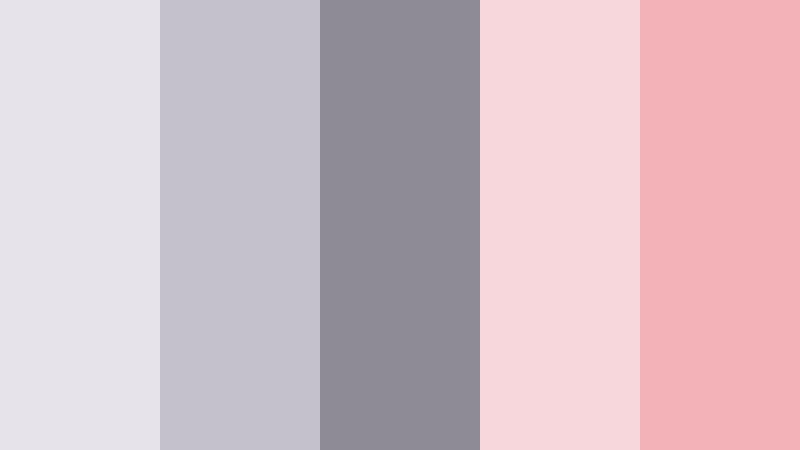
- HEX Codes: #e6e4ea, #c4c1cb, #8e8b96, #f7d7dc, #f3b1b8
- Mood: Romantic, dreamy, and softly nostalgic.
- Use for: Lovely for wedding highlight reels, engagement photos slideshows, and dreamy lookbooks.
Blush Harbor Dream combines cool Misty Horizon greys with gentle blush pinks. The mix feels romantic but not overly sweet, like a wedding morning under soft clouds.
Use the pinks for titles, handwritten-style fonts, and accent shapes in your wedding videos or love stories, while keeping backgrounds cool and neutral. For thumbnails, a soft pink title over a light grey frame instantly communicates romance and tenderness without overwhelming your footage.
Lilac Haze Promenade
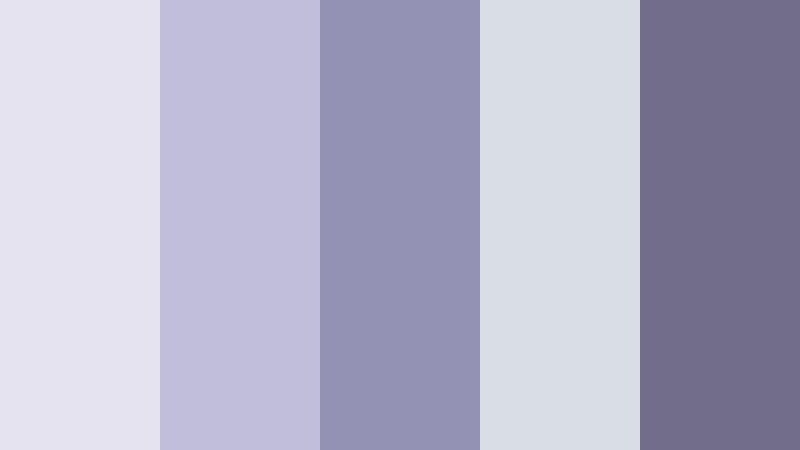
- HEX Codes: #e5e3f0, #c1bed9, #9492b4, #d9dde4, #726d8b
- Mood: Whimsical, artistic, and a bit ethereal.
- Use for: Use for fashion reels, dreamy b-roll, and aesthetic TikTok edits.
Lilac Haze Promenade pushes Misty Horizon into a pastel, artistic zone with soft lilac and periwinkle shades. It feels like walking along a waterfront at blue hour, with a subtle fantasy twist.
Try this palette for fashion content, poetry visuals, or dreamy TikTok transitions. Use the deeper lilac (#726d8b) for text and outlines, with pale purples and greys as backgrounds. It looks especially good paired with slow-motion shots, lens blur, and soft glow effects in Filmora.
Rose Veil Over Dunes
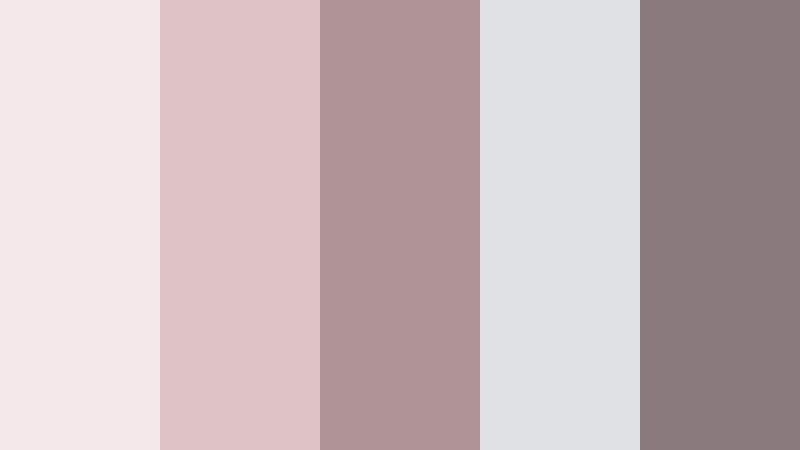
- HEX Codes: #f4e8ea, #ddc2c6, #b09396, #dfe1e4, #8a7a7d
- Mood: Softly vintage, sentimental, and warm.
- Use for: Best for nostalgic vlogs, vintage travel diaries, and family memory videos.
Rose Veil Over Dunes blends dusty rose and warm taupe with Misty Horizon greys, giving a gentle, almost sepia feel without turning everything brown. It is nostalgic and flattering on skin tones.
Use it to grade family footage, old trip videos, or storytime vlogs where you want a memory-filled vibe. Frame your thumbnails with the warm taupes and reserve the soft greys for background panels and subtitles, keeping everything easy to read while still feeling vintage.
Pastel Horizon Reverie
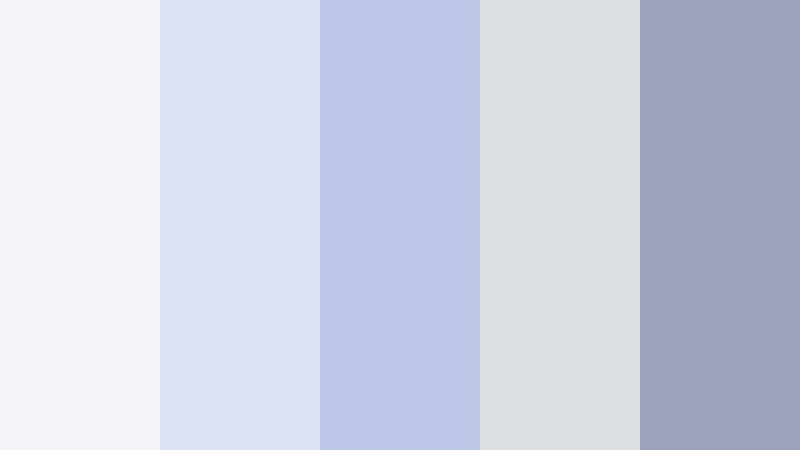
- HEX Codes: #f4f5fb, #dde3f5, #bcc7e7, #dcdfe3, #9ca3ba
- Mood: Light, dreamy, and quietly optimistic.
- Use for: Great for gentle channel intros, study-with-me videos, and soft-core gaming overlays.
Pastel Horizon Reverie is featherlight: a mix of pale blues and soft Misty Horizon greys that feels hopeful and airy. It is perfect when you want a dreamy look but still need a neutral base.
Use the lightest tones for background cards behind your webcam, chat windows, or captions, and save the slightly deeper blue-greys for menu bars and icons. This works well in Filmora for cozy vlogs, productivity content, or chill gaming where the focus is comfort rather than high energy.
Moonlit Ballet Studio
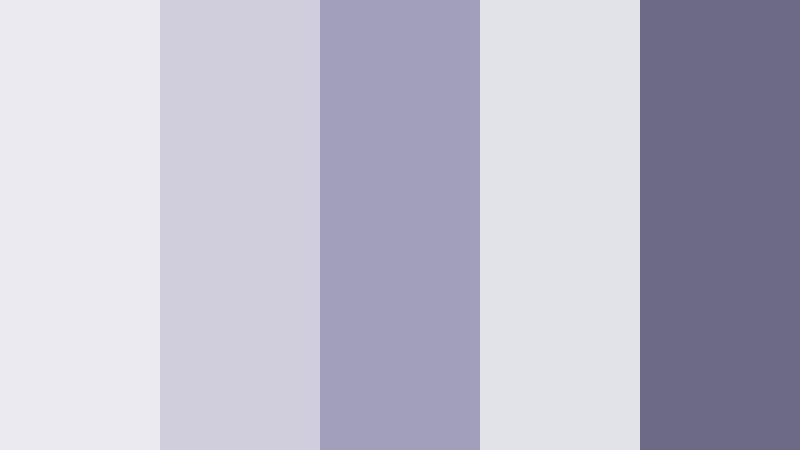
- HEX Codes: #ebeaf0, #d0cedc, #a29fba, #e1e3e8, #6c6a84
- Mood: Graceful, artistic, and gently dramatic.
- Use for: Perfect for dance films, performance promos, and fine art portfolios.
Moonlit Ballet Studio swirls soft lavender greys with Misty Horizon tones for a poised, stage-lit feel. The darker accent (#6c6a84) gives enough depth for elegant typography and logo marks.
Use this palette for performance videos, choreography reels, and art portfolio presentations. Combine the pale tones with spotlight or vignette effects in Filmora to suggest a stage, and use the deeper lavender for title cards and credits that look refined and cohesive.
Modern & Minimal Misty Horizon Color Palettes
Urban Loft Minimal

- HEX Codes: #e3e4e6, #b9bcc0, #8b8f94, #ffffff, #1f242a
- Mood: Sleek, modern, and confident with strong contrast.
- Use for: Great for tech channels, startups, and UI-heavy explainer videos.
Urban Loft Minimal pairs light Misty Horizon neutrals with a crisp white and a strong charcoal (#1f242a). This creates a bold, high-contrast palette that still feels sophisticated and clean.
Use white and pale greys for backgrounds, and reserve charcoal for key text, navigation bars, or thumbnail titles. This approach works especially well for tech content, startup intros, and pitch-style explainers, where you want clarity, authority, and a modern aesthetic.
Concrete Studio Grid

- HEX Codes: #d4d6d8, #b0b3b6, #7f8285, #f5f5f5, #ffb347
- Mood: Creative, structured, and slightly industrial with a pop of energy.
- Use for: Use for design tutorials, motion graphics packs, and modern course branding.
Concrete Studio Grid uses industrial Misty Horizon greys as a neutral base, then adds a bold amber accent (#ffb347) for energy. It feels like a design studio wall with a bright sticky note that draws your eye.
Use the greys for backgrounds, grids, and layout frames, and let the amber accent highlight calls to action, progress steps, or important stats. This palette shines in motion graphics, course intros, and design breakdown videos where structure and creativity need to meet.
Monochrome Storyboard

- HEX Codes: #f3f4f5, #d7d8da, #b2b3b6, #8b8c8f, #5a5b5e
- Mood: Professional, editorial, and focused.
- Use for: Best for documentary frames, infographic explainers, and case study videos.
Monochrome Storyboard is a pure Misty Horizon grayscale, stepping from soft light grey to darker slate. It gives an editorial feel, keeping full attention on your content, footage, and typography.
Use it for documentary-style explainers, interviews, case studies, or corporate content. In Filmora, you can create title cards, charts, and lower thirds directly from this palette, ensuring that your visuals never distract from key information or storytelling.
Cinematic & Moody Misty Horizon Color Palettes
Stormfront Cinematic Grade

- HEX Codes: #d0d3d6, #a4a8ad, #74787e, #43474d, #16181c
- Mood: Moody, dramatic, and cinematic.
- Use for: Ideal for short films, thrillers, and intense storytelling sequences.
Stormfront Cinematic Grade builds from soft Misty Horizon midtones into deep, inky shadows (#16181c). It mimics an incoming storm, adding weight and drama to your visuals.
Use this palette for narrative shorts, thriller-style edits, or intense storytime videos. Darker tones handle titles, frames, and letterboxing, while mid-greys keep faces and details visible. Pair it with slow transitions and subtle film grain in Filmora to reinforce the cinematic atmosphere.
Harbor Rain Noir

- HEX Codes: #ccced2, #a0a3a8, #707379, #30343a, #0d1014
- Mood: Gritty, mysterious, and rain-soaked noir.
- Use for: Use for crime vlogs, night city b-roll, and cyberpunk edits.
Harbor Rain Noir takes Misty Horizon into a dark, rain-slick direction. High-contrast greys tumble into near-black tones (#0d1014), perfect for night scenes and neon highlights.
Use this for crime commentary, cyberpunk city b-roll, or moody night vlogs. Let your footage lean cool and desaturated, then bring in neon or UI accents that pop against the deep greys. It works well with glitch effects, double exposure, or light streak overlays in Filmora.
Twilight Dock Reflections

- HEX Codes: #d6d8dc, #aaadb4, #7c828a, #28303a, #4e6e8e
- Mood: Contemplative, coastal, and quietly dramatic.
- Use for: Best for travel films, reflective monologues, and title cards over water scenes.
Twilight Dock Reflections unites cool Misty Horizon greys with a deep twilight blue (#4e6e8e) and dark navy (#28303a). It feels contemplative, like watching the last light fade over the water.
Use this palette in travel films, reflective monologues, or title cards over ocean or lake shots. Grade your footage a bit cooler and desaturated, then use the twilight blue for key text, lower third bars, and transitions. It pairs beautifully with slow pans, timelapses, and calm voiceover.
Tips for Creating Misty Horizon Color Palettes
Misty Horizon works best when you balance its soft greys with either subtle accents or controlled contrast. Here are practical tips for using it in video, design, and branding.
- Choose your base: start with 2 to 3 Misty Horizon greys for backgrounds, panels, and overlays, then add 1 highlight and 1 accent color.
- Control contrast for readability: use darker greys or near-black for text over light Misty Horizon tones, and avoid mid-grey text on mid-grey backgrounds.
- Add a single accent: pair Misty Horizon with one accent (like blush, lilac, amber, or twilight blue) for buttons, CTAs, and key icons so your UI stays focused.
- Match your footage: lightly cool down your clips in Filmora so real-world footage does not clash with your grey-blue UI and thumbnail colors.
- Stay consistent across assets: use the same HEX codes for thumbnails, lower thirds, titles, and end screens to build a recognizable brand identity.
- Adapt for platforms: increase contrast and saturation slightly for small mobile screens, where soft greys can otherwise look washed out.
- Test in grayscale: quickly preview your frames in black and white to check if there is enough tonal separation between background, subject, and text.
- Save presets: once you dial in a Misty Horizon grade in Filmora, save it as a preset so you can apply it to future projects with a single click.
Misty Horizon color palettes offer a calm, cinematic alternative to harsh black-and-white or overly bright aesthetics. Whether you lean into soft and serene, romantic, minimal, or moody looks, these HEX combinations help you shape emotion and build a coherent visual identity for your channel or brand.
Apply your favorite Misty Horizon palette to titles, overlays, and grading inside Filmora to keep everything aligned, from long-form videos to Shorts and social cutdowns. Experiment with the palettes above, tweak them with Filmora's tools, and save the ones that feel the most like your style.
Over time, a consistent Misty Horizon look can become part of your signature, making your videos instantly recognizable in feeds and recommendations. Filmora gives you the controls to refine that style without needing a full studio-level color workflow.
secure download