

 100% Security Verified | No Subscription Required | No Malware


 ChatGPT
 Perplexity
 Gemini
 Claude
 Grok
Grok
Radiant Cyan sits between blue and green and instantly feels clean, modern, and full of oxygen. It suggests clarity, innovation, and digital freshness, which is why it shows up so often in tech brands, futuristic interfaces, and wellness content. In video, it can read as either soft and airy or electric and neon, depending on how you pair it and how bright you push it in color grading.
For creators, Radiant Cyan is a powerful accent for intros, lower thirds, overlays, and thumbnails, especially when you want a bright, clickable look that still feels professional. Below are 15 ready-to-use Radiant Cyan color palettes with HEX codes, tailored for Filmora users and content creators so you can keep your thumbnails, vlog sequences, title cards, and branding visuals consistent across every platform.
In this article
Soft And Airy Radiant Cyan Color Palettes
Morning Mist Radiance

- HEX Codes: #c9f5ff, #7fe8ff, #00c4d6, #ffffff, #8ea0b5
- Mood: Calm, uplifting, and gently refreshing like an early coastal sunrise.
- Use for: Ideal for vlog openings, lifestyle reels, and minimal travel intros that need a clean, breezy atmosphere.
This palette wraps Radiant Cyan in a halo of soft sky tones and pure white, with #8ea0b5 bringing in a cool misty blue gray. It feels like filming next to a large window on a bright morning, where everything is softly lit and breathable.
Use it for lifestyle vlogs, morning routines, wellness content, or minimalist channel branding. Make Radiant Cyan your accent for title text or buttons, keep white as your background, and use the pale blues for subtle overlays, lower thirds, and thumbnail frames that promise calm and clarity.
Pro Tip: Keep Your Radiant Cyan Aesthetic Consistent In Filmora
When you commit to a gentle Radiant Cyan palette like Morning Mist Radiance, consistency is everything. In Filmora, you can reuse title templates, lower thirds, and background shapes in your preferred HEX values across intros, talking head clips, b roll, and even Shorts or Reels exports.
Save your Radiant Cyan color codes inside custom presets for text, shapes, and overlays. That way, every vlog episode or lifestyle edit can open with the same soft cyan tint, giving your channel a recognizable, polished look without redoing the design from scratch each time.
AI Color Palette
If you already have a screenshot, mood board, or thumbnail design that nails your Radiant Cyan vibe, you can let Filmora handle the heavy lifting. Filmora's AI Color Palette feature lets you pull the color style from a reference image and apply a cohesive Radiant Cyan look across your entire timeline.
Import your reference, choose a clip as the target, and allow AI Color Palette to match tones, saturation, and overall mood. This keeps your Morning Mist Radiance style aligned from intro to end screen, even when your footage was shot in different locations or lighting conditions.
 secure download

HSL, Color Wheels & Curves
Light Radiant Cyan tones can easily shift too green or too blue depending on your footage. Use Filmora's HSL and color wheels to nudge cyan and blue hues toward the exact radiant tone you want, and use curves to lift highlights while keeping shadows neutral so your whites stay clean instead of tinted.
By adjusting luminance on cyan in HSL and then fine tuning contrast with curves, you can turn a flat scene into a crisp, airy visual that matches the Morning Mist Radiance palette without overexposing skin tones or text elements.
secure download1000+ Video Filters & 3D LUTs
Once your Radiant Cyan palette is set, you can push it into a specific style using Filmora's filters and LUTs. Subtle film looks, pastel filters, or clean studio LUTs can all sit on top of Morning Mist Radiance to give your vlogs a signature finish.
Filmora's video filters and 3D LUTs make it easy to test different moods quickly. Apply a preset, then adjust intensity so your Radiant Cyan highlights stay bright but not overpowered, perfect for cohesive intros, channel banners, and thumbnail frames.
secure downloadCloudline Daydream
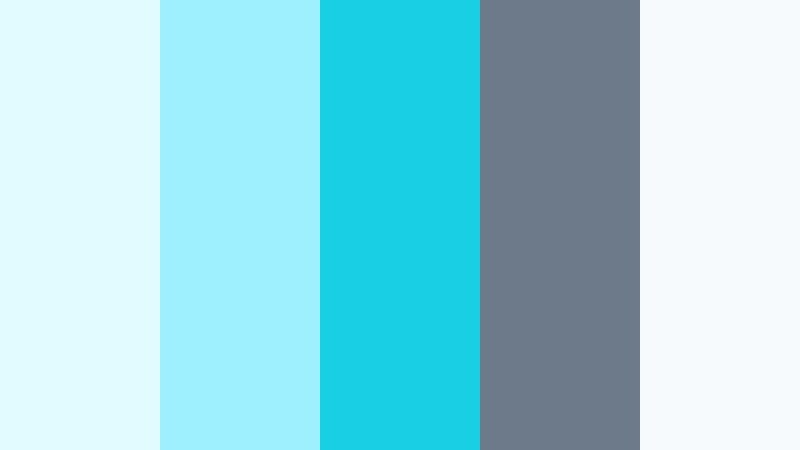
- HEX Codes: #e1fbff, #9ff0ff, #19d0e2, #6c7a89, #f7fafc
- Mood: Dreamy, optimistic, and slightly whimsical with a polished edge.
- Use for: Use for channel art, dreamy b-roll transitions, and title cards for inspirational or tech-lite content.
Cloudline Daydream combines soft Radiant Cyan with cool whites and a muted slate gray, giving you a weightless, floating feel that still looks modern. The darker accent (#6c7a89) adds just enough contrast for text, icons, or UI frames.
This palette is great for motivational edits, slow pan b roll, and B2C tech content where you want clean, gentle visuals. Use the light cyan and white as your base, then bring in the deeper Radiant Cyan and slate for thumbnail typography, call to action buttons, and animated title bars.
Lagoon Breeze Glow
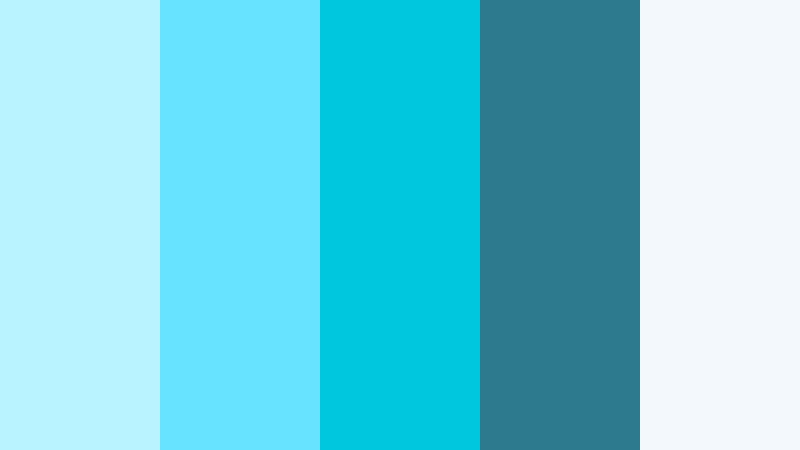
- HEX Codes: #b8f3ff, #68e3ff, #00c7dd, #2d7a8c, #f2f8fb
- Mood: Fresh and breezy with a hint of tropical escape.
- Use for: Great for travel vlogs, wellness channels, and upbeat summer promo graphics or intro cards.
Lagoon Breeze Glow leans into watery Radiant Cyan and teal, grounded by a deeper blue green (#2d7a8c) and a foamy off white (#f2f8fb). It feels like a modern beach resort identity or a spa brand with a digital twist.
Apply this palette to travel intros, wellness routines, or summer campaign thumbnails. Use the deepest teal for bold text or logo marks, and keep the lighter cyans for gradated backgrounds, animated waves, or softly glowing overlays that sit on top of your footage in Filmora.
Studio Light Minimal
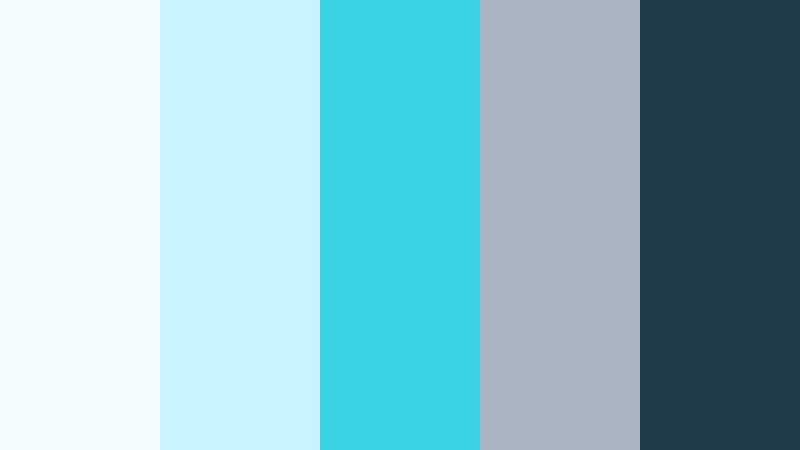
- HEX Codes: #f5fdff, #c8f3ff, #39d2e4, #aab4c2, #1f3b4a
- Mood: Clean, professional, and gently energetic with studio-style clarity.
- Use for: Use in tech reviews, app demos, and crisp UI overlays where clarity and focus matter.
Studio Light Minimal merges crisp whites and cool grays with a vivid yet controlled Radiant Cyan (#39d2e4). The deep navy (#1f3b4a) provides strong contrast for headlines, icons, or interface callouts.
This palette shines in software demos, unboxings, and productivity tutorials. Make the whites and light blues your backdrop, then drop in cyan accents for highlights on key features, pointer arrows, and animated UI panels inside Filmora so your viewers stay focused on what matters.
Nordic Ice Drift
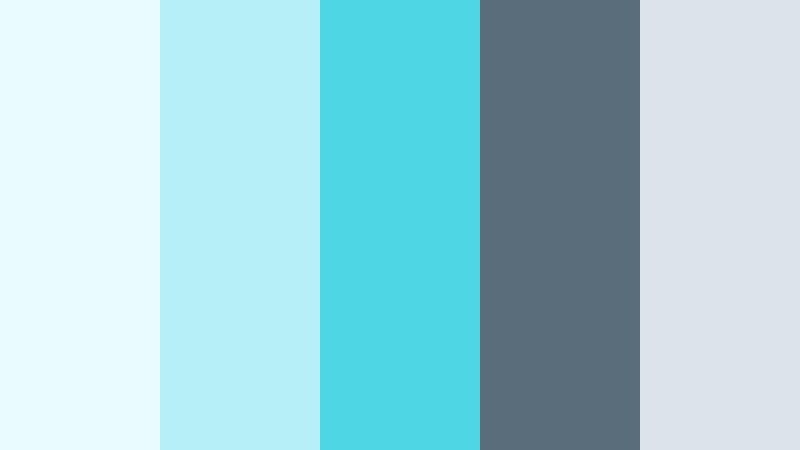
- HEX Codes: #e9fbff, #b6eff7, #4ed6e5, #5a6d7a, #dce3ea
- Mood: Cool, contemplative, and quietly sophisticated like a northern seascape.
- Use for: Best for cinematic b-roll, calm productivity edits, and subtle lower thirds for documentary style videos.
Nordic Ice Drift blends icy Radiant Cyan highlights with misty greys and blue slate. It feels restrained and minimal, great when you want an elevated cool tone without going neon or playful.
Use this palette for slow travel films, desk setup tours, or documentary style storytelling. In thumbnails and intros, keep Radiant Cyan for thin lines, progress bars, and gentle title glows, while the greys shape backgrounds and frames that let the footage breathe.
Bold And Dynamic Radiant Cyan Color Palettes
Neon Grid Pulse
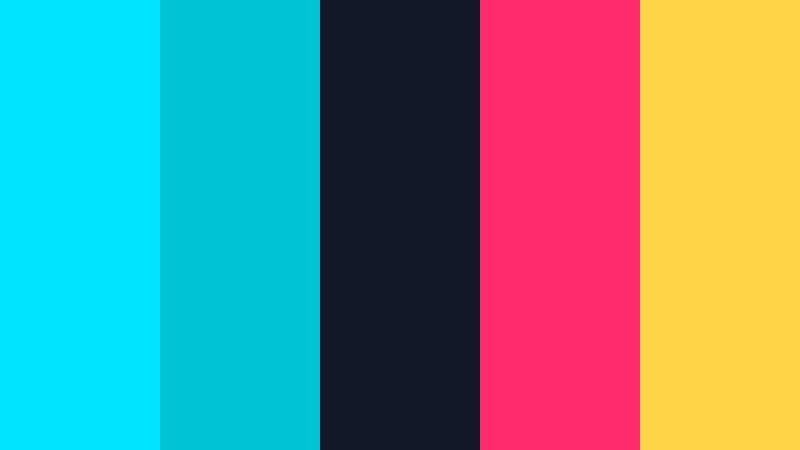
- HEX Codes: #00e4ff, #00c4d6, #111827, #ff2b6c, #ffd447
- Mood: High-energy, futuristic, and electric with retro arcade flair.
- Use for: Perfect for gaming intros, motion graphics, and cyberpunk style thumbnails that must grab attention instantly.
Neon Grid Pulse turns Radiant Cyan up to maximum brightness and pairs it with deep navy, hot magenta, and neon yellow. The result feels like glowing HUD elements over a dark city at night, or a synthwave arcade screen.
Use this palette when you need instant impact for gaming content, tech countdowns, or glitch transitions. Let dark navy dominate your background, then fire Radiant Cyan, magenta, and yellow into outlines, scanlines, streaks, and bold title text built in Filmora.
Tropical Splash Beat
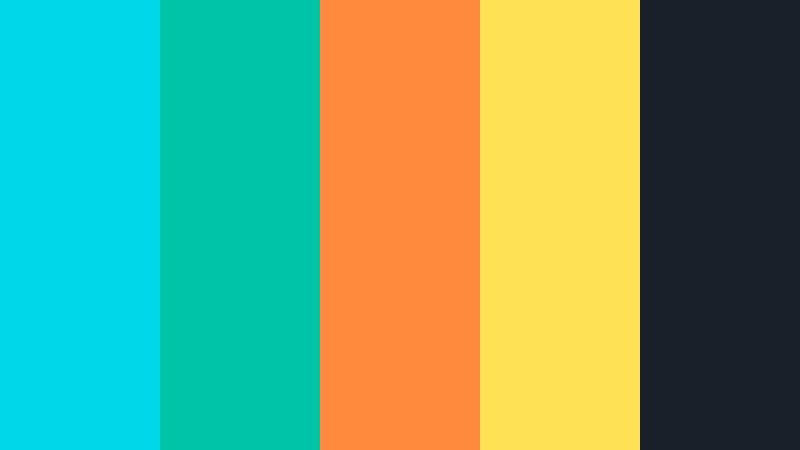
- HEX Codes: #00d7e9, #00c4a7, #ff8a3c, #ffe155, #18212a
- Mood: Playful, rhythmic, and sun-drenched with a festival atmosphere.
- Use for: Use in summer campaigns, upbeat music videos, and playful product promos or shorts.
Tropical Splash Beat throws vibrant Radiant Cyan against juicy orange and sunny yellow, grounded by a deep charcoal (#18212a). It feels energetic and festival ready, perfect for music driven content.
Drop this palette into animated text, sticker style graphics, and quick-cut social edits. Let Radiant Cyan and teal frame your scenes while orange and yellow punch out keywords, price tags, or countdown timers in Filmora overlays and transitions.
Cyber Circuit Rush
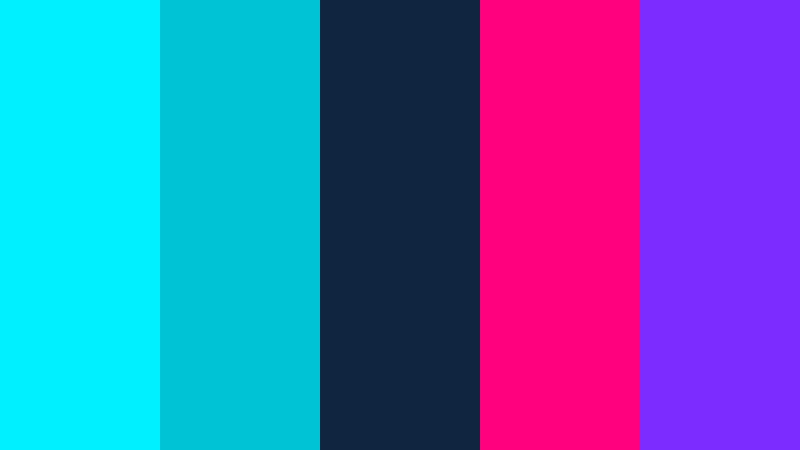
- HEX Codes: #00f0ff, #00c4d6, #102540, #ff007f, #7b2cff
- Mood: Intense, digital, and adrenaline-fueled like a high-speed data stream.
- Use for: Ideal for tech launches, esports montages, and kinetic typography sequences.
Cyber Circuit Rush uses ultra bright Radiant Cyan and deep blue (#102540) as its base, then layers in neon magenta and electric purple for pure sci fi energy. It feels like code flying across a dark interface.
Use it for product launches, esports highlight reels, and kinetic type intros. Dark blue becomes your canvas, Radiant Cyan your primary UI line color, and the magenta and purple your accent strokes and animated glows around logos inside Filmora.
Urban Night Splash
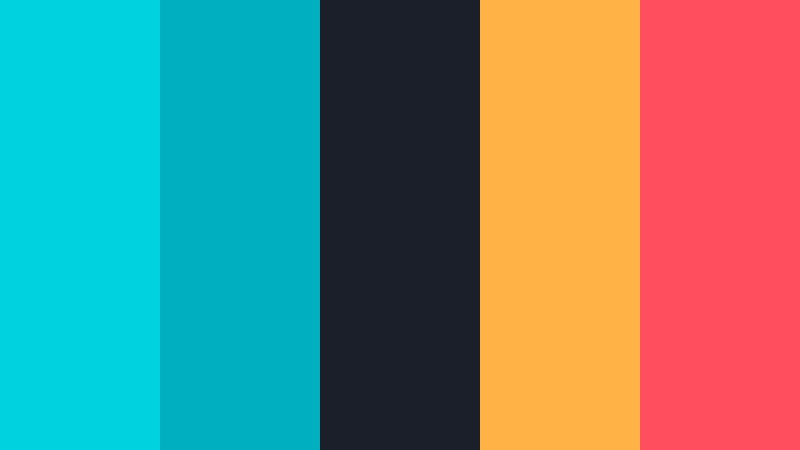
- HEX Codes: #00d2e0, #00b0c0, #1b1f2a, #ffb347, #ff4f5e
- Mood: Edgy, urban, and cinematic like city lights after rain.
- Use for: Great for street vlogs, fashion lookbooks, and urban travel intros that need contrast and attitude.
Urban Night Splash frames Radiant Cyan reflections against deep charcoal and warm neons (#ffb347 and #ff4f5e). It looks like neon signs bouncing off wet pavement in a downtown alley.
Apply it to street photography slideshows, fashion edits, or city travel vlogs. Use the dark background to make Radiant Cyan and warm neons pop in titles, frame edges, and animated brush strokes, giving your thumbnails and intros a moody but energetic punch.
Sport Motion Charge
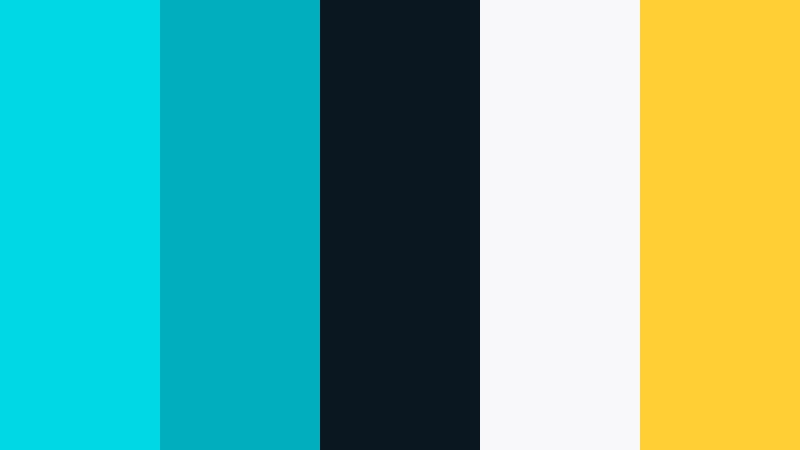
- HEX Codes: #00d8e5, #00aebe, #0b1720, #f8f8fa, #ffcf33
- Mood: Athletic, punchy, and fast with a performance mindset.
- Use for: Use in sports highlights, fitness intros, and energetic lower thirds for coaching or challenge videos.
Sport Motion Charge mixes Radiant Cyan with dark navy and a clear highlight yellow (#ffcf33). It immediately suggests speed, metrics, and performance tracking graphics.
Use navy for backgrounds, Radiant Cyan for motion trails and metric bars, and yellow for personal best numbers or calls to action. In Filmora, you can animate lines, arrows, and shape masks in these colors to make your fitness or sports content feel driven and dynamic.
Elegant And Modern Radiant Cyan Color Palettes
Glass Loft Serenity
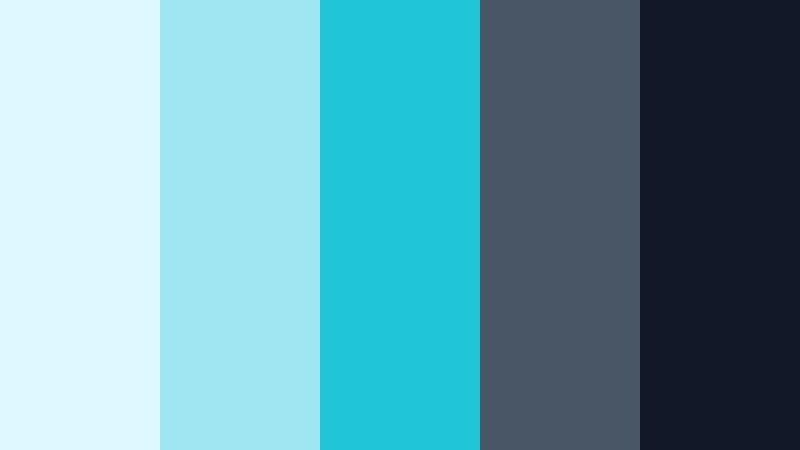
- HEX Codes: #dff8ff, #9fe6f2, #21c5d8, #495666, #111827
- Mood: Modern, airy, and composed with boutique studio vibes.
- Use for: Ideal for design portfolios, creative agency reels, and UI case-study breakdowns.
Glass Loft Serenity pairs luminous Radiant Cyan with steel blues and charcoal, evoking glass walls, polished concrete, and high end studio lighting. It feels refined and creative without being loud.
For portfolio videos and case studies, use pale cyan for backgrounds and #21c5d8 for key accents such as buttons, timeline markers, and logo reveals. The darker tones are ideal for typography and sleek split screen layouts in Filmora that show both your work and on screen text.
Cyan Noir Luxe
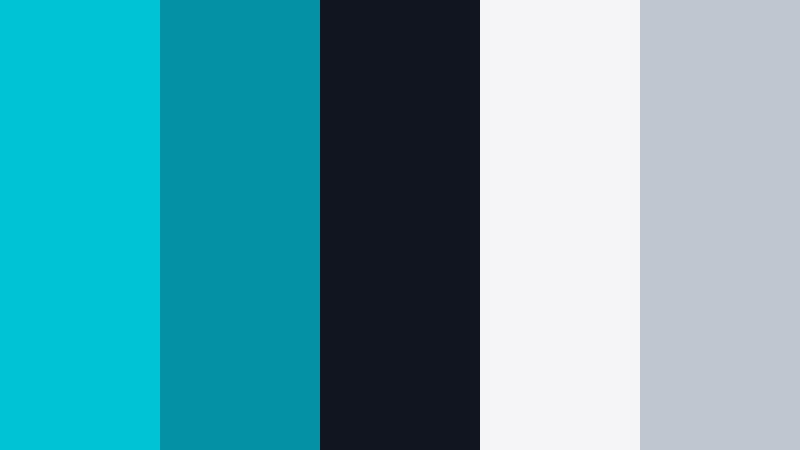
- HEX Codes: #00c4d6, #0591a5, #10151f, #f5f5f7, #c0c6cf
- Mood: Sophisticated, cinematic, and quietly luxurious.
- Use for: Best for brand intros, trailers, and luxe product showcases where elegance meets modern tech.
Cyan Noir Luxe slices vivid Radiant Cyan through near black, then softens everything with silver and light grey. It feels like a high end tech brand or luxury gadget launch.
Use the deep near black (#10151f) as your stage and let Radiant Cyan outline products, create elegant interface lines, or highlight logo animations. Silver and light grey can shape subtle shadows and clean UI panels for thumbnails, banners, and intro sequences in Filmora.
Aurora Boardroom
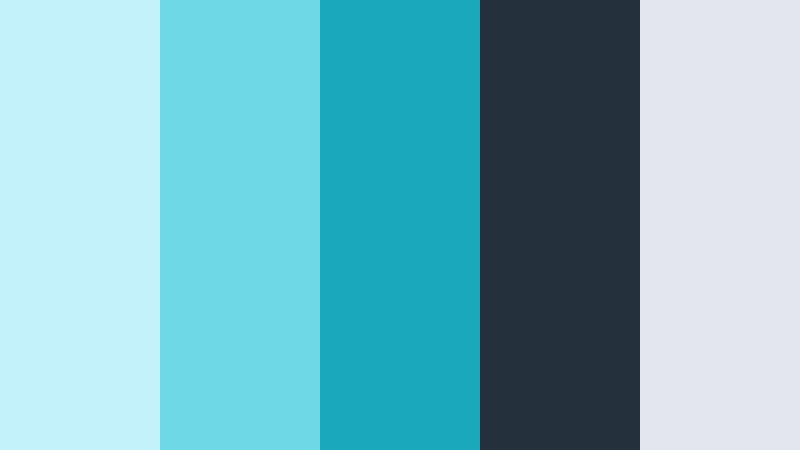
- HEX Codes: #c3f2fb, #6fd8e7, #1aa9bc, #24313c, #e3e7ed
- Mood: Professional, forward-thinking, and confidently calm.
- Use for: Use in business explainers, startup pitch videos, and corporate templates that still feel fresh.
Aurora Boardroom uses Radiant Cyan in a slightly muted way, backed by slate and soft greys. It feels like an updated corporate palette that is serious but not stiff.
Apply it to pitch decks turned into video, KPI explainers, and business case studies. Use cyan for graphs, progress circles, and icon accents, while the darker slate holds text and background panels together in Filmora templates.
Seaport Modern Chic
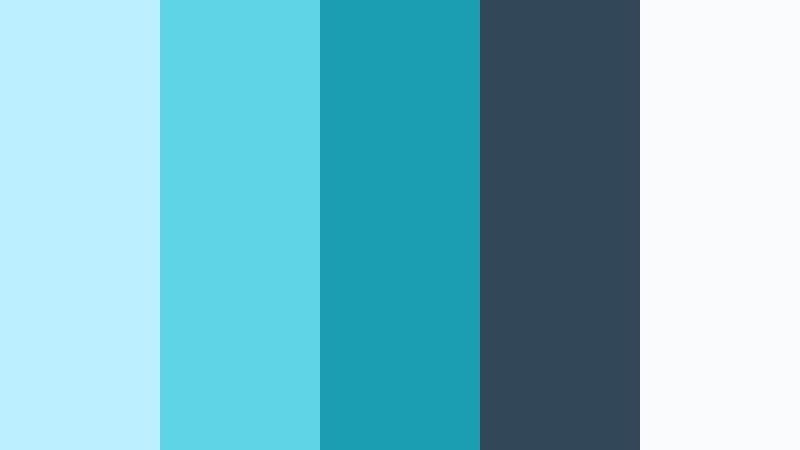
- HEX Codes: #bcefff, #5fd4e6, #1a9fb2, #324757, #fafbfc
- Mood: Refined, coastal, and design-forward with boutique brand energy.
- Use for: Perfect for lifestyle brands, boutique hotels, and minimal packaging reveals on camera.
Seaport Modern Chic blends Radiant Cyan with deep seaport blues and generous white space. It feels like a coastal boutique, airy and design focused.
Use the whites and pale cyan for clean background blocks in unboxing or product highlight videos, while the deeper blues anchor logos, taglines, and callouts. This palette is ideal for calm but premium branding across thumbnails, website overlays, and Filmora title designs.
Playful And Futuristic Radiant Cyan Color Palettes
Retro Arcade Surf
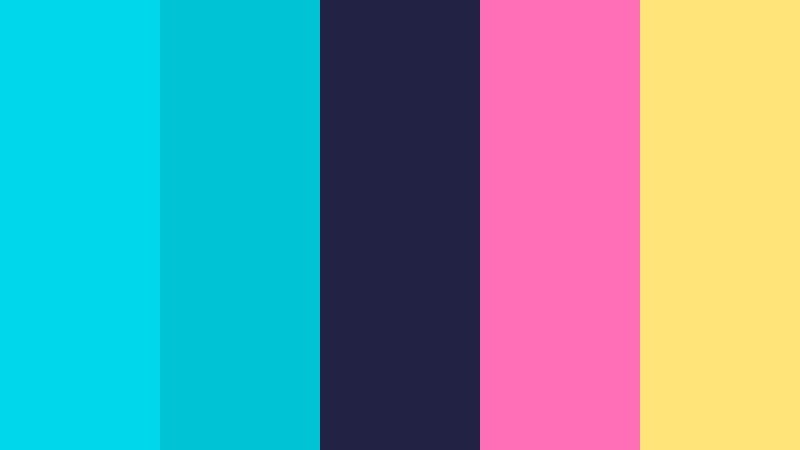
- HEX Codes: #00d7ea, #00c4d6, #222344, #ff6fb7, #ffe47a
- Mood: Playful, nostalgic, and surfy with synthwave flair.
- Use for: Great for retro edits, creator intro sequences, and playful motion graphics in shorts or reels.
Retro Arcade Surf mixes Radiant Cyan with deep indigo, bubblegum pink, and a soft yellow. It feels like an 80s game cabinet smashed into a sunny beach postcard.
Use the dark indigo (#222344) as your base, then stack Radiant Cyan for waves, lines, and HUD style frames. Pink and yellow can highlight your name, subscriber callouts, and playful sticker animations in Filmora, especially for creator intros and quick social edits.
Hologram Candy Pop
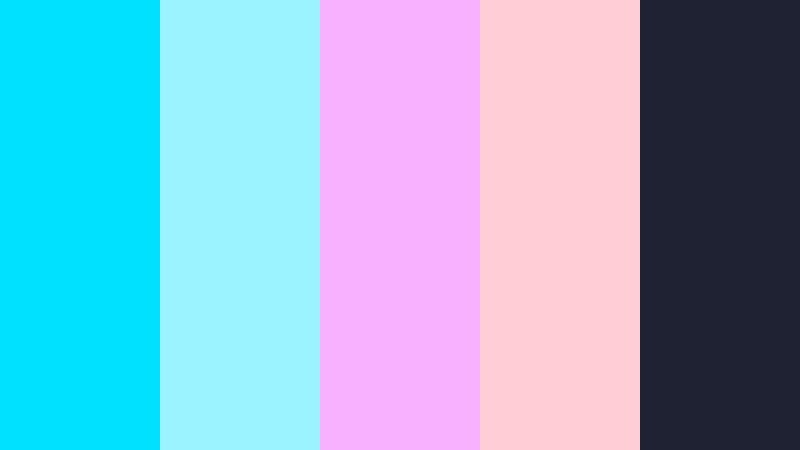
- HEX Codes: #00e0ff, #9af3ff, #f8b1ff, #ffcdd4, #1e2233
- Mood: Sweet, futuristic, and slightly surreal like holographic candy.
- Use for: Use for K-pop inspired edits, beauty content, and playful channel rebrands that lean into pastel neon.
Hologram Candy Pop pairs bright Radiant Cyan with pastel pinks and soft whites, all sitting on a dark ink backdrop (#1e2233). It feels dreamy, cute, and a bit sci fi at the same time.
Use this palette for beauty tutorials, K pop style edits, and playful rebrands. Let Radiant Cyan lead on text outlines, lens flare effects, and UI borders, while the pinks and whites shape gradient backgrounds and soft glow overlays in your Filmora projects and thumbnails.
Tips for Creating Radiant Cyan Color Palettes
Radiant Cyan is versatile, but the way you pair and balance it will decide whether your video looks soft, sporty, or cyberpunk. Use these tips to build or adapt palettes that stay readable, on brand, and flattering to your footage.
- Always pair Radiant Cyan with at least one dark and one light neutral so text and UI elements remain readable on both light and dark backgrounds.
- Decide if your Radiant Cyan should feel warm (leaning slightly toward teal) or cool (leaning toward blue) and adjust hue in Filmora's HSL controls to keep it consistent across clips.
- Limit yourself to one main accent color alongside Radiant Cyan (such as yellow, magenta, or coral) so thumbnails and overlays do not become visually noisy.
- Test your palette on mobile by exporting a frame or thumbnail mockup; if text or buttons are hard to read on a small screen, increase contrast or darken the background tone.
- Match Radiant Cyan to existing branding by sampling your logo color and building supporting tones around it rather than picking a new cyan from scratch.
- Use Radiant Cyan sparingly on skin tones; keep it mainly in backgrounds, text, and graphic elements so people look natural while the design still feels on theme.
- For cinematic looks, reduce saturation slightly and deepen shadows around Radiant Cyan accents; for gaming and pop content, do the opposite and boost saturation and contrast.
- Create a reusable style guide with HEX codes for your titles, backgrounds, and highlights so every new video in Filmora can be styled in minutes instead of redesigned.
Radiant Cyan can be soft as sea glass or bright as a neon sign, and the palettes above give you ready made combinations for almost any mood or niche. Whether you are designing thumbnails, building an intro sequence, or refreshing your channel branding, these HEX codes help you lock in a clear visual identity.
Try a soft airy palette for vlogs, a bold dynamic mix for gaming or sports, or an elegant modern set for brand and product videos. Then bring everything together in Filmora, where you can store your colors, grade your footage, and add motion graphics that all speak the same Radiant Cyan language.
The more consistently you use your chosen palette across intros, lower thirds, titles, and end screens, the more recognizable your content becomes. Experiment inside Filmora with these Radiant Cyan combinations, save your favorites as presets, and build a look that viewers can spot instantly in their feed.
secure download