

 100% Security Verified | No Subscription Required | No Malware


 ChatGPT
 Perplexity
 Gemini
 Claude
 Grok
Grok
Shadow Scene Purple sits between ink-dark violet and cinematic twilight. It carries a mix of mystery, focus, and quiet drama, so it naturally suits storytellers, streamers, and brands that want to feel modern and slightly moody instead of loud and primary-colored. In video editing, this kind of purple is often used in shadows, gradients, and accent graphics to frame your subject and guide the eye without stealing the spotlight.
For creators and Filmora users, choosing the right Shadow Scene Purple color palette can instantly upgrade intros, YouTube thumbnails, chapter cards, overlays, and social media branding. Below you will find 15 handpicked Shadow Scene Purple color combinations with HEX codes you can copy straight into your design tools or use as references for color grading inside Filmora.
In this article
Cinematic Shadow Scene Purple Color Palettes
Twilight Studio Glow

- HEX Codes: #2b193d, #5c2e7e, #f0b7ff, #ffd4a3
- Mood: Moody yet luminous, like a film set caught between golden hour and nightfall.
- Use for: Perfect for cinematic intros, moody vlog titles, and dramatic short film posters.
Twilight Studio Glow blends deep Shadow Scene Purple with glowing lilac and warm peachy highlights. It feels like a soundstage at dusk, where the lights are just strong enough to cut through the dark and wrap your subject in a soft spotlight.
Use the darker tones as backgrounds for titles or lower thirds, and reserve the lighter HEX codes for key text, call-to-action buttons, or accent shapes in your thumbnails. This palette works beautifully in Filmora when you want your opening titles, b-roll overlays, and end screens to all share the same cinematic purple atmosphere.
Pro Tip: Build a Cinematic Shadow Scene Purple Look in Filmora
To keep a Twilight Studio Glow style across your entire edit, start by designing one key asset, such as your intro title card. Sample the HEX codes for the background gradient and text, then reuse those same values in all your lower thirds, subscribe buttons, and chapter markers inside Filmora. This keeps every frame on-brand, from your first shot to your final end screen.
You can also tint your footage to echo the palette. Slightly cool the midtones toward Shadow Scene Purple while leaving skin tones warm and natural. This contrast between rich purples in the shadows and gentle warmth in the highlights gives your video a polished, big-screen feel.
AI Color Palette
If you have a still frame or design card that already nails your Twilight Studio Glow look, you can push that style across the entire timeline with Filmora's AI Color Palette feature. Import your reference image, let Filmora analyze its Shadow Scene Purple hues, then apply that palette to other clips so all your scenes share the same mood.
This is especially helpful when mixing camera sources or lighting setups. AI Color Palette can quickly align contrast, saturation, and purple tones, so your A-roll, B-roll, and cutaways feel like they are part of one cohesive visual world.
 secure download

HSL, Color Wheels & Curves
To fine-tune Shadow Scene Purple so it looks exactly how you imagined, adjust your clips with HSL, color wheels, and curves in Filmora. Use the HSL panel to target purples and magentas, then nudge their hue slightly cooler or warmer until they match your chosen HEX codes. With the color wheels, deepen shadows into #2b193d while pushing midtones gently toward #5c2e7e for a richer cinematic grade, as demonstrated in Filmora's advanced color grading tools.
Curves help you control contrast without crushing detail. Lift the highlights just enough to reflect the glow of #f0b7ff and #ffd4a3, while keeping blacks clean and inky. This balance ensures your footage stays dramatic, readable, and consistent with your Shadow Scene Purple design assets.
secure download1000+ Video Filters & 3D LUTs
If you want to move fast, Filmora's video filters and 3D LUTs make it easy to stylize your Shadow Scene Purple palettes in one click. Choose cinematic LUTs that lean toward cool, atmospheric tones, then tweak intensity so they complement, not overpower, your Twilight Studio Glow colors.
You can stack subtle glow, vignette, and film-grain filters on top to push the studio-at-dusk feeling even further. Save your favorite combination as a preset so every new project can instantly adopt the same Shadow Scene Purple identity.
secure downloadNeon Backlot Nights

- HEX Codes: #1a1027, #5a1e76, #ff4e9e, #39d5ff, #ffe8ff
- Mood: Electric and edgy, like a neon-lit alley behind a buzzing studio.
- Use for: Best for music videos, gaming intros, and bold YouTube channel branding.
Neon Backlot Nights throws deep Shadow Scene Purple together with hot pink and icy cyan for a cyberpunk alleyway vibe. The contrast between dark #1a1027 and bright #ff4e9e or #39d5ff makes text and UI elements jump off the screen.
Use the darker tones as full-frame backgrounds in your titles and end cards, then layer bright neon strokes around text, logos, and subscribe buttons. In Filmora, this palette is ideal for animated titles, glitch transitions, and high-energy gaming overlays that need instant impact in thumbnails and shorts feeds.
Director Chair Dusk
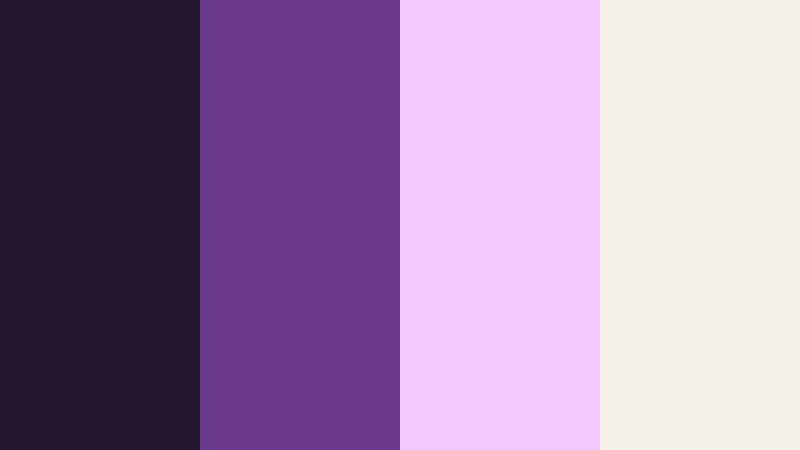
- HEX Codes: #241730, #6a3b8a, #f2c9ff, #f5f1e8
- Mood: Calm, focused, and subtly luxurious, like wrap time under soft studio lights.
- Use for: Great for filmmaker portfolios, behind-the-scenes reels, and documentary titles.
Director Chair Dusk is a muted, professional spin on Shadow Scene Purple. The deep base colors provide a confident backdrop, while the soft creams and lilacs feel refined and understated instead of flashy.
This palette fits filmmaker reels, BTS content, and case-study videos where storytelling and credibility matter. Use the dark tones for full backgrounds and the light hues for text, timeline graphics, and chapter cards. In Filmora, this combination works well with clean typography and minimal lower thirds for an auteur-inspired, portfolio-ready look.
Premiere Night Velvet

- HEX Codes: #1d1229, #4c255f, #8a4bb5, #f0e0ff, #ffd09c
- Mood: Glamorous and velvety, like a red carpet premiere under soft flash.
- Use for: Ideal for event promos, festival bumpers, and luxury brand collabs.
Premiere Night Velvet layers rich Shadow Scene Purple with plush lilac and warm spotlight tones. It feels like velvet curtains, soft flashes, and champagne lights around your subject.
Use it to brand event trailers, festival intros, and sponsorship segments. Reserve the warm #ffd09c and #f0e0ff for highlights on logos and calls to action, while the deeper purples frame your footage. In thumbnails, this palette signals prestige and high production value at a glance.
Lens Flare Midnight

- HEX Codes: #090712, #372055, #7f4fd1, #ffc857
- Mood: Intense and focused, with sharp pops of light against deep shadows.
- Use for: Perfect for trailer graphics, title cards, and action sequences.
Lens Flare Midnight contrasts almost-black shadows with concentrated purple midtones and a single golden highlight in #ffc857. It echoes night exteriors where every light streak stands out.
Use the dark colors for backgrounds and vignettes, then save the bright yellow for accents around titles, impact frames, or logo stings. In Filmora, this palette works brilliantly with light leak overlays and fast cuts for action trailers, sports edits, or thriller intros.
Soft & Romantic Shadow Scene Purple Color Palettes
Lavender Edit Suite
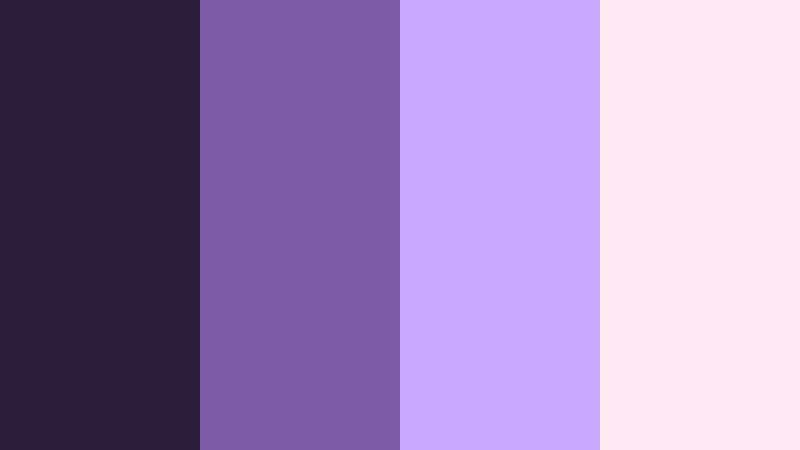
- HEX Codes: #2a1d3a, #7d5ba6, #c8a9ff, #ffe9f2
- Mood: Soft, dreamy, and creative, like a quiet edit room washed in pastel light.
- Use for: Lovely for couple vlogs, travel diaries, and calm productivity content.
Lavender Edit Suite surrounds deep Shadow Scene Purple with soft lavender and blush tones. It feels calm, personal, and slightly nostalgic, perfect for gentle storytelling.
Use the deeper shade as a subtle border or lower third, then lean on #c8a9ff and #ffe9f2 for backgrounds behind your text, journaling overlays, or YouTube community posts. This palette keeps your thumbnails clean and airy while still feeling cinematic and consistent across your Filmora projects.
Soft Focus Script

- HEX Codes: #312039, #9a6fb4, #f3c2ff, #ffe3cc, #faf6f9
- Mood: Nostalgic and tender, like a handwritten script under soft-focus lights.
- Use for: Best for wedding films, poetry reels, and heartfelt storytelling.
Soft Focus Script blends Shadow Scene Purple with milky lilac, peach, and off-white. The result feels like a memory: gentle contrast, creamy highlights, and a romantic glow.
Use the darker purple for understated titles and the pale tones as full-frame backgrounds for quotes, vows, and captions. In Filmora, pair this palette with slow dissolves and soft blur transitions for wedding highlight reels, lyric videos, or emotional montage edits.
Backstage Blush
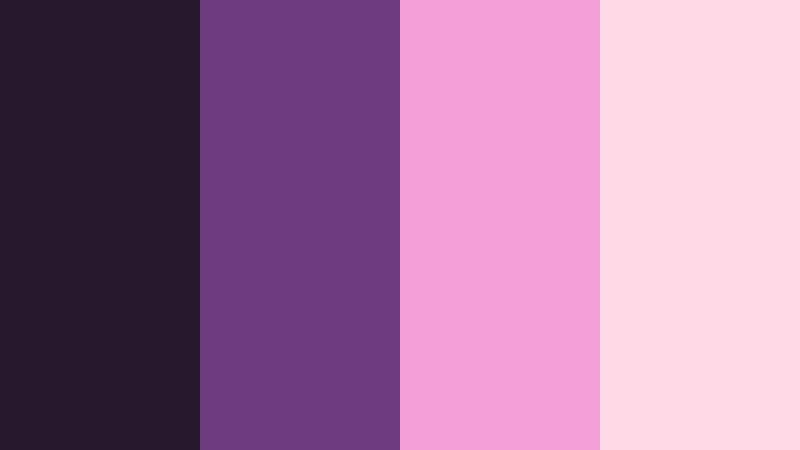
- HEX Codes: #26172c, #6c3c7e, #f3a0d7, #ffd9e6
- Mood: Intimate and playful, like stolen moments backstage before the show.
- Use for: Great for beauty channels, GRWM videos, and fashion lookbooks.
Backstage Blush pairs moody Shadow Scene Purple with bright rosy pinks. It is feminine, fun, and slightly glamorous, ideal for personality-driven content.
Use the purple as a sophisticated grounding color in your banners and lower thirds, then let #f3a0d7 and #ffd9e6 highlight product shots, outfit titles, and callouts. In thumbnails, this palette instantly reads as beauty or fashion, helping your channel look curated and cohesive.
Quiet Cinema Haze
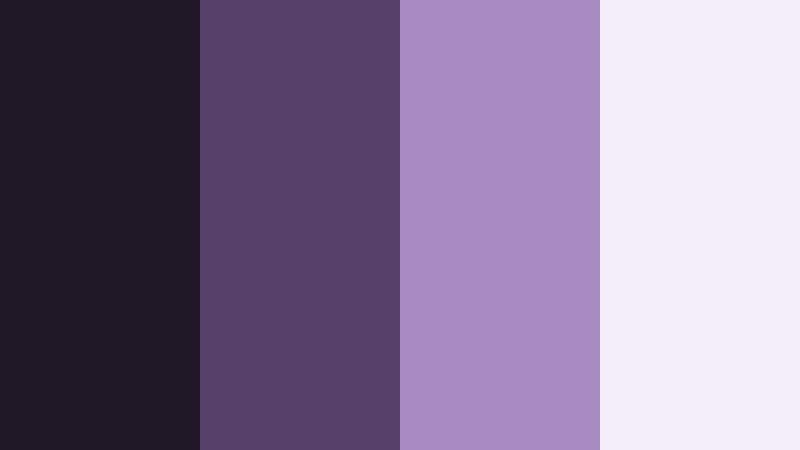
- HEX Codes: #1f1726, #564067, #a98bc3, #f2edf9
- Mood: Calm and introspective, like an empty cinema after the credits roll.
- Use for: Ideal for reflective vlogs, study ambience, and lo-fi music visuals.
Quiet Cinema Haze softens Shadow Scene Purple into misty violets and gentle grays. It feels still and thoughtful, like the glow of a blank screen in an empty theater.
Use the mid and light tones for simple gradient backgrounds behind minimalist text or timestamps. In Filmora, pair this palette with slow zooms, static tripod shots, and lo-fi music to create ambience videos, deep-talk vlogs, or cozy study streams that feel calm and comforting.
Moonlit Storyboard

- HEX Codes: #181320, #40345a, #8d7bb8, #e6defa, #fbe8ff
- Mood: Whimsical and storybook-like, as if sketches were drawn under moonlight.
- Use for: Perfect for animation projects, narrative shorts, and cozy bedtime content.
Moonlit Storyboard wraps Shadow Scene Purple in lighter moonlit purples and pastel highlights. It suggests hand-drawn frames and gentle night-time storytelling.
Use the darker shades as a stage for your characters or host, then layer the light pastels into speech bubbles, panels, and simple UI elements. In Filmora, this palette suits animated explainers, bedtime stories, or soft educational content for younger audiences.
Bold & Vibrant Shadow Scene Purple Color Palettes
Studio Spotlight Pop
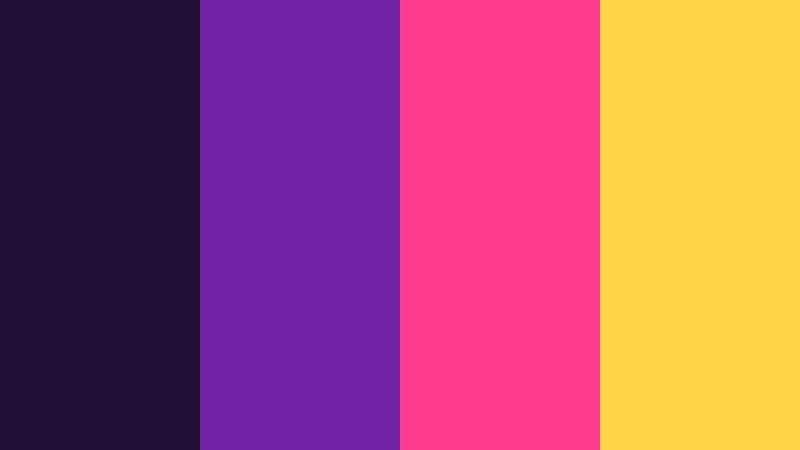
- HEX Codes: #220f36, #7022a5, #ff3b8d, #ffd447
- Mood: Loud, confident, and high-energy, like a studio filled with spotlights.
- Use for: Great for TikTok edits, reaction videos, and bold streaming overlays.
Studio Spotlight Pop cranks up the saturation. Deep Shadow Scene Purple anchors hot pink and neon yellow, creating a palette that refuses to blend in.
Use purple as your main backdrop or frame color, then drop #ff3b8d and #ffd447 into borders, emoji-style stickers, and subscribe buttons. In short-form edits and reaction videos, this palette helps your titles and commentary stand out even on small mobile screens.
Trailer Title Shock

- HEX Codes: #0b0613, #3f1562, #b127ff, #ff6f61, #fffbdb
- Mood: Explosive and suspenseful, built for punchy trailer moments.
- Use for: Ideal for movie trailers, channel teasers, and episodic intros.
Trailer Title Shock joins jet-black shadows with neon purple and red-orange accents. It screams tension and speed, perfect for countdowns, cliffhanger cuts, and bold title cards.
Use the darkest tones for backgrounds, then slam #b127ff or #ff6f61 onto big, uppercase titles and quick motion graphics. In Filmora, combine this palette with whip pans, impact sound effects, and glitch transitions for intense teasers or episodic intros.
Clamp Light Carnival
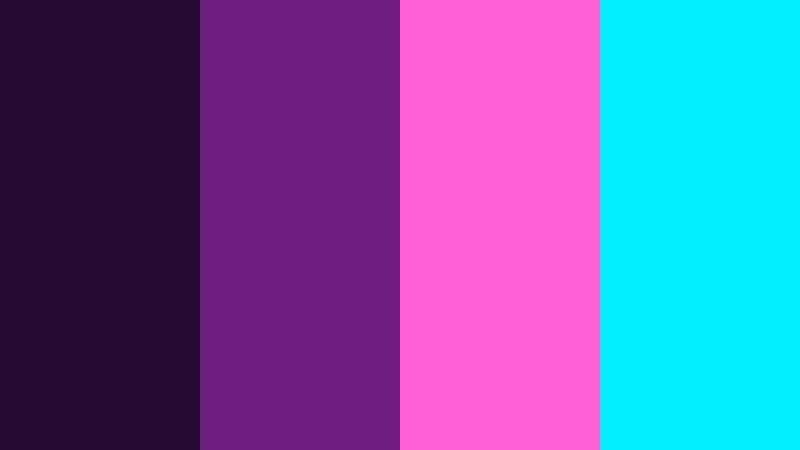
- HEX Codes: #260a33, #6d1f80, #ff5fd2, #00f0ff
- Mood: Playful and chaotic, like a carnival lit by clamp lights and LEDs.
- Use for: Perfect for festival recaps, dance edits, and party highlight reels.
Clamp Light Carnival mixes intense Shadow Scene Purple with neon pink and cyan. It feels like flashing LEDs, moving crowds, and loud music.
Use purple as the base layer for overlays or frames, then alternate pink and cyan in animated shapes, waveforms, or beat-synced titles. In Filmora, sync color pops and light leaks to the music for festival recaps, club edits, or dance challenge compilations.
Soundstage Electric

- HEX Codes: #160b22, #4b1d5f, #9b39ff, #ffca3a, #ff6f9c
- Mood: Buzzing and expressive, like a soundstage wired for a live show.
- Use for: Great for live stream branding, podcast covers, and creator logos.
Soundstage Electric sits between concert lighting and streaming neon. The dark purples create a studio-like base, while magenta and yellow accents give everything a live-on-air jolt.
Use the deep tones for your banner backgrounds and overlays, then highlight key elements like your channel name, stream alerts, or waveform animations in #9b39ff, #ffca3a, and #ff6f9c. In Filmora, this palette easily extends from stream replays to YouTube highlights and social clips.
Elegant & Modern Shadow Scene Purple Color Palettes
Minimal Frame Noir
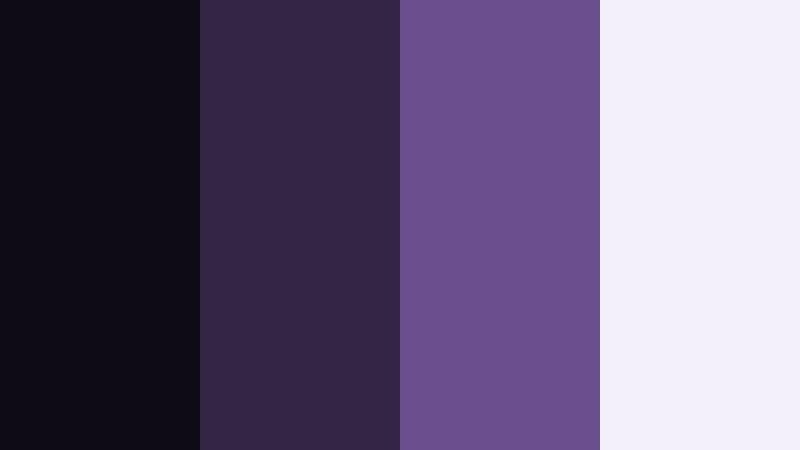
- HEX Codes: #0f0b16, #332544, #6a4e8e, #f3f0fa
- Mood: Sleek, minimal, and noir-inspired, with just enough contrast.
- Use for: Perfect for tech reviews, UI design, and minimalist channel branding.
Minimal Frame Noir uses deep, cool purples with a soft off-white. It feels editorial and restrained, like a magazine layout or UI mockup come to life.
Use the darkest shade for backgrounds or sidebars, then apply #f3f0fa as your main canvas for text and thumbnails. A touch of #6a4e8e works well on icons, progress bars, or callout arrows in Filmora. This palette is ideal if you want your tech reviews or tutorials to look clean, serious, and future-focused.
Studio Loft Gradient

- HEX Codes: #1b1325, #46345f, #8a73c9, #d7d4f8, #f9fafc
- Mood: Refined and airy, like a creative loft with tall windows and gradient light.
- Use for: Great for brand films, SaaS explainers, and portfolio websites.
Studio Loft Gradient flows from deep Shadow Scene Purple into airy neutrals, perfect for smooth gradients and modern landing pages. It feels open, premium, and quietly creative.
Use #1b1325 and #46345f at the edges of your frames, then blend toward #d7d4f8 and #f9fafc behind your title and product shots. In Filmora, this palette works perfectly for motion backgrounds, lower thirds, and full-screen titles in brand films and professional explainers.
Tips for Creating Shadow Scene Purple Color Palettes
When you build your own Shadow Scene Purple palettes for video and design, think about how your colors will read on small screens, support your story, and stay consistent across thumbnails, intros, and social clips.
- Pair deep Shadow Scene Purple with 1 to 2 lighter accent colors so text and icons remain easy to read on mobile and desktop.
- Use warm highlights (peach, soft gold) to balance cool purples when you want a cinematic, human feel that keeps skin tones flattering.
- For techy or cyberpunk content, match purples with neon cyan or magenta, but keep backgrounds dark to avoid visual noise.
- Check contrast between your background purple and text using simple accessibility tools to keep titles and subtitles legible.
- Reuse the same HEX codes across thumbnails, intros, lower thirds, and end screens so your channel branding feels consistent.
- Sample colors directly from your footage in Filmora, then build overlays and text styles that echo those natural purple tones.
- When using gradients, anchor one side in a rich Shadow Scene Purple and fade into a neutral gray or off-white for a modern, minimal look.
- Test your palette on both light and dark modes (for websites and overlays) to make sure your Shadow Scene Purple still looks intentional and balanced.
Shadow Scene Purple palettes can completely change how your videos feel, from neon nightlife edits to quiet, introspective vlogs. The right combination of deep purples, highlights, and neutrals helps define your brand identity and makes your channel instantly recognizable across platforms.
Use these 15 palettes as starting points: drop the HEX codes into your design tools, then mirror them in Filmora using color grading, overlays, and titles. Once you find a mix that fits your style, save it as a visual signature for future projects.
With Filmora's color tools, presets, and AI features, it is easy to test, refine, and lock in your Shadow Scene Purple look across intros, main edits, shorts, and social teasers.
secure download