

 100% Security Verified | No Subscription Required | No Malware


 ChatGPT
 Perplexity
 Gemini
 Claude
 Grok
Grok
Silver Moon is a versatile neutral that sits between cool gray and soft metallic shimmer. Psychologically it feels calm, intelligent, and quietly confident, making it perfect for creators who want a modern aesthetic without harsh or flashy colors. On screen, Silver Moon tones can suggest technology, night cityscapes, minimal studios, or dreamy clouds depending on how you combine them.
For video intros, YouTube thumbnails, lower thirds, and branding, Silver Moon color palettes give you clean contrast while keeping attention on faces and storytelling. Below are ready made Silver Moon color palettes with HEX codes you can plug straight into Filmora for color grading, titles, and overlays, whether you are building cinematic edits, lifestyle vlogs, or minimalist channel branding.
In this article
Soft And Dreamy Silver Moon Color Palettes
Moonlit Cloud Whispers

- HEX Codes: #dadddf, #c3ccd5, #9fa8b3, #727b84, #3d4348
- Mood: Calm, airy, and introspective like a quiet sky before dawn.
- Use for: Use for reflective vlogs, travel montages, and cinematic B-roll that needs a soft, dreamy feel.
This palette moves from pale, misty grays into deeper steel tones, like clouds slowly drifting across a Silver Moon sky. The softer tints are ideal for backgrounds, text panels, and overlays, while the darker shades anchor your titles and key elements so they remain readable.
In practice, Moonlit Cloud Whispers works beautifully for reflective voiceover videos, moody travel edits, or gentle channel intros. Use the lighter HEX values in YouTube thumbnail backgrounds and intro slates, then reserve the richer charcoal tones for typography, logo locks, and subtle borders so your visuals feel cinematic but still understated.
Pro Tip: Build a Cinematic Silver Moon Look in Filmora
To keep this soft Silver Moon gradient consistent across an entire project in Filmora, start by using the same HEX codes in your titles, graphics, and background shapes. Then apply a gentle cool color grade to your footage so the midtones lean toward the same silvery blue grays. This keeps jump cuts, B roll, and A roll within one unified mood.
You can also save a custom preset once you dial in the look. Apply that preset to your intros, talking head clips, and social media cuts so every export shares the same Moonlit Cloud Whispers vibe. This is especially useful for creators building a recognizable Silver Moon themed channel identity.
AI Color Palette
If you have a mood board, still frame, or exported color card that captures this palette, Filmora can automatically push that Silver Moon tonality across the rest of your clips. Filmora's AI Color Palette feature analyzes a reference image or video and matches its colors to your target footage with just a few clicks.
Import your reference frame with the Moonlit Cloud Whispers colors, open the AI Color Palette tool, and set that as your source. Filmora will transfer the cool silvers and gentle grays into your other shots, which is perfect for keeping vlog sequences, montages, and cutaways visually cohesive without manual grading every clip.
 secure download

HSL, Color Wheels & Curves
To fine tune this airy Silver Moon look, use Filmora's HSL controls to gently desaturate blues and cyans, so they feel misty rather than vibrant. Then nudge the midtone color wheel slightly toward blue while keeping highlights neutral for a clean, cinematic sheen. You can also add a soft S curve in the curves panel to deepen shadows without crushing detail.
If you want a more advanced walkthrough, check out Filmora's training on using HSL, color wheels, and curves for color correction. These tools help you lock in a polished Silver Moon style that still protects skin tones and important details on screen.
secure download1000+ Video Filters & 3D LUTs
Once your base grade is set, you can push Moonlit Cloud Whispers toward different moods with Filmora's filters and LUTs. A subtle filmic LUT adds grain and contrast for narrative shorts, while soft glow or vignette filters make the Silver Moon tones feel even more dreamy for vlogs and B roll.
Filmora's video filters and 3D LUTs make it easy to build a signature Silver Moon style in just a few clicks. Mix a gentle LUT with reduced intensity, plus a slight bloom effect on highlights, to keep your content polished and cohesive across thumbnails, intros, and full length videos.
secure downloadSilver Haze Daybreak

- HEX Codes: #e4e6ea, #cfd2d8, #aeb3bc, #7d828b, #50535a
- Mood: Serene and hopeful, with a quiet sense of morning light.
- Use for: Use for productivity vlogs, lifestyle intros, and clean overlays where you want a peaceful, focused tone.
Silver Haze Daybreak feels like first light filtering through a frosted window. The balanced mix of light and midtone grays keeps visuals calm but not flat, while the deeper slate shade adds contrast for legible text and icons.
Use the brightest HEX values in background shapes for YouTube chapters, task lists, or timers, and rely on the darker tones for headings and CTA buttons. In Filmora, this palette is ideal for clean channel intros, productivity vlogs, and overlay graphics that support your message without stealing attention.
Lunar Mist Pastels

- HEX Codes: #f3f5f8, #dde2f0, #bcc5de, #9aa7c8, #6b7690
- Mood: Gentle, dreamy, and slightly nostalgic with a pastel glow.
- Use for: Use for cozy storytelling, journaling videos, and soft animated titles or lower thirds.
Lunar Mist Pastels introduces a subtle lavender and pastel blue cast into the Silver Moon family, giving your visuals a nostalgic, almost analog softness. The lightest shades work well as full frame backgrounds, while the medium pastels are perfect for subtitles, badges, and iconography.
Apply this palette to journaling or study with me videos, using the deeper #6b7690 for main titles and key timestamps. In thumbnails, pair a soft pastel background with high resolution portraits to keep the overall look gentle but still eye catching in crowded feeds.
Quiet Harbor Silver

- HEX Codes: #e7eaee, #d0d5dd, #afb7c4, #87919f, #5a616c
- Mood: Peaceful and reflective, like a still harbor at dusk.
- Use for: Use for mindful content, study-with-me videos, and background graphics that should not distract from the message.
Quiet Harbor Silver layers cool silvers with muted navy inspired tones, evoking the calm of water and metal at dusk. The smooth gradient from light to dark gives you plenty of flexibility for building depth without using strong color accents.
For long form content, such as focus sessions or guided reflections, use the lighter values as unobtrusive backplates for timers, playlists, and quotes. Let the darker tones frame your footage with soft borders or lower thirds so the audience can relax into the scene while still navigating your content easily.
Frosted Moon Glow
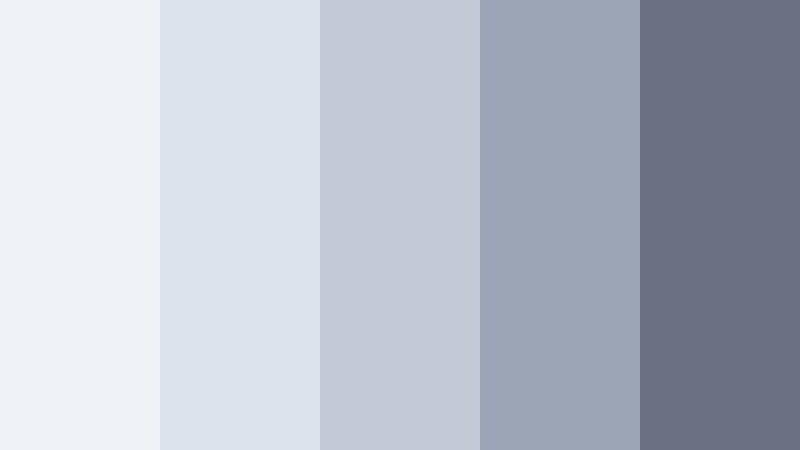
- HEX Codes: #f1f3f6, #dde1e8, #c4cad6, #9ca5b5, #6a7282
- Mood: Light, frosted, and gently futuristic.
- Use for: Use for clean app demos, tech explainer videos, and polished channel branding interludes.
Frosted Moon Glow leans into bright, icy silvers and softly tinted blues for a modern yet approachable look. The palette feels like frosted glass and brushed aluminum, which instantly suits UI showcases and tech focused branding.
Use the palest tones behind screen captures or device mockups to make interfaces stand out. The darker shades can outline UI callouts, feature highlights, or subscribe buttons in your Filmora projects, giving demos and tutorials a crisp, professional polish.
Elegant And Modern Silver Moon Color Palettes
Chrome City Nights

- HEX Codes: #f0f1f3, #d6d8dd, #a9adb5, #727782, #2f333b
- Mood: Sleek, urban, and cinematic with a subtle noir edge.
- Use for: Use for tech reviews, urban b-roll, and stylish channel intros with a metropolitan vibe.
Chrome City Nights brings together bright storefront reflections and deep street shadows in one balanced Silver Moon scheme. The lighter silvers feel like glass and neon reflections, while the deep #2f333b gives your designs a striking, noir inspired anchor.
In thumbnails and opening titles, place your subject against a mid silver background and use the darkest tone for bold, condensed typography. For urban B roll and night sequences, match your grades to the mid grays and let the darkest shade guide your vignette and shadow levels for a cinematic city feel.
Minimal Studio Silver

- HEX Codes: #f6f7f8, #e2e4e8, #c4c7cf, #999ea8, #40444c
- Mood: Clean, professional, and minimalist.
- Use for: Use for channel branding, corporate explainers, and UI overlays where clarity and polish matter.
Minimal Studio Silver is purpose built for clean layouts and professional presentations. The palette gives you a bright base that looks great on both desktop and mobile, with a controlled progression into darker grays for hierarchy and contrast.
Use the lightest HEX values as primary backgrounds for explainers, then apply #999ea8 for secondary text and #40444c for headings and CTAs. In Filmora, this palette is perfect for lower thirds, logo reveals, and subscribe animations that feel modern and trustworthy without any visual clutter.
Monochrome Lunar Luxe
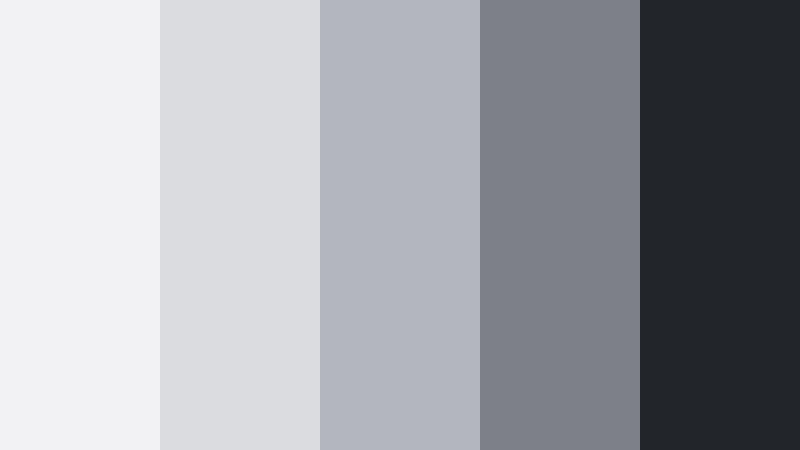
- HEX Codes: #f2f2f4, #dbdce0, #b4b6bd, #7d8087, #22252a
- Mood: Luxurious, restrained, and high contrast.
- Use for: Use for fashion lookbooks, product promos, and premium brand intros that need a luxe monochrome feel.
Monochrome Lunar Luxe stays within a narrow range of silvers and charcoals but leverages strong contrast for a luxury effect. The lighter shades mimic studio light on metal or fabric, and the nearly black #22252a gives you a strong base for text and logo marks.
Apply this palette to high end product shots or fashion edits in Filmora by pairing bright Silver Moon backgrounds with silhouetted text and minimal graphical elements. It works especially well for trailer style intros, lookbooks, or unboxing videos where you want the content to feel premium and editorial.
Steel Skyline Gradient
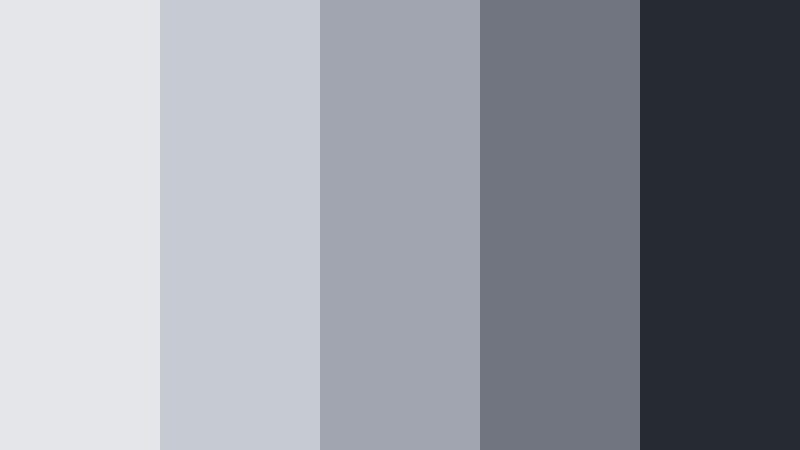
- HEX Codes: #e4e6ea, #c6cad1, #a0a5af, #70757f, #262b32
- Mood: Architectural, balanced, and confident.
- Use for: Use for real estate reels, architecture features, and modern typography-driven thumbnails.
Steel Skyline Gradient echoes concrete, glass, and shadow in a contemporary city. The progression from light to dark is smooth, making it ideal for gradient backgrounds and layered layouts where you want controlled depth.
Use the upper three tones for building dimension behind floor plans, exterior photos, or skyline shots. Then rely on #70757f and #262b32 for clean labels, price tags, and headlines. In Filmora, this palette helps real estate and architecture content feel polished and consistent from thumbnail to outro.
Satellite Signal Shine
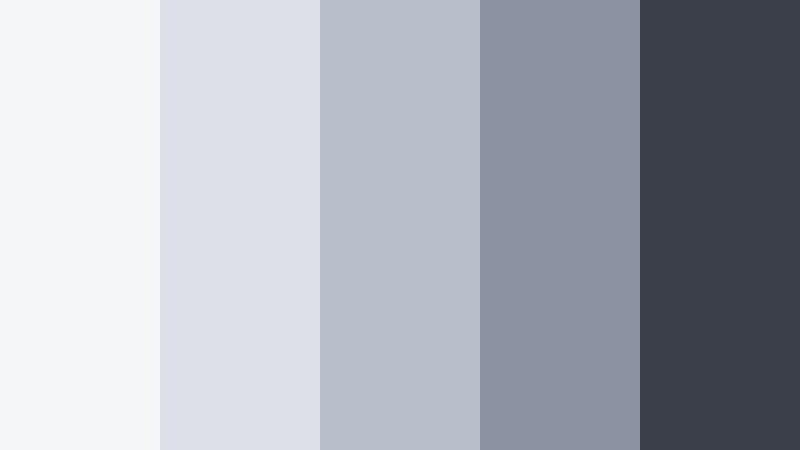
- HEX Codes: #f5f6f8, #dde1e7, #b8beca, #8b92a1, #3a3f4a
- Mood: Technical, precise, and lightly futuristic.
- Use for: Use for gadget reviews, motion graphics, and HUD-style overlays in techy edits.
Satellite Signal Shine combines bright monitor whites with steely blues for a crisp, technical atmosphere. The color steps are well spaced, which makes it a great choice for UI style infographics, animations, and on screen data.
Use lighter tones behind device close ups, while the darker shades outline HUD elements, graphs, and spec callouts in your tech reviews. In Filmora, pair this palette with subtle line animations and glitch transitions to give your edits a sleek, sci fi edge without overwhelming the viewer.
Cinematic And Moody Silver Moon Color Palettes
Nebula Silver Noir

- HEX Codes: #e1e3e7, #c2c5cd, #8c909b, #555863, #181b21
- Mood: Moody, cinematic, and slightly mysterious.
- Use for: Use for short films, dramatic trailers, and narrative edits that lean into shadow and contrast.
Nebula Silver Noir balances luminous Silver Moon highlights against deep, inky shadows. It has a quiet sci fi undertone, making it ideal for introspective narratives, moody character pieces, or mysterious teasers.
Use the lighter values for glints, light leaks, and title glows, while the mid grays define your main typography. The nearly black #181b21 can serve as a letterbox or background for end cards and credit rolls, helping your content feel cinematic and intentional.
Stormfront Horizon

- HEX Codes: #d8dce2, #bbc0c9, #8f959f, #616770, #2a2f37
- Mood: Tense, stormy, and atmospheric.
- Use for: Use for gaming edits, cinematic travel sequences, and intense storytelling moments.
Stormfront Horizon channels the feeling of a storm rolling in over a metallic sea. The palette moves from pale, overcast silvers into moody, storm dark grays, building tension without bright colors.
For gaming compilations, use the mid and dark tones in your overlays, kill feed graphics, or countdowns. In travel and adventure edits, bring your footage closer to this palette with cool, desaturated grades and then use lighter Hex codes for chapter cards or on screen captions.
Twilight Rail Silver

- HEX Codes: #e3e5ea, #c4c7cf, #9b9fab, #6a6f7a, #2d3138
- Mood: Reflective and cinematic, with a sense of travel and motion.
- Use for: Use for travel vlogs, train or road trip montages, and reflective time-lapse sequences.
Twilight Rail Silver evokes the colors of metal, glass, and distant city lights seen from a moving train. The palette sits comfortably between soft and moody, which is ideal for storytelling that moves through different locations.
In Filmora, use these colors for title cards marking each city or chapter, and add subtle gradient overlays to your footage to echo the Silver Moon tones. Thumbnails can pair a dark #2d3138 corner with bright text to frame a travel portrait or landscape shot, hinting at cinematic journeys.
Echo Chamber Chrome

- HEX Codes: #f0f1f3, #d2d4da, #a6a9b2, #767983, #31343b
- Mood: Intense, rhythmic, and slightly industrial.
- Use for: Use for music videos, performance edits, and kinetic typography that syncs to a beat.
Echo Chamber Chrome feels like a live venue or industrial soundstage, with sharp silvers and solid charcoals. It is designed for rhythmic edits, where strong contrast helps motion graphics and typography hit with the beat.
Use the darker tones for backgrounds and the mid silvers for moving text, waveform shapes, or animated bars in your Filmora timeline. The palest shade can highlight key lyrics, hooks, or timestamps, making your music content both stylish and easy to follow.
Orbital Shadow Fade

- HEX Codes: #e6e7eb, #c8cbd2, #a0a3ad, #6e717a, #202329
- Mood: Weightless, distant, and quietly sci fi.
- Use for: Use for sci fi intros, space themed explainers, and subtle glitch transitions.
Orbital Shadow Fade is a smooth descent from light Silver Moon into near space black. It feels weightless and slightly detached, ideal for content about technology, science, or speculative storytelling.
Use the lighter HEX codes for diagrams, planet overlays, or data cards, while the darkest tone becomes the canvas for your titles and outros. Add subtle glitch or RGB split effects in Filmora using these colors to give your intros a futuristic, controlled atmosphere.
Cozy And Lifestyle Silver Moon Color Palettes
Soft Loft Morning
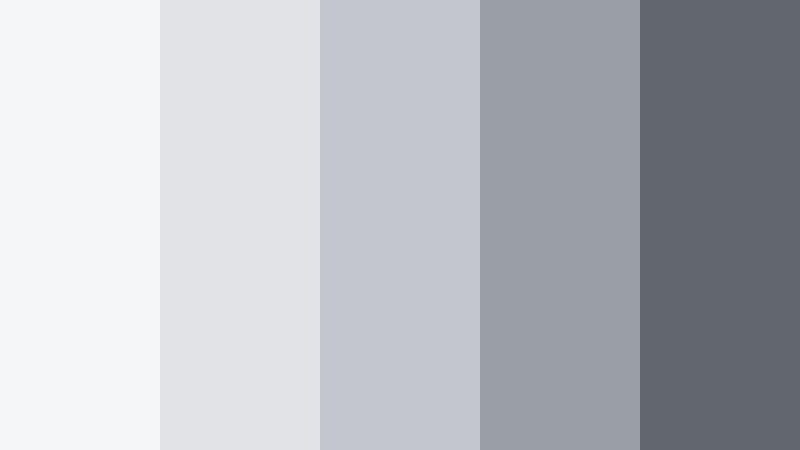
- HEX Codes: #f5f6f7, #e1e3e6, #c3c6cc, #9a9ea7, #62666f
- Mood: Cozy, approachable, and lightly modern.
- Use for: Use for daily vlogs, home decor content, and warm yet neutral lifestyle thumbnails.
Soft Loft Morning brings Silver Moon into a homier, lifestyle context. These gentle grays feel like soft daylight on concrete, fabric, and wood, creating a neutral base that flatters a wide range of skin tones and interior shots.
Use the paler tones behind text overlays in morning routines, home tours, or decor tips, and rely on the darker shades for clean typography and icons. In thumbnails, this palette pairs well with natural beiges and skin tones, giving your channel a calm, lived in aesthetic that looks great next to bolder videos in the feed.
Tips for Creating Silver Moon Color Palettes
When building your own Silver Moon color combinations for video and design, focus on balance between light and dark, readability, and how the palette interacts with skin tones and scene lighting.
- Pair Silver Moon with one accent color at a time, such as Brushed Gold or muted teal, to keep your branding clean and recognizable.
- Always test text contrast: use the darkest Silver Moon shade for typography on light backgrounds, and the lightest shade for text over charcoals.
- Match your color grade to your graphics by slightly cooling highlights and midtones, so footage and overlays share the same Silver Moon mood.
- Create a hierarchy: reserve the strongest dark tone for headlines and CTAs, midtones for secondary info, and the lightest tones for backgrounds.
- Check how your palette looks on mobile and desktop thumbnails, since small screens can reduce subtle contrast between similar grays.
- Save reusable presets in Filmora so your Silver Moon style stays consistent across intros, lower thirds, transitions, and end screens.
- Be careful with saturation: keep Silver Moon neutrals low in saturation and let any accent color handle emotional impact or highlights.
- Test your palette on both dark and bright footage to be sure subtitles, buttons, and icons remain legible in a variety of scenes.
Silver Moon color palettes are a powerful way to shape mood, from dreamy and introspective to sleek and futuristic. By choosing the right mix of silvers, charcoals, and soft blues, you can give your videos a distinct identity that feels modern yet timeless.
Use these ready made palettes as a starting point, then refine them inside Filmora with grading tools, AI Color Palette, and LUTs until they perfectly match your channel or brand. Whether you are designing thumbnails, intros, or full cinematic edits, a consistent Silver Moon scheme will help your content stand out and feel more professional.
Open Filmora, try a few of these HEX codes in your next project, and save your favorite combinations as presets. Over time you will build a signature Silver Moon look that viewers recognize instantly across platforms.
secure download