

 100% Security Verified | No Subscription Required | No Malware


 ChatGPT
 Perplexity
 Gemini
 Claude
 Grok
Grok
Ashen Teal sits between muted teal and soft gray, which gives it a calm, intelligent, and trustworthy feel. It suggests depth and clarity without shouting for attention, so it works beautifully for creators who want their content to feel cinematic, thoughtful, or gently modern rather than overly saturated.
In video, branding, thumbnails, intros, and lower thirds, Ashen Teal is a versatile base color: it pairs well with warm neutrals for cozy vlogs, with charcoal for tech content, and with soft whites for minimalist channels. Below are 15 Ashen Teal color palettes with HEX codes that you can plug directly into Filmora for cohesive thumbnails, title cards, overlays, and color grading presets.
In this article
Soft And Dreamy Ashen Teal Color Palettes
Misty Harbor Dawn
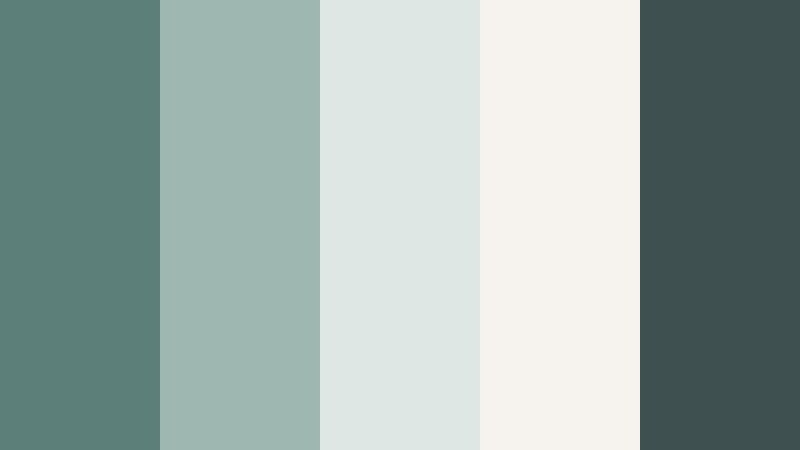
- HEX Codes: #5c7f7a, #9fb7b1, #dfe7e4, #f6f3ee, #3e5150
- Mood: Calm, reflective, and gently cinematic.
- Use for: Ideal for reflective travel vlogs, calm talking head videos, and minimalist YouTube channel branding.
Misty Harbor Dawn wraps Ashen Teal in soft grays and off white, like early light rolling across a quiet bay. The palette feels tranquil and airy, with just enough contrast from the deep #3e5150 accent to keep titles and icons readable.
Use these HEX codes for muted thumbnails, lower thirds, and intro frames when you want viewers to feel relaxed from the first second. It works especially well for long form videos, journaling content, and ambient b roll where subtle Ashen Teal grading and overlays keep the entire edit cohesive.
Pro Tip: Build a Soft Cinematic Ashen Teal Look in Filmora
To keep a gentle palette like Misty Harbor Dawn consistent, set one Ashen Teal tone as your main brand color for titles and motion graphics inside Filmora. Then use the lighter neutrals for backgrounds, borders, and safe areas around text so your visuals stay calm but legible across intros, b roll sequences, and end screens.
You can also save this palette as a custom color set in Filmora and reuse it on every project: apply the deeper teal for call to action buttons, the paler grays for overlay shapes, and the off white as your default background for text-based scenes.
AI Color Palette
If you have a reference image of this Ashen Teal moodboard, you can let Filmora match that look across your entire video. Filmora's AI Color Palette feature analyzes the colors in a still frame or design and automatically transfers that Ashen Teal balance to other clips.
Import a screenshot of your palette or a graded hero shot, run AI Color Palette on the rest of your timeline, and your talking head, b roll, and cutaways will all share the same soft teal and misty neutral tones with just a few clicks.
 secure download

HSL, Color Wheels & Curves
Once you have a base Ashen Teal grade, refine it in Filmora with HSL, Color Wheels, and Curves. Use HSL to desaturate overly green teals and nudge them toward a softer blue gray, then adjust midtone color wheels so skin tones stay natural against your Ashen Teal overlays.
You can also use curves to lift the shadows slightly for that misty, low contrast look while keeping highlights under control so whites remain creamy instead of harsh. This combination lets you keep your Ashen Teal aesthetic consistent even when the original footage comes from different cameras or lighting setups.
secure download1000+ Video Filters & 3D LUTs
If you want to move faster, Filmora’s video filters and 3D LUTs make it easy to give your Ashen Teal palette a cinematic or dreamy finish. Start from a teal or cinematic LUT, then fine tune the intensity so your colors still match the Misty Harbor Dawn HEX codes.
You can stack subtle film grain, vignette, and soft focus filters on top of your grade to enhance the dreamy harbor feel in intros, outros, and chapter cards without rebuilding the look from scratch every time.
secure downloadCloudlight Studio
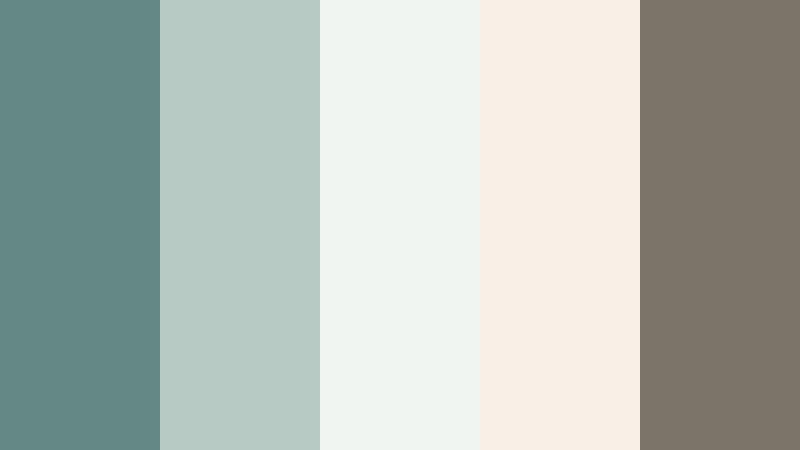
- HEX Codes: #648984, #b7cbc4, #f0f5f2, #f9efe7, #7c7469
- Mood: Light, creative, and softly professional.
- Use for: Perfect for design portfolios, educational videos, and gentle channel intros that need a clean but cozy look.
Cloudlight Studio feels like a calm creative workspace bathed in diffused daylight. Ashen Teal tones sit alongside soft stone and warm cream, giving you a palette that is clean enough for professional content but still inviting and human.
Use the lighter HEX codes for background slides, annotation cards, and chapter titles, while the deeper teal and warm brown bring focus to important text or icons. This palette works well in Filmora for simple lower thirds, minimal thumbnails, and portfolio reels where you want your work to stand out against a quiet, cohesive color system.
Seaside Lullaby
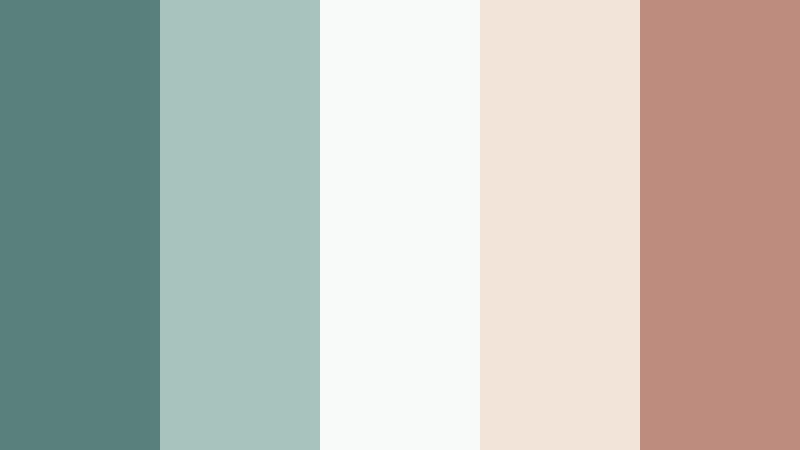
- HEX Codes: #5a807c, #a6c3bd, #f7faf8, #f3e4da, #be8c7e
- Mood: Nostalgic, gentle, and slightly romantic.
- Use for: Great for wedding highlight reels, engagement announcement edits, and nostalgic family montage videos.
Seaside Lullaby blends Ashen Teal with driftwood blush and seashell whites, creating a palette that feels like a quiet morning at the beach. The soft teal keeps everything grounded while the blush accent adds a hint of romance.
In Filmora, you can use this palette for wedding titles, save the date animations, and warm family montage thumbnails. The brighter neutrals keep photos and footage feeling fresh, while a touch of the blush tone in text or icons adds emotion without overwhelming your frames.
Fogbound Garden
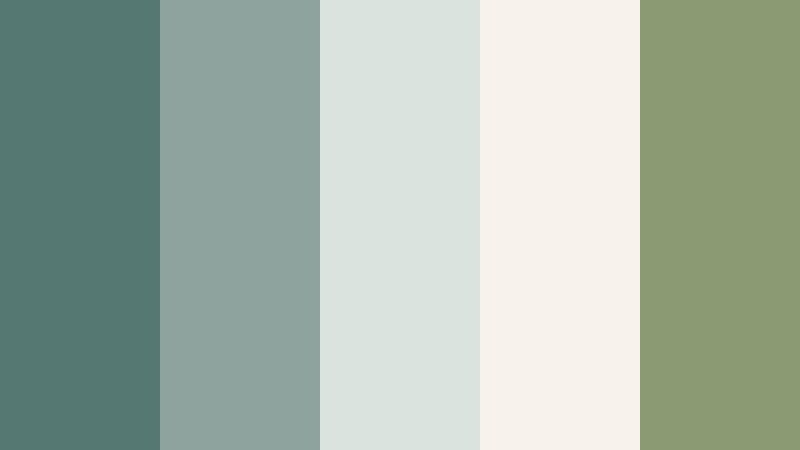
- HEX Codes: #567873, #8ea39d, #dbe3df, #f7f2ea, #8b9a72
- Mood: Organic, grounded, and softly mystical.
- Use for: Use for slow lifestyle vlogs, plant care channels, and cozy studio tours where nature is part of the story.
Fogbound Garden combines muted Ashen Teal with soft sage greens and warm parchment, evoking a greenhouse at dawn. It feels earthy and slow, perfect for channels focused on plants, crafts, or mindful living.
Apply these HEX codes to your YouTube banner, end screens, and chapter cards, and then echo the same tones in Filmora’s color grading so foliage and interiors sit comfortably inside the palette. Lower saturation and gentle contrast will help your footage match the misty, organic character of this scheme.
Winter Glass Light

- HEX Codes: #5b7d78, #9fb3b0, #e3ebea, #f5f4f2, #a3a0a3
- Mood: Quiet, frosted, and introspective.
- Use for: Ideal for study with me videos, lo fi music visuals, and subtle cinematic b roll sequences.
Winter Glass Light uses cool Ashen Teal with frosted grays and soft whites, like looking through a window layered with winter light. The result is very gentle on the eyes and perfect for long watch sessions.
Use it in study streams, focus playlists, and lo fi animations by tinting overlays and graphics with the teal and gray HEX values. Keep your text in the darker shades for readability, while using the pale tones as backgrounds and subtle gradients in Filmora’s titles and transitions.
Modern And Minimal Ashen Teal Color Palettes
Urban Loft Teal

- HEX Codes: #4f716c, #0f1a1c, #f3f5f4, #d0d6d4, #ba7e4b
- Mood: Sleek, modern, and slightly edgy.
- Use for: Perfect for channel rebrands, startup promos, and tech product explainers that need a clean but characterful base.
Urban Loft Teal anchors Ashen Teal with deep charcoal and bright white, while a copper accent adds a hint of industrial warmth. It feels like a downtown studio space filled with concrete, metal, and good light.
In Filmora, use the dark shade for backgrounds or letterboxes, the light neutrals for text panels, and the copper for subscribe buttons, icons, and key callouts. This palette is ideal for tech thumbnails, SaaS intros, and B2B explainer videos where you want clarity with a distinctive Ashen Teal identity.
Monochrome Drift
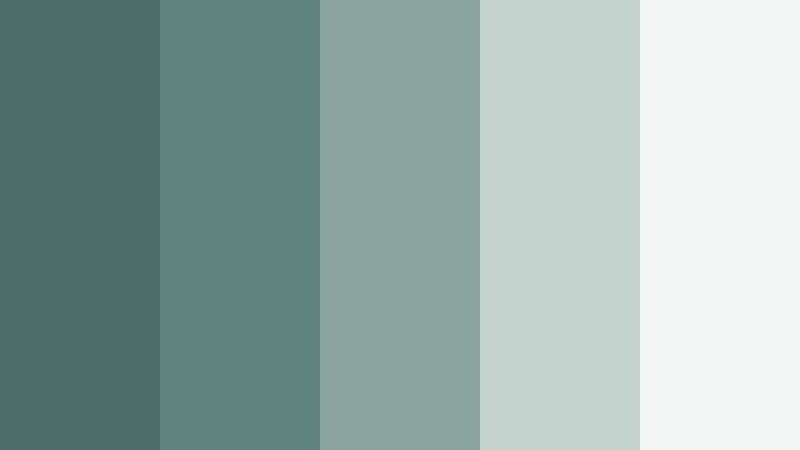
- HEX Codes: #4c6d68, #5f837d, #8aa39d, #c5d3cf, #f2f6f5
- Mood: Balanced, minimal, and quietly confident.
- Use for: Great for minimalist brand kits, portfolio websites, and UI overlays inside tutorial videos.
Monochrome Drift explores Ashen Teal from deep to pale without introducing strong accent colors. The result is a smooth gradient of teals and mints that feels unified and highly controlled.
Use this palette when you want your content to look polished but non distracting, such as interface walkthroughs and design tutorials. In Filmora, you can color code different layers of text or shapes using each shade, while keeping thumbnails and banners very consistent across your channel.
Concrete Tide
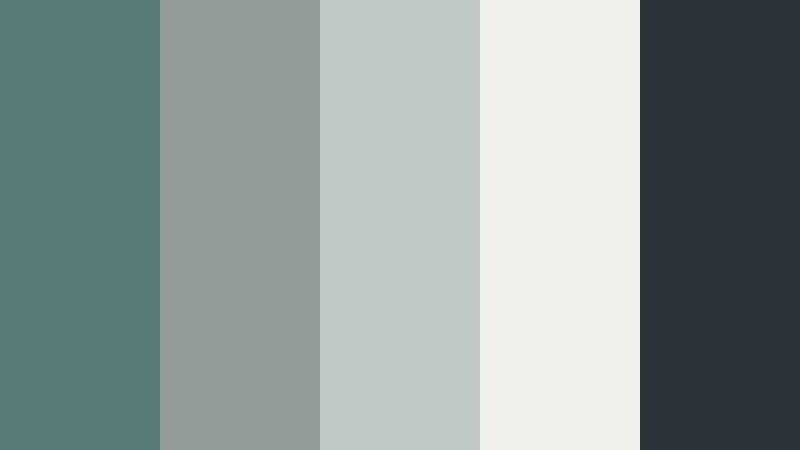
- HEX Codes: #597c77, #929c98, #c2c8c5, #efefed, #2a3436
- Mood: Industrial, cool, and design forward.
- Use for: Use in architecture reels, interior design tours, and minimalist product shots where structure matters.
Concrete Tide pairs Ashen Teal with concrete grays and a deep inky accent, giving your visuals a gallery like, architectural quality. It feels structured and cool, ideal for design centric content.
Apply the darker tones to frames and letterboxes in Filmora to give your footage a cinematic container, while using the mid grays for captions and diagrams. The Ashen Teal shade can highlight floor plans, product outlines, or key details in minimalist thumbnails.
Screenlight Interface

- HEX Codes: #4f7771, #111517, #181f24, #e5f1ee, #ffc857
- Mood: Digital, focused, and high contrast.
- Use for: Ideal for app demos, SaaS explainer videos, and motion graphics with data driven storytelling.
Screenlight Interface gives Ashen Teal a tech leaning twist by combining it with dark UI neutrals and a precise golden highlight. The contrast is high, making charts, numbers, and UI elements very clear on screen.
Use the dark tones as backgrounds for screen recordings and overlays, the Ashen Teal for panels and shapes, and the gold for buttons and important metrics. In Filmora, this palette is excellent for animated dashboards, tutorial callouts, and teaser graphics for software launches.
Nordic Workspace
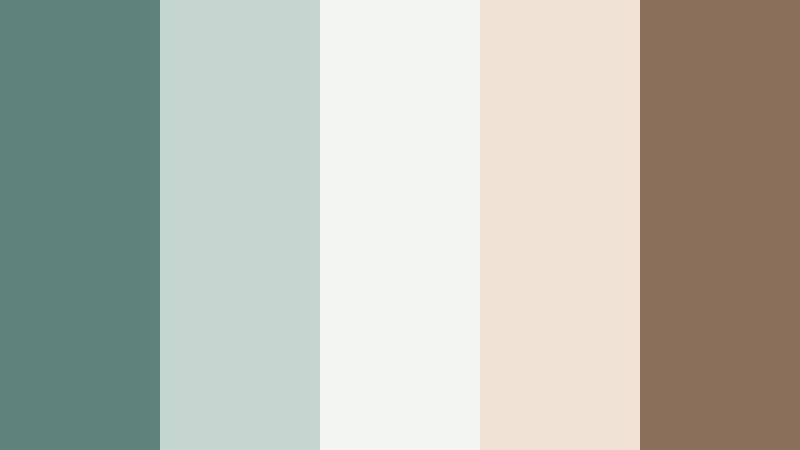
- HEX Codes: #5f827d, #c5d5cf, #f3f5f3, #f0e2d5, #8a6f5b
- Mood: Productive, airy, and intentionally simple.
- Use for: Great for productivity channels, workspace makeovers, and minimalist desk setups on social platforms.
Nordic Workspace mixes Ashen Teal with pale woods and paper whites, evoking Scandinavian interiors and tidy desk setups. It balances productivity and calm, which suits planning and study content.
Use the soft neutrals as the base for your titles and chapter cards, then weave in Ashen Teal for headings and icons. In Filmora, you can add simple animated shapes in these HEX colors to frame your shots or label segments in workspace tours and productivity vlogs.
Cinematic And Moody Ashen Teal Color Palettes
Noir Harbor Night

- HEX Codes: #476662, #0a1012, #141c1f, #ece1d4, #be9153
- Mood: Dramatic, cinematic, and mysterious.
- Use for: Perfect for trailers, narrative shorts, crime podcasts, and stylized YouTube intros with a story feel.
Noir Harbor Night leans into deep Ashen Teal, inky blacks, and a vintage gold accent to create a moody harbor atmosphere. It feels like a suspense scene framed by fog, streetlights, and old metal.
Use this palette in Filmora for title sequences, lower thirds, and chapter cards in narrative or documentary work. Apply the dark tones as background plates, the gold for typography and key graphics, and the lighter neutral to keep text readable against the shadows.
Tidal Eclipse
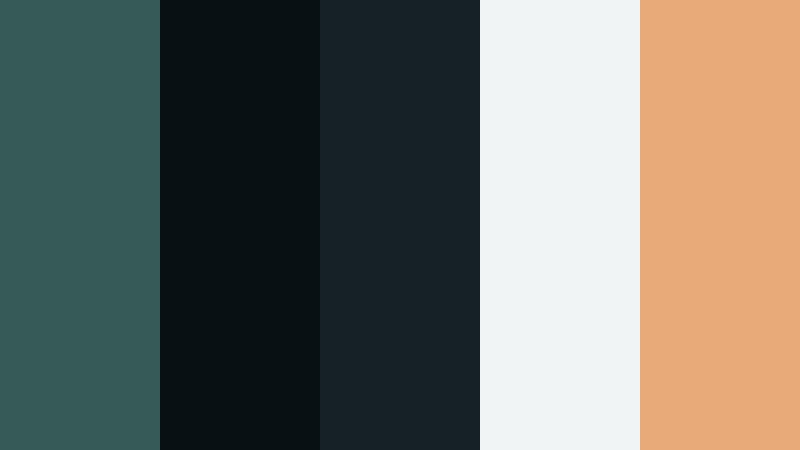
- HEX Codes: #365b57, #071013, #152126, #f0f4f4, #e9aa7a
- Mood: Tense, atmospheric, and otherworldly.
- Use for: Use in sci fi edits, game montages, and dramatic cinematic b rolls that need depth and contrast.
Tidal Eclipse pairs shadowed Ashen Teal with deep navy blacks and pale highlights, like a moonlit tide under an eclipse. The warm accent prevents the palette from feeling too cold while preserving the tension.
In game montages or sci fi edits, push your shadows toward these teal and navy HEX codes using Filmora’s grading tools, then reserve the warm tone for score displays, usernames, or important UI. The pale highlight can frame your titles so they remain legible even over dark action shots.
Rainsoaked Alley

- HEX Codes: #486966, #1a2426, #313d40, #dcdedb, #c06b5c
- Mood: Gritty, emotional, and urban cinematic.
- Use for: Great for street photography edits, music videos, and gritty storytelling sequences.
Rainsoaked Alley sets Ashen Teal against wet asphalt tones and a rusted brick accent, perfect for moody city visuals. It suggests neon reflecting on puddles, late night streets, and emotional beats.
Use this palette in Filmora for music video overlays, credits, or lyrical typography. Grade your footage toward the teal and charcoal tones, then introduce the rust shade in titles or transitions to add warmth and emotion to your story.
Submerged Echo
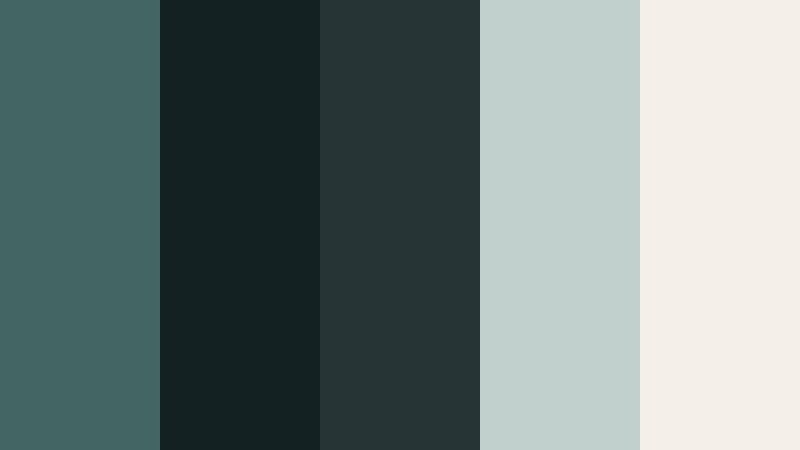
- HEX Codes: #436662, #132123, #273436, #c1d0cc, #f4efe8
- Mood: Subtle, submerged, and introspective.
- Use for: Ideal for underwater themes, slow motion b roll, and reflective voiceover driven edits.
Submerged Echo is a deep water Ashen Teal story with soft stone and ivory reflections. It feels like light filtering through a quiet pool, making it a strong fit for introspective or meditative content.
In Filmora, grade your shadows and midtones toward the darker teals and blues, while reserving the lighter HEX codes for titles and graphics. This keeps your text floating clearly above the footage, like reflections on the water’s surface.
Warm And Cozy Ashen Teal Color Palettes
Fireside Teal Glow

- HEX Codes: #5b7e79, #e6d6c5, #f6f0e9, #c48a60, #7a4b32
- Mood: Warm, comforting, and nostalgic.
- Use for: Perfect for vlogmas intros, cozy evening routines, and storytelling podcasts with a homely feel.
Fireside Teal Glow balances the coolness of Ashen Teal with fireplace ambers and soft cream, creating a snug, nostalgic atmosphere. It suggests blankets, candles, and glowing screens on winter evenings.
Use this palette in Filmora for holiday intros, storytime overlays, and warm vlog thumbnails. Let the creams and warm browns dominate backgrounds and frames, while Ashen Teal handles logos, titles, and subtle accent shapes so your branding stays recognizable.
Cafe Window Haze

- HEX Codes: #597a75, #f1e0d2, #f8f3ec, #d09a7b, #846a5d
- Mood: Inviting, casual, and storyteller friendly.
- Use for: Use in cafe study vlogs, city diaries, and lifestyle content that mixes teal branding with latte warmth.
Cafe Window Haze pairs Ashen Teal with latte foam and caramel tones, capturing the mood of a backlit coffee shop window. It feels relaxed, conversational, and perfect for lifestyle storytelling.
Apply the warmer neutrals as your main background colors in thumbnails and title cards, using Ashen Teal for channel nameplates, subscribe badges, and navigation elements. In Filmora, a slight teal tint in the shadows plus warm highlights can help your footage echo this inviting palette.
Tips for Creating Ashen Teal Color Palettes
Ashen Teal is flexible, but the way you combine it with neutrals, accents, and contrast levels will decide whether your video feels dreamy, modern, or cinematic. Use these tips to design palettes that look great in Filmora and across your wider branding.
- Pair Ashen Teal with soft neutrals (off white, light gray, warm beige) for readable thumbnails and text overlays that do not feel heavy.
- Use one strong accent color (gold, copper, blush, or rust) sparingly for buttons, icons, and CTAs so important elements stand out without breaking the palette.
- Check contrast on mobile: test your Ashen Teal text over backgrounds at small sizes to ensure titles and subtitles are easy to read in YouTube previews and Shorts.
- Match your color grade to your graphics by nudging shadows or midtones in Filmora toward your chosen Ashen Teal HEX code, so overlays and footage feel like one design system.
- Keep skin tones natural by limiting Ashen Teal shifts to backgrounds, shadows, and graphics, and then gently compensating with HSL if faces start to look too green or blue.
- Create a simple hierarchy: pick one Ashen Teal shade for primary headlines, a lighter tone for secondary text, and a dark neutral for body copy to keep layouts consistent.
- Save presets in Filmora for your favorite Ashen Teal LUT or color correction settings so you can apply the same look across intros, vlogs, and shorts with one click.
- When combining Ashen Teal with warm colors, keep saturation moderate; muted ambers and blushes usually blend better than very bright oranges or reds.
Ashen Teal color palettes can quietly transform your videos, helping you signal calm, modern clarity, or cinematic tension before a single word is spoken. Whether you lean into soft and dreamy schemes or high contrast moody tones, using consistent HEX codes keeps your thumbnails, overlays, and grades working together.
Try a few of these palettes inside Filmora and build presets that match your channel identity. Once your Ashen Teal look is dialed in, you can apply it across intros, main edits, and social clips so your audience recognizes your style instantly.
Because Filmora combines color tools, AI features, and ready made filters, it is easy to experiment until you find an Ashen Teal combination that feels exactly right for your niche.
secure download