

 100% Security Verified | No Subscription Required | No Malware


 ChatGPT
 Perplexity
 Gemini
 Claude
 Grok
Grok
Electric Fuchsia is a loud, glowing pink-purple that instantly feels energetic and modern. It lives where nightlife, neon signs, and futuristic UI all collide, which is why it works so well for attention-grabbing visuals. In color psychology, this kind of vivid fuchsia suggests excitement, creativity, and bold self-expression, making it perfect for creators who want their work to feel unapologetically alive.
In video editing, thumbnails, intros, and branding, Electric Fuchsia slices through crowded feeds, especially against dark backgrounds. It pairs beautifully with cool cyans, deep navies, and bright accents like Neon Tangerine to build bold, cinematic looks. Below you will find 15 Electric Fuchsia color palettes with HEX codes that you can plug directly into your thumbnails, overlays, titles, and brand systems in Filmora and other creative tools.
In this article
Bold And Vibrant Electric Fuchsia Color Palettes
Neon Night Pulse

- HEX Codes: #ff2ad1, #0d0221, #05d9e8, #fffb8a, #f75c03
- Mood: Electric, high-energy, and futuristic with a club-night glow.
- Use for: Perfect for high-impact YouTube thumbnails, EDM lyric videos, and bold gaming intros that need to stand out in dark mode feeds.
Neon Night Pulse is a hyper-bright clash of Electric Fuchsia, teal, and neon accents floating over deep navy-black. It feels like a packed dance floor at 2 a.m., with strobes and lasers cutting through the dark. The dominant fuchsia (#ff2ad1) and teal (#05d9e8) give your visuals that unmistakable neon sign intensity.
Use this palette when you want your thumbnails and intros to dominate on mobile and in dark mode. The near-black #0d0221 is perfect for backgrounds, while #fffb8a and #f75c03 add eye-catching highlights for titles, lower thirds, and progress bars. In Filmora, you can apply these tones to text, shapes, overlays, and animated elements for festival recaps, rave edits, and fast-cut gaming montages.
Pro Tip: Build a Cinematic Electric Fuchsia Nightlife Look in Filmora
To keep a bold palette like Neon Night Pulse feeling cohesive, build a simple visual system in Filmora. Use the Electric Fuchsia for titles and key UI accents, the deep navy-black for backgrounds and letterboxing, and teal for motion elements like callouts, waveforms, or HUD-style graphics. Repeat this combination across your intro, main edit, and end screen so your channel feels like one continuous nightlife experience.
You can also stack glow effects and blend modes on fuchsia shapes or text inside Filmora to mimic neon tubes. Try duplicating a title, blurring the bottom copy, shifting its color slightly toward teal or Neon Tangerine, and setting it to Screen or Add. This gives your Electric Fuchsia glow a layered, cinematic finish that looks great on both phones and big screens.
AI Color Palette
If you already have a poster, album cover, or moodboard using Neon Night Pulse, you can turn that into your video look in a few clicks. Filmora's AI Color Palette feature analyzes a reference image and transfers its color mood to your clips, keeping Electric Fuchsia, teal, and neon yellows consistent across the timeline.
Drop your performance footage, B-roll, and overlays into a sequence, then use AI Color Palette to match everything to one strong frame or design. This is perfect for EDM edits, highlight reels, or launch trailers where every shot should share the same glowing Electric Fuchsia energy instead of looking like a mix of random cameras and lighting setups.
 secure download

HSL, Color Wheels & Curves
Even with a strong palette, you often need to tame or polish Electric Fuchsia in real footage. Use Filmora's HSL controls to target magentas and pinks, nudging saturation and luminance until fuchsia glows without clipping. Color wheels let you cool down shadows into deep navy while keeping highlights warm with Neon Tangerine accents, creating a more cinematic club-night contrast.
Curves are ideal when you want to push contrast without losing detail in bright neon signs or LED panels. Create a gentle S-curve to deepen blacks and make Electric Fuchsia pop, then slightly lift the blue or green channel in shadows to add a cyberpunk cast. You can see this type of color control in Filmora's tutorials on using wheels and curves for stylized grading on YouTube and in the help center.
secure download1000+ Video Filters & 3D LUTs
If you want an Electric Fuchsia aesthetic without manual grading on every clip, Filmora's video filters and 3D LUTs make it easy to test looks fast. Stack neon-inspired filters, cyberpunk LUTs, or high-contrast cinematic presets to see how they interact with your fuchsia accents, then fine-tune opacity until the style matches your brand.
Once you find a combination that makes Electric Fuchsia and Neon Tangerine sing, save it as a custom preset and reuse it on future intros, Shorts, and livestream highlights. This keeps your color story consistent across platforms, even when you are working with different cameras or lighting conditions.
secure downloadCyber Pop Arcade
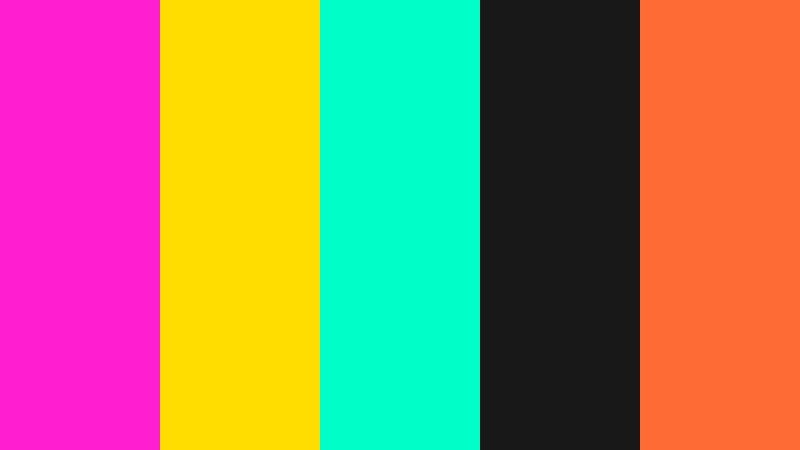
- HEX Codes: #ff1ed0, #ffdd00, #00ffc8, #181818, #ff6b35
- Mood: Playful, retro, and arcade-inspired with intense contrast.
- Use for: Best for creator logos, gaming overlays, Twitch panels, and kinetic typography for fast-paced channels.
Cyber Pop Arcade feels like a glowing arcade cabinet brought to life. Electric Fuchsia (#ff1ed0) teams up with acid yellow (#ffdd00) and aqua (#00ffc8) against a nearly black #181818 base. The result is a palette that screams high score screens, pixel art, and neon tokens.
Use this scheme for gaming thumbnails, esports branding, and Twitch overlays where you want readable UI but maximum pop. Fuchsia and yellow work great for headline text and badges, while aqua can highlight buttons, stats, and alerts. In Filmora, pair this palette with glitch transitions and fast motion graphics for channel trailers and alert animations.
Streetwear Neon Hype

- HEX Codes: #ff29c8, #16161a, #00ff6a, #f5f5f5, #ff4d4d
- Mood: Edgy, urban, and fashion-forward with a neon street glow.
- Use for: Use in streetwear brand lookbooks, hype reels, sneaker promos, and bold social carousels.
Streetwear Neon Hype mixes Electric Fuchsia with neon green and hot red over charcoal black and crisp white. It feels like a late-night city alley lit by store signs and hoodie graphics. The contrast is strong, but the addition of neutral white (#f5f5f5) keeps it from becoming overwhelming.
Apply this palette to fashion B-roll, dance edits, and sneaker spin shots. Use #16161a for clean, minimal backgrounds, then layer bold text and shape blocks in fuchsia and green for pricing, drops, and release dates. In Filmora, you can build dynamic lower thirds and overlay titles with these colors to give your brand a repeatable, hype-driven look.
Electric Festival Fireworks
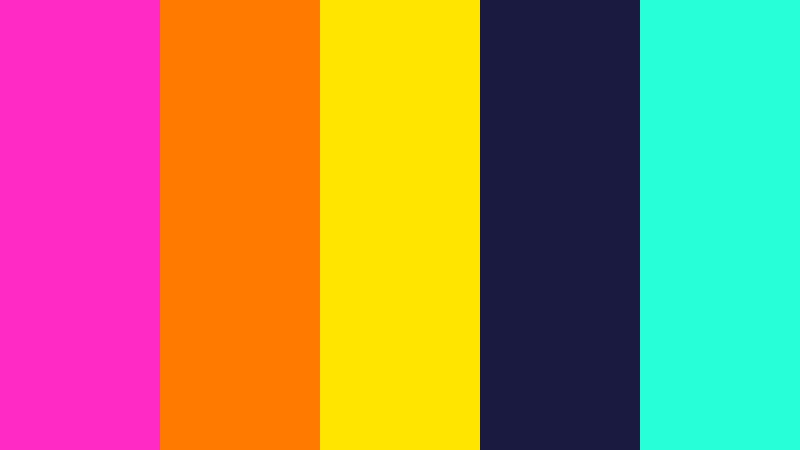
- HEX Codes: #ff2bc4, #ff7b00, #ffe500, #1a1a40, #27ffd8
- Mood: Explosive, celebratory, and festival-ready.
- Use for: Ideal for music festival trailers, concert highlight reels, event promotions, and countdown animations.
Electric Festival Fireworks feels like a time-lapse of sparks and confetti. Electric Fuchsia (#ff2bc4) and blazing orange (#ff7b00) burst over deep indigo (#1a1a40) with neon yellow and aqua accents. It is intense and celebratory, perfect for edits that want to bottle the feeling of a main stage drop.
Use the indigo as a base for overlays and countdown timers, while fuchsia, orange, and yellow draw attention to your headliners, dates, and calls to action. In Filmora, combine this palette with light leaks, lens flares, and particle effects to create intros and promo teasers with real festival energy.
K-Pop Spotlight Glow

- HEX Codes: #ff3ccd, #ffc7e6, #00dbff, #1b1d3c, #ffffff
- Mood: Glossy, idol-worthy, and ultra-polished with a pop star feel.
- Use for: Perfect for K-pop reaction edits, dance covers, fancams, and glamorous social banners.
K-Pop Spotlight Glow blends Electric Fuchsia with soft pinks and bright sky neon, framed by midnight blue and pure white. It feels like a stage spotlight hitting glitter, with a balance of boldness and sweetness. The palette gives your videos a polished, fan-friendly sheen.
Use #1b1d3c as your stage-like background, then layer titles, subtitles, and stickers in fuchsia and sky neon to highlight idols, song titles, and timestamps. In Filmora, combine this palette with smooth zooms, light leaks, and soft glow effects for fancams, dance covers, and lyric videos that feel ready-made for stan culture.
Soft And Romantic Electric Fuchsia Color Palettes
Cotton Candy Skyline

- HEX Codes: #ff5ad9, #ffc1e3, #ffe6fa, #87bfff, #ffffff
- Mood: Dreamy, airy, and sweet like a sunset over a fairground.
- Use for: Use for gentle vlog intros, travel diaries, day-in-the-life content, and whimsical Instagram Reels covers.
Cotton Candy Skyline softens Electric Fuchsia into sugary pastels and pairs it with baby blue and white. It feels light, floaty, and nostalgic, like a fairground sky at golden hour. The palette delivers a romantic tone without feeling too vintage or dull.
Use this combination for lifestyle intros, handwriting-style titles, and soft overlays on B-roll. In Filmora, you can add pastel gradient backgrounds in these HEX codes behind your text, or tint your footage slightly toward pink and blue for a dreamy vlog look that still keeps Electric Fuchsia as a subtle accent.
Electric Rose Garden

- HEX Codes: #ff34b8, #ff9bbd, #ffe0e9, #5ca08f, #2b3a3a
- Mood: Romantic, floral, and slightly nostalgic with a modern twist.
- Use for: Great for wedding highlight films, love-story edits, beauty channels, and soft product launches.
Electric Rose Garden sets bright fuchsia petals against blush tones and dusty greens. The deep teal-gray (#2b3a3a) grounds the palette, keeping it from becoming overly sweet. It feels like a rose bouquet shot in soft window light with a subtle modern edge.
Use fuchsia for key moments like names, dates, or calligraphy titles, and let the softer pinks fill backgrounds, frames, and overlays. The greens are perfect for accent lines, icons, or lower-third bars. In Filmora, this palette works beautifully with slow motion, crossfades, and gentle film grain for romantic edits and beauty product showcases.
Bubblegum Daydream

- HEX Codes: #ff4fd0, #ff9fd5, #ffd1f0, #fef6ff, #7ccfff
- Mood: Playful, sweet, and nostalgic with a dreamy glow.
- Use for: Ideal for lifestyle vlogs, stationery brands, cute app promos, and kawaii-inspired channels.
Bubblegum Daydream takes Electric Fuchsia and melts it into creamy pinks and cottony whites, with a splash of sky blue. It feels playful and youthful, like stickers, candy packaging, and pastel UI all in one.
Use this palette when your brand voice is cute, positive, and slightly nostalgic. Apply fuchsia and sky blue to icons and buttons, and use the lighter pinks (#ff9fd5, #ffd1f0) as card backgrounds or lower thirds. In Filmora, pair this palette with rounded shapes, animated doodles, and simple transitions for stationery launches, planners, and kawaii-themed content.
Twilight Balcony Whisper

- HEX Codes: #ff3ecb, #f7a1c4, #fbe0d9, #584b8d, #1d1a33
- Mood: Cinematic, intimate, and wistful like a quiet evening confession.
- Use for: Use for narrative shorts, poetic travel films, slow-mo B-roll, and cinematic title cards.
Twilight Balcony Whisper frames Electric Fuchsia with warm blush tones and muted lavenders, anchored by deep twilight purples. It feels like the in-between light just after sunset, perfect for introspective or emotional storytelling.
Use the darkest purple (#1d1a33) as your letterbox or background, then let fuchsia and blush tones paint your titles, captions, and chapter screens. In Filmora, pair this palette with slow pans, lens blur, and soft music for poetic travel sequences, narrative shorts, or cinematic Instagram edits.
Velvet Studio Portraits

- HEX Codes: #ff2fc0, #ff8bc2, #f7e3ff, #5a1445, #0b0510
- Mood: Luxurious, intimate, and studio-chic with velvety depth.
- Use for: Best for portrait sessions, beauty tutorials, album covers, and moody brand photography overlays.
Velvet Studio Portraits blends Electric Fuchsia with soft blush and creamy lilac over deep wine and black. It feels like a velvet backdrop in a studio, perfect for moody beauty looks and expressive portraits.
Use the darkest tones (#5a1445 and #0b0510) as backdrops for portrait frames or product shots, then highlight key elements with fuchsia and blush gradients. In Filmora, this palette works well with vignette effects, subtle skin-tone enhancement, and slow cuts for beauty, music, and editorial-style content.
Futuristic And Techy Electric Fuchsia Color Palettes
Synthwave Grid Horizon
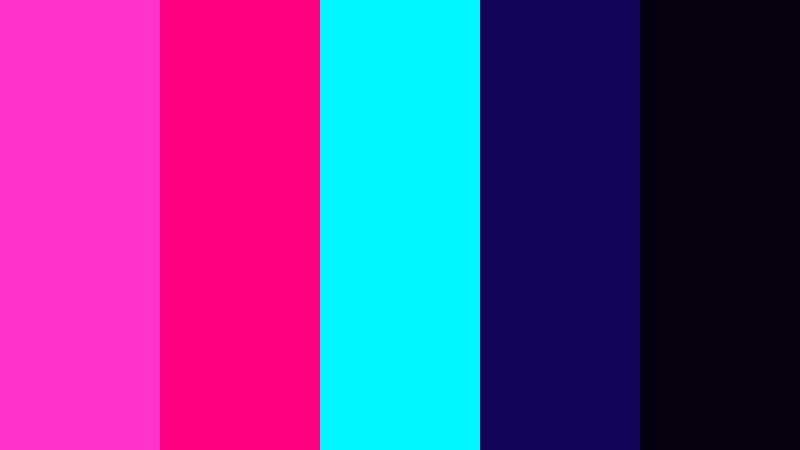
- HEX Codes: #ff33cc, #ff0080, #00f6ff, #120458, #050010
- Mood: Retro-futuristic, digital, and cinematic with a 80s sci-fi feel.
- Use for: Perfect for tech explainers, motion graphics, channel branding, and music visualizers with a synthwave style.
Synthwave Grid Horizon is a classic neon sunset: bright Electric Fuchsia and magenta streaking across cyan over deep cosmic blues. It immediately recalls 80s sci-fi, VHS intros, and retro game loading screens.
Use this palette to build grid lines, wireframes, and horizon lines in your motion graphics. In Filmora, you can create titles with fuchsia and cyan glows over #050010 or #120458 backgrounds, then add subtle scanline overlays for a retro-futuristic explainer or music visualizer.
Holographic Interface

- HEX Codes: #ff3bd0, #8f8bff, #41ffd9, #0f172a, #020817
- Mood: High-tech, sleek, and hologram-inspired with cool neon accents.
- Use for: Use for UI mockups, app promos, SaaS product videos, and tech startup pitch visuals.
Holographic Interface uses Electric Fuchsia as a pulse against periwinkle, mint neon, and deep navy. It feels like a futuristic dashboard or AR overlay, with clean, cool tones that still feel vibrant.
Use the dark blues (#0f172a, #020817) as your main canvas, then let fuchsia and mint highlight important buttons, metrics, or callouts. In Filmora, this palette works well with HUD-style elements, animated line charts, and interface reveals for app promos and startup explainers.
Glitch Signal Burst
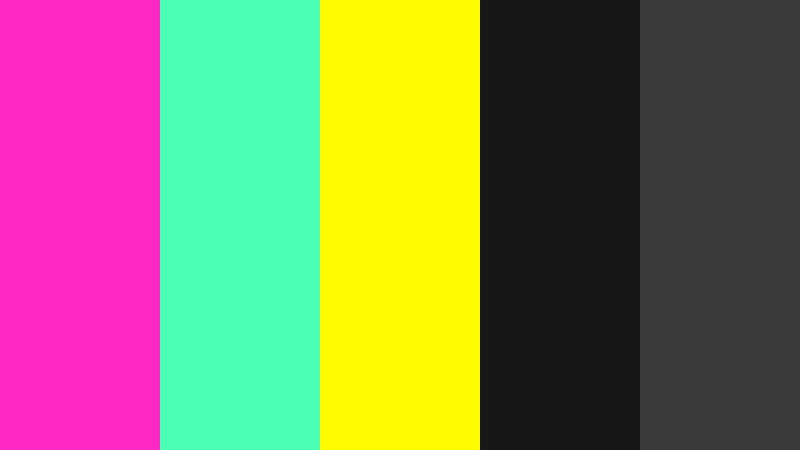
- HEX Codes: #ff28c4, #4bffb5, #fffb00, #171717, #3a3a3a
- Mood: Chaotic, glitchy, and experimental with a cyberpunk edge.
- Use for: Ideal for glitch transitions, experimental music videos, hacker themes, and edgy short-form edits.
Glitch Signal Burst throws Electric Fuchsia together with neon mint and signal yellow over grayscale noise. It feels unstable, like a corrupted feed or hacked broadcast, perfect for cyberpunk storytelling and experimental edits.
Use #171717 and #3a3a3a as your glitchy base, adding fuchsia, mint, and yellow as flashes, error text, or scanline blocks. In Filmora, combine this palette with glitch effects, RGB splits, and frame skipping to create intense, stylized hacker intros or music video breaks.
Neon Circuit Matrix

- HEX Codes: #ff36c9, #22ff99, #6bffea, #101820, #252a34
- Mood: Tech-savvy, coded, and sleek like illuminated circuitry.
- Use for: Great for coding channels, cybersecurity explainers, fintech branding, and tech intros.
Neon Circuit Matrix weaves Electric Fuchsia through green and aqua neons on dark graphite. It looks like a lit-up circuit board or data stream, giving your videos a sharp, tech-forward identity.
Use the dark grays (#101820, #252a34) as your main background, then draw thin lines and node icons in fuchsia, green, and aqua. In Filmora, this palette is perfect for line animations, loading bars, and data visualizations in intros and explainer segments for tech and finance channels.
Elegant And Modern Electric Fuchsia Color Palettes
Fuchsia On Marble Luxe

- HEX Codes: #ff2ec5, #ffe4f4, #f5f5f5, #2e2e38, #0b0b10
- Mood: Chic, minimal, and editorial with a luxury contrast.
- Use for: Perfect for beauty brand idents, product flatlays, logo stings, and minimalist title cards.
Fuchsia On Marble Luxe sets strong Electric Fuchsia against pale marble whites and soft grays, grounded by charcoal and black. It feels like a high-end magazine spread or cosmetics launch, mixing playfulness with restraint.
Use the whites and light pinks as background for product shots or text blocks, and keep Electric Fuchsia reserved for logos, key words, and accent lines. In Filmora, this palette shines in clean openers, lower thirds, and subtle motion graphics for beauty, lifestyle, and design-focused channels.
Midnight Gallery Opening

- HEX Codes: #ff32c7, #f4b3d8, #f9f3ff, #151521, #2f3145
- Mood: Artful, sophisticated, and quietly dramatic.
- Use for: Use for gallery promos, filmmaker reels, moody brand films, and design portfolios.
Midnight Gallery Opening uses Electric Fuchsia as a spotlight in a subdued, gallery-like environment of blush, porcelain white, and deep blues. It feels refined and artistic without losing the energy that fuchsia brings.
Use the darker blues for clean, cinematic backgrounds, then reserve fuchsia for logos, name cards, or key transition frames. In Filmora, this palette is ideal for showreels, portfolio intros, and brand films where you want sophistication with a single signature Electric Fuchsia accent to tie your identity together.
Tips for Creating Electric Fuchsia Color Palettes
Electric Fuchsia can easily become overpowering, but with the right companions it becomes a strong signature color for videos, thumbnails, and design. These tips will help you combine it with supporting hues while keeping your visuals readable and on-brand.
- Use Electric Fuchsia as an accent, not the entire canvas. Let it highlight titles, buttons, and key shapes while neutrals or dark tones handle the background.
- Pair fuchsia with deep blues, charcoals, or black for high contrast that pops on dark mode feeds, especially on YouTube and TikTok.
- Add one warm accent such as Neon Tangerine or bright orange to balance the coolness of fuchsia and cyan-based palettes, especially in festival or nightlife edits.
- Check text readability at small sizes. Test white or near-white text on fuchsia blocks, and avoid fully saturated fuchsia behind long paragraphs.
- Build a simple hierarchy: one primary color (Electric Fuchsia), one secondary (teal, blue, or blush), and one neutral (black, navy, or off-white) to keep branding consistent.
- Match your footage to your chosen palette in Filmora by gently shifting shadows, midtones, and highlights so clothing, lights, or UI elements echo your HEX codes.
- Use gradients that blend Electric Fuchsia into purple or blue for smoother, more cinematic backgrounds instead of flat, harsh blocks of color.
- Create reusable title and lower-third templates in Filmora with your Electric Fuchsia palette baked in, so every new edit automatically feels on-brand.
Electric Fuchsia is one of those colors that instantly defines a mood: bold nightlife, dreamy romance, sleek tech, or modern luxury, depending on what you pair it with. By choosing the right palette, you can shape how your audience feels about your channel or brand in just a few frames.
Whether you prefer soft pastels or high-voltage neon, the HEX codes above give you ready-made combinations for thumbnails, intros, overlays, and social media branding. Drop these colors into Filmora, apply them to your titles and graphics, and use grading tools to nudge your footage into the same Electric Fuchsia world.
Experiment with a few palettes across different edits, then settle on one or two that truly fit your story and audience. With consistent use and Filmora's color tools, Electric Fuchsia can become a recognizable signature that makes your content stand out everywhere it appears.
secure download