

 100% Security Verified | No Subscription Required | No Malware


 ChatGPT
 Perplexity
 Gemini
 Claude
 Grok
Grok
Obsidian Blue sits between deep navy and ink black, carrying a sense of focus, depth, and quiet power. It feels cinematic and polished, which is why it works so well for serious content, late-night aesthetics, and anything that needs a moody, high-end finish. In video, this tone instantly adds drama to intros, text overlays, and transitions, while still looking clean and professional.
For creators and brands, Obsidian Blue is a reliable base color for YouTube thumbnails, logo animations, channel banners, and social intros. It pairs beautifully with soft neutrals, warm highlights, and neon accents. Below, you will find ready-made Obsidian Blue color palettes with HEX codes, tailored for Filmora users and visual creatives who want cohesive color across edits, graphics, and branding.
In this article
Cinematic Obsidian Blue Color Palettes
Midnight Cinema Frame
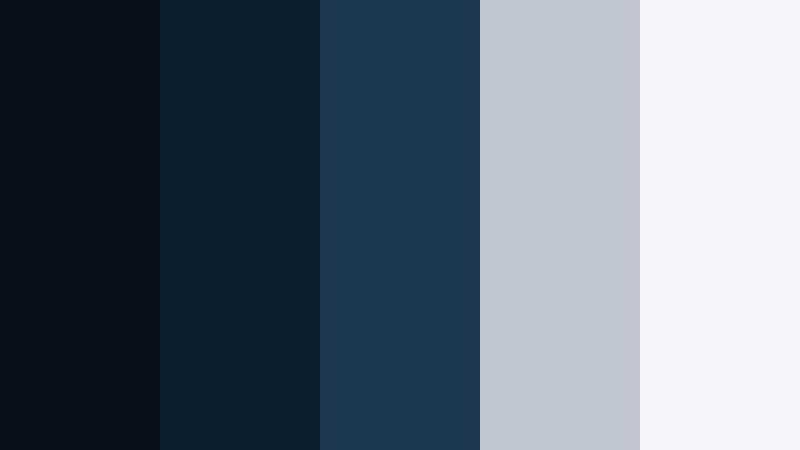
- HEX Codes: #071019, #0b1c2b, #1c3752, #c1c7d0, #f5f6fa
- Mood: Moody, cinematic, and immersive like a late-night movie screening.
- Use for: Perfect for dramatic film intros, narrative short films, and dark, atmospheric YouTube essays.
This palette wraps your visuals in deep Obsidian Blue shadows, stepping up through muted navy into soft gray and nearly white highlights. It feels like sitting in a quiet cinema, where the only light is from the screen. The darkest tones build a strong base for backgrounds and letterbox bars, while the lighter grays and off-white make titles, captions, and UI overlays easy to read.
Use it for serious storytelling edits, documentary-style videos, and long-form essays where you want the imagery to feel focused rather than flashy. In Filmora, it works beautifully across intro slates, lower thirds, and end cards. You can also carry this palette into your thumbnails, channel banner, and watermark so your Obsidian Blue aesthetic feels consistent everywhere viewers see your brand.
Pro Tip: Build a Cinematic Obsidian Blue Look in Filmora
To keep a Midnight Cinema Frame vibe across your entire project, start by choosing one of the darker blues as your main background color for titles, frames, and overlays. In Filmora, you can save this as a custom color and reuse it in text, shapes, and filters so every scene feels like part of the same film. Then, use the light grays and off-white for readable typography and subtle UI-style elements like progress bars or chapter markers.
When editing, apply a soft vignette and slightly lower the overall saturation so your footage sinks into the Obsidian Blue mood. Use adjustment layers in Filmora to apply these changes once and affect all clips underneath. This helps your intros, B-roll, and outros share the same cinematic tone, even if they were shot in different locations or lighting conditions.
AI Color Palette
If you love how this palette looks in the swatch but your raw footage feels all over the place, Filmora's AI Color Palette feature can bridge the gap. Simply use a still frame or reference image that already uses your Midnight Cinema Frame colors, then let AI analyze it and apply a similar palette across your shots.
This is especially helpful for narrative edits or essay-style videos where clips come from different cameras or days. With AI Color Palette, you can quickly unify exposure and tone, pushing everything toward that cool, Obsidian Blue cinematic look while preserving skin tones and key details.
 secure download

HSL, Color Wheels & Curves
To refine this Obsidian Blue palette, use Filmora's HSL panel to pull blues and cyans slightly deeper while lifting luminance in the grays. Then, in the color wheels, cool down the shadows and leave midtones neutral so skin and key subjects do not look too cold. A gentle S-curve in the curves tool can add contrast, making titles sharper against those dark blue backgrounds.
You can follow a similar process to what is shown in Filmora's advanced color grading tutorials on YouTube, applying HSL, color wheels, and curves to turn a flat image into a cinematic frame. Once you like the result on one shot, save it as a custom preset and apply it to the rest of your timeline for a unified Midnight Cinema Frame style.
secure download1000+ Video Filters & 3D LUTs
Once you have your base Obsidian Blue grade, Filmora's video filters and 3D LUTs make it easy to stylize it further. You can try film-style LUTs to give your Midnight Cinema Frame palette a subtle analog feel, or use moody filters that add grain, glow, or faded blacks for an art-house look.
Apply filters on adjustment layers so you can dial them back if needed. This way, your Obsidian Blue foundation stays intact, but you can quickly test different moods for trailers, essays, or channel intros until you find the perfect cinematic finish.
secure downloadNoir Harbor Streets
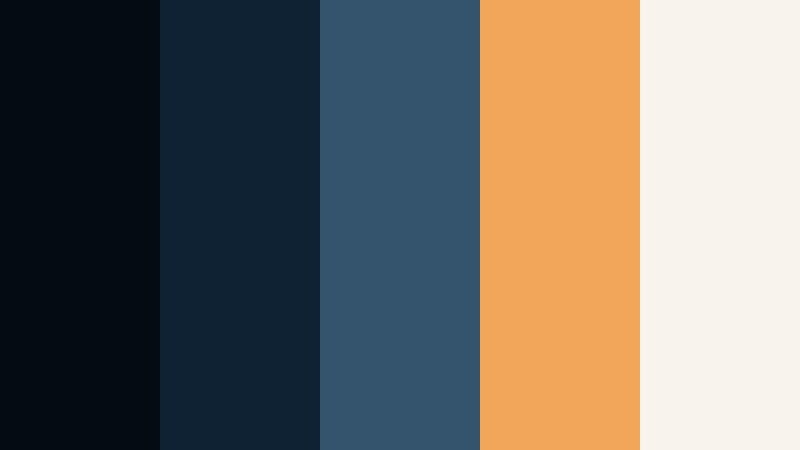
- HEX Codes: #050b12, #0e2233, #34546d, #f2a65a, #f8f3ec
- Mood: Urban, mysterious, and slightly nostalgic with a hint of warm neon.
- Use for: Great for cityscape b-roll, travel vlogs, and title cards that balance cool shadows with warm highlights.
Noir Harbor Streets sets heavy Obsidian Blue shadows against a single warm streetlight glow. The deep blues ground your frames in mystery, while the amber accent and soft off-white bring life back into key elements like signs, windows, or text. It feels like walking through a quiet dockside street after rain.
Use the darkest tones as background plates for YouTube titles, then pick the warm amber for buttons, subtitles, and call-to-action badges. In Filmora, this palette works perfectly for grungy travel vlogs, city B-roll sequences, and thumbnails featuring silhouettes or skyline shots with bold typography.
Stormy Lens Flare

- HEX Codes: #050910, #102336, #204667, #ffcc73, #ffffff
- Mood: Intense, high-contrast, and dramatic with a cinematic punch.
- Use for: Ideal for trailer-style edits, sports highlights, and dynamic motion graphics with bold titles.
Stormy Lens Flare builds a powerful contrast between inky Obsidian Blue and bright golden highlights. The layered blues are perfect for stormy skies, stadium scenes, or high-energy transitions, while the warm yellow and white create explosive flares and focal points.
Use the gold and white for title text, streaks, and motion graphics elements that slice through dark frames. In sports or gaming highlight edits, this palette helps important moments stand out, while maintaining a polished, cinematic feel suitable for thumbnails, intros, and social teasers.
Deep Ocean Narrative
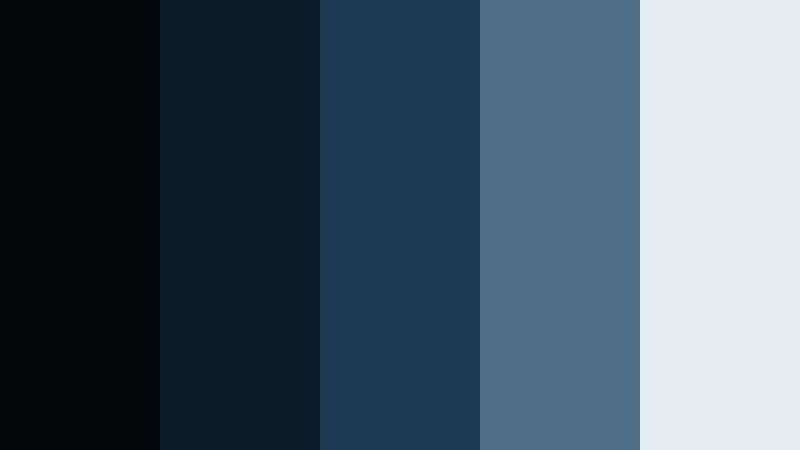
- HEX Codes: #02070c, #0c1b27, #1f3b52, #4f7084, #e4edf2
- Mood: Reflective, calm, and introspective like an underwater monologue.
- Use for: Best for documentaries, educational videos, and reflective travel pieces needing a quiet cinematic tone.
Deep Ocean Narrative gently moves from near-black Obsidian shadows into muted teal blues and misty highlights. It feels calm and thoughtful, like a slow dive beneath the surface. The midtone blues work well for overlays and charts, while the pale blue-gray keeps text approachable and easy on the eyes.
This palette is ideal for educational content, data explainers, and reflective voiceovers. In Filmora, use the darker shades as backgrounds for info panels, then apply the lighter tones to icons, lower thirds, and subtitles. It also makes a soothing choice for channel art if your brand is focused on learning, productivity, or slow-travel storytelling.
Twilight Title Card

- HEX Codes: #050814, #121d30, #2e4260, #f47458, #fef7f3
- Mood: Dusk-lit, emotional, and cinematic with a soft touch of warmth.
- Use for: Great for emotional storytime videos, cinematic reels, and channel trailers with heartfelt messaging.
Twilight Title Card combines soft Obsidian Blue dusk tones with a gentle coral accent and creamy highlight. It captures the feeling of golden hour fading into night, with just enough warmth to keep things emotional and human. The coral is perfect for accent words in titles, notifications, and small icons.
Use this palette for storytime thumbnails, personal documentaries, and channel trailers that lean into feeling rather than speed. In Filmora, pair the deeper blues with a subtle vignette, then let coral and cream draw attention to faces, quotes, and subscriber prompts without breaking the overall twilight mood.
Modern & Minimal Obsidian Blue Color Palettes
Obsidian Interface Clean

- HEX Codes: #050b12, #152235, #2e3f59, #e0e5ec, #ffffff
- Mood: Clean, modern, and professional with tech-forward clarity.
- Use for: Optimized for app UI mockups, SaaS promo videos, and sleek lower-thirds templates.
Obsidian Interface Clean leans into crisp, business-ready Obsidian Blue balanced with cool neutrals. The darker blues are strong enough for headers and background blocks, while the light grays and white keep the overall look airy and minimal.
Use this palette for product demos, software walkthroughs, and UI-style overlays in your tutorials. In Filmora, build consistent text styles and shape layers using the deep blues for panels and white for copy, so your videos feel like an extension of a modern app interface or website.
Corporate Night Shift

- HEX Codes: #060910, #101a28, #27405a, #7fa1c1, #f4f7fb
- Mood: Trustworthy, corporate, and composed with late-night productivity vibes.
- Use for: Great for pitch decks, LinkedIn content, and corporate explainers that need calm authority.
Corporate Night Shift is built around deep, reassuring Obsidian Blue accented with dusty steel blues and a pale, almost white background. It feels like working in a glass office tower after dark, calm but productive.
Use the softer blues for charts and data callouts, while keeping the darkest tones in headers and footers. This palette suits LinkedIn videos, business case studies, and internal training clips. In Filmora, it helps your lower thirds, bullet lists, and infographic-style overlays look professional and on-brand for corporate audiences.
Tech Studio Grid

- HEX Codes: #050812, #122034, #1f3550, #00d0ff, #f2fbff
- Mood: Futuristic, focused, and energetic with a crisp digital edge.
- Use for: Perfect for tech channels, gadget reviews, and overlays on screen recordings or tutorials.
Tech Studio Grid combines sleek Obsidian Blue foundations with an electric cyan accent. It feels like a modern control room or clean digital dashboard. The light cyan and off-white give you strong, high-contrast options for icons and buttons.
Use this palette for tech reviews, coding tutorials, and productivity workflows. In Filmora, apply the deep blues as full-screen overlays behind your webcam shot, then use cyan for subscribe buttons, timeline markers, and animated HUD elements to reinforce the tech identity of your channel.
Minimal Night Workspace
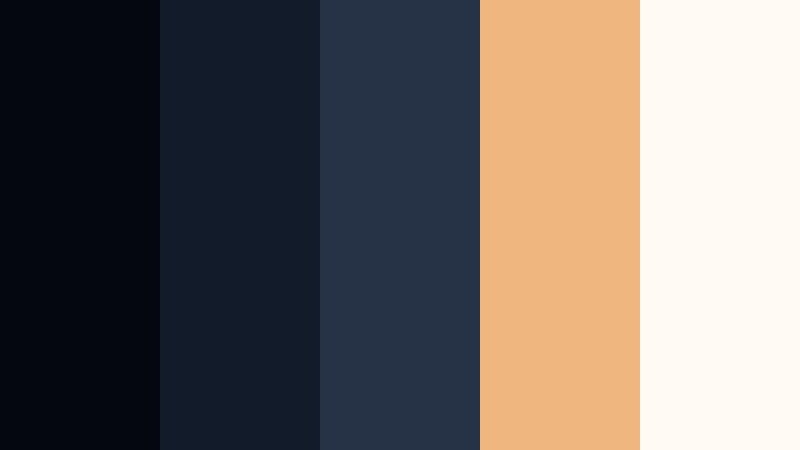
- HEX Codes: #04070d, #121b29, #263347, #f0b67f, #fffaf3
- Mood: Cozy yet minimal, like a tidy desk lit by a warm lamp at night.
- Use for: Great for productivity vlogs, study-with-me videos, and aesthetic workspace reels.
Minimal Night Workspace sets calm Obsidian Blue shadows against a soft, warm beige accent and creamy white. It captures the feeling of late-night focus with a desk lamp glowing just outside the frame.
Use the warm tone to highlight timers, to-do lists, and small icons, while keeping most of the frame in deep blue to avoid visual clutter. In Filmora, create simple lower thirds, timestamps, and chapter cards using this palette to give your productivity or study content a cohesive, calming aesthetic.
Sleek Channel Identity
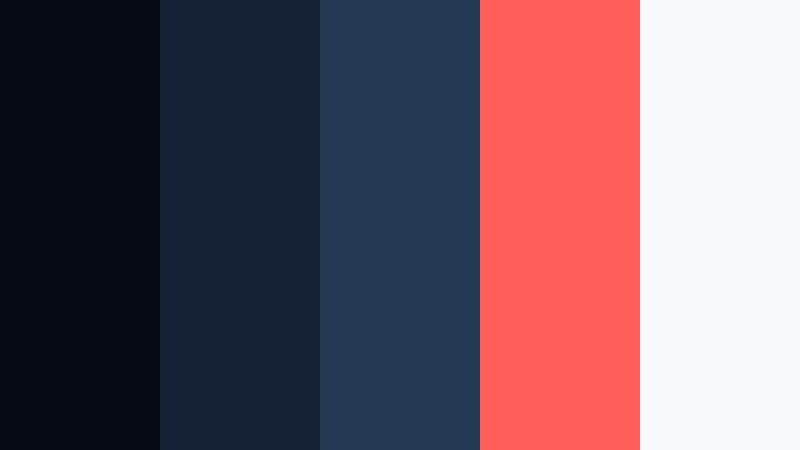
- HEX Codes: #050a11, #142034, #243a54, #ff5e5b, #f7f9fc
- Mood: Confident, modern, and distinctly branded with a pop of bold accent.
- Use for: Ideal for YouTube channel branding, logo stings, and recurring series intros.
Sleek Channel Identity uses Obsidian Blue as a strong anchor, then injects a punchy red-coral for calls to action. The clean off-white keeps everything readable and sharp. The result is modern, bold, and instantly recognizable.
Reserve the coral for subscribe buttons, key words in your titles, and small UI elements you want viewers to click. In Filmora, build template intros and end screens with this palette so every upload reinforces the same channel identity in your thumbnails, lower thirds, and logo animations.
Moody & Atmospheric Obsidian Blue Color Palettes
Rainy Window Bokeh

- HEX Codes: #03070d, #0f1a28, #25354a, #6c7c8f, #f1f2f6
- Mood: Soft, melancholic, and atmospheric like watching rain at night.
- Use for: Best for lofi beats videos, ambience loops, and reflective vlogs about personal growth or journaling.
Rainy Window Bokeh blends deep Obsidian Blue with muted slate and foggy highlights, creating a gentle, rainy-night mood. The darker tones feel like the world outside, while the lighter grays mimic blurred city lights and reflections on glass.
This palette is ideal for lofi loops, chill background videos, and personal vlogs about reflection or journaling. In Filmora, you can use the mid-blues for overlays and the light tones for unobtrusive text, letting music and atmosphere be the focus while your visuals stay soft and cohesive.
Subway Reverie
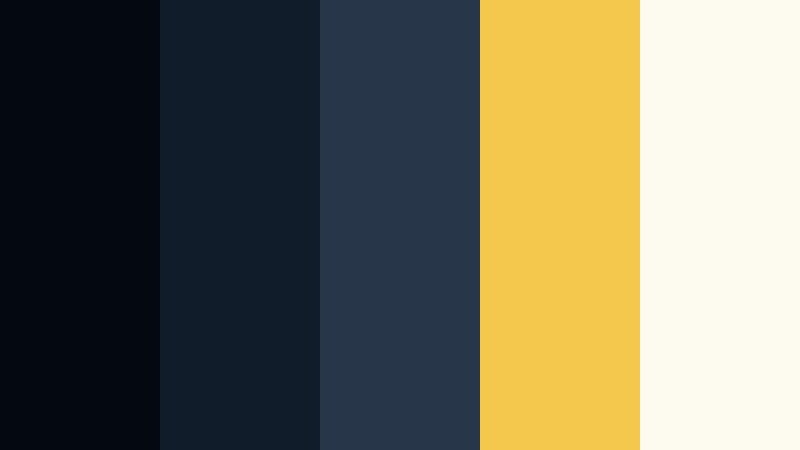
- HEX Codes: #040910, #111c2a, #28364a, #f2c94c, #fdfaf0
- Mood: Urban, introspective, and slightly surreal with a single bright accent.
- Use for: Great for travel montages, street photography edits, and cinematic B-roll sequences.
Subway Reverie wraps your frame in tunnellike Obsidian Blue shadows and then pierces them with a muted yellow accent. It evokes the feeling of staring out a subway window, lost in thought, while fluorescent lights flicker past.
Use the yellow selectively for subjects you want to highlight, key words in titles, or directional arrows in your motion graphics. In Filmora, it works well over street photography, handheld travel footage, and slow B-roll cuts where the color pop guides the viewer's eye without breaking the moody atmosphere.
Nebula Drift

- HEX Codes: #030611, #151d33, #2d3e5e, #774aa4, #f4e8ff
- Mood: Dreamy, cosmic, and imaginative like floating through a quiet galaxy.
- Use for: Perfect for sci-fi edits, gaming intros, and motion graphics with a space or tech theme.
Nebula Drift mixes Obsidian Blue voids with violet highlights and soft starlight tones. It feels ethereal and futuristic, ideal for floating particles, galaxy shots, or abstract digital backgrounds.
Use the violet as an accent for titles, HUD elements, and logo glows in your sci-fi intros or gaming montages. In Filmora, combine this palette with light leaks, particle overlays, and slow zooms to create dreamy space-themed sequences and animated title cards.
Aurora Forest Chill
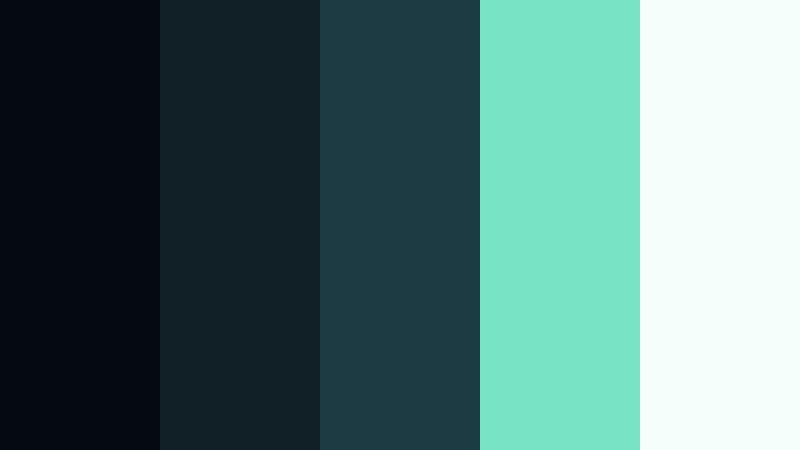
- HEX Codes: #050a10, #102026, #1c3b43, #78e3c5, #f4fffb
- Mood: Calm, mysterious, and slightly magical like a forest under northern lights.
- Use for: Ideal for nature vlogs, hiking reels, and ASMR or meditation visuals.
Aurora Forest Chill places Obsidian Blue night tones beneath minty green aurora accents and soft white. It feels grounded yet otherworldly, like a long exposure of the sky over dark trees.
Use the greens generously for gradients in your titles, soundwave visuals, or subtle glows around key objects. In Filmora, it is a great fit for nature B-roll, camping stories, ASMR soundscapes, and meditation loops where you want viewers to feel both calm and a bit enchanted.
Bold & Creative Obsidian Blue Color Palettes
Neon Arcade Night
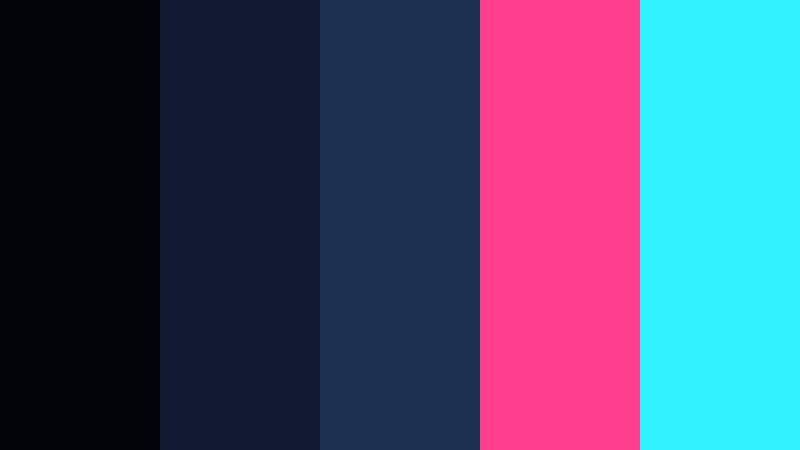
- HEX Codes: #03040a, #111933, #1c3052, #ff3f8e, #30f2ff
- Mood: Loud, playful, and high-energy like a retro gaming arcade.
- Use for: Great for gaming channels, hype edits, and bold social clips that need strong contrast and color pops.
Neon Arcade Night sets a dark Obsidian Blue base, then slices through it with hot pink and neon cyan accents. It is loud, playful, and instantly eye-catching, perfect for thumbnails and edits that need to stand out in crowded feeds.
Use the neon colors for glitch text, button highlights, and animated shapes. In Filmora, combine this palette with fast cuts, RGB split effects, and bold typography to build high-energy gaming intros, esports hype reels, and short social clips that demand attention.
Festival Night Lights

- HEX Codes: #050814, #141f34, #253a57, #ff9f1c, #ffece0
- Mood: Celebratory, warm, and energetic like a night festival or outdoor concert.
- Use for: Perfect for event recaps, travel vlogs, and highlight reels packed with movement and music.
Festival Night Lights grounds your frames in deep Obsidian Blue while golden orange and peach accents add a lively festival glow. It feels like string lights, fireworks, and food stalls against a dark sky.
Use the warm tones for animated titles, countdowns, and callouts over party or travel footage. In Filmora, it is great for concert recaps, city nightlife montages, and event highlight reels, where the contrast between cool shadows and warm highlights captures the excitement of the moment.
Tips for Creating Obsidian Blue Color Palettes
Obsidian Blue is flexible and powerful, but it works best when balanced with contrast, warmth, and clear design choices. Use these tips to build your own palettes or tweak the ones above for your videos and graphics.
- Pair deep Obsidian Blue with at least one light neutral (off-white or pale gray) so text and icons remain readable on thumbnails and title cards.
- Add a warm accent color (amber, coral, or peach) to prevent your visuals from feeling too cold, especially if you feature faces or lifestyle content.
- Use Obsidian Blue for large background areas and interface-style elements, then reserve bright accents for calls to action, buttons, and keywords.
- Check your designs in grayscale to ensure there is enough contrast between your dark blues and any text or logo elements on top.
- Keep your palette consistent across intros, lower thirds, and end screens so viewers start to recognize your Obsidian Blue brand identity instantly.
- When grading footage, lower saturation in the shadows and push them slightly toward blue while keeping skin tones and highlights more neutral.
- Create custom presets in Filmora for your chosen Obsidian Blue grade and reuse them on every project to save time and maintain a cohesive look.
- For social content, test your palette on both desktop and mobile screens, adjusting brightness and contrast so Obsidian Blue does not appear too dark on small displays.
Obsidian Blue palettes can shift your content from casual to cinematic, giving your channel a focused, cohesive mood. Whether you lean into moody documentaries, clean tech explainers, or neon gaming edits, this deep blue base helps tie every frame together.
Try these palettes as starting points, then fine-tune them in Filmora using AI tools, color grading controls, and filters. As you build templates for intros, lower thirds, and end cards, your Obsidian Blue identity will become more recognizable with every new upload.
The more you experiment with combinations of Obsidian Blue, warm highlights, and bright accents, the easier it becomes to match your visuals to the story or emotion you want to share. Open Filmora, drop in your footage, and start testing these HEX codes to see which palette fits your style best.
secure download