

 100% Security Verified | No Subscription Required | No Malware


 ChatGPT
 Perplexity
 Gemini
 Claude
 Grok
Grok
Ocean Breeze sits between blue and green, bringing together the calm of open water and the freshness of coastal air. It feels clean, modern, and quietly optimistic, which is why it works so well for cinematic edits, minimalist branding, and any video that should feel relaxing but still alive. In color psychology, these blue-green tones are linked with clarity, trust, balance, and focus.
For creators and Filmora users, Ocean Breeze is a flexible base for intros, lower-thirds, channel art, thumbnails, and LUT-style grades over entire timelines. Below you will find 15 curated Ocean Breeze color palettes with HEX codes so you can match your vlogs, aesthetic edits, product videos, and brand visuals with consistent, coastal-inspired color combinations.
In this article
Soft & Serene Ocean Breeze Color Palettes
Morning Harbor Haze
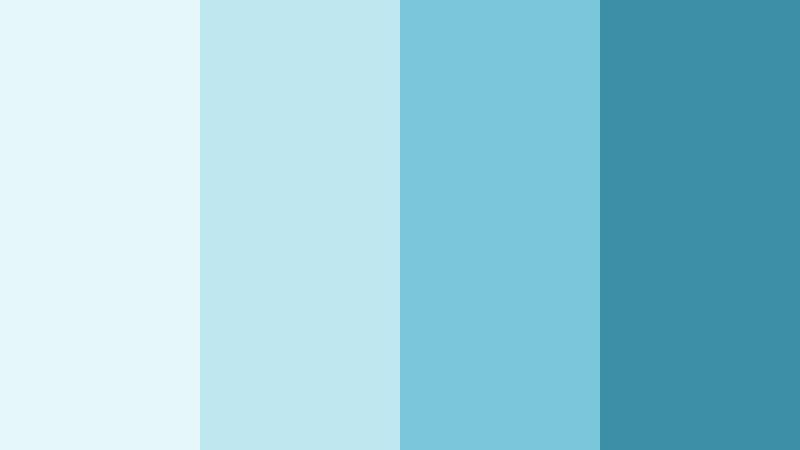
- HEX Codes: #e6f7fb, #bfe7f0, #7bc6d8, #3b8fa6
- Mood: Calm, airy, and reflective like a quiet seaside morning.
- Use for: Ideal for reflective vlog intros, peaceful travel sequences, and meditative B-roll overlays.
Morning Harbor Haze layers light misty blues over deeper Ocean Breeze tones, creating the feeling of a harbor just before the day begins. The soft top hues keep everything bright and breathable, while the darker accent color (#3b8fa6) grounds titles and key UI elements.
Use this palette when you want your videos to feel slow, thoughtful, and uncluttered. It works beautifully for intro screens, chapter cards, end slates, and channel banners where you want gentle gradients or flat backgrounds under clean typography. For thumbnails, let the lighter colors carry the background and use the deepest Ocean Breeze shade behind text so it stays readable on mobile.
Pro Tip: Build a Cinematic Ocean Breeze Morning Look in Filmora
To translate Morning Harbor Haze into a full video style, start by using Filmora to add soft blue-green tints to your highlights and midtones, while keeping shadows slightly desaturated. This keeps skin tones natural but pushes the overall frame toward that quiet harbor feeling. Apply the palette to your intro, talking-head clips, B-roll, and outro so every part of the edit feels like it belongs in the same morning world.
Create simple motion graphics in Filmora that match the HEX values from this palette. Use the lightest colors as card backgrounds or lower-third bars, and the deeper Ocean Breeze shade for text, icons, and call-to-action buttons. Once you build a few presets, you can reuse them across episodes for a consistent, calming brand identity.
AI Color Palette
If you have a still frame, brand board, or PNG swatch of Morning Harbor Haze, you can use Filmora's AI Color Palette feature to spread that look across your entire video. The tool analyzes the reference image and automatically applies matching tones, so your A-roll, B-roll, and cutaways all feel like they live in the same Ocean Breeze atmosphere.
This is especially useful for vlog series and travel diaries. Build your look once, save that frame, and then use AI Color Palette whenever you edit a new episode so your channel keeps one cohesive soft blue visual language.
 secure download

HSL, Color Wheels & Curves
Once the base palette is in place, use HSL in Filmora to gently shift blue and cyan hues toward Ocean Breeze while lowering saturation in the green and magenta channels. With the color wheels, add a hint of teal to the midtones and a cooler blue to the shadows to give your footage a cinematic coastal cast. Curves let you lift highlights slightly while keeping contrast soft, so the image feels airy rather than crunchy.
You can follow along with Filmora's advanced color grading tools tutorial to see how HSL, wheels, and curves work together. Save your final grade as a preset, then apply it across multiple clips to maintain that Morning Harbor Haze mood from start to finish.
secure download1000+ Video Filters & 3D LUTs
If you want to stylize Morning Harbor Haze without grading from scratch, Filmora's video filters and 3D LUTs make it easy to test different Ocean Breeze variations. Try subtle cinematic LUTs to add depth to the blues, then combine them with soft glow or vignette filters to emphasize the serene, early-morning mood.
You can also stack filters lightly: one to cool the temperature, another to lower contrast, and a third for slight film grain. This keeps your palette recognizable while giving it a polished, professional finish that stands out in feeds and playlists.
secure downloadCoastal Daydream Drift

- HEX Codes: #f0fbff, #cbeaf5, #8fd2e1, #4fa9c0, #2c6a7b
- Mood: Dreamy and light, with a touch of cinematic depth.
- Use for: Perfect for dreamy montages, lifestyle lookbooks, and soft overlay graphics for captions.
Coastal Daydream Drift moves from pale sky tones down into rich Ocean Breeze shadows. The gradient effect feels like looking from the horizon into deeper water, giving your visuals a natural sense of depth and motion even in static frames.
Use the lighter HEX codes as backgrounds for captions and chapter titles, then bring in the darker shades for gradients, borders, and accent text. In Filmora, this palette suits lifestyle lookbooks, dreamy slow-motion B-roll, and Pinterest-style montage edits where you want subtle cinematic contrast without losing softness.
Saltwater Whisper

- HEX Codes: #f6fbfc, #e1f3f6, #b0dde7, #7abfd3, #4f95aa
- Mood: Gentle, cozy, and comforting with a coastal breeze vibe.
- Use for: Use for sit-down talking-head videos, wellness content, and subtle lower-third graphics.
Saltwater Whisper is soft and approachable, with powdery Ocean Breeze tones that never feel harsh on the eye. The progression from near-white cyan into muted blue-greens makes it easy to build layers that stay cohesive on screens of any size.
This palette is great for calm talking-head setups, wellness channels, or coaching content where you want viewers to feel safe and at ease. Use the lightest shades for backgrounds and panels, mid tones for shapes and callouts, and the deeper Ocean Breeze color for lower-thirds and name tags in Filmora.
Cloudline Over Tide

- HEX Codes: #ffffff, #edf5f9, #c7e3f0, #86c3dc, #3e8eaa
- Mood: Fresh, optimistic, and clean with a hint of movement.
- Use for: Great for modern tutorials, app walkthroughs, and clean channel branding overlays.
Cloudline Over Tide blends crisp whites with Ocean Breeze blues so your visuals feel fresh and lightweight. It has a modern, UI-inspired character that works perfectly for software demos, productivity tips, and tech explainers.
Use white and near-white tones as your core background, then add Ocean Breeze strips for titles, progress bars, and section dividers in your Filmora graphics. This keeps your frames uncluttered while still giving your brand a recognizable splash of Ocean Breeze color.
Lagoon Lullaby Glow

- HEX Codes: #f8fdff, #dceff7, #aad6e8, #6db8d0, #2c7d93
- Mood: Lullaby-soft yet visually polished, like a glowing blue lagoon.
- Use for: Perfect for night routine vlogs, ASMR channels, and gentle motion graphics backgrounds.
Lagoon Lullaby Glow captures the feeling of a softly lit lagoon at dusk, with delicate highlight tones and smooth Ocean Breeze midtones. It is soothing but still crisp enough to look professional on large displays.
Apply this palette to bedtime routines, ASMR, or chill study-with-me videos. Use the lighter HEX codes to create glowy backgrounds and subtle gradients in Filmora, then let the richer teal accents shape animated titles, subscribe reminders, or looping background cards for live streams.
Vibrant & Fresh Ocean Breeze Color Palettes
Tropical Surf Burst

- HEX Codes: #fef6e7, #ffd27a, #00c2b7, #0390b5, #02506b
- Mood: Energetic, sunny, and adventurous like a surf day highlight reel.
- Use for: Best for travel vlogs, energetic reels, and bold thumbnail text blocks.
Tropical Surf Burst mixes warm sand and sunshine with punchy Ocean Breeze and teal tones. The result feels like waves breaking under bright light, perfect for content that should feel active and outdoorsy.
Use the warm yellows as highlight colors for badges and buttons, while the teal and blue shades anchor text and borders. In Filmora thumbnails and titles, this contrast pulls the eye quickly, making your surf, travel, or summer recap videos stand out in busy feeds.
Coral Reef Splash

- HEX Codes: #ffe9f0, #ff8fa3, #00bcd4, #008da4, #01566b
- Mood: Playful and bold with a fun beach-party attitude.
- Use for: Great for channel rebrands, lifestyle edits, and animated sticker-style graphics.
Coral Reef Splash pairs juicy coral pinks with vivid Ocean Breeze blues to mimic the contrast of coral against clear water. It is playful and energetic, with enough saturation to handle bold, graphic-heavy layouts.
Use coral tones for stickers, emojis, and badges in Filmora overlays, while the blues hold your core text and lower-thirds. This palette suits lifestyle channels, party recaps, and fun product promos where you want a friendly but eye-catching Ocean Breeze theme.
Sunlit Pier Pop

- HEX Codes: #fff9ea, #ffd993, #ffb347, #00a7c2, #03627a
- Mood: Uplifting and dynamic with a cinematic golden-hour touch.
- Use for: Use for upbeat intros, summer recap videos, and eye-catching title cards.
Sunlit Pier Pop combines golden-hour oranges with cool Ocean Breeze shadows for a strong warm-versus-cool contrast. It evokes sunlight hitting wood and water, which reads instantly as summer and outdoor fun.
Let the warm tones drive highlight elements like banners and transitions, while the Ocean Breeze blues sit behind typography or in gradient panels. This pairing can make your Filmora title cards, recap sequences, and travel intros feel like film stills from a sunny coastal movie.
Neon Marina Nights

- HEX Codes: #050916, #0b1530, #00e0ff, #00a2c1, #00607d
- Mood: Electric, modern, and a bit edgy like neon reflecting on water.
- Use for: Perfect for music videos, tech channels, and cyberpunk-style motion graphics.
Neon Marina Nights sets deep navy shadows against electric Ocean Breeze and cyan highlights. It feels like a futuristic marina lit by neon signs, ideal for content with a modern or cyberpunk edge.
Use the darkest tones as full-screen backgrounds in Filmora and overlay bright cyan titles, glitch transitions, or equalizer-style graphics. This palette is especially strong in music videos, gaming intros, and tech explainers where you want a high-energy, night-time Ocean Breeze aesthetic.
Citrus Current Rush

- HEX Codes: #fefbe9, #f7e47a, #f4b824, #00c1ce, #047a8a
- Mood: Zesty, energetic, and fast-paced like a creative brainstorm.
- Use for: Great for snappy shorts, product demos, and kinetic typography scenes.
Citrus Current Rush throws bright lemon and amber against cool Ocean Breeze currents to create a zesty, fast-paced palette. The contrast feels like sparks on water, perfect for quick edits and kinetic text.
Use the warm yellows to highlight keywords, progress steps, or countdowns, while keeping the Ocean Breeze colors as your consistent brand base. In Filmora, this mix works especially well for YouTube Shorts, Reels, or TikTok edits where you need instant, high-contrast impact.
Elegant & Modern Ocean Breeze Color Palettes
Glass Tower Marina
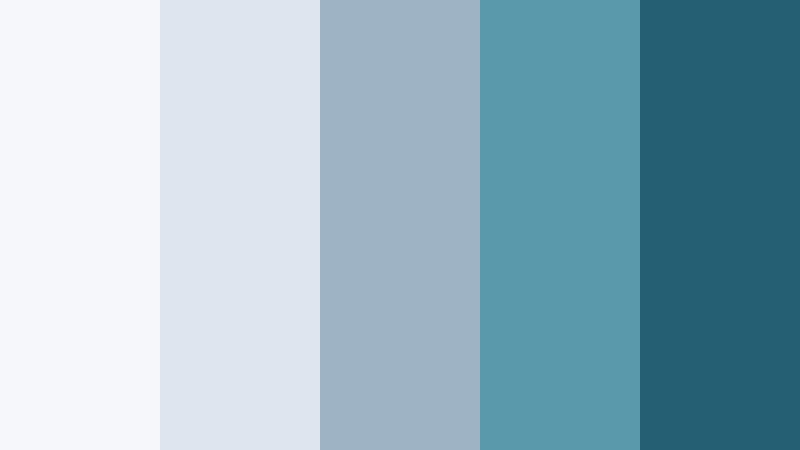
- HEX Codes: #f5f7fa, #dde5ee, #9eb3c4, #5a98ab, #245f73
- Mood: Sleek, corporate, and trustworthy with a coastal skyline feel.
- Use for: Use for tech explainers, SaaS promos, and professional brand intros.
Glass Tower Marina feels like glass and steel towers reflected in a harbor. The muted neutrals and controlled Ocean Breeze tones communicate professionalism, stability, and modern design.
Use the lighter greys for presentation-style backgrounds and slide-style frames in Filmora, then rely on the deeper Ocean Breeze shades for logo locks, stats boxes, and key callouts. This palette is ideal for brands that want a subtle coastal identity without looking playful or overly casual.
Minimal Harbor Slate
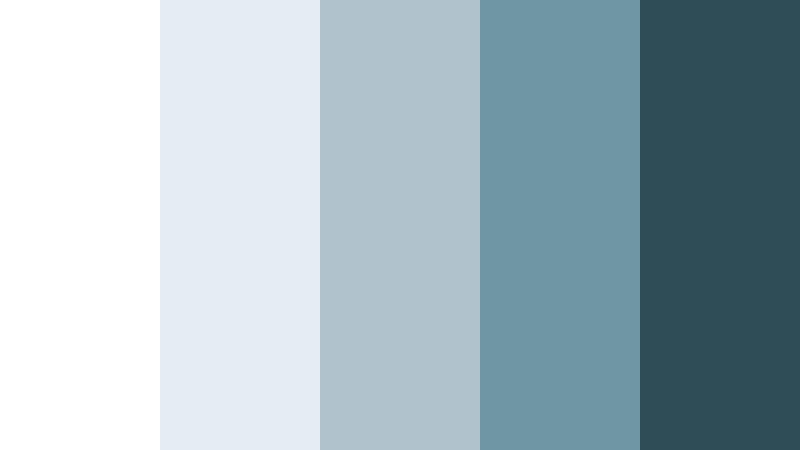
- HEX Codes: #ffffff, #e4edf1, #b0c3cd, #6f96a5, #2f4d57
- Mood: Minimal, refined, and balanced for modern design systems.
- Use for: Perfect for UI overlays, tutorial graphics, and minimalist channel looks.
Minimal Harbor Slate balances cool grays with deep Ocean Breeze slate to create a restrained, design-system-friendly palette. It is minimal and clean, making it a strong choice for tutorials and educational channels.
In Filmora, keep backgrounds almost white or light gray and drop in the mid and dark tones for icons, outlines, and text. This keeps your Ocean Breeze theme visible while preserving maximum readability and a modern, tech-forward vibe.
Tidal Ink Contrast
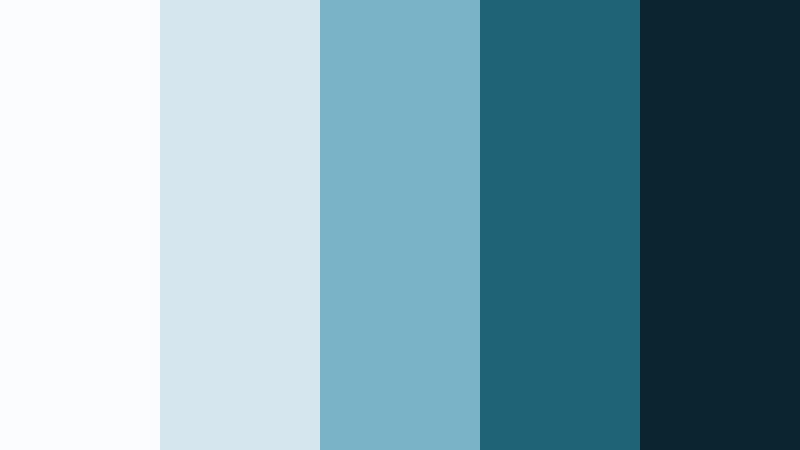
- HEX Codes: #fafcfd, #d6e6ee, #7ab3c7, #1f6476, #0a2530
- Mood: Cinematic and balanced with strong light-to-dark contrast.
- Use for: Great for cinematic title sequences, lower-thirds, and end-screen designs.
Tidal Ink Contrast stacks luminous Ocean Breeze midtones over inky navy shadows. The high contrast feels cinematic while still being clean and controlled.
Use the darkest shade (#0a2530) as a solid background for title cards and end screens, and place lighter Ocean Breeze tones on top for text and graphic accents. This palette shines in trailer-style intros, episode openers, and any Filmora project where you want drama without harsh colors.
Frosted Marina Chrome
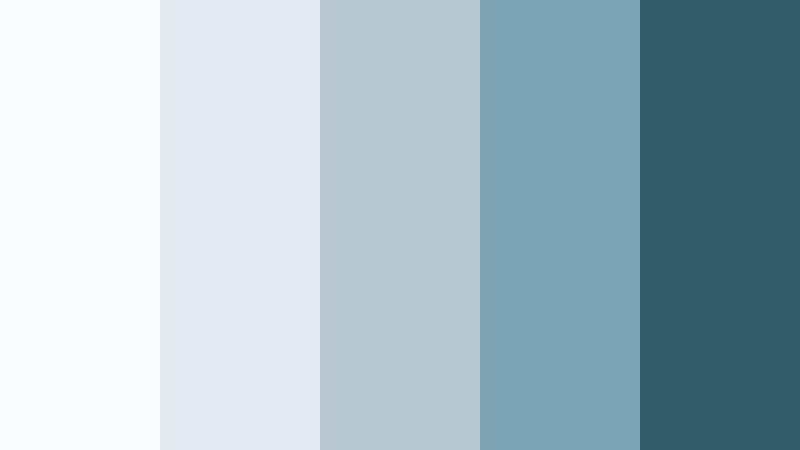
- HEX Codes: #f9fbfc, #e1ebf0, #b8c8d3, #7da4b4, #355c6a
- Mood: Cool, polished, and slightly futuristic like frosted glass UI.
- Use for: Use for motion UI, product feature highlights, and sleek infographic sections.
Frosted Marina Chrome looks like frosted glass panes over Ocean Breeze accents. The muted blues feel polished and slightly futuristic, making this palette ideal for UI-style motion graphics and product demos.
Build lower-thirds and info panels in the lighter shades, then use the deeper blue for accent lines, icons, and emphasis text in Filmora. This gives your videos a clean, tech-marina personality without overwhelming viewers with color.
Pastel & Aesthetic Ocean Breeze Color Palettes
Seafoam Storyboard

- HEX Codes: #f6fffb, #d7f6ee, #a9e6dd, #74c8c7, #3c8f96
- Mood: Soft, creative, and aesthetic with a pastel coastal twist.
- Use for: Perfect for aesthetic vlogs, journaling content, and soft thumbnail backgrounds.
Seafoam Storyboard blends pastel greens with Ocean Breeze blues to create a gentle, aesthetic seafoam look. It is airy and creative, ideal for mood-driven content and journaling-style storytelling.
Use the palest hues for collage-style backgrounds, doodle frames, and sticky-note overlays in Filmora. The deeper Ocean Breeze shade (#3c8f96) works well for handwritten-style fonts and icons that need to remain readable over soft, washed backgrounds.
Beach Glass Keepsake
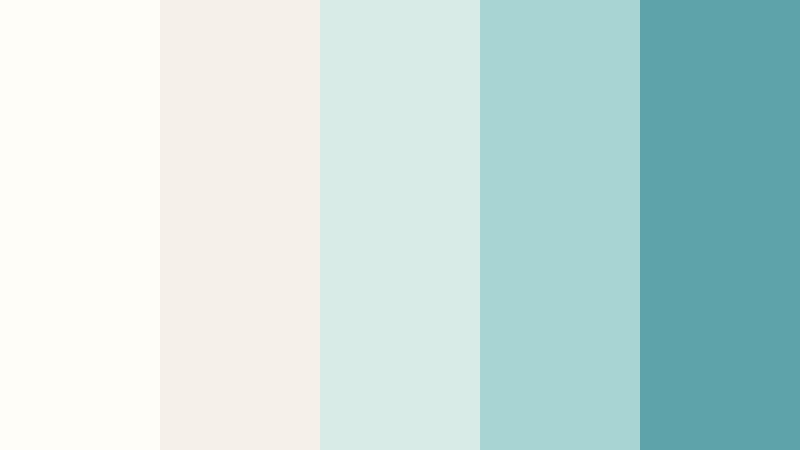
- HEX Codes: #fffdf8, #f5f0e8, #d9ebe6, #a7d5d4, #5ea3aa
- Mood: Nostalgic, gentle, and sentimental like found beach glass.
- Use for: Great for memory montages, wedding highlight reels, and nostalgic reels.
Beach Glass Keepsake feels like worn pieces of sea glass and sun-faded photos. Creams and soft Ocean Breeze tints give it a nostalgic, emotional quality that suits personal stories and romantic edits.
In Filmora, use the warm neutrals for background cards and frames, while the Ocean Breeze tones highlight names, dates, and key quotes. This palette works beautifully for wedding highlights, family montages, or throwback reels where you want emotion without heavy, dark colors.
Tips for Creating Ocean Breeze Color Palettes
When you build your own Ocean Breeze color combinations for video and design, focus on balance: mix soft sea tones with carefully chosen accents so your footage stays calming but still readable and on brand.
- Pair Ocean Breeze with warm neutrals (sand, cream, light beige) to avoid a cold look while keeping the coastal feeling.
- Use the darkest Ocean Breeze or navy shade for body text, and test readability on both desktop and mobile thumbnails.
- Keep 1 to 2 accent colors only (such as coral or citrus yellow) so the Ocean Breeze base remains the hero of your palette.
- Sample colors directly from your footage in Filmora using the eyedropper, then align your titles and graphics with those tones for a natural match.
- Check contrast by viewing your design in grayscale; if key information still stands out, your Ocean Breeze palette is strong.
- Create a hierarchy: light tones for backgrounds, medium tones for shapes and panels, and dark tones for text and outlines.
- Save your favorite Ocean Breeze grades and title templates as presets in Filmora so you can reuse them across series and platforms.
- Test your palette under different lighting: bright daytime clips, indoor scenes, and night shots may need small tweaks in HSL or curves to stay consistent.
Ocean Breeze color palettes are powerful tools for shaping mood, from dreamy and pastel to sleek and corporate or neon and futuristic. With the right mix of blues, greens, and supporting accents, you can give your channel, brand, or project a recognizable coastal identity that feels clean and modern.
Use these 15 palettes as starting points for your intros, titles, overlays, and thumbnail designs in Filmora. Once you find a combination that matches your story, lock it in with presets, AI Color Palette, and grading tools so every video feels like part of one coherent Ocean Breeze world.
Experiment, tweak, and save your favorite looks in Filmora until your Ocean Breeze aesthetic feels natural and effortless across long-form videos, shorts, and social teasers.
secure download