

 100% Security Verified | No Subscription Required | No Malware


 ChatGPT
 Perplexity
 Gemini
 Claude
 Grok
Grok
Rainforest color palettes sit right between earthy and electric. Deep greens signal growth, safety, and balance, while mists, stones, and floral accents add mystery and freshness. On screen, these tones instantly suggest dense jungle air, filtered sunlight, and quiet rivers, which is why they work so well for cinematic grading, ambient vlogs, and story-driven edits.
For creators and Filmora users, a well-chosen rainforest color palette can tie together thumbnails, intros, lower thirds, and social snippets into one recognizable style. Below are 15 rainforest color palette ideas with HEX codes for branding, YouTube thumbnails, gaming overlays, cinematic rainforest grading, and more, so you can build immersive visuals with confidence.
In this article
Lush & Natural Rainforest Color Palettes
Emerald Canopy Mist
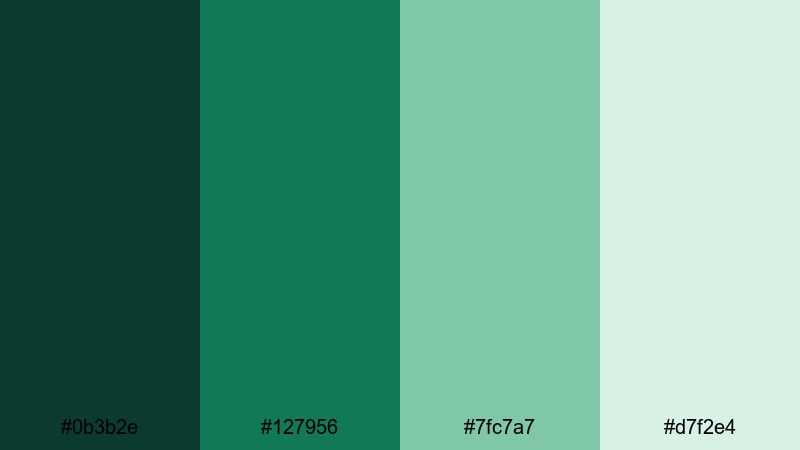
- HEX Codes: #0b3b2e, #127956, #7fc7a7, #d7f2e4
- Mood: Fresh, tranquil, and softly adventurous.
- Use for: Ideal for calming travel vlogs, nature b-roll, and clean channel branding with a natural feel.
Emerald Canopy Mist layers deep jungle green with softer, misty aquas for a palette that feels like a quiet hike under thick leaves after sunrise. The contrast between #0b3b2e and the airy #d7f2e4 gives you a natural way to balance rich footage with light, breathable UI elements.
Use the darker tones for lower thirds, logo reveals, or intro backgrounds, and let the pale greens handle text blocks, end screens, and YouTube thumbnails. This rainforest color palette is especially strong for eco-friendly brands, wellness channels, and any vlog series that leans on lush, slow-moving b-roll.
Pro Tip: Build a Cinematic Rainforest Look in Filmora
To keep a consistent Emerald Canopy Mist vibe across an entire edit, set up a simple style system in Filmora. Use the deepest green as your main overlay or panel color, then apply the lighter tones to titles, button shapes, subscribe animations, and chapter markers so every element feels like it belongs in the same rainforest world.
Save your title presets, lower thirds, and split-screen layouts using these exact HEX values, so you can reuse them in future episodes or playlists. Over time, viewers will associate that signature rainforest green gradient with your channel the second your intros and thumbnails appear.
AI Color Palette
If you have a reference photo of rainforest leaves in soft fog, you can turn it into a grading shortcut. Filmora's AI Color Palette feature lets you sample the mood of that image and apply its tones across clips, so your A-roll, B-roll, and cutaways all share the same Emerald Canopy Mist character.
Import your reference frame, use AI Color Palette to match those greens and mists, then fine-tune saturation so faces and skin tones stay natural. This is a fast way to keep long travel videos or documentaries visually unified without manually color matching every shot.
 secure download

HSL, Color Wheels & Curves
Once you have the base palette, refine those rainforest greens with HSL and color wheels. In Filmora you can gently shift the green hue toward teal for a cooler, mistier atmosphere, or warm it slightly if your rainforest footage was shot at golden hour. Curves help deepen shadows without crushing detail, so leaves keep texture while your scenes look more cinematic.
If you are new to grading, follow a simple workflow similar to the one in Filmora's color correction tutorials, starting with exposure, then contrast, then targeted HSL tweaks. This keeps your Emerald Canopy Mist look consistent from intro to outro, even if clips were recorded on different days or cameras.
secure download1000+ Video Filters & 3D LUTs
To push this rainforest palette into a specific style fast, combine it with Filmora's built-in looks. Filmora's video filters and 3D LUTs make it easy to create dreamy, desaturated jungle scenes or bold, contrasty adventure edits without starting from scratch every time.
Stack subtle film-style filters on top of your Emerald Canopy Mist grade to add grain, soften highlights, or bring a vintage explorer feeling to your travel series. Save these setups as custom presets so your channel keeps the same rainforest aesthetic across future thumbnails, shorts, and full-length videos.
secure downloadJungle River Stones
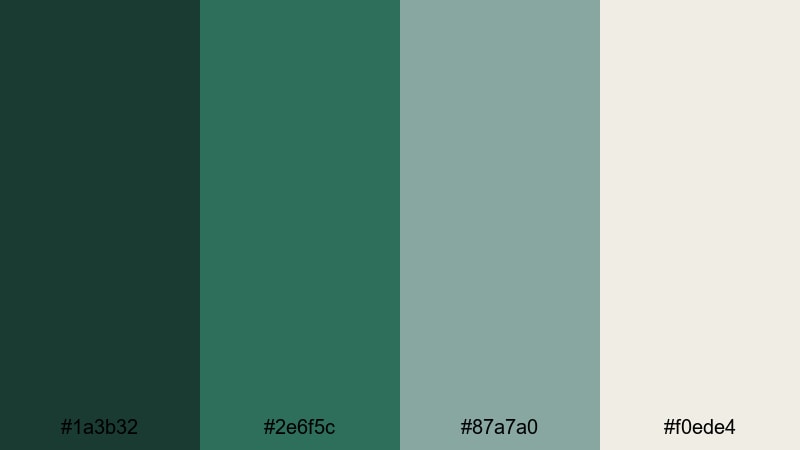
- HEX Codes: #1a3b32, #2e6f5c, #87a7a0, #f0ede4
- Mood: Grounded, refreshing, and quietly energetic.
- Use for: Works well for cinematic travel titles, lower thirds, and documentary-style graphics.
Jungle River Stones mixes foliage greens with river rock neutrals for a calm, grounded look. The balance of #1a3b32 and #2e6f5c with the muted #87a7a0 and #f0ede4 keeps your visuals natural without going neon.
Use the darker greens for title bars and map graphics, and keep the light stone tones for captions, statistics, and subtitles. This palette works especially well for documentary-style intros, educational rainforest videos, and travel explainers where the content should stand out more than the graphics.
Morning Leaf Light
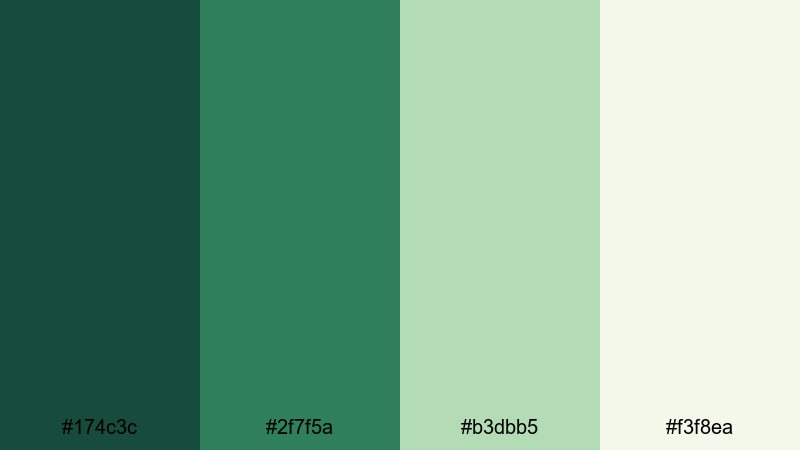
- HEX Codes: #174c3c, #2f7f5a, #b3dbb5, #f3f8ea
- Mood: Hopeful, crisp, and uplifting.
- Use for: Perfect for wellness content, productivity videos, and clean channel rebrands.
Morning Leaf Light captures first light filtering through fresh leaves. The gentle contrast from #174c3c to the bright #b3dbb5 and almost-white #f3f8ea makes everything feel clean, optimistic, and ready for a new day.
Try this palette for productivity or wellness channels that want rainforest energy without feeling dark. Use the deeper greens for frame lines, sidebars, and background gradients, and keep the pale tones for text, infographic icons, and end screen panels to maintain clarity and readability.
Rain Washed Understory
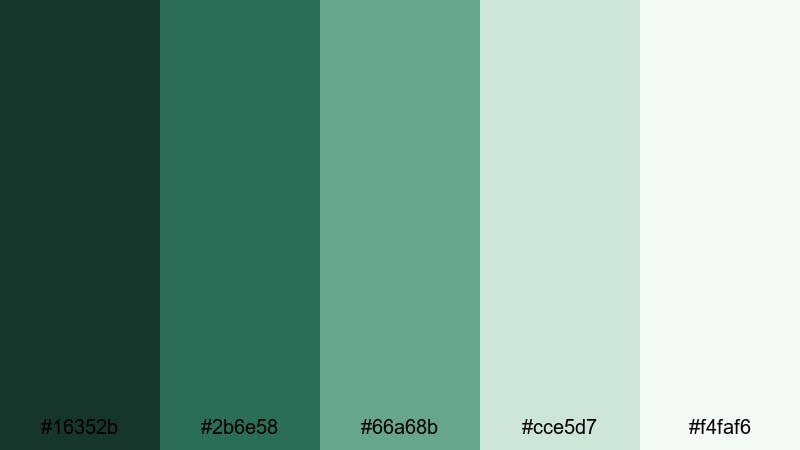
- HEX Codes: #16352b, #2b6e58, #66a68b, #cce5d7, #f4faf6
- Mood: Cool, dewy, and restorative.
- Use for: Great for ASMR, ambient backgrounds, and documentary overlays that need a calm, immersive base.
Rain Washed Understory layers cool greens and soft mints to mimic a rainforest floor after rain. The shift from #16352b up to #f4faf6 creates a soothing gradient ideal for long, relaxing videos.
Use the darker shades behind text and progress bars, while the lighter tones can soften frame edges or host delicate icons. This palette is perfect for ASMR channels, ambient loops, focus playlists, and any cinematic overlay that should feel immersive but never distracting.
Moody & Cinematic Rainforest Color Palettes
Stormy Forest Shadows
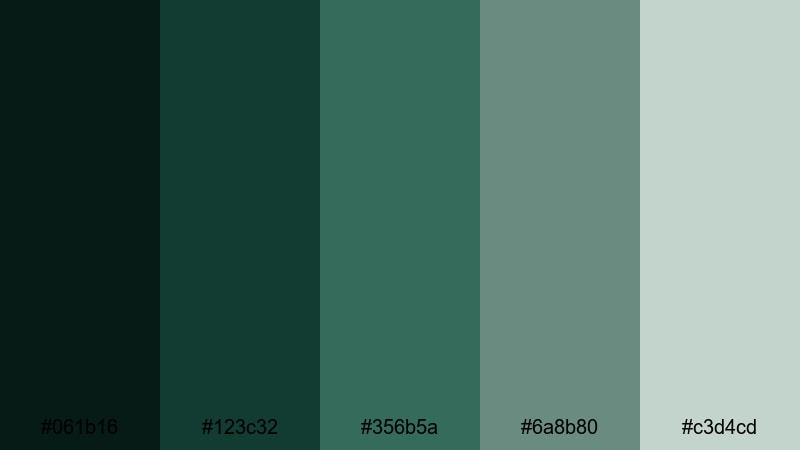
- HEX Codes: #061b16, #123c32, #356b5a, #6a8b80, #c3d4cd
- Mood: Dark, cinematic, and mysterious.
- Use for: Designed for dramatic title cards, movie-style trailers, and story-driven shorts.
Stormy Forest Shadows leans into inky greens and muted teals to create tension. The near-black #061b16 paired with #123c32 and #356b5a gives you a strong base for thriller-style overlays and moody cinematic grading.
Use the lighter tones #6a8b80 and #c3d4cd sparingly for legible text, UI icons, or subtle glows behind titles. This rainforest color combination is ideal for teaser trailers, horror or mystery shorts set in jungles, and gaming intros with a dark, story-heavy feel.
Midnight Canopy Glow
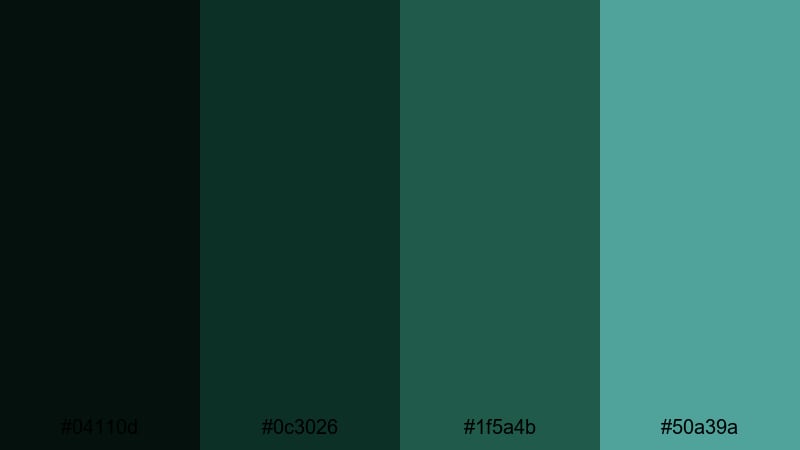
- HEX Codes: #04110d, #0c3026, #1f5a4b, #50a39a
- Mood: Nocturnal, tense, and slightly futuristic.
- Use for: Great for gaming overlays, cyber-jungle intros, and tech reviews with a nature twist.
Midnight Canopy Glow feels like moonlight cutting through dense leaves. The deep teal-blacks (#04110d and #0c3026) create a strong base, while #50a39a acts as a glowing accent that can draw the eye to buttons, health bars, or subscribe prompts.
Use this palette for HUD-style overlays, sci-fi jungle graphics, or tech reviews where the branding nods to nature. Keep most of the frame dark and let the aqua highlights pulse on key elements like stats, timers, and lower thirds.
Misty Valley Dusk
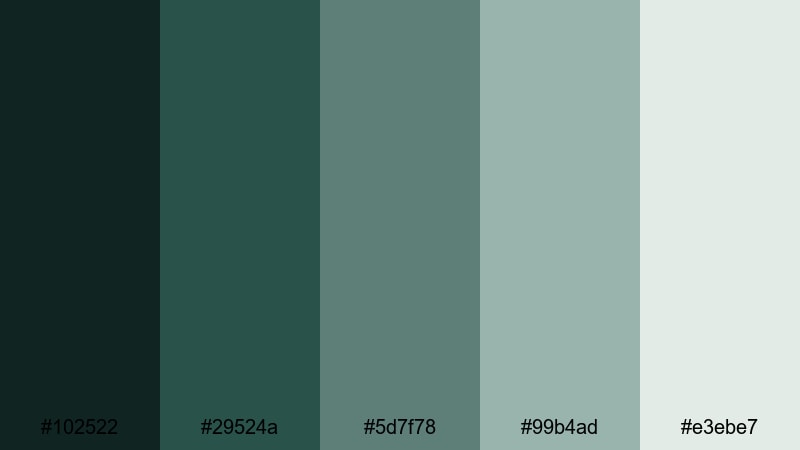
- HEX Codes: #102522, #29524a, #5d7f78, #99b4ad, #e3ebe7
- Mood: Hazy, reflective, and cinematic.
- Use for: Ideal for slow-travel montages, reflective storytelling, and subtle lower thirds.
Misty Valley Dusk blends blue-greens with foggy grays, giving your edits a quiet, reflective mood. The midtones (#5d7f78, #99b4ad) are soft enough not to steal attention from your footage, which makes this palette perfect for narrative travel videos and voiceover-heavy essays.
Use dark tones for letterbox bars or subtle vignettes, then apply the pale #e3ebe7 to text and delicate icons. It keeps your graphics visible against dark footage while preserving the misty atmosphere.
Ancient Moss Ruins
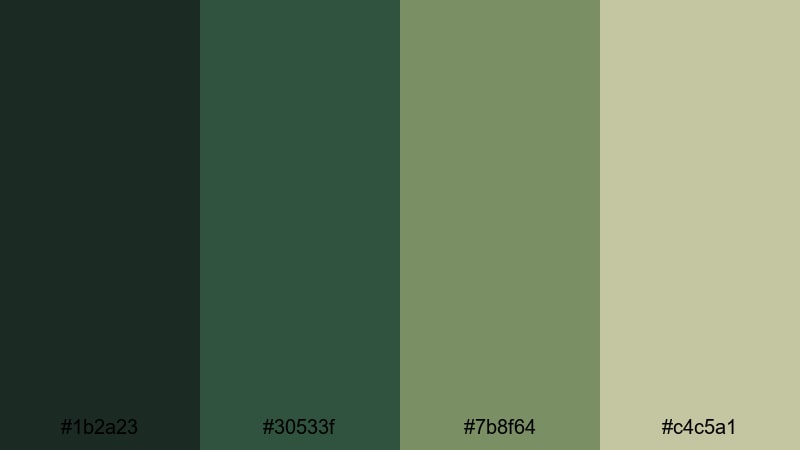
- HEX Codes: #1b2a23, #30533f, #7b8f64, #c4c5a1
- Mood: Historic, earthy, and quietly powerful.
- Use for: Use for archaeology videos, exploration vlogs, and cinematic text overlays.
Ancient Moss Ruins combines mossy greens with aged stone tones, ideal for content about ruins, temples, or lost cities hidden in the rainforest. The earthy mix feels grounded and serious, without being dull.
Use #1b2a23 for backgrounds, let #30533f and #7b8f64 shape buttons and frames, and rely on #c4c5a1 for legible titles and captions. This palette works beautifully in exploration vlogs, historical explainers, and cinematic overlays that reference time, heritage, or discovery.
Vibrant Wildlife Rainforest Color Palettes
Toucan Beak Pop
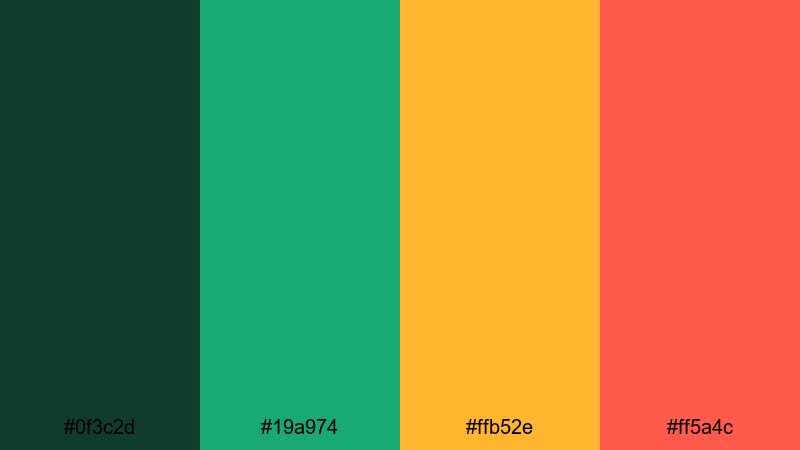
- HEX Codes: #0f3c2d, #19a974, #ffb52e, #ff5a4c
- Mood: Playful, bold, and high-energy.
- Use for: Perfect for clickable YouTube thumbnails, shorts, and animated titles that must stand out in feeds.
Toucan Beak Pop throws vivid greens against bright orange and coral for instant attention. The rainforest base #0f3c2d keeps everything grounded, while #ffb52e and #ff5a4c scream for clicks in crowded feeds.
Use the green tones for main backgrounds or frames, then reserve the orange and coral for CTAs, arrows, and key text in your thumbnails. This palette is great for high-energy intros, gaming highlight reels, and fast-paced vlogs where you want a tropical feel that still feels polished.
Macaw Canopy Carnival
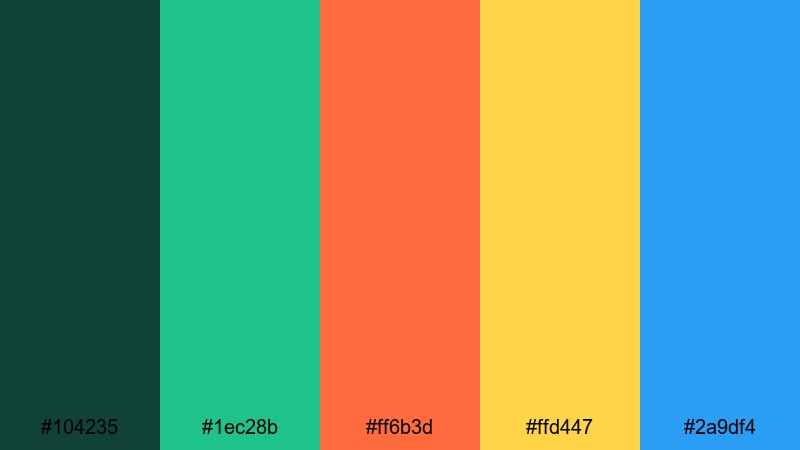
- HEX Codes: #104235, #1ec28b, #ff6b3d, #ffd447, #2a9df4
- Mood: Festive, adventurous, and extroverted.
- Use for: Great for travel channels, festival recaps, and energetic intros or subscribe animations.
Macaw Canopy Carnival pulls together saturated greens, a hot orange, bright yellow, and sky blue, echoing macaw feathers flashing between trees. It is a rainforest color combination built for parties, festivals, and adventures.
Use #104235 as your base, #1ec28b for secondary panels, and let the orange, yellow, and blue hit as accents in motion graphics, text outlines, or animated subscribe buttons. This palette shines in festival recaps, carnival travel vlogs, and any brand that wants loud, joyful color without losing structure.
Orchid Creek Bloom
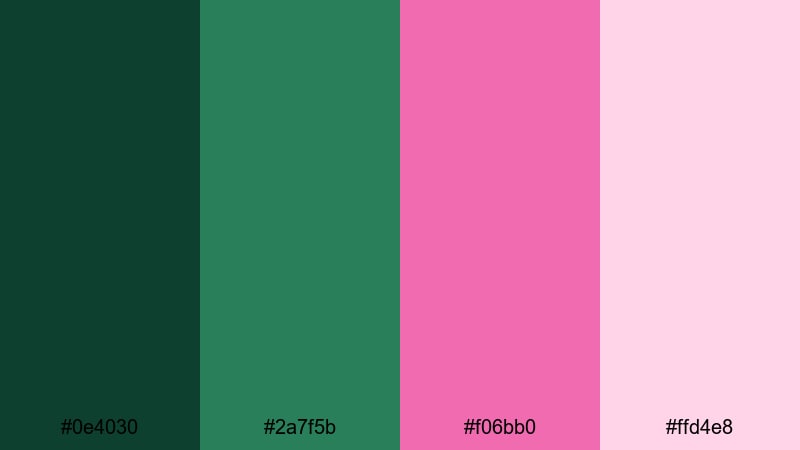
- HEX Codes: #0e4030, #2a7f5b, #f06bb0, #ffd4e8
- Mood: Exotic, romantic, and slightly dreamy.
- Use for: Ideal for beauty content, product showcases, and romantic travel edits with a jungle backdrop.
Orchid Creek Bloom pairs lush greens with orchid pinks for a vivid yet elegant rainforest aesthetic. The contrast between #2a7f5b and #f06bb0 gives thumbnails and titles an instant focal point.
Use the greens as your structural colors for frames, lower thirds, and background gradients, then layer the pink tones on key product shots, callouts, and romantic travel moments. This palette works beautifully for beauty channels, skincare tutorials filmed outdoors, and couples travel edits in tropical locations.
Sunlit Liana Playground
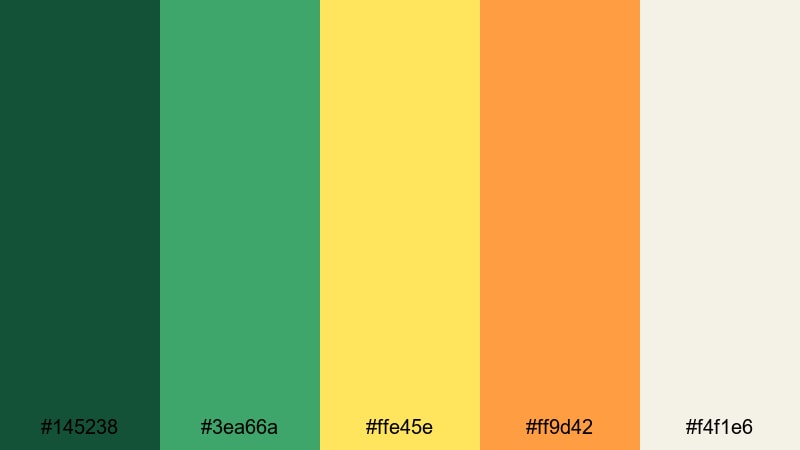
- HEX Codes: #145238, #3ea66a, #ffe45e, #ff9d42, #f4f1e6
- Mood: Sunny, carefree, and energetic.
- Use for: Use for family vlogs, kids content, and upbeat social edits that need a joyful jungle feel.
Sunlit Liana Playground combines bright rainforest greens with cheerful yellow and orange, plus a soft off-white for balance. It looks like sunbeams swinging through vines.
Use #145238 and #3ea66a as your main brand colors, then bring in #ffe45e and #ff9d42 for playful icons, badges, and buttons. The light #f4f1e6 is perfect for text backgrounds or simple frames in kids content, family adventures, or any upbeat channel that wants a friendly jungle influence.
Minimal & Modern Rainforest Color Palettes
Clean Foliage UI
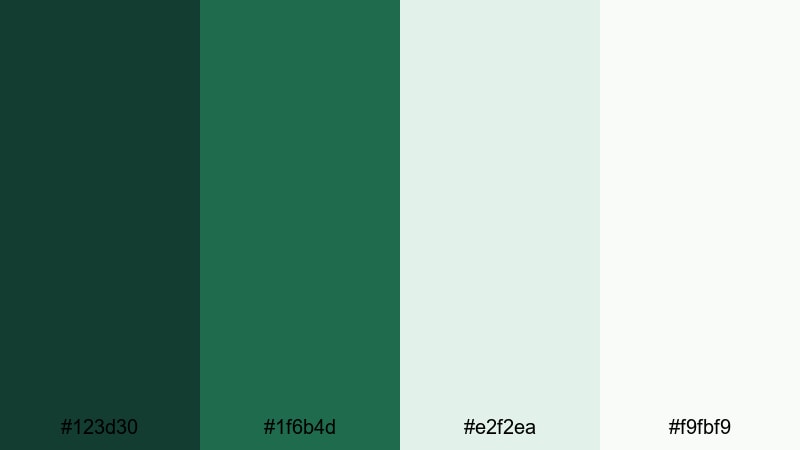
- HEX Codes: #123d30, #1f6b4d, #e2f2ea, #f9fbf9
- Mood: Fresh, minimal, and professional.
- Use for: Perfect for app-style overlays, channel UI elements, and modern logo animations.
Clean Foliage UI uses two focused greens with airy off-whites, giving you a modern rainforest look suited to apps, dashboards, and sleek overlays. The contrast between #123d30 and #f9fbf9 keeps interfaces easy to read on both desktop and mobile.
Apply the dark green for header bars or side panels, the mid green for buttons and highlights, and the off-whites for backgrounds and text blocks. This is a strong choice for tech channels that want to point to sustainability or nature without looking rustic.
Soft Moss Neutrals
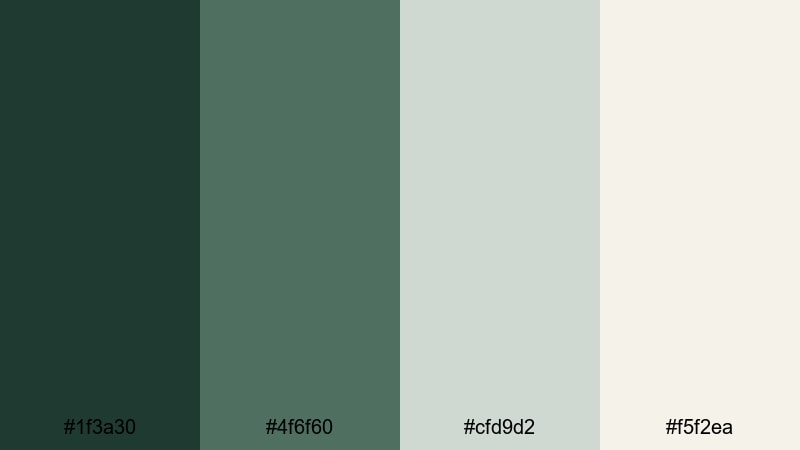
- HEX Codes: #1f3a30, #4f6f60, #cfd9d2, #f5f2ea
- Mood: Calm, sophisticated, and understated.
- Use for: Ideal for educational videos, talking-head explainers, and minimalist title cards.
Soft Moss Neutrals softens rainforest greens into muted tones and pairs them with gentle grays and creams. The result is calm and sophisticated, great for content where clarity and trust matter.
Use the deeper greens for subtle frames or accent bars, keep #cfd9d2 as a neutral base behind graphics, and reserve #f5f2ea for clean text areas. This palette suits talking-head explainers, tutorials, and long-form educational videos where you want a hint of rainforest without overpowering your subject.
Deep Jungle Monochrome
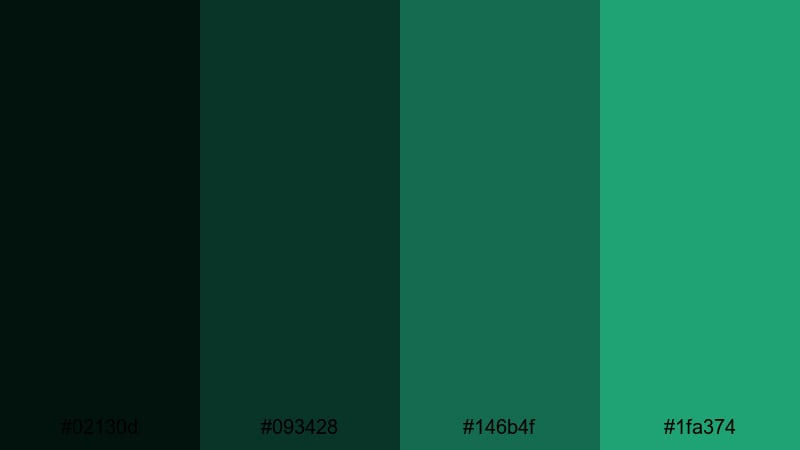
- HEX Codes: #02130d, #093428, #146b4f, #1fa374
- Mood: Focused, modern, and intense.
- Use for: Useful for cohesive brand systems, overlays, and motion graphics built around one strong color family.
Deep Jungle Monochrome stacks rainforest greens in a tight gradient, from near-black #02130d to bright #1fa374. It feels modern and bold, while staying completely on theme with jungle visuals.
Use the darkest shades behind footage and UI elements, and let the lighter greens highlight buttons, progress bars, logo marks, and key text. Because every tone sits in the same color family, this palette is ideal for consistent channel branding, gaming overlays, cinematic title packs, and minimalist social templates.
Tips for Creating Rainforest Color Palettes
When you design a rainforest color palette for video, thumbnails, or branding, the goal is to balance rich greens with supporting tones that keep everything readable, cinematic, and on-brand.
- Pick one main rainforest green as your hero color, then choose 2 to 4 supporting tones (neutrals, mists, or wildlife brights) so your palette stays focused and easy to manage.
- Keep strong contrast between background and text: pair deep greens with off-whites or light grays so titles and captions stay readable on phones and small screens.
- Use warm wildlife accents (yellow, orange, coral) sparingly around CTAs, timestamps, or subscribe buttons so they stand out without overwhelming the scene.
- Match your palette to your footage: cooler teals work better for rainy jungle clips, while warmer greens and yellows suit golden-hour rainforest shots.
- Test your palette in real YouTube thumbnails, shorts covers, and end screens to confirm that important elements remain legible against busy rainforest backgrounds.
- For talking-head videos, keep overlays and lower thirds in softer moss or stone tones so they support the subject instead of competing with skin tones.
- Save presets in Filmora for titles, filters, and overlays using the same HEX codes, so every upload keeps a consistent rainforest brand identity.
- Check accessibility: aim for sufficient contrast between text and backgrounds so your rainforest aesthetic still works for viewers with different levels of vision.
Rainforest color palettes can make your channel feel grounded, adventurous, or mysterious, depending on how you combine greens with stone neutrals, misty highlights, or wildlife accents. Once you lock in a palette that fits your story, it quickly becomes a visual signature across intros, overlays, thumbnails, and social edits.
Try these 15 rainforest color combinations in Filmora, save your favorite presets, and build a repeatable workflow for grading and motion graphics. With consistent use, your audience will start to recognize your rainforest aesthetic before they even read the channel name.
Experiment, tweak the tones with Filmora's tools, and let your own version of the jungle define your brand.
secure downloadNext: Dark Cyan Color Palette
