

 100% Security Verified | No Subscription Required | No Malware


 ChatGPT
 Perplexity
 Gemini
 Claude
 Grok
Grok
Cinematic Bronze sits between warm gold and deep brown, giving visuals a rich, filmic glow. It feels nostalgic, grounded, and premium, which is why it shows up so often in movie posters, title cards, and luxury branding. Used well, it suggests warmth, depth, and story without shouting for attention.
For video creators, Cinematic Bronze is perfect for thumbnails, YouTube intros, overlays, and color grading that adds a subtle, professional mood. Below you will find 15 Cinematic Bronze color palettes with HEX codes you can use directly in your edits, branding, and graphics, especially when working in Filmora.
In this article
Classic Cinematic Bronze Color Palettes
Golden Hour Cinema
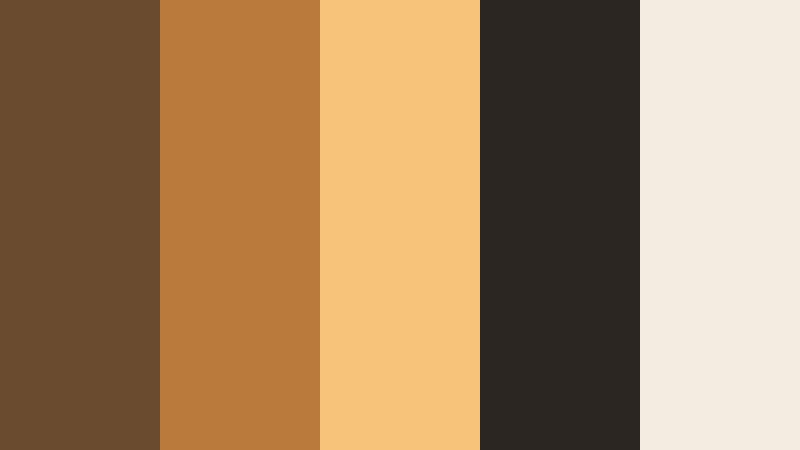
- HEX Codes: #6b4b2f, #b97a3b, #f5c37a, #2b2622, #f3ede1
- Mood: Warm, nostalgic, and cinematic like a late afternoon sun flare.
- Use for: Ideal for vlogs, travel films, and B-roll sequences that need a golden, story-driven atmosphere.
Golden Hour Cinema wraps your frame in warm bronzes and creamy highlights, just like sunlight hitting skin or buildings before sunset. The deeper browns keep it grounded, while the pale highlight shade adds space for text and UI elements.
Use this palette for emotional vlogs, travel montages, family videos, and cinematic thumbnails. It works beautifully for YouTube intros, lower thirds, and subtitle bars where you want warmth, readability, and a consistent aesthetic across your whole channel.
Pro Tip: Build A Golden Cinematic Bronze Look In Filmora
To keep this Golden Hour Cinema palette consistent, build a simple visual system in Filmora. Use the darkest shade for backgrounds or shadow overlays, mid bronzes for title bars and shapes, and the lightest tones for text or soft gradients. Save these colors in Filmora so your intros, B-roll, and end screens all share the same Cinematic Bronze identity.
When you color grade footage, gently warm the midtones and highlights to echo the HEX codes, then add a subtle vignette using the darker bronze. This keeps faces flattering while giving your entire edit a cohesive bronze cinematic wash.
AI Color Palette
You can turn a single still frame into the look of your entire project using Filmora's AI Color Palette. Export a frame that already uses this Golden Hour Cinema palette, or design a simple color card with these HEX values, then let Filmora analyze it.
Filmora's AI Color Palette feature reads the tones and applies that bronze mood across all your clips in a sequence. It is an easy way to match your A-roll, B-roll, and thumbnails so everything feels like the same golden hour story.
 secure download

HSL, Color Wheels & Curves
Once your base look is in place, use Filmora's HSL, color wheels, and curves to fine-tune the Cinematic Bronze feeling. Lift the orange and yellow saturation slightly to make bronze accents pop, and use the midtone wheel to nudge overall warmth without crushing shadows.
You can also follow Filmora's color grading tutorials on YouTube to see how subtle curve adjustments shape contrast for a filmic roll-off in highlights. A gentle S-curve gives the Golden Hour Cinema palette more depth and drama while keeping skin tones natural.
secure download1000+ Video Filters & 3D LUTs
If you want an instant bronze film look, combine this palette with Filmora's filters and LUTs. Start from a warm cinematic LUT, then refine overlays, titles, and graphics using the exact HEX codes to keep everything on-brand.
Filmora's video filters and 3D LUTs make it easy to test different levels of contrast, fade, and grain without rebuilding your grade from scratch. Once you find your favorite look, save it and reuse it across vlogs, shorts, and teasers.
secure downloadStudio Spotlight Bronze
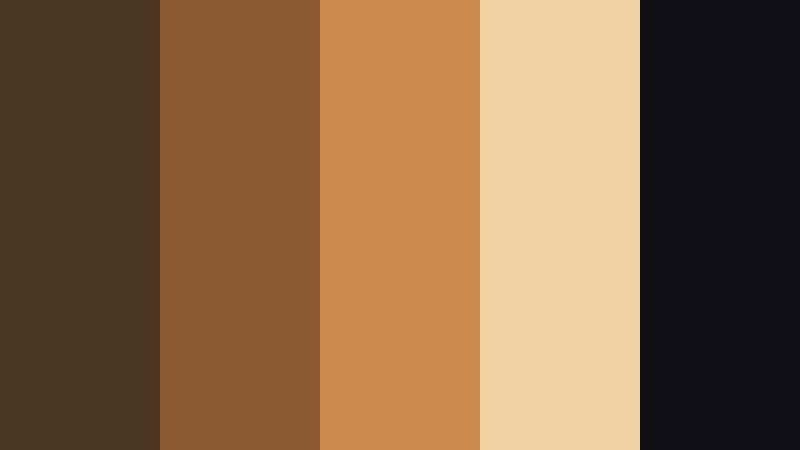
- HEX Codes: #4b3623, #8b5a32, #c98a4b, #f0d1a1, #111017
- Mood: Polished and professional with a subtle studio glamour.
- Use for: Perfect for creator logos, channel branding, and sleek title cards with a premium feel.
Studio Spotlight Bronze combines rich browns with champagne highlights and a near-black accent, giving you a sophisticated, studio-ready look. It feels glossy and controlled, like a well-lit set.
Use this palette for YouTube channel branding, logo animations, intro stings, and clean lower thirds. The darkest shade (#111017) is ideal for backgrounds, while the lighter tones make text, badges, and subscribe buttons stand out without breaking the cinematic mood.
Vintage Reel Bronze
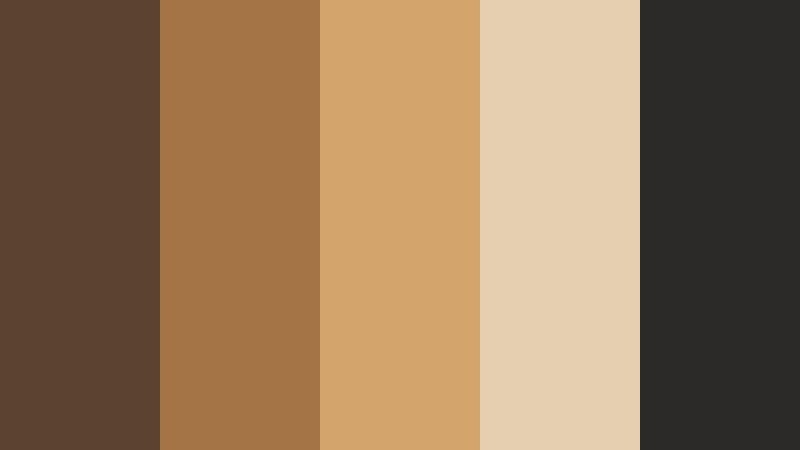
- HEX Codes: #5c4330, #a47445, #d3a46b, #e4cfb0, #2c2a28
- Mood: Retro, filmic, and slightly faded like cherished old footage.
- Use for: Great for documentary intros, memory sequences, and throwback edit styles.
Vintage Reel Bronze softens contrast and saturation for a lived-in, archival feel. The dusty bronzes and muted off-whites echo aged film stock and printed photos.
Apply this palette to memory montages, family history videos, or documentary openers. In thumbnails and title cards, combine the mid bronzes with the near-black accent for retro text treatments that still feel clean on modern platforms.
Old Theater Glow
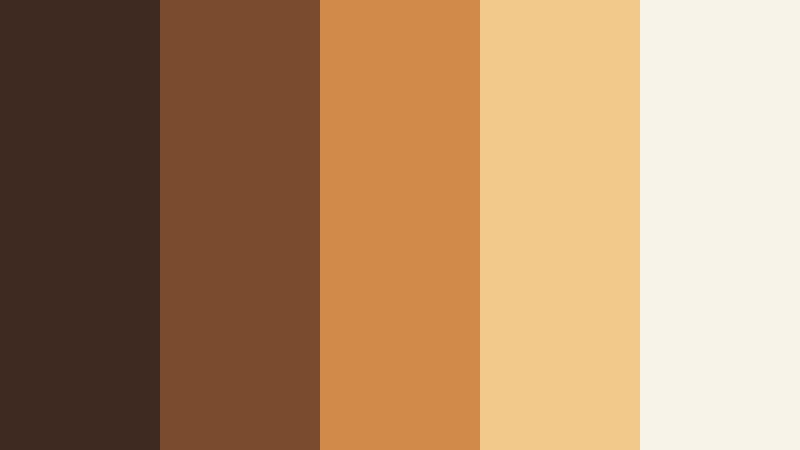
- HEX Codes: #3e2a20, #7b4b2f, #d08a4a, #f2c98b, #f7f3e9
- Mood: Cozy and dramatic, like lights dimming in a historic cinema.
- Use for: Use for movie review channels, trailer reactions, or any project with a classic film vibe.
Old Theater Glow brings together deep browns, amber highlights, and a soft cream to mimic vintage cinema lighting. It feels like warm bulbs reflecting off red curtains and polished wood.
Use it to brand movie review shows, trailer breakdowns, and film analysis channels. The brighter tones are great for rating badges, episode titles, and subscribe overlays, while the darker bronze makes an elegant frame around your main content.
Film Festival Bronze Carpet
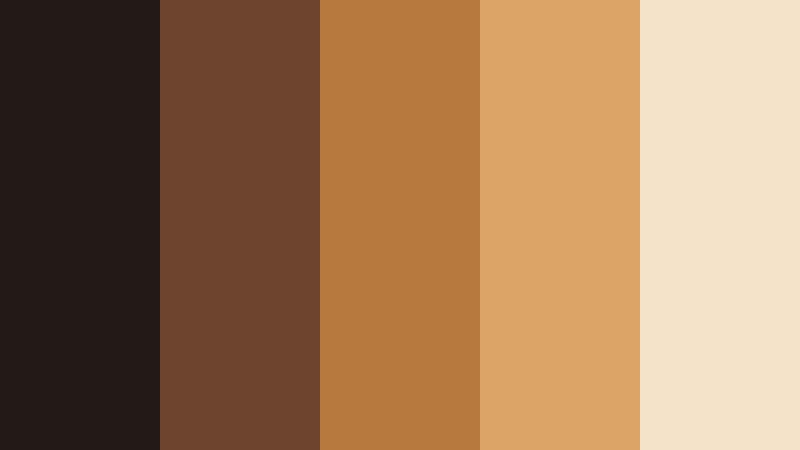
- HEX Codes: #231917, #6f442e, #b8793f, #dca567, #f5e3c9
- Mood: Chic, celebratory, and award-night ready.
- Use for: Perfect for event recaps, highlight reels, and sponsor slides that need a red-carpet feel without using bright red.
Film Festival Bronze Carpet replaces bright red with rich bronzes and honey highlights, creating a subtler, more cinematic celebration vibe. The dark base gives strong contrast for text and logos.
Use it for premiere recaps, conference highlights, sponsor slides, and community award videos. In thumbnails, contrast the pale highlight with the deep base color to frame faces and titles, giving every upload a festival-ready presence.
Moody & Dramatic Cinematic Bronze Color Palettes
Noir Bronze Shadows
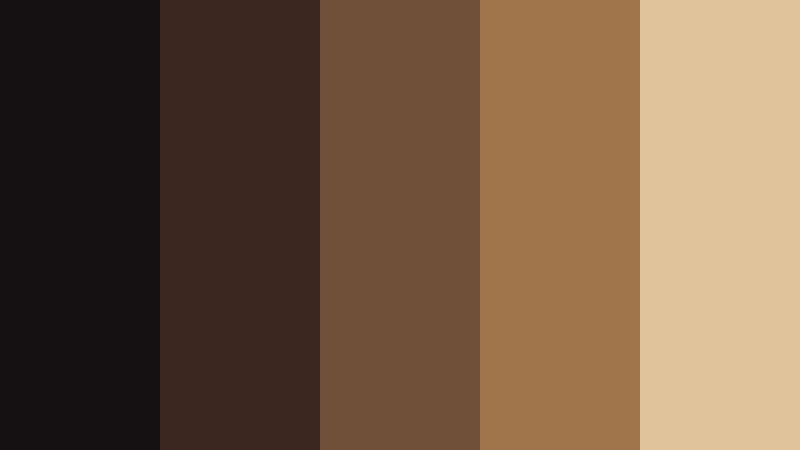
- HEX Codes: #151012, #3b2720, #71503a, #a1754b, #e0c39a
- Mood: Dark, mysterious, and tension-filled with a warm metallic edge.
- Use for: Great for thrillers, game cinematics, or tech promos that lean into drama and intrigue.
Noir Bronze Shadows blends near-black tones with molten bronze midtones, giving your frames a cinematic crime-drama feel. It is shadowy but not cold, thanks to the warm metallic accents.
Use it for story-driven trailers, game intros, suspenseful thumbnails, and countdown timers. The pale bronze highlight is perfect for impactful typography and UI panels over darker backgrounds.
Desert Night Bronze
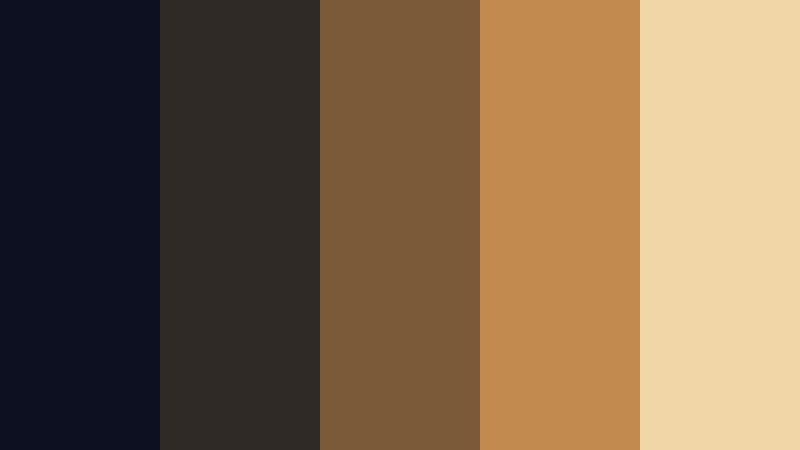
- HEX Codes: #0d1020, #2f2a25, #7b5a39, #c28a4e, #f1d6a7
- Mood: Expansive and cinematic, with the quiet intensity of a desert sky.
- Use for: Ideal for landscape edits, drone footage, and travel vlogs with night or dusk scenes.
Desert Night Bronze contrasts cool midnight blues with glowing sand-colored bronzes. It feels vast and calm but still dramatic, like a time-lapse of a desert sky.
Use this palette for drone shots, travel reels, and horizon-heavy B-roll. It works especially well in thumbnails where a dark sky contains bright bronze titles or paths of light.
Rust and Ember Frame
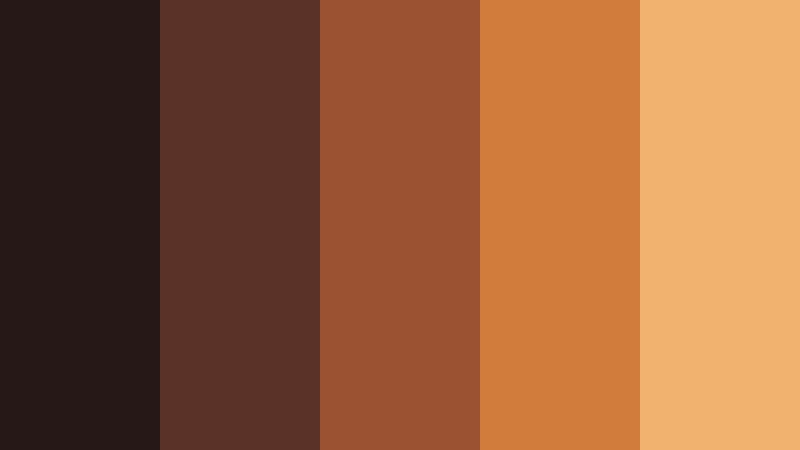
- HEX Codes: #261817, #5b3228, #9a5232, #d17b3c, #f1b26f
- Mood: Smoldering, intense, and grounded like dying embers.
- Use for: Use in action edits, automotive content, or gritty story pieces that need heat and impact.
Rust and Ember Frame pushes bronze toward fiery rust, creating a palette that feels hot and energetic. The dark maroon-brown base adds grit and tension.
Choose this for action sequences, car edits, sports hype videos, and powerful trailers. Use the brighter ember tones for strokes around text, glitch elements, and motion graphic accents that cut through dark footage.
Urban Bronze Alley
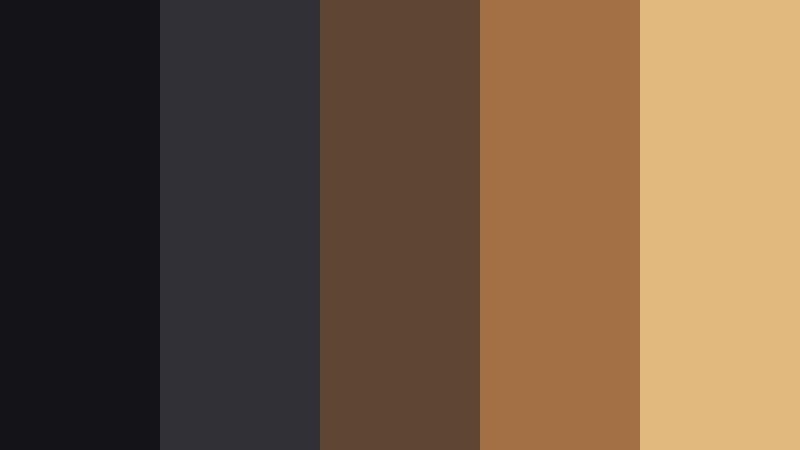
- HEX Codes: #141418, #303036, #5e4635, #a27044, #e1b87e
- Mood: Edgy and modern, balancing street grit with warm light spills.
- Use for: Perfect for street photography edits, hip-hop visuals, and night city vlogs.
Urban Bronze Alley combines cool asphalt grays with pockets of warm bronze, capturing the feel of city lights bouncing off walls. It is contemporary and slightly gritty, but still inviting.
Use it for nightlife vlogs, rooftop sessions, music visuals, and city B-roll. In thumbnails, a gray base with bronze text and accent bars gives a strong, modern street-style identity.
Smoky Lens Bronze
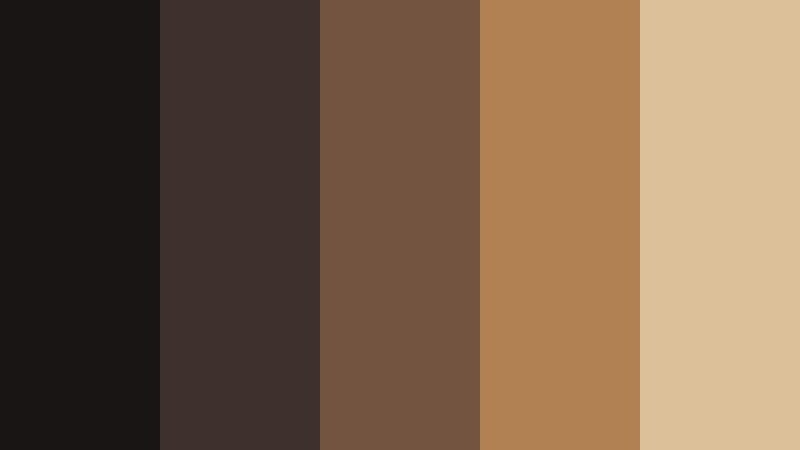
- HEX Codes: #1a1515, #3e312d, #725440, #b18153, #dbc09a
- Mood: Softly hazy and introspective, like a scene shot through smoke or glass.
- Use for: Great for music videos, poetic short films, and mood reels with slow motion.
Smoky Lens Bronze is all about soft, muted transitions between dark browns and gentle bronzes. It feels like looking through fogged glass or an old lens filter.
Use this palette for slow-motion edits, lyrical music videos, and visual poems. Layer soft gradients and light leaks in these colors over footage to create a dreamy, emotional atmosphere.
Soft & Romantic Cinematic Bronze Color Palettes
Rose Veil Bronze

- HEX Codes: #4d3327, #936047, #c98d70, #f1c7ac, #fff5eb
- Mood: Romantic and tender with a cinematic blush.
- Use for: Ideal for wedding films, engagement reels, and lifestyle content with soft storytelling.
Rose Veil Bronze fuses warm bronze with rosy undertones and soft ivory, giving your visuals a blush of romance. It is flattering on skin and perfect for intimate, emotional stories.
Use it for wedding highlight films, proposal clips, couple portraits, and gentle lifestyle vlogs. The lightest shade makes beautiful title backgrounds, while the mid rose-bronze tones work well for lower thirds and call-to-action buttons.
Champagne Bronze Dust

- HEX Codes: #5c4533, #a6754b, #e3b77e, #f7ddaf, #fef7e8
- Mood: Light, celebratory, and softly luxurious.
- Use for: Great for brand promos, product reveals, and beauty content needing an elegant shimmer.
Champagne Bronze Dust leans into lighter, sparkling tones that feel like glittering confetti in soft focus. It is bright but not harsh, with a gentle luxury vibe.
Use this palette for beauty campaigns, product unboxings, brand trailers, and social media ads. The pale champagne tones are great for backgrounds and overlay shapes, while the deeper bronze anchors your logo and key text.
Sunlit Loft Bronze

- HEX Codes: #3c2e27, #7a5740, #c28a5a, #f1c99a, #fdf2e2
- Mood: Airy and inviting, like a creative studio bathed in afternoon light.
- Use for: Perfect for creator workspaces, behind-the-scenes content, and interior aesthetics.
Sunlit Loft Bronze mixes cozy browns with soft, creamy highlights to recreate the feel of sunlight in a stylish studio. It feels calm, creative, and welcoming.
Use it for workspace tours, aesthetic desk setups, productivity vlogs, and behind-the-scenes edits. In channel graphics, it makes a great foundation for clean, lifestyle-focused branding.
Candlelit Bronze Portrait
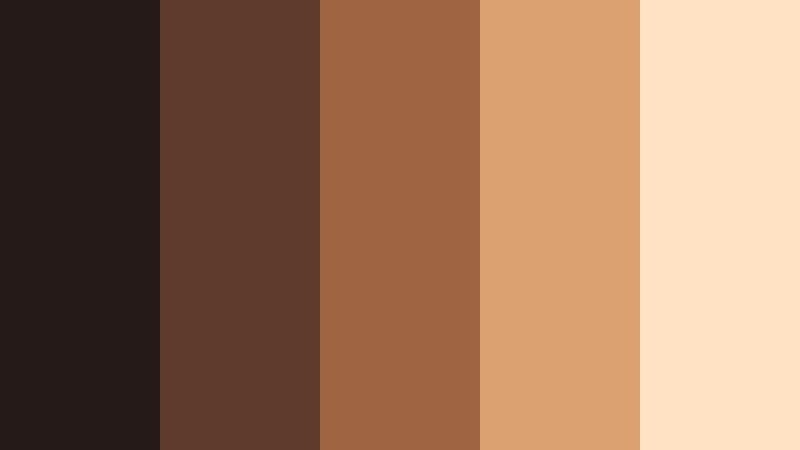
- HEX Codes: #261a19, #5f3b2e, #9e6543, #dba170, #ffe2c4
- Mood: Intimate and flattering, echoing candle glow on skin.
- Use for: Use for portrait edits, talking-head videos, and interviews that need warmth and depth.
Candlelit Bronze Portrait emphasizes warm browns and peachy highlights that flatter skin tones. It looks like a room lit by candles or a single warm lamp.
Use this palette for interviews, sit-down commentary, podcasts with video, and closeup portraits. Apply the deeper shades to backgrounds or subtle vignettes while keeping faces in the soft, peachy bronze range.
Modern & Minimal Cinematic Bronze Color Palettes
Bronze Minimal Title Card
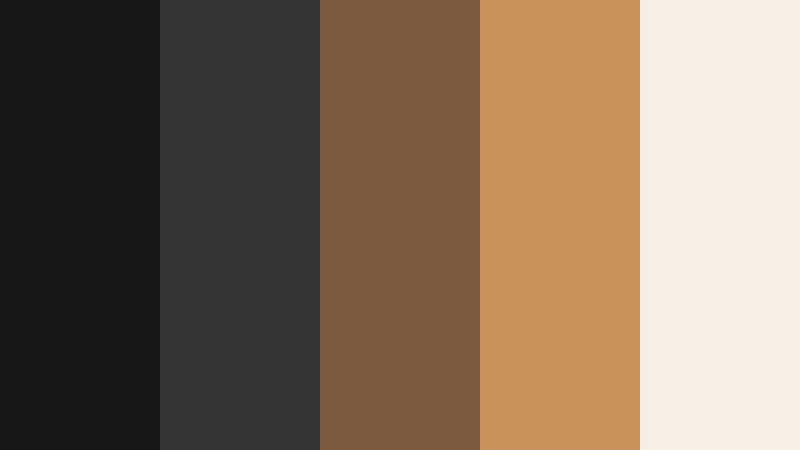
- HEX Codes: #171717, #343434, #7b5a3f, #c8925a, #f5efe6
- Mood: Clean, confident, and design-forward with a metallic accent.
- Use for: Perfect for minimal channel branding, typography intros, and UI-style overlays.
Bronze Minimal Title Card sits on a neutral gray-black base with sharp bronze accents and a light, almost white highlight. It feels sleek and modern while still cinematic.
Use it for minimalist intro animations, typography-only openers, chapter cards, and UI-style overlays in tutorials. The neutral tones keep things professional, while the Cinematic Bronze accent adds a recognizable signature color.
Tech Frame Bronze

- HEX Codes: #101218, #222833, #465160, #7b5c42, #e1b27d
- Mood: Futuristic yet grounded, blending cool tech tones with warm bronze.
- Use for: Great for app promos, SaaS explainers, and motion graphics with data or HUD elements.
Tech Frame Bronze combines cool navy and slate with carefully placed bronze highlights. The result is a look that feels techy and modern but not sterile.
Use it for software explainers, app promos, UI walkthroughs, and data visualizations. Keep backgrounds in the cool tones and reserve the bronze shades for key metrics, buttons, and logo marks so your calls to action stand out instantly.
Tips for Creating Cinematic Bronze Color Palettes
Cinematic Bronze is versatile, but it works best when you balance warmth, contrast, and readability. These tips will help you build palettes that look great in Filmora and stay consistent across all your visual assets.
- Combine at least one deep shade, one mid bronze, and one light neutral so you have clear roles for backgrounds, accents, and text.
- Check text contrast by testing white, off-white, and very dark tones against your main bronze; prioritize readability for thumbnails and lower thirds.
- Use cooler supporting colors (like navy, charcoal, or desaturated teal) to keep bronze from feeling too orange or saturated on screen.
- Match your grade to your graphics by sampling HEX colors from your palette when adjusting HSL and color wheels in Filmora.
- Create a channel style guide that defines which bronze you use for titles, buttons, borders, and overlays, then reuse it in every project.
- When working with skin tones, avoid pushing orange too far; aim for gentle warmth that echoes bronze without making faces look unnatural.
- Test your palette on mobile and desktop thumbnails to ensure small details and text still read clearly at tiny sizes.
- Save presets or custom LUTs in Filmora so your Cinematic Bronze look is one click away for future videos, shorts, and social edits.
Cinematic Bronze color palettes can completely change how your videos feel, from nostalgic travel diaries to polished tech explainers. A consistent bronze tone helps tell your story, makes your brand recognizable, and links your thumbnails, intros, and edits into one cohesive visual language.
Use the HEX codes above as starting points, then refine them with Filmora's color tools until they match your footage and personal style. Whether you lean into warm, romantic bronzes or cool techy contrasts with subtle metallic accents, the right palette will make your edits feel more cinematic and intentional.
Open Filmora, pick a palette you like, and start building titles, overlays, and grades around it. After a few projects, your Cinematic Bronze look will become a signature that viewers recognize instantly in their feeds.
secure download