

 100% Security Verified | No Subscription Required | No Malware


 ChatGPT
 Perplexity
 Gemini
 Claude
 Grok
Grok
Moody YouTube videos live on deep contrast, rich shadows, and desaturated tones that pull viewers into your world. With the right Filmora filters, you can turn ordinary footage into dark, cinematic visuals that match your channel’s aesthetic in just a few clicks.
Below you will find 12 curated moody YouTube video filters built for dark aesthetic YouTubers, cinematic creators, and anyone shooting atmospheric vlogs or story-driven content. Each filter includes the effect look, best use case, and a quick editing tip so you can dial in your style fast.
In this article
Deep Shadows Filters for Dark Cinematic Mood
Noir Fade
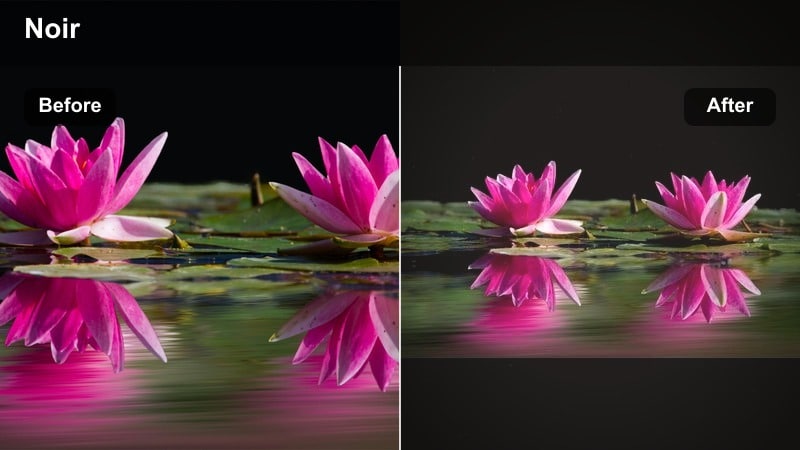
- Effect look: Soft contrast, deep blacks, and a slight matte fade on highlights for a modern film noir mood.
- Best for: Cinematic dark YouTube video intros, narrative b-roll, and slow atmospheric city shots at night.
- Editing tip: Lower saturation slightly and add a subtle vignette to keep attention centered on your subject in low light scenes.
Noir Fade is designed to give your YouTube videos a modern noir aesthetic without complicated grading curves. When you drop this filter onto a clip in Filmora, it deepens blacks, softens highlight roll-off, and adds a gentle matte finish that feels like a contemporary take on classic black-and-white cinema, even when you keep some color in the frame.
Use Noir Fade on intros, narrative sequences, or city b-roll where you want viewers to feel tension and mystery. In Filmora, combine the filter with slight saturation reduction and a vignette from the Effects panel to guide the eye. If your footage was shot a bit underexposed, nudge exposure up first so that when the filter crushes shadows, you still retain essential detail in faces and key objects.
Build a Cohesive Moody Palette with AI Tools
Filmora’s AI-powered color tools help you keep your moody YouTube video filters consistent from clip to clip. Once you dial in a dark, cinematic grade you love, you can quickly match other footage to that look without rebuilding your grade from scratch.
Use the AI color match features to balance exposure, contrast, and saturation across different cameras and lighting conditions. This is especially useful for atmospheric vlogs or cinematic dark YouTube videos where a sudden shift in tone can break immersion. Experiment with AI color matching on a few key hero shots, then apply that look to the rest of your timeline for a unified moody aesthetic.
 secure download

See Moody Filters in Action on Real Footage
To really understand how each moody filter behaves, drop them onto a mix of footage types: talking head, night street, window-lit interior, and outdoor b-roll. You will quickly see which filters flatter your shooting style and lighting setups.
Scrub through your timeline with and without the filters enabled to decide how strong you want the effect. Many creators find that running filters at 60–80 percent intensity gives a dark aesthetic without sacrificing detail. Create a short test sequence with 3–4 clips and cycle through these Filmora filters to choose your core set for future uploads.
secure download1000+ Video Filters and 3D LUTs
Filmora includes a large library of built-in video filters and 3D LUT-like effects that can instantly set a dark, cinematic mood. You can stack filters, adjust their strength, and combine them with color controls to fine-tune your own signature look.
Once you find combinations that work for your channel, save them as presets so you can apply them in one click on every new project. Over time, this workflow becomes as fast as using dedicated LUTs, but with the flexibility to tweak each layer whenever your style evolves.
secure downloadShadow Ink
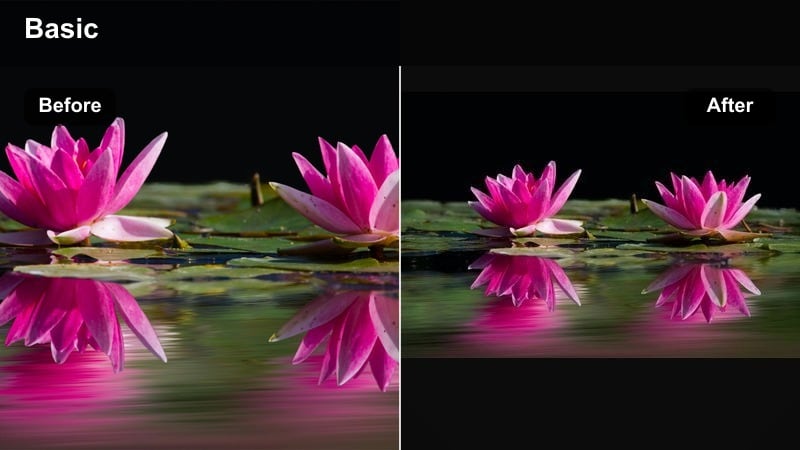
- Effect look: High contrast, inky blacks, and muted colors with a slight cool shift in the shadows.
- Best for: Dark aesthetic YouTubers filming studio sequences, desk setups, and moody product shots.
- Editing tip: Use negative clarity or a tiny blur on the background to keep the inky shadows from becoming noisy on lower bitrate footage.
Shadow Ink pushes your blacks deep and clean while muting overall color, giving studio and desk footage a graphic, ink-like quality. In Filmora, this filter works especially well when your scene has a single dominant light source so the contrast feels intentional rather than accidental.
Apply Shadow Ink to product shots, tech reviews, or moody commentary videos where the background should fall away. After adding the filter, use Filmora’s color tools to gently lift skin midtones so faces stay readable. If the cool tint in shadows goes too far, slightly warm your white balance or add a subtle temperature adjustment layer focused on skin tones only.
Dusk Contrast
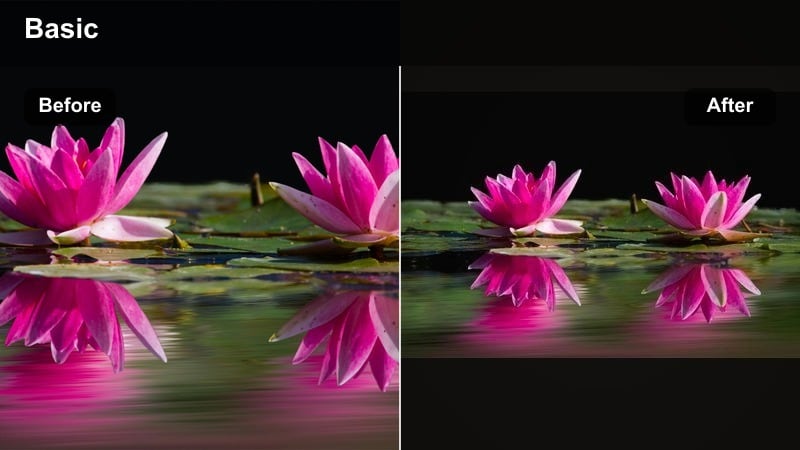
- Effect look: Rich twilight contrast with lifted blacks and slightly warm midtones for a late-evening vibe.
- Best for: Outdoor cinematic dark YouTube videos, moody walk-and-talks, and atmospheric travel b-roll at blue hour.
- Editing tip: Lower highlights a touch to keep clouds and streetlights from clipping and to emphasize the overall dusk mood.
Dusk Contrast captures the feeling of the moments right after sunset: cool ambient light, gentle shadows, and warm skin tones. When you apply it in Filmora, your skies get a richer blue, while faces and practical lights stay inviting and slightly warm.
Use Dusk Contrast on walk-and-talk sequences, quiet city explorations, or travel clips shot during blue hour. Pair the filter with small highlight adjustments in Filmora to prevent bright streetlights and windows from blowing out. If your footage was shot in full daylight, you can still use Dusk Contrast but may want to cool the white balance slightly first so the filter can convincingly mimic a twilight atmosphere.
Muted Tones for Atmospheric Vlogs
Faded Film
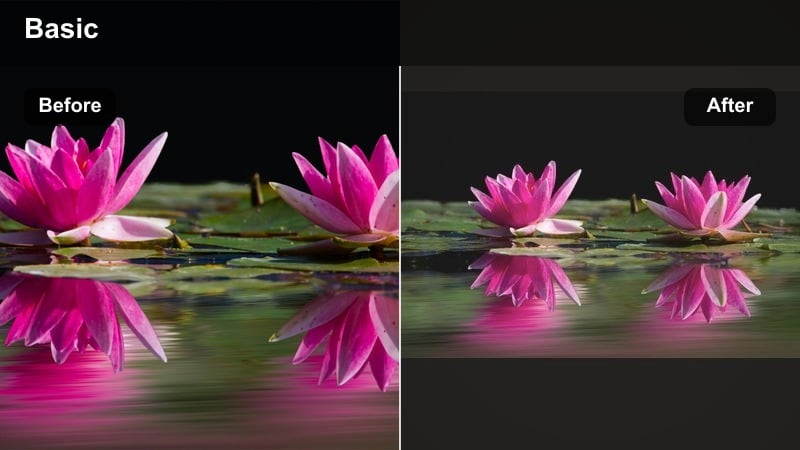
- Effect look: Desaturated colors, lifted blacks, and a subtle film fade that softens contrast.
- Best for: Atmospheric vlogs, quiet morning routines, and storytelling sequences with a nostalgic feel.
- Editing tip: Reduce sharpness slightly and add a tiny bit of film grain to complete the soft, analog vibe.
Faded Film gives your vlogs a dreamy, nostalgic character by dialing back saturation and contrast. In Filmora, it lifts the darkest parts of the image so nothing feels too harsh, while a gentle fade in the highlights mimics the response of vintage film stocks.
Apply Faded Film to morning routines, journaling segments, or reflective storytelling chapters in your videos. To enhance the analog mood, slightly soften overall sharpness and add Filmora’s grain effects at a low intensity. Neutral or earth-tone props and wardrobe will blend beautifully with this palette, helping your entire frame feel cohesive and calming.
Urban Haze
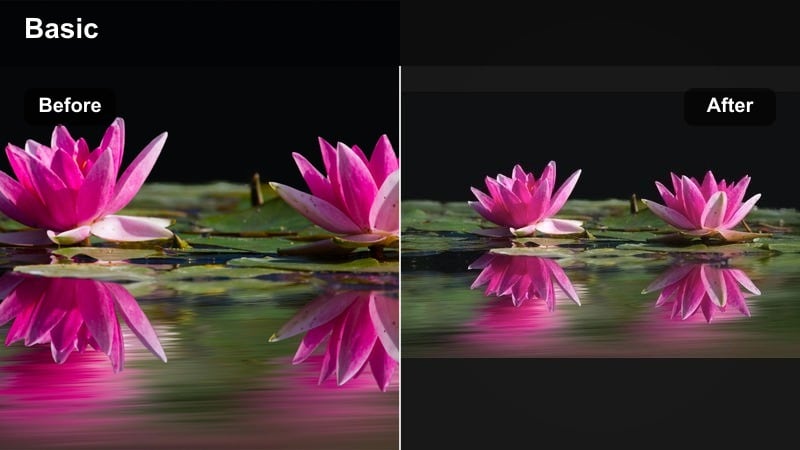
- Effect look: Soft low-contrast image with hazy highlights and slightly cyan shadows for a city-dream look.
- Best for: Atmospheric city vlogs, rooftop b-roll, and late-night urban explorations with neon lights.
- Editing tip: Use masks to keep your subject a bit clearer while letting the background stay hazy for depth and separation.
Urban Haze leans into a dreamy, cinematic vision of the city by lowering contrast and introducing a soft cyan tint into the shadows. In Filmora, this filter slightly blooms highlights so streetlights and windows feel enveloped in a gentle mist.
Use Urban Haze on rooftop monologues, city walks, or slow handheld shots of traffic and architecture. After applying the filter, you can create a masked adjustment around your subject to preserve clarity and contrast while letting the background remain washed and hazy. This separation boosts depth and keeps your storytelling clear even when the environment looks stylized.
Coffee Grain
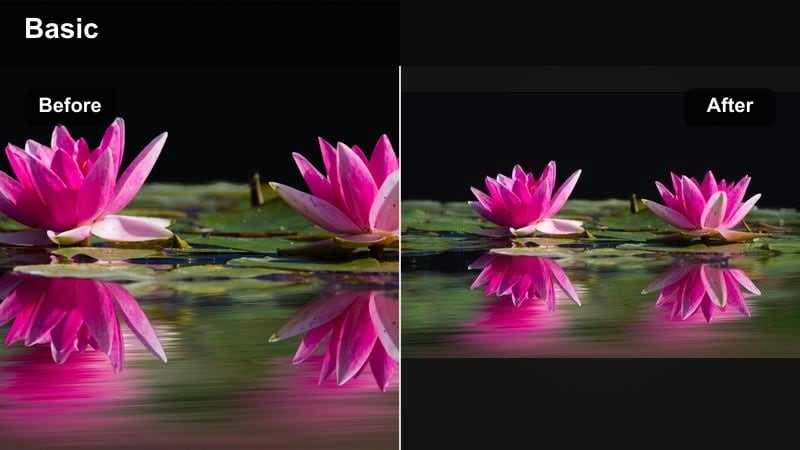
- Effect look: Warm, muted browns and soft grain with low saturation and lifted blacks.
- Best for: Cozy moody YouTube content like journaling sessions, cafe vlogs, and desk study scenes.
- Editing tip: Keep your white balance slightly warm and lower vibrance instead of full saturation for a more natural, cozy tone.
Coffee Grain wraps your footage in warm, muted browns and subtle texture, ideal for intimate, cozy storytelling. In Filmora, the filter gently lifts blacks so shadows never feel heavy, while a light grain overlay adds tactile charm without overwhelming the image.
Apply Coffee Grain to cafe scenes, study-with-me sessions, or personal reflection videos. Maintain a slightly warm white balance in-camera or in Filmora’s color correction for the best result, and reduce vibrance instead of overall saturation if colors feel too intense. Pairing this look with soft ambient sounds and slower editing rhythm will amplify the cozy, moody atmosphere.
Cool Cinematic Filters for Dark Stories
Steel Teal
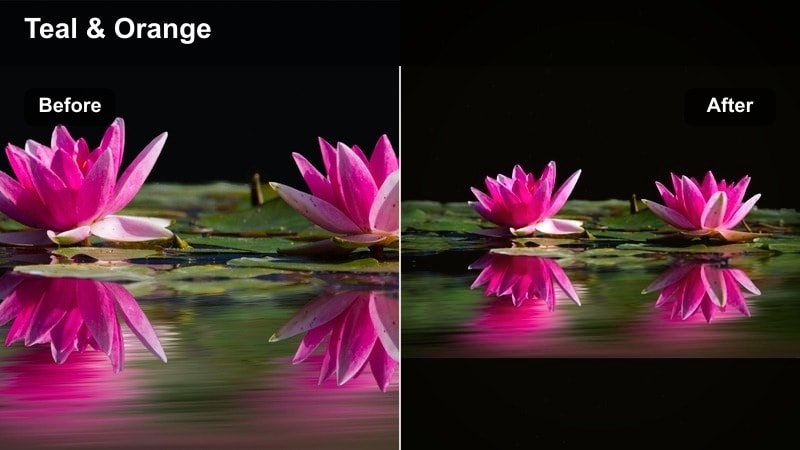
- Effect look: Classic teal shadows with slightly warm skin tones and strong, cinematic contrast.
- Best for: Moody LUT YouTube style intros, cinematic dark YouTube videos, and narrative short films.
- Editing tip: Pull down blues in the highlights if skies or screens become too saturated compared to skin tones.
Steel Teal gives you that familiar blockbuster look by pushing shadows towards teal while preserving natural warmth in skin. In Filmora, the filter also adds firm contrast so shapes and silhouettes stand out strongly against darker backgrounds.
Use Steel Teal for dramatic intros, trailers, or narrative sequences where you want maximum cinematic impact. Combine it with directional side or back lighting on set to avoid flat faces, then fine-tune color in Filmora by reducing blue saturation in highlights if skies, monitors, or neon signs start to overpower the scene. If the effect feels too heavy, simply lower the filter intensity to around 60–70 percent for a subtler grade.
Midnight Neon
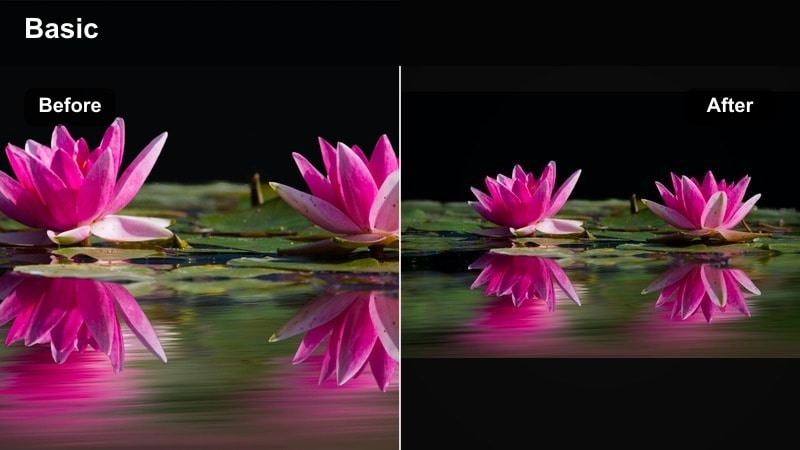
- Effect look: Deep, cool shadows with boosted neon colors and strong contrast for night city scenes.
- Best for: Night-time dark YouTube filter looks, cyberpunk streets, and neon-signed storefront sequences.
- Editing tip: Underexpose slightly in-camera so neon signs retain detail; the filter will lift and color them without clipping.
Midnight Neon is built for city nights, emphasizing bright signs and colored lights against almost inky surroundings. When applied in Filmora, the filter enhances neon hues while driving shadows deeper, giving your footage a cyberpunk or street-photography edge.
Use this filter on handheld street walks, establishing shots of nightlife districts, or character portraits framed by signage. To control noise, run light noise reduction on your clips before adding Midnight Neon, especially if they were shot at high ISO. If skin starts picking up too much color contamination from nearby lights, isolate skin tones in Filmora’s color tools and lower saturation slightly for a more natural but still moody result.
Storm Glass
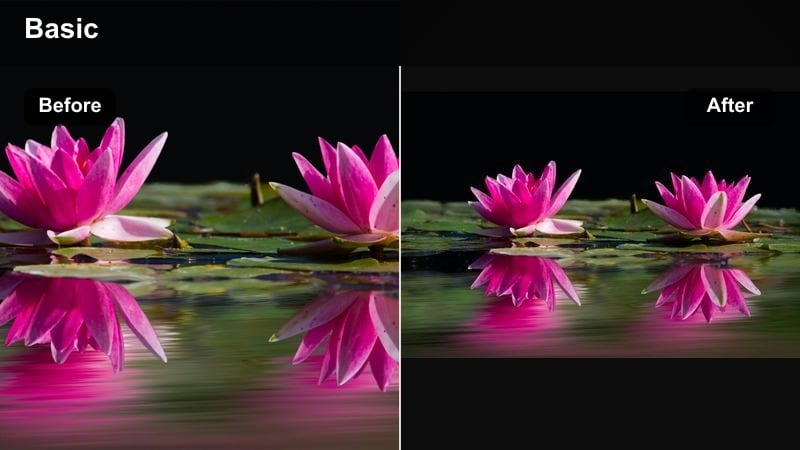
- Effect look: Low-saturation cool tones with slightly crushed blacks and a glassy, crisp sharpness.
- Best for: Moody tech videos, desk setups with RGB lights, and introspective narrative scenes.
- Editing tip: Dial back clarity on skin while keeping edges sharp elsewhere to avoid making faces look too textured.
Storm Glass introduces a slick, glass-like clarity to your footage, paired with cool, desaturated tones and firm shadows. In Filmora, this filter is especially effective on reflective surfaces, metal, and screens, making it ideal for tech-heavy or futuristic content.
Apply Storm Glass to desk setups, gadget b-roll, or moody reflections by windows. Let the filter handle overall crispness and contrast, then selectively soften skin using Filmora’s beauty tools or localized blur so faces do not appear overly textured. Adding a small warm accent light or candle within the frame can create a pleasing color contrast against the dominant cool palette.
Warm-Dark Signatures for Channel Identity
Ember Glow
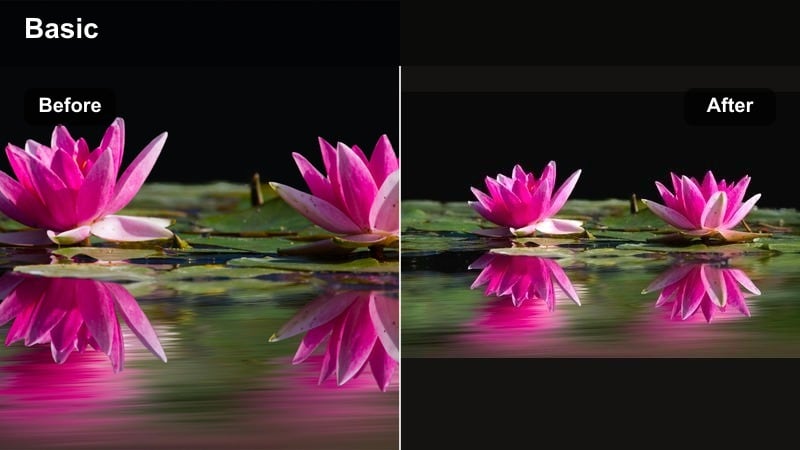
- Effect look: Warm highlights and midtones with gently darkened shadows for a fire-lit, intimate mood.
- Best for: Storytime videos, moody YouTube content with candles or practical lamps, and cozy sit-down talks.
- Editing tip: Lower overall saturation slightly so the warmth feels like light, not an orange color cast across the whole frame.
Ember Glow mimics the look of candlelight or a small bedside lamp, concentrating warmth in the brighter areas while letting corners sink into darkness. In Filmora, the filter wraps your subject in a gentle amber halo, perfect for intimate, personal content.
Use Ember Glow for storytime uploads, confessional vlogs, or late-night commentary filmed in a dim room. Place practical lights within the frame so viewers can see what is creating the glow, then use Filmora to slightly reduce saturation so the warmth reads as natural light rather than a color cast. A subtle vignette and reduced background detail will reinforce the feeling of sharing secrets by the fire.
Rustic Cinema
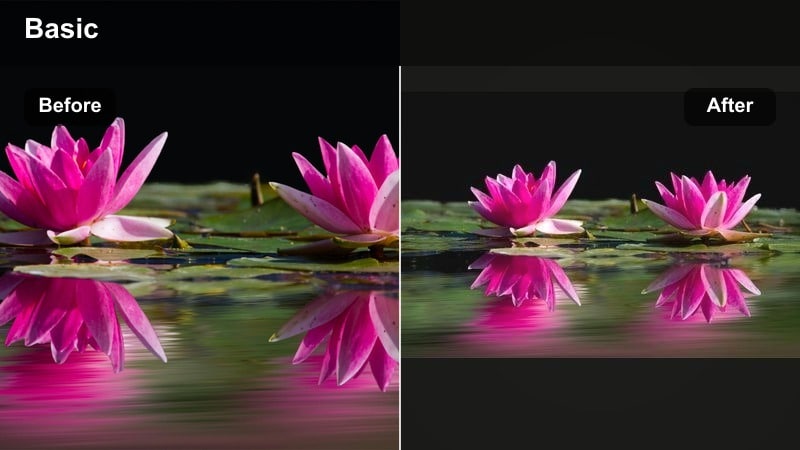
- Effect look: Earthy warm tones, slight fade in blacks, and reduced saturation with subtle film-like contrast.
- Best for: Cinematic dark YouTube videos shot in nature, cabin interiors, or vintage-inspired locations.
- Editing tip: Push greens slightly toward olive and lower their saturation to avoid oversaturated foliage breaking the rustic palette.
Rustic Cinema gives outdoor and interior scenes an earthy, storybook character by warming tones and slightly fading blacks. In Filmora, the filter lowers overall saturation just enough to tame harsh greens and bright colors without making your footage look flat.
Use Rustic Cinema for forest walks, cabin weekends, or any setting with wood, stone, or natural fabrics. After you apply the filter, nudge green hues towards olive in Filmora’s color settings and reduce their saturation to maintain a cohesive, rustic palette. Slow camera moves, gentle motion blur, and soft ambient audio will help the cinematic, grounded mood really connect with viewers.
Ink and Amber
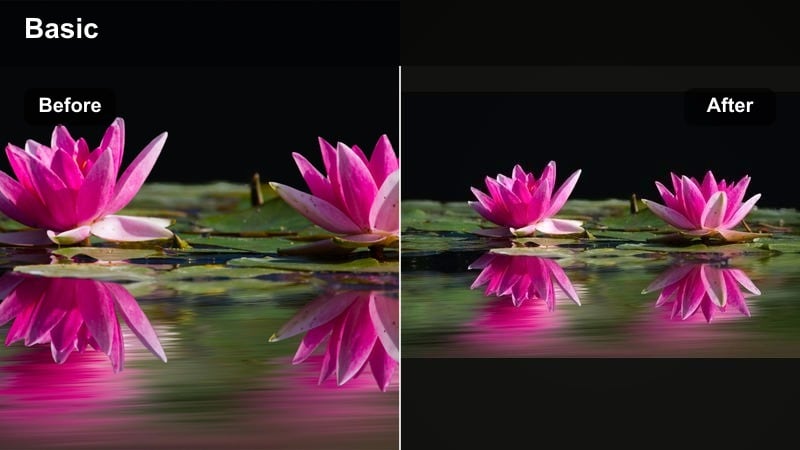
- Effect look: Deep, inky shadows combined with amber-tinted midtones and controlled highlights.
- Best for: Signature channel looks for dark aesthetic YouTubers, cinematic intros, and thumbnails that stand out.
- Editing tip: Use consistent exposure and this same filter across all videos to build a recognizable, branded moody style.
Ink and Amber creates a high-impact combination of near-black shadows and rich, amber midtones, making it a strong candidate for a signature channel look. In Filmora, this filter darkens backgrounds aggressively while keeping faces and key elements bathed in warm, controlled light.
Use Ink and Amber on your intros, outros, and thumbnails to make your brand instantly recognizable in the YouTube feed. Keep your lighting and camera settings consistent from shoot to shoot, then apply the same adjusted version of this filter as a preset in Filmora. Over time, viewers will associate the inky darkness and warm glow with your content, helping your channel stand out in a crowded niche.
Tips for Using Youtube Video Moody Filters in Filmora
- Shoot slightly flatter and cleaner in-camera, then let the moody filter handle contrast and color so you keep more detail in the grade.
- Avoid mixing too many different styles of dark filters in one video; pick one or two that support your story and stick with them.
- Use practical lights like lamps, candles, or neon signs in-frame to give your moody grades natural points of interest.
- Check how your moody YouTube video filters look on mobile, where extra darkness can make details disappear.
- Keep an eye on noise in shadows; reduce ISO where possible and apply gentle noise reduction before adding strong dark filters.
- Save your favorite Filmora filter adjustments as presets so you can apply a consistent moody look quickly across multiple videos.
- Test different filter intensities, often between 60 and 80 percent, to balance cinematic mood with clear, readable details.
- Use masks and keyframes in Filmora to keep faces slightly brighter than the background so your subject never gets lost in the darkness.
Moody YouTube video filters are one of the fastest ways to transform everyday footage into dark, cinematic visuals that feel intentional and immersive. By combining deep shadows, controlled color, and subtle grain, you can give your channel a signature look that viewers recognize instantly.
Test a handful of these Filmora filters on your next moody YouTube content, refine them into presets, and keep your lighting consistent so your aesthetic stays strong from video to video. When you are ready to explore a slightly warmer vibe, you can move into warm, cinematic grades that still feel atmospheric but more inviting.
secure download