

 100% Security Verified | No Subscription Required | No Malware


 ChatGPT
 Perplexity
 Gemini
 Claude
 Grok
Grok
This cafe minimal aesthetic filter collection is designed for content creators who love clean lines, soft light, and calm coffee shop vibes in their videos.
Use these Filmora-ready looks to turn everyday cafe clips into cohesive, cinematic scenes with muted tones, gentle contrast, and a timeless minimalist mood.
In this article
Soft Morning Cafe Scenes
Linen Latte Glow
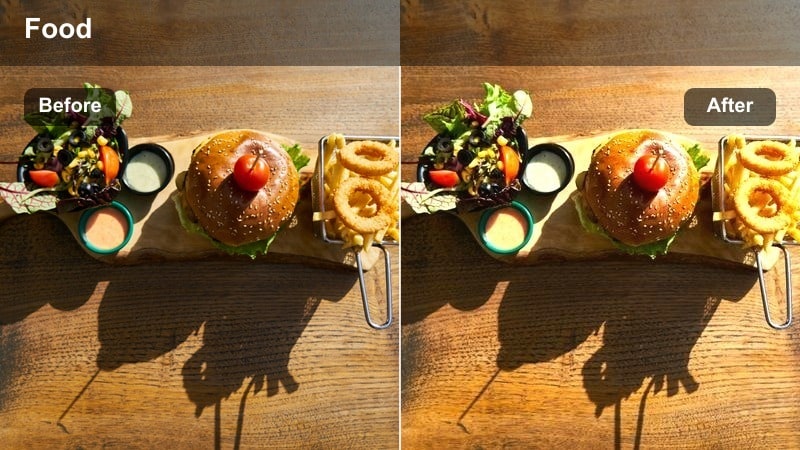
- Effect look: Soft, bright whites with creamy highlights and subtle desaturation for a calm, airy cafe feel.
- Best for: Morning coffee shop vlogs with big windows, table setups, and slow lifestyle shots.
- Editing tip: Slightly lower saturation in vibrant clothing to keep the palette neutral and cohesive.
In Filmora, Linen Latte Glow is ideal when you want your cafe footage to feel like a bright editorial spread rather than a busy coffee shop. Apply this filter to clips shot near windows or light tabletops to emphasize clean whites, soft textures, and gentle contrast, then fine-tune exposure so the brightest parts of the frame stay detailed instead of blown out.
To keep the look consistent across an entire vlog, copy and paste the filter settings onto all your morning cafe clips, then make small adjustments to saturation or exposure on a per-clip basis. This helps neutralize distracting colors, giving your thumbnails and shorts a unified, minimal aesthetic that feels soft and professional.
Lock In a Minimal Cafe Palette with AI Tools
Before you apply any cafe minimal aesthetic filter in Filmora, use AI color tools like AI Color Correction or AI Auto to quickly balance exposure and white balance. Getting a clean base image first prevents your whites from shifting too warm or cool when you stack a preset on top.
Once your footage is roughly matched, add your chosen cafe filter to unify tones from street exteriors, interior wide shots, and tabletop B roll. This workflow keeps your entire sequence locked into a soft, cohesive palette without heavy manual grading.
 secure download

Preview Cafe Filters on Multiple Scenes
To find the perfect cafe minimal aesthetic filter, drop several presets onto duplicated clips in the same Filmora project. Use window shots, desk setups, and low light interiors as test scenes so you can see how each look behaves in different lighting conditions.
By toggling visibility on tracks or switching between timelines, you can compare versions side by side and quickly decide which minimal style best matches your branding, thumbnails, and channel grid.
secure downloadTurn Cafe Filters into Reusable Looks
After you fine tune a cafe preset in Filmora with HSL, curves, and additional effects, save it as a custom preset or export a LUT so you can reuse the same look on future projects. This cuts down grading time and keeps your channel aesthetic instantly recognizable.
Pair your saved cafe minimal preset with consistent framing and typography to build a signature style that carries from coffee shop vlogs to desk diaries and city B roll.
secure downloadPorcelain Flat White
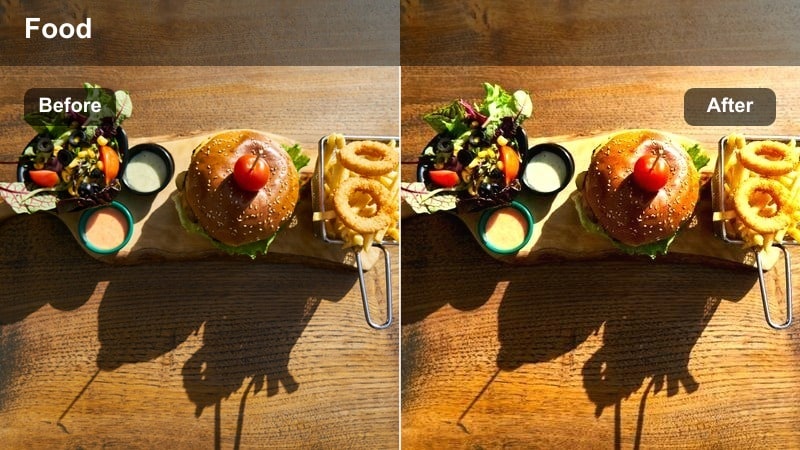
- Effect look: Neutral whites, soft shadows, and slightly matte contrast for a modern editorial cafe mood.
- Best for: Minimalist desk setups in cafes, overhead shots, and clean talking head clips.
- Editing tip: Use light vignetting to subtly frame your subject while keeping the image minimal.
Porcelain Flat White in Filmora is perfect for creating that polished, magazine style workspace aesthetic. Apply it to overhead shots of laptops, notebooks, and cups to smooth contrast, flatten harsh shadows, and keep whites looking accurate without leaning too warm or too cool.
For talking head segments filmed in a cafe, combine this preset with a small vignette and Filmora skin smoothing at low strength. This keeps your face nicely framed and clean while the background remains soft, neutral, and distraction free for tutorials, productivity videos, or study vlogs.
Foggy Window Brew
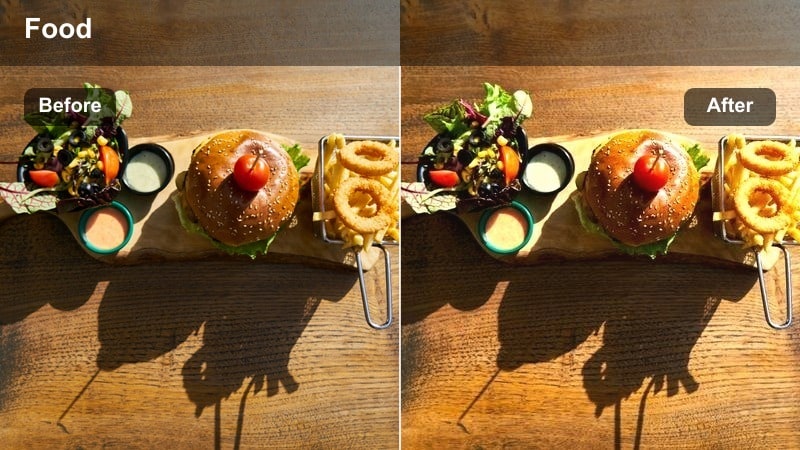
- Effect look: Muted colors with a gentle cool tint and softened contrast for quiet, misty morning vibes.
- Best for: Cafe window shots on cloudy days, reflective glass, and slow motion clips.
- Editing tip: Reduce clarity slightly to enhance the dreamy softness without losing your subject.
Foggy Window Brew is designed for reflective, moody storytelling shots where the city outside feels distant and soft. In Filmora, apply this filter to footage captured on overcast days or near large windows, then tweak the temperature slider a touch warmer if skin tones start to feel too cool.
Because this look mutes color and contrast, it pairs well with slow motion B roll, lens flare overlays, and gentle zooms. Use it to bridge voiceover segments, introspective monologues, or chapter breaks in travel and lifestyle vlogs that revolve around quiet time in cafes.
Neutral Afternoon Coffee Work Sessions
Beige Desk Clarity
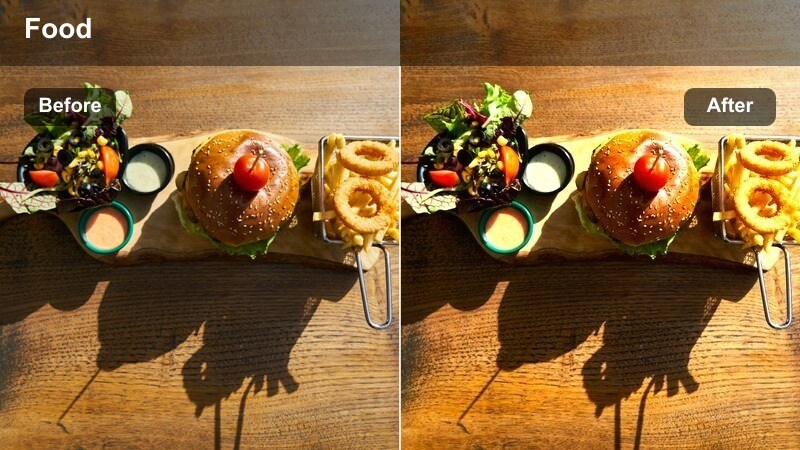
- Effect look: Warm beige tones, subtle contrast, and clear midtones for focused workspace shots.
- Best for: Cafe co-working sessions, keyboard close-ups, and productivity B-roll.
- Editing tip: Gently sharpen text areas like notebooks or screens to highlight details in the minimal frame.
Beige Desk Clarity gives afternoon work sessions a warm yet controlled color grade that feels calm and studious. In Filmora, apply this preset to clips featuring laptops, planners, and hands on keyboards to enhance midtone detail while keeping the overall palette softly beige and unobtrusive.
To emphasize productivity, combine this filter with subtle speed ramps on typing or writing shots and add a touch of sharpening only to areas with fine text. The result is a minimal, focused aesthetic that works well for study with me, work from home, or freelance day in the life content filmed in cafes.
Soft Espresso Matte
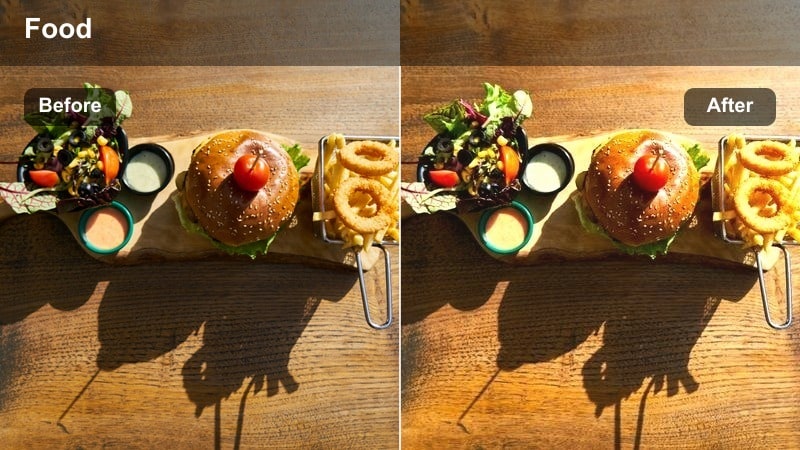
- Effect look: Slightly lifted blacks and reduced saturation for a soft matte minimalist finish.
- Best for: Barista action shots, coffee pours, and detail clips shot in natural light.
- Editing tip: Trim contrast a bit more for very bright scenes to keep shadows pleasingly soft.
Soft Espresso Matte is tailored for close up coffee action where you want the scene to feel cinematic but still understated. In Filmora, use this filter on shots of espresso pulling, milk swirling, and latte art to gently lift shadows and pull back saturation, creating a subtle matte film look.
Pair the preset with slow motion and tight framing to highlight textures like crema, steam, and foam. If your source footage is very contrasty, slightly lower additional contrast in the Color panel after the preset is applied so the lifted blacks stay soft and flattering rather than harsh.
Cream Notes Focus
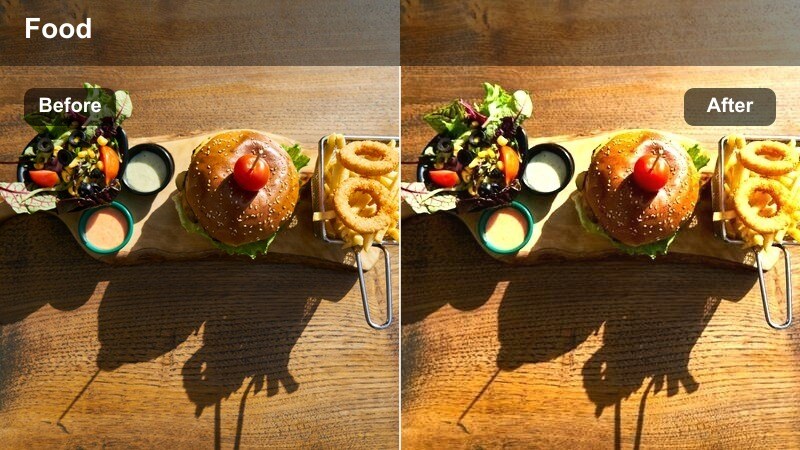
- Effect look: Warm cream highlights and balanced midtones that spotlight notebooks and hands.
- Best for: Journaling shots, handwriting close-ups, and story-driven cafe sequences.
- Editing tip: Use gentle punch in zooms to emphasize writing or hand movements within the minimalist frame.
Cream Notes Focus is all about storytelling through paper, pens, and small gestures. In Filmora, apply this preset to clips of journaling, planning, or sketching so your highlights take on a soft cream tone while midtones remain clear enough to read text and see fine details.
Use keyframed zooms in the Animation panel to slowly push in on important lines in your notebook or key moments like circling a date. This filter works especially well for voiceover segments, affirmations, or planning videos where calm cafe ambience and handwritten notes drive the narrative.
Warm Evening Cafe Ambience
Amber Hush Lights
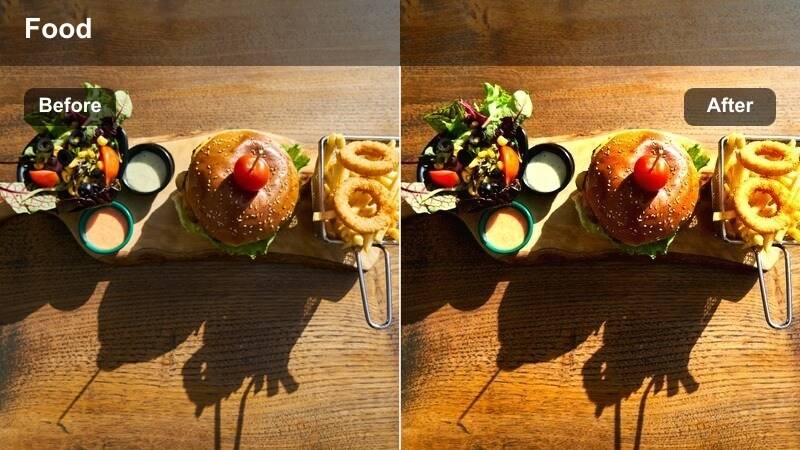
- Effect look: Soft amber highlights with gentle bloom on lights for cozy evening interiors.
- Best for: Cafe lamps, hanging lights, and intimate conversations in low light.
- Editing tip: Raise exposure slightly before applying the filter to keep faces visible in dim scenes.
Amber Hush Lights brings out the glow of hanging bulbs, table lamps, and candles without turning your footage orange or overly contrasty. In Filmora, slightly brighten your clips first, then apply this preset so faces remain legible while bulbs and reflections take on a soft, cinematic bloom.
This look pairs beautifully with quiet conversations, studying at dusk, or late night editing sessions in cafes. Add a touch of Filmora glow or vignette around the edges if you want to further center attention on your subject while keeping the rest of the frame minimal and warm.
Dusky Minimal Neon
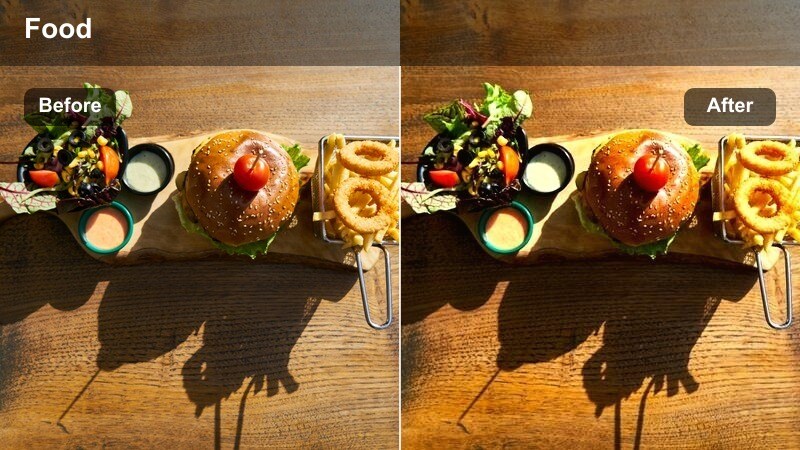
- Effect look: Muted overall palette with controlled pops from signs or neon for refined night cafe shots.
- Best for: Window exteriors, subtle signage, and walking into or past cafes at night.
- Editing tip: Lower saturation selectively on bright signs so they stay readable but not overpowering.
Dusky Minimal Neon is crafted for nighttime street scenes where you want neon or signage to stand out without overwhelming the frame. In Filmora, apply this filter to exteriors or walk by shots, then use the HSL controls if needed to slightly reduce saturation on specific neon colors.
Combine the preset with smooth camera movement, stabilized in Filmora if necessary, to keep lines straight and the composition clean. This look is ideal for establishing shots in vlogs, intro sequences, or transitions from busy streets into the calm of a cafe interior.
Candle Slate Minimal
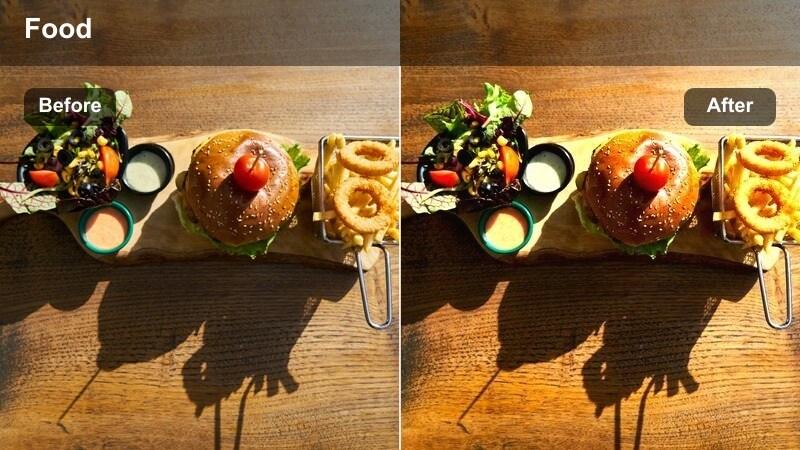
- Effect look: Cooler shadows and warm highlights for a balanced, cinematic candlelit aesthetic.
- Best for: Tabletop cafe conversations, quiet reading shots, and moody B-roll.
- Editing tip: Reduce contrast if skin looks too shiny, then add a tiny bit of glow for elegance.
Candle Slate Minimal balances the warmth of candles with cooler surrounding shadows, creating a refined, cinematic feel for late night scenes. In Filmora, apply this preset to close ups of cups, books, and faces lit by candles or warm lamps, then adjust exposure so highlights stay soft rather than harsh.
For moodier edits, layer in Filmora LUTs at low intensity on top of the preset or add a very subtle grain effect. This keeps the scene feeling tactile and intimate while the color grade remains minimal and controlled, perfect for date night vlogs, reflective monologues, or cozy reading sessions.
From Street to Cafe Transitions
Sidewalk to Steam
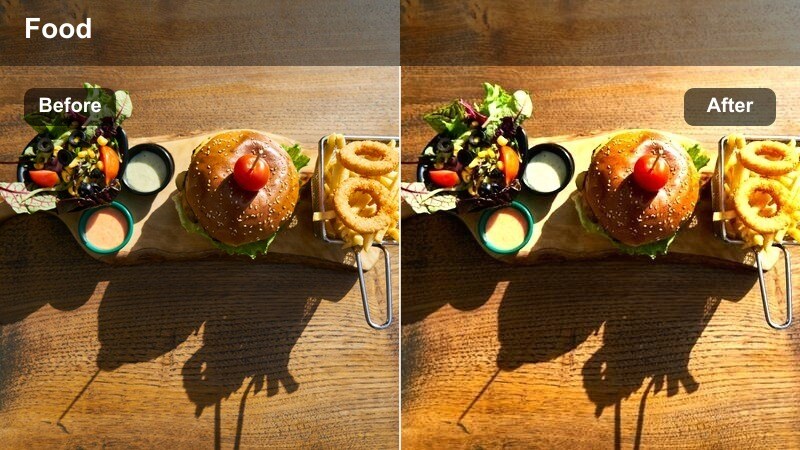
- Effect look: Softens harsh outdoor contrast and matches it to gentle indoor cafe tones.
- Best for: Sequences where you walk from the street into a cafe in one smooth shot.
- Editing tip: Apply the filter across both clips in a cut to create seamless visual continuity.
Sidewalk to Steam is designed to bridge bright outdoor streets and softer interior cafe lighting so your sequence feels like a single, cohesive moment. In Filmora, apply this filter uniformly to both exterior and interior clips, then fine tune exposure per shot to even out transitions.
This preset works especially well with simple cuts or gentle cross dissolves rather than flashy transitions. Use it to anchor recurring formats like morning routine walks to your favorite cafe, intro sequences, or city to cafe B roll that opens each vlog episode.
Window Seat City Soft
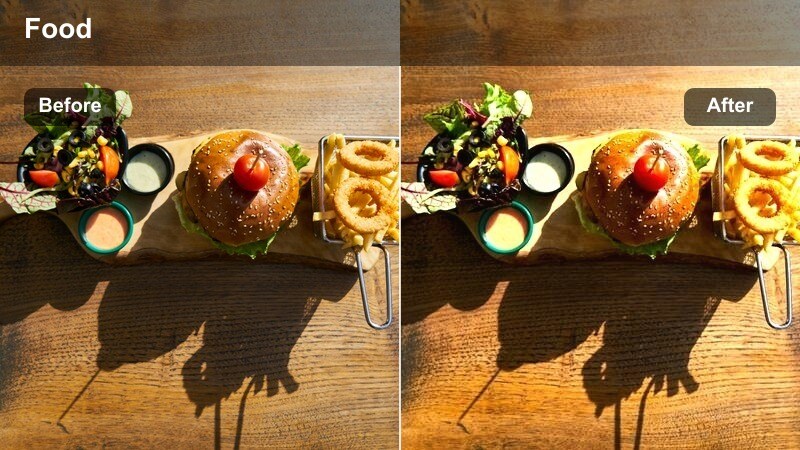
- Effect look: Balances indoor warm light with cooler city tones outside the window for refined, minimal contrast.
- Best for: Cafe window seating shots that show both the street and your subject.
- Editing tip: If the street looks too bright, drop highlights slightly to keep focus on the person inside.
Window Seat City Soft carefully balances the mixed lighting you get when filming a subject inside while the city remains visible outdoors. In Filmora, use this preset on shots where your subject sits at a window bar, then gently adjust highlights so the outside view supports, rather than steals, attention.
To enhance the reflective, minimal mood, slow down your footage slightly or mix in a very light motion blur effect. The result is a contemplative, cinematic framing that works well for voiceovers, reflective conversations, or aesthetic B roll layered under on screen text.
Minimal Crosswalk Cafe
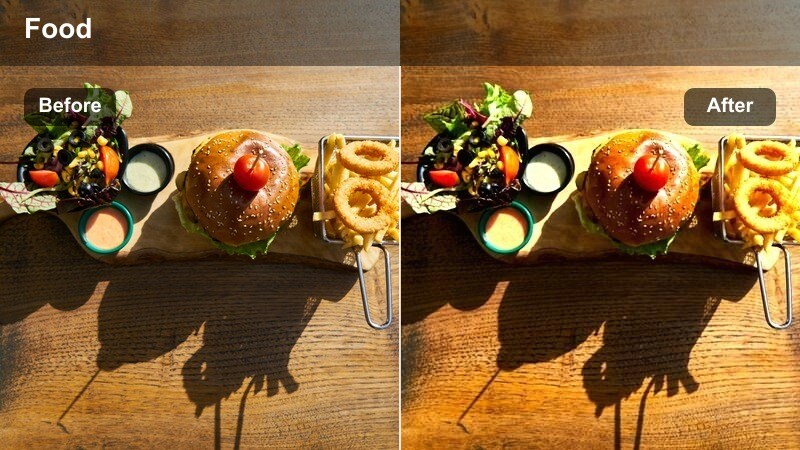
- Effect look: Soft, slightly desaturated street colors that transition smoothly into neutral cafe interiors.
- Best for: B-roll of crosswalks, walking shots, and entering a cafe from across the street.
- Editing tip: Stabilize handheld shots before applying the filter to keep the clean aesthetic from feeling chaotic.
Minimal Crosswalk Cafe brings structure and calm to everyday street shots by dialing back saturation and smoothing contrast. In Filmora, stabilize your walking clips first, then apply this preset so crosswalk lines, building edges, and the cafe entrance all feel clean and composed.
Use this look for sequences that lead viewers into your main cafe setting, such as walking from a parking lot, crossing the street, or approaching the storefront. When paired with your interior cafe presets, it helps create a complete minimal narrative from outside to inside in every vlog.
Tips for Using Cafe Minimal Aesthetic Filter Filters in Filmora
- Film near large windows, open doors, or bright entrances so your cafe minimal filters have soft, flattering light to enhance rather than fix.
- Avoid very saturated clothing or decor when possible; neutral outfits and simple tabletops keep your color palette cohesive with these presets.
- At the start of each cafe session, shoot a quick clip of a white mug or notebook to use as a reference when matching exposure and white balance in Filmora.
- Use slower, intentional camera movements and stabilize handheld shots so the minimal aesthetic feels calm instead of shaky or chaotic.
- Keep your audio design simple, mixing gentle background music with real cafe ambience like cups, pages, and soft chatter.
- Group similar clips on the same track and apply one cafe preset to the whole group, then make small tweaks per clip for consistent results.
- Combine filters with Filmora tools like vignettes, HSL, and subtle glow at low intensity to fine tune your own signature cafe look.
With the right cafe minimal aesthetic filter, even simple coffee shop moments can look cinematic and cohesive across your whole channel.
Experiment with a few of these Filmora presets, save your favorites as custom looks, and build a calm, recognizable style for all your cafe videos.
secure download