

 100% Security Verified | No Subscription Required | No Malware


 ChatGPT
 Perplexity
 Gemini
 Claude
 Grok
Grok
Cafe Outdoor Seating LUT style filters are perfect for creators who shoot vlogs, reviews, and B-roll on patios and sidewalks but struggle with harsh daylight, flat colors, and mixed shadows.
This guide walks content creators through a curated set of Filmora filters inspired by a cafe outdoor seating LUT look, helping you quickly turn any patio, terrace, or sidewalk table into a warm, inviting cinematic scene.
In this article
Golden Hour Patio Cafes
Honey Sunlit Espresso
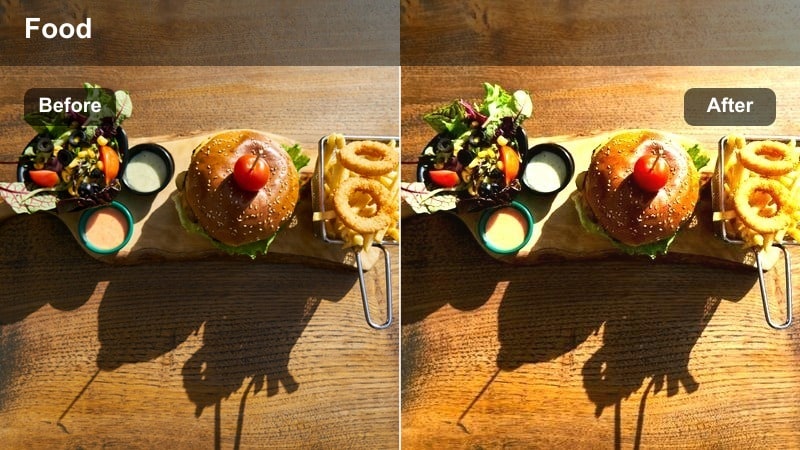
- Effect look: Soft golden warmth that wraps your outdoor tables in a subtle honey glow while keeping skin tones natural and flattering.
- Best for: Late-afternoon cafe vlogs, coffee B-roll, and lifestyle reels shot during golden hour on sidewalks or patios.
- Editing tip: Lower saturation on yellows by 5-10 percent if your tabletops or umbrellas become too intense under strong sunlight.
Honey Sunlit Espresso is designed to emulate the flattering wrap of late-afternoon sun without pushing your footage into overly orange territory. In Filmora, this style keeps skin tones in check while letting warm highlights roll across tabletops, mugs, and cafe facades for an end-of-day glow that feels cinematic rather than filtered.
Use this filter on exterior intros, latte-pouring B-roll, and slow pans of sidewalk seating to establish a cozy, wind-down mood. If you are cutting between shots captured in both sun and shade, apply the filter uniformly, then fine-tune exposure per clip so your golden hue stays consistent across the entire sequence.
Match Your Cafe Outdoor Seating LUT Look with AI Color Tools
Filmora AI color tools can quickly analyze your patio clips, correct exposure, and balance white tones so your cafe outdoor seating LUT look starts from a clean, neutral base. Once the AI has handled the heavy lifting, you can lean on warm filters like Honey Sunlit Espresso to give every table, cup, and chair a cohesive vibe.
By stabilizing color and brightness with AI first, you avoid jarring shifts when you move from one cafe location or shooting day to another, keeping your whole vlog or reel unified.
 secure download

Preview Cafe Filters on Real Patio Footage
To choose a signature cafe outdoor seating LUT style, drop a short patio clip into Filmora and rapidly cycle through filters like Honey Sunlit Espresso, Amber Latte Glow, and Sunset Terrace Wash. Seeing them back-to-back on the same footage makes it simple to decide which grade fits your brand, from soft golden storytelling to punchier sunset vibes.
You can then lock in one look for your whole vlog, or assign different filters to intros, B-roll, and talking-head segments for a structured, cinematic flow.
secure downloadBlend Filters with Cafe Outdoor Seating LUTs
If you already use a favorite cafe outdoor seating LUT, Filmora filters can act as gentle refinements instead of full-on color overhauls. Keep your LUT as the base layer, then mix in low-intensity filters to tweak skin tones, brighten shadowy corners, or warm up tabletops without breaking your overall grade.
This stacked approach lets you preserve a recognizable visual identity while still adapting to different locations, weather, and cafe lighting setups.
secure downloadAmber Latte Glow
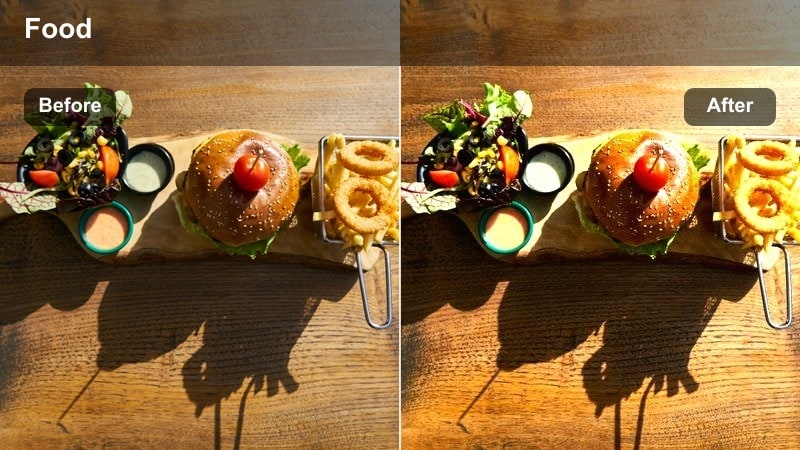
- Effect look: Creamy highlights with a soft amber tint that make cafe tabletops, mugs, and chairs feel cinematic and inviting.
- Best for: Product-style coffee shots, tabletop B-roll, and close-up storytelling at outdoor seating areas.
- Editing tip: Reduce contrast slightly to keep the glow dreamy, then add subtle sharpening on key details like mugs or laptops.
Amber Latte Glow focuses on the small details that define your cafe story, from foam art to laptop keys and notebook pages. In Filmora, it lifts highlights into a creamy, latte-like sheen while gently warming neutrals, making your close-ups look polished without overwhelming viewers with saturation.
Apply this filter to macro shots of cups, desserts, and hands as you build ASMR-style or aesthetic B-roll sequences. For talking-head clips at the same table, keep the effect consistent but tweak Filmora sharpness and clarity so your face stays crisp while backgrounds melt into a soft glow.
Sunset Terrace Wash
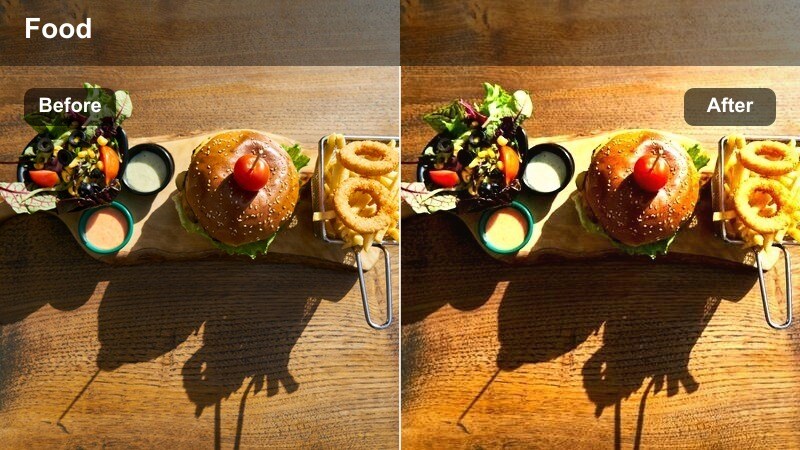
- Effect look: Subtle orange and rose tones that mimic a late-day sunset wash across your entire outdoor cafe scene.
- Best for: Patio intros, establishing shots, and B-roll of people chatting at the end of the day on a cafe terrace.
- Editing tip: Boost midtones slightly while keeping highlights under control to avoid blowing out bright skies or white umbrellas.
Sunset Terrace Wash is built to make wide patio scenes feel like they were shot during the perfect soft dusk, even if the real light was flat or overcast. It adds a light layer of orange and rose across your image, ideal for showing clusters of tables, umbrellas, and city backdrops in one cohesive wash.
Use this style on establishing shots at the beginning or end of your cafe segments in Filmora, then transition into closer clips graded with matching warm filters. When editing, combine the filter with gentle midtone adjustments using the Color tools to keep detail in the sky while maintaining that calm, sunset-inspired mood.
Bright Daylight and Umbrella Shade
Shade Balancer Cappuccino
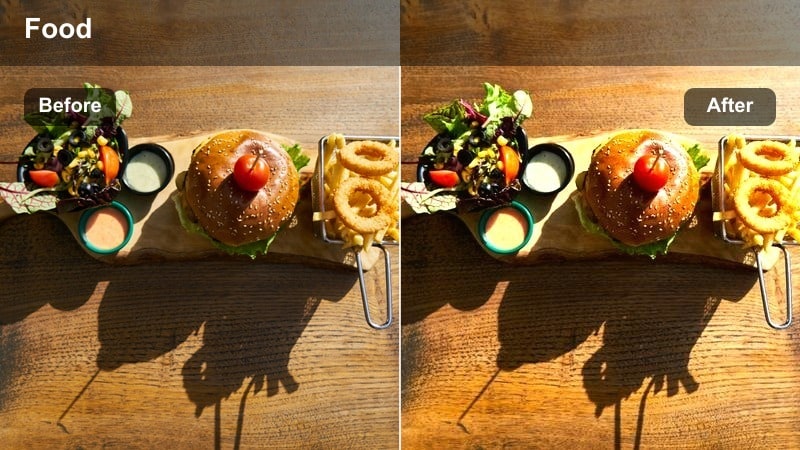
- Effect look: Balances harsh sun and deep shadow by lifting dark areas and softening bright spots around umbrellas and awnings.
- Best for: Midday cafe seating, umbrella-covered tables, and sidewalk interviews shot under strong sun.
- Editing tip: After applying, use selective exposure adjustments on faces to bring them slightly above the background brightness.
Shade Balancer Cappuccino is tailored for chaotic noon lighting, where umbrellas, awnings, and tree shadows slice across your frame. In Filmora, this filter softens contrast, recovers detail in both bright tabletops and dark corners, and gives your clip a more even, editorial finish that is much easier on the eyes.
Apply it to travel vlogs, street interviews, or cafe reviews shot in unforgiving sunlight, then refine the grade with local exposure tweaks on faces. This workflow helps you rescue clips that would otherwise look too patchy or blown out, turning them into stable, professional-looking shots suitable for YouTube and social feeds.
Cool Breeze Terrace
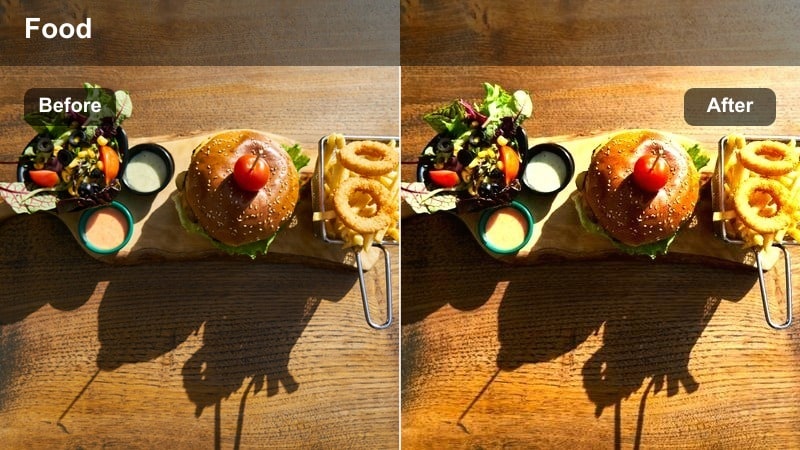
- Effect look: Adds a lean, slightly cool tone to neutralize yellow midday sun while preserving the cafe's inviting mood.
- Best for: Outdoor seating on white or light-colored patios, especially travel vlogs and street cafe B-roll.
- Editing tip: If skin starts looking too cool, warm up the temperature slider just a little while keeping the neutral pavement tones.
Cool Breeze Terrace is ideal when your footage leans too yellow or orange due to harsh midday sun bouncing off white walls and pavement. It introduces a restrained cool cast that modernizes the scene, making clean lines, minimalist furniture, and bright facades feel crisp and editorial.
In Filmora, use this filter on B-roll of white tables, neutral chairs, and bright streets to align with a fresh, urban brand aesthetic. If human subjects appear slightly cold, simply nudge the Temperature slider warmer or selectively adjust skin tones while keeping the surrounding architecture and ground pleasantly cool.
Umbrella Soft Cream
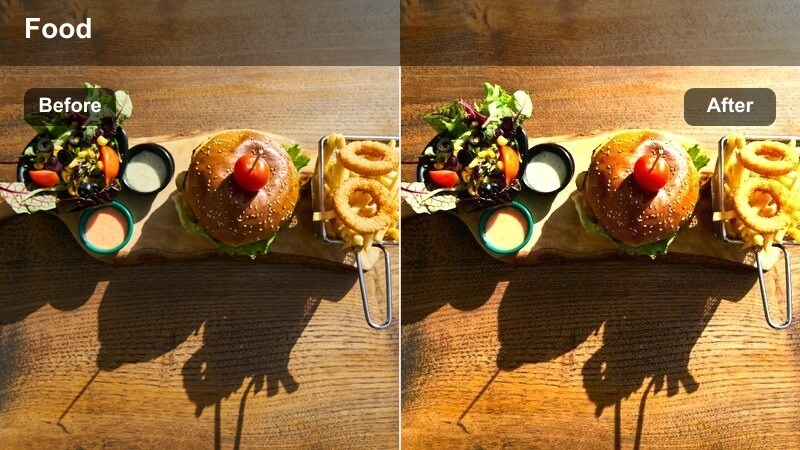
- Effect look: Softens contrast and adds a creamy highlight roll-off so umbrellas and awnings look smooth instead of harsh.
- Best for: Patio cafes with lots of white umbrellas, branded awnings, or reflective tabletops.
- Editing tip: Dial clarity down a touch to keep the overall scene gentle, then locally sharpen your main subject for separation.
Umbrella Soft Cream tackles the problem of glare and hard reflections that often pop up on glossy tabletops and bright fabric shades. The filter eases transitions between highlights and midtones, giving your cafe patio a soft, almost filmic roll-off that draws attention back to people rather than shiny surfaces.
In Filmora, pair this style with masked adjustments that slightly darken the brightest areas of the frame so logos and text stay readable without stealing focus. Lightly reduce clarity to maintain a gentle atmosphere, then add sharpening or detail to faces and key props so your subject still stands out against the softened background.
Moody Evening and Street-Side Corners
Dusky Street Sip
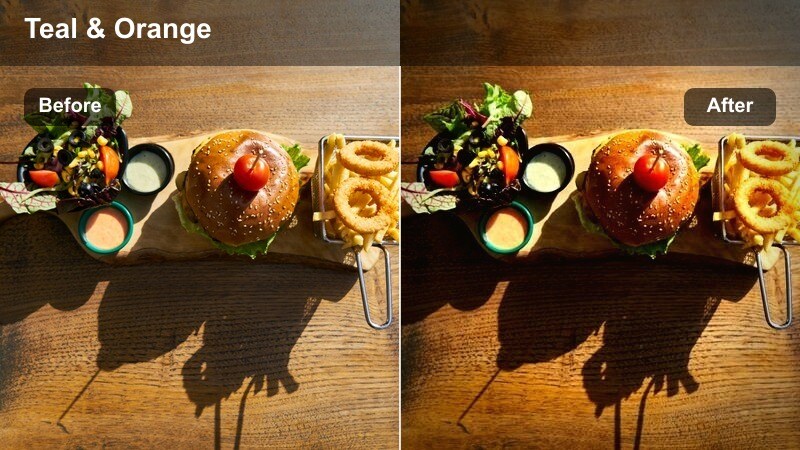
- Effect look: Deepens shadows and adds a muted teal and amber contrast for moody yet cozy evening cafe corners.
- Best for: Street-side cafe seating at dusk, moody talking-head shots, and cinematic B-roll transitions.
- Editing tip: Slightly raise exposure on faces while letting the background fall darker to keep attention on your subject.
Dusky Street Sip channels the classic teal-and-amber film look to turn casual evening cafe shots into atmospheric, story-driven moments. It enriches shadows, cools background elements, and warms highlights, producing a refined contrast that feels perfect for reflective vlogs or narrative sequences.
In Filmora, use this filter on dusk walk-ups to your favorite cafe, or on intros filmed at a corner table as city lights begin to appear. Combine it with subtle vignettes and stabilized camera movement so your subject remains the visual anchor while surrounding streets sink into a moody, cinematic backdrop.
Neon Sign Reflection
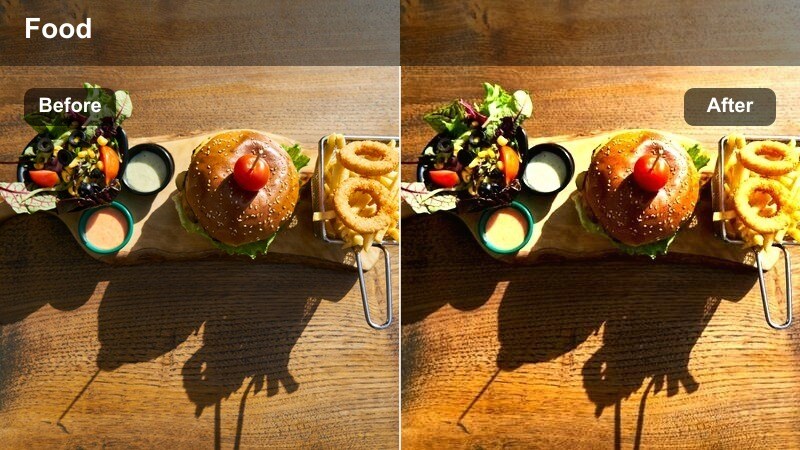
- Effect look: Boosts saturation in warm signage and cool street lights for a night-in-the-city cafe aesthetic.
- Best for: Outdoor seating near glowing cafe signs, street lamps, and window reflections after dark.
- Editing tip: Keep exposure slightly lower than usual to maintain the glow of neon and avoid washing out the sign text.
Neon Sign Reflection is made for creators filming outside cafes surrounded by glowing logos, menu boards, and city lights. The filter selectively emphasizes warm and cool light sources, turning signs, reflections, and lamp pools into vibrant accents that frame your subject with a clear urban energy.
When editing in Filmora, lower overall exposure a touch and let your highlights breathe so neon edges stay crisp and legible. Use this look on night B-roll, walk-by shots, or seated conversations beneath signage, then cut between tight sign close-ups and wider tables to build a rhythmic, city-at-night sequence.
Cobblestone Lantern Mood
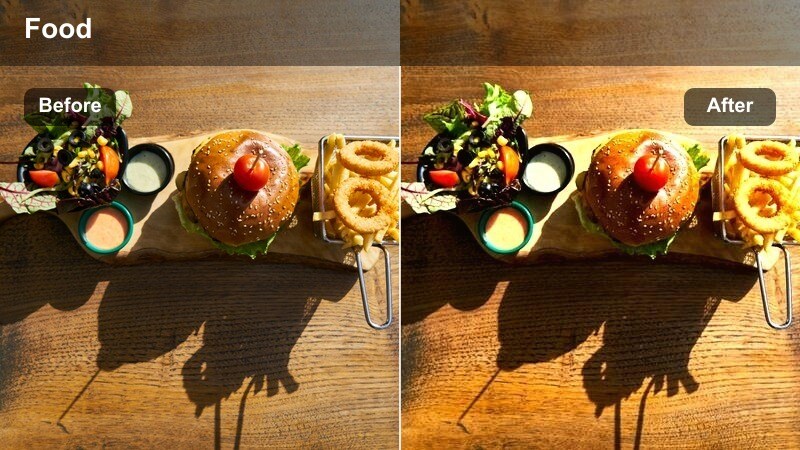
- Effect look: Adds warm highlights and gently desaturated backgrounds to evoke lantern-lit streets and intimate pavement cafes.
- Best for: Old-town or historic street cafes, especially where cobblestones, lanterns, or vintage chairs are in frame.
- Editing tip: Lower vibrance slightly to keep the old-town feel, then boost saturation only on key wardrobe or props.
Cobblestone Lantern Mood is tailored for historic neighborhoods and vintage-style cafes, where texture and architecture tell as much story as the coffee itself. The filter warms highlights to feel like lantern or string-light glow, while gently muting surrounding colors so chairs, cobblestones, and facades have a timeless character.
In Filmora, apply this look across entire travel sequences in older districts to keep the journey cohesive from shot to shot. Use it on static compositions of empty chairs, slow walk-throughs of narrow streets, and close-ups of stone or wood details to build a nostalgic, postcard-worthy cafe atmosphere.
Work, Study, and Creator-Friendly Cafe Spots
Creator Desk Terrace
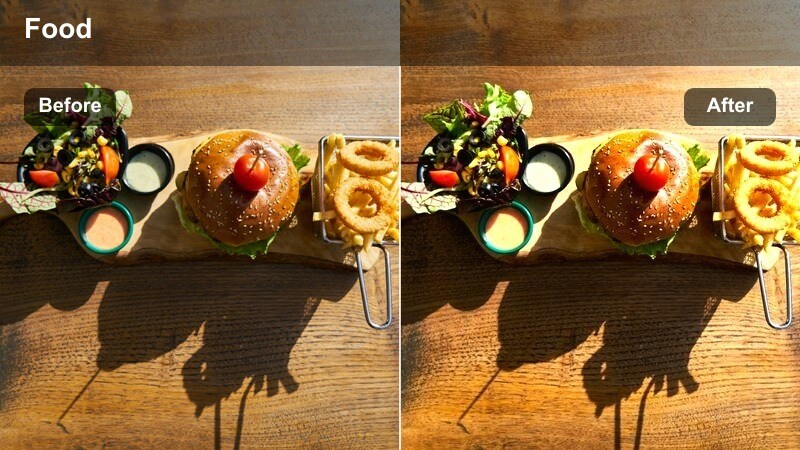
- Effect look: Clean, lightly warm tones with lifted shadows for laptop, notebook, and camera gear shots on cafe patios.
- Best for: Productivity vlogs, remote work video, and creator behind-the-scenes sequences at outdoor seating.
- Editing tip: Use subtle color boost on blues and teals to make screens and devices pop against the cafe background.
Creator Desk Terrace is all about showcasing your workspace clearly while keeping the cafe setting relaxed and relatable. The filter brightens shadows and adds a gentle warmth so laptops, cameras, and notebooks are easy to read without the harsh, clinical feel of an office environment.
In Filmora, pair this style with top-down shots of your desk layout, time-lapses of editing sessions, or B-roll of gear packing on the terrace. A slight saturation boost on blues and teals helps laptop screens, headphones, and device accents stand out, giving your productivity or behind-the-scenes content an organized, professional polish.
Study Session Patio
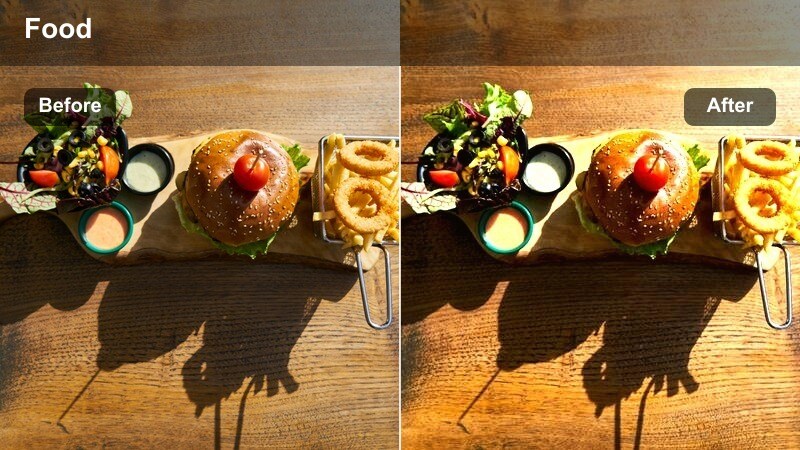
- Effect look: Soft, low-contrast look with slightly muted colors to keep notes, books, and screens easy on the eyes.
- Best for: Study-with-me videos, productivity montages, and calm cafe B-roll showing long work sessions outside.
- Editing tip: Pair this filter with slower cuts and gentle background music to lean into a relaxed, focused atmosphere.
Study Session Patio dials back contrast and saturation to create a gentle, focus-friendly image that viewers can watch for long periods. Notebooks, highlighters, and laptop screens remain clear, but the overall palette is softened so your study-with-me or co-working videos feel calm rather than visually overwhelming.
Use this filter in Filmora when assembling longer timelines of you reading, typing, or annotating notes at an outdoor cafe table. Combine it with slower-paced edits, minimal transitions, and soft background audio or ambient cafe sounds to support a sustained, concentration-driven viewing experience.
Creator Meetup Sidewalk
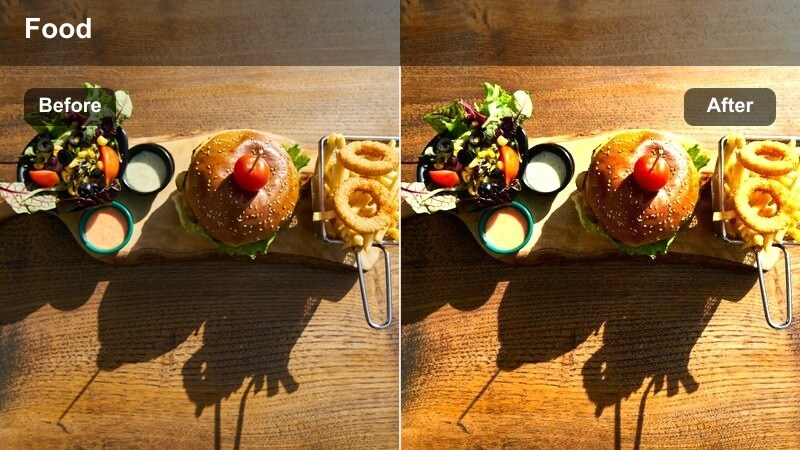
- Effect look: Balanced, social-media-ready tones that keep multiple skin tones natural while the cafe background remains vibrant.
- Best for: Group meetups, collaboration vlogs, and podcast-style conversations filmed at sidewalk tables.
- Editing tip: After adding the filter, fine-tune white balance with a minor adjustment toward warmth for a more welcoming feel.
Creator Meetup Sidewalk is tuned for multi-person shots where different skin tones, clothing colors, and background elements all need to look good together. The filter keeps contrast moderate and colors lively without letting the street or decor overpower your guests, which is crucial for collaborations and group vlogs.
In Filmora, apply this style to wide and medium shots of your meetup, then make small white balance shifts toward warmth to enhance the friendly, conversational feel. Add gentle background blur or depth-of-field effects where possible so the busy sidewalk remains atmospheric while the focus stays on faces and interactions.
Tips for Using Cafe Outdoor Seating Lut Filters in Filmora
- Shoot a quick gray or white reference at your cafe table so you can balance color in Filmora before adding any outdoor seating filter.
- Keep ISO as low as possible on bright patios to preserve highlight detail for filters that emphasize golden or sunset light.
- Capture several seconds of ambient cafe and street audio to layer under your graded patio B-roll for a more immersive experience.
- Record multiple angles of the same seating area so you can use one filter consistently without distracting changes in lighting.
- Avoid mixing radically different filter moods within the same short video unless you clearly separate scenes with transitions or title cards.
- Use Filmora keyframes or masks to reduce filter intensity only on faces when direct sunlight becomes too strong.
- Export a short test clip with your cafe outdoor seating look and preview it on your phone to see how it feels in real YouTube or social feeds.
- Lock white balance in-camera when vlogging so your chosen cafe filter behaves predictably across multiple locations and shots.
Cafe outdoor seating LUT-style filters are a fast way for content creators to turn ordinary sidewalk tables and patios into polished, cinematic scenes that feel intentional and on-brand.
Save your favorite combinations as Filmora presets so every future cafe vlog, review, or study-with-me video can instantly match the same warm, inviting outdoor aesthetic.
secure download