

 100% Security Verified | No Subscription Required | No Malware


 ChatGPT
 Perplexity
 Gemini
 Claude
 Grok
Grok
Mountain clips can look flat on TikTok if you just rely on your phones default camera, but the right mountain video filters for TikTok can instantly turn hazy peaks and dull trails into sharp, cinematic landscapes packed with detail.
Below are 12 creator friendly filter ideas inspired by alpine LUTs and hiking color styles, designed for TikTok outdoor creators and hiking influencers who want quick, scroll stopping looks without complicated grading.
In this article
Bright, Crisp Alpine Light Filters
Sunlit Ridge Pop
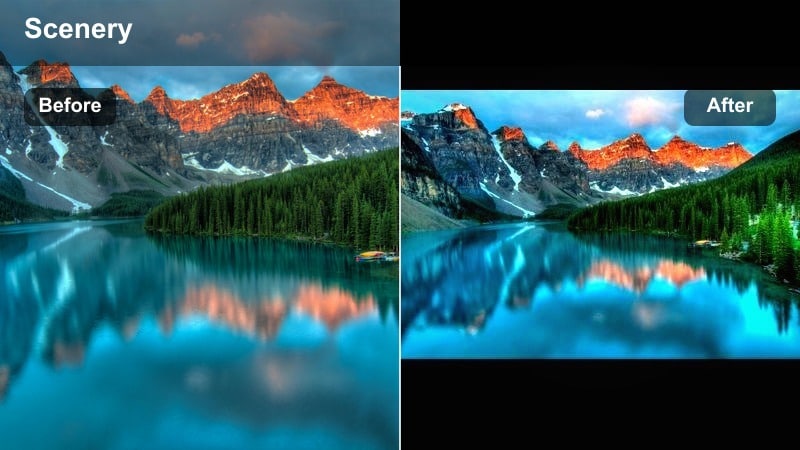
- Effect look: Clean, bright alpine contrast with crisp whites and punchy midtones that make rocky ridgelines stand out against the sky.
- Best for: Bluebird hiking days, summit reveals, wide panning shots of mountain ranges on TikTok.
- Editing tip: Slightly lower highlights to avoid blown out snow, then add a touch of clarity to sharpen rock textures without making faces look harsh.
Sunlit Ridge Pop is ideal when you want your mountain video TikTok filter to cut through haze and make every ridge line pop without looking fake. By boosting midtone contrast and tightening the whites, this look keeps the sky clean and your subject clearly separated from the background in vertical video.
In Filmora, start with your clip on the timeline, open the Color panel, and bump contrast and whites while slightly pulling down highlights as described. Add a bit of Clarity and Sharpen, then save the settings as a custom preset so you can drop the same bright alpine style onto every bluebird hike in a single click.
Let AI Suggest the Right Mountain Filter
If you are not sure which mountain video filters for TikTok will work best for a specific clip, let AI do the first pass. Filmoras AI Color tools can scan your hiking footage, read the lighting, snow, and sky, and suggest a matching alpine palette automatically.
Once Filmora proposes a look, you can fine tune it with basic sliders for warmth, contrast, and saturation so the result still matches your personal TikTok branding and creator style.
Pro workflow: Import two or three trail clips from the same hike, let the AI suggest a palette, then save that as your go to look for the entire mini series.
 secure download

Preview Mountain Filters on Multiple Clips
A mountain video TikTok filter can look perfect on a sunny ridgeline but fall apart in shadowy forests or valleys. That is why previewing a single preset against a full sequence of clips is essential before you commit to a look.
In Filmora you can drop a whole mini edit on the timeline, apply one filter or LUT to every clip, and then scrub through to see how it handles snow, rock, trees, and skin tones in different lighting conditions.
Pro workflow: Use side by side comparison view while you tweak color so you always see the raw clip next to the filtered version and avoid over editing for small screens.
secure download1000+ Video Filters and 3D LUTs
Filmora ships with a large library of built in filters and 3D LUTs that can give your TikTok mountain videos an instant cinematic base. From teal and orange blockbuster styles to soft matte forest looks, you can layer these with basic color tweaks to build your own signature alpine preset.
When you find a combination that works, save it as a custom preset or export it as a LUT. That way you can reuse the same mountain video TikTok filter look across future edits and maintain a consistent grid aesthetic.
secure downloadPeak Clarity Boost
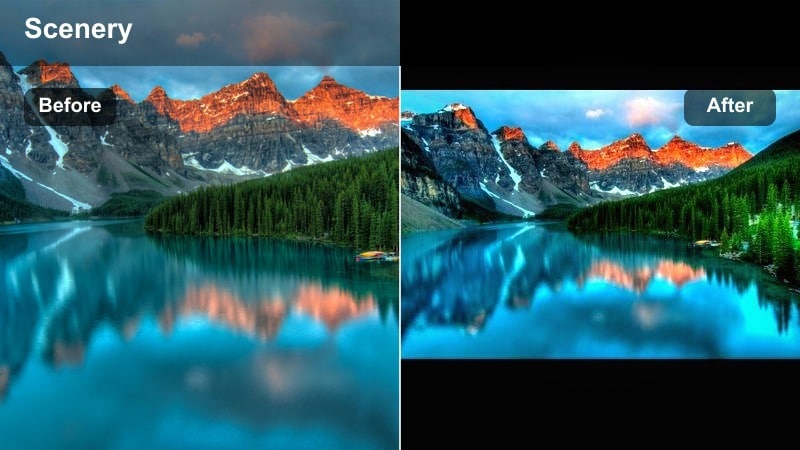
- Effect look: High clarity and micro contrast focused on mountain edges, with cooler whites and neutral greens for a modern outdoor aesthetic.
- Best for: Handheld POV hikes, ridge walks, and fast TikTok transitions between different altitudes.
- Editing tip: Use this filter on clips with lots of fine detail, then add a subtle blur or soften effect to faces in close ups to keep skin flattering.
Peak Clarity Boost is built for those hyper detailed shots where you want viewers to feel every rock and snow line. It adds micro contrast and clarity to the edges of peaks and ridges, helping your mountain video TikTok filter stand out even on small screens.
In Filmora, push Clarity and Texture while slightly cooling the white balance and keeping greens neutral. Use the Mask tool or Face Retouching features to gently soften faces and keep your subject flattering, then bundle these adjustments into a reusable preset for all your high detail POV hikes.
Alpine Sky Boost
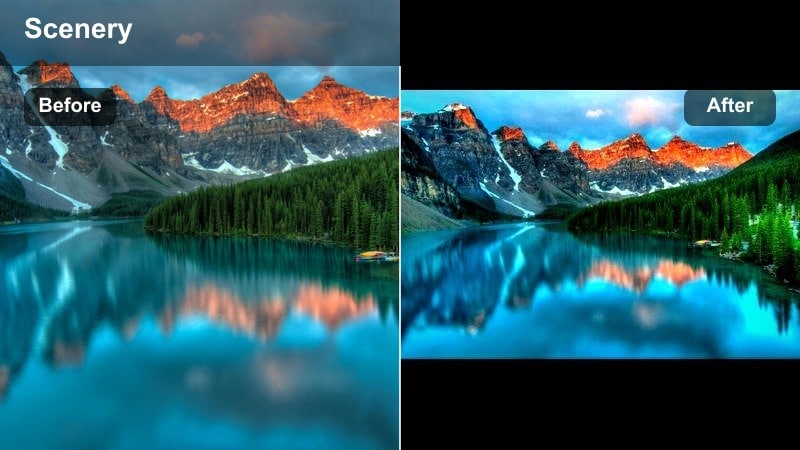
- Effect look: Deep, rich blue skies with subtle teal shadows, preserving natural greens while removing haze from distant mountains.
- Best for: Drone flyovers, big panoramic reveals, and TikTok edits that rely on strong sky drama.
- Editing tip: Pair this filter with a slight dehaze adjustment and a soft vignette to keep viewers eyes drawn toward the ridgeline.
Alpine Sky Boost is the go to tiktok mountain filter when your composition is dominated by sky and distant peaks. It deepens blues, gently cools shadows, and clears atmospheric haze so your horizon line feels clean and dramatic.
Inside Filmora, use the Color panel to increase saturation in the blue channel while adding Dehaze and a feathered vignette. If skin tones drift too cool, fine tune them with HSL controls so you keep natural faces along with those rich alpine skies.
Moody Alpine Vibes and Overcast Trails
Stormy Pass Drama
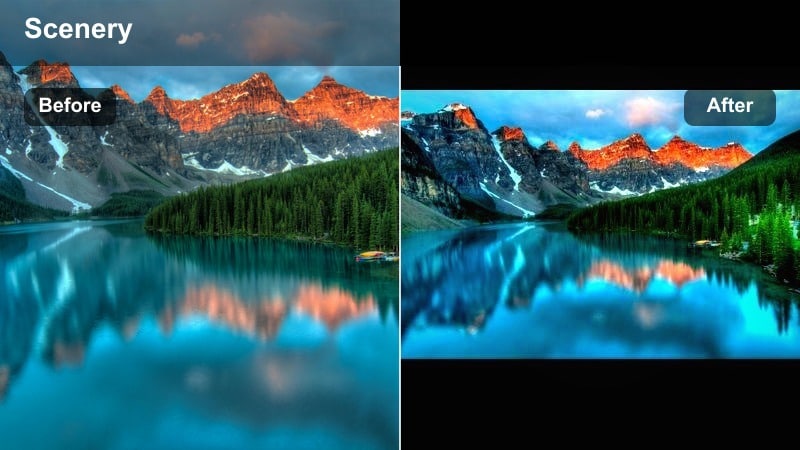
- Effect look: Cinematic, low key contrast with muted greens, slightly lifted blacks, and moody cool shadows that sell incoming storms.
- Best for: Cloudy summit attempts, approaching storms over peaks, or storytelling TikToks about tough trail sections.
- Editing tip: Lower saturation slightly and add slow push in keyframes to match the drama of the graded clouds.
Stormy Pass Drama is made for those days when the weather turns and you want to lean into the mood. It mutes greens, cools shadows, and lifts blacks just enough to keep detail in the darker areas while still feeling cinematic and intense.
In Filmora, reduce global saturation, add a cool temperature shift, and use keyframed Scale or Position to create slow push ins on your most dramatic cloud formations. This combo turns an ordinary overcast clip into a story driven mountain video TikTok filter sequence.
Fogline Soft Matte
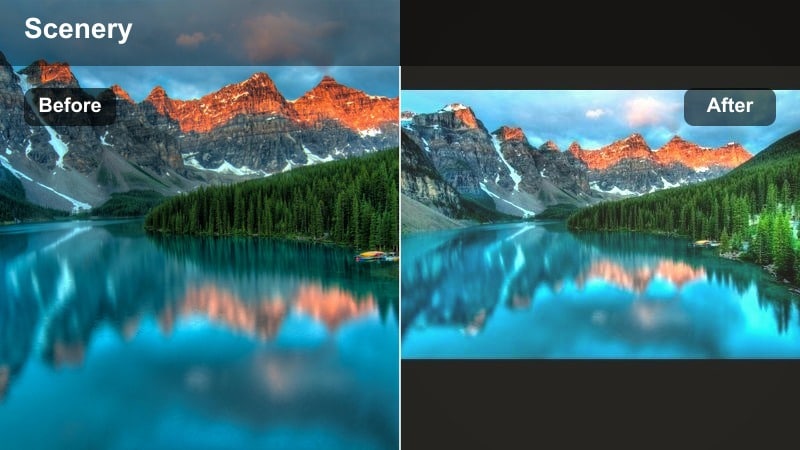
- Effect look: Soft, low contrast matte finish that brightens fog and mist, with gentle desaturation for dreamy alpine forests.
- Best for: Early morning fog, tree line hikes, and slow B roll shots of boots, moss, and pine needles.
- Editing tip: Add a subtle warm temperature shift if your fog looks too blue, and slightly raise shadows to keep the mist airy.
Fogline Soft Matte excels when your hike takes you into misty forests and cloud wrapped switchbacks. By lowering contrast and adding a matte curve to the blacks, this look turns flat fog into a soft, dreamy atmosphere that loops beautifully on TikTok.
In Filmora, use the Curves tool to lift the blacks, pull contrast down, and drop saturation a touch. Then warm the Temperature slider slightly if the fog skews too cold, and use slow motion or speed ramps to emphasize the hypnotic quality of the drifting mist.
Twilight Ridge Cooler
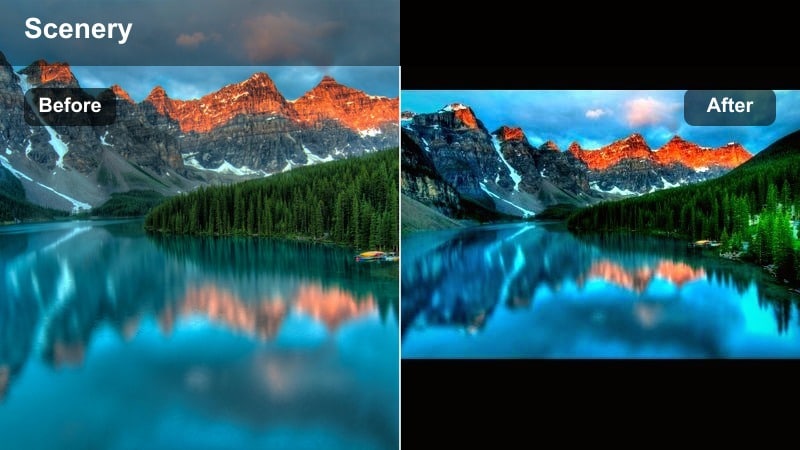
- Effect look: Cool dusk cast with slight magenta in shadows, balanced highlights, and protected midtones so faces remain visible at blue hour.
- Best for: Blue hour descents, tent side TikToks, and moody storytime clips filmed after sunset.
- Editing tip: Nudge exposure up just a bit and add very light noise reduction to keep low light mountain footage clean.
Twilight Ridge Cooler is tailored for blue hour, when the sun has dipped but you still want to capture silhouettes and trail details. It cools the scene, adds a hint of magenta to shadows, and protects midtones so faces do not disappear into the dark.
With Filmora, raise Exposure slightly, cool the Temperature, and apply gentle Noise Reduction in the Color tab. Combine this mountain video TikTok filter style with in app stabilization to keep handheld low light shots from feeling too shaky or grainy.
Golden Hour and Warm Sunset Mountain Filters
Golden Ridge Glow
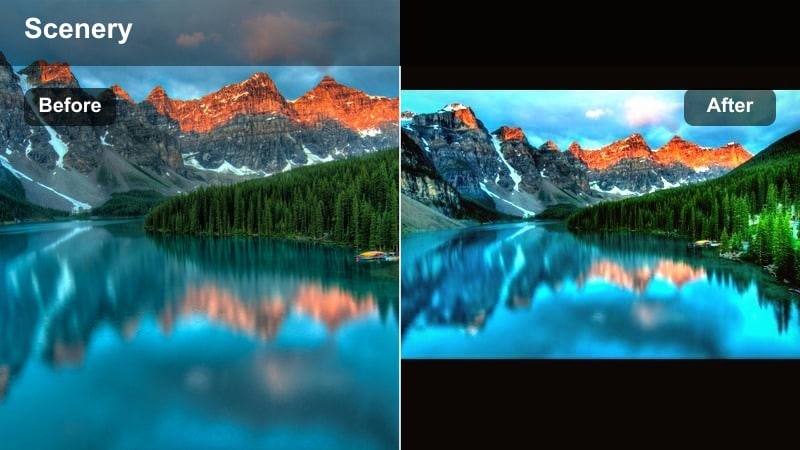
- Effect look: Warm, amber highlights with softly lifted shadows and rich oranges that make sunset rays feel thick and glowing.
- Best for: Sunset summit celebrations, silhouette jumps, and slow motion hair or jacket flips on ridges.
- Editing tip: Lower overall contrast just a touch so warm light can wrap around faces and rocks without crushing shadows.
Golden Ridge Glow enhances golden hour by amplifying ambers and oranges, making rays look thicker and more cinematic. It is perfect when your TikTok hook is a sun kissed summit celebration or a dramatic silhouette against the sky.
In Filmora, warm the Temperature, increase saturation in the orange and yellow channels, and pull global contrast down slightly. Add a subtle lens flare overlay or light leak from the Effects library if you want extra glow around the sun and your subject.
Campfire Trail Warmth
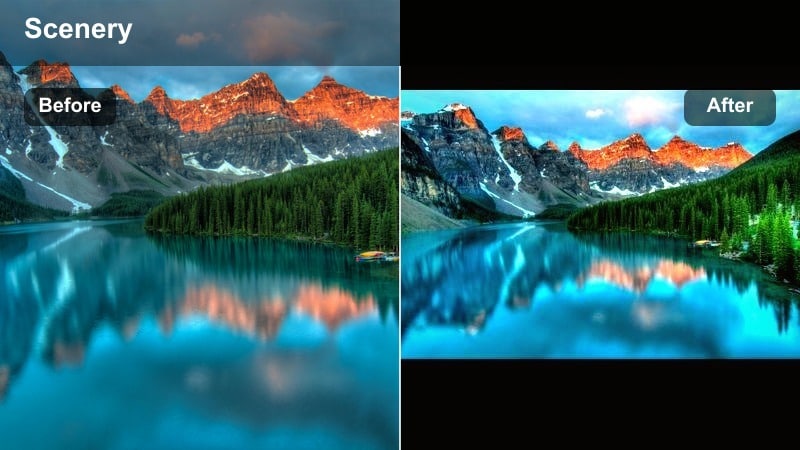
- Effect look: Cozy, campfire inspired warmth with soft contrast, emphasized oranges and reds, and gentle vignette around the frame.
- Best for: Overnight hikes, tent and camp scenes, cooking clips, and TikTok storytimes around a fire.
- Editing tip: Lower highlight saturation to prevent fire from clipping to pure yellow, then add subtle grain for a nostalgic camp vibe.
Campfire Trail Warmth is all about coziness, turning your campsite or tent scenes into intimate, storytelling focused clips. It pushes oranges and reds, softens contrast, and darkens edges so the viewers attention stays on faces and flames.
In Filmora, raise the Vibrance of warm tones, pull down highlight saturation, and add a light vignette. Finish with a small amount of Film Grain from the Effects panel to give your mountain video TikTok filter a nostalgic, analog camping feel.
Sunset Trail Fade
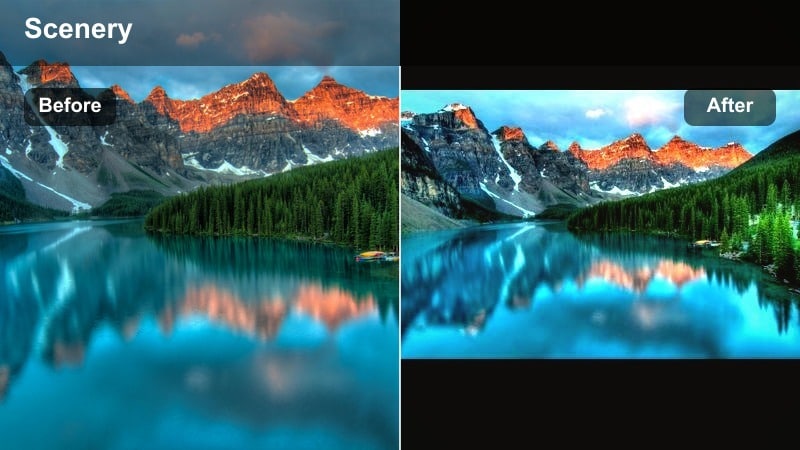
- Effect look: Warm split tone style with orange highlights and slightly cooler shadows, plus soft fade in blacks for a filmic finish.
- Best for: Descending trails at sunset, backlit ridge walks, and TikTok transitions from day to night.
- Editing tip: Add a gentle speed ramp as you walk into the sun so the graded light shift feels like a natural transition point.
Sunset Trail Fade blends warm highlights with cooler shadows to create a balanced, film inspired color palette. It is especially effective for transition edits where you move from bright daytime into dusk in a single TikTok.
With Filmora, use Split Toning in the Color panel to assign warm hues to highlights and cooler tones to shadows, then lift the blacks slightly with Curves. Add a speed ramp on the exact moment you walk into or away from the sun to turn the light change into a creative transition beat.
Snowy Peaks and High Altitude TikTok Mountain Filters
Glacier Clean Whites
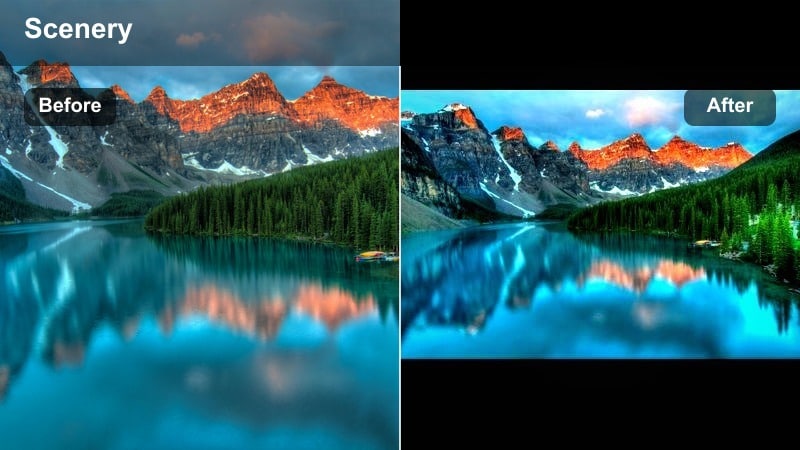
- Effect look: Neutral, crisp whites with slightly cooled shadows, reduced blue cast in snow, and gentle contrast to keep detail in ice and ridges.
- Best for: Snowy summit days, glacier walks, ski touring clips, and bright winter TikToks.
- Editing tip: Turn down blue saturation specifically in highlights to avoid neon snow, then boost micro contrast in midtones for texture.
Glacier Clean Whites is the mountain video TikTok filter you want whenever snow dominates the frame. It cleans up blue casts, keeps whites looking pure instead of neon, and preserves ridge details that often vanish in overexposed winter clips.
In Filmora, slightly underexpose your footage, then reduce blue saturation in the HSL panel and cool the shadows. Add local contrast with Clarity or Sharpen and, if faces are too dark against the snow, use masks to brighten only your subject without losing snow detail.
Icy Teal Altitude
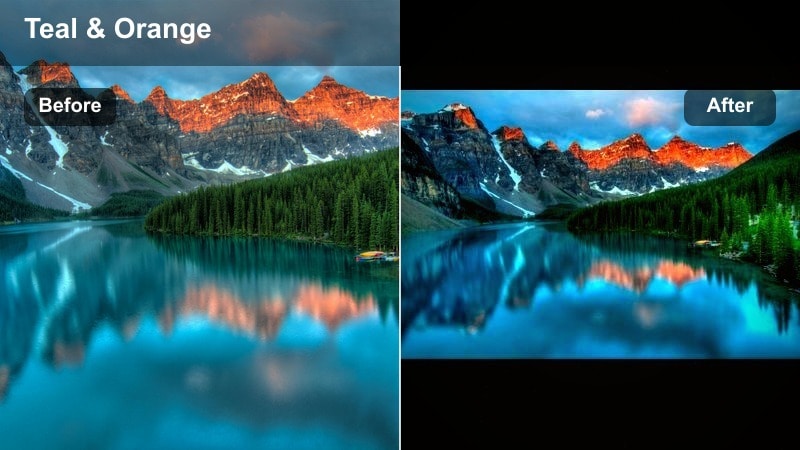
- Effect look: Cool teal shadows with slightly cyan skies and desaturated greens to give a high altitude, otherworldly color mood.
- Best for: Exposed ridgelines, sharp rock spires, alpine lakes with snow, and dramatic cinematic B roll.
- Editing tip: Dial back teal saturation on close ups of jackets or gear if brand colors need to stay accurate in your TikTok sponsors.
Icy Teal Altitude introduces a stylized, high contrast teal palette that makes big alpine scenes feel icy and surreal. It is a strong, brandable look that can become the signature mountain video TikTok filter across your most epic clips.
In Filmora, push teal and cyan saturation in shadows and midtones while desaturating greens. If your gear or sponsor logos shift color too much, selectively reduce saturation in those hues using HSL so your overall scene stays stylized without breaking brand guidelines.
Highline Cinematic Mix
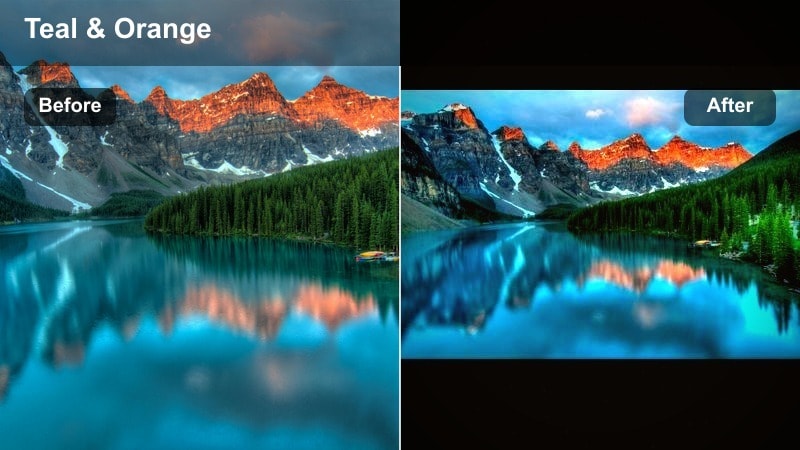
- Effect look: Balanced cinematic look with gentle teal shadows, warm skin tones, and a light contrast curve suited to both hiking and skiing clips.
- Best for: Mixed light mountain days with snow patches, rocky sections, and forest approaches all in one TikTok edit.
- Editing tip: Apply this filter across your entire edit to maintain a consistent feel when switching between trail, forest, and summit clips.
Highline Cinematic Mix is a versatile mountain preset that ties together shots from forest trailheads to snowy summits. With soft teal shadows and warm, flattering skin tones, it delivers a cinematic mood without overpowering your original colors.
In Filmora, create this balance by warming the midtones, cooling shadows slightly, and applying a gentle S curve for contrast. Once it looks right across a variety of clips, save it as a LUT or custom preset so every new hiking or skiing edit on TikTok feels part of the same visual series.
Tips for Using Mountain Video Tiktok Filter Filters in Filmora
- Shoot with a slightly lower exposure in snow and bright midday scenes so mountain filters have highlight detail to work with.
- Pick one or two signature alpine tones and use them consistently to build a recognizable TikTok outdoor creator aesthetic.
- Mix wide establishing shots of peaks with tight gear and boot details so your filters have both texture and scale to enhance.
- Always preview your filtered clips on a phone screen, not just a desktop, to be sure shadows and sky gradients look smooth.
- If greens look too neon after adding a mountain filter, reduce saturation only in the green and yellow channels, not globally.
- Save your favorite Filmora color settings as custom presets or LUTs so you can apply the same look across multiple trips.
- Use Filmoras keyframes to ease filters in and out for transitions, especially when moving from forest shade to bright alpine sun.
- Combine color work with subtle stabilization and speed ramps so your TikTok mountain edits feel polished, not over processed.
With a handful of focused mountain video filters for TikTok, you can turn raw ridge hikes, foggy forests, and snowy summits into a cohesive alpine story that viewers recognize instantly in their For You feed.
Start with one bright look, one moody style, and one snow safe preset, then refine those filters into your own custom alpine toolkit you can apply to every new outdoor short you share.
secure download