

 100% Security Verified | No Subscription Required | No Malware


 ChatGPT
 Perplexity
 Gemini
 Claude
 Grok
Grok
Outdoor footage can look flat or washed out on YouTube, especially under harsh sun or in deep shadows. With the right outdoor video filters and grades, you can turn everyday hikes, road trips, and travel vlogs into crisp, cinematic stories that feel just as epic as they looked in real life.
This guide breaks down ready-to-use outdoor video filters for YouTube creators and adventure vloggers. Each style is explained in simple terms so you know exactly when to use it, what it will do to your image, and how to tweak it for your channel’s vibe.
In this article
Warm Outdoor Filters for Golden Hour and Sunset
Sunset Trail Glow
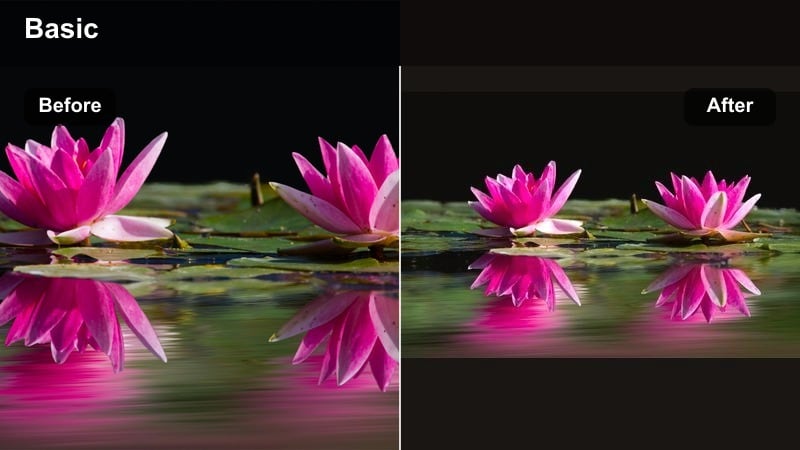
- Effect look: Soft golden warmth with gentle contrast and a subtle highlight bloom that flatters skin tones and makes skies look rich without over-saturation
- Best for: Golden hour hikes, sunset beach walks, warm travel vlogs, campfire B-roll, and talking-head intros filmed outdoors near dusk
- Editing tip: Lower the filter intensity to around 60 to 70 percent if your footage is already very warm, and slightly reduce saturation on oranges to keep skin from turning too red
Sunset Trail Glow is designed to amplify the natural warmth of golden hour without destroying detail in the sky or making your vlog look overprocessed. In Filmora, dropping this filter onto your clip instantly adds soft contrast, gentle highlight bloom, and rich oranges that make clouds, mountains, and faces feel cinematic while still believable.
Use it on sunset hiking sequences, beach walks, and outdoor talking-head shots where the sun is low and backlighting your subject. After applying the filter, fine-tune intensity and saturation in Filmora so skin tones stay natural while the environment gets that glowing, adventure-movie feel.
Match Your Outdoor Vibe with AI-Powered Color Suggestions
Use Filmora’s AI color tools to scan a reference outdoor clip or thumbnail from a creator you like, then generate a similar palette for your own adventure vlogs. This keeps your filters and grades consistent across hikes, road trips, and travel episodes.
Once your AI-suggested palette is set, save it as a custom preset so every new upload has the same recognizable outdoor look, from your talking-head segments to drone flyovers and B-roll.
 secure download

Preview Filters on Real Outdoor Footage Before You Commit
Filmora lets you apply and preview outdoor filters on sample hiking, travel, and landscape clips so you can see how each look handles sky, foliage, and skin before grading your entire vlog.
Cycle through multiple presets quickly, compare before and after views, and adjust strength on the fly until you find the balance that fits your channel branding.
secure downloadBlend Filters with LUTs for a Signature YouTube Outdoor Grade
Combine Filmora’s built-in outdoor filters with your favorite youtube outdoor LUT to fine-tune contrast, color separation, and mood for specific locations or series.
Lower the LUT opacity, keep the outdoor filter as your base, and adjust basic color controls on top so you can maintain a consistent brand look while still adapting to different environments.
secure downloadCampfire Ember Tone
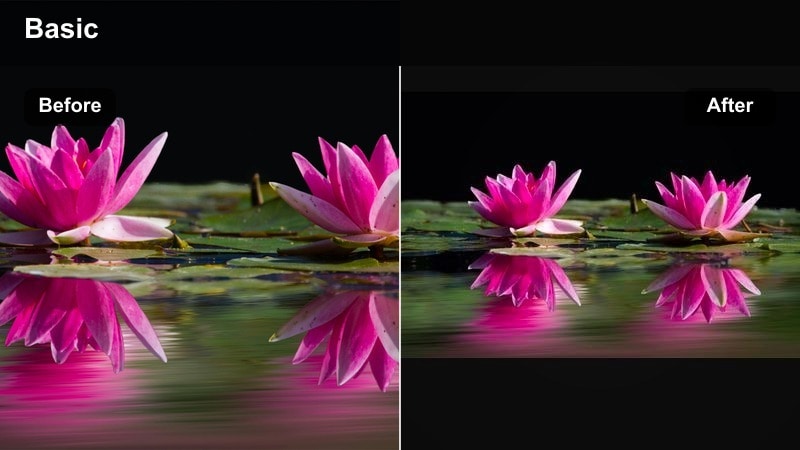
- Effect look: Deep warm mids and lifted shadows with a cozy amber tint that emphasizes flames, lanterns, and warm light sources
- Best for: Campfire scenes, night hangouts, cabin vlogs, and moody b-roll where the main light comes from fire or warm bulbs
- Editing tip: Increase the filter strength on underexposed clips to bring out shadow detail, then reduce contrast a little to avoid crushing dark areas around the fire
Campfire Ember Tone turns noisy, dim camp clips into storytelling-friendly night scenes by lifting shadows and emphasizing amber hues around flames and lanterns. In Filmora, apply this filter to make faces more visible and to give logs, tents, and background trees a rich, cinematic glow.
Because low light can introduce noise, pair this filter with Filmora’s noise reduction first, then adjust contrast and blacks so your background feels deep but not totally crushed. The result is a cozy, cinematic vibe that works perfectly for campfire stories and nighttime transitions in your YouTube vlogs.
Golden Peak Cinematic
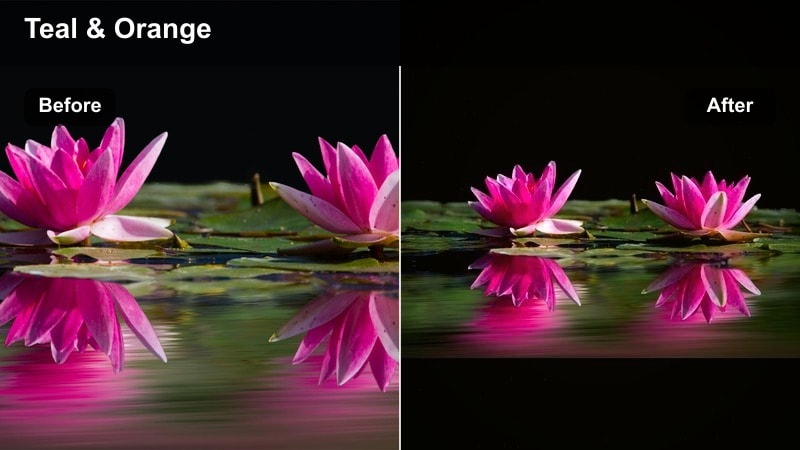
- Effect look: Film-style contrast with rich golden highlights and teal shadows for a classic blockbuster adventure feel
- Best for: Epic mountain vistas, drone flyovers at sunset, road trip sequences, and cinematic B-roll sequences for channel intros
- Editing tip: Use this filter on clips that are slightly underexposed to protect highlight detail in the sky, then bump exposure and shadows to taste after the filter is applied
Golden Peak Cinematic brings that familiar teal-and-gold movie look to your outdoor sequences. In Filmora, it deepens sky and shadow areas toward teal while pushing warm highlights, which makes rocks, cliffs, and sunlit faces stand out with a dramatic, polished finish.
Apply it to your hero shots, drone reveals, and opening montages to instantly elevate the production value of your channel. After dropping the filter onto a clip, fine-tune exposure and midtone contrast, then copy those settings across the sequence so your entire adventure feels like a cohesive cinematic film.
Clean Outdoor Filters for Harsh Daylight and Midday Sun
Midday Hike Clean
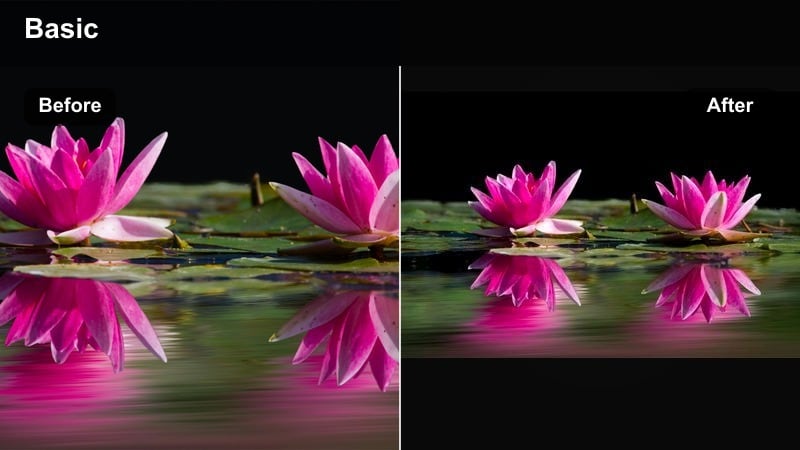
- Effect look: Neutral, crisp contrast with controlled highlights and balanced colors to tame harsh midday sunlight
- Best for: Sunny hikes, city exploration vlogs, handheld talking heads in open shade, and action shots filmed around noon
- Editing tip: Pull down highlights and whites slightly after applying this filter to recover blown-out areas like clouds or snow, and avoid adding extra contrast
Midday Hike Clean is a corrective filter built for the worst light of the day. In Filmora, it tames blown-out highlights, evens out color, and adds just enough contrast to make your footage look intentional instead of overexposed.
Drop it on bright hiking trails, city streets, and open-field vlogs where the sun is directly overhead. Then tweak highlights, whites, and a bit of saturation to keep skies and clothing detailed while your face remains clean, natural, and easy to watch on YouTube.
Cloudline Balance
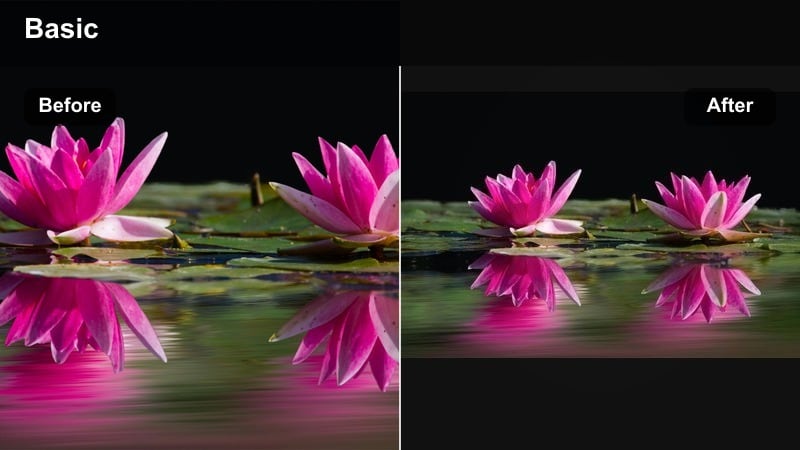
- Effect look: Soft contrast with gentle saturation that recovers skies and keeps greens from looking neon or oversaturated
- Best for: Overcast hikes, moody mountain ridges, cloudy beach days, and drone shots above low clouds
- Editing tip: Boost saturation on blues slightly if the sky looks too gray, but keep greens modest so foliage looks realistic instead of cartoonish
Cloudline Balance leans into the soft, even light of cloudy days instead of trying to fake sunshine. In Filmora, it adds subtle contrast, pulls back overly bright clouds, and keeps greens looking real, not neon, so your moody conditions feel cinematic.
Use it on overcast ridge hikes, gray beach sessions, and drone flights above low clouds to create an intentional, atmospheric style. From there, adjust blue saturation and clarity to bring out texture in clouds and ridgelines without losing that natural, low-contrast vibe.
Snowfield Clarity
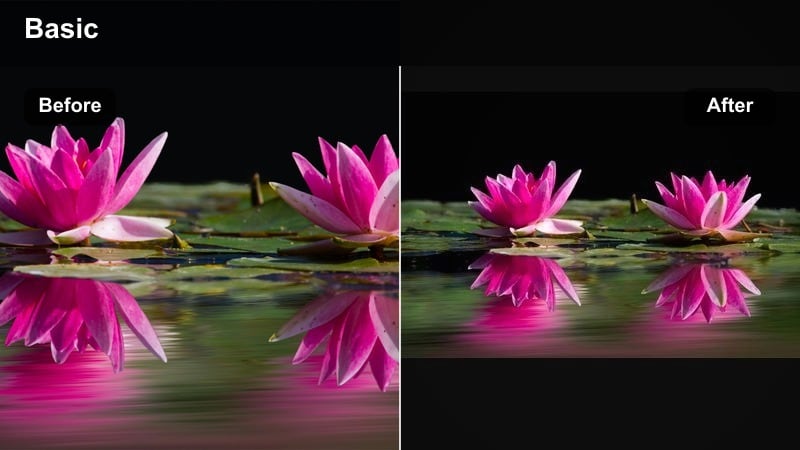
- Effect look: Clean whites, cool shadows, and extra detail in bright snow with reduced color cast and controlled highlights
- Best for: Snowboarding vlogs, ski adventures, alpine hiking, glacier shots, and any outdoor YouTube content in snow or ice
- Editing tip: Lower overall exposure slightly, then apply the filter and nudge saturation up just a bit to keep jackets and gear vibrant against neutral snow
Snowfield Clarity is tuned for blindingly bright snow scenes that often look blown out on YouTube. In Filmora, the filter protects texture in the snow, cools shadows slightly, and removes ugly color casts so whites stay crisp and clean.
Apply it to ski runs, snowshoe hikes, and glacier views, then adjust exposure and saturation around your subject to keep jackets, helmets, and boards vibrant. If the snow shifts toward blue, warm up the white balance slightly after the filter for a natural but energetic winter look.
Nature, Forest, and Trail Filters for Outdoor Vlogs
Evergreen Trail Grade
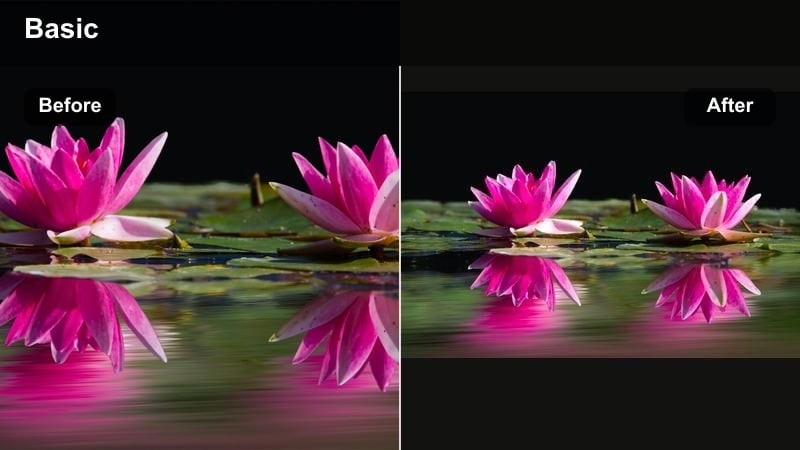
- Effect look: Rich greens with gentle contrast and slightly warm skin tones to keep faces natural in deep forest shade
- Best for: Forest hikes, camping vlogs under trees, running videos, and any footage where greens dominate the frame
- Editing tip: If foliage still looks too intense, slightly desaturate greens and yellows while keeping the filter active so viewers focus on people, not just the background
Evergreen Trail Grade is made for dense woods where foliage fills the frame and light gets patchy. In Filmora, it deepens greens, lifts muddy shadows, and adds a touch of warmth to skin tones so your face does not pick up too much green from the environment.
Apply it to camping scenes, shaded hikes, and trail runs. Then tweak green and yellow saturation plus HSL controls to keep trees looking lush without distracting from your story, ensuring your subject is always the focus amid the forest.
Mossy Creek Soft
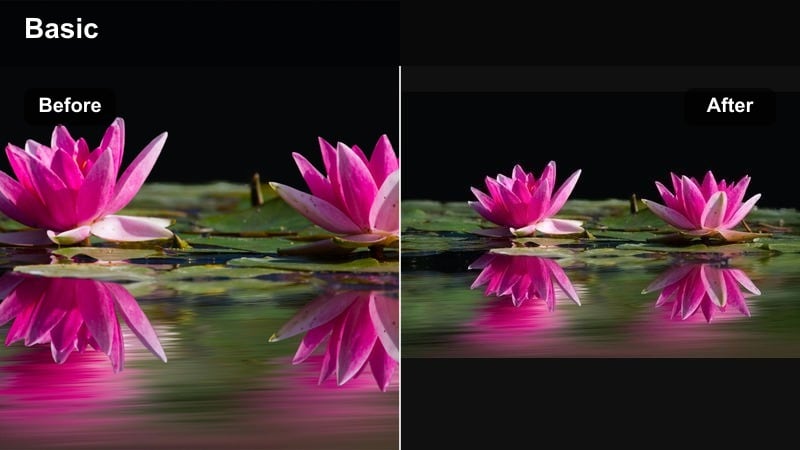
- Effect look: Muted greens, soft contrast, and cool highlights that create a calm, cinematic forest stream mood
- Best for: Waterfall b-roll, creek shots, slow hiking sequences, and cinematic nature cutaways between vlog segments
- Editing tip: Slow your clips down and add a little motion blur or smoothing, then apply this filter to emphasize the tranquil, flowing feel of water and foliage
Mossy Creek Soft focuses on atmosphere over punch. It mutes greens, cools highlights, and reduces harsh contrast so creeks, waterfalls, and slow-moving trail shots feel dreamy and tranquil when edited in Filmora.
Use it specifically for b-roll and transition shots between high-energy segments in your vlog. Combine the filter with slower playback speed, subtle motion blur, and ambient audio to give your audience a breathing moment before the next big adventure beat.
Ridge Runner Adventure
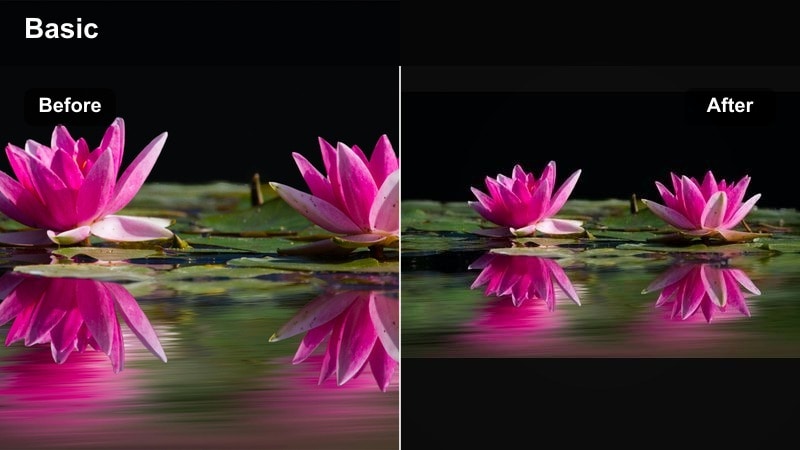
- Effect look: Punchy contrast with slightly cooler shadows and boosted clarity for rugged, high-energy trail adventures
- Best for: Trail running, mountain biking, scrambling, ridge hikes, and fast-paced outdoor montages
- Editing tip: Combine this filter with a touch of stabilization or speed ramping, and dial back sharpening if your action camera already oversharpens footage
Ridge Runner Adventure is your go-to look for fast, rugged trails and high-energy sequences. In Filmora, it increases clarity, deepens shadows slightly cool, and sharpens contrast so rocks, dirt, and ridgelines feel visceral and intense.
Apply it to POV runs, bike descents, and quick-cut montages. Add stabilization, speed ramps, and controlled sharpening to keep the action clear but not harsh, using the filter selectively so your storytelling segments still feel relaxed by comparison.
Adventure Travel and Coastal Filters for YouTube
Coastal Clarity Pop
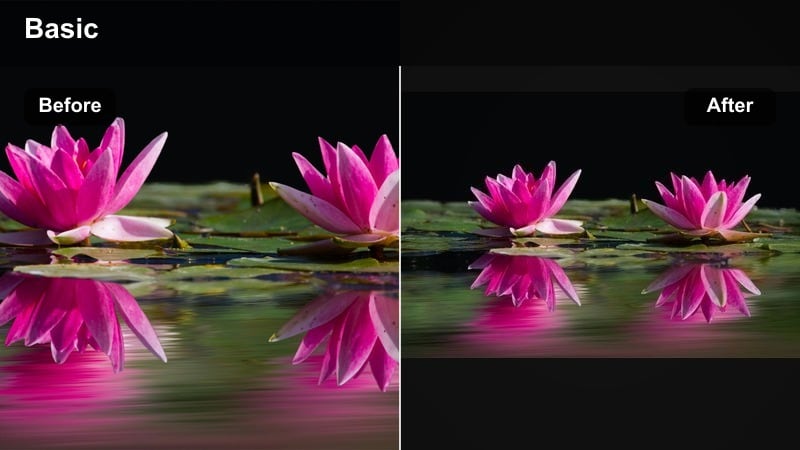
- Effect look: Bright, clean blues and cyans with crisp whites and moderate contrast for tropical beaches and coastline vistas
- Best for: Beach vlogs, tropical travel videos, coastal drone shots, and boat days with lots of water and sky in the frame
- Editing tip: Drop saturation on aquas slightly if the water looks unreal, and keep exposure a bit lower so clouds and wave highlights hold detail
Coastal Clarity Pop is tailored for sea and sky. In Filmora, it polishes blues and cyans, keeps whites clean, and adds moderate contrast so your waves, boats, and beaches look bright and inviting without going neon.
Use it on tropical vlogs, harbor walks, and drone passes along the coast. After applying, manage aqua saturation and overall exposure to protect detail in foam and clouds, and check skin tones in closeups so people stay natural against the vivid water.
Desert Dune Cinema
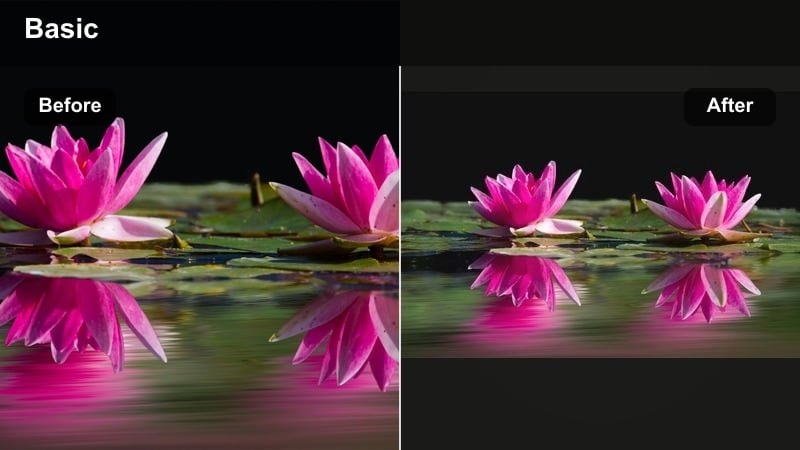
- Effect look: Warm sand tones, soft highlights, and gently faded shadows for a cinematic desert or dry-climate travel style
- Best for: Desert road trips, dune hikes, canyon treks, and dry, sunlit landscapes with lots of earth tones
- Editing tip: Reduce saturation in yellows if the sand looks too intense, and add a touch of vignette to focus attention on your subject in wide open spaces
Desert Dune Cinema brings a filmic softness to harsh desert light. In Filmora, it warms earth tones, gently fades shadows, and rolls off highlights so sand and rock look rich and dimensional instead of flat and blinding.
Apply it to dune hikes, canyon overlooks, and road trip b-roll through dry landscapes. Tweak yellow and orange saturation and add a slight vignette to keep attention on your subject in wide, open spaces, and consider a hint of film grain for an extra cinematic finish.
City to Summit Log Fix
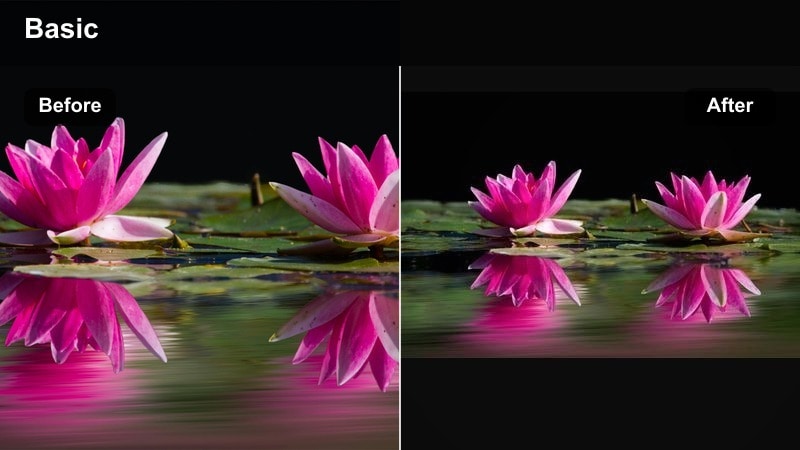
- Effect look: Base contrast and color restoration for flat log or desaturated action camera footage, tuned for outdoor scenes
- Best for: Log or flat-profile clips from city walks to mountaintop views that need a fast, consistent outdoor vlog grade
- Editing tip: Use this filter as a starting point, then add a creative filter or LUT on top at lower intensity if you want a stronger adventure style without breaking skin tones
City to Summit Log Fix is a foundational correction filter for flat or log-profile footage. In Filmora, it restores contrast, color, and saturation to a natural baseline so your outdoor scenes look normal before you add any creative grading.
Use it across entire projects shot in log or flat profiles, from city b-roll to summit reveals. Normalize your clips with this filter first, adjust exposure and white balance, then layer your favorite adventure filters or LUTs on top at reduced strength to keep things consistent and professional.
Tips for Using Outdoor Video Youtube Filter Filters in Filmora
- Shoot slightly flatter or with lower contrast in-camera so your outdoor filters have more dynamic range to work with, especially in bright skies and white clouds.
- Group similar lighting conditions together on your Filmora timeline and apply the same filter across those clips to keep your outdoor vlog looking consistent.
- Prioritize natural-looking skin tones, then fine-tune greens and blues with Filmora’s color tools so the environment supports your story instead of stealing focus.
- Use filter intensity like a volume knob; in most cases 60 to 80 percent looks more natural on YouTube than a full 100 percent effect.
- Combine Filmora filters with slight adjustments to exposure, contrast, and HSL so each outdoor location feels stylized but still true to life.
- Export a short test reel with different filters applied and watch it on both your phone and TV to see how your outdoor grades translate across devices.
The right outdoor video filters for YouTube can turn flat trail, travel, and coastal footage into a polished adventure vlog that feels professional and on-brand without hours of manual grading. With Filmora’s presets and AI tools, it becomes easy to control skies, foliage, and skin tones in just a few clicks.
Pick one or two core looks from this list, save them as presets in Filmora, and build your workflow around them so every new hiking episode, campsite story, or travel vlog instantly matches your channel’s outdoor style. Test your favorite filters on a mix of sunny, cloudy, and low-light clips, then fine-tune intensity and color so your grading process becomes fast, reliable, and repeatable for every upload.
secure download