

 100% Security Verified | No Subscription Required | No Malware


 ChatGPT
 Perplexity
 Gemini
 Claude
 Grok
Grok
Travel clips move fast on TikTok, so your visuals need to hook viewers in the first second. The right filter can turn a simple train window shot or airport transition into a cinematic moment that people watch on repeat.
Below are 12 Filmora travel video filters for TikTok designed for creators and travel influencers. Use them on travel TikToks and short travel clips to keep a consistent aesthetic, boost colors, and stay on trend with current travel looks.
In this article
Warm Golden Hour Travel Filters for TikTok
Sunset Glow Trails
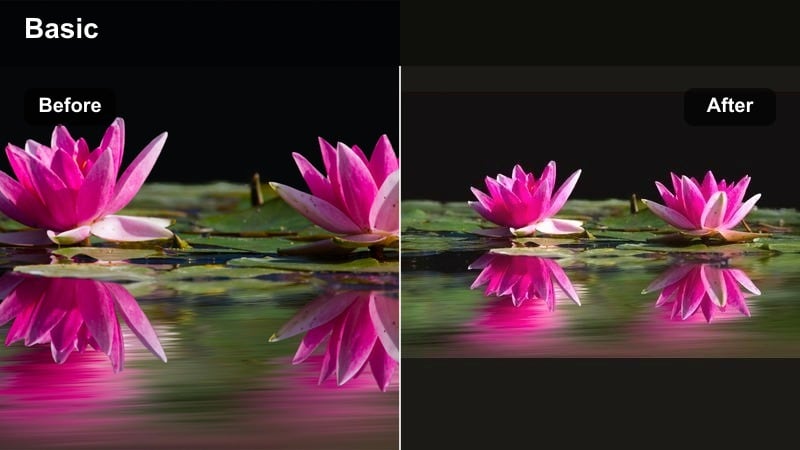
- Effect look: Soft golden highlights with gentle contrast and warm skin tones for dreamy late-afternoon scenes.
- Best for: Beach walks, rooftop sunsets, slow-motion hair flips, and golden hour outfit reveals.
- Editing tip: Lower the intensity slightly for close-ups so faces stay natural; add a light vignette to pull attention to the subject.
Sunset Glow Trails wraps your travel footage in a soft golden tone that enhances sunsets without crushing details. It keeps skin tones warm and flattering while adding gentle contrast so skies, waves, and silhouettes feel cinematic instead of flat.
In Filmora, drop this filter onto clips shot in late afternoon or early evening, then adjust intensity to match your original lighting. Combine it with slow motion and a slight vignette to guide attention toward your subject, and use keyframes on exposure or color if you want the warmth to build as the sun dips.
Smart Color Matching for Every Destination
Filmora s AI tools help you keep a cohesive travel aesthetic on TikTok, even when clips come from different phones, cameras, or lighting conditions. Instead of grading every shot from scratch, you can let AI analyze your favorite look and apply it across the whole edit.
Use AI-based color matching to copy the vibe of a trending travel TikTok or LUT and push that same palette to all your footage. Your hotel room clips, street walks, and drone shots will share one consistent mood that makes your profile grid look intentional and branded.
Open your project, choose a reference clip with colors you love, and let AI match the rest in a few clicks.
 secure download

Preview Travel Filters in Real Time
Filmora lets you hover over filters and see the result instantly on your travel clips, so you can test warm, cool, and retro looks in seconds. You do not have to apply, undo, and re-apply over and over just to see what fits.
As you scroll through categories like Golden Hour, Urban, Nature, or Vintage, watch how each preset treats skies, skin tones, and city lights. Once you find a vibe that matches your TikTok sound and pacing, lock it in and fine-tune intensity for a polished finish.
Drop in a short travel video, hover over different filters, and pick the look that matches your TikTok style.
secure downloadCombine Filters with Trending Travel LUTs
For even more control, Filmora lets you stack filters with 3D LUTs so you can build a signature travel grade. Use a subtle LUT to set overall contrast and color balance, then layer a filter on top to push your chosen aesthetic, from teal-and-orange beaches to moody alpine blues.
This workflow keeps editing simple but powerful. Once you find a LUT and filter combo that fits your brand, you can reuse it on every trip while making small tweaks per location for TikTok and other platforms.
Browse Filmora s LUT library, pick a trending travel LUT, and fine-tune it with a filter to lock in your signature travel grade.
secure downloadTropical Gold Rush
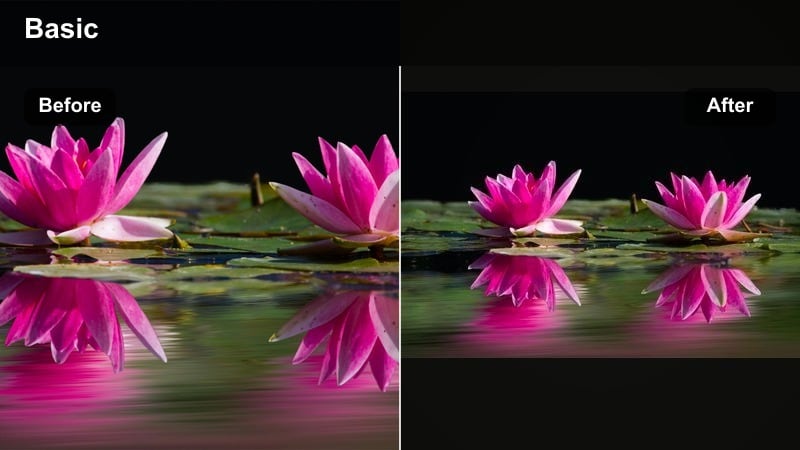
- Effect look: Punchy golden warmth with boosted teal water and rich palm greens for tropical destinations.
- Best for: Island hopping, pool days, boat rides, and resort walkthroughs filmed in bright daylight.
- Editing tip: Slightly increase saturation on blues and greens only to avoid orange skin; keep shadows lifted for a light, vacation vibe.
Tropical Gold Rush turns bright daytime travel footage into eye-catching luxury visuals. It deepens teals in the water, enriches palm tree greens, and adds a golden sun-kissed cast that makes resorts and islands feel premium.
In Filmora, apply this filter to your brightest clips, then fine-tune color using HSL or color wheels to protect skin tones from going too orange. Keep clips short and stack the filter across a full sequence of pool days, boats, and cocktails so your TikTok feels like one continuous tropical story.
Desert Dusk Aura
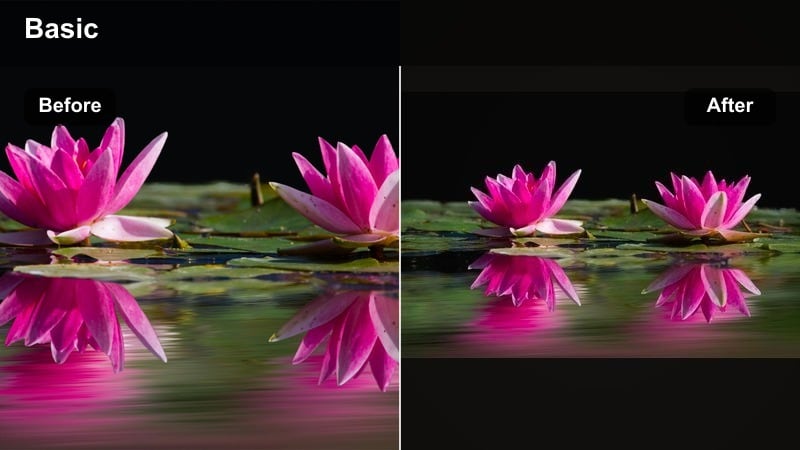
- Effect look: Muted highlights with warm amber tones and soft shadows, perfect for dry landscapes and dusk skies.
- Best for: Desert trips, road journeys, canyon views, and any wide landscape shots during late afternoon.
- Editing tip: Use slower pans and longer shots with this filter so viewers can appreciate the subtle color shifts and textures.
Desert Dusk Aura is built for wide, open spaces and textured landscapes. It mutes harsh highlights, adds amber warmth, and softens shadows so dunes, canyons, and rocky roads feel expansive and cinematic without looking over-edited.
Inside Filmora, apply this filter to road-trip sequences, then combine it with slower clips, tripod shots, or smooth pans. Use keyframes for gentle zooms or tilt movements so TikTok viewers can take in the details while the warm color grade reinforces the dusk mood.
Cool Urban Filters for City Travel TikToks
Neon City Rush
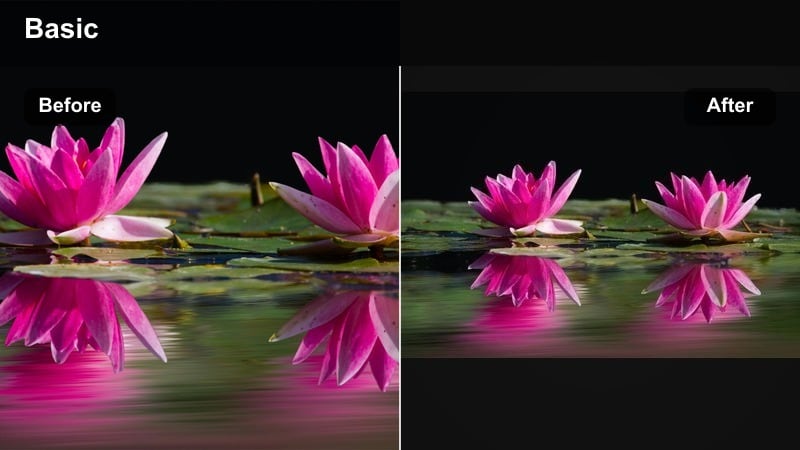
- Effect look: Cool, contrasty tones with boosted neon signs and deeper blacks for night city shots.
- Best for: Night markets, street food crawls, cityscapes with light trails, and handheld night walks.
- Editing tip: Stabilize clips slightly and add subtle motion blur on transitions so the neon glow feels smooth instead of shaky.
Neon City Rush emphasizes the color and energy of nightlife with punchy contrast and saturated signage. It deepens blacks to make neon lights and car trails stand out sharply in busy city scenes.
Use this filter in Filmora on handheld night clips, adding light stabilization and maybe a touch of motion blur for transitions. Cut your shots to the beat of energetic music and let the filter handle the intense colors so your TikTok feels like a short cyberpunk montage.
Metro Cool Chrome
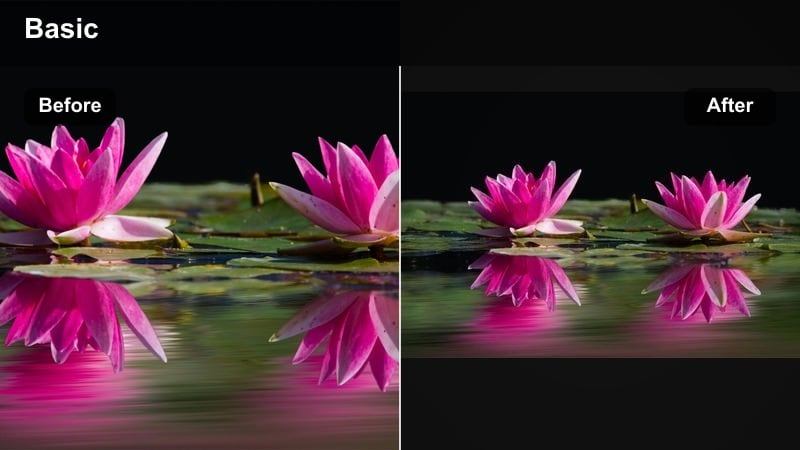
- Effect look: Cool-toned filter with slight desaturation, crisp edges, and a modern, metallic city feel.
- Best for: Subways, airport terminals, skyscraper views, and minimalist architecture shots.
- Editing tip: Shoot lots of leading lines like escalators and railings; this filter loves symmetry and clean compositions.
Metro Cool Chrome adds a sleek, editorial tone to urban travel clips by cooling down colors and sharpening details. It gently desaturates the scene to focus on shapes, lines, and reflections rather than bright colors.
In Filmora, apply this filter to metro stations, airports, and skyscraper shots, then trim clips into a fast routine of entrances, escalators, and views. Use text overlays for timestamps or flight numbers and let the filter give everything a cohesive, futuristic travel aesthetic.
Rainy Street Reflections
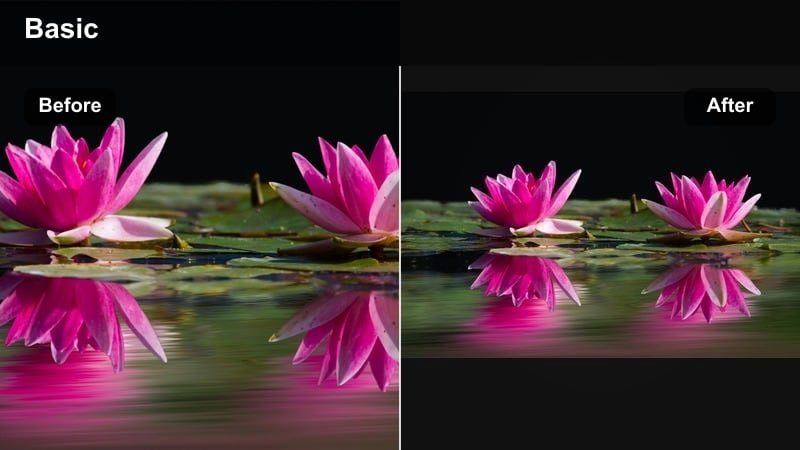
- Effect look: Moody cool blues with gentle fades and visible reflections, ideal for wet streets and umbrellas.
- Best for: Rainy city days, window reflection shots, slow walks with umbrellas, and cozy coffee shop exteriors.
- Editing tip: Slow down clips with reflections and use a gentle zoom-in keyframe to highlight puddles and window details.
Rainy Street Reflections turns bad-weather footage into moody, aesthetic content. It cools down the color palette, lifts reflections in puddles and windows, and softens contrast to create a cinematic, rainy-day vibe.
Apply this filter in Filmora to clips of umbrellas, wet streets, and cafe windows, then slow the footage slightly and add subtle zooms with keyframes. Pair with soft lo-fi music or ambient rain sounds so your TikTok feels like a cozy, scroll-stopping moment instead of a throwaway rainy day.
Nature and Adventure Travel Filters for TikTok
Emerald Trail Boost
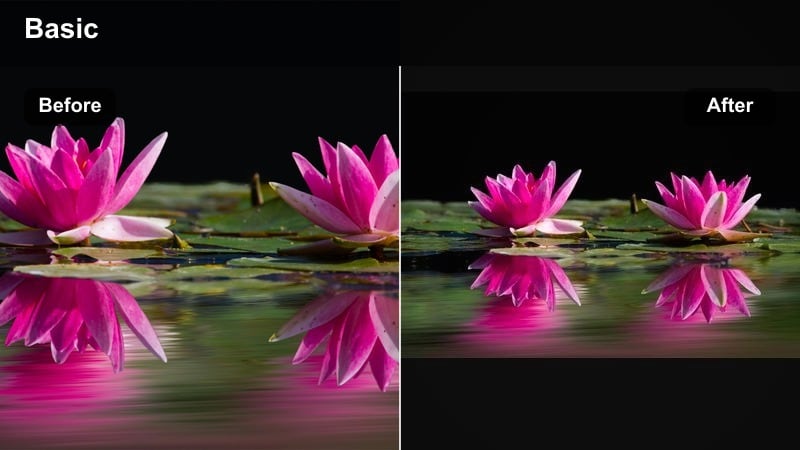
- Effect look: Rich greens, clear skies, and bright but balanced contrast that make forests look lush and alive.
- Best for: Hiking trails, waterfalls, jungle trips, and drone shots over forests or cliffsides.
- Editing tip: Avoid over-saturating greens; instead, lift shadows slightly to keep foliage detailed and not muddy.
Emerald Trail Boost amplifies greens and clarifies skies so forests and jungles look rich without going cartoonish. It keeps contrast balanced, which helps leaves, moss, and water textures stay crisp on mobile screens.
Inside Filmora, add this filter to hiking and waterfall clips, then fine-tune greens with HSL if certain plants look too intense. Lift shadows a touch and layer in ambient trail sounds so your TikTok feels immersive and adventurous while maintaining a clean, cinematic nature grade.
Glacier Air Clean
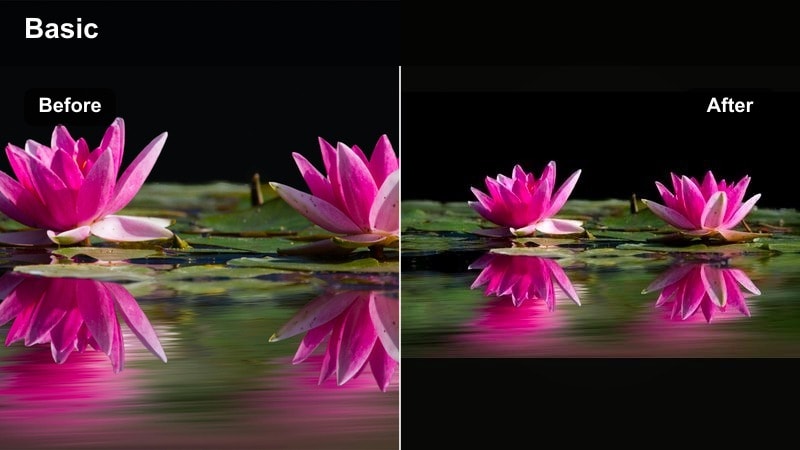
- Effect look: Crisp whites, clean blues, and lowered warmth for a fresh, high-altitude feel.
- Best for: Mountain peaks, snowy trips, alpine lakes, and early morning views from cable cars.
- Editing tip: Slightly decrease exposure and increase clarity so snow and clouds keep texture instead of blowing out.
Glacier Air Clean is designed for bright, high-altitude locations where snow and sky dominate the frame. It cools warmth, brightens whites, and refines blues to create an airy, premium travel look with strong detail in snow and clouds.
Use this filter in Filmora on mountain and ski clips, dialing exposure down a bit and raising clarity to protect texture. Longer shots, slow pans, and drone passes work especially well, giving TikTok viewers time to take in the minimalist, clean scenery.
Coastal Breeze Soft
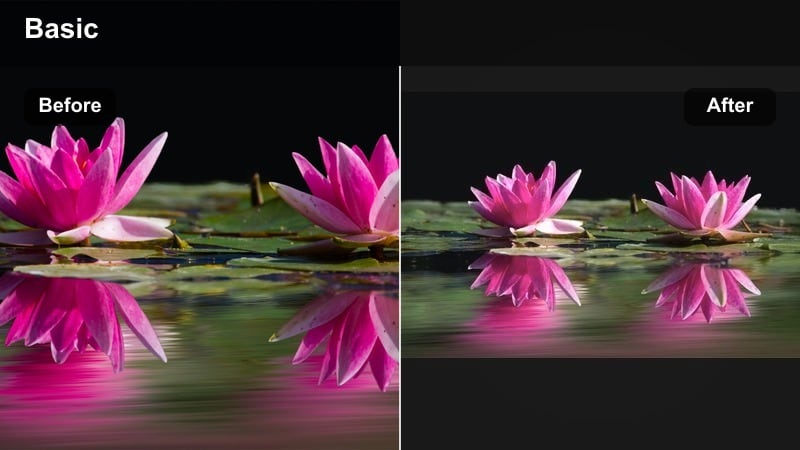
- Effect look: Soft pastel blues and light sand tones with gentle contrast for relaxed, airy beach days.
- Best for: Coastal walks, sunrise by the sea, sailing clips, and soft-focus beach content.
- Editing tip: Use gentle crossfades between clips and keep camera movements smooth to match the filter’s relaxed, dreamy tone.
Coastal Breeze Soft transforms simple shoreline footage into pastel, relaxing visuals. It lowers contrast, softens blues, and warms sands slightly to give beach scenes a dreamy, scroll-worthy aesthetic.
In Filmora, apply this filter to sunrise or calm daytime beach clips, then use crossfades and slow, steady camera moves. Build loopable sequences where the first and last frames match, and pair with gentle audio to encourage replays on TikTok.
Retro and Cinematic Travel Filters for TikTok
Vintage Postcard Mood
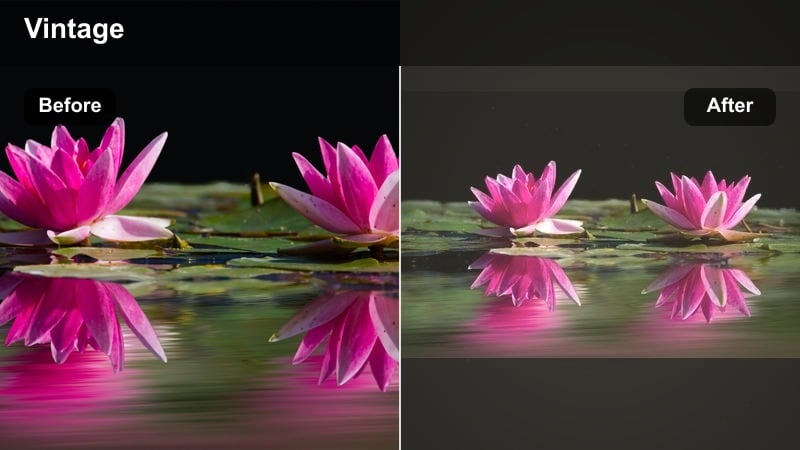
- Effect look: Soft grain, slight fade, and warm, nostalgic tones that mimic old travel postcards and film.
- Best for: Historic streets, old towns, cafes, and throwback-style travel storytimes.
- Editing tip: Add a subtle film grain layer and keep your cuts slower so the retro vibe has time to register.
Vintage Postcard Mood adds a gentle fade, warm color shift, and soft grain that make modern clips feel like they were captured on old film. Cobblestone streets, historic facades, and vintage cafes all benefit from this nostalgic palette.
Within Filmora, pair this filter with slightly slower pacing, longer holds on key shots, and handwritten-style text overlays. The combination helps TikTok viewers feel like they are flipping through an old travel album instead of watching a fast montage.
Cinema Route Contrast
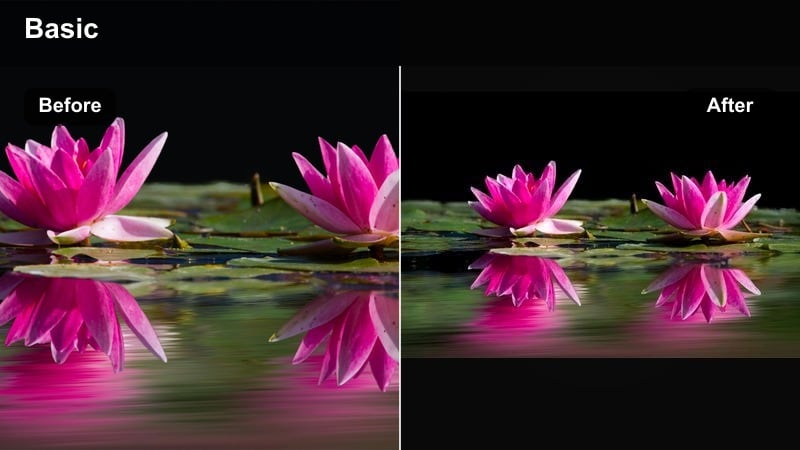
- Effect look: High contrast, rich colors, and subtle letterbox feel for cinematic travel sequences.
- Best for: Drone reveals, train window views, car rides, and epic location reveals synced to music drops.
- Editing tip: Use strong beats in your audio and cut right as the scenery changes; this filter emphasizes dramatic shifts in light and color.
Cinema Route Contrast pushes your travel clips into full movie-trailer territory. It boosts contrast and saturation while preserving detail, making reveals from trains, cars, or drones feel dramatic and high-impact.
In Filmora, use this filter across your strongest shots and cut them to a cinematic soundtrack. Add letterbox bars if you like, then time scene changes with beat drops so the bold grading hits hardest when the view opens up or location changes.
Analog Roadtrip Fade
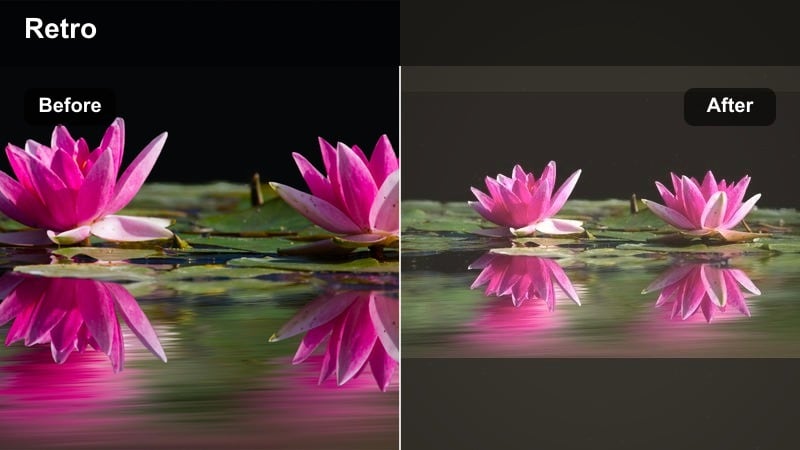
- Effect look: Soft faded contrast, light halation around highlights, and subtle warm tint for film-roadtrip vibes.
- Best for: Car rides, trains, buses, hostel mornings, and in-between travel days when nothing is planned.
- Editing tip: Use lots of quick cuts from small everyday moments and let the faded tones connect them into a coherent mood.
Analog Roadtrip Fade is made for the in-between moments of travel: bus windows, hostel beds, rest stops, and quiet mornings. Its faded contrast, warm tint, and highlight glow create a dreamy, memory-like feel.
Apply this filter in Filmora to short clips of small details, then cut them quickly together into a memory reel. Because the grade is so consistent and gentle, even random shots feel connected, giving your TikTok roadtrip edits emotional cohesion.
Tips for Using Travel Video Tiktok Filter Filters in Filmora
- Keep one or two signature travel video filters for TikTok so your profile grid looks cohesive and recognizable at a glance.
- Record at the highest resolution and frame rate your device supports, then rely on Filmora filters and LUTs to craft the final aesthetic.
- Always adjust filter intensity instead of leaving it at 100 percent to maintain natural skin tones and believable skies.
- Batch-edit clips from the same location with identical filter settings to save time and give that part of your trip a unified look.
- Match the energy of your filter to your soundtrack: soft, warm grades for chill audio and punchy contrast for fast, upbeat tracks.
- Experiment with stacking a subtle LUT under a filter to create a unique travel grade you can reuse across multiple trips.
- Use Filmora keyframes with your filters to gradually ramp warmth, contrast, or saturation during sunsets and location reveals.
- Preview several filters in real time on the same clip in Filmora before committing, so you can quickly choose the most TikTok-friendly look.
Using the right travel video filters for TikTok helps you turn simple clips into share-worthy moments that match your brand, your destination, and the current trends on the platform.
Experiment with these Filmora presets, tweak intensity to fit your footage, and then explore more travel video filters for Instagram to keep your content cohesive across every platform.
secure download