

 100% Security Verified | No Subscription Required | No Malware


 ChatGPT
 Perplexity
 Gemini
 Claude
 Grok
Grok
These cafe lifestyle vlog video LUT-inspired filters are crafted for content creators who want their coffee shop clips to feel warm, cozy, and cinematic with minimal effort.
From slow mornings by the window to busy barista shots, each filter below is tuned for different cafe scenes so you can keep a consistent aesthetic across your entire vlog.
In this article
Soft Morning Light by the Cafe Window
Latte Soft Glow
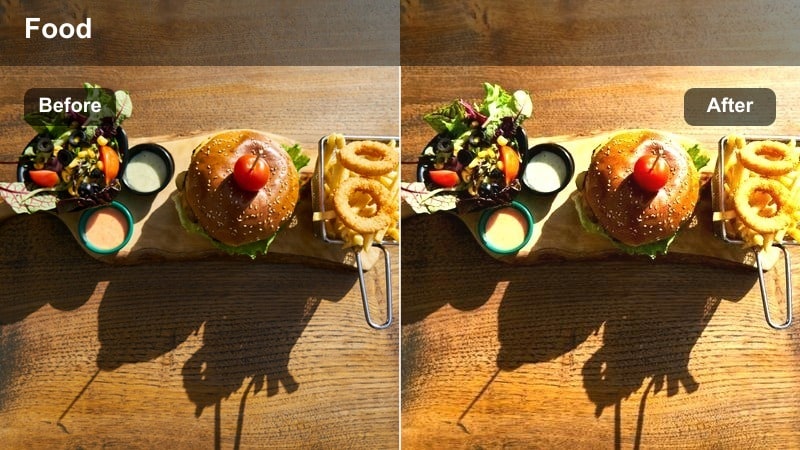
- Effect look: Creamy highlights with gentle bloom and softened contrast for bright cafe interiors.
- Best for: Sit-down A-roll by the window, journaling shots, and slow sips in natural light.
- Editing tip: Lower the filter intensity to around 60% if your original footage is already overexposed to keep skin tones natural.
Latte Soft Glow is ideal when your cafe has plenty of natural daylight and you want that creamy, airy mood without complicated grading. In Filmora, apply this filter after you have set basic exposure, then adjust the intensity slider so the glow gently wraps around highlights like the coffee cup, hair edges, and window frame while preserving detail in your face.
For vlogs built around calm, slow mornings, combine this filter with Filmoras subtle vignette and a light crop-in to create an intimate feel. Use masks or keyframing to keep your eyes and key details slightly sharper, echoing the pro tip of balancing glow with clarity so your storytelling remains crisp inside the dreamy atmosphere.
Use Filmora's AI Tools to Match Your Cafe Palette
Filmoras AI-driven color tools can automatically analyze your cafe footage and adapt these filters to the natural palette of your space, from honey-toned wood tables to cool concrete walls. This helps you avoid mismatched clips when you move between windows, corners, and the bar.
Start by picking a representative frame from your vlog, then use Filmoras AI color matching to set temperature and tint before you layer creative filters like Latte Soft Glow or Bar Espresso Rich. You get a consistent base color grade that still feels authentic to your favorite coffee shop.
 secure download

Preview Cafe Filters on Sample Footage
Before you commit to a full cafe lifestyle vlog video LUT style, try your favorite filters on a short test clip in Filmora. Mix bright window shots, darker corners, and barista B-roll so you can see how consistently each filter performs in different lighting conditions.
Use the split-screen or side-by-side preview options to compare several filters at once, then choose one main look for A-roll and a few complementary options for B-roll and ambience. This workflow keeps your cafe vlogs cohesive while still letting each scene have its own character.
secure downloadCombine Filters and LUTs for Signature Cafe Looks
Filmora includes 1000 plus video filters and 3D LUTs, giving you plenty of room to build a signature cafe look that you can repeat across your channel. Start with a neutral LUT or one of Filmoras cinematic presets, then layer these cafe lifestyle filters at low intensity to fine-tune each scene.
Once you find a combination that works for your coffee shop interiors, save it as a custom preset. This way, future cafe vlogs need only small tweaks, and your subscribers instantly recognize your warm, cozy grading style from the first frame.
secure downloadWindow Journal Matte
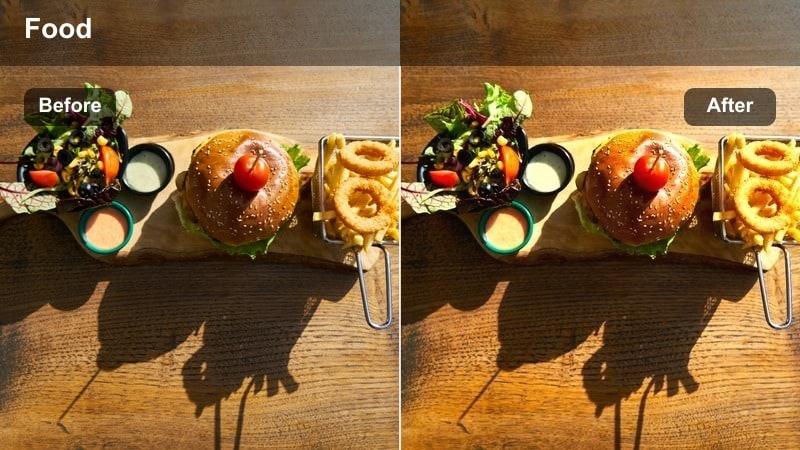
- Effect look: Muted contrast with a subtle matte finish and slightly desaturated background tones.
- Best for: Overhead journal shots, laptop B-roll, and soft focus moments at a cafe table.
- Editing tip: Pair this filter with a slight vignette to guide the viewer's eye toward notebooks, hands, or your coffee cup.
Window Journal Matte is tailored for slower, detail-focused moments where you want the page, pen, and hands to feel calm and cinematic. In Filmora, add this filter to your top-down desk shots and adjust the contrast curve slightly if your footage was lit with harsh midday sun, so the matte look stays gentle instead of muddy.
This filter works especially well on filler clips between talking segments, helping you create visual breathing room in the edit. Slow these shots down a bit, apply a light vignette, and keep camera motion minimal so the matte grade reinforces a relaxed, reflective mood in your cafe lifestyle vlogs.
Hazy Morning Film
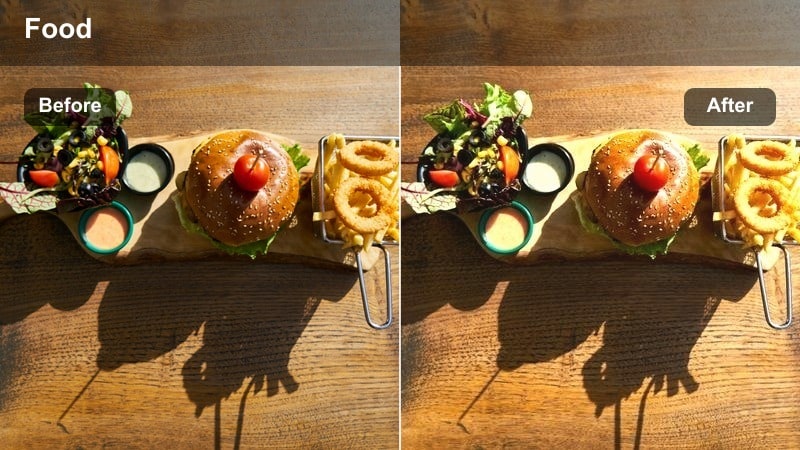
- Effect look: Low-contrast, film-like pastel tones with gentle highlight roll-off.
- Best for: Slow pan shots of the cafe interior, window reflections, and quiet early-opening scenes.
- Editing tip: Reduce saturation on greens slightly to keep the filmic look clean if your cafe has a lot of indoor plants.
Hazy Morning Film gives your establishing shots a soft, nostalgic character that feels like shooting on pastel film stock. In Filmora, apply it to wide pans or slider moves across the empty cafe, then subtly decrease clarity and sharpening so the highlight roll-off feels smoother and more analog.
Because this look de-emphasizes contrast, it is perfect for transitional moments at the start of a vlog or between chapters. Add a light film grain effect on top and pull back the saturation of any distracting green plants so the color palette remains simple, guiding focus toward shapes, light, and your narrative voiceover.
Behind the Bar: Barista and Brew Shots
Bar Espresso Rich
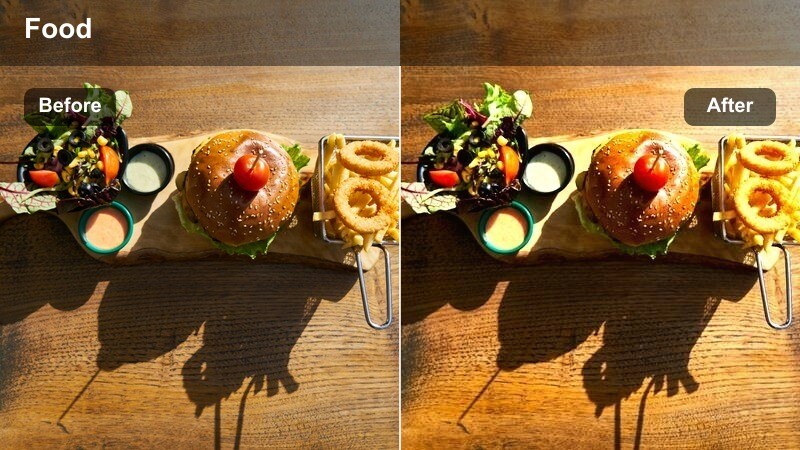
- Effect look: Deep, rich contrast with warm midtones that emphasize coffee browns and wood textures.
- Best for: Barista pulling espresso shots, tamping, and close-ups of the coffee machine in action.
- Editing tip: Increase shadow detail slightly if your cafe bar is dark so you keep texture in metal surfaces and latte art tools.
Bar Espresso Rich is designed to make every crema layer, portafilter, and wooden counter pop with depth and warmth. In Filmora, use it on tight, kinetic B-roll of espresso pulls and tamping sequences, then adjust the shadow slider to reveal more texture if your bar area is underexposed.
To keep skin tones under control, correct white balance first and, if needed, nudge color temperature cooler instead of drastically lowering filter intensity. This way, your barista sequences stay punchy and cinematic while still matching the softer looks you use for window shots and table scenes throughout the vlog.
Steam Warm Fade
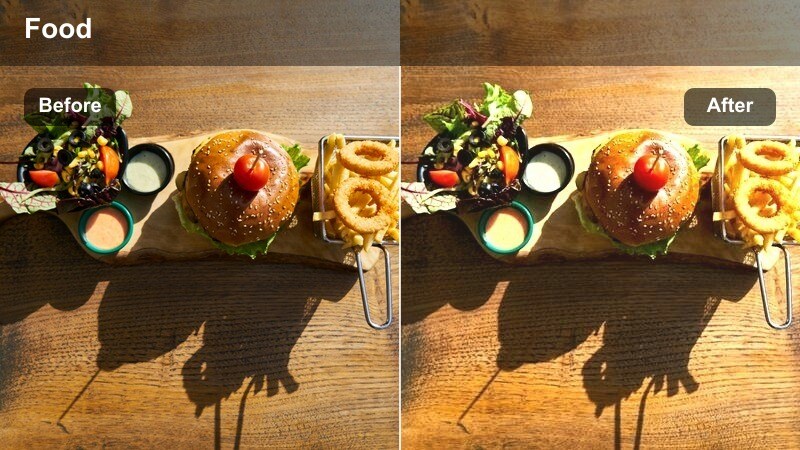
- Effect look: Warm, slightly faded highlights with a soft glow around steam and metal reflections.
- Best for: Slow-motion milk steaming, coffee pour shots, and close-ups of cups moving along the bar.
- Editing tip: Use a higher frame rate and slow the clip down, then apply this filter to accentuate the movement of steam and pouring liquid.
Steam Warm Fade turns everyday latte prep into cinematic, slow-motion hero shots by gently blooming steam and reflections. Shoot in a high frame rate, then slow your clips in Filmora before applying the filter so the softened highlights emphasize the graceful movement of swirling milk and pouring espresso.
Trim your clips so the filter is active only during the most visually satisfying motions, like the peak of a pour or the moment steam is fullest. Pair these shots with tasteful sound design hits and warm background music to anchor them as visual highlights within your overall cafe vlog story arc.
Copper Bar Glow
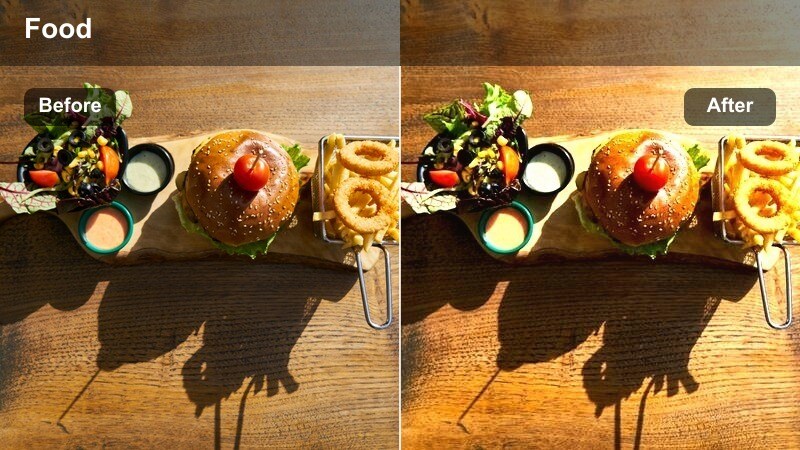
- Effect look: Warm copper tint with lifted blacks and subtle halation around bright metal edges.
- Best for: Detailed shots of the espresso machine, grinders, and cafe equipment on the bar.
- Editing tip: Dial down saturation in the reds if your espresso machine is already colorful to keep the copper tint from overpowering the scene.
Copper Bar Glow gives your cafe equipment an editorial, premium finish that is perfect for branding-focused B-roll. In Filmora, apply it to logo shots, signature drinks, or hero angles of the espresso machine, and fine-tune saturation so the copper cast enhances, rather than overwhelms, existing colors.
Use these clips sparingly as visual accents in your timeline so the glow feels intentional and luxurious. Short, well-timed cuts with this filter can serve as chapter markers or transitions, signaling key moments like arriving at the cafe, ordering your usual, or highlighting the shop's unique design details.
Tabletop Chats and Study Sessions
Cozy Desk Tint
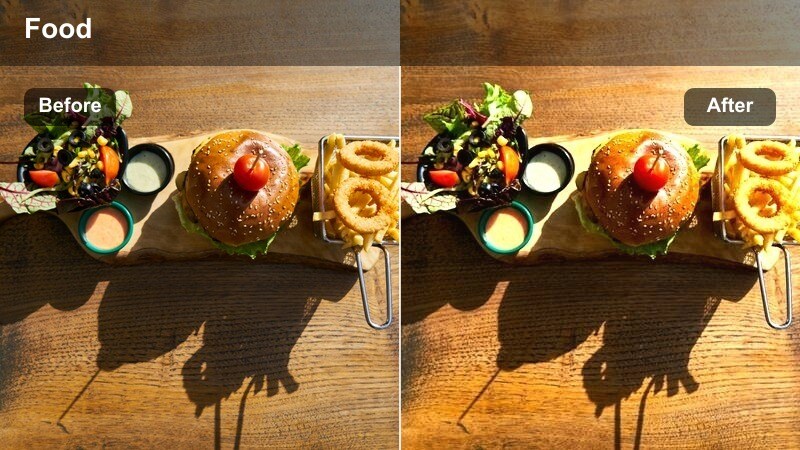
- Effect look: Soft warm tint with gentle contrast and slightly lifted blacks for a cozy desk feel.
- Best for: Laptop work sessions, casual conversations across the table, and side-angle study shots.
- Editing tip: Stabilize handheld footage before applying this filter to keep the calm, grounded feeling it creates.
Cozy Desk Tint is built for intimate, table-level scenes where you want viewers to feel like they are sharing the cafe with you. In Filmora, add this filter to medium shots of conversations, typing, or sketching, then apply stabilization first so the relaxed, warm tone is not undercut by shaky movement.
If skin starts to skew too orange, slightly adjust the tint toward green in your basic color controls while leaving the filter intensity fairly strong. Keeping these corrections consistent across all angles in a scene prevents color jumps as you cut between close-ups, over-the-shoulder shots, and wider table views.
Study Nook Neutral
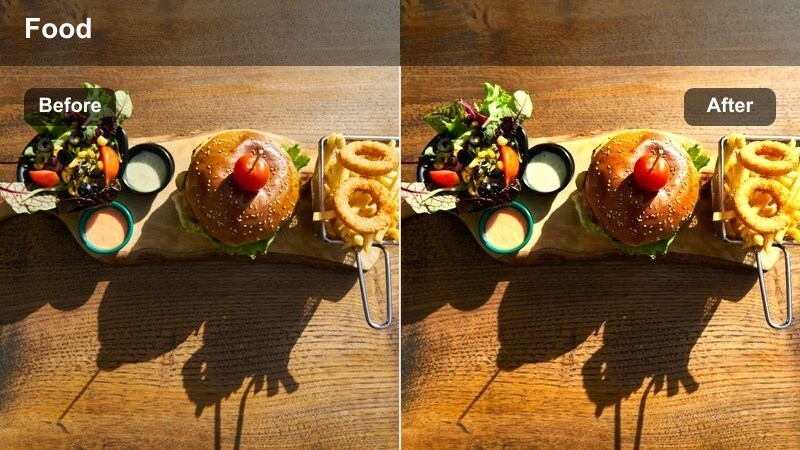
- Effect look: Balanced neutral contrast with slight cool shadows and clean, accurate colors.
- Best for: Study vlogs, productivity segments, and scenes where you show planners or digital notes at the cafe.
- Editing tip: Use this filter on multi-camera setups to create a consistent baseline look before adding creative overlays or light leaks.
Study Nook Neutral is your go-to filter when you want realistic color with just a touch of polish, making it ideal for productivity-focused segments. In Filmora, apply it across your study clips from different cameras or angles first, then use color match features to ensure all shots share the same neutral baseline.
After your footage is standardized with this filter, you can layer subtle overlays, light leaks, or text graphics without worrying about clashes in color temperature. Saving this combination as a preset gives you a dependable starting point for future cafe study vlogs, keeping your visual brand clean and consistent.
Chat Corner Soft
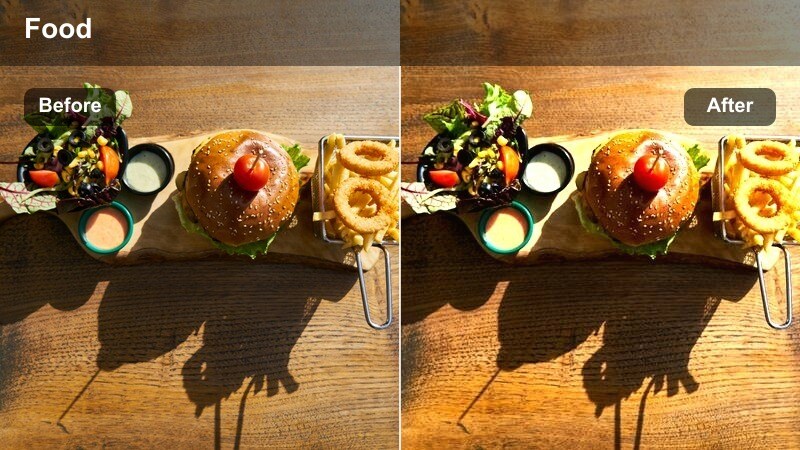
- Effect look: Softened micro-contrast with gentle skin smoothing and a subtle warm cast.
- Best for: Sit-down talking segments in a corner booth or along a side wall with mixed cafe lighting.
- Editing tip: If your background lights look too bright, lower overall exposure slightly and compensate with a small boost in midtones.
Chat Corner Soft is tailored to make your face the star of the frame, especially in mixed lighting from lamps, windows, and wall fixtures. In Filmora, use it on talking-head segments filmed in cozy booths, then fine-tune exposure so your skin looks smooth and bright while background lights stay flattering, not blown out.
For extra polish, use face tracking or masking to subtly brighten your face and eyes after the filter is applied. Matching white balance across all angles before adding this filter will help avoid distracting color shifts when you cut between primary and secondary cameras in your cafe conversations.
Golden Hour and Evening Cafe Ambience
Golden Hour Cafe
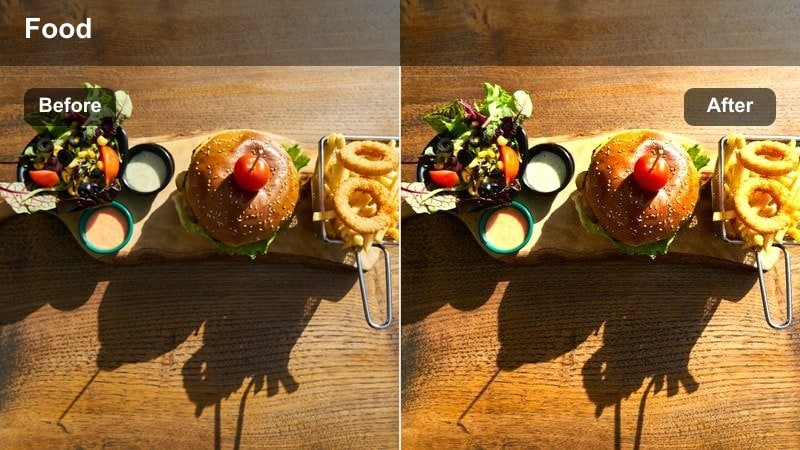
- Effect look: Warm golden highlights with soft contrast and gentle color roll-off in the mids.
- Best for: Exterior cafe shots at sunset, walking into the cafe, and window silhouettes during golden hour.
- Editing tip: Lower saturation in oranges slightly if your sunset footage is already very vivid to keep the scene from looking unreal.
Golden Hour Cafe is perfect for framing the start or end of your vlog with glowing, atmospheric exteriors. In Filmora, apply it to wide shots of the storefront or silhouettes by the windows, then temper orange saturation if your camera already captured intense sunset colors, so the look stays cinematic rather than cartoonish.
Use this filter on both establishing shots and immediate cutaways to the interior to create a seamless transition from street to cafe. Keeping exposure slightly on the softer side will let the warm highlights wrap gently around edges, reinforcing the cozy, end-of-day mood that pairs well with reflective voiceovers or outro segments.
Evening Fairy Warm
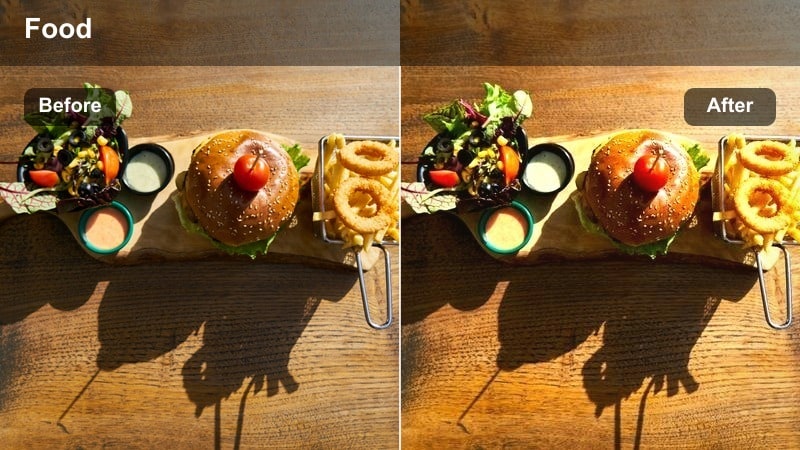
- Effect look: Warm, slightly saturated midtones with gentle bloom on small light sources like string lights.
- Best for: Interior night shots with hanging bulbs, string lights, or candle-like ambience at the cafe.
- Editing tip: Reduce clarity a touch to enhance the dreamy glow while keeping your subject in focus with a sharpen mask.
Evening Fairy Warm emphasizes the magic of string lights, hanging bulbs, and candle-like glows in nighttime cafe scenes. In Filmora, apply it to medium or wide interior shots when the house lights are low, and soften clarity slightly so each small light source blooms with a dreamy halo.
Because low-light footage often carries some noise, avoid aggressive denoising and instead let a touch of grain support the cozy, organic feel. If the glow starts to overpower your subject, drop the filter intensity a bit rather than crushing overall exposure, preserving both atmosphere and facial detail.
Night City Cafe
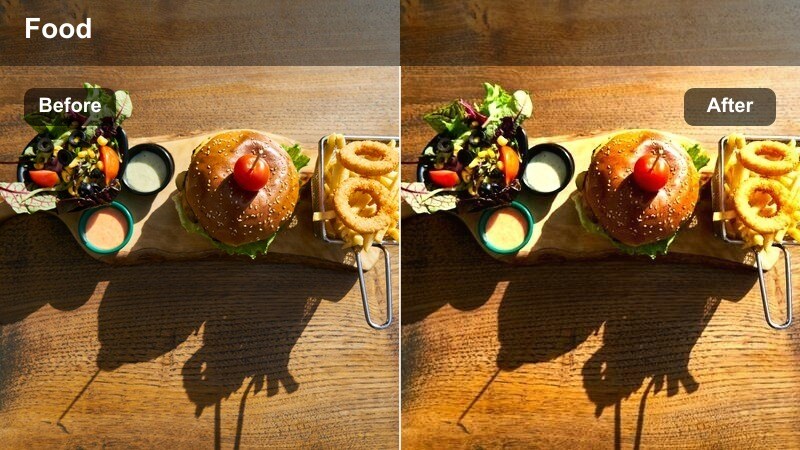
- Effect look: Cinematic contrast with cool shadows, warm highlights, and slightly boosted saturation in street lights.
- Best for: Street-level shots outside the cafe at night, walking footage, and reflections in cafe windows.
- Editing tip: Stabilize your walking clips and add a small amount of motion blur before applying this filter to get a polished night sequence.
Night City Cafe blends cool blue shadows with warm interiors and streetlights, creating a classic city-at-night contrast. In Filmora, use it on walking shots past the cafe, traffic reflections in windows, and transitions from the street into the glowing interior to build narrative around your evening outing.
Stabilize handheld footage and, if available, add subtle motion blur before applying the filter so movement feels smooth and cinematic. Sequence your clips from cooler, exterior views to warmer interior shots with the same grade to tell a visual story of stepping out of the city rush and into a welcoming late-night cafe.
Tips for Using Cafe Lifestyle Vlog Video Lut Filters in Filmora
- Shoot a gray or white object at the start of each cafe scene so you can quickly fix white balance before applying filters.
- Group similar scenes on your timeline and apply the same filter and intensity across the whole group to avoid jarring color shifts.
- Lower filter intensity on skin-focused clips to keep faces natural while still maintaining the overall cafe mood.
- Balance creative filters with a neutral base grade so your cafe lifestyle vlog video LUT choices do not fight each other across scenes.
- Use Filmoras scopes, such as waveform and vectorscope, to check that your warm tones stay within a pleasing range and do not clip.
- Export a short test montage of your key scenes to check that your cafe grading looks consistent on both phone and laptop screens.
- Save frequently used filter combinations as custom presets so future cafe vlogs can reuse the same cinematic look in a few clicks.
With the right mix of cafe lifestyle vlog video LUT-inspired filters, your coffeehouse stories can feel warm, cinematic, and cohesive from the first sip to the last closing shot.
Experiment with a few of these looks in Filmora, then refine your favorites into a repeatable preset so every cafe vlog on your channel carries the same signature atmosphere.
secure download