

 100% Security Verified | No Subscription Required | No Malware


 ChatGPT
 Perplexity
 Gemini
 Claude
 Grok
Grok
Cosmic Jade sits between teal and emerald, blending the calm of blue with the growth and energy of green. It feels modern, futuristic, and slightly otherworldly, which is why it works so well for cinematic grading, clean tech branding, and stylish social feeds. Used well, it can make your videos feel polished and intentional without looking overly saturated.
For creators and Filmora users, Cosmic Jade is a powerful base color for YouTube thumbnails, video intros, lower thirds, and branding kits. Below you will find ready to use Cosmic Jade color palettes with HEX codes, so you can drop them straight into your editor, thumbnails, and channel assets and keep your entire visual identity consistent.
In this article
Calm And Cinematic Cosmic Jade Color Palettes
Deep Nebula Teal

- HEX Codes: #03312e, #065f59, #1fa6a0, #88d9c5, #f3f7f4
- Mood: Moody, cinematic, and slightly mysterious with a sci fi edge.
- Use for: Great for cinematic B roll sequences, film style vlog grading, and dramatic title cards that need depth without losing clarity.
Deep Nebula Teal feels like you are floating through a quiet green tinted galaxy. The near black teal shadows (#03312e, #065f59) add weight and drama, while the brighter jade notes (#1fa6a0, #88d9c5) give you clean accents for text, UI details, and subtle glows. The soft off white (#f3f7f4) keeps everything readable and prevents the palette from becoming too heavy.
Use this palette to give your vlogs or B roll a cinematic teal cast, especially when you want a sci fi or techy atmosphere without neon chaos. It works beautifully for YouTube thumbnails with dark backgrounds and bright teal outlines, title cards with glowing borders, and lower thirds where Cosmic Jade becomes your signature accent color across intros, transitions, and end screens.
Pro Tip: Build A Cinematic Cosmic Jade Look In Filmora
When you use a moody palette like Deep Nebula Teal, consistency across your whole edit is what makes it feel truly cinematic. In Filmora, you can bring your footage onto the timeline, add a teal leaning LUT or color preset, and then use the same color settings for your B roll, talking head shots, and outro. That way your Cosmic Jade blacks and highlights feel connected from the first frame to the last.
Save this palette as your reference for channel branding: use the deepest jade as your video background, mid tones for overlays, and the lighter jades for buttons and icons. With Filmora you can easily reuse the same color styles in intros, social cutdowns, and Shorts so your Cosmic Jade identity is instantly recognizable.
AI Color Palette
If you already mocked up this palette in a thumbnail, poster, or color card, you can use it as a reference image and spread the same Cosmic Jade mood across your whole video. Filmora's AI Color Palette feature analyzes the colors of a reference clip or image and automatically matches your other clips to that look.
Drop a shot that perfectly captures your Deep Nebula Teal tones into Filmora, then use AI Color Palette to align the rest of your timeline. In a few clicks your A roll, B roll, and cutaways share the same teal shadows and jade highlights, which is ideal for cinematic vlogs, trailers, or brand films.
 secure download

HSL, Color Wheels & Curves
Once you match your overall look, you can refine your Cosmic Jade tones with HSL, color wheels, and curves in Filmora. Gently shift the green and cyan hue sliders to nail that perfect teal, lower saturation in the shadows for a more cinematic feel, or push a bit more brightness into the jade mid tones so titles and skin still look natural.
Use the color wheels to keep your shadows cooler and your highlights slightly warmer, then fine tune contrast with curves for rich blacks and soft rolloff in the whites. This combination lets you protect your signature Cosmic Jade while still adapting it to different lighting conditions and scenes.
secure download1000+ Video Filters & 3D LUTs
To move faster, you can stack your Cosmic Jade palette with Filmora presets. Filmora’s video filters and 3D LUTs make it easy to add teal and jade leaning looks, then tweak intensity so your brand color still shines through. This is ideal when you want your footage to feel cinematic without manual grading for every clip.
Combine a teal oriented LUT with your HEX based graphics and overlays, and you get a unified Cosmic Jade identity for intros, transitions, and Shorts. Save your favorite combo as a custom preset so you can reuse it on future episodes with one click.
secure downloadEmerald Orbit Glow

- HEX Codes: #072824, #0b4b3e, #14a78d, #5de1c1, #fefcf4
- Mood: Balanced and futuristic with a clean sci fi glow.
- Use for: Perfect for tech explainers, product demos, and UI motion graphics that need a fresh but trustworthy vibe.
Emerald Orbit Glow layers deep emerald greens (#072824, #0b4b3e) with bright jade cores (#14a78d, #5de1c1) and a warm off white (#fefcf4). The result is a palette that feels like a user interface floating in space: high tech, but still soft and friendly.
Use the darker tones for background panels and overlays in your explainers, then highlight key features, buttons, and progress bars with the glowing jade. This combo is ideal for tech channel branding, animated HUDs in Filmora, and YouTube thumbnails that signal innovation without harsh neon.
Midnight Lagoon Drift
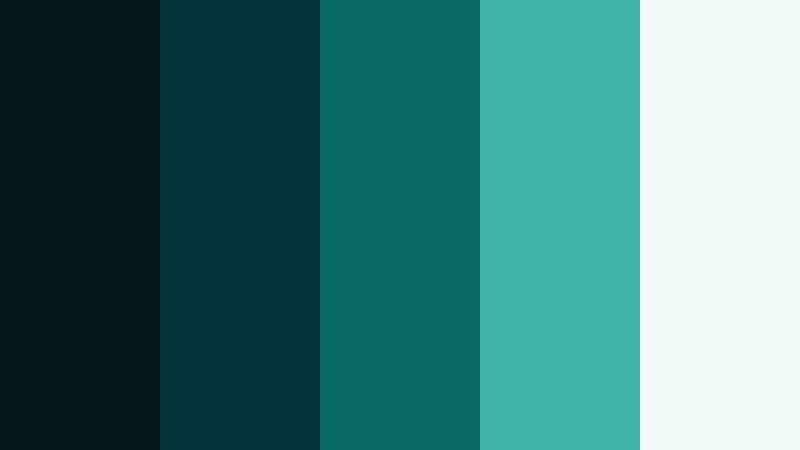
- HEX Codes: #041719, #05343a, #0a6865, #3fb3aa, #f0faf8
- Mood: Quiet, introspective, and gently cinematic.
- Use for: Use in travel vlogs, night city montages, and atmospheric storytime videos needing subtle teal grading.
Midnight Lagoon Drift brings together inky blue greens (#041719, #05343a) with calm jades (#0a6865, #3fb3aa) and a soft misty white (#f0faf8). It feels like a city reflected on water at night, gentle and reflective rather than loud.
Apply this palette to travel vlogs, narrative pieces, or soft spoken storytime videos where you want viewers to sink into the mood. Use the darkest shades for background plates and letterboxing, while the lighter jades and white handle text, icons, and subtitles for comfortable readability.
Tidal Glass Horizon
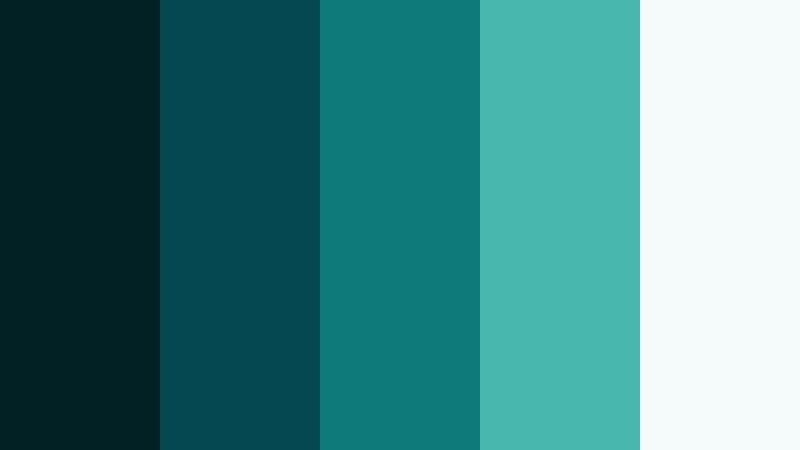
- HEX Codes: #022125, #064851, #0e7a7a, #48b8ad, #f5fbfa
- Mood: Expansive and airy, with an oceanic film look.
- Use for: Ideal for landscape reels, surfing or beach content, and nature documentaries with a polished teal tone.
Tidal Glass Horizon captures the feeling of a crisp ocean sunrise. Deep sea tones (#022125, #064851) sit under glassy jades (#0e7a7a, #48b8ad) and a foamy white (#f5fbfa). It is a natural fit for water themed content, but still feels modern and stylized.
Use the darker colors as gradient overlays on drone shots and beach clips to pull everything toward a unified Cosmic Jade look. The lighter jades and whites are perfect for titles, chapter cards, and lower thirds in surf edits, travel reels, or nature mini docs.
Shadowed Forest Prism
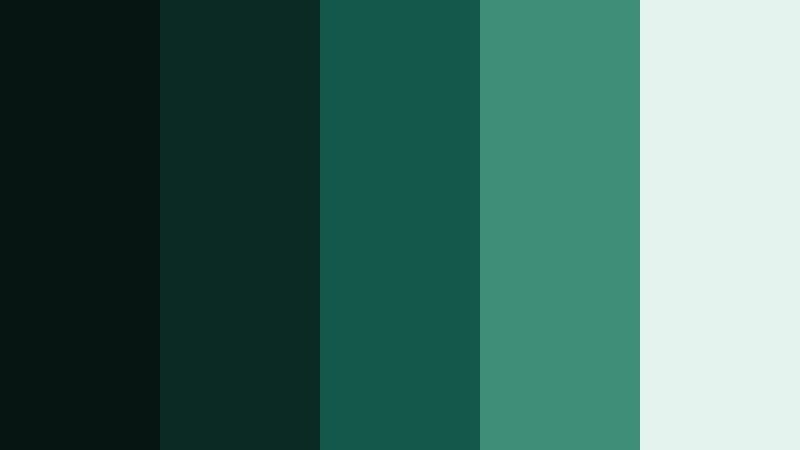
- HEX Codes: #061511, #0a2a23, #14584b, #3f8e78, #e4f3ee
- Mood: Earthy, grounded, and slightly enigmatic.
- Use for: Strong for documentary interviews, sustainable brand stories, and eco themed channel branding.
Shadowed Forest Prism combines forest shadow greens (#061511, #0a2a23) with prismatic jades (#14584b, #3f8e78) and a pale, almost foggy white (#e4f3ee). It feels grounded and real, ideal when you want authenticity over a glossy studio look.
Lean on the darker tones for backgrounds in interviews and talking head videos, then let the brighter jades highlight stats, icons, and callouts about sustainability or nature. This palette fits eco brands, outdoor creators, and documentary style YouTube channels that want a consistent but subtle Cosmic Jade identity.
Fresh And Modern Cosmic Jade Color Palettes
Digital Jade Interface
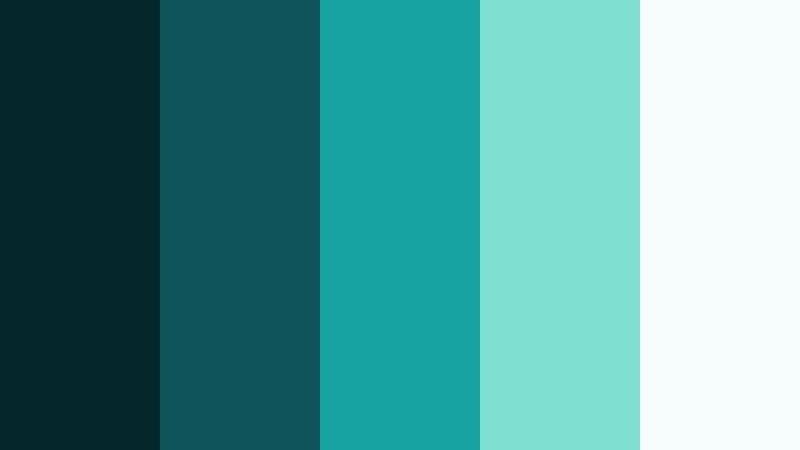
- HEX Codes: #05262a, #0e545a, #17a4a0, #7fe0d2, #f7fdfc
- Mood: Sleek, innovative, and tech forward.
- Use for: Perfect for app walkthroughs, UI mockups, SaaS promos, and animated dashboards.
Digital Jade Interface mixes deep teal UI bases (#05262a, #0e545a) with crisp, modern jades (#17a4a0, #7fe0d2) and a cool white (#f7fdfc). It looks like a polished dashboard screenshot, ready to drop into your motion graphics.
Use the darker shades for panels and overlays, then apply the bright jade and mint for buttons, highlights, and data visualizations. This palette keeps your product demos clean and legible, especially for YouTube explainers, in app tutorials, and SaaS promo videos built in Filmora.
Studio Loft Mint
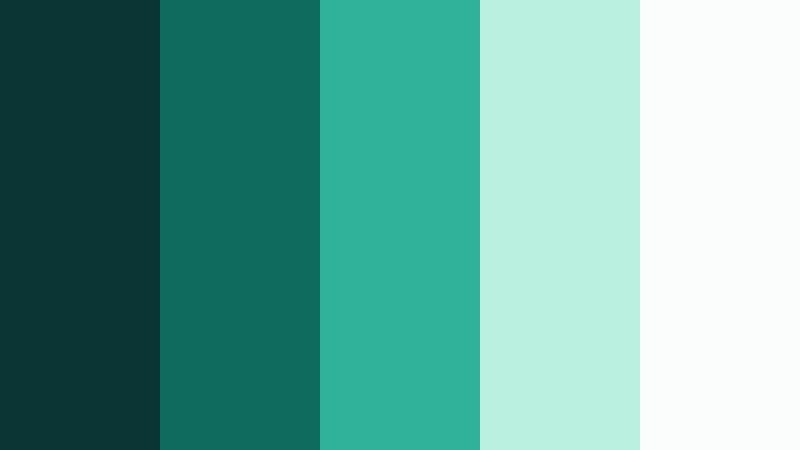
- HEX Codes: #0a3534, #0f6b5e, #2fb19a, #b9f0df, #fafdfb
- Mood: Airy and creative with a modern studio aesthetic.
- Use for: Use for creator brand kits, channel banners, and minimalist workspace B roll.
Studio Loft Mint blends deep studio greens (#0a3534, #0f6b5e) with bright creative jades (#2fb19a) and soft mint whites (#b9f0df, #fafdfb). It has the feel of a clean, plant filled workspace with plenty of daylight.
This palette is a natural match for productivity channels, design studios, and creative entrepreneurs. Use the darker tones for frame edges and background cards, and reserve the airy mints for typography, icons, and thumbnail blocks that highlight episodes or product shots.
Neon Jade Circuit

- HEX Codes: #020b10, #06303b, #10a19a, #5af2d5, #f5fff8
- Mood: Energetic, digital, and neon tinged without going full cyberpunk.
- Use for: Great for gaming intros, e sports overlays, and fast cut montage edits.
Neon Jade Circuit pushes Cosmic Jade toward the gaming world. Dark circuitry bases (#020b10, #06303b) meet electric jades (#10a19a, #5af2d5) and a soft white glow (#f5fff8) so your visuals pop without being blinding.
Use this palette for gaming overlays, stream screens, and YouTube intros where titles and player tags glow in jade above dark gameplay. The lighter tones make strong accent strokes, HUD icons, and animated lines in Filmora motion graphics.
Aqua Workspace Focus

- HEX Codes: #05333a, #0c6a72, #27b2b0, #b2f3ec, #ffffff
- Mood: Focused, optimistic, and productivity driven.
- Use for: Ideal for tutorial overlays, productivity dashboards, and educational explainer videos.
Aqua Workspace Focus keeps things bright and clear. It pairs darker teal anchors (#05333a, #0c6a72) with focused aqua jades (#27b2b0) and clean whites (#b2f3ec, #ffffff). The Result is a calm but energizing workspace vibe.
Use it for step by step tutorials and screen recordings where on screen text needs to be super legible. Darker tones can form header bars or side panels, while the aquas and whites highlight buttons, keyboard shortcuts, and key tips in your Filmora overlays.
Minimal Jade Monochrome
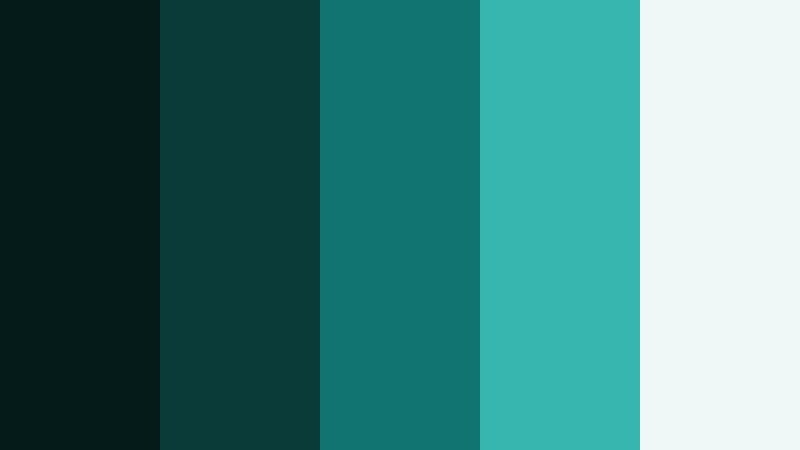
- HEX Codes: #041b1a, #0a3b38, #127470, #36b6ae, #eef8f6
- Mood: Understated, stylish, and brand ready.
- Use for: Strong base for logo systems, lower thirds, and cohesive channel kits using a single color family.
Minimal Jade Monochrome is pure Cosmic Jade from shadow to highlight. Deep greens (#041b1a, #0a3b38) transition into mid jades (#127470, #36b6ae) and top out at a pale jade white (#eef8f6). Because it is a single color family, it instantly looks cohesive.
Use this as your main brand palette if you want everything to feel sleek and minimal. In Filmora, build templates for lower thirds, subscribe buttons, and end screens using only these tones. Your thumbnails will look instantly on brand even as your content topics change.
Soft And Dreamy Cosmic Jade Color Palettes
Celestial Mint Daybreak
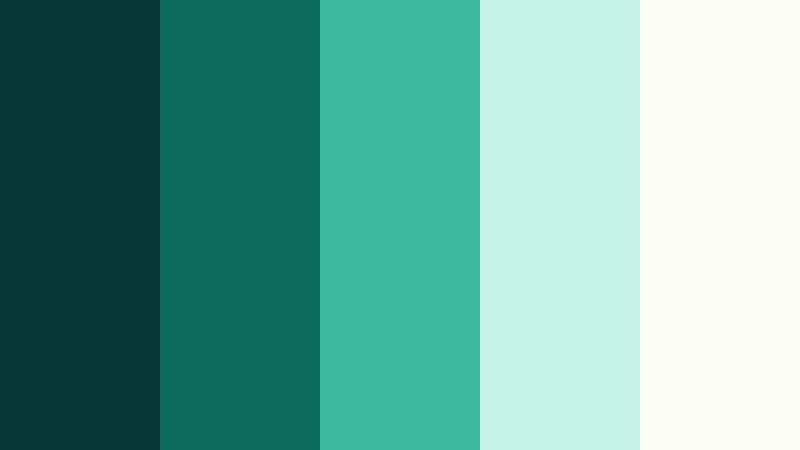
- HEX Codes: #063636, #0b6b5e, #3bb79e, #c5f4e6, #fdfdf8
- Mood: Light, optimistic, and gently ethereal.
- Use for: Lovely for lifestyle vlogs, morning routines, and wellness channels looking for a soft glow.
Celestial Mint Daybreak softens Cosmic Jade into a fresh morning palette. Deeper jades (#063636, #0b6b5e) ground the look, while milky mints (#3bb79e, #c5f4e6) and a creamy white (#fdfdf8) keep everything light and uplifting.
This palette works beautifully for lifestyle and wellness content: morning routines, Sunday resets, breathwork, or mindful productivity. Use darker tones in small amounts for contrast and rely on the mints and whites for backgrounds, overlays, and thumbnail blocks that feel soft and approachable.
Jade Cloud Reverie

- HEX Codes: #022325, #075054, #1da29b, #a8eae0, #fbfffd
- Mood: Dreamy, floaty, and soothing like drifting through clouds.
- Use for: Use for meditation clips, lo fi music visuals, and dreamy timelapse skies.
Jade Cloud Reverie layers soft sea greens (#022325, #075054) with airy jades (#1da29b, #a8eae0) and a cloud white (#fbfffd). It feels like an ambient playlist cover or a slow moving sky timelapse.
Apply this to meditation videos, lo fi beats loops, or slow motion B roll. Use the darker shades around the frame edges or in subtle vignettes, then let the lighter jades and whites carry titles, quotes, and subtle animated shapes that drift calmly across the screen.
Pastel Reef Echoes
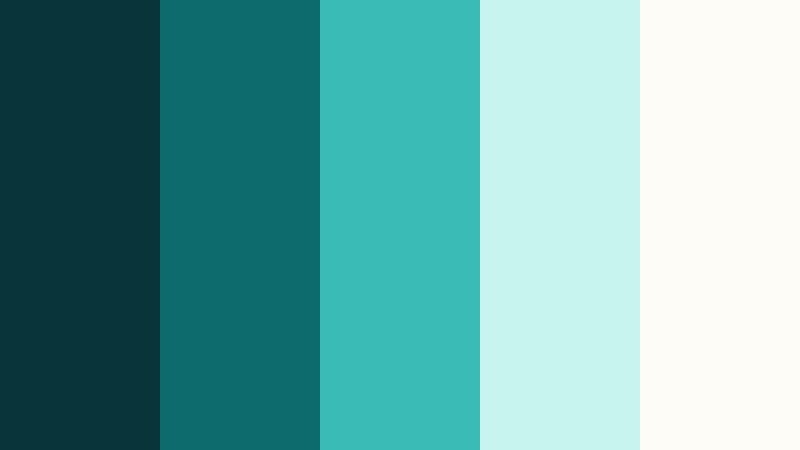
- HEX Codes: #073539, #0d6b6e, #3abbb5, #c6f5f0, #fefcf7
- Mood: Gentle, oceanic, and slightly nostalgic.
- Use for: Perfect for underwater footage, aquarium B roll, and family vacation edits with a soft pastel twist.
Pastel Reef Echoes balances deep sea teal (#073539, #0d6b6e) with pastel jades (#3abbb5, #c6f5f0) and a warm off white (#fefcf7). It is ocean inspired but has a gentle, slightly nostalgic softness.
Use this for underwater clips, aquariums, and family beach trips. In your thumbnails and titles, let the pastels dominate so the mood stays light and kids friendly, while the deeper tones give just enough contrast around borders, icons, or text shadows.
Moonlit Jade Mist
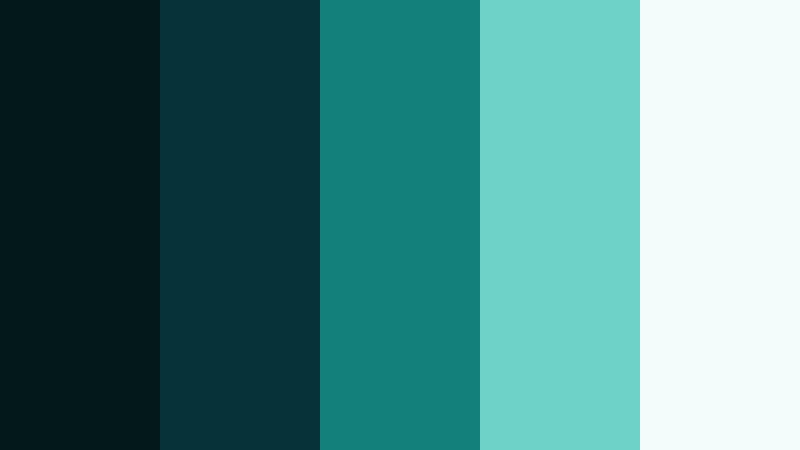
- HEX Codes: #021819, #06323a, #14807c, #6fd2c9, #f3fbfb
- Mood: Gentle night time calm with a touch of magic.
- Use for: Ideal for night vlogs, city skyline timelapses, and quiet cinematic outros.
Moonlit Jade Mist mixes dark teal nights (#021819, #06323a) with softened jades (#14807c, #6fd2c9) and a misty white (#f3fbfb). It feels like a calm city or forest at night with a faint magical glow.
Use this palette for night vlogs, city skyline time lapses, or closing sequences in your videos. Let the darkest colors define the frame and use the lighter jades for neon signs, light streak accents, and titles that gently stand out without shattering the calm mood.
Aurora Spring Veil

- HEX Codes: #05302e, #0c5f57, #29b89a, #d4f7ea, #ffffff
- Mood: Fresh, hopeful, and lightly whimsical.
- Use for: Great for spring collection promos, fresh product reveals, and upbeat reels.
Aurora Spring Veil brings fresh Cosmic Jade energy into a springlike palette. Deeper greens (#05302e, #0c5f57) support bright jade (#29b89a) and airy whites (#d4f7ea, #ffffff), creating a sense of renewal and optimism.
This palette is perfect for spring drops, product launches, and upbeat lifestyle content. In thumbnails and intros, use the white and pale jade as your primary field, and let the deeper tones frame the layout or highlight CTAs like Subscribe or Shop Now.
Bold And Vibrant Cosmic Jade Color Palettes
Cosmic Jade Neon Burst
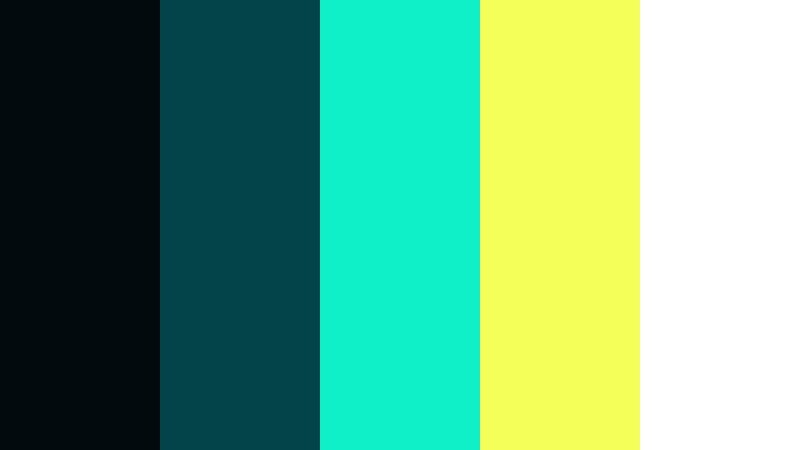
- HEX Codes: #010a0d, #02444a, #0ff0c8, #f5ff5a, #ffffff
- Mood: High impact, energetic, and attention grabbing.
- Use for: Use for bold YouTube thumbnails, hook intros, and short form content that must pop on mobile feeds.
Cosmic Jade Neon Burst is built to grab attention. Deep space blacks and teals (#010a0d, #02444a) collide with neon jade (#0ff0c8), electric yellow (#f5ff5a), and pure white (#ffffff). On small mobile screens this combo cuts through the noise immediately.
Use it sparingly but boldly: neon jade and yellow for title text, arrows, and emojis in your thumbnails; deep backgrounds to keep everything readable. In Filmora intros and Reels, flash these colors in fast animations to hook viewers in the first seconds of your video.
Tips for Creating Cosmic Jade Color Palettes
Cosmic Jade pairs beautifully with both dark neutrals and bright accents, but it is easy to overdo. A few simple rules will help you keep your videos clean, readable, and on brand across thumbnails, intros, and in video graphics.
- Use dark jade or teal for backgrounds and panels, and keep text in white or very pale jade to maximize readability.
- Limit strong neon accents (like electric yellow) to small areas such as key words, arrows, or CTAs so the frame does not feel chaotic.
- Pick one main Cosmic Jade HEX as your brand anchor, then build lighter and darker variations around it for buttons, borders, and shadows.
- Check your thumbnails and titles on a phone screen to confirm that Cosmic Jade text stands out clearly from the background.
- When grading footage, keep skin tones natural and push only the greens and cyans toward your chosen Cosmic Jade tone.
- Mix Cosmic Jade with soft neutrals (off white, warm gray, charcoal) to avoid a cold or clinical look in lifestyle and vlog content.
- Save your favorite color combinations as presets or templates in Filmora so intros, lower thirds, and end screens stay visually consistent.
- Balance motion and color: if your edit is very fast paced, use simpler Cosmic Jade palettes; if the pacing is slow, you can explore subtler gradients and overlays.
Cosmic Jade is flexible enough to feel cinematic, techy, or soft and dreamy, depending on the supporting colors you choose. With carefully designed palettes, you can shape the mood of your videos, build a recognizable brand identity, and make your thumbnails stand out without relying on harsh primaries.
Take the HEX codes from your favorite palettes above and test them inside Filmora. Apply them to titles, overlays, filters, and LUTs until you find a signature Cosmic Jade look that fits your channel. Once you lock it in, reuse it across your intros, B roll, Shorts, and social graphics for a consistent, professional presence.
With Filmora’s color tools, AI features, and ready made effects, it becomes much easier to turn a simple Cosmic Jade idea into a polished visual system that supports every video you publish.
secure download