

 100% Security Verified | No Subscription Required | No Malware


 ChatGPT
 Perplexity
 Gemini
 Claude
 Grok
Grok
Cyber Lime is one of those colors that instantly feels alive. It sits between neon green and electric yellow, so it naturally suggests speed, innovation, and energy. In color psychology, this kind of vivid green is linked to freshness, curiosity, and futuristic thinking. That makes Cyber Lime a powerful choice when you want your brand, thumbnails, or on screen graphics to feel high tech, playful, or simply impossible to ignore.
In video editing and design, Cyber Lime works brilliantly for YouTube intros, gaming overlays, kinetic titles, and bold call to action buttons. Used carefully, it can guide the viewer’s eye to key text or UI elements without overwhelming the frame. Below you will find ready to use Cyber Lime color palettes with HEX codes tailored for creators and Filmora users, so you can color match your intros, vlogs, social edits, and branding in a consistent, modern way.
In this article
Bold And Futuristic Cyber Lime Color Palettes
Neon Interface Glow
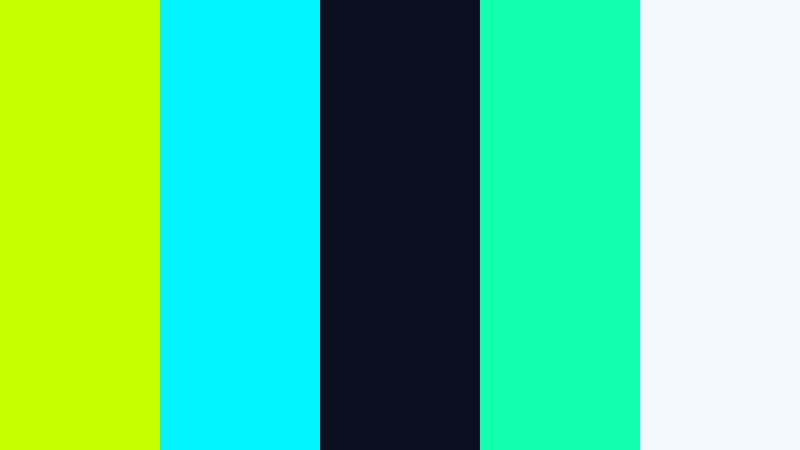
- HEX Codes: #c6ff00, #00f5ff, #0b1020, #12ffb0, #f4f9ff
- Mood: High energy, techy, and ultra modern with a digital glow.
- Use for: Works well for gaming intros, tech explainers, and UI inspired motion graphics.
Neon Interface Glow feels like opening a sleek dashboard in a sci fi game. Pure Cyber Lime (#c6ff00) and cyan cut through the deep navy background, while aqua and a soft off white add legibility and polish. The palette feels crisp, holographic, and full of digital depth.
Use this combo for HUD style overlays, animated lower thirds, or subscribe buttons that need to pop against dark footage. It is ideal for tech and gaming channels that want a professional but playful look across thumbnails, channel banners, and Filmora title templates.
Pro Tip: Enhance Your Cyber Lime HUD Look With Filmora
When you build a Neon Interface Glow style edit, consistency is everything. In Filmora, you can design one Cyber Lime lower third or title, save it as a custom preset, and reuse it across your entire series. That way, your intros, b roll callouts, and end screens all share the same neon accents and navy background tones.
Combine Cyber Lime titles with matching elements like animated lines, shapes, and glitch overlays. By reusing your HEX codes for #c6ff00 and #00f5ff in Filmora’s color picker, you keep your HUD visuals on brand whether you are editing YouTube videos, shorts, or TikTok exports.
AI Color Palette
If you have a Cyber Lime style reference frame or thumbnail design, you can use it as a base look for the rest of your edit. Filmora's AI Color Palette feature analyzes your reference colors and applies a similar grade to other clips, so your dark navy backgrounds and neon accents stay consistent from intro to outro.
This is especially useful for gaming or tech explainers where you mix screen recordings, face cam, and b roll. Start by grading one hero shot with your Cyber Lime palette, then let AI Color Palette spread that same neon glow across every scene in a few clicks.
 secure download

HSL, Color Wheels & Curves
To perfect your Cyber Lime glow, head into Filmora’s advanced color tools. With HSL, you can isolate the green and cyan range and push them slightly toward yellow or blue to match your exact HEX codes. Color wheels help you cool down shadows into deep navy while keeping midtones neutral, so text and UI elements stay readable.
Use curves to add contrast in the dark areas without blowing out bright Cyber Lime highlights. For more ideas on shaping a stylized look, check out Filmora’s color grading workflow with wheels and curves and try adapting those techniques to your own neon palette.
secure download1000+ Video Filters & 3D LUTs
Once your Cyber Lime base is set, you can push it toward different styles with Filmora’s filters and LUTs. A subtle teal and orange LUT can warm up skin tones while keeping your neon UI intact, or a glitch filter can add distortion that fits perfectly with the Neon Interface Glow mood.
Filmora’s video filters and 3D LUTs make it easy to test multiple atmospheres on the same Cyber Lime palette, from clean corporate tech to edgy cyberpunk, without having to rebuild your color grade from scratch.
secure downloadCyber Grid Velocity
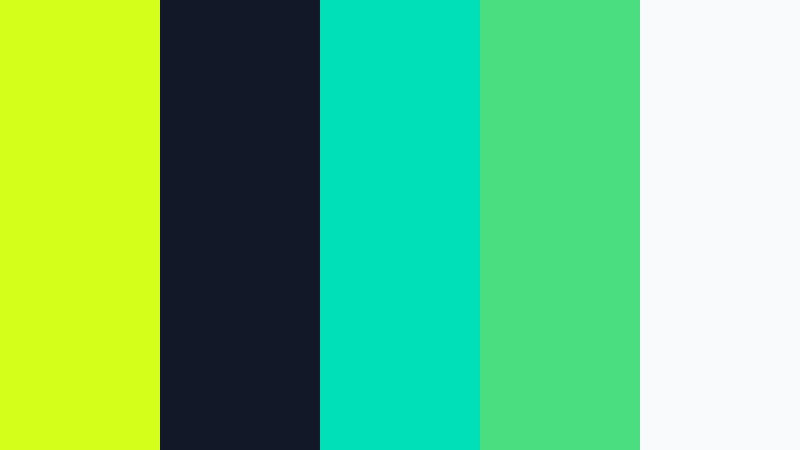
- HEX Codes: #d4ff1a, #111827, #00e0b8, #4ade80, #f9fafb
- Mood: Fast paced, dynamic, and optimized for high contrast motion.
- Use for: Use for kinetic typography, esports highlights, and high contrast lower thirds.
Cyber Grid Velocity mixes bright Cyber Lime with aqua and mint green against a deep charcoal base. The effect is a fast, high contrast palette that feels like moving through a digital racetrack or esports interface.
This combo works especially well for animated scoreboards, bold typography, or velocity edits where text and graphic elements fly on and off screen. Use charcoal for background plates, Cyber Lime for key words, and aqua accents for progress bars and team colors in your Filmora projects.
Laser Arcade Neon
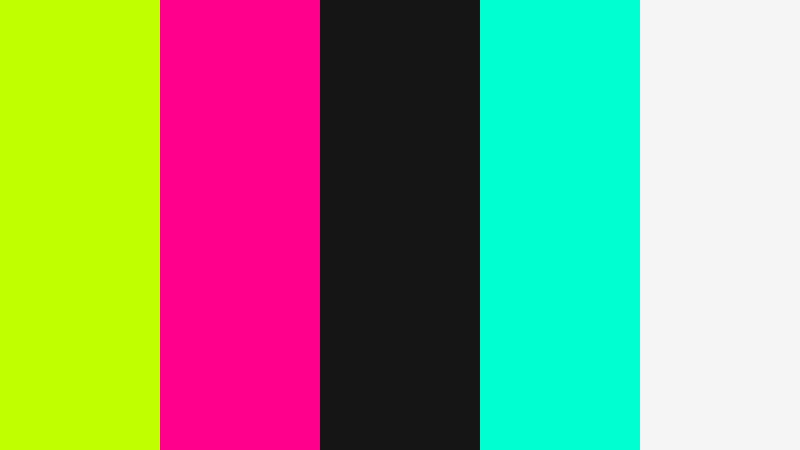
- HEX Codes: #c0ff00, #ff008c, #151515, #00ffd1, #f5f5f5
- Mood: Retro futuristic and playful, like an updated vaporwave arcade.
- Use for: Great for retro gaming recaps, synthwave lyric videos, and bold title cards.
Laser Arcade Neon throws Cyber Lime together with Hot Magenta style pink and aqua over a near black background. It feels like stepping into a neon arcade full of glowing cabinets and synthwave tracks.
Use the dark gray as your canvas, Cyber Lime and pink for logo locks or bold titles, and aqua as a supporting highlight on progress bars or animated frames. This palette can power attention grabbing thumbnails, nostalgia packed lyric videos, or channel branding that leans into vaporwave and retro gaming aesthetics.
Hologram Circuit Burst

- HEX Codes: #d8ff3f, #0b1120, #38bdf8, #5eead4, #e5f2ff
- Mood: Sleek, digital, and slightly sci fi with a cool technological edge.
- Use for: Ideal for app promos, UI mockups, and futuristic explainer graphics.
Hologram Circuit Burst pairs Cyber Lime with cool blues and aqua on a deep midnight navy background. The palette feels like a holographic interface or a futuristic circuit board glowing in the dark.
It is a strong choice for app and SaaS promos, especially when you want clean, professional visuals that still feel innovative. Use the blues for charts and UI shapes, keep white for body copy and subtitles, and use Cyber Lime as the bright accent for buttons, arrows, and key data points in your Filmora overlays.
Urban Street Signal
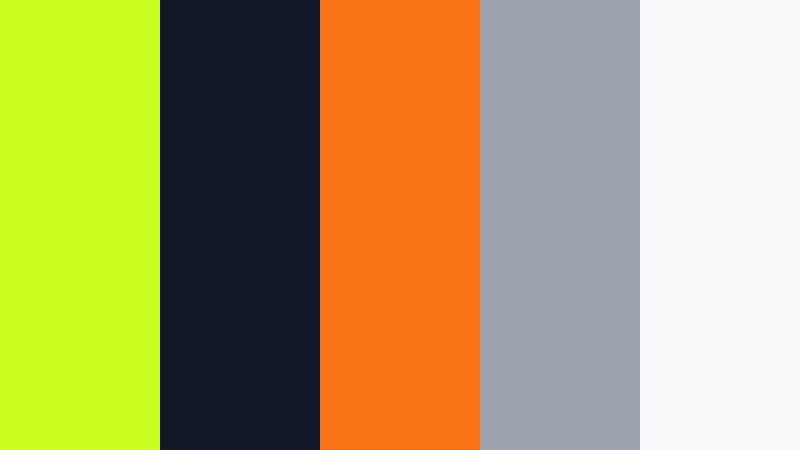
- HEX Codes: #ccff1e, #111827, #f97316, #9ca3af, #f9fafb
- Mood: Edgy, urban, and grounded with pops of warning sign energy.
- Use for: Perfect for streetwear lookbooks, city vlog titles, and edgy overlays.
Urban Street Signal draws from traffic lights and city signage. Cyber Lime and safety orange sit on deep charcoal and soft grays, giving you a palette that feels urban, gritty, and packed with warning sign energy.
Use this combo for city vlog intro titles, lower thirds on street interviews, or bold callouts in fashion lookbooks. Cyber Lime can highlight discounts or episode numbers, while orange signals urgency on subscribe CTAs or limited drops in your Filmora projects.
Fresh And Playful Cyber Lime Color Palettes
Lime Soda Pop

- HEX Codes: #d4ff3f, #ffb347, #ff6b81, #ffffff, #2f3c4f
- Mood: Fun, bubbly, and youthful with a candy coated feel.
- Use for: Use for lifestyle vlogs, summer product hauls, and playful channel branding.
Lime Soda Pop feels fizzy and light, like a citrus drink shot in bright studio light. Cyber Lime gets balanced by peach and strawberry pink, with white and a muted navy blue to keep everything readable and clean.
This palette is perfect for lifestyle creators, haul videos, or beauty content where you want cheerful but still polished visuals. Use Cyber Lime for bursts and badges, peach for subtle backgrounds, and pink for playful text highlights on your Filmora titles and thumbnail designs.
Electric Playground
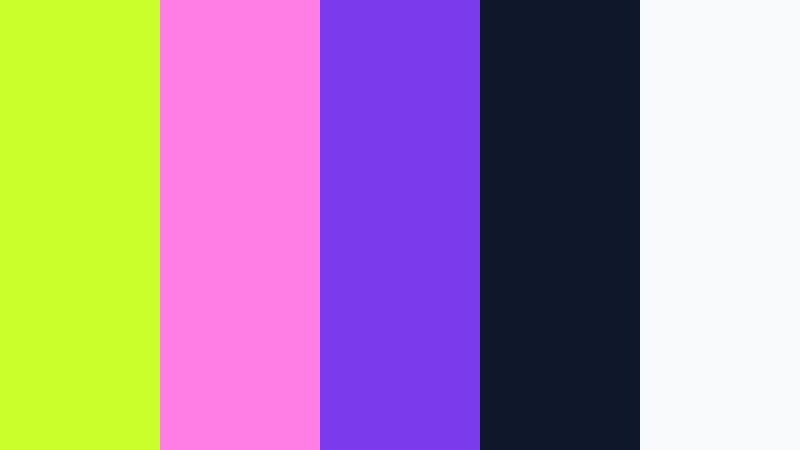
- HEX Codes: #caff2c, #ff7ee5, #7c3aed, #0f172a, #f9fafb
- Mood: Creative, whimsical, and full of kinetic energy.
- Use for: Great for kids content, music driven edits, and bold TikTok style graphics.
Electric Playground brings together Cyber Lime, candy magenta, and vivid violet on a dark navy base. It is loud, bright, and full of motion, ideal for content that needs to grab attention in the first second.
Use the dark navy as your background, letting Cyber Lime and magenta pop in big titles, countdowns, or motion graphics. This palette suits TikTok style edits, kids channels, and music videos where you want quick cuts, bouncy transitions, and reactive text inside Filmora.
Tropical Scooter Ride

- HEX Codes: #d6ff3f, #00c4b3, #ff9f1c, #fffcf2, #233142
- Mood: Sunny, adventurous, and carefree with island vacation vibes.
- Use for: Ideal for travel vlogs, beach intros, and energetic Instagram reels.
Tropical Scooter Ride mixes Cyber Lime with turquoise sea tones, juicy orange, and a soft cream. A deep blue gray grounds the palette, so it never feels too sugary.
Use Cyber Lime and orange for location tags, map pins, and animated route lines over your travel footage. Cream backgrounds and turquoise accents work well in story highlight covers, lower thirds, or vertical reel overlays, giving your travel content a cohesive, sun soaked identity in Filmora.
Matcha Arcade Mix
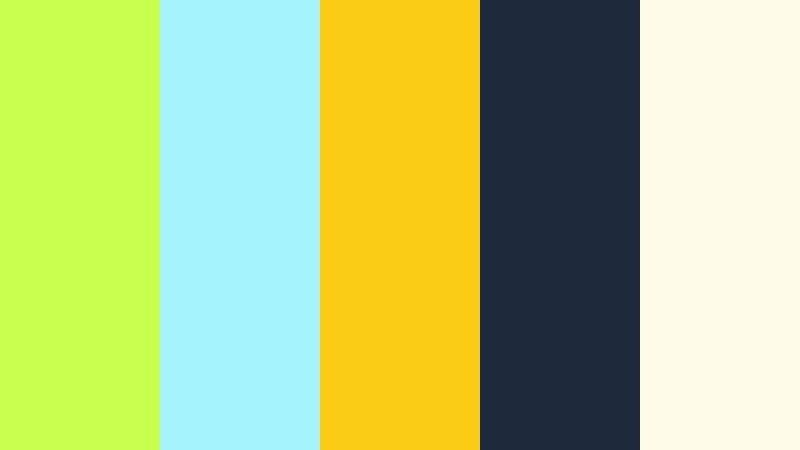
- HEX Codes: #c9ff4f, #a5f3fc, #facc15, #1e293b, #fefce8
- Mood: Lighthearted, quirky, and slightly nostalgic with a snacky twist.
- Use for: Works for food content, cafe reels, and cozy yet bright lifestyle channels.
Matcha Arcade Mix nudges Cyber Lime toward matcha green, pairing it with pastel cyan, sunny yellow, and inky slate blue. The cream tone ties everything together with a soft, cozy feel.
This palette is ideal for cafe walkthroughs, snack reviews, and cozy vlogs that still want a pop of neon freshness. Use the darker slate for text, cream for background panels, and Cyber Lime for swipe up prompts, subscribe buttons, or animated stickers in Filmora.
Festival Confetti Lights

- HEX Codes: #d4ff3f, #ff6f61, #ffcf33, #3b82f6, #111827
- Mood: Celebratory, noisy, and vibrant like a night festival.
- Use for: Use for event recaps, concert aftermovies, and energetic countdowns.
Festival Confetti Lights turns Cyber Lime into a stage light, throwing it together with coral, gold, and bright blue on a deep dark base. It looks like confetti frozen in motion under spotlights.
Use the dark navy as your base layer, then let Cyber Lime, coral, and gold drive animated countdowns, set lists, or highlight graphics. This palette is excellent for concert recaps, festival aftermovies, or party invitations, especially when you sync motion graphics to the beat using Filmora.
Minimal And Modern Cyber Lime Color Palettes
Glass Panel Minimal

- HEX Codes: #d5ff3f, #0f172a, #14b8a6, #e5e7eb, #f9fafb
- Mood: Clean, minimal, and slightly tech forward with a glassy finish.
- Use for: Great for SaaS promos, portfolio bumpers, and sleek UI overlays.
Glass Panel Minimal uses Cyber Lime as a soft accent against teal, slate navy, and light grays. It feels like a modern interface with frosted glass panels and subtle shadows.
Use the light grays and white as backgrounds, keep dark navy for text, and apply Cyber Lime sparingly on icons, progress indicators, or CTA buttons. This palette works well in Filmora for clean explainer lower thirds, product feature callouts, and portfolio bumpers that need a professional but modern edge.
Studio Loft Accent
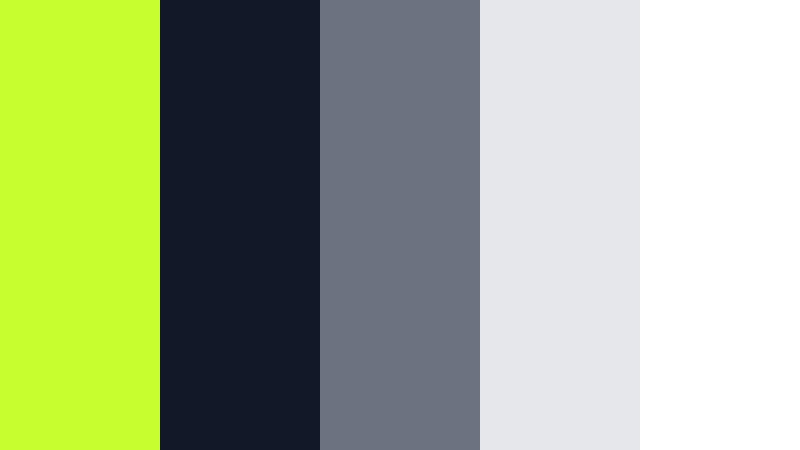
- HEX Codes: #c7ff2e, #111827, #6b7280, #e5e7eb, #ffffff
- Mood: Sophisticated, airy, and editorial with a subtle industrial edge.
- Use for: Ideal for design case studies, interior tours, and brand identity breakdowns.
Studio Loft Accent imagines a cool gray loft with one striking Cyber Lime detail. Deep charcoal, mid grays, and white create an editorial canvas, while Cyber Lime acts as the single accent that guides the eye.
Use this palette when you want understated design with one memorable pop of color. Keep most of your titles and graphics in grayscale, then reserve Cyber Lime for logo locks, key stats, or section headers in your Filmora sequences.
Monochrome Voltage
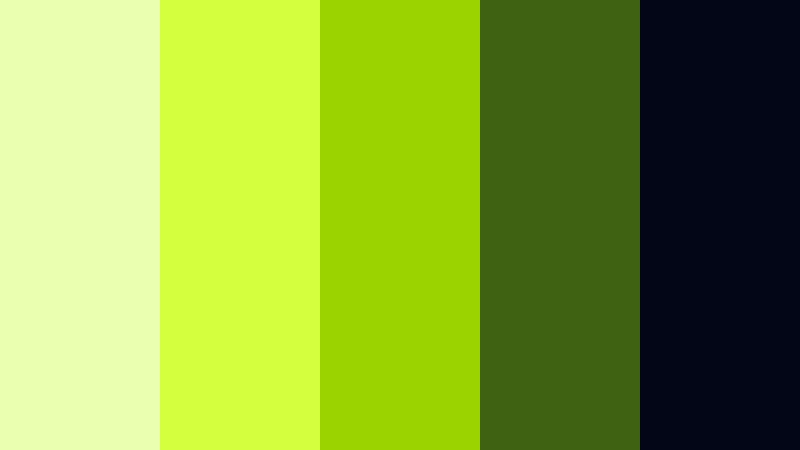
- HEX Codes: #ebffb0, #d4ff3f, #9bd300, #3f6212, #020617
- Mood: Focused, bold, and disciplined within a narrow green spectrum.
- Use for: Use for logo reveals, brand stings, and monochrome data visualizations.
Monochrome Voltage stays strictly in the green family, from soft neon to deeper olive, anchored by a nearly black blue. Cyber Lime is the brightest note, surrounded by supporting greens that build depth.
This is a strong option for logo stings or brand intros where you want a clear signature color. Use the darker greens for charts, bars, or background gradients, and keep Cyber Lime as the highlight for logos, buttons, and important numbers within Filmora titles and motion graphics.
Night Mode Highlight
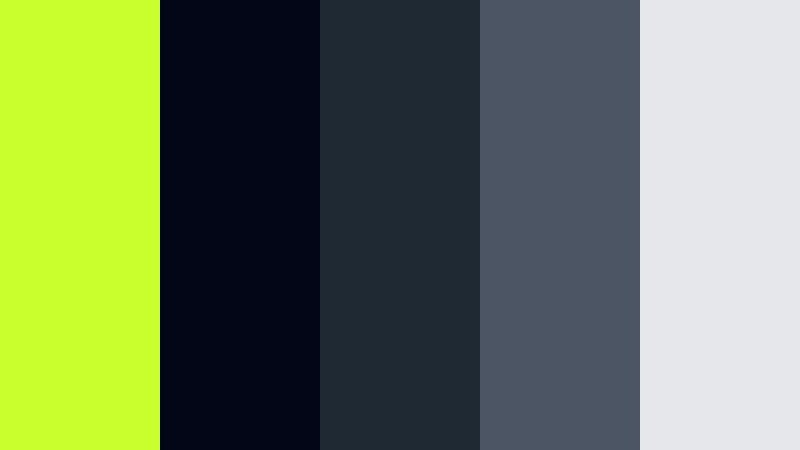
- HEX Codes: #caff2e, #020617, #1f2933, #4b5563, #e5e7eb
- Mood: Sleek, focused, and optimized for dark mode layouts.
- Use for: Perfect for dark UI tutorials, coding content, and night themed channels.
Night Mode Highlight is a classic dark mode setup with one electric accent. Almost black blues and smooth grays create a calm interface, while Cyber Lime acts as the primary highlight for cursors, buttons, and important text.
Use this palette for coding tutorials, productivity apps, or late night channels that want a focused, minimal mood. In Filmora, design dark panels for lower thirds and reserve Cyber Lime for hover states, chapter markers, or keyboard shortcut callouts.
Organic And Eco Cyber Lime Color Palettes
Eco Startup Launch
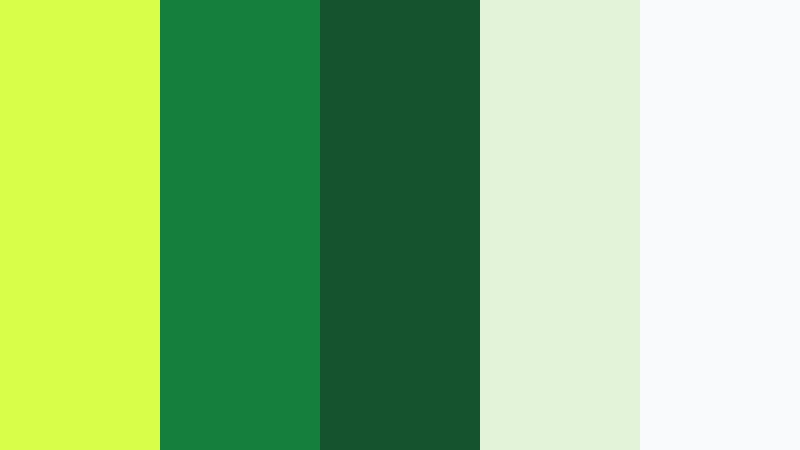
- HEX Codes: #d7ff4a, #15803d, #14532d, #e2f3d9, #f9fafb
- Mood: Optimistic, trustworthy, and grounded in nature inspired tones.
- Use for: Great for sustainability explainers, eco startup pitches, and NGO videos.
Eco Startup Launch fuses Cyber Lime with deep forest greens and soft leaf tints. It feels fresh and optimistic but still grounded, ideal for topics around sustainability, wellness, or farm to table projects.
Use dark greens as backgrounds, soft tints for panels and infographics, and Cyber Lime as the bright accent on impact numbers, timelines, or key headlines. This palette helps climate explainers and NGO pitch decks feel modern and hopeful when edited in Filmora.
Garden Tech Hybrid

- HEX Codes: #d4ff3f, #16a34a, #0369a1, #facc15, #f8fafc
- Mood: Innovative yet organic, merging greenery with clean technology cues.
- Use for: Ideal for smart home demos, urban farming content, and green tech brands.
Garden Tech Hybrid blends botanical greens with sky blue, golden sunlight, and Cyber Lime. It suggests a bridge between natural gardens and clean, intelligent devices or interfaces.
Use blue for data overlays or app UI graphics, greens for background gradients and icons, and Cyber Lime plus gold for main highlights. This palette suits smart home demos, hydroponic or urban farming videos, and any green tech storytelling where you want nature and innovation to feel equally present in your Filmora edits.
Tips for Creating Cyber Lime Color Palettes
Cyber Lime is powerful, so the secret is pairing it with the right neutrals and supporting hues. Use it as a highlight rather than flooding the whole frame, and always think about readability on small screens and bright displays.
- Balance intensity by pairing Cyber Lime with dark navy, charcoal, or soft gray so text and UI elements remain readable.
- Use Cyber Lime as an accent color for CTAs, icons, and key words instead of large background blocks that can overwhelm the viewer.
- Check contrast on mobile by testing your thumbnails and titles at small sizes; add outlines or shadows if Cyber Lime text sits on bright footage.
- Keep branding consistent by reusing the same HEX codes across Filmora titles, lower thirds, and thumbnail templates.
- Combine Cyber Lime with complementary tones like magenta or violet for bold gaming and music content, or with navy and gray for polished tech branding.
- Match your footage by gently shifting greens and yellows in Filmora’s HSL panel so your Cyber Lime accents do not clash with natural greens in the background.
- Use gradients that move from dark teal or navy into Cyber Lime for modern, UI style backgrounds that still feel cinematic.
- Limit yourself to 1–2 strong accent colors alongside Cyber Lime to avoid a chaotic, oversaturated frame.
Cyber Lime color palettes can completely transform how your content feels, from neon gaming overlays and festival recaps to eco friendly explainers and clean product promos. Used thoughtfully, this electric hue becomes a signature that viewers instantly connect with your channel or brand.
Try a few of these palettes directly inside Filmora by copying the HEX codes into your titles, shapes, and color grading tools. Once you find a Cyber Lime mix that fits your voice, save it as a repeatable style for intros, outros, and social cutdowns.
The more consistently you apply your Cyber Lime combinations, the stronger your visual identity becomes across YouTube, Instagram, TikTok, and beyond. Filmora gives you the tools to keep that look cohesive, fast, and fun to work with.
secure download