

 100% Security Verified | No Subscription Required | No Malware


 ChatGPT
 Perplexity
 Gemini
 Claude
 Grok
Grok
Food videos feel most delicious when the steam looks tangible and the colors glow with a cozy warmth. A food steam warm tone LUT filter helps content creators turn simple cooking clips into cinematic stories that highlight heat, texture, and flavor.
These curated Filmora filters are designed for steamy dishes, golden kitchen lights, and rich food tones, giving your content a professional, appetizing look with minimal color grading effort.
In this article
Stovetop Steam and Simmering Kitchen Moments
Simmer Glow
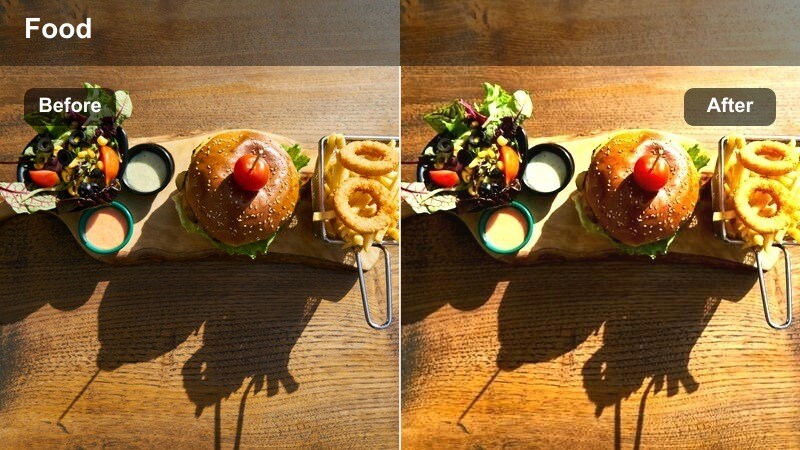
- Effect look: Soft golden warmth that boosts steam contrast and highlights glistening sauces.
- Best for: Close-up shots of simmering pots, stews, and ramen with visible steam.
- Editing tip: Lower contrast slightly if your highlights clip on reflective pots or glossy broths.
Simmer Glow wraps your stovetop shots in a soft golden hue that makes steam and surface reflections feel cozy and cinematic. In Filmora, this filter is ideal when you want viewers to almost feel the heat coming off a pot of stew or noodles, without losing detail in the steam or the liquid.
Use Simmer Glow on tight shots of simmering dishes where bubbles, oil, and steam play across the surface. Keep your footage slightly underexposed and then add this filter in Filmora to separate the steam from the background while preserving rich, appetizing colors in sauces and broths.
Match Warm Food Tones with AI Color Tools
Filmora AI color tools help you quickly align your food steam warm tone LUT filters with other clips in your project. Even if you filmed on different days or under mixed kitchen lighting, AI Color Match can keep your steam shots and food colors consistent.
Apply your favorite warm steam filter, then use AI color matching to protect skin tones while keeping dishes vibrant and cozy, so your entire timeline feels unified from pot to plate.
 secure download

Preview Warm Food Filters in Real Time
Filmora lets you hover over warm tone filters to preview how they affect your simmering pots, boiling water, or steaming plates before you apply them. This makes it easy to compare subtle differences in warmth, contrast, and steam clarity.
Drop a representative cooking clip onto the timeline, then scroll through steam-friendly filters to see which one adds the right blend of warmth and texture for your channel.
secure downloadBuild a Signature Food Steam Warm Tone LUT Pack
Filmora includes 1000 plus video filters and 3D LUT options, so you can stack warm steam filters with subtle color tweaks to build a signature look. Once you dial in the tones that fit your cooking niche, save them as reusable presets.
Use these custom LUT style presets across soups, bakery content, and tabletop scenes to make your feed instantly recognizable, no matter what recipe you are filming next.
secure downloadBoil Burst
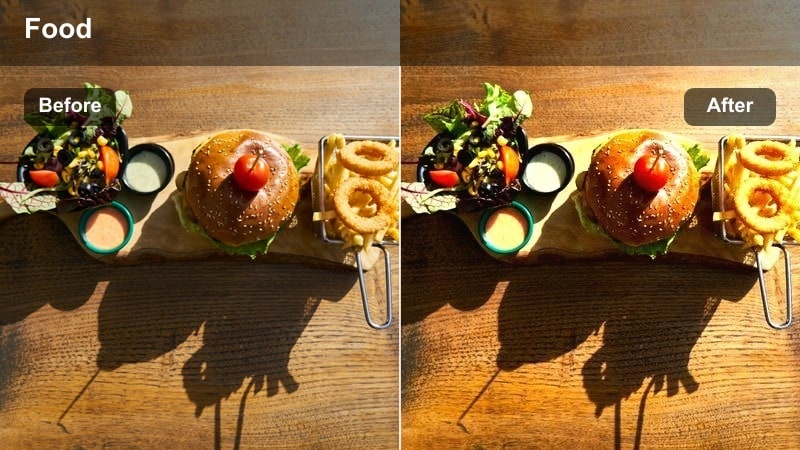
- Effect look: Punchy warm contrast that makes bubbling liquids and steam look energetic and sharp.
- Best for: Fast-paced b-roll of boiling pasta water, blanched vegetables, and sizzling sauces.
- Editing tip: Increase shutter speed during filming to keep droplets crisp, then apply the filter to intensify motion.
Boil Burst is built for high-energy kitchen moments where water explodes into bubbles and steam rushes past the frame. In Filmora, this warm contrast filter gives your steam highlights extra bite, so every burst from boiling water or sizzling sauce feels more dramatic.
Use Boil Burst on rapid b-roll sequences, like pasta going into boiling water or vegetables being blanched, and pair it with quick cuts for a dynamic cooking montage. Combine the filter with speed ramping or slightly faster playback to exaggerate the bubbling action while keeping colors rich and appetizing.
Gentle Simmer
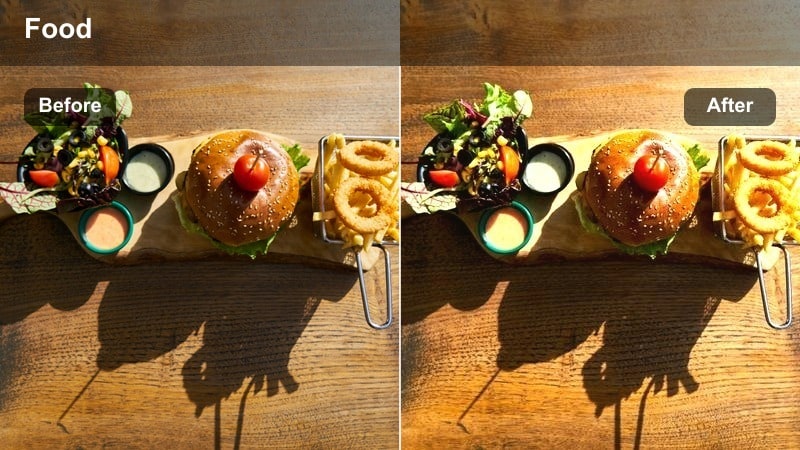
- Effect look: Muted highlights and velvety warm tones for calm, slow-cooking stovetop scenes.
- Best for: Slow, cinematic shots of soups, curries, and braises with subtle steam.
- Editing tip: Shoot in slightly softer light, then use this filter to keep the mood relaxed and intimate.
Gentle Simmer tones down harsh highlights and gives your steam a delicate, velvety presence that feels perfect for slow-cooked recipes. The warm matte style softens reflections on pots and keeps the viewer focused on gentle bubbles and drifting steam.
Apply Gentle Simmer in Filmora to long, lingering shots of soups, curries, or braises that you place under calm voiceover or storytelling. Combine the filter with slow camera moves and minimal transitions so the relaxed steam and cozy color palette carry the emotional tone of your recipe.
Plating, Serving, and Tabletop Steam Shots
Table Warmth
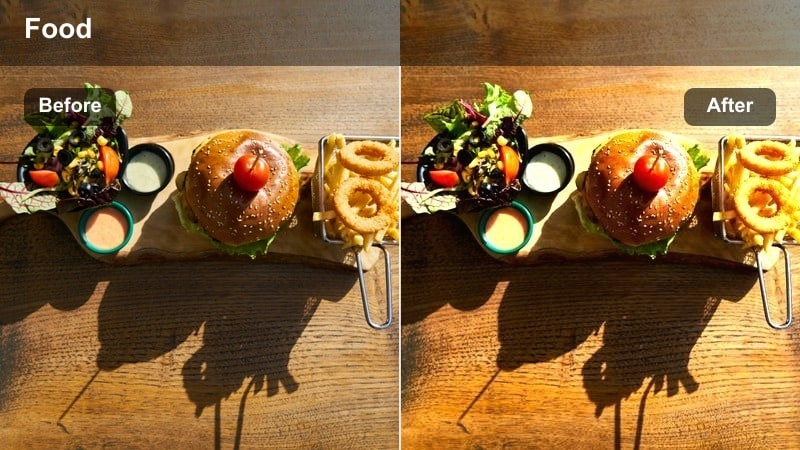
- Effect look: Rich amber tones that deepen wood textures and make rising steam near plates stand out.
- Best for: Tabletop close-ups of plated meals, especially on wooden boards or rustic tables.
- Editing tip: Reduce saturation on background colors so the food and steam remain the brightest elements.
Table Warmth is tuned to bring out deep, golden tones in wooden tables and serving boards while giving steam a soft, glowing lift. It is ideal for those final plating shots where you want the dish to feel fresh from the stove and ready to serve.
Use this filter in Filmora on close-ups of hot plates and bowls placed on rustic surfaces, and slightly desaturate the background so the food remains center stage. The result is a cozy, restaurant inspired look where steam subtly curls above the dish without competing with the overall composition.
First Bite
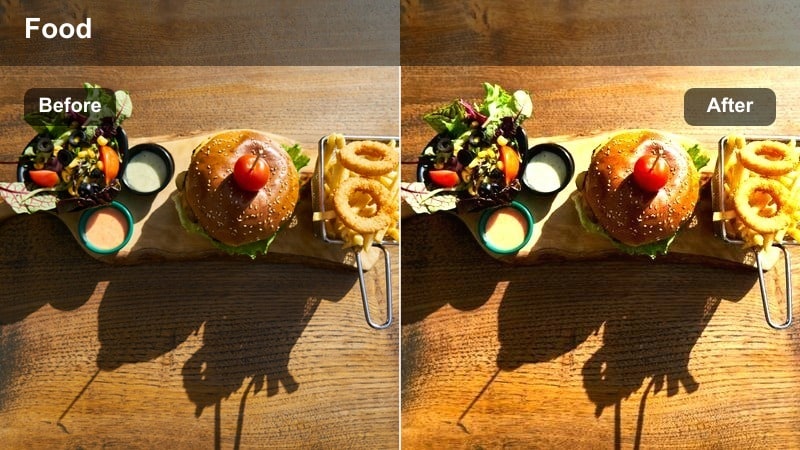
- Effect look: Creamy warm midtones with slight softening, perfect for capturing hands reaching for steaming food.
- Best for: Hand interaction shots, first bites, and close-ups of utensils cutting into hot dishes.
- Editing tip: Use gentle slow motion to emphasize the steam and texture as the food is broken open.
First Bite is designed for intimate food moments where a fork, spoon, or pair of chopsticks moves into the frame. The filter smooths midtones and adds a creamy warmth that flatters skin tones while keeping steam visible as you break open a hot dish.
Apply this filter in Filmora to slow motion shots of first cuts into lasagna, molten desserts, or juicy meats, where steam pours out at the moment of contact. Pair it with subtle sound design and close framing to make viewers feel like they are sharing the very first taste.
Cozy Table
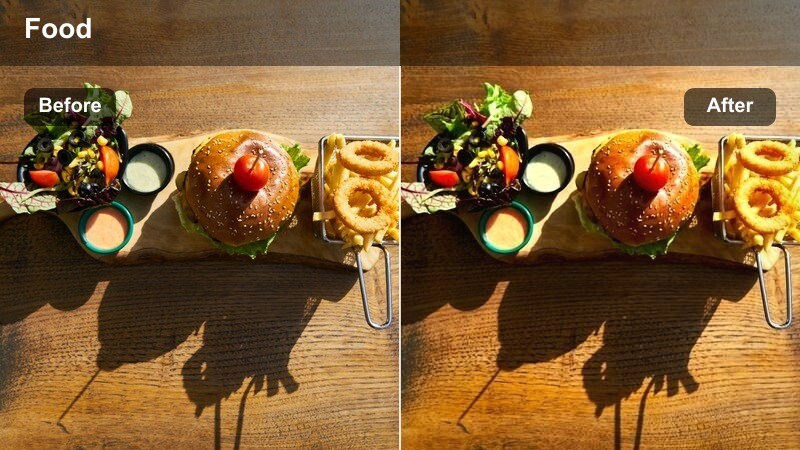
- Effect look: Subtle matte finish with warm highlights that mimic candlelit or evening dining ambiance.
- Best for: Dinner table spreads, shared plates, and family-style serving shots with light steam.
- Editing tip: Lower exposure slightly before applying to avoid muddy shadows with the matte effect.
Cozy Table brings an evening, candlelit mood to shared dining scenes, perfect for family style spreads and wide table shots. The matte finish gently softens contrast while warm highlights keep dishes and light steam feeling inviting.
Use this filter in Filmora on wider compositions that show several plates, hands reaching in, and a soft background. It works especially well for opening or closing scenes where you want to communicate comfort, togetherness, and the warmth of a shared meal in a single frame.
Bakery Oven Reveals and Freshly Baked Shots
Oven Glow
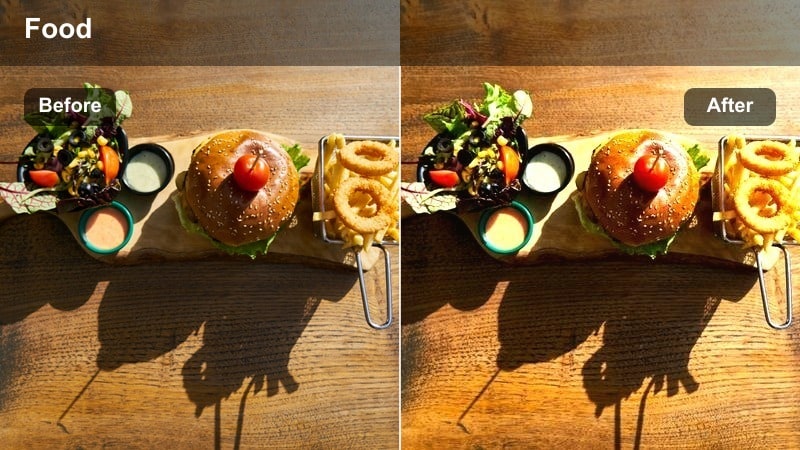
- Effect look: Intense golden warmth that emphasizes oven light and the moment doors open with steam.
- Best for: Oven door reveals of bread, pastries, and casseroles releasing a burst of steam.
- Editing tip: Add a slight fade-in when the oven opens to enhance the feeling of heat and light spilling out.
Oven Glow is tailored for that dramatic moment when the oven door swings open and steam rushes out. The filter amplifies the golden interior light, making baked goods look richly browned and perfectly cooked while steam blooms into the room.
Use this look in Filmora on reveal shots of bread, pastries, or casseroles as they exit the oven, and pair it with a subtle brightness ramp or fade in at the exact moment the door opens. This combination heightens the sense of heat and anticipation, making the reveal feel like the climax of your baking video.
Baked Crust
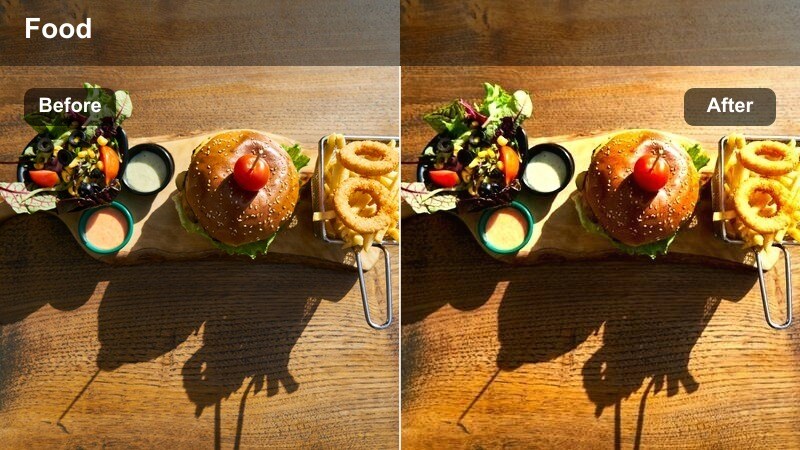
- Effect look: Warm, slightly toasty color shift that deepens browns and highlights crispy textures.
- Best for: Close-ups of bread crusts, pies, and pastries right after they leave the oven.
- Editing tip: Avoid overexposing highlights on glossy glazes so the filter can keep color detail in the crust.
Baked Crust enhances every ridge, crackle, and blister on freshly baked surfaces, pushing browns into a toasty, appetizing range. Light steam remains visible, but the real focus is on the crisp texture that tells viewers exactly how good that crust will taste.
Apply this filter in Filmora to macro shots of loaves, pies, and pastries immediately after baking, especially when you can catch a hint of steam leaving the crust. Combine it with close-up sound design, like crunches or knife cuts, to make the warmth and crispness practically audible through the screen.
Bakery Morning
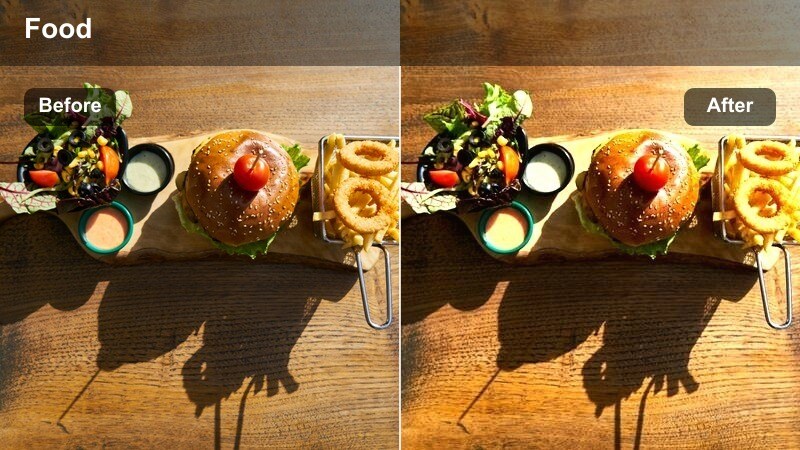
- Effect look: Soft yellow warmth with gentle haze that mimics early morning bakery light over steaming trays.
- Best for: Wide shots of bakery counters, trays of pastries, and steam rising from fresh batches.
- Editing tip: Set white balance slightly cool in-camera, then let this filter add the final warmth for a natural look.
Bakery Morning recreates the feeling of first light coming through a bakery window, with a soft haze and gentle yellow warmth across the frame. Steam rising from trays of pastries or bread is visible but cushioned by this dreamy, welcoming glow.
Use this filter in Filmora on your establishing bakery shots or wide countertop scenes, especially when introducing a new batch of fresh goods. Keep camera moves slow and smooth so the haze, steam, and warm tones have time to register, signaling to viewers that it is a fresh, just baked moment.
Cinematic Kitchen Storytelling and Recipe Montages
Recipe Reel
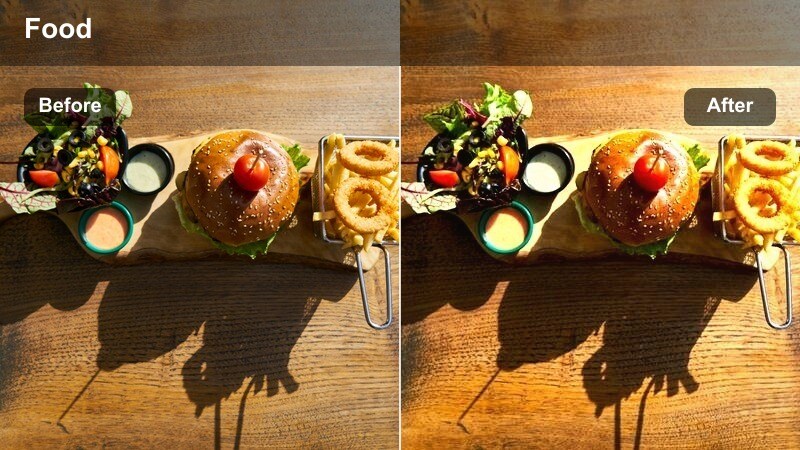
- Effect look: Balanced warm tones with slightly boosted saturation for short-form, vertical cooking videos.
- Best for: Reels, Shorts, and vertical recipe videos that move quickly between steamy steps.
- Editing tip: Apply the filter to all clips in the reel and then fine-tune exposure per clip for consistency.
Recipe Reel is tuned for short form vertical content where every second counts and visuals must pop on mobile screens. The filter adds balanced warmth and a touch of saturation so steam, sauces, and garnishes stand out as viewers swipe through their feeds.
In Filmora, apply Recipe Reel across all clips in your vertical sequence before adjusting exposure and contrast per shot. This workflow keeps your steam heavy steps, close-ups, and wide kitchen angles visually coherent, helping you build a recognizable, branded reel style.
Story Kitchen
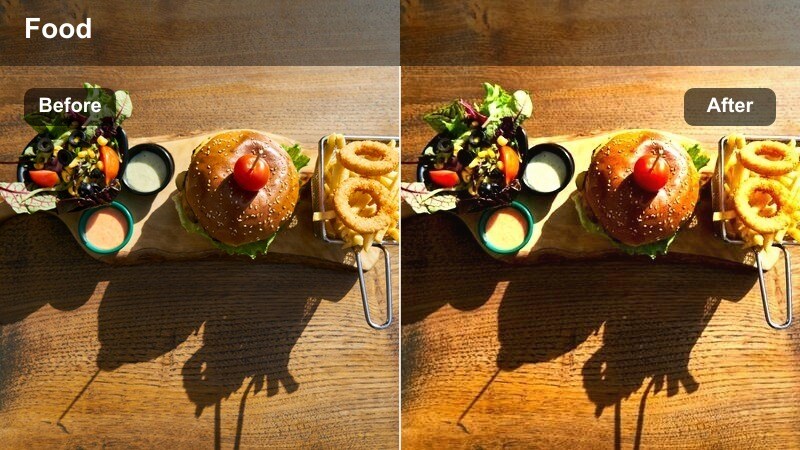
- Effect look: Cinematic warm shadows with slightly cooled highlights for a storytelling documentary vibe.
- Best for: Narrated recipes, behind-the-scenes kitchen stories, and chef-focused content with steam.
- Editing tip: Use gentle camera movement and longer clips so viewers can appreciate the cinematic mood.
Story Kitchen leans into a more cinematic documentary look by warming shadows while keeping highlights slightly cooler. This balance adds depth to steamy pans and busy countertops, making your kitchen feel like a lived in character in your video rather than just a backdrop.
Use Story Kitchen in Filmora for narrated recipes, chef interviews, and behind the scenes sequences where steam, motion, and emotion intersect. Let shots breathe a bit longer, add natural kitchen sounds beneath the music, and allow this nuanced color treatment to support the storytelling arc of your video.
Steam Focus
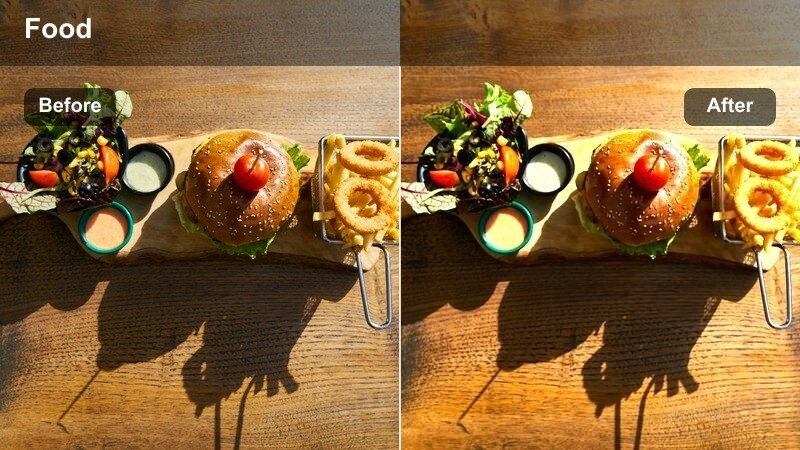
- Effect look: High micro-contrast on steam with gentle warm tint, making vapor trails crisp and visible.
- Best for: Hero shots where steam is the main subject, such as soups, noodles, and hot drinks.
- Editing tip: Use backlighting or side-lighting in-camera, then apply this filter to define steam lines clearly.
Steam Focus is all about making vapor itself the star of the shot. It increases micro contrast and clarity around steam trails while adding a light warm tint, so curls and wisps of vapor become sharply defined against the background.
Apply Steam Focus in Filmora to hero shots of ramen, soups, hot chocolate, or coffee where you want the rising steam to signal temperature and comfort. Use it sparingly on key transition moments or final reveals so the heightened steam detail feels special and memorable in your overall edit.
Tips for Using Food Steam Warm Tone Lut Filters in Filmora
- Shoot with backlight or side light so steam naturally separates from the background before you apply any warm tone filter.
- Slightly underexpose bright kitchen scenes in camera to preserve highlight detail for warm LUTs and filters to enhance later.
- Keep white balance a bit cooler while filming when you know you will add strong golden or amber warmth during color grading.
- Use the same food steam warm tone LUT across all shots in a single recipe video to avoid distracting color shifts between angles.
- Adjust filter intensity and basic exposure per clip instead of swapping filters too often within one short sequence.
- Add selective sharpening or clarity to the food area only, leaving backgrounds softer to guide attention to the dish and steam.
- Mix close ups of steam heavy shots with wider context views of the kitchen to tell a fuller visual story.
- Use slow motion on your most dramatic steam moments so the warm tone, texture, and movement can fully register with viewers.
A dedicated food steam warm tone LUT or filter can turn basic kitchen footage into cinematic, mouthwatering content with consistent color and mood. By emphasizing steam, texture, and warmth, your viewers will feel closer to the food you are preparing.
Experiment with these Filmora filters across stovetop, tabletop, and bakery scenes to build a signature warm style that fits your audience and brand. Over time, your consistent steam rich grading can become a recognizable part of your cooking channel identity.
secure download